AWS Deadline Cloud Alternative: A Migration Guide for Maya, USD and Arnold Pipelines
Overview
If you landed here, you are probably mid-render-deadline and tired of fighting your render manager instead of your shots. We talk to a lot of studios in exactly that spot, and lately a recurring conversation comes from teams running AWS Deadline Cloud who have hit a wall their pipeline cannot easily climb over. This is a practical look at what that wall usually is, what a fully managed render farm does differently, and the honest limits you should weigh before you move a single frame.
We will keep this operator-first. We run a managed farm at Super Renders Farm, so we will tell you what we have actually seen on real production runs, where we fit, and where we do not. AWS Deadline Cloud is a capable product and we will describe it factually, not as a punching bag.
What AWS Deadline Cloud actually is (and isn't)
AWS Deadline Cloud is Amazon's managed render-farm scheduling and orchestration service, announced in April 2024. It handles job submission, queuing, and auto-scaling of render workers inside your AWS account. If you already live in AWS and want a render manager that talks to EC2 and S3 natively, it does that job well.
The nuance that trips teams up is the word "managed." Deadline Cloud manages the orchestration layer: it schedules jobs and spins workers up and down. It does not manage your pipeline. You still own and configure the software stack, the plugins, the licensing model, the storage wiring, and the troubleshooting when a job dies. AWS even publishes a troubleshooting guide and an AI log-analysis assistant for failed jobs, which tells you something about how often render jobs need debugging in that model.
So the honest framing is this: Deadline Cloud is a render-management offering that auto-scales workers, while leaving you as the integrator of everything those workers run. That is a fundamentally do-it-yourself orchestration choice. We wrote more about that split in managed vs DIY cloud rendering, and it is the central decision most readers of this article are quietly making. AWS describes the service itself in its own Deadline Cloud user guide if you want the primary source.
Why studios are leaving AWS Deadline Cloud
When teams reach out to us about moving off Deadline Cloud, the reasons cluster into a few familiar buckets.
The first is setup overhead. Standing up a usable fleet means roles and permissions, storage configuration, a custom AMI, VPC and security-group rules, and fleet configuration before the first frame renders. For a small studio without a dedicated cloud engineer, that is days of work that has nothing to do with the actual shot.
The second is ongoing maintenance. Plugin versions and DCC versions drift, and keeping service-managed workers aligned with your local artist installs is a recurring chore. When a worker is missing something your scene needs, the job fails at render time rather than at submit time.
The third is licensing complexity, which we will give its own section below because it is where a lot of hidden hours go. The fourth is cost predictability: billing is region-based and built from three moving parts, plus software charges on top. For a worked total-cost view, render farm build vs cloud total cost breaks down where the money actually goes when you run your own orchestration.
None of these make Deadline Cloud a bad product. They make it the wrong shape for a team that wants to render, not to operate render infrastructure.
The Maya + USD gap (and why it matters)
This is the sharpest wedge, and it is the one that brought a UK VFX studio running Maya plus USD on Arnold, mounted via LucidLink, to us after they migrated off AWS Deadline Cloud following USD failures.
Here is the publicly documented version. The Maya Conda package shipped to Deadline Cloud workers did not include the mayaUsdPlugin that ships with a normal Maya GUI install. That gap is recorded in the public AWS Deadline Cloud GitHub issue #409, "Maya Conda package does not include mayaUsdPlugin," now closed. When that plugin is absent, USD-dependent scenes fail at render with a runtime error along the lines of Plug-in, 'mayaUsdPlugin', was not found on MAYA_PLUG_IN_PATH. The community workaround, documented in the follow-on discussion, is to deliver the MayaUSD plugin to workers manually via Plugin Sync.
To be fair to AWS: this is a closed issue with a documented manual fix, not a permanent product defect. But it captures the experience perfectly. The studio we worked with had Maya plus USD scenes failing on their existing Deadline Cloud setup, and the fix was a manual plugin-delivery dance they did not want to maintain mid-production. USD is increasingly the backbone of large-studio scene interchange, so "USD just works on render" is not a nice-to-have anymore. It is the pipeline.
On our farm, Maya plus USD rendering on Arnold is proven. We initialised a MayaUSD plus Arnold USD procedural cleanly on a live customer run. When that UK studio sent us a representative shot, we matched their environment and the scenes that had been failing rendered successfully. If you are evaluating Deadline Cloud specifically for Maya and Arnold work, the managed Maya path and the Arnold render path describe how we handle those workloads.
Self-managed licensing vs fully managed: where the hours go
On Deadline Cloud, licensing is split. There is Usage-Based Licensing, which is pay-per-job for a set of supported applications such as Maya, Arnold, and Nuke. And there is Bring-Your-Own-License, where you connect fleets to your own license server for anything outside that supported set. Both are workable, but both put the licensing model on your desk: you track which path each application uses, you stand up and maintain a license server for BYOL software, and you reconcile that against your job mix.
We do it differently. All engine licenses are bundled and included in the rate, and we manage them. There is no RDP into a node to self-install anything, and no license server for you to babysit. On that UK studio's live Arnold production deploy, the Arnold license was part of what we provided; the earlier free demo ran watermarked, and the production run was fully licensed at scale across the node count it needed. The bundle held end to end.
A note on what "bundled" covers honestly: the engines we support are V-Ray, Corona, Arnold, Redshift, and Octane, plus Cycles, which is free open-source. The DCCs we support are 3ds Max, Maya, Cinema 4D, Blender, Houdini, After Effects, and NukeX. If your engine or DCC is on that list, the license is handled. If it is not, we are the wrong farm for that job, and we would rather tell you up front. For the broader picture of what bundled-and-managed buys you, what is a fully managed render farm lays out the definition.
What a fully managed render farm does differently
"Fully managed" is a phrase everyone uses, so here is what it concretely means in our day-to-day.
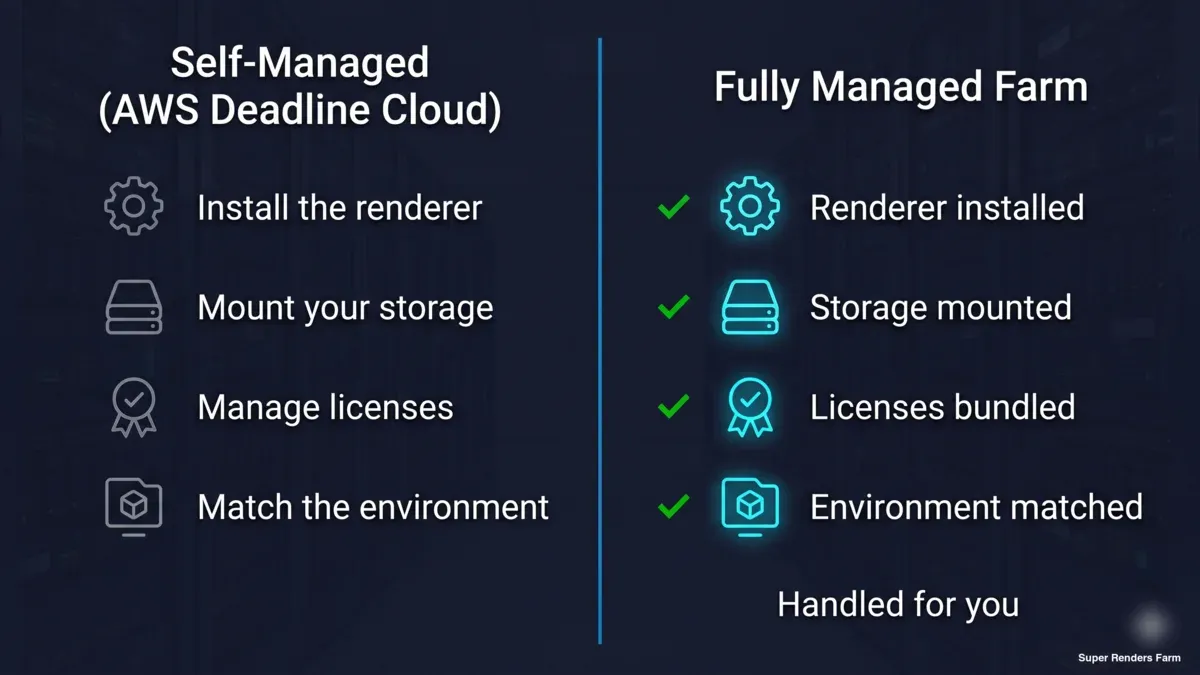 Side-by-side comparison: self-managed AWS Deadline Cloud (install renderer, mount storage, manage licenses, match environment) versus a fully managed render farm where each step is handled for you
You do not configure infrastructure. There is no VPC, no AMI, no IAM role, no security group to author. We run a single managed region and provision the environment for you. For a vanilla submission, nodes are ready quickly. For a custom-matched pipeline, we have provisioned a matched environment, including things like a VPN and a mounted drive, in roughly 24 hours.
Roles are separated the way any managed farm separates them: a submitter or monitor node is distinct from the render nodes themselves, so the machine you interact with is not the machine grinding frames.
We also handle the messy onboarding frictions that surface on real pipelines. On that live deal we sorted an OCIO color-profile fix on the client side, and we confirmed that leftover Redshift attributes in the scene were harmless on the Arnold farm rather than letting them spook anyone. That is the hands-on part of managed that a pure orchestration layer leaves to you. If you want the side-by-side framing, fully managed vs DIY render farm covers what you are actually choosing between, and you can rent ready-to-render capacity directly via render farm rental rather than standing a fleet up yourself.
The motion that earns trust before any of this is simple: send us a failing or representative shot, and we run it free and match your environment exactly. Proof before commitment, on a real shot, is how every serious migration we have done has started.
Mounted storage: rendering from LucidLink without re-uploading
Storage is the other place studios get stuck. On a cloud-native model, assets flow through S3-backed job attachments plus mounted or shared storage, and USD references are expected as relative paths added as input folders in the submitter. It works, but it is wiring you maintain, and large asset libraries make every re-upload expensive in time.
A lot of studios already keep their working filespace on LucidLink. The thing they want is simple: mount what we already have, do not make us re-upload the library. We support that, and it is proven. For that UK studio, our team set up the LucidLink mount directly so their files were always present, with no re-upload of the asset library. The files the render needed were just there.
For teams not on LucidLink, the transfer rules are plain. Upload the project folder unpacked, because the farm does not extract archives (.zip, .rar, .7z, .tar, .tar.gz). For transfers above roughly 2 GB, use our Client App or S3 access (Cloud Direct Connect) rather than a browser: a single browser upload gets slow at that size, becomes unreliable above about 5 GB and does not resume if the tab closes. Knowing those constraints before you migrate saves a frustrating first day.
Bundled licenses vs bring-your-own, and what it costs
We try to keep pricing legible. CPU rendering is billed at $0.004 per GHz-hour, and GPU rendering at $0.003 per OctaneBench-hour, with engine licenses already included in those rates. There is a $25 free trial credit to validate your pipeline, and trial credits never expire. Rendered output stays available for download; there is no fixed automatic deletion period.
Contrast that with the Deadline Cloud billing shape: region-based pricing built from fleet type, the AWS compute instance size you chose, and job duration, with software and license charges layered on top, plus the EC2 and data-transfer costs that come with running it in your own account. Neither model is automatically cheaper for every job. The honest difference is the number of variables you have to reason about. If you want to model your own workload, our pricing page shows the rate card, render farm pricing guide 2026 explains how per-GHz-hour and per-OctaneBench-hour math works, and SaaS render farm vs dedicated cluster frames managed rates against running your own cluster, which is effectively what Deadline Cloud plus EC2 becomes. For what a single dedicated machine looks like when we provision it, see our dedicated RTX 5090 render server breakdown.
Migration walkthrough: moving a Maya + USD + Arnold pipeline
Here is the shape of a real migration, drawn from the USD and Arnold studio we keep referencing.
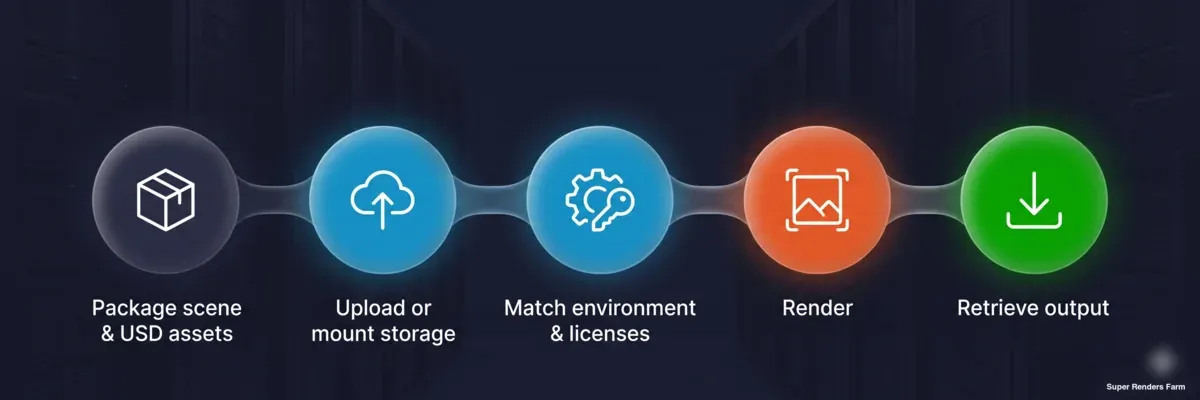 Five-stage migration flow for a Maya, USD and Arnold pipeline: package scene and USD assets, upload or mount storage, match environment and licenses, render, retrieve output
It starts with a representative shot. You send a scene, ideally one that is currently failing, and we run it free. That single step verifies two things at once: that the scene renders, and that we can match your environment exactly.
Next we match the environment. For a custom pipeline that meant a VPN, a dedicated workstation, and a mounted drive, provisioned to live in roughly 24 hours. Your LucidLink filespace gets mounted so assets are present without re-upload. We resolve the onboarding frictions that surface, color management and stray engine attributes among them, on our side or yours as appropriate.
Then we run the production deploy with licenses included. The Arnold license is part of the deploy; you do not self-install or stand up a license server. The watermarked demo gives way to a fully licensed production run at the node count the job needs.
One honest limit on the mechanics: we are a GUI farm. There is no public render API or SDK and no programmatic job-submission endpoint, so if your current workflow depends on scripting submissions against an API, that part does not port over and you will submit through our interface and move files through the web or the Client App instead.
What to check before you migrate (and the honest limits)
A good migration decision is mostly about matching constraints. Here is the checklist we would actually want a studio to run, including the places we are not a fit.
GPU memory is a hard ceiling. Our GPU hardware is RTX 5090 with 32GB of VRAM per GPU, and that is the maximum. We do not have 48GB or 96GB cards. If your GPU scenes need to fit in more than 32GB per GPU, qualify that against your heaviest scene before you move, because we cannot stretch past it.
Infrastructure is a single region. We do not run multi-region, so if your requirement is geographic distribution across regions, that is not us.
Submission is GUI only, as noted above. No public API, no SDK.
Storage and transfer rules are fixed. Upload folders unpacked; the farm does not extract archives. Above roughly 2 GB, use the Client App or S3 access rather than a browser upload.
There is no fixed automatic deletion period for output, but pull and archive your finals promptly as part of your own pipeline hygiene.
On compliance, we do not claim TPN or ISO 27001 certification; if your client contract mandates a specific certification, confirm that requirement explicitly first. And Redshift on our farm is GPU-only, so there is no CPU Redshift path.
Where we do fit cleanly: a studio that wants Maya plus USD rendering on Arnold to simply work, existing LucidLink storage mounted instead of re-uploaded, engine licenses included and managed, and a matched environment stood up in about a day, all validated by a free test render first. If that is the shape of your problem, the migration is straightforward. The broader landscape lives in render farm comparison 2026 if you want to weigh other options too. We are Super Renders Farm LLC, a US LLC headquartered in Santa Ana, California, with 24/7 live chat, email, and US phone support if you want to talk it through with a human.
FAQ
Q: What is a good AWS Deadline Cloud alternative for a fully managed Maya and Arnold pipeline? A: A fully managed render farm is the usual alternative when the goal is to render rather than operate orchestration. On our farm, Maya plus USD on Arnold is proven on live customer runs, engine licenses are bundled into the rate, and we match your environment for you with no VPC, AMI, or license server to configure. The trade is that you submit through a GUI rather than a programmatic API.
Q: What are the most common AWS Deadline Cloud problems studios run into? A: The recurring ones are multi-step setup (roles, permissions, storage, custom AMI, VPC, fleet config), ongoing plugin and version maintenance, split licensing between usage-based and bring-your-own, and billing built from several moving parts. A specific, publicly documented example is the Maya Conda package omitting the mayaUsdPlugin on workers, recorded in AWS Deadline Cloud GitHub issue #409, which causes USD scenes to fail until the plugin is delivered manually.
Q: How does Deadline Cloud compare to a managed render farm for running Maya USD? A: Deadline Cloud orchestrates and auto-scales workers inside your AWS account but leaves the pipeline, plugins, and licensing to you, which is where the documented MayaUSD plugin gap bites. A fully managed farm instead matches your environment and proves the USD scene renders before commitment. We mounted one UK studio's LucidLink storage and ran their previously failing Maya plus USD Arnold scenes successfully after matching their setup.
Q: Can a render farm for Maya USD mount my existing LucidLink storage so I don't re-upload? A: Yes. LucidLink mounting is supported and proven on our farm; our team set up the mount directly for a studio so their asset library was always present with no re-upload. If you are not on LucidLink, upload the project folder unpacked (the farm does not extract archives), and transfers above roughly 2 GB should go through our Client App or S3 access (Cloud Direct Connect) rather than a browser, since a browser upload does not resume if the tab closes.
Q: How does pricing for a managed farm compare to AWS Deadline Cloud setup complexity and cost? A: Our rates are flat and include engine licenses: $0.004 per GHz-hour for CPU and $0.003 per OctaneBench-hour for GPU, with a $25 trial credit that never expires and no fixed automatic deletion period for your output. Deadline Cloud billing is region-based and assembled from fleet type, instance size, and job duration, with software, license, and transfer costs layered on top in your own AWS account. The practical difference is how many cost variables you have to reason about.
Q: How do I migrate off AWS Deadline Cloud without disrupting an active production? A: Start with a free test render of a representative or currently failing shot, which verifies the scene renders and that the environment can be matched exactly. From there we provision a matched custom environment, including a VPN and mounted drive, in roughly 24 hours, then run the licensed production deploy with engine licenses included. Before moving, confirm the honest limits fit your work: 32GB VRAM per GPU as a hard ceiling, single-region infrastructure, GUI submission rather than an API, and no fixed automatic deletion period for output, so archiving finals stays your responsibility.
About Thierry Marc
3D Rendering Expert with over 10 years of experience in the industry. Specialized in Maya, Arnold, and high-end technical workflows for film and advertising.