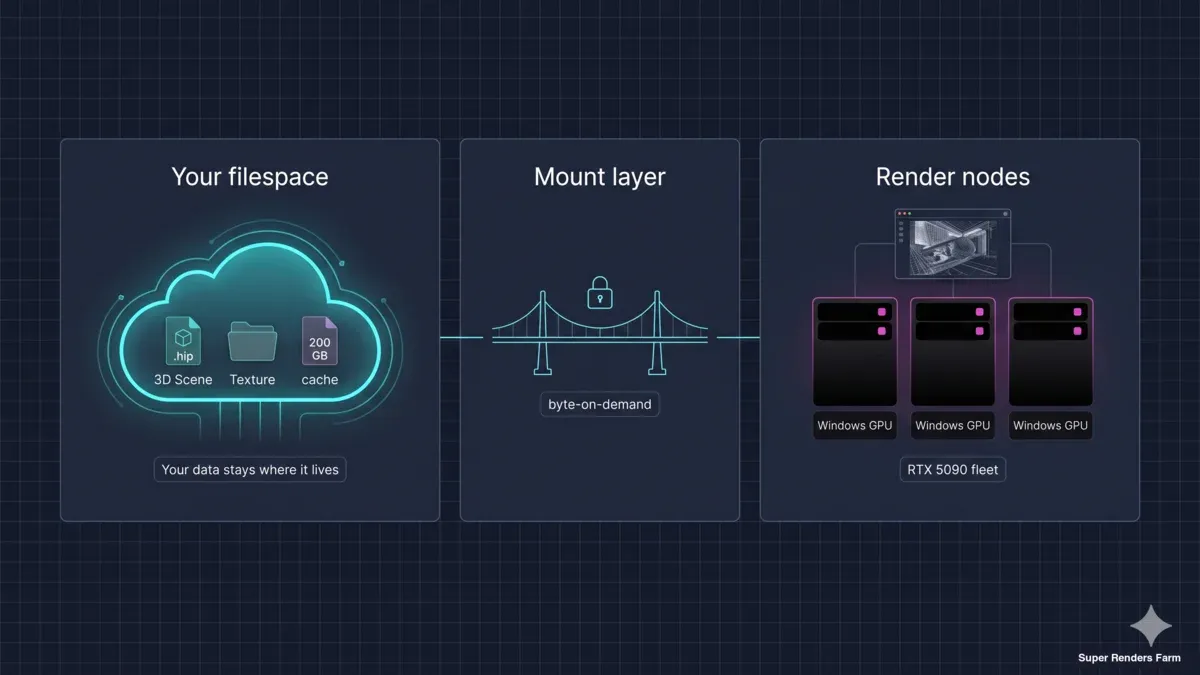
How to Render from Your Existing Filespace — A Guide for Studios on LucidLink, Suite Studios, and Beyond
Overview
Introduction
Imagine an 800 GB Houdini-VFX shot. Houdini sim cache, geometry, textures, plates — the full project on disk. Your studio is rendering iterations daily, and every iteration starts the same way: zip, upload, wait. At a 100 Mbps office connection, 800 GB of upload takes roughly eighteen hours. That is two days of artist idle time per cycle, just for transfer.
This is what most teams call the re-upload tax. It is not a fringe problem. Mid-market archviz, motion design, and VFX studios that hit a few terabytes of working data run into it the moment they try to scale beyond a local workstation. The tax compounds: every revision multiplies it, every dropped connection restarts it, and every artist on the team adds another upload queue.
We have spent the last few years helping studios escape it. Not by building a faster pipe — the bandwidth math always loses against working-set growth — but by changing the model: leaving your data exactly where it already lives, and bringing the render nodes to the data. We call this mount-and-render. This guide walks through how it works, when it fits, when it does not, and what your options look like in 2026.
The market quadrant — where mount-and-render sits
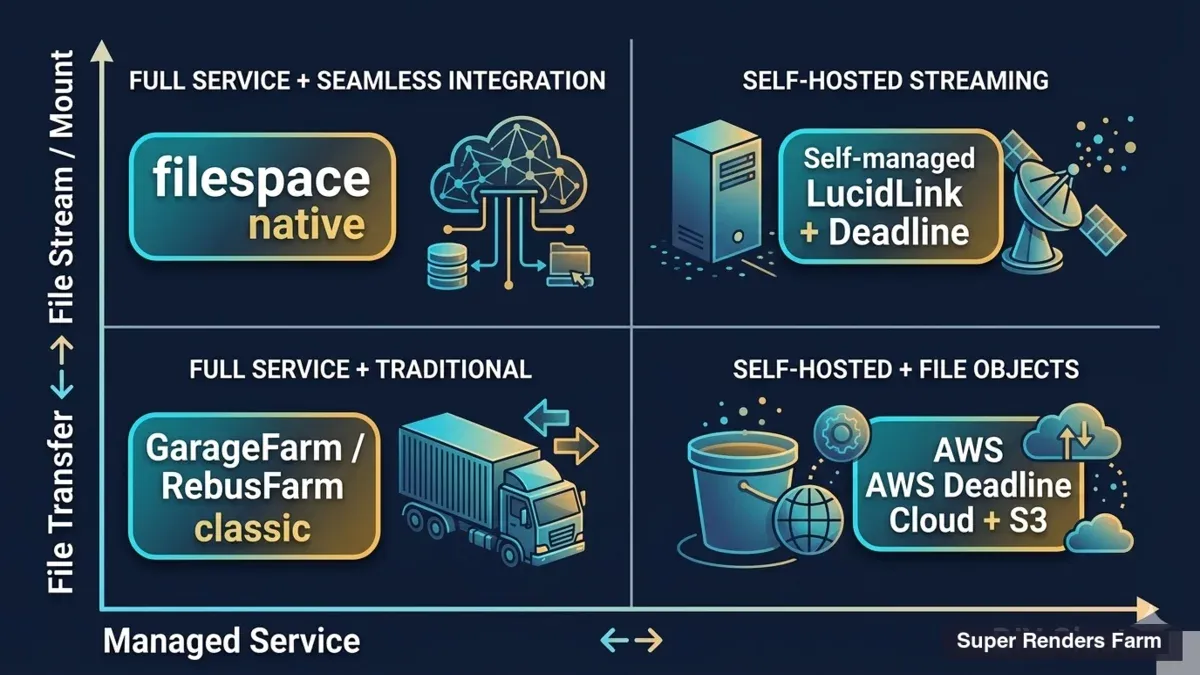 2x2 market quadrant comparing managed vs DIY render farms and file transfer vs file stream approaches with vendor positioning
It helps to map the render-farm landscape against two axes: who manages the pipeline (managed versus DIY) and how data moves to the farm (file transfer versus file stream). Four quadrants emerge.
The managed + file-transfer quadrant is the dominant market today. Customers upload assets through a portal, the operator runs the render, the customer downloads results. iRender, RebusFarm, and GarageFarm all live here, and the model works well for a large set of workloads — particularly small-asset projects with low iteration counts.
The managed + file-stream quadrant is where Super Renders Farm has been quietly building. Render nodes mount the customer's filespace directly, no copy step. The customer keeps full control of source data, and the farm becomes an on-demand compute layer attached to that data.
The DIY + file-transfer quadrant is occupied by services like AWS Deadline Cloud, where studios provision their own Linux render fleet on AWS infrastructure and handle data movement via S3. Powerful for teams with in-house devops capacity, less appealing for studios without it.
The DIY + file-stream quadrant is where in-house Hammerspace, Nasuni, or rolled-your-own NAS-plus-render-farm deployments live. Enterprises with large IT teams build this themselves; mid-market studios rarely have the headcount.
There is honest overlap between SRF's quadrant and the DIY-stream quadrant — both are conceptually similar. The difference is the managed layer on top, plus the Windows DCC fleet, plus the per-customer cache isolation pattern that mid-market studios cannot easily build themselves.
When a studio needs that pattern built out as a dedicated cross-country cluster, we document the WireGuard-and-SMB3-cache design in our cross-country render farm architecture guide.
How filespace-native rendering works at Super Renders Farm
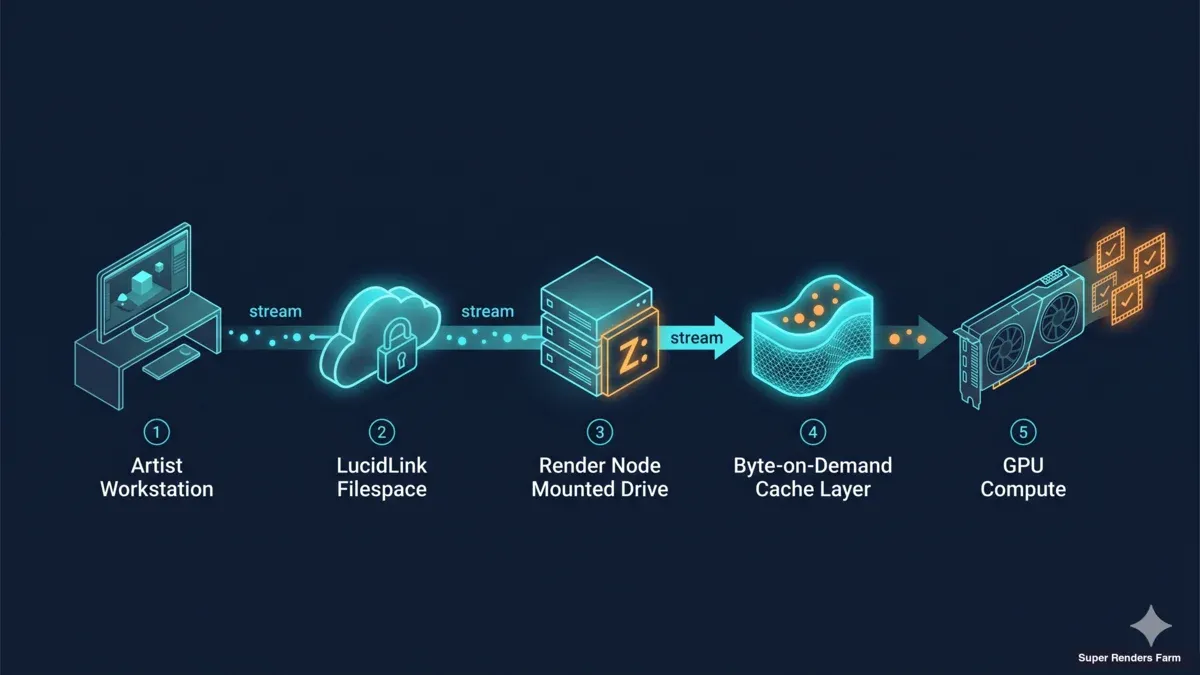 Data flow diagram showing artist workstation rendering through LucidLink filespace mounted on render node with byte-on-demand cache and GPU output
The mechanics are straightforward in plain English. Your filespace — LucidLink today, a compatible Windows mount workflow more broadly — appears as a drive letter on each render node. Houdini, V-Ray, Redshift, Cinema 4D, all of them just see files on disk. There is no copy step before the render starts. Files are pulled byte-on-demand as the renderer touches them.
We pair this with per-customer cache isolation. Every project that streams through our nodes lands in a cache segment that is logically and physically segregated from other customers' segments. Operators do not co-mingle data across cache pools, and the cache lifecycle is bound to the project lifecycle. We inherit the data-segregation posture that MPA TPN expects of vendors working with major-studio content. To be precise: Super Renders Farm is not separately TPN Gold Shield certified — the segregation pattern is built into the architecture, and we surface it for review on customer request.
Four operational characteristics carry across every customer who runs this workflow with us:
- GPU on Windows, not Linux. Our render fleet is Windows-native, with NVIDIA RTX 5090 GPUs (32 GB VRAM) backing the GPU pipeline and 20,000+ CPU cores backing the CPU pipeline. Most major DCCs and their commercial render engines are first-class on Windows; staying Windows-native sidesteps the Linux-port quirks that bite GPU rendering hardest.
- Footprint across more than 50 countries, not bound to AWS regions. Our compute reach is operator-managed and globally distributed. Studios working on EU data-residency projects can keep their LucidLink filespace in an EU region and pair it with our compute; nothing in the data path requires routing through AWS or any single hyperscaler.
- Per-customer cache isolation. No shared cache pools, no project bleed-through. This is the foundation that lets us work with studios on NDA-sensitive content.
For studios that need that in writing, see how signing an NDA with Super Renders Farm works, including what the agreement covers and how long it takes.
- Maxon, Chaos, and AXYZ official partnerships. Cinema 4D, Redshift, V-Ray, Corona, and Anima licensing flows are operated under official partner agreements with the engine vendors. License compliance is our problem, not the customer's.
LucidLink: the primary use case today
If you already run a LucidLink filespace, you have the configuration that lines up most directly with mount-and-render today.
LucidLink was built for distributed creative pipelines: byte-on-demand reads, real file-locking semantics, and a workflow that treats remote storage like a local mount. Those three properties matter for 3D work specifically. Byte-on-demand reads mean Houdini does not have to materialize a 200 GB sim cache before sampling a single frame; it pulls only what the renderer touches. File-locking semantics mean two render nodes will not race over the same scene file. The local-mount feel means render submission workflows behave the same as on an artist workstation.
We talk about LucidLink the way we would talk about any compatible workflow we support. We do not resell LucidLink licenses. The customer brings their LucidLink filespace; our render nodes mount it. The configuration is contained, the customer keeps administrative control, and the partnership conversation with LucidLink is ongoing on the commercial side.
The pattern is proven in production with a marketing and advertising production team running on our farm today. Daily turnaround on multi-hundred-gigabyte projects, no re-upload, no asset-path drift between artist machines and render nodes.
For studios on Suite Studios, the compatibility conversation is active but unconfirmed at the time of writing. Suite has a Windows mount story that lines up well with our fleet, and we are in charter discussion with their team. We are not promising availability — what we can say is that the architectural pattern is the same as LucidLink, and we will publish when the configuration is operator-validated.
For studios on a NAS (Synology, QNAP, TrueNAS) at the office and looking to push to the cloud: NAS-via-VPN rendering is on our 2026 second-half roadmap. The current workaround is to upload the project through the web, the Client App, or S3 access (Cyberduck or the AWS CLI) (see the Super Renders Farm /render-farm-rental service hub), or to migrate working assets onto a LucidLink filespace for the mount workflow.
For studios with assets sitting in S3 buckets (Wasabi, Backblaze, Cloudflare R2, AWS S3): the recommended path is to bridge through LucidLink Connect. LucidLink Connect mounts your S3 bucket as a LucidLink filespace, and our render nodes then mount that filespace. One bridging layer, no direct-S3-mount complexity, and the file-locking semantics that 3D pipelines depend on stay intact.
Versus AWS Deadline Cloud — a different DIY managed alternative
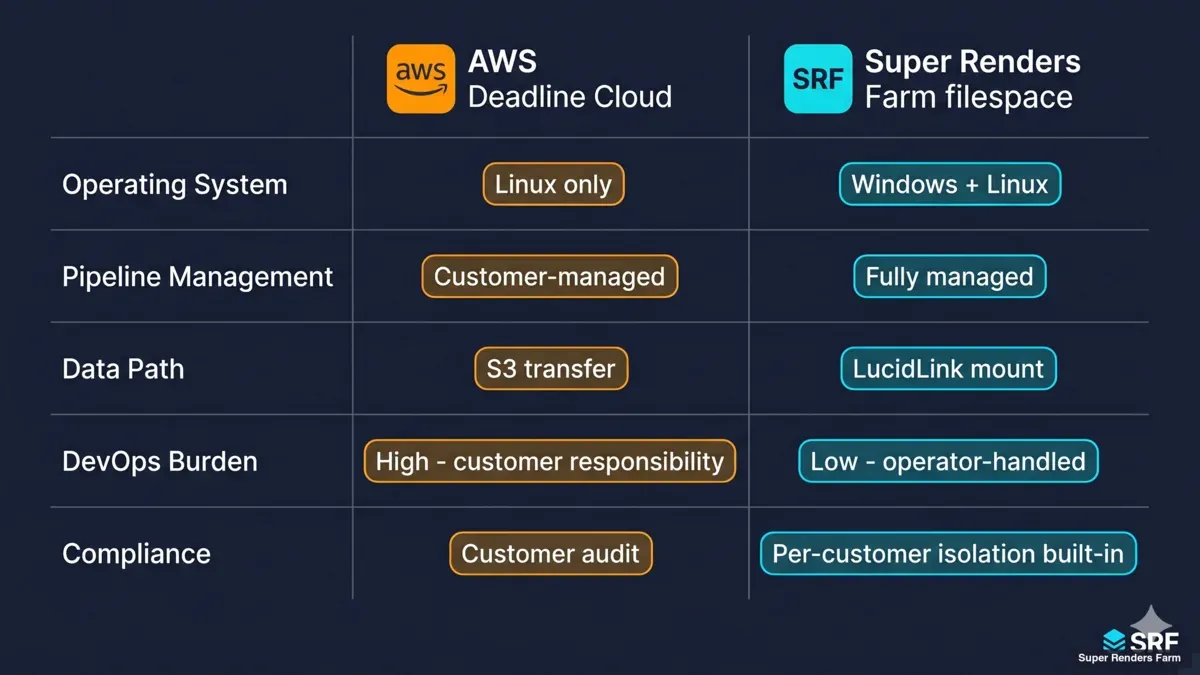 Side-by-side comparison grid AWS Deadline Cloud vs Super Renders Farm filespace covering operating system pipeline management data path and devops burden
AWS Deadline Cloud and Super Renders Farm get compared frequently, but the value propositions are genuinely different.
AWS Deadline Cloud is a customer-managed Linux fleet running on AWS infrastructure. The customer owns the queue configuration, the worker fleet scaling rules, and the data path through S3. AWS provides the rendering control plane and the compute capacity; everything else, including pipeline integration, falls on the studio's devops team. For studios that already operate inside AWS, run Linux render workflows in-house, and have engineers on staff who can write Deadline event plugins, the model fits well.
Super Renders Farm sits in a different spot. The fleet is Windows, the pipeline is operator-managed, and the mount layer is part of the service. Studios do not provision worker capacity, do not write Deadline scripts, do not configure license servers, and do not own the cache lifecycle. The trade-off is simple: less customizability, less operational overhead.
The two services are not zero-sum. We see studios use AWS Deadline Cloud for their internal Linux ML-adjacent rendering and use Super Renders Farm for the Windows-DCC burst capacity. The honest question is which one matches your existing pipeline OS, your devops staffing, and your data location — not which one is universally faster or cheaper. For more on that decision shape, our fully managed versus DIY render farm trade-offs walks through the operator-side math.
Versus upload-only render farms — iRender, RebusFarm, GarageFarm
The upload-only model is the established way to use a render farm, and we want to be clear: it works for many workloads. Small-asset projects, one-off renders, occasional bursts, archviz studios working with a few hundred megabytes of textures plus a scene file — all of these are well-served by uploading once, rendering, downloading the result.
Where the upload-only model breaks is the place where mount-and-render starts to look attractive. Large repeat scenes — the same 50 GB project asset set across thirty revision rounds — multiply transfer cost by every iteration. Daily revision cycles on multi-hundred-gigabyte projects turn the upload step into the production bottleneck. Network-constrained studios — offices on shared 200 Mbps connections, regional studios on metered links — feel this most acutely.
Upload-only farms cannot trivially add a mount layer. The architecture commitment runs the wrong direction: their security model, their pricing model, and their fleet provisioning all assume the data lives on the farm during the render. Adding a mount-and-render path means re-architecting customer-facing flows, not just adding a feature.
Our honest take: if you fit the small-asset, low-iteration shape, upload-only is the right answer and we would point you at a direct upload through the web or the Client App before recommending the mount workflow. If you fit the large-asset, iterative-cycle shape, the mount model exists to solve exactly that.
When mount-and-render fits — a decision aid
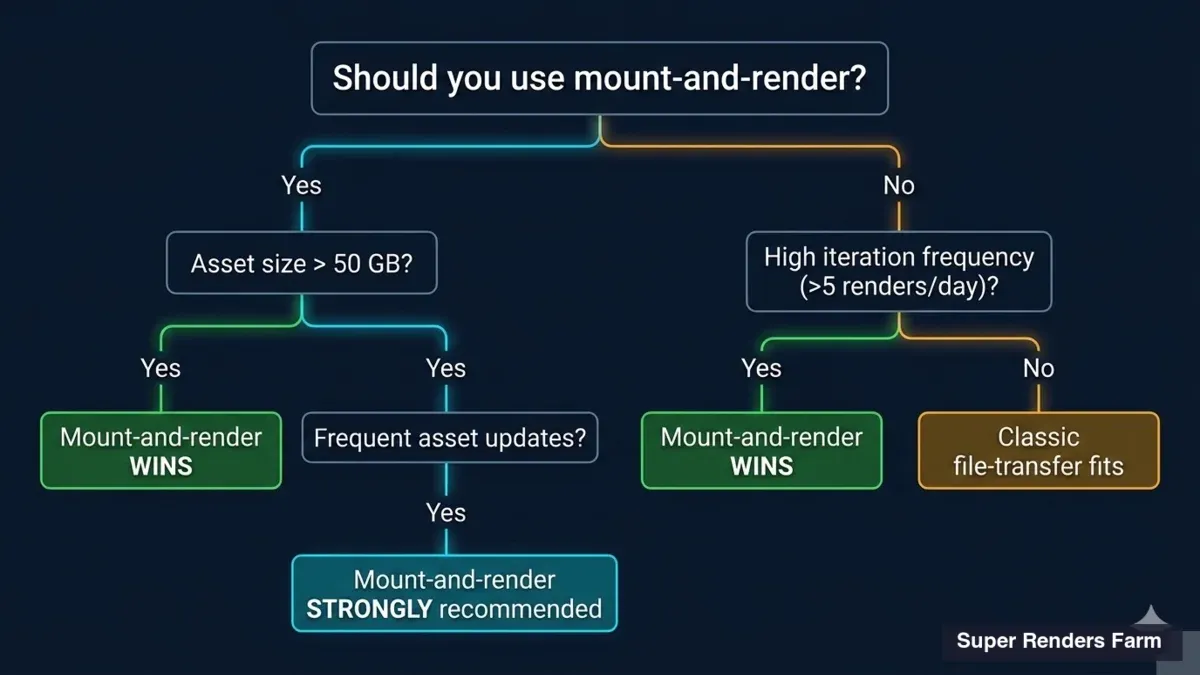 Decision tree infographic helping readers choose between mount-and-render and file-transfer based on asset size iteration frequency and pipeline complexity
The clearest way we have found to think about this is to look at three axes: asset size, iteration count, and data residency. The recommendation below is the one we give over support email.
| Workload shape | Recommended model | Notes |
|---|---|---|
| Small assets (under ~10 GB) + low revision count | Direct upload (web or Client App) | Re-upload cost is minimal; the simpler path is the right one. See the /render-farm-rental hub. |
| Mid-sized assets (10–100 GB) + occasional iteration | Direct upload or mount, depends on revision cadence | At 5+ iterations per week, the mount math starts favoring mount. |
| Large assets (100+ GB) + iterative cycles | Mount-and-render via LucidLink (or LucidLink Connect for S3) | Re-upload tax compounds against you. The mount model is the structural answer. |
| EU data-residency requirement | Mount via LucidLink EU region | Keep filespace in EU, render compute is geographically flexible. Suite EU compatibility pending. |
| Existing S3 storage (Wasabi / Backblaze / R2 / AWS S3) | Route via LucidLink Connect bridge | Bridge S3 to LucidLink filespace, then our nodes mount that filespace. Affiliate path. |
| Existing on-prem NAS (Synology / QNAP / TrueNAS) | Direct upload today; NAS-VPN mount on our 2026 H2 roadmap | We do not yet offer direct NAS mount; the safer pattern today is a direct upload. |
This is also where the managed-versus-DIY decision shape is worth thinking through separately — the mount-versus-transfer choice is partly an architecture decision and partly an operations-staffing decision.
Security and compliance
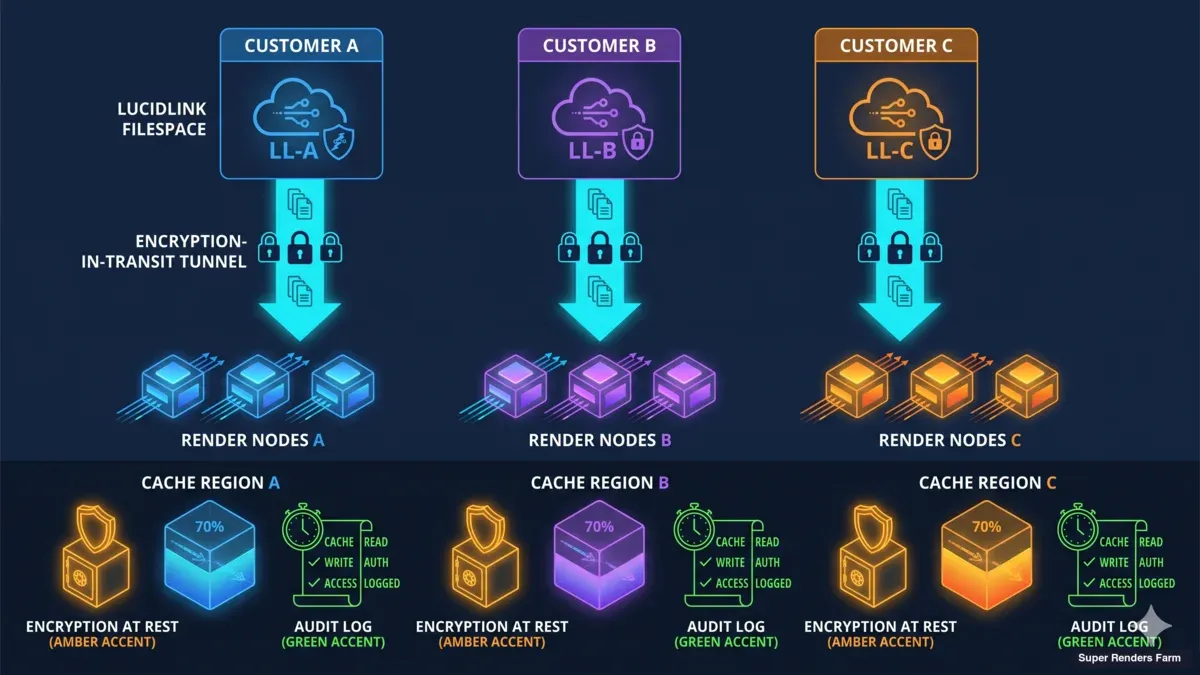 Network architecture diagram showing per-customer cache isolation encryption at rest and in transit and audit logging flow for filespace rendering
Two questions come up in nearly every customer conversation about the mount model: is my data isolated, and what compliance posture do you carry?
On isolation: every customer's filespace is cached in a segment that no other customer touches. Cache segments are bound to the project lifecycle — when a project ends, the segment is purged on a defined schedule. Cache pools are not shared across projects, and operator access to cache segments is logged and audited per project. The pattern follows MPA TPN data-segregation expectations.
On certification posture: Super Renders Farm is not separately TPN Gold Shield certified. The architecture inherits the segregation pattern that TPN frameworks require, and we surface the architectural detail for review on customer request. Studios working on TPN-sensitive content have walked our cache architecture in detail before signing on.
On in-flight and at-rest protection: TLS protects data in transit between the customer filespace and our render nodes. Cache segments are encrypted at rest with per-segment keys. Audit logs covering operator access, render job lifecycle, and cache purge events are available on the operator side and can be shared with customers for compliance reconciliation.
On vendor licensing: Cinema 4D, Redshift, V-Ray, Corona, and Anima crowd-simulation plugins are operated under official partner agreements with Maxon, Chaos, and AXYZ design respectively. License compliance for these engines is our problem; the customer just runs the render. For engines outside our partner agreements, the standard render-only license model applies.
FAQ
Q: Do you support LucidLink today? A: Yes. LucidLink is our primary mount-and-render workflow, validated in production with a working customer. Setup is straightforward for studios already running LucidLink filespaces — render nodes mount the filespace, no re-upload step.
Q: What about Suite Studios? A: Suite Studios compatibility is in active charter discussion. We cannot confirm a public availability date yet. The architectural pattern lines up with LucidLink, and we will publish a setup guide when the configuration is operator-validated.
Q: Can I render from my NAS (Synology, QNAP, TrueNAS)? A: NAS-via-VPN rendering is on our 2026 second-half roadmap. The current workaround is to upload the project through the web, the Client App, or S3 access (Cyberduck or the AWS CLI), or to migrate working assets to a LucidLink filespace for the mount workflow.
Q: Is my data isolated from other customers? A: Yes. Per-customer cache isolation — each project gets a logically and physically segregated cache segment, no shared pools, no co-mingling across customers. The architecture inherits MPA TPN data-segregation patterns; Super Renders Farm itself is not separately TPN Gold Shield certified and we surface architectural detail on request.
Q: What if my assets sit in an S3 bucket (Wasabi, Backblaze, R2, AWS S3)? A: Route through LucidLink Connect. LucidLink Connect mounts your S3 bucket as a LucidLink filespace, and our render nodes mount that filespace. One bridging layer instead of direct S3 mounts that lack the file-locking semantics 3D pipelines depend on.
Q: How does this compare to AWS Deadline Cloud? A: AWS Deadline Cloud is a customer-managed Linux fleet on AWS infrastructure; you own queue configuration, fleet scaling, and the S3 data path. We are a managed Windows fleet with mount-layer integration; you do not provision workers or manage license servers. The right choice depends on your pipeline OS, your devops staffing, and where your data lives today.
Q: Which DCCs and render engines are supported in this workflow? A: 3ds Max, Maya, Cinema 4D, Blender, Houdini (including native simulation cache support), After Effects, and NukeX. Engine coverage includes V-Ray, Corona, Redshift, Arnold, Octane, Cycles, and Karma. The mount workflow is engine-agnostic — if your DCC reads files from a drive letter, it reads from a mounted filespace the same way.
Q: When does mount-and-render not make sense?
A: Small-asset workflows under about 10 GB with low iteration counts. The re-upload cost is minimal and a direct upload through the web or the Client App is the simpler answer. Check our /render-farm-rental hub for non-mount workflow options.
Conclusion
The shape of cloud rendering is shifting from "move the data to the compute" to "move the compute to the data." For studios working with large assets and iterative cycles, the re-upload tax was always the part of the workflow nobody wanted to talk about, and it is the part that mount-and-render removes.
The model is operationally mature on LucidLink today, expanding to compatible Windows mount workflows as charters firm up, and on a roadmap to cover NAS and S3-bridged cases through the rest of 2026. The four characteristics that hold across all of these — Windows-native GPU and CPU fleet, distributed across more than 50 countries, per-customer cache isolation, and Maxon/Chaos/AXYZ partner-operated licensing — are the parts of the service that do not change regardless of where your data lives.
If your workflow looks like the large-asset iterative shape this guide describes, the Super Renders Farm /render-farm-rental service hub is the next step to map your specific setup to the right path. Your assets stay where they are — render at Super Renders Farm.
About Thierry Marc
3D Rendering Expert with over 10 years of experience in the industry. Specialized in Maya, Arnold, and high-end technical workflows for film and advertising.