Render Farm Software Licenses Included in 2026: Per-Renderer + Per-DCC Coverage
Overview
Introduction
Most studios looking at cloud render farms ask the wrong first question. They ask "how much per hour?" before they ask "which licenses do I still need to bring, configure, or pay for separately?" The per-hour number sits on a public pricing page. The license answer is usually buried inside EULA carve-outs, per-engine subscription tiers, and render-node licensing rules — and getting it wrong means a render that won't start, a compliance gap your auditor catches later, or a per-frame surcharge that wasn't in the per-hour quote.
On our farm we've worked through hundreds of license-side support tickets — render engines included in the rate, render-only application models, BYOL with floating servers, scene-side plugin checks, all of it. This guide lays out, in plain language, what's included when you submit a job to Super Renders Farm in 2026, what stays on your workstation, and where we run an application under render-only utilization terms rather than reselling a vendor license.
Three things this guide covers, in order:
- A renderer × DCC matrix showing what's supported and whose license covers each layer.
- Per-renderer, per-DCC, and per-plugin inclusion details — including the eight After Effects plugin packages we provision on request and a plain statement of why Houdini runs under render-only utilization (we are not a SideFX partner).
- A worked-example cost comparison (included vs BYOL), tier-compliance rules, and the hidden costs that never appear on a per-hour pricing page.
If your studio renders V-Ray, Corona, Redshift, Arnold, Octane, Cycles, EEVEE, Karma, Karma XPU, or Mantra on 3ds Max, Maya, Cinema 4D, Blender, Houdini, or After Effects, this guide applies.
Renderer × DCC Support and License Matrix
| Renderer ↓ / DCC → | 3ds Max | Maya | Cinema 4D | Blender | Houdini | After Effects |
|---|---|---|---|---|---|---|
| V-Ray | ✅ | ✅ | ✅ | On request | On request | — |
| Corona | ✅ | — | ✅ | — | — | — |
| Arnold | ✅ | ✅ | — | — | On request | — |
| Redshift | On request | ✅ | ✅ | On request | ✅ | — |
| Octane | ✅ | ✅ | ✅ | On request | On request | — |
| Cycles | — | — | — | ✅ | — | — |
| EEVEE | — | — | — | ✅ | — | — |
| Karma / Karma XPU | — | — | — | — | ✅ | — |
| Mantra | — | — | — | — | ✅ | — |
How to read this table. A ✅ means the combination is supported and the render-engine license is handled for you: V-Ray, Corona, Redshift, Arnold, and Octane render licenses are included in your per-hour rate, while Cycles and EEVEE are free under the GPL and ship inside Blender, and Karma, Karma XPU, and Mantra ship inside Houdini at no extra engine cost. "On request" marks a pairing we provision for your job rather than keep ready on every node, so contact support to confirm before you upload. A "—" means the combination isn't a supported pairing — Corona ships no Maya integration, Cycles and EEVEE are Blender's own engines while Karma, Karma XPU, and Mantra are Houdini's, and After Effects runs as its own compositing pipeline rather than a host for these 3D engines. The Blender entry under "Per-DCC Application License" below states which engines we run for Blender and on what terms; read it before you conclude anything about a Blender pairing from this table alone. Two license layers sit behind every ✅, and the next sections break them down: the render engine (covered above) and the DCC application (your own seat for 3ds Max / Maya / Cinema 4D; render-only utilization for Houdini and After Effects).
What "Licenses Included" Actually Means at a Cloud Render Farm
When a cloud render farm advertises "licenses included," that phrase hides three different operational realities. Knowing which one applies to your stack tells you whether you have setup work ahead of you or whether you can submit and walk away.
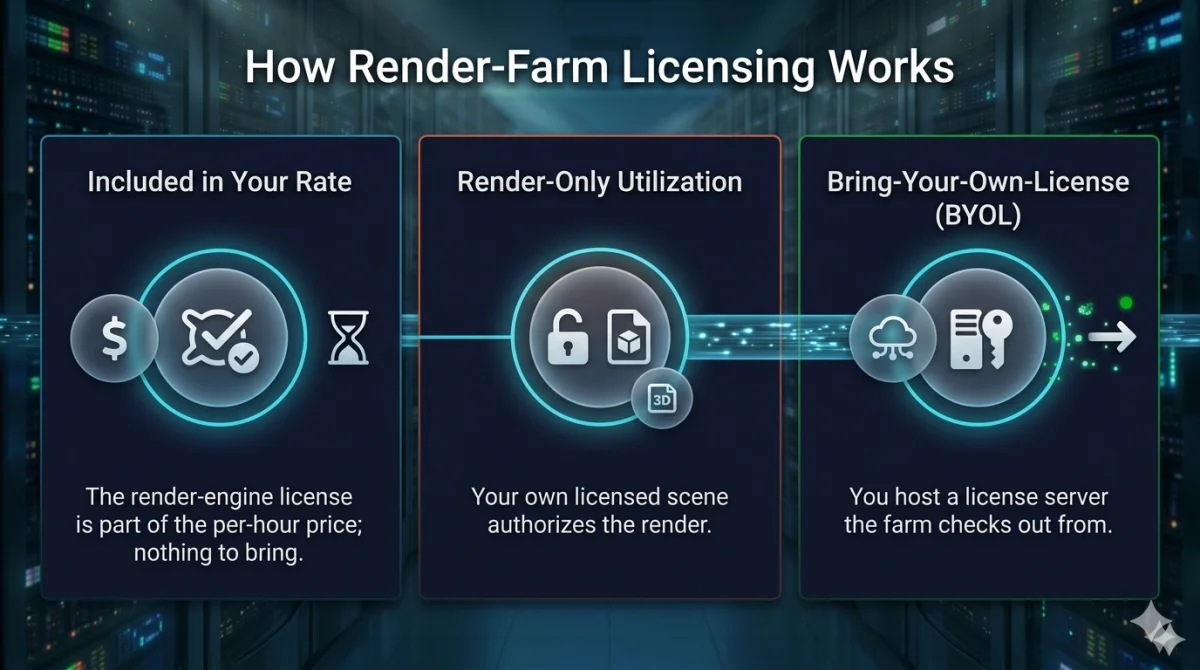 Three render-farm licensing models — included in your rate, render-only utilization, and bring-your-own-license (BYOL).
The first model is included in your rate. The farm already holds the render-side engine license and folds its cost into the per-hour price. There's no license server to host, no scene-side check, and nothing to configure on your end. At Super Renders Farm this is how the render engines work — V-Ray, Corona, Redshift, Arnold, and Octane are part of what you pay per hour, and Cycles and EEVEE are free because they're GPL-licensed. For several of these engines we hold direct vendor partnerships that let us provision render licensing cleanly: Super Renders Farm is an official Chaos partner (V-Ray, Corona) and an official Maxon partner (Redshift, Cinema 4D). Arnold and Octane are included through render-node licensing rather than a partner program, and Cycles and EEVEE need no license at all.
The second model is render-only utilization — the license stays tied to your scene or entitlement. When a render node boots, the application reads the license authority that travels with your project, and our nodes execute the render under the vendor's render-only terms. This is how we handle the Houdini and After Effects applications: we are not a SideFX or Adobe partner, so rather than reselling a render-side seat, we run your job under the render-only authority your own license already carries.
The third model is BYOL (bring-your-own-license), sometimes implemented via RLM (Reprise License Manager) or a USB dongle. You host the license server in your studio, the farm's render nodes check out a seat across the public internet, and you handle firewall rules, time-zone activation drift, and version locking yourself. It works, and it's the right answer for some enterprise and legacy setups, but the configuration is real.
Most jobs only touch the first two models. The split looks like this:
| License layer | Who covers it at Super Renders Farm |
|---|---|
| Render engine — V-Ray, Corona, Redshift, Arnold, Octane | ✅ Included in your per-hour rate — nothing to bring. Where the matrix above marks a pairing "On request", confirm it with support first |
| Cycles and EEVEE (Blender's built-in renderers) | ✅ Free — GPL, ship inside Blender |
| Karma / Karma XPU / Mantra | ✅ Ship inside Houdini — no separate engine license |
| Application — 3ds Max, Maya, Cinema 4D | You author with your own seat; our managed nodes handle the render-side |
| Application — Houdini, After Effects | Render-only utilization — your licensed scene governs the render (not a SideFX/Adobe partner) |
| After Effects plugins: 8 packages | ✅ Provisioned on request |
| 3ds Max plugins: Forest Pack, RailClone, Anima | ✅ Installed on our nodes |
| Enterprise license servers · legacy dongles · unsupported engines | BYOL — contact support |
Per-Renderer License Inclusion
V-Ray — V-Ray render licensing is included in your per-hour rate across 3ds Max, Maya, Cinema 4D, and Houdini (V-Ray for Houdini) workflows. V-Ray for Houdini is an on-request pairing rather than one we keep ready on every node, so contact support to confirm before you upload a Houdini job. You author with your workstation V-Ray license; our nodes carry the render-side entitlement, so there's no floating license server to configure and no dongle to ship. V-Ray for Blender is likewise an on-request pairing, so contact support to confirm it before you upload a Blender job. See our V-Ray cloud render farm page for version coverage.
Corona — Corona Renderer licensing is included for 3ds Max and Cinema 4D, the two DCCs Corona ships an integration for. Your workstation Corona license handles authoring; our nodes handle the render.
Arnold — Arnold render licensing is included in your rate on Maya, 3ds Max, and Arnold for Houdini. Arnold for Houdini is an on-request pairing rather than one we keep ready on every node, so contact support to confirm before you upload a Houdini job. For a standard job you don't host an Arnold license server or pay a separate Arnold render-node fee — the render-side entitlement lives on our nodes. Studios that must route through their own enterprise Arnold network license server fall into the BYOL pattern below.
Redshift — Redshift render licensing is included across Cinema 4D, Houdini, Maya, and 3ds Max integrations. You author with your own Redshift-enabled seat — for example, a Maxon One subscription — and our nodes carry the render-side license. Redshift for 3ds Max and Redshift for Blender are on-request pairings rather than ones we keep ready on every node, so contact support to confirm the pairing before you upload a 3ds Max job, and to confirm the pairing and the Redshift version before you upload a Blender job. If your studio still runs legacy standalone Redshift floating licenses from the pre-Maxon era, contact support to confirm how that reconciles on submit.
Octane — Octane render licensing is included on our GPU nodes, billed by GPU time. You don't bring an Octane subscription seat for a standard render. Octane for Blender is an on-request pairing rather than one we keep ready on every node, so contact support to confirm before you upload a Blender job. If your project depends on a specific Octane network-rendering capability at high concurrent node counts, contact support to confirm coverage before submitting.
Cycles — GPL-licensed and free. No commercial license is required by any party. Cycles is Blender's built-in renderer and ships inside every .blend submission. (This is Blender's "Cycles," not the separate INSYDIUM "Cycles 4D" Cinema 4D plugin, which we don't support — don't conflate the two.)
EEVEE — Blender's real-time engine ships inside the same Blender installation as Cycles, so there's no separate render-engine license here either. EEVEE jobs run on our CPU and our GPU nodes and submit exactly the way Cycles jobs do. The honest nuance: EEVEE is fast enough per frame that short sequences are often quickest to render on your own workstation. Where the farm earns its keep with EEVEE is scale: large unattended batch frame ranges, or a job you need to run while your own machine is tied up. For the full set of engines a Blender scene can use here, see the Blender entry under "Per-DCC Application License" below.
Karma + Karma XPU — Karma CPU and Karma XPU ship inside the Houdini installation, so there's no separate render-engine license to buy. They run under Houdini's render-only utilization model: your Houdini entitlement, tied to your scene, governs the render. Karma XPU runs on our RTX 5090 GPU nodes in the Solaris/USD context — see the Karma section below for the SideFX partner-status disclosure.
Mantra — Houdini's original built-in renderer, still shipped with every Houdini install and superseded by Karma for new work. Like Karma, it carries no separate render-engine license and runs under Houdini's render-only utilization model.
Per-DCC Application License: When the Farm Needs Your DCC License vs Not
3ds Max — Your workstation 3ds Max license is yours, and you author with it. Because Super Renders Farm is fully managed, you don't install software or configure licenses on our render nodes — you upload the scene and our managed render-side handles execution. If your studio mandates its own Autodesk network license server, the BYOL section applies.
Maya — Same pattern as 3ds Max. Your Maya seat stays on your workstation for authoring; our managed nodes handle the render. Confirm your Maya tier (Indie, Standard, Enterprise) permits commercial cloud rendering before submitting paid work. Enterprise Maya network-license setups fall under BYOL.
Cinema 4D — You author with your own Cinema 4D seat, whether a perpetual license or a Maxon One subscription. Our managed nodes handle the render side; nothing to configure.
Blender — Blender itself is GPL-licensed, so the application layer needs no commercial license from anyone: submit the .blend and render. Which engine renders the scene decides the layer below it, and there are two answers. Cycles and EEVEE are Blender's own engines: both ship inside the Blender installation under the GPL, both run on our CPU and our GPU nodes, and neither carries a render-engine license for anyone to pay. V-Ray for Blender, Octane for Blender, and Redshift for Blender are on-request pairings: we provision them for your job rather than keep them ready on every node, so contact support to confirm the pairing, and for Redshift the version, before you upload. That is the set this guide states for Blender today; if your scene uses any other render engine, contact support before you upload rather than assuming either way.
Houdini — Render-only utilization. Your Houdini license, tied to your scene, governs the render; our nodes execute under SideFX's render-only terms. This covers Houdini Indie, Houdini Core, and Houdini FX scenes — confirm your SideFX license tier permits commercial cloud rendering (Houdini Indie carries a revenue cap). See Houdini cloud render farm for HDA and Solaris workflow notes.
After Effects — Render-only utilization. Your After Effects entitlement licenses the composition, and our nodes render it headless under that authority. Your Creative Cloud subscription stays with you. See After Effects cloud render farm for the plugin stack we provision on request.
Plugin License Inclusion (After Effects + 3ds Max + Maya + C4D)
After Effects — Eight plugin packages are provisioned on request for our After Effects render nodes so your comp's effect references resolve at render time. Tell us which ones your comp uses before you upload:
- Element 3D (Video Copilot)
- Trapcode Suite (Red Giant / Maxon): Particular, Form, Tao, Mir, Shine, Echospace, Lux, Sound Keys, Starglow, Horizon
- Red Giant Universe (Maxon)
- Optical Flares (Video Copilot)
- Sapphire (Boris FX)
- Magic Bullet Suite (Red Giant / Maxon): Looks, Mojo, Cosmo, Denoiser
- Stardust (Superluminal)
- Plexus (Rowbyte)
These span several different vendor license models — Maxon App for the Red Giant packages, node-locked per machine for Video Copilot's, and Boris FX's own scheme for Sapphire — and all of them are handled on our nodes once your setup is provisioned. If your comp references a plugin not on this list, contact support before submitting.
3ds Max — Forest Pack and RailClone from iToo Software read their entitlement from your scene file; our nodes execute the scatter and parametric builds at render time. Anima from AXYZ design — Super Renders Farm is an official AXYZ partner — renders on our nodes too; character-crowd .anima files render without you shipping AXYZ seats.
Maya — Plugins that use a scene-side license check render the same way: our nodes read the entitlement from your scene and execute. If your studio relies on a plugin that requires its own floating license server, see the BYOL section.
Cinema 4D — Redshift is included on our nodes (covered in the renderer section above). Red Giant effects used inside Cinema 4D are handled the same way as on the After Effects nodes.
Karma XPU & SideFX Partner Status (Honest Disclosure)
Super Renders Farm runs Karma XPU on RTX 5090 GPU nodes with current NVIDIA production drivers and a CUDA 12.x runtime. The Solaris/USD context Karma XPU expects is fully supported — LOP-based scene assembly, USD layer composition, and XPU device selection all behave as they do on a local workstation.
On the license model: Karma ships inside Houdini, so there's no separate engine license. Your Houdini entitlement, tied to your scene, governs the render. That's the render-only utilization pattern Houdini uses.
On partner status, the honest disclosure: we are not currently in the SideFX official partner program. If that matters to your studio's licensing audit, contact our support team for the specific compliance details.
Why this matters operationally: most studios don't care about partner-program status — they care that the render completes and the license terms are clean. But some procurement processes, SOC 2 audits, and enterprise licensing reviews specifically ask whether your render vendor is an official partner of the software vendor. If that question shows up in your vendor onboarding paperwork, talk to our support team first. We'd rather give you the exact compliance answer for your auditor than have you discover the gap mid-procurement.
Bring-Your-Own-License (BYOL) Scenarios
Most jobs need no license setup from you. A few enterprise and legacy scenarios still push you toward BYOL:
- Enterprise studios with a mandated internal license server — if your IT department requires that every render check out from your own Arnold (RLM) or V-Ray license server rather than the farm's included entitlement, our nodes need to reach that server.
- Legacy dongle-locked V-Ray — older V-Ray deployments still on USB dongles can't use cloud-included licenses. Migrating to Chaos's modern online licensing usually resolves this.
- Engines we don't currently run — Pixar RenderMan, for example, is not among our supported render engines today. If your pipeline depends on an engine outside our supported list, contact support before planning the job rather than assuming a BYOL path exists.
The risks with BYOL are real and worth naming. License-server time-outs across time zones are the most common gotcha — if your server is in Los Angeles and a job submits at 2 AM Pacific, a nightly maintenance window can kill the render mid-frame. Firewall rules have to permit license-checkout traffic from our render-node IP range. And version mismatches between your server's supported versions and the farm's renderer version can fail silently.
Recommendation: contact support before submitting any BYOL job. Most setups work, but the configuration overhead is real, and we'd rather walk through it once than have you debug license-checkout failures from render logs at midnight.
License Tier Compliance (Commercial vs Educational vs Indie vs Personal)
A cloud render farm is, by definition, a commercial render utility. That changes which tiers of your DCC and plugin licenses are eligible to render here.
Educational and student licenses — Maya LT student, Cinema 4D Education, and most academic Houdini Apprentice deployments either restrict commercial output entirely or specifically prohibit commercial cloud rendering. (Blender is GPL-licensed and has no commercial-use restriction, so the student/commercial split doesn't apply there.) If your project will be invoiced to a client or distributed commercially, the workstation tier needs to match. Submitting a student-tier scene for commercial render isn't a technical failure — it's an EULA violation that can void your output's commercial usability.
Autodesk Indie and Houdini Indie tiers — both are real commercial-tier licenses priced for solo artists and small studios, and both permit paid client work within a published revenue cap. They are eligible for commercial cloud rendering as long as your studio stays under the stated ceiling. The eligibility math gets complex with multi-entity studios, prior-year revenue, and pass-through contractor revenue. See our Autodesk Indie License Guide for the current thresholds and edge cases.
Mixed-tier studios — if your project mixes a commercial Maya seat with a student Cinema 4D scene, you have a compliance gap regardless of farm capability. Keep your workstation tier matched to the commercial intent of the project end-to-end, not just on the seat that submits to the farm.
When in doubt, the conservative read is that any output rendered on a commercial cloud farm is itself commercial output. Tier your workstation licenses accordingly.
Hidden License Costs to Watch For
A few license-side costs never appear on the per-GHz-hour price page but show up in real production:
- Your own DCC and subscription maintenance — your 3ds Max, Maya, Cinema 4D, Houdini, or After Effects subscription is your cost, unchanged by where you render. The farm includes the render engine, not your authoring application.
- Network license-server maintenance (BYOL only) — if you run your own Arnold or V-Ray license server for a BYOL workflow, its annual maintenance is a real cost that the included-in-rate path avoids entirely.
- Plugins outside the list we provision — if your comp or scene references a plugin we don't provision, you're responsible for getting it licensed and available, which can mean a separate purchase or a BYOL arrangement.
- Version-mismatch resubmits — our nodes run specific renderer point versions. If you author on V-Ray 7.00.05 and our nodes run 7.00.03, a feature may not resolve correctly, forcing a resubmit on the matching version — and the resubmit bills again.
- Mid-frame plugin license-check failures — a plugin instance that fails its own license check partway through a render can re-trigger billing on the affected frames. We monitor for this and credit back where the failure is farm-side; failures originating from scene-side license drift bill normally.
Cost Comparison: Included vs BYOL (Worked Example)
Take a 200-frame V-Ray 3ds Max archviz job at 4K — a complex glass-and-vegetation interior, roughly 45 minutes per frame on a typical workstation (illustrative).
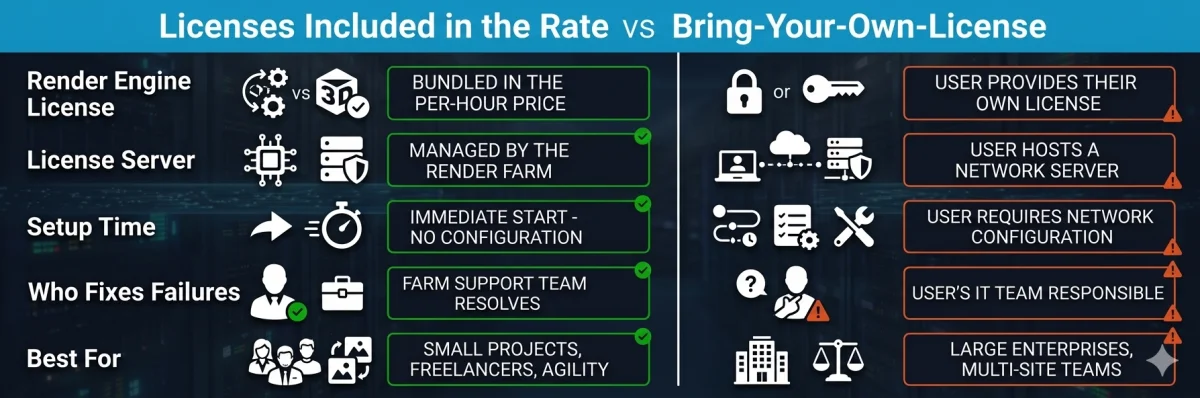 Comparison of render-engine licenses included in the per-hour rate vs a bring-your-own-license (BYOL) setup at a cloud render farm.
BYOL self-hosted scenario:
- Your own V-Ray license-server maintenance (an existing studio cost, allocated to this render)
- Your 3ds Max Indie or commercial workstation seat (existing cost)
- License-server admin time: ~2 hours to configure the farm's IP allowlist, test checkout from a render node, and troubleshoot time-zone activation if your server runs maintenance windows
- Vendor support routing: a frame that fails on a license issue means triaging between Chaos support, your IT team, and the farm
- Plus the actual render cost at the farm's per-GHz-hour rate
SuperRenders included-in-rate scenario:
- Per-GHz-hour CPU rendering at $0.004/GHz-Hr (current published rate — see /pricing), with the V-Ray render license already in that rate
- No license server to maintain on your end
- No farm-side IP allowlist to configure
- License questions go to a single support contact, not a three-party triage
- Your 3ds Max workstation seat is still your cost (unchanged from BYOL)
What disappears in the included scenario: license-server admin overhead, time-zone activation issues, and the slow "our server is fine, the farm must be the problem" debugging cycle. What stays: your workstation 3ds Max and V-Ray authoring seats — those are yours either way.
The dollar comparison varies by studio size and how much you'd amortize a license server. The operational comparison is consistent: included-in-rate removes a class of failures from your week.
Renderer-Specific Caveats
A few engine-specific notes that don't fit the general license-flow framing:
Karma — the license model is context-bound to Solaris/USD. Karma CPU and Karma XPU both expect a LOP-based scene assembly; if your Houdini scene still renders through the legacy OBJ context, migrate the render context to Solaris before submitting — Karma XPU is not available in the OBJ network.
Redshift — the render license is included in your rate on our nodes; your own Redshift entitlement (for example, via Maxon One) is what you author with, not something the farm rents from you. If your studio still runs legacy standalone Redshift floating licenses from the pre-Maxon era, check with support to confirm how that reconciles on submit. Most cases are clean; the edge cases sit around legacy Redshift-only subscriptions.
Octane — Octane render licensing is included on our GPU nodes, billed by GPU time. If your scene relies on a specific Octane network-rendering capability at high concurrent node counts, contact support to confirm coverage before submitting.
Arnold — the Arnold render license is separate from your Maya or 3ds Max workstation license, and on our farm it's included in your rate rather than something you bring. Enterprise studios that must route through their own Arnold network license server fall into the BYOL pattern above.
FAQ
Q: Do cloud render farms include software licenses for V-Ray, Redshift, and Arnold? A: It depends on the farm. At Super Renders Farm, the render-engine licenses for V-Ray, Corona, Redshift, Arnold, and Octane are included in the per-hour rate — Super Renders Farm is an official Chaos partner (V-Ray, Corona) and an official Maxon partner (Redshift), with Arnold and Octane covered through render-node licensing — so you don't bring keys, host a license server, or pay a separate renderer surcharge for a standard job. Cycles is free under the GPL. The license that stays with you is your authoring application (3ds Max, Maya, Cinema 4D, Houdini, After Effects) and any plugin we don't provision.
Q: Do I need to bring my own Cinema 4D or Maya license when rendering on the cloud? A: You author the scene with your own Cinema 4D or Maya seat, and that license stays on your workstation. Because Super Renders Farm is fully managed, you don't install software or configure licenses on our render nodes — you upload the scene and our nodes handle the render-side, with the render engine already included in your rate. Always confirm your specific license tier (Indie, Standard, Enterprise) permits commercial cloud rendering before submitting paid work.
Q: How does the Houdini license work on Super Renders Farm? A: We are not currently a SideFX official partner, so Houdini does not run on a resold render-side seat at our facility. Instead we use the render-only utilization model that SideFX permits for licensed Houdini users: your license, tied to your scene, authorizes the render, and our nodes execute against that entitlement. This applies whether you hold Houdini Indie, Houdini FX, or Houdini Core — confirm your tier permits commercial cloud rendering (Indie carries a revenue cap) before submitting paid work.
Q: Are After Effects plugins like Element 3D and Trapcode included on cloud render farms? A: On Super Renders Farm, eight plugin packages are provisioned on request for the After Effects render nodes: Element 3D (Video Copilot), Trapcode Suite, Red Giant Universe, Optical Flares (Video Copilot), Sapphire (Boris FX), Magic Bullet Suite, Stardust (Superluminal), and Plexus (Rowbyte). Tell us which ones your comp uses before you upload. After Effects itself runs headless under your own entitlement — Adobe is not a Super Renders Farm partner, so the model parallels Houdini: your AE seat licenses the composition and our nodes render it under that authority. If your comp references a plugin not on that list, contact support before submitting.
Q: What's the difference between BYOL and licenses included in the render rate? A: BYOL (bring-your-own-license) means you provide credentials or a license server the farm reaches across the internet — common for enterprise tools or legacy setups where you must use your own entitlement. Licenses included in the rate means the farm already holds the render-side engine license and folds it into the per-hour price, so you never transfer credentials. At Super Renders Farm, the render engines (V-Ray, Corona, Redshift, Arnold, Octane) are included in the rate, Cycles and EEVEE are free under the GPL, and the Houdini and After Effects applications run under render-only utilization tied to your scene. Engines outside our supported list — Pixar RenderMan, for example — aren't available today, so contact support before planning that kind of job.
Q: Can I use an educational or student license to render on a cloud render farm? A: No. Every major vendor — Autodesk, Maxon, Chaos, SideFX, Adobe, OTOY — restricts educational and student licenses to non-commercial coursework, and that restriction extends to cloud rendering. Submitting a commercial project under an educational entitlement violates the EULA regardless of where the render runs. If you need an affordable commercial path, Autodesk Indie (revenue-capped) and Houdini Indie are commercial-tier licenses priced for solo artists and small studios, and both permit paid client work within their stated revenue ceilings.
Q: Does Karma XPU work on cloud GPU nodes? A: Yes. Karma XPU runs on Super Renders Farm's NVIDIA RTX hardware, including RTX 5090 nodes, in the Solaris/USD context it expects. Because Karma ships inside Houdini and we are not a SideFX partner, Karma XPU jobs follow the same render-only utilization model as the rest of Houdini: your Houdini license authorizes the scene and our GPU nodes execute the render against that entitlement. Confirm your Houdini Indie, FX, or Core tier permits the render scope you intend before submitting commercial work.
Q: How are GPU render-engine licenses like Redshift and Octane billed? A: GPU rendering at Super Renders Farm is billed by GPU time — the current published GPU rate is $0.003 per OctaneBench-hour (OBh), shown on our pricing page — and the Redshift, Octane, and Karma XPU render-engine licenses are already included in that rate. You don't hold a separate GPU-renderer subscription seat for the farm; you author with your own license and the render-side engine license is part of what you pay per hour.
About Alice Harper
Blender and V-Ray specialist. Passionate about optimizing render workflows, sharing tips, and educating the 3D community to achieve photorealistic results faster.