
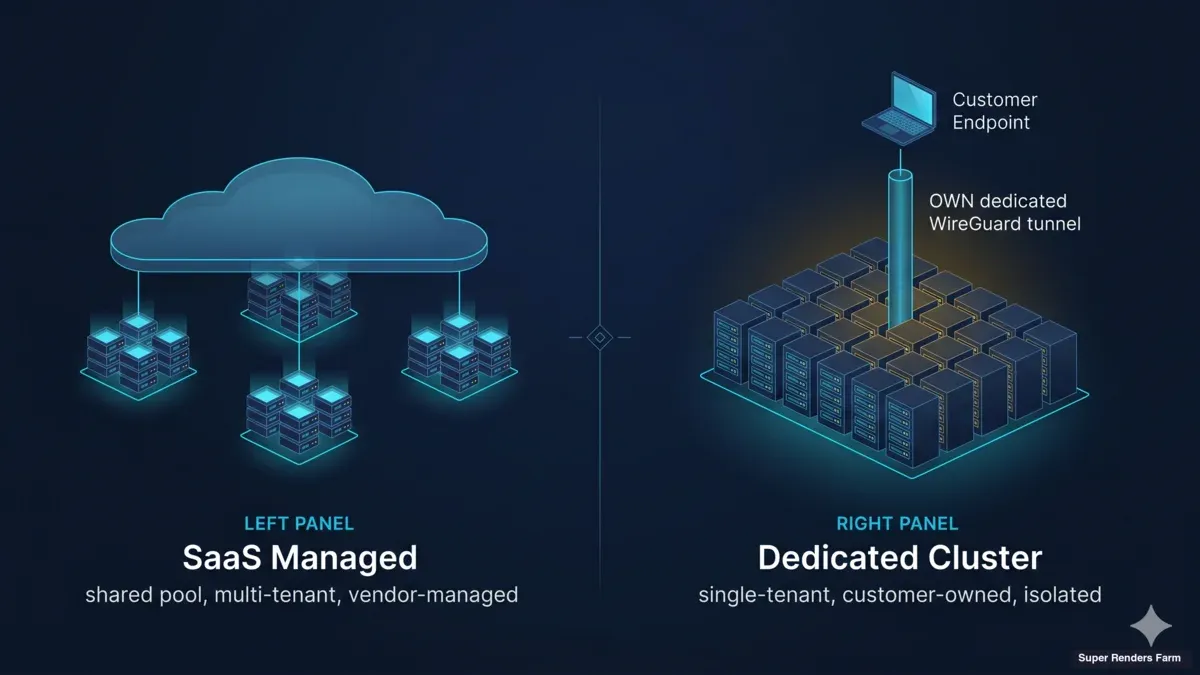
SaaS Render Farm vs Dedicated Cluster: A Honest Comparison for Buyers
Overview
Introduction
 A SaaS managed render farm — a shared, vendor-operated service behind an upload-and-render surface — set against a dedicated single-tenant cluster of customer-controlled render nodes.
The render farm conversation in 2026 still defaults to a single question: which vendor will finish my job sooner and bill me less. That question matters, but it answers the wrong layer. The decision that shapes the entire engagement — pricing math, security boundary, scalability behavior, integration cost, where your data lives — is the deployment model the vendor sells, not the vendor brand on top of it. Two well-run farms with different models will feel like different products even when both can render the same scene.
The two dominant deployment models in this market are SaaS managed render farms (shared infrastructure, vendor-managed credentials, vendor-handled workflow) and dedicated render clusters (vendor-provided hardware, customer-owned credentials, customer-controlled workflow). Most cloud render farms only operate the SaaS model; a smaller set offers dedicated as a parallel option for enterprise and IP-sensitive buyers. We operate both — SaaS managed is our default service and where most of our customer base lives, and dedicated cluster is an option we deploy for studios whose workload, IP posture, or workflow complexity makes the dedicated tradeoffs worth paying for. We will be upfront about when each model wins. There are workloads where dedicated is overkill and SaaS is the obviously right answer; there are workloads where SaaS is the wrong fit no matter how good the SaaS vendor is.
For the node-level version of the dedicated option, a rented block of GPU nodes rather than a retainer cluster, see what renting a GPU server on a render farm involves.
This article walks through what each model is, how their economics work, how they handle data control and IP isolation, how they scale, a ten-row use-case fit matrix, a ten-question buyer framework you can answer in an afternoon, and honest vendor examples in each category. The audience is studio CTOs, pipeline TDs, agency production leads, and freelance VFX supervisors evaluating cloud rendering for a real project. If you are evaluating render farms for the first time, the what is a fully managed render farm guide is a better starting place; this article assumes you already know what a render farm is and you are choosing how to consume one.
What Is a SaaS Managed Render Farm?
A SaaS managed render farm is a multi-tenant rendering service.
For more on how the terms render farm and render service relate to each other, see our render service vs. render farm breakdown. The vendor owns and operates a pool of hardware — CPU nodes, GPU nodes, or both — and exposes that pool to many customers concurrently through a dashboard, a DCC plugin, or a web upload form. You upload your scene, pick the render configuration, submit the job, and the vendor's queue dispatches it onto whatever hardware is free. Most studios reading this have used a SaaS render farm at some point. It is the model that put cloud rendering on the map.
The defining characteristic of the SaaS model is that the vendor handles the workflow, not just the hardware. The vendor maintains DCC installations and plugin versions, holds the rendering software licenses, runs the render manager (typically Deadline or an equivalent), manages the asset upload pipeline, runs the render queue scheduler, and delivers finished frames back to the customer. From the customer's perspective, the surface is "upload, render, download." Pricing is usage-based — typically per-OctaneBench-hour for GPU rendering, per-GHz-hour for CPU rendering, or per-frame depending on the engine.
The economics suit a specific shape of workload. A studio that submits a Karma test scene across 500 frames, gets a bill measured in dollars rather than thousands, and finishes by the next morning is the canonical SaaS use case. A freelancer running a single archviz job pays for that job and walks away. A studio with bursty needs — quiet weeks, spike weeks — pays only when they render and does not carry capacity through the quiet weeks. The vendor's shared pool absorbs the burst because other customers' quiet weeks subsidize it.
Vendors in this category include iRender, RebusFarm, GarageFarm.net, FoxRenderFarm, and Super Renders Farm in our SaaS-managed configuration. Differentiation between these vendors is real but lives below the model itself — supported DCCs and plugins, hardware specs, geographic latency, pricing per OctaneBench-hour, partner-authorized licensing where required, and customer support quality during a deadline week. The model itself, across these vendors, is recognizably the same: shared infrastructure, vendor-managed workflow, pay-per-use.
What Is a Dedicated Render Cluster?
A dedicated render cluster is the architectural opposite of the SaaS model along the dimensions that matter. The vendor still provides and operates the hardware — same chassis, same GPUs, same network — but the operating boundary stops at the hardware. The customer owns the credentials, runs their own render manager (often their own Deadline repository moved to the cluster), maintains their own software stack, and treats the cluster as if it were on-premise hardware that happens to live in the vendor's datacenter. The vendor is responsible for the physical layer, the operating system baseline, the network, and shared storage; the customer is responsible for everything above that line.
The defining characteristic of the dedicated model is that the cluster is single-tenant. No other customer's jobs land on those nodes. No other customer's user accounts exist in the cluster's authentication boundary. The render manager, when it logs out an asset path or a license check-out, points only at the customer's pipeline. At end of engagement, the cluster is wiped and the customer can be issued an attestation that their data was removed. This is the model that makes sense for studios with NDAs that forbid multi-tenant rendering, for licensed asset workflows where the asset library cannot leave a defined trust boundary, and for pipelines that have been heavily customized in-house and cannot be expressed in a SaaS vendor's submission UI.
The model's economics suit a different shape of workload. Pricing is typically a monthly retainer plus a setup fee, with a multi-month minimum commit. The hardware capital is absorbed by the vendor and amortized across the retainer; the customer pays a predictable monthly number rather than a per-frame variable bill. The math works when the customer's utilization is high enough that the monthly retainer is cheaper than the equivalent per-OctaneBench-hour bill at SaaS rates, and when the operational continuity of "same cluster, same configuration, every project" justifies the commit.
For a concrete look at what a dedicated cluster deployment actually includes at the machine level, see our dedicated RTX 5090 render server breakdown.
The dedicated cluster market is much smaller than the SaaS market. Most cloud render farms do not offer this option at all — their entire business model is built around shared infrastructure utilization, and a single-tenant deployment cuts against the operating assumptions. Within our customer base, dedicated cluster deployments are a minority of engagements but a significant share of enterprise revenue. We operate them when the customer's workload, IP posture, or workflow makes the dedicated tradeoffs the better fit; we route customers toward our SaaS-managed service when their workload does not require what dedicated provides. Self-hosted on-premise is the third alternative — a customer can buy their own hardware and run the cluster in their own datacenter, trading off the capital, real estate, power, cooling, and operational burden against the freedom of full control. Each model has cases where it is the right answer.
Pricing Models Comparison
Pricing is where the two models look most different on paper and the comparison most often gets framed incorrectly. The honest version requires comparing the same workload through both models at realistic utilization, not headline rates against headline rates.
SaaS pricing is usage-based. For GPU rendering, the canonical billing unit is the OctaneBench-hour: the vendor measures your scene's compute consumption in OctaneBench-hour equivalents and multiplies by the per-OB-hour rate. For CPU rendering, the billing unit is the GHz-hour. A representative illustration: a 500-frame Karma scene that takes a single RTX 5090 about 20 minutes per frame at typical settings consumes roughly 1900 OctaneBench-hours across a distributed render, which at industry-typical $0.10 per OctaneBench-hour bills out at around $190 for the job. The customer pays that bill once, the engagement is complete, and the next job's bill depends on the next job's scope. The bill scales linearly with the work.
Dedicated cluster pricing is retainer-based. A representative shape is a monthly retainer in the low-to-mid five figures for a 10–20 node GPU cluster, a setup fee in the four-to-five figure range to provision the build, and a multi-month minimum commit — typically 3 to 12 months.
For what a ready-to-run dedicated GPU cluster looks like at that tier, see our dedicated GPU cluster rental page. Public price sheets are uncommon because the configuration matters too much; node count, GPU choice, storage sizing, network capability, and the customer's licensing model all shift the number. The pattern is consistent: a predictable monthly cost, no per-frame variability, and a hard floor underneath that the customer pays whether they fill the cluster or not.
SaaS wins on pricing when utilization is low or bursty. A studio whose render demand is project-based, with quiet periods between engagements, pays less on SaaS because they are not subsidizing idle capacity. A studio whose total monthly render bill on SaaS is in the low four figures or below has no math case for dedicated.
Dedicated wins on pricing when utilization is high and sustained. A studio whose SaaS bill consistently runs into the mid five figures per month hits a crossover where the monthly retainer is cheaper than the equivalent per-OB-hour bill. The crossover varies by engine, hardware, and negotiated rate, but the pattern is reproducible: there is a utilization threshold above which dedicated becomes the cheaper operating model. The retainer also includes a layer of operational continuity — same cluster, same configuration, same warm caches, same customer-owned render manager — that the per-bill SaaS comparison does not capture and that is worth real money to high-volume operators.
Neither model wins on pricing in the general case. They win in different operating regimes. The right comparison is the customer's actual workload through both models at the customer's actual utilization, not headline rates.
Data Control and IP Security Comparison
The data and security comparison is where the model decision often gets made for customers whose contracts forbid the SaaS posture. The two models have different default boundaries, and the dedicated model has an additional configuration variant — Bring Your Own Credentials (BYOC) — that further tightens the boundary for customers who need it.
On the SaaS model, the vendor handles customer data inside the vendor's operating boundary. The customer's scene file lands on the vendor's storage, the vendor's render manager dispatches it onto multi-tenant workers, the vendor's credentials authorize software license check-outs, and the rendered output sits on vendor storage until the customer downloads it. The vendor sees the assets, manages the credentials, and operates inside the tenancy. For non-IP-sensitive workloads — most consumer-facing archviz, most freelance work, most projects without contractual data-handling obligations — this posture is normal and accepted, and the multi-tenant economics are what make the SaaS model affordable.
On the dedicated cluster model, the customer's credentials operate inside the cluster. The cluster is single-tenant, so no other customers' jobs run adjacent. The customer can choose how tightly to scope vendor access: full BYOC, where the customer holds all credentials and the vendor has no logical access beyond the operating-system baseline, sits at one end; vendor-assisted operation, where the vendor helps with credential management but credentials still live inside the customer's tenancy, sits in the middle. At end of engagement, the cluster is wiped and the customer can be issued an attestation that their data was removed.
The customers who need the dedicated posture know they need it, because the requirement comes from outside the rendering decision — an NDA from a client, a contractual obligation from a film studio working with licensed IP, a compliance requirement from a regulated industry, or a security posture from the customer's CISO that does not accept multi-tenant rendering. The dedicated cluster satisfies those requirements without requiring the customer to buy and operate the hardware themselves. For more on what BYOC means in practice, our customer-owned credentials guide covers the model in detail.
The dedicated posture does not automatically improve security — a poorly operated dedicated cluster is weaker than a well-operated SaaS deployment, and most SaaS vendors of any size have invested more in security engineering than most studios will over a decade. What dedicated provides is a different boundary — one that satisfies contractual and compliance requirements that the SaaS boundary, by its multi-tenant nature, cannot. The choice is about which boundary the customer's contracts and obligations require, not which model is "more secure" in the abstract.
Scalability Comparison
Scalability is the comparison dimension where the two models behave in genuinely different ways, and where the right answer depends on which kind of scaling the customer needs.
SaaS scales instantly to the limit of the vendor's shared pool. When a customer submits a job that needs 80 nodes for two hours, the vendor's scheduler dispatches across whatever 80 nodes are free. The customer does not provision, does not warm, does not pay for unused capacity — the elasticity is absorbed by the shared pool. For unpredictable bursts — a client deadline change that compresses a week of rendering into 36 hours, a render redo on a finalized shot, an unexpected job arrival — SaaS handles the spike without the customer needing to plan capacity. The ceiling is the vendor's total pool size and contention with other customers running large jobs at the same time, which in practice is rarely a real constraint outside a few peak periods per year.
Dedicated scales by planned capacity. A 20-node dedicated cluster gives the customer 20 nodes — every hour of every day, whether jobs are running on them or not. Burst beyond 20 nodes requires either growing the cluster (a procurement and provisioning step that takes days to weeks) or operating a hybrid where dedicated capacity handles the baseline and SaaS capacity absorbs the spike. The cluster is sized for the steady state, not the peak.
The right scaling model depends on the predictability of the load. A studio whose monthly render volume varies within 30% of a baseline, who knows months in advance when their large projects land, fits dedicated. A studio whose monthly load varies 5× between quiet and busy months does not — that customer will be over-provisioned in quiet months or under-provisioned in busy ones, and SaaS absorbs the variability more naturally.
A hybrid pattern uses both models intentionally: dedicated for the predictable share, SaaS from the same vendor for spike peaks. The hybrid requires a vendor that supports both models, and it is a common end-state for studios past the pure-SaaS phase.
Use-Case Fit Matrix
 A use-case fit matrix mapping studio scenarios — project length, IP sensitivity, utilization, and pipeline complexity — onto the SaaS managed or dedicated cluster model that fits each.
The two models suit different studio scenarios. The matrix below maps common situations to a default recommendation. None of these are absolute — a studio whose constraints sit outside the typical pattern can land in a different cell — but the defaults are the starting point we would offer in a conversation with a prospective customer.
| Use case | SaaS managed | Dedicated cluster |
|---|---|---|
| Mid-size agency client work (varies project-to-project) | ✅ Default | Consider if utilization sustained |
| Multi-month brand campaign with predictable load | Consider for spikes | ✅ Default |
| One-off short project (single deliverable) | ✅ Default | ❌ Overkill |
| IP-sensitive workflow (NDA, licensed assets, regulated) | ❌ Boundary mismatch | ✅ Default |
| Burst peak (last-minute deadline compression) | ✅ Default | Hybrid with SaaS burst |
| Cross-country team distribution (US ↔ EU ↔ APAC) | Depends on workflow | ✅ Default via tunnel + cache |
| Custom plugin stack (in-house tools, niche plugins) | Depends on vendor support | ✅ Default — full control |
| First-time render farm user (no prior cloud experience) | ✅ Default — easier onboarding | ❌ Heavy setup |
| Cost-conscious low utilization (occasional jobs) | ✅ Default — pay only for use | ❌ Math does not work |
| High-utilization enterprise (sustained multi-month load) | ❌ Bill exceeds dedicated retainer | ✅ Default via owned/hybrid |
A few rows warrant explicit "depends on workload" treatment. Cross-country team distribution can work on SaaS for studios whose workflow is asset-upload-then-render-then-download, because the SaaS vendor handles the geography internally; but studios that need persistent low-latency artist access to the rendering environment across continents end up needing the dedicated model with a cross-country architecture that uses WireGuard and shared SMB caching. Custom plugin stack works on SaaS if the SaaS vendor's plugin support already covers the customer's stack; if the customer runs in-house plugins or niche third-party tooling that the SaaS vendor cannot install on shared workers, dedicated becomes the default. Mid-size agency client work defaults to SaaS for most agencies but tips into dedicated for the agencies whose largest clients have NDAs requiring single-tenant rendering — the IP posture overrides the utilization economics.
The matrix is meant to be read as "where to start the conversation," not "what to do." A studio whose situation sits in two cells should think about which cell carries the stronger constraint. IP posture and utilization are the two cells that most often override the others.
10-Question Buyer Decision Framework
The matrix gives a model recommendation per scenario. The buyer framework below is the granular version — ten questions that, answered honestly, will land you on the right model for your specific situation. Most studios can answer all ten in an afternoon.
- What is your average project length? Short projects (one-off deliverables, single-month engagements) favor SaaS. Multi-month engagements with sustained render load favor dedicated.
- Do your client contracts or NDAs require single-tenant rendering or restrict where data can be processed? A yes here largely settles the decision toward dedicated regardless of other factors.
- What is your licensing model — BYOL (Bring Your Own License) or vendor-provided? Both models support both licensing approaches, but the operating cost shifts. Dedicated typically pairs more cleanly with BYOL; SaaS often bundles vendor-provided licensing into the per-OB-hour rate.
- Do you need to run multiple concurrent projects on different pipelines? If yes, the project isolation argument tilts toward dedicated, where each project can have its own user accounts and configuration. SaaS handles concurrent projects but through the vendor's queue, not through customer-managed isolation.
- What is your internal IT and pipeline-engineering capacity? Dedicated requires an in-house team capable of operating the render manager and pipeline. If your studio does not have that capacity, SaaS removes the requirement because the vendor operates the pipeline.
- Do you prefer CapEx or OpEx flexibility? SaaS is pure OpEx — the bill scales with use, no commitment. Dedicated is OpEx in retainer form but with a multi-month commit that behaves more like a fixed cost. Hybrid splits these.
- How complex is your plugin and DCC stack? A standard 3ds Max + V-Ray pipeline runs on every SaaS vendor in the market. An in-house Houdini pipeline with custom HDAs, niche third-party plugins, and specific OS-level dependencies may not fit on a SaaS vendor's shared workers and pushes the decision toward dedicated.
- Where are your team members geographically? Single-country teams have the lightest geographic constraints. Multi-continent teams may need the dedicated model's cross-country networking architecture to keep workflow latencies sane.
- What are your compliance requirements? SOC 2, ISO 27001, MPA-readiness, and similar compliance postures typically require single-tenant rendering or specific data-handling commitments that the SaaS multi-tenant model cannot offer out of the box.
- What is your annual render volume in OctaneBench-hours or GHz-hours? Run the math: at industry-typical SaaS rates, what would your annual volume cost on SaaS, and what would the equivalent dedicated retainer cost over the same period? If dedicated is cheaper at your volume, the utilization economics favor dedicated. If SaaS is cheaper, the utilization economics favor SaaS.
Most studios who answer these ten questions honestly arrive at a clear default. The studios who get genuinely split decisions are usually the ones whose IP posture says dedicated but whose utilization says SaaS — that case typically resolves toward dedicated because IP requirements are non-negotiable in a way that utilization economics are not.
Vendor Examples (Honest)
The model decision narrows the vendor list. We will name names where it helps a buyer evaluate the landscape honestly. SRF appears last in this section deliberately — we are not the only choice in either category, and the decision should be made on the vendor's fit to your workload, not on which vendor's article you happened to read.
SaaS managed render farm vendors with established operating histories include:
- iRender — Vietnam-based, GPU-first orientation, hybrid subscription and pay-per-use pricing. Strong in markets where artists self-manage more of the pipeline.
- RebusFarm — Germany-based, 20-year operating history, broad DCC and engine support, multiple geographic datacenters. Long-established commercial-render service with extensive language coverage.
- GarageFarm.net — UK-registered with a Polish datacenter (Copernicus Computing in Toruń, ISO 27001 certified), Korea customer service hub, 16-year operating history. Generalist farm with broad DCC support; AE has been deprecated and Houdini is not natively supported as of 2026.
- FoxRenderFarm — China-based, broad DCC support, multilingual coverage. Strong in Asia-Pacific markets.
- Super Renders Farm (SaaS-managed) — Our default service. Per-OctaneBench-hour billing for GPU rendering, per-GHz-hour for CPU rendering. Supports 3ds Max, Maya, Cinema 4D, Blender, Houdini, After Effects, and NukeX. Render engines: V-Ray, Corona, Arnold, Redshift, Octane, Cycles. Partner-authorized licensing through Chaos Group (V-Ray, Corona) and Maxon (Cinema 4D, Redshift). Fleet: 20,000+ CPU cores and a dedicated GPU fleet on NVIDIA RTX 5090 with 32 GB VRAM each.
Dedicated render cluster is a smaller market. Most SaaS vendors above do not offer dedicated as a parallel option — their business model is built around shared utilization, and a single-tenant configuration is outside their default offering. Customers needing dedicated either build it on infrastructure-as-a-service rails (AWS, GCP, bare-metal providers) and run their own render manager on top, or work with a vendor that operates both models.
Super Renders Farm (dedicated cluster) — Our dedicated cluster offering. We deploy customer-specific clusters on the same hardware our SaaS service runs, but configured as single-tenant with customer-owned credentials, customer-controlled render manager, BYOC capability, end-of-engagement data attestation, and hybrid capacity (dedicated baseline with SaaS burst absorption from our shared pool when needed). The dedicated offering is built around the operating patterns we have learned from running production clusters at customer sites across multi-month engagements, including cross-country deployments that combine US-based artists with Vietnam-based infrastructure through encrypted tunnels.
A note on self-hosted as the third alternative: a studio with strong infrastructure-engineering capacity can build the same architecture on hardware they own, in a colocation facility they rent, with the same open-source components (Linux, Samba SMB3, Deadline, etc.). The decision between dedicated-with-a-vendor and self-hosted is a build-versus-buy question that turns on the studio's available capital, real estate, power and cooling, and operational maturity. Our render farm build vs cloud total cost guide covers the math on the self-hosted vs vendor decision separately.
FAQ
Q: When does dedicated cluster ROI beat SaaS managed? A: The crossover happens when sustained monthly utilization at SaaS rates exceeds the equivalent dedicated retainer. The exact threshold depends on the customer's per-OB-hour rate, hardware mix, and contract length, but the pattern is reproducible: studios whose monthly SaaS bill consistently lands in the mid-five-figure range and above usually find the dedicated math works, with the additional value of operational continuity (same cluster, same warm caches, same customer-owned render manager) on top of the unit-cost savings.
Q: Can I start on SaaS managed and upgrade to dedicated later? A: Yes, this is a common path. Studios typically start on SaaS to validate their workflow and measure their real utilization, then move to dedicated once the monthly bill or the IP posture justifies it. With a vendor that operates both models, the move is mostly a procurement step plus a pipeline-migration step; with a vendor that only operates SaaS, the move requires switching vendors or building self-hosted, which is a larger lift.
Q: Is dedicated cluster only for enterprise? A: It skews enterprise because the retainer math requires sustained utilization that smaller studios typically do not have, but it is not exclusive to enterprise. Mid-size studios with IP-sensitive workloads (agencies with NDA-constrained clients, indie VFX houses working on licensed-property projects) often deploy dedicated even at lower utilization because the posture is required, not because the utilization economics demand it. The IP requirement overrides the volume requirement in those cases.
Q: How is render manager (Deadline) handled differently between the two models? A: On SaaS, the vendor operates the render manager and the customer submits jobs through the vendor's submission UI or plugin. The customer does not log into Deadline directly. On dedicated, the customer either runs their own Deadline repository inside the cluster or uses one the vendor operates on the customer's behalf — but the customer has direct access to the render manager, can configure pools and groups, can integrate their own pipeline tools against the Deadline API, and can change scheduling behavior without going through a vendor support request.
Q: What about hybrid SaaS + dedicated — running some jobs on each? A: This is a common end-state for studios past the pure-SaaS phase. The baseline load runs on dedicated for the unit-cost economics and the operational continuity, and burst peaks push onto SaaS from the same vendor (or a different vendor) for the duration of the spike. The hybrid requires a vendor that operates both models or operational discipline to split workflows between two vendors. Most studios who land on hybrid started on SaaS, moved baseline to dedicated, and kept SaaS for spike absorption.
Q: How is uptime and SLA different between the two models? A: SaaS SLAs are typically queue-availability commitments — the vendor guarantees the queue accepts jobs and dispatches them within some time window, but the customer's individual job latency varies based on shared pool contention. Dedicated SLAs are typically per-node availability commitments — the vendor guarantees the dedicated nodes themselves are up and reachable, and the customer controls the queue behavior. Studios with deadline-sensitive workflows often prefer the dedicated SLA because it puts the queue control in their hands, removing the shared-pool variability from their critical path.
Q: What is the typical contract length for a dedicated cluster engagement? A: Minimum commits typically run from three months for shorter engagements to twelve months for full enterprise deployments, depending on cluster size and setup fee structure. Shorter commits exist for trial or single-project work but carry a higher monthly rate to amortize setup. Multi-year contracts come with rate concessions in exchange for the commit length. The right contract length matches the customer's planning horizon for the workload that justifies the cluster.
Q: Can a dedicated cluster scale up mid-engagement if my workload grows? A: Yes, but scaling is planned rather than instant. Growing a dedicated cluster by adding nodes requires procurement, provisioning, and a brief commissioning window — typically days to weeks rather than SaaS's instant elasticity. For workloads where the scale-up is predictable, this is not a problem; for unpredictable growth, customers typically configure a hybrid arrangement where SaaS absorbs the spike while the dedicated cluster scales up to a new steady state.
About Alice Harper
Blender and V-Ray specialist. Passionate about optimizing render workflows, sharing tips, and educating the 3D community to achieve photorealistic results faster.



