
What's Included in a Dedicated RTX 5090 Render Server
Overview
Introduction — the real question behind "rent a render node"
When a studio asks us about renting a dedicated RTX 5090 render server, the question on the surface is usually about hardware. How many GPUs, how much VRAM, what CPU. But the question underneath — the one that actually decides whether a deadline-critical block goes smoothly — is different: if I rent one of these boxes, what's actually included, and what am I still on the hook to set up myself?
That distinction matters more than the spec sheet. A lot of "rent a GPU node" offers hand you raw compute and walk away. You get a machine, an IP address, and a clock that starts ticking while you install your renderer, mount your storage, match your color pipeline, and figure out why a frame looks different than it does on your workstation. The hardware was the easy part. The setup is where the days go.
This article walks through exactly what you receive when you rent a dedicated RTX 5090 render server from Super Renders Farm — the hardware, the mounted storage, the bundled renderer licenses, the managed matched-environment setup, the support during your block, and the optional capacity lock for studios that come back every quarter. It is a product-detail piece, not a benchmark and not a buying-decision debate. If you're earlier in your thinking, our plain-English guide to cloud render farms covers the landscape and when each model makes sense; this article assumes you're closing in on the dedicated option and want to know what's in the box. You can also see our dedicated RTX 5090 rental options on the rental hub for the product overview.
What a dedicated RTX 5090 render server actually is (the hardware)
Let's start with the physical machine, because the rest of the bundle sits on top of it.
For the general concept behind that kind of machine, see our what is a render server overview. On our farm, one dedicated machine is built like this:
- 2× NVIDIA RTX 5090, with 32 GB of VRAM on each card (see the official NVIDIA GeForce RTX 5090 specs for the silicon-level detail)
- AMD Ryzen 9 9950X CPU
- 256 GB of system RAM
- 2 TB SSD
That's a single machine — two flagship Blackwell-generation GPUs, a high-core-count desktop CPU to keep them fed, generous system memory, and fast local storage for scene data and frame output. It's the kind of node that handles GPU-renderer workloads — V-Ray GPU, Corona, Redshift, Arnold GPU, Octane — and real-time-engine archviz output like Lumion, Enscape, and D5 Render without choking on the everyday stuff.
For the Blender-specific version of this setup, including add-on and version handling, see Blender on a dedicated render server.
One honest point up front, because it's the single most important hardware fact for anyone planning a heavy scene: the 32 GB of VRAM is per card, and it is not pooled. Two RTX 5090s in a machine give you two independent 32 GB pools, not a single 64 GB pool. So your real ceiling for a single GPU task is 32 GB of VRAM. That is also the hard top of what we offer — we run no 48 GB or 96 GB cards on the farm. There is no bigger card behind a curtain. We'd rather tell you that before you commit than have you hit a wall mid-deadline.
For the raw RTX 5090 throughput numbers — frame times, scene-by-scene comparisons across V-Ray, Redshift, Arnold, and Octane — see our RTX 5090 cloud rendering performance breakdown; that benchmark detail lives there, not here. This article is about what's bundled around the hardware. The hardware is table stakes; the certainty is the product.
What's bundled in (the part most rentals leave out)
Here's where a dedicated rental from us diverges from "here's a box, good luck." When the block goes live, these things are already done, not left to you.
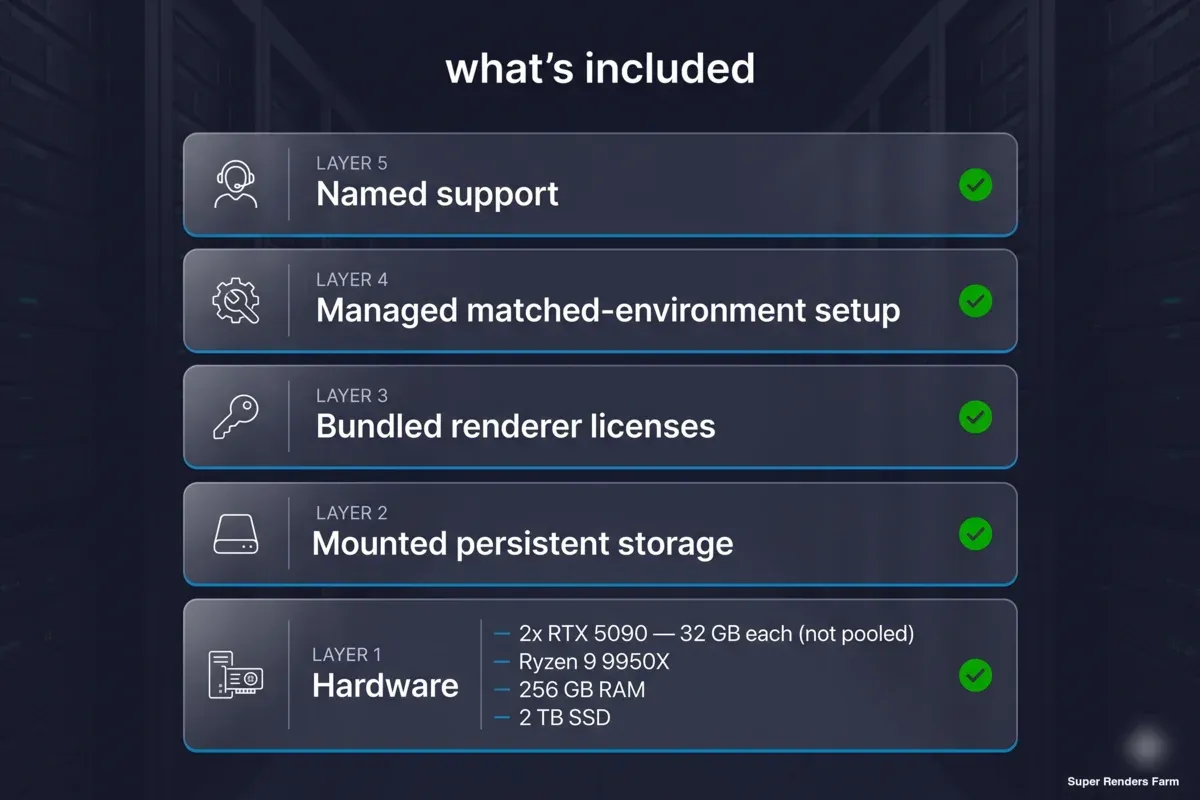 What's included in a dedicated RTX 5090 render server: hardware (2x RTX 5090 32GB each, Ryzen 9 9950X, 256GB RAM, 2TB SSD), mounted persistent storage, bundled renderer licenses, managed matched-environment setup, and named support
Mounted, persistent project storage. We mount your project drive directly into the render environment, so your files are simply present on the machine — not re-uploaded at the start of every session, not synced by hand. The studio's project space lives on the node the way it lives on a local workstation. When your team opens a scene, the assets are where the scene expects them to be. This "mount and render" setup is something we stand up for you as part of provisioning; it's not a feature you bolt on afterward.
Bundled DCC and renderer licenses. You don't bring or buy your own renderer license for the block — the license is part of what we deploy. We've proven this end-to-end on a live Arnold deployment where we provided the renderer license as part of the bundle, and the same applies across the GPU renderers our machines run (V-Ray, Corona, Redshift, Arnold, Octane). The point is that the live environment is licensed and ready, so your artists open the scene and render rather than chasing entitlements.
Managed, matched-environment setup. This is the heart of the bundle and the part worth being precise about. We replicate your pipeline on the machine: VPN access, a dedicated workstation login, the mounted drive, and your color and scene environment — OCIO config, look transforms, the things that make a frame match what you see at home. The goal is that the block is ready to render rather than something you administer. This custom-matched provisioning takes about 24 hours. That's a real, managed step — not the 15-to-30-minute spin-up of a vanilla node. We say "about 24 hours" because matching a real pipeline carefully takes time, and rushing it is how color shifts and missing-plugin surprises happen. If you've ever wondered what "managed" buys you over DIY, this is it in concrete terms — and our guide to managed vs DIY rendering walks through that architectural trade-off in full.
Named support during the block. During your active block, there is a specific named person who answers the render-down call. This is a deadline-completion commitment: your block completes by the agreed end date, and if operator-caused downtime gets in the way, we make it good — in equivalent free hours, escalating to a refund of fees for the affected period if a deadline genuinely can't be recovered. It's a human commitment with a name attached, qualified honestly. We're not selling an automated, always-monitored guarantee here; we're telling you who picks up the phone and what we owe you if our side drops the ball.
Certainty: reserved capacity, not a shared queue
The other half of what you're buying — beyond the bundle contents — is certainty about when the machines are available. On a dedicated block, the machines are hard-reserved for the agreed period and written into the quote. They are not best-effort, not "subject to availability," not pulled out from under you because someone else's job spiked. When your deadline hits, the capacity you reserved is there.
That predictability extends to the commercial terms. At the published tier, pricing is flat and transparent: a per-machine, per-week rate for one to five machines, and a month is simply four weeks at that same rate — no surprise multipliers, no commitment-discount maze to decode. You can read the quote and know what the block costs.
For studios with recurring production windows, there's an optional Yearly Capacity Lock. It turns one-off certainty into recurring certainty: locked per-machine rates plus guaranteed priority capacity for your scheduled windows across the year. Between your windows, the machines return to the shared pool — you're not paying to idle them — but when your window comes around, the capacity and the rate are both held. This suits a producer who knows they have, say, several deadline-critical shows a year and would rather lock the runway than re-negotiate each time.
The pattern this serves is consistent: when a hard air date is on the line, the value isn't a clever price — it's that the capacity is reserved, the pipeline is already matched and mounted, the renderer license is already deployed, and there's a named person to call if anything goes sideways during the run. The certainty is the product.
Who this is for (and who it isn't)
A dedicated RTX 5090 block is a good fit when you have a defined, deadline-bound block of GPU work and you'd rather render than administer infrastructure. Concretely, that's:
- Archviz and real-time-engine output — Lumion, Enscape, D5 Render — where you need to push a lot of GPU frames or animation in a tight window. A render farm for Lumion-style projects is exactly the workload these nodes are built around.
- Broadcast and event production blocks — a show or campaign with a hard air date, where reserved capacity and a matched pipeline matter more than squeezing the last cent out of per-frame pricing.
- Studios that come back on a schedule and want the Yearly Capacity Lock to remove the re-negotiation overhead each cycle.
It's also worth being honest about who this isn't the best fit for.
If your scenes genuinely need more than 32 GB of VRAM per GPU, qualify that up front. Before a block locks, we check your scenes against the 32 GB-per-GPU ceiling. Scenes that fit proceed. Borderline scenes can sometimes run out-of-core, with a clearly stated caveat about the performance trade-off. But scenes that genuinely exceed 32 GB per GPU get an honest scope conversation — an adjustment, not an over-promise — because, as noted above, there is no bigger card on our farm. Knowing this before you commit is the whole point of the qualification gate.
If your workload is bursty, unpredictable, or per-frame spot work, a reserved dedicated block may be the wrong shape entirely — you'd be paying to reserve capacity you don't continuously need. That pattern is better served by on-demand, pay-as-you-go GPU rendering. Our GPU cloud render farm is built for exactly that bursty, queue-based model, and it bills differently from a dedicated block.
If you're not yet sure which side of that line you're on, that's a decision question, not a "what's included" question — our SaaS render farm vs dedicated cluster comparison works through that exact choice, and it's worth resolving first.
If the question is the wider one of renting a dedicated node or paying per frame, renting a GPU server on a render farm sets the two models side by side.
What it costs (honestly)
We'll be precise and we'll be limited about what we publish, because honest pricing means not pretending a single number covers every case.
The structure is this: a dedicated machine — two RTX 5090s, a Ryzen 9 9950X, 256 GB of RAM, and a 2 TB SSD — rents at a transparent flat per-machine weekly rate of $1,172.50, for one to five machines. Billed monthly, a month is four weeks at that same rate, with no surprise multiplier layered on top. The rate is per machine, per week, and it's the same whether you take one machine or five.
For larger fleets — six machines or more — volume pricing is quoted per project. We don't list a public number for that tier, because the right figure depends on the size and shape of the block, and publishing a fake ladder would be worse than honest silence. So for anything past five machines, the answer is simply: talk to us, and we'll quote the project.
One clarification, because it trips people up: the credit-based, pay-as-you-go pricing you may have seen for our on-demand render service (the per-GHz-hour and per-GPU-hour model) is a different product. That's the shared, queue-based SaaS render service. A dedicated RTX 5090 block is reserved hardware billed per machine per week — don't blend the two. If you want to understand how billing units differ across render-farm models in general, our guide to render farm pricing breaks down the mechanics of GHz-hours, GPU-hours, and bundled-versus-unbundled licensing.
One last honest note on infrastructure: we operate a single render region (Hà Nội). There's no multi-region failover to imply, and we won't imply one. What we offer instead is a tightly matched, mounted, licensed, supported block in that region — set up by us, reserved for you.
FAQ
Q: What hardware do I get in one dedicated RTX 5090 render server? A: One machine is two NVIDIA RTX 5090 GPUs (32 GB of VRAM each, not pooled), an AMD Ryzen 9 9950X CPU, 256 GB of system RAM, and a 2 TB SSD. The 32 GB per card is the hard VRAM ceiling — we run no 48 GB or 96 GB cards on the farm — so a single GPU task tops out at 32 GB, and we qualify any scene that pushes past that before the block locks.
Q: Is the renderer license included, or do I bring my own? A: It's included. When we stand up your block, the renderer license is part of the live deployment — we've proven this end-to-end on a live Arnold deployment and the same applies across the GPU renderers our machines run, including V-Ray, Corona, Redshift, and Octane. Your artists open the scene and render rather than wrangling entitlements.
Q: How long does setup take before I can render? A: About 24 hours. That's because we don't hand you a bare node — we replicate your pipeline: VPN access, a dedicated login, your project drive mounted in, and your color and scene environment (OCIO and look transforms) matched. It's a real managed step, deliberately not the 15-to-30-minute spin-up of a vanilla machine, so the block is ready to render rather than something you set up yourself.
Q: Do I have to re-upload my project files for each session? A: No. We mount your project storage directly into the render environment, so your files are persistently present on the machine the way they'd be on a local workstation. There's no per-session re-upload and no manual syncing — when a scene opens, its assets are already where it expects them.
Q: What happens if something goes wrong during my deadline block? A: During your active block there's a specific named person who answers the render-down call. It's a deadline-completion commitment: your block completes by the agreed end date, and if operator-caused downtime gets in the way, we make it good in equivalent free hours, escalating to a refund of fees for the affected period if a deadline genuinely can't be recovered. It's a human, named commitment — qualified honestly, not marketed as an automated, always-monitored guarantee.
Q: What does a dedicated RTX 5090 render server cost? A: A machine — two RTX 5090s, a Ryzen 9 9950X, 256 GB of RAM, and a 2 TB SSD — rents at a transparent flat per-machine weekly rate of $1,172.50, for one to five machines, billed monthly as four weeks at the same rate with no surprise multiplier. For fleets of six or more, volume pricing is quoted per project, so reach out and we'll quote your block. Note this is separate from our on-demand, credit-based render service, which is billed by GHz-hour and GPU-hour.
About Thierry Marc
3D Rendering Expert with over 10 years of experience in the industry. Specialized in Maya, Arnold, and high-end technical workflows for film and advertising.



