
Rent a GPU Server for Rendering: Dedicated Node vs. Per-Frame Cloud
Overview
Introduction
If you're searching for how to rent a GPU server for rendering, you've probably already outgrown a single workstation and you're deciding between two genuinely different ways to buy compute: pay per frame on a shared cloud render farm, or rent dedicated GPU hardware outright and run your own queue on it. Both are real options on our farm, and they're not the same product wearing different pricing.
We've spent the last few years building out our CPU fleet, and it's still the majority of what we run. But our GPU side has grown a lot faster than the content about it has. We recently brought a batch of RTX 5090 nodes online, 32 GB of VRAM each with hardware ray tracing, and most of what we've published about them so far is benchmark and performance data. What's been missing is the buying question: what does it actually mean to rent a GPU server here, what do you get for it, and when does renting a dedicated node make more sense than paying per frame.
This article is that answer. We'll walk through both models, look at the workload patterns that tend to favor one over the other, and lay out the actual numbers so you can work out which lane fits your project.
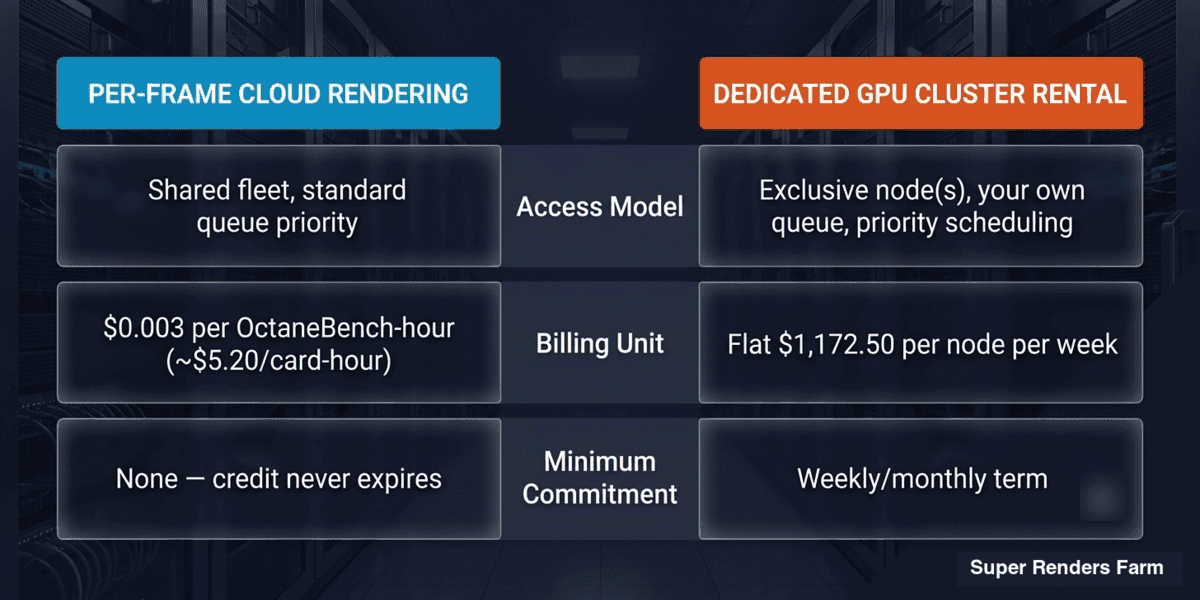 Comparison of per-frame cloud rendering vs dedicated GPU cluster rental: access model, billing unit, minimum commitment
What "Renting a GPU Server" Actually Means
"Rent a GPU server" covers two different arrangements, and mixing them up is the most common source of surprise on either side.
The first is per-frame cloud rendering, which is what most people mean by "cloud render farm." You upload a scene, submit a job, and pay for the compute your job actually consumes, billed by the render engine's own metric (OctaneBench-hours for GPU, GHz-hours for CPU). You're sharing the underlying fleet with other customers, but your job gets scheduled onto available GPU nodes. There's no fixed hardware assigned to you and no minimum spend beyond what you top up. This is GPU cloud rendering in the conventional sense.
The second is dedicated GPU server rental, sometimes called cluster rental or IaaS-style rental. Here you're renting specific physical GPU nodes, typically RTX 5090 pairs, for a fixed period (a week or a month, with longer terms available). The hardware is yours for that window: you run your own job queue, your own render manager submission, and you're not sharing scheduling priority with anyone else. Billing is a flat rate per node per period, not per frame rendered. At smaller node counts this is our render farm rental offer, which publishes flat per-node weekly rates you can read off a page, and we've covered a single-node version of it in our dedicated RTX 5090 render server piece if you're comparing a smaller setup first. Above that size the same idea becomes a full dedicated GPU cluster, which is quoted per engagement rather than read off a rate card, because at that scale the edge networking, shared storage and tenant isolation are provisioned specifically for you. The rates in this article are the published per-node ones; a cluster engagement is a conversation, not a table.
Neither model is "better" in the abstract. They're built for different usage shapes, and the workload pattern below is a good illustration of when the second one is the right call.
The Hardware: What You Actually Get on a Dedicated GPU Node
Every GPU node we rent out, whether per-frame or dedicated, runs on the same hardware tier: NVIDIA RTX 5090, 32 GB of VRAM per card, with OptiX-accelerated hardware ray tracing. On the dedicated rental product, a "node" is two RTX 5090 cards, so a single-node rental gives you two full cards to schedule your own jobs across.
That VRAM figure matters more than people expect going in. Complex scenes, especially archviz interiors with heavy asset libraries or VFX shots with dense simulation caches, can hit VRAM ceilings before they hit compute ceilings. We've written up the specifics of where that limit shows up in our VRAM limit breakdown if that's a concern for your scenes.
Supported GPU render engines on our fleet are Redshift, Octane, V-Ray GPU, Arnold GPU, and (as two separate engines, not one) Blender's Cycles and EEVEE (GPU). EEVEE-Next renders headless on our GPU nodes as a full production engine, not a viewport-only preview mode. Engine licensing runs on one catalog across both billing models: per-frame and dedicated rental both include the same license coverage for Redshift, Octane, V-Ray, and Arnold, and dedicated rental doesn't extend that catalog with anything extra. Cycles and EEVEE are free and open-source, so they sit outside the licensing conversation either way. Need an engine outside that catalog? Bring your own license, or ask our ops team about adding it. If you want the raw performance numbers behind the RTX 5090 fleet, we've published those separately in our RTX 5090 cloud rendering performance data.
When a Sustained Workload Points to Dedicated Rental
The clearest way to think about when dedicated rental beats per-frame is workload shape, not a headline number. A production that needs sustained GPU throughput across an entire cycle looks nothing like one submitting a handful of one-off jobs between deadlines, even if the total render hours end up similar.
The pattern that tends to justify dedicated rental: rendering runs continuously across weeks rather than in short bursts, revision cycles overlap with new scenes so the queue rarely sits idle, and a delivery schedule where waiting behind someone else's job in a shared queue is a real cost, not just an inconvenience. Sustained archviz production cycles, ongoing VFX shot work, and any pipeline running its own render manager against a fixed hardware budget tend to fit this shape.
For a workload like that, a flat per-node weekly rate does two things per-frame billing can't: it caps the bill regardless of how hard you push the hardware that week, and it gives you exclusive scheduling priority instead of sharing queue position with other customers. The tradeoff runs the other way too: you're paying for the node whether or not it's fully utilized every hour of the rental period, which is exactly why dedicated rental only pays off when the workload is genuinely sustained rather than just occasionally heavy.
That's the pattern to watch for in your own decision: if your workload is sustained and predictable rather than bursty, and if idle-queue time or shared scheduling priority is a real cost to your production, dedicated rental starts making more sense than per-frame the moment your monthly per-frame spend would land in the same range as a flat node rate.
Per-Frame vs. Dedicated: How the Billing Actually Differs
Here's the concrete difference in numbers, using our published rates.
Per-frame GPU rendering: billed at $0.003 per OctaneBench-hour (OBh), which works out to roughly $5.20 per card-hour on an RTX 5090. New accounts get $25 in free starter credit to test the flow before topping up. There's no minimum commitment; you pay for what you use, and unused credit never expires.
Dedicated node rental: billed at a flat weekly rate of $1,172.50 per node (2× RTX 5090), against a list rate of $1,750/node/week, so the published rate reflects roughly a 33% discount off list. A month is calculated as four weeks flat, with no additional commitment discount layered on top:
| Nodes | Weekly rate | Monthly rate (4 weeks) |
|---|---|---|
| 1 node (2× RTX 5090) | $1,172.50 | $4,690 |
| 3 nodes (6× RTX 5090) | $3,517.50 | $14,070 |
| 5 nodes (10× RTX 5090) | $5,862.50 | $23,450 |
Larger volume beyond 5 nodes moves to a custom quote rather than a published rate. For CPU-side dedicated rental, the equivalent product runs $60/node/week with a 5-node minimum, though that's a separate offer from the GPU node rental discussed here.
The math that actually matters for your decision: work out your realistic monthly OctaneBench-hour consumption on per-frame pricing, and compare it against the flat node rate above. If your projected per-frame bill is consistently landing above the equivalent dedicated tier, and your workload doesn't have long idle gaps, dedicated rental is the cheaper and more predictable option. If your usage is spiky, seasonal, or you're not yet sure how much GPU time your pipeline actually needs, per-frame keeps you from paying for idle hardware.
How That Compares to Renting GPUs Elsewhere
A concrete reference point, since "GPU server rental" covers a wide price range. iRender publishes $10.80 per hour for a single RTX 5090 workstation ($9.72 at three hours or more), $20/hour for two cards, $38/hour for four and $62/hour for eight; its RTX 4090 machines run $8.20 per hour for one card ($7.38 at three hours or more), $15 for two, $30 for four and $52 for eight. Our per-frame GPU rate of $0.003/OBh works out to roughly $5.20 per RTX 5090 card-hour, which is the like-for-like comparison against the $10.80 single-RTX-5090 tier: same card generation, same 32 GB of VRAM. Both figures are the vendors' own published rates, checked in September 2026; verify current pricing on either site before budgeting against these numbers.
The billing unit matters as much as the rate. A per-machine-hour rental meters the clock, which includes upload time, scene setup, look-dev iteration, a stalled viewport, and any hour the machine sat reserved but idle. OctaneBench-hour billing meters work actually delivered. So $5.20 is a ceiling that assumes the card renders flat out for a full hour, while an hourly machine rate is a floor that assumes nothing about utilization. On a rented workstation, the gap between those two is usually where the real cost difference lives.
Where the comparison runs the other way, and it's worth knowing before you choose: iRender sells up to eight cards inside one machine (RTX 4090 or RTX 5090), and our per-node ceiling is two. For a single very heavy still frame that scales across cards within one box, more cards in one box wins, and VRAM does not pool across cards on either platform. Our shape is many two-card nodes rendering frames in parallel, which suits animation and sustained queue throughput rather than one enormous still.
When Dedicated Rental Makes Sense (and When It Doesn't)
A few practical signals worth checking before you commit to either lane:
Dedicated rental fits when:
- Your GPU workload is sustained across weeks or months, not occasional bursts.
- You need priority scheduling and can't tolerate queue contention with other customers.
- Your team already runs its own render management (Deadline, or an equivalent) and wants to point it at fixed hardware rather than an upload-based job flow.
- You want predictable, budgetable weekly or monthly spend rather than usage-variable billing.
- Your projected per-frame spend would already exceed the equivalent flat node rate most months.
Per-frame cloud rendering fits when:
- Your rendering needs are irregular, project-based, or still ramping up.
- You want to test GPU rendering with minimal commitment before scaling.
- You don't want to manage your own render queue infrastructure.
- Your monthly GPU-hour usage is well under what a dedicated node would cost you.
If you're not sure which side you land on, the billing math above is a quick way to check: estimate your monthly OctaneBench-hours, multiply by $0.003, and compare that number against the node rate table. We've also written a fuller side-by-side breakdown in our SaaS vs. dedicated cluster comparison if you want the deeper version of this decision, and our multi-node cluster performance data if you're scaling past a single node and want to see how throughput actually holds up.
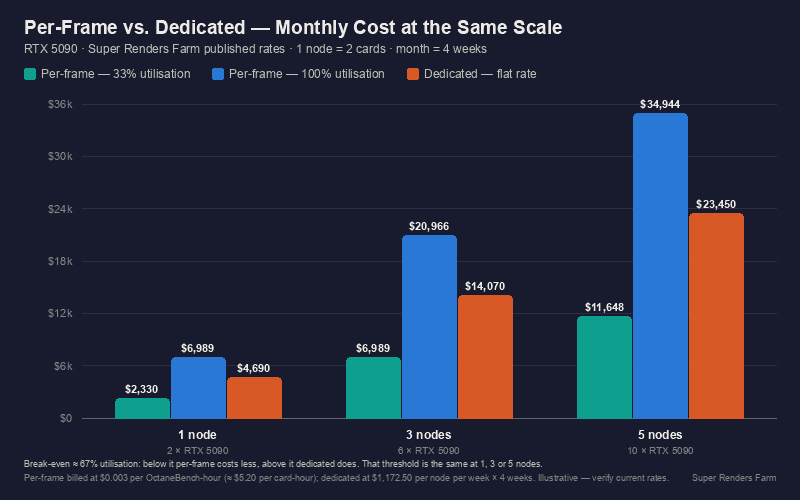 Monthly cost of per-frame rendering at 33% and 100% node utilisation compared with the flat dedicated monthly rate for 1, 3, and 5 nodes
How Access and Onboarding Actually Work
For per-frame rendering, access is entirely web- and Client App-based: you upload your scene through the web interface or our Client App, submit the job, and download output when it completes. There's no remote desktop step and nothing to install on the render side.
For dedicated node rental, onboarding looks different because the hardware is genuinely yours for the term. We provision the node(s) and hand off remote access over Moonlight paired with Sunshine as the streaming host on each node, tunneled through WireGuard. This isn't RDP: Sunshine uses NVENC hardware encoding on the GPU itself to compress the video stream, and Moonlight's client is tuned for 3D and GPU workloads specifically, giving low and consistent latency for viewport interaction, rather than the generic remote-desktop latency profile that tends to break down under that kind of use. In practice that means you drive the machine much the way you'd drive a workstation: install your licensed plugins, point your render manager at the nodes, and keep your existing project structure, over a connection built for GPU work rather than general remote-desktop use. Because the fleet runs on GUI-based tooling rather than a public API or SDK, any automation your pipeline needs on top of that gets built against the node access we provide, not against a hosted API endpoint, since we don't currently offer one. If your pipeline depends on programmatic job submission, confirm the specifics with our support team before committing to a rental term.
Whichever model you're on, both draw from the same underlying render farm rental infrastructure, and both include the same engine licensing catalog (V-Ray, Redshift, Octane, Arnold GPU), so switching between them later doesn't mean re-learning a different toolchain. Dedicated rental doesn't add any engine beyond that catalog; Cycles and EEVEE are free and open-source either way, and anything outside the catalog is bring-your-own-license or an ops request.
What to Check Before You Commit
A short list worth working through before signing up for either model:
- VRAM headroom: check your heaviest scene against the 32 GB per-card ceiling, especially if you're running dense archviz interiors or simulation-heavy VFX shots.
- Usage predictability: sustained and steady points toward dedicated; bursty and occasional points toward per-frame.
- Pipeline dependencies: if your studio's render management already assumes dedicated hardware it fully controls, per-frame's upload flow may mean pipeline changes.
- Budget shape: flat and predictable (dedicated) vs. usage-variable (per-frame); pick the one your finance process actually wants.
- Commitment length: dedicated rental is priced by the week/month; per-frame credit never expires, so it's the lower-commitment starting point if you're unsure.
Summary: Dedicated vs. Per-Frame at a Glance
| Per-Frame Cloud | Dedicated Node Rental | |
|---|---|---|
| Billing unit | Per OctaneBench-hour ($0.003) | Flat rate per node per week ($1,172.50/node) |
| Minimum commitment | None (credit never expires) | Weekly/monthly term |
| Scheduling | Shared queue, standard priority | Priority (hardware is exclusively yours) |
| Access | Web upload, Client App | Node access via Moonlight/Sunshine over WireGuard; you run your own queue/tooling |
| Best fit | Irregular, project-based, testing the waters | Sustained, predictable, high-volume workloads |
FAQ
Q: What's the difference between renting a GPU server and using a per-frame render farm? A: Renting a GPU server (dedicated node rental) gives you exclusive hardware for a fixed weekly or monthly term, billed at a flat rate regardless of how much you render. A per-frame render farm shares the fleet across customers and bills only for the compute your job actually consumes, with no minimum commitment.
Q: How much VRAM does a rented RTX 5090 GPU have? A: Each RTX 5090 card carries 32 GB of VRAM, and a dedicated rental node includes two cards. The two pools do not combine: 32 GB per card is the ceiling any single frame has to fit inside, and the second card does not raise it. What the pair gives you is two frames rendering at once, not one frame with more memory. If your scene does not fit in 32 GB, adding cards is not the fix.
Q: What's the minimum commitment for renting a dedicated GPU node? A: Node rental is billed per node per week, with monthly rates calculated as four weeks flat, and the published tiers start at a single node. Larger volumes move off the rate card to a quoted engagement, which is a different conversation with its own scoping rather than a bigger number in the same table.
Q: Can I run my own render management software on a rented GPU server? A: Yes. On dedicated rental, the node is yours for the rental term, so your team installs and configures whatever render manager and job submission tooling your studio already uses. Per-frame rendering, by contrast, goes through our own upload-based job flow rather than your own queue.
Q: Is there an API for automating GPU server rental jobs? A: We don't currently offer a public render API or SDK. Access is through the web interface, the Client App, or direct node access for dedicated rentals. If your pipeline needs programmatic job submission, talk to support before committing to a rental term to confirm what's feasible for your setup.
Q: Which render engines work on the RTX 5090 GPU rental fleet? A: Redshift, Octane, V-Ray GPU, Arnold GPU, and (as two separate engines) Blender's Cycles and EEVEE (GPU) all run on the RTX 5090 nodes. Engine licensing for Redshift, Octane, V-Ray, and Arnold is included on both billing models, from the same catalog; dedicated rental doesn't extend that catalog with anything extra. Cycles and EEVEE are free and open-source either way. Need an engine outside that list? Bring your own license or ask our ops team.
Q: Is dedicated GPU rental cheaper than per-frame cloud rendering? A: It depends on your usage volume. Estimate your monthly OctaneBench-hour consumption, multiply by $0.003, and compare that to the flat node rate (from $1,172.50/node/week). If your projected per-frame bill regularly exceeds the equivalent dedicated tier, and your workload is sustained rather than bursty, dedicated rental works out cheaper and more predictable.
Q: Do I need a full cluster, or can I rent a single GPU node? A: A single node (two RTX 5090 cards) is the minimum published rental unit, priced at $1,172.50/week, and the published tiers scale from there at 3 and 5 nodes. You do not need a cluster engagement to rent one node. Larger volumes move off the published rate card into a quoted engagement, which is scoped as a conversation rather than a bigger row in the same table.
About Richard Ta
Richard Ta is co-founder and technical lead of Super Renders Farm (superrendersfarm.com), a fully managed cloud render farm that supports Maya, 3ds Max, Cinema 4D, Blender, and Houdini across the major render engines. He has spent over a decade building and running large-scale CPU and GPU render infrastructure for studios in more than 50 countries.



