
How Much Does a Render Farm Cost in 2026? Pricing Models, Per-Frame Math, and When to Go Cloud
Overview
Introduction
Render farm pricing is the most common question we field at Super Renders Farm — more than technical issues, plugin support, or licensing. People want to know what a job will cost before they commit, and most pricing pages online don't make that easy. Some farms quote per GHz-hour, some per OctaneBench-hour, some per node-hour, some per frame. You end up comparing numbers that mean completely different things.
At Super Renders Farm, we run a fully managed render farm with 20,000+ CPU cores and a dedicated GPU fleet (RTX 5090, 32 GB VRAM) processing thousands of jobs per month. Pricing on a managed farm bundles licensing into the per-job cost, which behaves differently from per-instance cloud VM billing
For a breakdown of which render and plugin licenses a managed farm covers versus what you supply yourself, see our render farm software licenses included guide. — something worth reviewing before comparing headline hourly rates.
This guide breaks down what render farm pricing actually looks like in 2026: the four billing models you'll encounter, real per-frame costs across CPU and GPU workloads, a head-to-head comparison of how five active farms structure their pricing, and the hidden costs that turn a "cheap" rate into an expensive job. If you are still getting oriented, our guide to what a render farm is and how it works covers the basics, and our cloud rendering explained guide walks through the service models before pricing comes into the picture.
TL;DR — Render Farm Pricing in 2026 at a Glance
If you only have 30 seconds, here are the numbers that matter for budgeting a 2026 job on a managed cloud render farm.
| Workload | Engine | Typical per-frame cost | What drives the variance |
|---|---|---|---|
| Archviz still (4K interior) | V-Ray / Corona CPU | $0.10 – $1.50 | Sample count, GI bounces, vegetation density |
| Archviz animation (1080p) | V-Ray / Corona CPU | $0.15 – $0.90 / frame | Motion blur, scene complexity, denoiser |
| Product visualization (4K) | Redshift / Octane GPU | $0.06 – $1.20 / frame | VRAM headroom, displacement, hair |
| Motion design / VFX (4K) | Redshift / Octane GPU | $0.30 – $2.00 / frame | Volumetrics, AOV count, light samples |
| Feature animation (4K) | Arnold / V-Ray CPU | $0.80 – $3.50 / frame | Subsurface, layered shaders, sample budget |
Billing model key:
- GHz-hour — most CPU farms (including ours). You pay for processing power × time.
- OctaneBench-hour (OB/h) — most GPU farms. Hardware-normalized GPU compute.
- Subscription — flat monthly fee for a credit allowance (RenderStreet, a few others).
- IaaS hourly — AWS / Azure / GCP per-VM rates, licenses NOT included.
A managed farm price typically includes render engine licenses, render manager (Deadline), storage, and support. An IaaS rate looks 30 – 50% lower until you add those back in.
What Render Farm Pricing Looks Like in 2026
The render farm market in 2026 has split into three pricing postures.
Managed farms with all-inclusive rates — the largest segment. You see one rate (usually GHz-hour for CPU or OB-hour for GPU), and the price covers compute, render engine licenses, render manager, storage during the job, and support. This is how Super Renders Farm, GarageFarm, RebusFarm, Fox Renderfarm, and most of the top-15 managed providers operate in 2026.
IaaS / per-VM rentals — services where you rent a virtual machine, install your own software, and manage everything. Headline rates are lower, but render engine licenses ($500 – $1,500 per node per year for V-Ray, Corona, Redshift), render manager hours, egress fees, and your own setup time are not included. AWS, Azure, GCP, and self-IaaS render providers sit in this category.
Subscription / credit-pool plans — flat monthly fees for a fixed credit pool. Useful for studios with steady, predictable rendering volume; not great for project-based work where demand is bursty. RenderStreet's $60 – $480/month tiers are typical.
For a buyer in 2026, the meaningful pricing question isn't "which farm has the lowest GHz-hour rate" — it's "what does a typical scene of mine actually cost on each model after licenses, transfer, and priority adjustments." That is what the rest of this guide is built around.
If you want to compare on raw billing unit alone, our render farm pricing models comparison puts six pricing models side by side with the math on each. For Blender-specific budgeting, see our Blender render farm comparison; for V-Ray-specific, the top render farms for V-Ray guide goes deeper on engine-specific pricing.
 Four render farm pricing models compared — GHz-hour, OctaneBench-hour, subscription, and IaaS hourly rate
How Render Farm Pricing Models Work
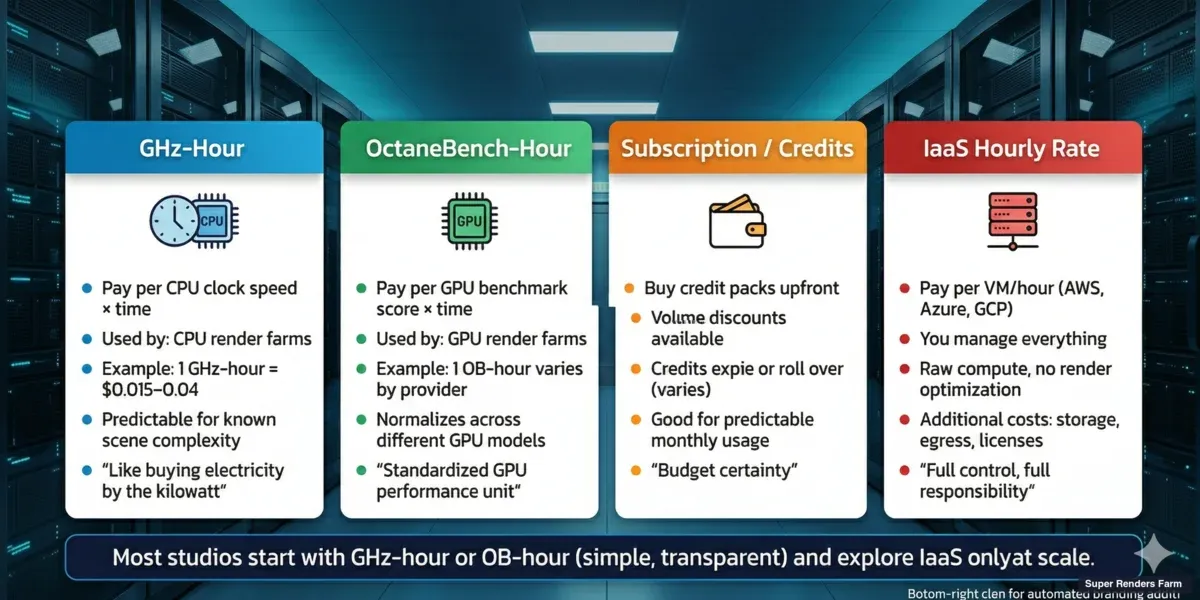
There are four main pricing models in the cloud rendering market. Understanding which one a farm uses is the first step to comparing costs accurately.
Credit-Based / GHz-Hour (Most Common for CPU)
The majority of CPU render farms — including Super Renders Farm — price work in GHz-hours. One GHz-hour means one gigahertz of processing power running for one hour. A dual-processor server with 44 cores running at 2.20 GHz base clock delivers roughly 96.8 GHz per hour of wall-clock time.
Why GHz-hours instead of frames? Because frame render time varies wildly. A simple interior scene in V-Ray might take 3 minutes per frame. A complex exterior with Forest Pack vegetation and high-resolution textures could take 45 minutes. Pricing per frame would require the farm to predict your scene complexity — which is impossible without actually rendering it.
GHz-hour pricing means you pay for exactly the compute you consume. At Super Renders Farm, our CPU machines run Dual Intel Xeon E5-2699 V4 processors (44 cores, 2.20 GHz base clock) for a fleet total of 20,000+ CPU cores. When you submit a job, the system estimates your GHz-hour usage based on a test frame, then shows you the projected cost before rendering starts.
Advantages: Transparent, predictable once you've run a test, scales linearly with scene complexity. Watch out for: Different farms define "GHz-hour" slightly differently. Some measure at base clock, some at boost clock. This can make a farm look 15 – 20% cheaper on paper when it's actually the same price.
OctaneBench-Hour / GPU-Hour (GPU Rendering)
GPU render farms typically price by OctaneBench-hour (OB/h) or by GPU-node-hour. OctaneBench is a standardized GPU benchmark, so 1 OB/h on any farm should represent roughly the same compute power — in theory.
In practice, GPU pricing varies dramatically because hardware matters. An RTX 3090 and an RTX 5090 are both "GPUs," but the 5090 renders 2 – 3× faster for the same scene. A farm charging $2/OB-hour on RTX 5090s delivers more frames per dollar than a farm charging $1.50/OB-hour on RTX 3090s.
At Super Renders Farm, the GPU fleet runs NVIDIA RTX 5090 cards with 32 GB VRAM each. For GPU engines like Redshift and Octane, VRAM is often the bottleneck — not raw speed. A scene that fits in 24 GB VRAM renders normally; a scene that exceeds it either fails or falls back to slower out-of-core rendering. The 32 GB on our RTX 5090 cards handles most production archviz and VFX scenes without overflow. For real benchmark numbers — frame times and per-frame costs — on V-Ray GPU specifically, see our V-Ray GPU render farm speed and cost test for 2026.
Advantages: Standardized (OB/h), hardware-independent comparison possible. Watch out for: VRAM limits not reflected in pricing, older GPU hardware hidden behind low per-hour rates.
Subscription / Monthly Plans
A few farms offer monthly subscription plans — pay a flat fee for a set amount of rendering per month. RenderStreet, for example, offers plans starting around $60/month.
Subscriptions make sense if you render consistently every month and can predict your usage. They don't make sense for project-based studios that render heavily for two weeks, then nothing for a month.
Most managed farms (including Super Renders Farm) don't use subscriptions because rendering demand is inherently bursty. A flat monthly fee either overcharges you in quiet months or underserves you during crunch.
Advantages: Predictable monthly cost, simple budgeting. Watch out for: "Unlimited" plans that throttle priority or queue position, wasted capacity in low-usage months.
IaaS Hourly Rate (DIY Cloud)
This isn't technically a "render farm" model — it's cloud infrastructure pricing. Services like AWS EC2, Google Cloud, and Azure charge per virtual machine per hour. You rent the machine, install your software, manage everything yourself.
Hourly rates look cheap: $2 – $6/hour for a GPU instance on AWS. But this doesn't include render engine licenses ($500 – $1,500/year per node for V-Ray or Corona), render manager costs (Thinkbox Deadline at $0.005/core-hour), storage, data transfer fees, or the 5 – 15 hours per month someone on your team spends managing the infrastructure.
We covered this in detail in our fully managed vs DIY comparison. The short version: DIY is cheaper per compute-hour, but total cost of ownership is often higher for studios under 10 people.
Advantages: Maximum flexibility, potential savings at massive scale. Watch out for: Hidden costs (licenses, egress, management time) that can double or triple the apparent hourly rate.
Real Cost Examples: What a Typical Job Costs in 2026
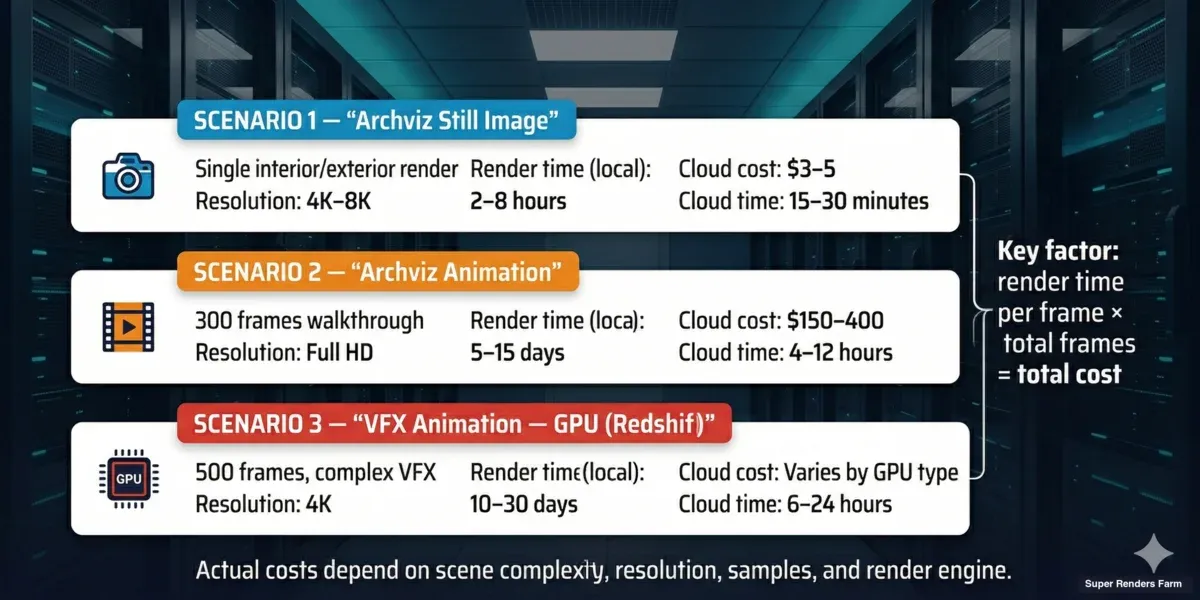
Abstract pricing models are hard to evaluate. Here are five real-world scenarios based on jobs we process regularly on our farm.
Scenario 1: Archviz Still Image — V-Ray CPU
A freelance architect submits a single high-resolution interior render (4K, V-Ray, 3ds Max) with moderate complexity — standard materials, one HDRI light, some Forest Pack vegetation outside the window.
| Item | Value |
|---|---|
| Render time (single workstation, 16 cores) | ~45 minutes |
| Render time (Super Renders Farm, 20 nodes, 880 cores) | ~2 minutes |
| Cost on our farm | ~$3 – $5 |
| Cost on local workstation | $0 (but 45 min of blocked machine time) |
For a single frame, the financial case for cloud rendering is marginal. The value is time — you get the result in 2 minutes instead of 45, freeing your workstation for modeling.
Scenario 2: Archviz Animation — Corona CPU
A 5-person archviz studio renders a 90-second walkthrough animation (2,700 frames at 30fps) in Corona Renderer, 1080p resolution, moderate complexity.
| Item | Value |
|---|---|
| Average frame time (local, 16 cores) | ~8 minutes |
| Total local render time | ~360 hours (15 days non-stop) |
| On our farm (50 nodes) | ~6 hours wall time |
| Estimated cost | $400 – $800 |
| Local electricity cost (15 days × 500W) | ~$25 – $40 |
| Local opportunity cost (workstation blocked 15 days) | Significant |
This is where cloud rendering pays for itself. The studio gets 2,700 frames overnight instead of losing a workstation for two weeks.
Scenario 3: Product Visualization — Redshift GPU
An e-commerce product team renders a 12-second turntable for a hero product (360 frames at 30fps) in Redshift, 4K resolution, glossy materials with detailed reflections.
| Item | Value |
|---|---|
| Average frame time (local, RTX 4090) | ~6 minutes |
| Total local render time | ~36 hours |
| On our farm (5 GPU nodes, RTX 5090) | ~70 minutes wall time |
| Estimated cost | $25 – $90 |
| What changes the cost band | VRAM use, displacement, AOVs |
For short product viz loops, the per-job cost stays in the tens of dollars range while the time savings free up artist machines for the next product.
Scenario 4: VFX / Motion Design — Redshift GPU
A motion graphics studio renders a 30-second product visualization with VFX (900 frames at 30fps) in Redshift, 4K resolution, complex shading and reflections.
| Item | Value |
|---|---|
| Average frame time (local, single RTX 4090) | ~12 minutes |
| Total local render time | ~180 hours (7.5 days) |
| On our farm (10 GPU nodes, RTX 5090) | ~3 hours wall time |
| Estimated cost | $55 – $350 |
| Redshift license cost (if DIY cloud) | ~$50/month amortized |
GPU rendering on a farm with current-generation hardware (RTX 5090, 32 GB VRAM) is particularly cost-effective because the hardware is expensive to buy. An RTX 5090 costs $2,000 – $2,500. Renting that compute on demand makes financial sense for any studio that doesn't render 24/7.
Scenario 5: Feature Animation Sequence — Arnold CPU
An animation studio renders a 60-second sequence (1,440 frames at 24fps) in Arnold for 3ds Max, 4K resolution, with subsurface scattering, hair, and complex layered shaders.
| Item | Value |
|---|---|
| Average frame time (local, 16 cores) | ~28 minutes |
| Total local render time | ~672 hours (28 days non-stop) |
| On our farm (80 nodes) | ~9 hours wall time |
| Estimated cost | $1,400 – $3,200 |
| Arnold license cost (if DIY cloud) | ~$575/year per node + Maxon subscription |
Feature animation is where managed pricing diverges most sharply from IaaS math. Renting a comparable CPU pool on AWS for 9 hours wall time is around $400 in compute alone, but the studio would also be paying ~$575 per node per year for Arnold licenses plus the time cost of building the pipeline. On a managed farm, all of that sits inside the per-frame estimate.
 Render farm cost examples — archviz still ($3-5), archviz animation ($400-800), product viz, VFX GPU animation, feature animation pricing
Pricing Comparison: 5 Active Render Farms in 2026
Headline rates are easy to publish; the real cost depends on billing model, what's included, and what gets added at checkout. The table below compares five active managed farms in 2026 on the structural attributes that actually drive your final invoice.
For Super Renders Farm specifically, see payment methods, invoices, and receipts for how a top-up is charged, which payment methods are accepted, and where to find your billing documents. Specific dollar rates change frequently — every farm publishes a calculator on its pricing page; check those for current numbers before you commit.
| Farm | Billing unit | License fees | Storage / transfer | Minimum commitment | Priority tiers | Calculator on pricing page |
|---|---|---|---|---|---|---|
| Super Renders Farm | GHz-hour (CPU) / OB-hour (GPU) | Included (V-Ray, Corona, Redshift, Arnold, Octane, Cycles) | Included during job | None — pay-as-you-go | Standard / Express / Priority | Yes, public |
| Fox Renderfarm | Per core-hour | Included | Included during job | None | Economy / Standard / High | Yes, public |
| RebusFarm | CinebenchHour (CB-h, EUR) | Included | Included during job | None | Standard / High / Express | Yes, public |
| GarageFarm | GHz-hour | Included | Included during job | None | Standard / Express / Priority | Yes, public |
| Ranch Computing | GHz-hour (EUR), priority-tiered | Included | Included during job | None | 4 named tiers | Yes, public |
A few patterns worth noting:
- All five include render-engine licenses in their headline rate. This is the meaningful difference between a managed farm and an IaaS rental — on AWS, Azure, or any "rent a GPU" platform, you bring your own V-Ray or Redshift license at $500 – $1,500 per node per year.
- None require a subscription to use the platform; all five offer pay-as-you-go.
- All five publish a public cost calculator. If a farm doesn't, that's a transparency signal worth questioning.
- Priority tiers exist on all five — the "starting at" rate on every pricing page is typically the lowest priority. Express or Priority adds 1.5 – 3× to the rate, depending on the farm.
For a head-to-head against one of these specifically, our Fox Renderfarm vs. Super Renders Farm comparison breaks down the per-core-hour vs GHz-hour models and which workloads favor which. For a European alternative comparison, see Ranch Computing vs Super Renders Farm. For a structural side-by-side of all six pricing models, our render farm pricing models comparison covers the math on each.
For a third comparison — this one against a self-managed GPU IaaS provider rather than another fully managed farm — our iRender vs Super Renders Farm comparison breaks down per-machine-hour pricing, RDP setup time, and license costs on actual GPU workloads.
Why Render Farm Prices Vary So Much
A buyer comparing pricing pages across five farms can see rates that look like they should be twice as much or half as much as each other. Most of the spread is explained by four factors.
1. Hardware generation. A farm running RTX 3090s charges less per OB-hour than one running RTX 5090s, but the 5090 farm renders 2 – 3× faster on the same scene. Your cost per frame can end up identical — or the older-hardware farm can end up more expensive on complex scenes that overflow VRAM.
2. Bundled vs unbundled services. A managed farm includes licenses, render manager, storage, and support. An IaaS rate looks 30 – 50% lower until you add those back in. The farm with the lowest visible rate is often the farm with the most line items added at checkout.
3. Priority tier on display. Pricing pages advertise the lowest available rate, which is usually the lowest-priority queue. If you submit a job at that rate during a busy period, it may sit in the queue for hours before processing begins. Priority or Express tiers cost 1.5 – 3× more and enter the queue at the front.
4. Currency and region. RebusFarm (EUR) and Ranch Computing (EUR) publish in euros; US-based farms publish in dollars. Currency fluctuations can make a euro-denominated farm look 5 – 10% more or less expensive than it actually is week-to-week.
For a per-frame breakdown that controls for these variables across project types, our cost-per-frame guide puts specific dollar ranges on archviz stills, animations, and VFX shots. The cost-per-frame breakdown for 2026 goes deeper on how to estimate before you submit, and our cloud rendering cost-per-frame 2026 pricing guide covers the four cost drivers that swing the math from $0.03 stills to $5 feature shots.
Flat-Rate Transparency vs Promotional Pricing
Some render farms run promotional pricing schemes — cashback credits, time-window discounts, deposit bonuses, or tiered rebates that stack. On paper these can look like meaningful savings. In production planning they introduce a different problem: you have to model the promotion's terms before you can model the per-frame cost.
Promotional pricing is not inherently bad. It can fit short-term experiments or one-off projects where the discount window aligns with your render schedule. The trade-off shows up in three places.
1. Expiring credit balances. Cashback or deposit-bonus credits typically expire on a 30 / 60 / 90 day schedule. If a project slips by a week, the credit you budgeted around can vanish before the render completes — turning the "discount" into a sunk cost.
2. Real per-unit cost is hidden behind tier math. A discount that requires a deposit threshold, plus a time-of-day multiplier, plus a first-deposit bonus, is hard to reduce to a single per-GHz-hour or per-OBh number. Studio pipelines that bill clients by the frame need a flat number, not a promotional formula.
3. Production overruns sit outside the promo. If a job runs longer or re-renders are needed, the extra usage usually falls outside the promotional bracket and reverts to standard rates.
At Super Renders Farm we publish a single per-unit rate per service tier (per GHz-hour for CPU, per OBh for GPU) with no expiring credits, no time-of-day multipliers, and no deposit thresholds. The number on the pricing page is the number you pay. For a studio quoting a 200-frame archviz animation or a 4,000-frame feature sequence, that predictability is usually worth more than a headline discount that requires careful timing.
If you're comparing render farms with promotional pricing, three questions cut through the math: what is the real per-unit rate with no promotion applied, what happens to credit balances if the project slips two weeks, and what rate applies to frames that fall outside the promotion window.
Cloud Rendering vs. Building Your Own Workstation
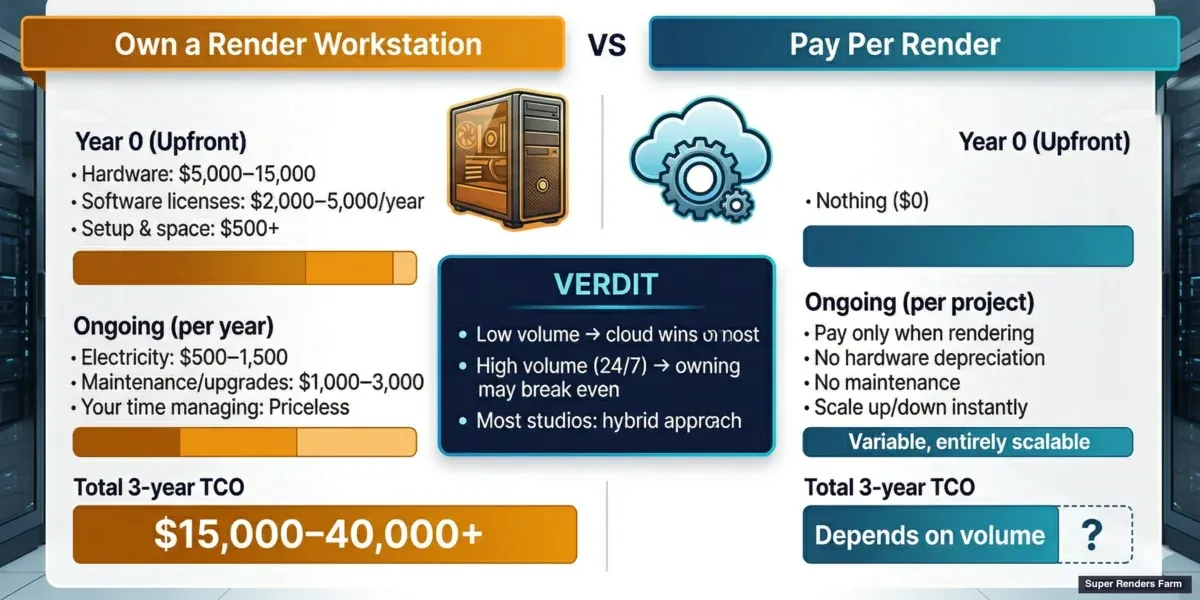
One of the most common questions we get is: "Should I buy more hardware or use a render farm?" The answer depends on three variables: how often you render, how many frames per job, and what your time is worth.
The Workstation Math
A high-end CPU render workstation in 2026 costs roughly:
| Component | Cost |
|---|---|
| Dual Xeon / Threadripper PRO workstation | $5,000 – $8,000 |
| 128 GB RAM | $400 – $600 |
| 2× RTX 5090 (if GPU rendering) | $4,000 – $5,000 |
| Storage, PSU, cooling, case | $1,000 – $1,500 |
| Total | $10,000 – $15,000 |
That workstation gives you 44 – 128 CPU cores or 2 GPUs available 24/7 for 3 – 5 years. Electricity costs add $50 – $100/month if running under load frequently.
The Render Farm Math
On a cloud render farm, that same $10,000 – $15,000 budget buys you approximately:
- 15,000 – 30,000 GHz-hours of CPU rendering, or
- 2,000 – 5,000 OB-hours of GPU rendering
For a studio that spends $300 – $500/month on cloud rendering, the annual cost is $3,600 – $6,000. Over 3 years, that's $10,800 – $18,000 — roughly the same as buying a dedicated workstation, but without depreciation, maintenance, or the months when the hardware sits idle.
 Build your own workstation vs cloud render farm — total cost of ownership comparison over 3 years
When the Workstation Wins
- You render every day, all day — the machine pays for itself through constant use
- Your scenes are small and fast — local rendering takes minutes, not hours
- You need the machine for other tasks too (modeling, simulation, compositing)
- Your data is extremely sensitive and can't leave your network
When the Cloud Wins
- Your rendering is bursty — heavy for 2 weeks, then nothing for a month
- You need hundreds of cores for animation sequences (no single workstation matches this)
- You want to avoid hardware maintenance, upgrades, and depreciation
- Your team needs their workstations for creative work while renders run
- You want to scale up for a deadline without buying hardware you'll rarely use again
For most archviz studios rendering 5 – 20 jobs per month, cloud rendering is cheaper than owning dedicated render hardware. The workstation option makes sense when rendering is constant and predictable — which describes maybe 10% of the studios we work with.
We've put together a detailed build-vs-cloud cost breakdown that covers the full math — hardware depreciation, electricity, maintenance hours, and opportunity cost — so you can see exactly where the crossover point is for your studio.
What to Watch for When Comparing Render Farm Prices
Not all pricing pages tell the full story. Here's what to check before committing to a farm.
Hidden Cost Checklist
| Cost | Managed Farm | DIY Cloud (AWS / Azure) |
|---|---|---|
| Software licenses (V-Ray, Corona, etc.) | Included | $500 – $1,500/node/year |
| Render manager (Deadline, etc.) | Included | $0.005/core-hour |
| Storage (scene files, output) | Included (temporary) | $0.023/GB/month + egress |
| Data transfer (upload / download) | Included | $0.09 – $0.20/GB egress |
| Support | Included | $29 – $100+/month (AWS) |
| Setup time | Minutes | Hours to days |
| Infrastructure management | Included | 5 – 15 hours/month (your time) |
On a managed farm, the price you see is the price you pay. On DIY infrastructure, the visible per-hour rate can be 30 – 50% of the actual total cost once you factor in licenses, storage, transfer, and time.
Licensing is the line most often left out of that estimate; for 3ds Max specifically, the 2026 licensing breakdown shows what each path costs per year.
Priority Tiers and Queue Position
Many farms offer priority tiers: pay more per GHz-hour to render sooner. This is legitimate — it's how farms manage demand during busy periods (quarter-end deadlines, holiday season). But it means the "starting at" price on a farm's marketing page is usually the lowest-priority tier. If you need results within hours, expect to pay 1.5 – 3× the base rate.
At Super Renders Farm, we show the estimated wait time and cost for each priority level before you submit. No surprises.
Test Frame Estimates vs. Actual Cost
Most farms render a test frame to estimate your job cost. This is generally accurate for animations where frames are similar, but it can be off for scenes where complexity varies across frames (a camera flythrough that starts in a simple corridor and ends in a detailed atrium, for example).
Ask the farm how they handle cost overruns. At Super Renders Farm, if the actual cost exceeds the estimate by more than a set threshold, we flag it and let you decide whether to continue or adjust settings.
Pricing on Super Renders Farm
We're not going to claim to have the lowest per-hour rate in the market. Some farms charge less per GHz-hour. What Super Renders Farm offers is a different set of trade-offs:
- All-inclusive pricing — render engine licenses (V-Ray, Corona, Redshift, Arnold, Octane, Cycles), storage during the job, and human support are part of the rate. No add-ons at checkout.
- 20,000+ CPU cores (Dual Xeon E5-2699 V4) and a dedicated GPU fleet (RTX 5090, 32 GB VRAM) available on demand.
- Fully managed workflow — you upload a scene file, our system handles the rest. No remote desktop, no software installation, no license juggling.
- Transparent estimates — test frame rendered before you commit, cost shown upfront with priority options.
Our pricing page has a cost calculator where you can estimate your job. For V-Ray and Corona CPU rendering — which accounts for about 70% of our workload — the per-frame cost for a typical archviz scene lands between $0.10 and $1.50 depending on complexity and resolution.
For GPU rendering with Redshift or Octane, expect $0.06 – $2.00 per frame depending on scene complexity and resolution. The RTX 5090 hardware means fewer frames fail due to VRAM limits, which reduces waste and re-render costs.
Making the Decision: A Simple Framework
If you're still unsure whether cloud rendering makes financial sense for your studio, here's a quick decision framework:
| Question | If Yes → | If No → |
|---|---|---|
| Do you render more than 500 frames/month? | Cloud saves time | Local may be sufficient |
| Does rendering block your workstation for hours? | Cloud frees your machine | Less urgent |
| Do your render jobs exceed 4 hours locally? | Cloud significantly faster | Local is manageable |
| Is your rendering irregular (feast or famine)? | Cloud avoids idle hardware cost | Dedicated hardware may pay off |
| Do you lack IT staff for DIY cloud? | Managed farm recommended | DIY cloud is an option |
Most studios that answer "yes" to 3 or more of these questions benefit from cloud rendering. The specific farm — and pricing model — depends on your software stack, render engine, and volume.
If you are evaluating options at the lower end of the budget spectrum, our free render farm comparison breaks down what is genuinely free versus what requires a paid commitment. For practical comparisons across the major providers, our render farm services comparison for 2026 puts real numbers side by side.
FAQ
Q: How much does a render farm cost in 2026? A: For a managed cloud render farm, typical 2026 per-frame costs land between $0.10 and $1.50 for V-Ray or Corona archviz, $0.06 to $2.00 for Redshift or Octane GPU jobs, and $0.80 to $3.50 for feature-animation Arnold sequences. A 90-second 1080p archviz walkthrough animation in Corona usually costs $400 – $800 on a managed farm; a 30-second 4K Redshift VFX shot ranges $55 – $350. Almost every managed farm offers a public cost calculator and a test-frame estimate before you commit, so you can confirm the number for your specific scene before rendering starts.
Q: How does render farm pricing per frame compare to per hour? A: Per-frame pricing is what you ultimately pay; per-hour (or per-GHz-hour, per-OB-hour) is how the farm bills under the hood. A farm quotes a per-hour rate because it can't predict your scene's complexity in advance — a 4K interior with simple shaders might render in 3 minutes per frame, while a complex exterior with vegetation could take 45. Multiply your per-hour rate by actual render time to get your per-frame cost. On Super Renders Farm, the system runs a test frame and shows you the projected per-frame and per-job cost before approving the job.
Q: Which render farms have the lowest prices in 2026? A: Headline rates change month to month, and the lowest-priced farm for your job depends on your engine and scene type. RebusFarm publishes some of the lowest entry-level rates in EUR; Fox Renderfarm and GarageFarm are competitive on per-core-hour CPU pricing in USD; Ranch Computing's lowest-priority tier is among the most affordable for non-urgent jobs. The pitfall: a low headline rate often pairs with older hardware (slower per-frame), unbundled add-ons (license fees billed separately), or low-priority queue position (long wait times during peak periods). Compare the actual per-frame cost on a representative test scene rather than the published per-hour rate.
Q: Are render farm prices transparent? A: On managed farms, yes — every credible farm in 2026 publishes a public cost calculator and provides a test-frame estimate before you commit to a full job. Where transparency breaks down: priority tier multipliers are sometimes only visible after submitting, "starting at" rates often refer to lowest-priority queue position, and IaaS providers (AWS, Azure) display per-VM hourly rates without bundling licenses, storage, or transfer. If a farm doesn't publish a calculator on its pricing page, treat that as a yellow flag worth investigating.
Q: What are the hidden fees on a render farm? A: On a managed farm with all-inclusive pricing — like Super Renders Farm, Fox Renderfarm, RebusFarm, GarageFarm, and Ranch Computing — there usually aren't hidden fees: licenses, storage, and support are bundled. Where hidden costs do appear: priority-tier multipliers (1.5 – 3× the base rate), data transfer egress on IaaS platforms ($0.09 – $0.20/GB), render engine licenses on DIY cloud setups ($500 – $1,500/node/year), and support tiers above the free baseline ($29 – $100+/month on AWS). Reading the pricing page top to bottom — including the FAQ — usually surfaces them before you submit.
Q: Is cloud rendering cheaper than buying a render workstation? A: For studios that render intermittently (a few projects per month), cloud rendering is usually cheaper because you avoid the $10,000 – $15,000 upfront hardware cost and ongoing maintenance. For studios rendering 8+ hours every day, a dedicated workstation may be more cost-effective over 3 – 5 years.
Q: Are render farm licenses included in the price? A: On managed farms like Super Renders Farm, yes — V-Ray, Corona, Redshift, Arnold, Octane, Cycles, and other supported engine licenses are part of the rate. You don't pay extra for software. On DIY cloud platforms (AWS, Azure), you must purchase and manage your own render engine licenses, which can add $500 – $1,500 per node per year.
Q: How do I estimate my render farm costs before submitting a job? A: Most farms offer a cost calculator or a test-frame estimate. At Super Renders Farm, you upload your scene, the system renders one test frame, and the calculator shows the estimated cost for the full job based on actual render time. You see the estimate — with different priority options — before approving the job. Lowering resolution, reducing sample counts, and optimizing materials can all bring the estimate down further; sometimes a small quality reduction (e.g., V-Ray noise threshold from 0.005 to 0.01) cuts render time 30 – 40% with minimal visible difference. Our cost calculator gives a quick estimate, and the cost-per-frame guide puts dollar ranges on common scenarios.
For a head-to-head comparison of published rates across eight major cloud render farms in 2026 — grouped by use case so you can see which provider is cheapest for your specific workload — see our multi-provider cheapest render farm comparison.



