How Much Does Autodesk Maya Cost in 2026
Overview
Introduction
Autodesk Maya's standard annual subscription costs $2,010 a year, or $168 a month if you pay for the year up front. Paying month to month instead runs $255 a month. A third path, Flex tokens, bills by the day you actually open Maya rather than by a fixed term. These figures are measured directly on Autodesk's own buy page, dated 3 September 2026, US pricing.
The rest of this guide breaks down all three official payment paths and which one is actually cheaper at different usage levels, what Maya Indie requires and why Autodesk won't tell you its price up front, and the cost every "how much does Maya cost" answer tends to leave out entirely: the machine the software runs on.
If you are still deciding whether Maya fits your pipeline at all, our overview of what Maya is and who uses it covers the software before the pricing question.
Autodesk Maya Pricing in 2026 (US, Measured 3 September 2026)
| Plan | Price (US) | How it's billed |
|---|---|---|
| Annual subscription | $2,010/year ($168/month, billed annually) | Paid annually; the monthly figure is how Autodesk quotes the rate, not an installment plan |
| Monthly subscription | $255/month | Pay month to month, no annual commitment |
| Flex (token-based) | $99 minimum for 33 tokens ($3/token); Maya draws 6 tokens per day of use | Buy tokens up front, spend them only on days you open Maya |
A small honesty note on that first row: Autodesk's own buy page states the annual price two different ways on the same page, "$168/month, paid annually" and "$2,010/year." The two don't quite agree. $168 x 12 comes to $2,016, six dollars over the figure Autodesk prints as the annual total. That gap is Autodesk's own rounding, not an error introduced here. $2,010/year is the number stated explicitly as the annual price, and it's the figure used throughout this guide.
The buy page's term selector offers a 1-year or a 3-year term. Which term was selected when these prices were read was not recorded, and no separate 3-year rate was measured, so treat the figures above as the prices the page displayed on 3 September 2026 rather than as a rate for either term. Autodesk also states a 30-day return policy on annual and multi-year subscriptions and a 15-day return policy on monthly ones.
Two things worth knowing if you check these numbers yourself. The direct URL you'd expect, autodesk.com/products/maya/pricing, returns a 404; the live prices live at autodesk.com/products/maya/buy instead. And the price panel on that page loads in after the page itself renders, so opening it and reading the first thing that appears can show a placeholder rather than a number; give it a moment. Worth noting for anyone trying to pin these figures to a release: the buy page prices exactly three plans, annual, monthly and Flex, and carries no version number anywhere on it. These figures are the prices that page showed on 3 September 2026; this guide attaches them to no Maya release, because the page named none.
3ds Max is sold on the same schedule, and we tracked its prices the same way; the equivalent breakdown is in what 3ds Max licensing costs in 2026.
Houdini, Cinema 4D and Blender are priced next to Maya and 3ds Max in our side-by-side guide to what 3D software costs in 2026.
Three Ways to Pay for Maya, and Which One Is Cheaper Depends on Usage
Autodesk doesn't frame these three plans as a decision tree, but the math resolves into one pretty cleanly.
Monthly versus annual comes down to how long you actually need the seat, not which one is cheaper per month, because monthly never wins that comparison. Across a full 12 months, the monthly plan costs $3,060 ($255 x 12) against $2,010 paid annually, a $1,050 difference, or roughly 52% more for the same year of access. But that comparison assumes you use Maya for the whole year. An annual subscription is also a year-long commitment, so for a short engagement, a two or three month project, for example, paying $255 for just the months you need and then stopping costs less than committing $2,010 up front for months that would sit unused. Monthly is Autodesk's flexibility option, not its cheap option: it costs more for every month of access, and it earns that extra cost specifically when you don't yet know how many months you'll actually need.
Flex changes the shape of the question entirely, because it's the only one of the three that bills by the day rather than by the term. Tokens cost $99 for a minimum pack of 33, which works out to $3 per token, and Maya draws 6 tokens for every day it's opened, so a day of Maya use costs roughly $18 in tokens. That per-day figure is this guide's own arithmetic from Autodesk's published Flex rate, not a number Autodesk states outright, so treat it as a calculation rather than a quote.
Run that $18/day figure against the other two plans and a breakeven point falls out. Against the annual plan's effective $168/month, Flex stops being the cheaper option once you're using Maya more than roughly 9 days in a given month. Against the $255/month plan, that threshold moves out to roughly 14 days. In practice, that means Flex is the right call for genuinely occasional Maya use, well under two weeks a month, and a bad one for anything approaching daily work, where the annual plan has already won before Flex even gets compared to the monthly plan.
| Roughly how many days a month you open Maya | Cheapest of the three, by this math |
|---|---|
| Up to 9 days (about $162 or less in tokens) | Flex |
| 10 days or more | Annual subscription |
| Past about 14 days | Annual subscription, and Flex now costs more than even the monthly plan |
The monthly plan is never the answer in that table, and that is the point: within any single month it is never the cheapest of the three. Its one real case sits outside the table entirely, in a short, defined engagement where the alternative is paying for a year-long commitment you won't use. Otherwise Flex and the annual plan are the two paths actually worth comparing, and which one wins depends entirely on how many days a month Maya is genuinely open, not on how the work itself is billed to a client.
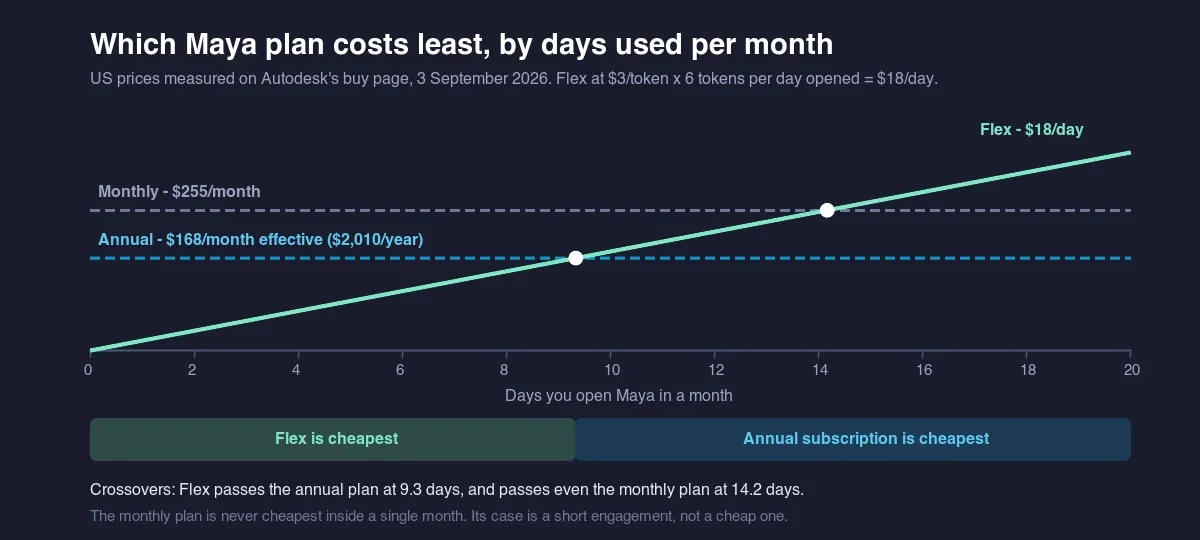 Chart comparing Maya's three payment plans by days used per month: Flex is cheapest up to 9 days, the annual subscription from 10 days onward, and the monthly plan is never cheapest within a single month
Maya Indie: Full Eligibility, and Why There's No Price to Quote
Maya Indie is a separate commercial license Autodesk sells only to buyers who meet an eligibility cap, and it is not one of the three plans priced on the buy page. As measured on Autodesk's Indie campaign pages, the eligibility rules are:
- Gross annual revenue from creative work under $100,000 USD
- The license cannot be used on any single project worth more than $100,000 USD
- One subscription per person or organization
- Sold on an annual term only, no monthly or Flex option
- Renews automatically, except through the India and China estores, where renewal has to be done manually
- The United States is on Autodesk's published list of eligible countries
What isn't there is a price. Neither of Autodesk's two Indie campaign pages lists a number anywhere on them, and the "Buy Maya Indie" button doesn't lead to a pricing page at all, it leads straight into a shopping-cart checkout URL. That's an unusual amount of friction to put in front of a headline number, and it means the price only becomes visible once you're inside checkout with your eligibility already confirmed. Following that link just to read a figure means stepping into a live purchase flow rather than a pricing page, which isn't something to do casually, and it's why no Indie figure appears in the table above.
The honest answer, as of 3 September 2026, is that Maya Indie's price isn't public. Any specific dollar figure you find for it elsewhere, including older coverage of this exact program, was either read off a checkout screen at some point in the past or has simply gone stale since. Autodesk not publishing this number is itself the useful fact here, not a gap in this guide. How the eligibility cap works in practice, including how it applies to studios rather than individuals, is covered in our Autodesk Indie licence guide.
The Real Cost of Running Maya: License Plus Machine
Every figure above is the cost of the software license. It isn't the cost of using Maya professionally, and treating it as the whole answer is where most "how much does Maya cost" write-ups quietly stop short.
Maya's own viewport performance and its GPU-accelerated renderers both lean on the graphics hardware underneath it, so the workstation a Maya license runs on is a real, ongoing cost of its own, not a one-time footnote. We compare that spend against renting capacity in building a render workstation versus using the cloud. That cost shows up in more than the purchase price of the machine: render time itself is a cost, because a scene tying up a workstation for hours or days is time that machine isn't doing anything else, and a workstation sized for comfortable interactive work isn't automatically sized for comfortable render times on a deadline.
Which part of that hardware bill matters most depends on which render engine the work actually runs. Maya's native software renderer and CPU-based engines lean on core count and system memory; GPU-accelerated engines shift the weight onto the graphics card and its VRAM instead, and a scene that outgrows available VRAM doesn't just render slower, it can fail to render at all. Choosing an engine is a creative and pipeline decision first, but it quietly sets the hardware floor underneath the Maya license, and that floor isn't something Autodesk's pricing page has any reason to mention.
None of that is captured in Autodesk's $2,010, $255, or $18-a-day figures, and none of it is optional once you're actually producing something rather than just licensing the software to do it. A machine also doesn't stay current forever: the graphics card and CPU that were comfortable for one Maya release can become the bottleneck a couple of releases later, which turns the workstation into a recurring cost on its own schedule, separate from whichever Autodesk plan is being renewed that year.
That second cost is also the one with more room to move. A Maya license is a fixed, published number regardless of how you use it. The machine underneath it doesn't have to be a fixed cost at all.
Renting Render Capacity Instead of Buying More Machine
A separate guide on this site covers the workflow side of that decision in more depth, scene prep, license handoff, and the errors that show up the first time a Maya scene moves off a local machine: rendering Maya scenes on a cloud render farm.
Buying a bigger workstation is one answer to a Maya scene that renders too slowly on the machine you have. It isn't the only one. A category of provider generally called a render farm sells rendering compute directly, billed by the hour or by the job rather than as a fixed asset sitting idle between projects. Super Renders Farm is one such provider, and on the Maya side it licenses Arnold, V-Ray, Redshift, and RenderMan on its render nodes, so a Maya scene built in any of those engines doesn't need a separate render-side license purchase just because the rendering itself moved to rented hardware. Current rates and a per-job cost calculator are published rather than quoted per client, and the Maya-specific coverage sits on the Maya render farm page.
FAQ
Q: How much does Autodesk Maya cost per year in 2026? A: $2,010/year on the standard annual subscription, or $168/month if that year is paid up front, as measured on Autodesk's buy page on 3 September 2026 (US pricing). Paying month to month instead costs $255/month, or $3,060 across a full year.
Q: Is it cheaper to pay for Maya monthly or annually? A: Annually. A full year on the monthly plan costs $3,060 ($255 x 12) against $2,010 paid annually, a $1,050 difference. Monthly only makes sense as a short-term option when you don't yet know if you'll need Maya past a few months.
Q: What are Flex tokens, and how many does Maya use per day? A: Flex is Autodesk's pay-by-use option: tokens cost $99 for a minimum pack of 33, and Maya draws 6 tokens for every day it's opened, whether that day is one hour of work or eight. That works out to roughly $18 per day of actual Maya use, which is this guide's own calculation from the published rate rather than a figure Autodesk states directly.
Q: Who qualifies for Maya Indie, and how much does it cost? A: Eligibility requires gross annual creative revenue under $100,000 USD, no single project worth more than $100,000 USD, one subscription per person or organization, and it's sold on an annual term only. Autodesk does not publish a price for Maya Indie: the "Buy" button leads directly into a checkout cart, and the figure only appears there once eligibility is confirmed, not on a public pricing page.
Q: Does Maya's subscription price include the computer needed to run it? A: No. The published price covers the software license only. A workstation capable of comfortable viewport and render performance, and the render time a demanding scene actually takes, are separate, ongoing costs that sit alongside the license rather than inside it.
Q: Can I rent render capacity instead of buying a more powerful workstation? A: Yes. A render farm sells rendering compute by the hour or by the job instead of as a machine you own outright, which turns a fixed hardware cost into one that scales with how much you actually render. It's a separate decision from which Maya license you buy, and one worth making after the license, not instead of it.
Q: Can I get a refund on a Maya subscription? A: Autodesk states a 30-day return policy on annual and multi-year subscriptions, and a 15-day return policy on monthly subscriptions. Those are the windows shown on its buy page on 3 September 2026; check the current terms before you rely on them.
Q: Does Maya cost the same amount everywhere, not just in the US? A: The figures in this guide are US prices, measured directly on Autodesk's US buy page on 3 September 2026. No other market's store was measured for this guide, so treat these numbers as the US baseline and check your local Autodesk site directly if you're buying from outside the US.
Q: What version of Maya do these 2026 prices apply to? A: The buy page lists three plans, annual, monthly and Flex, and carried no version number anywhere on it when these prices were read, so none of the three is presented as a per-version price. This guide therefore does not attach a release number to these figures at all: the measurement behind it recorded plans and prices only, on 3 September 2026. Check the buy page directly for what Autodesk is selling on the day you subscribe.
About Thierry Marc
3D Rendering Expert with over 10 years of experience in the industry. Specialized in Maya, Arnold, and high-end technical workflows for film and advertising.