
Render Farm for TV Commercial VFX: Handling the Rush Before Air Date
Overview
Introduction
A TV commercial doesn't get a soft deadline. The brief comes down from the agency, the offline edit locks against a media plan the client already bought, and the finishing work — VFX, color, comp — has to be signed off with enough runway for broadcast delivery before the spot is scheduled to air. That air date doesn't move because a shot needs one more pass. It's a different production rhythm than a feature VFX shoot with a flexible turnover date, and it produces a different render load: not steady, but bunched into a short, high-pressure window right before delivery.
Most render farm content aimed at VFX studios is written around motion design workflows or general product-visualization pipelines — useful, but not written for the specific shape of agency commercial work, where a single client sign-off can trigger a same-day re-render of a shot that was supposedly finished a week ago. This guide covers that shape specifically: why the workload arrives in a burst, what late revisions do to a render schedule, what to check before sending a job the night before air, and the cost model that fits (or doesn't) a workload that's quiet for weeks and then suddenly isn't. For the render engine and DCC-specific detail this guide deliberately doesn't repeat, see our motion design, product visualization and VFX, and compositing guides.
Why Commercial Render Load Clusters at the End
A TV spot moves through a chain most studios don't fully control: creative brief, offline edit lock, VFX and finishing, internal agency review, client review, and — depending on the market and the spot — a broadcaster or network compliance pass before delivery. Every one of those steps can push a note back downstream, and because the air date is fixed, every pushback compresses the time left for the next stage rather than moving the deadline.
The practical effect is that render demand for a commercial doesn't ramp up evenly across a project's schedule. It's often light in the early weeks — animatics, previz, look development — and then spikes hard in the last few days as shots come out of comp, get reviewed, get notes, and go back in. A studio juggling several spots for different clients can see that spike land on the same week for unrelated reasons, simply because agencies tend to schedule campaigns around the same broadcast windows (a major sports season, the holiday season, a product launch quarter). None of that is unique to any one studio's process — it's a structural feature of how commercial production is scheduled around a fixed broadcast slot, and it sits upstream of the render-settings and engine-choice detail our motion design and product visualization guides cover.
Where Late Revisions Actually Come From
Three sources of revision tend to hit a commercial in the final stretch, and they behave differently:
Client review rounds. A creative director or brand team signs off on cuts in rounds, and each round can touch specific shots rather than the whole spot — a color grade adjustment on one product shot, a logo placement fix on another, a pacing note on a transition. That means the re-render is usually shot-level, not whole-spot, but it's shot-level work under a full-spot deadline.
Broadcaster and network compliance. Depending on the market, a network or broadcaster can flag something during a technical or standards-and-practices review — a claim that needs on-screen legal text resized, a frame rate or safe-area issue, a flash-frame concern in a fast-cut sequence — and that note can arrive after the studio considered the spot locked.
Agency-internal pivots. Sometimes the note isn't from the client at all — an agency creative lead sees the finished cut against a competitor's spot that just aired and wants a change. This is the least predictable source and the hardest to plan around, precisely because it isn't driven by a scheduled review gate.
What all three have in common: the change usually affects a subset of shots, arrives with little notice, and has to be turned around against a deadline that was already tight. That's a materially different render pattern than a VFX studio iterating toward a director's creative approval on a longer schedule — the changes here are driven by an external, fixed calendar event, not an internal creative process with some flex in it.
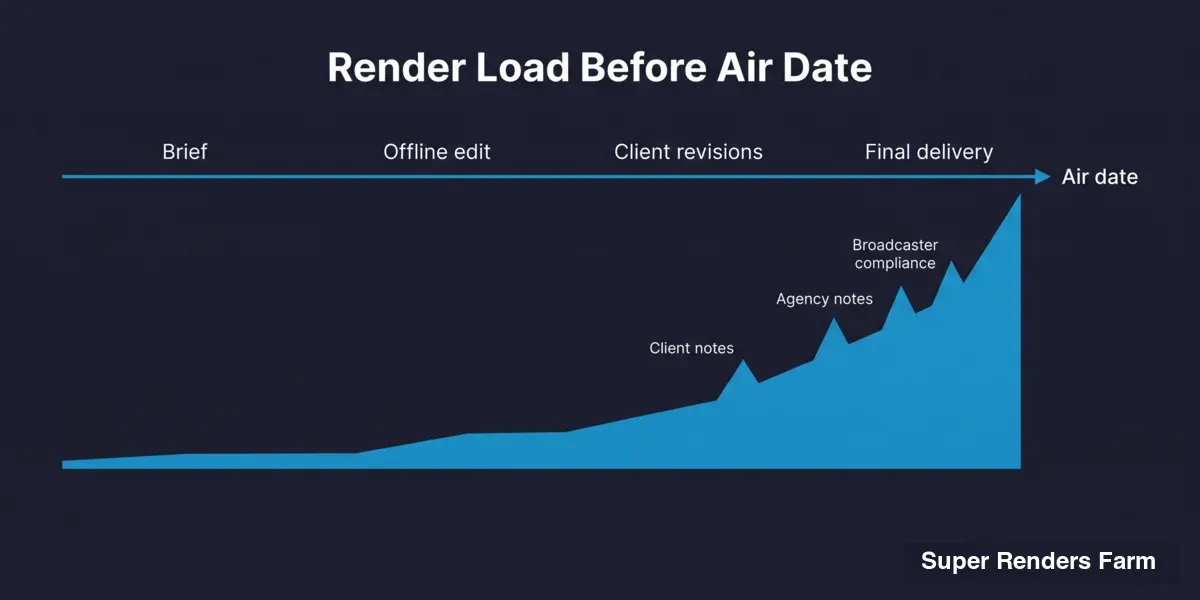 Area chart of render load rising sharply before a TV commercial's air date, with peaks marked for client notes, agency notes, and broadcaster compliance.
What to Prepare So a Rush Job Doesn't Fail the Last Night
The worst time to discover a pipeline problem is the night before air, with a client waiting on a delivery. A few things are worth settling before you're in that position, not during it:
Scene and asset path hygiene. On any fully managed farm, your scene needs to resolve its assets from a path structure the render nodes can see — not a path that only exists on your local workstation. A shot that renders fine locally because a texture or plate is still pointed at a personal drive letter will fail (or worse, render with the wrong asset) once it's off your desk. Catch this on the first shot you send, not the last one under deadline.
A real test render, not just frame one. Rendering the first frame of a sequence proves very little about a shot with a simulation, a particle system, or motion blur across a full range. Send a short representative range — including whatever frame is heaviest, not just the first one — early enough that a real problem shows up while there's still time to fix it.
Confirming software and plugin coverage in advance, not on delivery night. Not every plugin or render engine is pre-installed and ready on every host DCC. If your pipeline depends on something provisioned on request rather than ready by default — more on which engines fall into which category below — that's a conversation to have days ahead of a deadline, not an hour before you need to submit.
A plan for priority, before you need it. Rendering here is billed per compute consumed rather than as a flat monthly plan, and the CPU rate runs across a priority range of roughly $0.004 to $0.016 per GHz-hour — paying more per GHz-hour buys a faster turnaround on a job that's queued behind others. Knowing that range exists, and roughly what a priority bump costs, before the night you actually need it beats discovering the pricing model under deadline pressure. Current rates are on our pricing page.
Uploading early, not at the deadline. There's no hard limit on upload size, but anything above roughly 2 GB is more reliably handled by the Client App or S3 access (Cloud Direct Connect) than a browser upload, which gets slow above that size, becomes unreliable above about 5 GB and does not resume if the tab closes — start the upload for a heavy project the moment a shot is ready, rather than queuing a multi-hundred-gigabyte transfer behind the clock on delivery night.
Knowing there's no scripted submission path. Job submission is through a web interface, not a programmatic API — there's no public render API or SDK today. If your pipeline assumes a script can queue jobs automatically overnight with no one at a keyboard, that's a real constraint to plan around, not a detail to discover during a crunch.
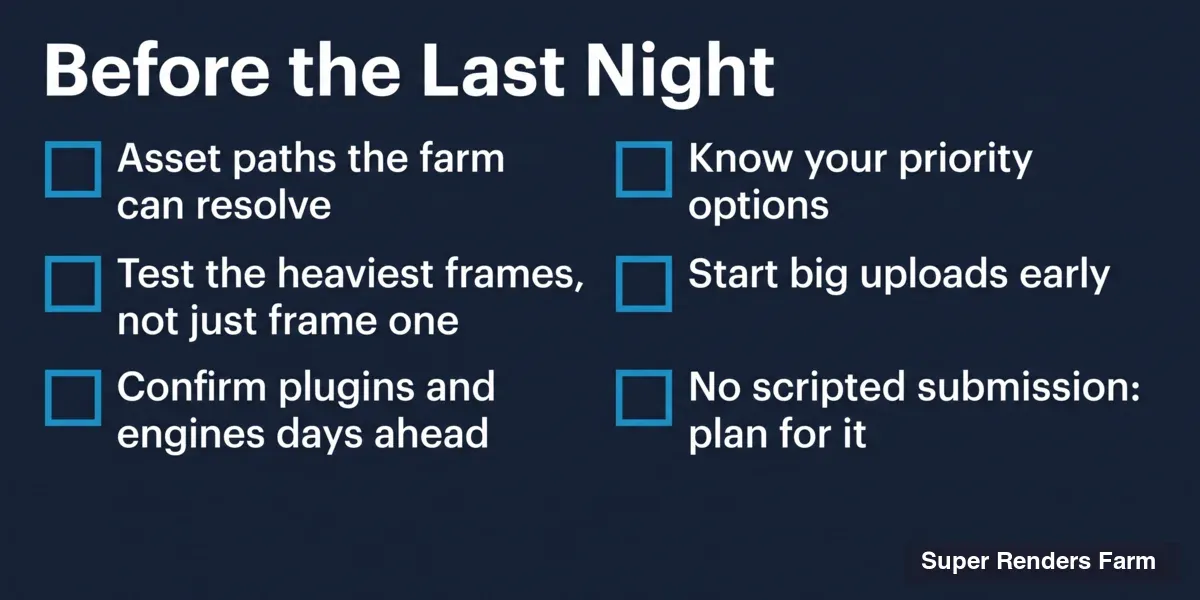 Checklist titled Before the Last Night: asset paths the farm can resolve, test the heaviest frames, confirm plugins and engines days ahead, know your priority options, start big uploads early, and plan for having no scripted submission.
The Software Side: Whatever the Pipeline Actually Runs
Commercial VFX doesn't standardize on one DCC the way some niches do — the software mix follows what a particular studio's pipeline already uses, and a single campaign can move through more than one tool between motion graphics, CG, simulation, and comp.
Cinema 4D shows up heavily in commercial motion graphics — MoGraph-driven title sequences, product beauty shots, abstract brand animation. Cinema 4D R14 through 2027 is supported, and Redshift ships bundled and ready on our GPU nodes; X-Particles is provisioned on request, so confirm it before uploading a scene that depends on it. See our Cinema 4D render farm page.
Maya covers CG-heavier work — hero product animation, character or creature shots, complex rigged simulations. Maya 2014 through 2027 is supported, and Arnold, V-Ray, and RenderMan are ready on the node, with Redshift ready on our GPU nodes. See the Maya render farm page.
Houdini commonly handles the effects layer underneath a commercial — destruction, fluid, particle, and crowd simulation feeding into a Cinema 4D or Maya-driven spot. Houdini 21.0 or later is supported. Karma, Karma XPU, and Mantra are ready on every node and Redshift on our GPU nodes; Arnold for Houdini, V-Ray, and Octane are provisioned on request. See the Houdini render farm page.
Blender is a real option for smaller shops and freelancers on tighter budgets, since Cycles and EEVEE — both running on CPU and GPU here — carry no separate license cost. Supported versions run from 2.79 through 5.2, with 4.5 LTS recommended. V-Ray, Octane, and Redshift for Blender exist but are provisioned on request — check before committing a pipeline to one. See the Blender render farm page.
After Effects carries much of the finishing and compositing weight, particularly where 3D renders get comped against live-action plates. After Effects 2024 through 2026 is supported and the AE render-only license is ready on every node; the common plugin set (Element 3D, Trapcode Suite, and similar) is provisioned on request. See the After Effects render farm page, and for deeper compositing detail, our compositing guide.
The operational model underneath all of this is fully managed: no remote desktop into machines, no installing renderer or plugin licenses yourself, no administering a worker fleet — which matters more than usual on a commercial timeline, since the last thing a small studio needs on delivery week is to also be doing IT.
Cost Shape: Burst Workloads vs. Steady Workloads
A studio doing commercial work rarely renders at a constant rate. There might be nothing queued for two or three weeks between campaigns, and then a single air-date week that needs more compute than the rest of the month combined. A flat monthly subscription is a poor match for that pattern — you're either paying for idle capacity in the quiet weeks or under-provisioned exactly when the deadline hits.
Rendering here is billed per compute actually consumed: CPU by the GHz-hour across a priority range of roughly $0.004 to $0.016, GPU by the OctaneBench-hour (a GPU benchmark unit used here as the billing yardstick) starting around $0.003. Purchased credits don't expire, so there's no penalty for the quiet stretch between campaigns — you aren't paying to hold capacity you aren't using, and you aren't losing unused balance to a use-it-or-lose-it window. New accounts start with $25 free render credits, and studios buying credits in larger single top-ups get an automatic volume discount that scales up to 30% at the largest published tier — worth knowing if your studio runs enough campaigns per year that credit purchases add up. Current rates live on our pricing page.
This billing shape is not unique to us, and it isn't the right model for every workflow — a studio with a genuinely constant, predictable render load year-round may do just as well or better on a different arrangement. But it maps cleanly onto the specific pattern commercial work tends to produce: long quiet stretches, then a short, compute-heavy spike tied to a date that doesn't move.
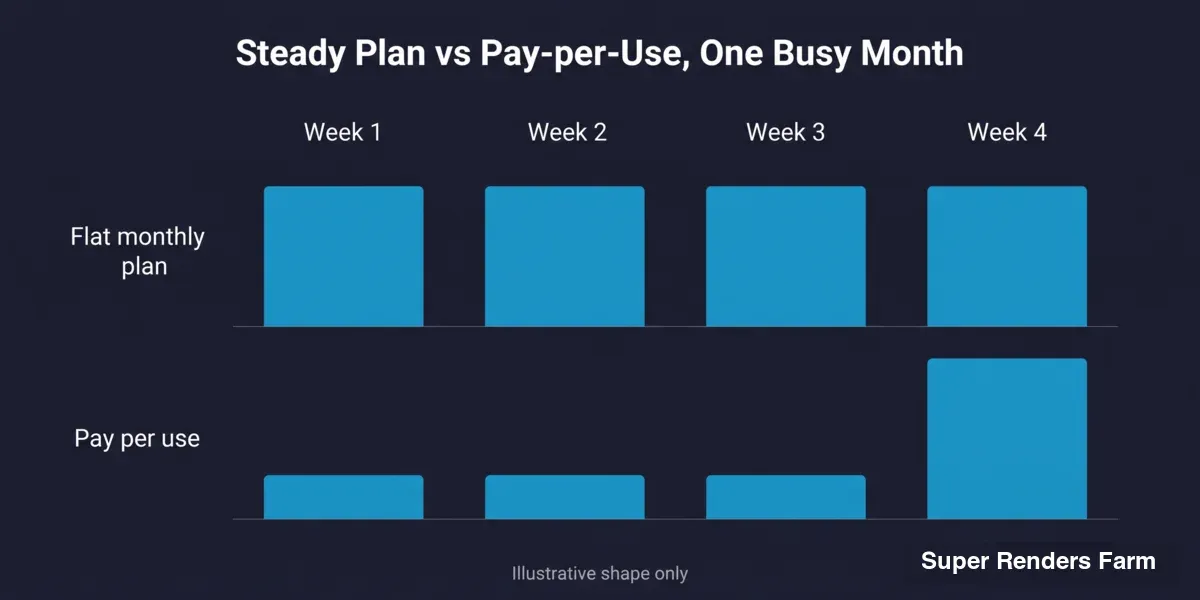 Illustrative bar chart: a flat monthly plan costs the same every week, while pay-per-use billing stays low for three quiet weeks and rises in the busy fourth week.
When a Render Farm Is the Wrong Call for a Commercial Job
None of the above means a public cloud farm is the right tool for every commercial deadline. A few situations where it genuinely isn't:
The night-before-air job with zero buffer and no prior test. Onboarding any new rendering resource — ours or anyone else's — the same night you need a delivery is a bad bet regardless of how the farm performs, because you have no data on how your scenes behave there and no time to react if something needs adjusting. The first test render belongs on a lower-stakes job with days of buffer, not the highest-pressure job of the quarter.
Pipelines that require scripted, automated job submission. There's no public render API today — submission is through a web interface. A workflow that assumes unattended, script-driven queueing overnight with no one at a keyboard hits a real gap here.
Campaigns with a contractual data-residency requirement. We're a US company — headquartered in Santa Ana, California, with US jurisdiction, support, and billing — but that's a fact about the company, not about where compute physically runs, and we don't publish node or storage locations. For most commercial work that isn't an issue; where a client contract or agency policy specifies a data-residency guarantee, put that question to us directly and get it in writing before uploading anything.
Short, small jobs where the upload round-trip costs more time than it saves. A small, fast local render on a well-specced workstation can sometimes finish before a large project's assets would even finish uploading. Farm rendering earns its place on jobs heavy or urgent enough that distributed compute beats the transfer overhead.
A software mix that leans entirely on provisioned-on-request engines with no lead time. If a pipeline depends on V-Ray for Blender, Octane for Houdini, or a specific After Effects plugin set that isn't pre-installed, and there's no time to confirm availability before the deadline, that's a real risk to plan around rather than assume away.
For campaigns carrying real secrecy requirements — an unreleased product, an embargoed brand launch, a spot that can't leak before air — a signed NDA is a standard, available step through our NDA request page, and it's worth having in place before sending anything sensitive rather than after.
Decision Framework
| Your situation | Does a public cloud farm fit? |
|---|---|
| Steady render volume most weeks, occasional but not extreme deadline pressure | Maybe — compare per-compute cost against owned hardware or a flat arrangement; a constant load can do as well or better elsewhere |
| Bursty workload tied to fixed air dates, with quiet weeks in between campaigns | Generally yes — per-compute billing with non-expiring credits maps to this pattern better than a flat monthly plan |
| Frequent late-stage revisions after client review or broadcaster compliance notes | Generally yes — re-render individual shots on demand rather than owning idle hardware for the rest of the month |
| First-ever job for this pipeline, delivery is tonight, zero buffer | No — test on a lower-stakes job first; the night of a hard deadline is the wrong time to learn how your scenes behave on any new farm |
| Pipeline requires scripted/API-driven job submission with no one at a keyboard | No — submission here is GUI-only |
| Contract or client policy sets a specific data-residency guarantee | Ask first, in writing, before assuming either way — we don't publish node or storage locations |
| Software mix depends entirely on provisioned-on-request engines, no lead time to confirm | Risky — confirm plugin/engine availability days ahead, not the night of |
| Small studio or freelancer without in-house render infrastructure | Generally yes — no hardware purchase to size for a peak that only happens a few times a year |
FAQ
Q: How does a render farm handle the render crunch that happens right before a commercial's air date? A: It absorbs the burst by billing per compute actually consumed rather than a flat monthly rate, so a studio can scale up hard for a delivery week without carrying that capacity the rest of the month. Non-expiring credits mean the quiet weeks between campaigns don't cost anything either.
Q: What software does Super Renders Farm support for TV commercial VFX and motion graphics work? A: Cinema 4D (R14–2027, Redshift bundled and ready, X-Particles on request), Maya (2014–2027, Arnold/V-Ray/Redshift/RenderMan all ready), Houdini (21.0 or later, Karma/Karma XPU/Mantra/Redshift ready, Arnold/V-Ray/Octane on request), Blender (2.79–5.2, 4.5 LTS recommended, Cycles and EEVEE ready on CPU and GPU, V-Ray/Octane/Redshift for Blender on request), and After Effects (2024–2026, common plugins provisioned on request).
Q: What should we do before sending a rush job the night before air? A: Confirm asset paths resolve off your local machine, send a real test render covering the heaviest frame in the sequence (not just frame one), confirm any non-default engine or plugin is provisioned ahead of time, start the upload as early as possible, and know the priority-tier pricing range before you need to use it.
Q: Is there a way to submit render jobs automatically from our own pipeline instead of through a website? A: Not currently. There's no public render API or SDK — job submission is through the web interface, so a person needs to be at the keyboard to queue a job.
Q: How does billing work for a workload that's idle for weeks and then suddenly urgent? A: Rendering is billed per compute actually consumed — CPU across a priority range of roughly $0.004 to $0.016 per GHz-hour, GPU from around $0.003 per OctaneBench-hour — rather than a flat monthly plan, and purchased credits never expire. You aren't paying for capacity during the quiet weeks between campaigns.
Q: Is a cloud render farm the right choice for every commercial deadline? A: No. It's a poor fit for a first-ever job with zero buffer the night before delivery, for pipelines that need fully automated scripted submission, for campaigns with a strict contractual data-residency requirement that hasn't been confirmed in writing, and for very small jobs where the upload time outweighs the render-time savings.
Q: What happens to our project files after the campaign has aired? A: Files stay available for download for as long as you need them. There's no fixed automatic deletion period, and deletion happens on request whenever you're ready.
Q: Can we get an NDA in place before uploading an unreleased or embargoed campaign? A: Yes — a signed NDA is available through our NDA request page, and it's worth putting in place before sending anything sensitive, not after.
About Alice Harper
Blender and V-Ray specialist. Passionate about optimizing render workflows, sharing tips, and educating the 3D community to achieve photorealistic results faster.



