What Is SheepIt Render Farm? How Free Blender Rendering Actually Works
Overview
SheepIt render farm is a free, community-powered distributed rendering service built exclusively for Blender. Users contribute their idle CPU or GPU power to render other artists' frames and earn points, which they then spend to get their own Blender projects rendered. There are no fees, no subscriptions, and no credit card required — rendering capacity comes entirely from volunteer hardware.
The model works well for a specific audience: students, hobbyists, and personal projects with flexible timelines. But as scene complexity grows and deadlines appear, the limitations of volunteer-based rendering become apparent. We've seen this transition pattern repeatedly — artists start on SheepIt, then move to a paid farm when the stakes change.
This guide covers how SheepIt actually works in practice, where it excels, where it falls short, and how to decide whether a free or paid render farm fits your situation. For a broader look at all free options available to Blender users, see our free render farms comparison for 2026.
How SheepIt Works: The Point System Explained
SheepIt operates on a points-based economy that balances contribution with consumption. Understanding this system is essential before submitting your first project.
Step 1 — Install the client. Download and run the SheepIt client application on your machine. It is open-source software, so the code is available for inspection. The client connects to SheepIt's server and waits for rendering tasks.
Step 2 — Contribute rendering power. When your machine is idle, the client picks up frames from other users' projects and renders them locally. Each completed frame earns you points. A machine with a powerful GPU earns points faster than one with a modest CPU because it completes frames more quickly.
Step 3 — Submit your project. Upload your Blender file to SheepIt. The platform splits your animation into individual frames and distributes them across available volunteer machines. Your queue priority depends on your point balance — more points mean your frames get picked up sooner.
Step 4 — Download results. Once volunteer machines finish rendering your frames, SheepIt reassembles them for download. The total time depends on scene complexity, your point balance, and how many volunteers are online at that moment.
The balance mechanic is where it gets practical. Your effective queue position depends on the ratio between points earned and points spent. Heavy contributors who rarely submit their own projects accumulate large balances and get near-instant rendering. Occasional contributors who submit large projects regularly may find their queue position dropping. New users receive a small starter balance, but we've heard from clients that there's a "slow start" period — running the client for several days before your first submission builds a useful point reserve.
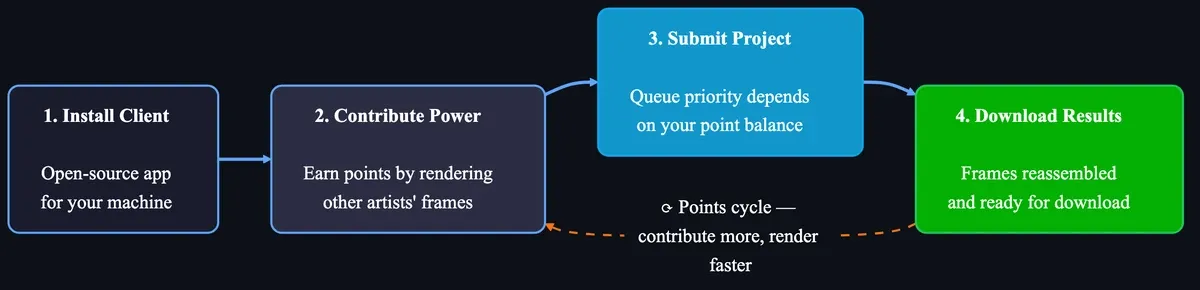 How SheepIt point system works — 4-step flow: install client, contribute GPU/CPU power, submit project, download rendered frames
What SheepIt Supports
SheepIt's scope is deliberately narrow, which keeps it focused but limits who can use it:
| Feature | SheepIt Support |
|---|---|
| Render engines | Cycles and EEVEE only |
| DCC software | Blender only — no Maya, 3ds Max, Cinema 4D, or Houdini |
| GPU rendering | Yes (CUDA/OptiX), but limited to volunteers with compatible GPUs |
| CPU rendering | Yes — larger volunteer pool than GPU |
| Third-party engines | Not supported (no V-Ray for Blender, LuxCoreRender, or add-on renderers) |
| Blender versions | Specific versions only — latest releases may take days to weeks to be added |
| Distribution method | Frame-level (not tile-level) — each volunteer renders complete frames |
If your workflow involves any engine beyond Cycles or EEVEE, or any software beyond Blender, SheepIt cannot help. For multi-engine and multi-DCC workflows, see our Blender render settings optimization guide for preparing scenes for commercial render farms.
Where SheepIt Excels
Credit is due for what SheepIt accomplishes at zero cost:
Learning and experimentation. For students and hobbyists exploring Blender animation, SheepIt removes the hardware barrier entirely. You can render a 300-frame animation without owning a powerful machine — that's a meaningful enabler for people learning 3D.
Simple Cycles scenes. Projects with moderate geometry, standard materials, and straightforward lighting render reliably on SheepIt. The distributed model handles these well because each frame is self-contained and doesn't require massive VRAM.
Community and mutual support. SheepIt's model creates a genuine sense of collaboration. The forums are active with troubleshooting advice and Blender tips. For someone new to rendering, this community aspect has real value beyond the compute capacity itself.
Zero financial risk. No billing surprises, no accidental overcharges. For personal projects where the timeline is flexible, this removes all cost anxiety from the rendering step.
Practical Limitations and Trade-offs
Every free service involves trade-offs. SheepIt's are worth understanding before relying on it for anything time-sensitive:
Unpredictable render times. Capacity depends on volunteers, so you cannot guarantee when your project will finish. During low-activity periods, simple projects can wait hours. During peak volunteer hours, results may arrive in minutes. If you have a client deadline, this unpredictability is a serious risk.
VRAM and scene complexity ceilings. Volunteer machines have widely varying hardware. A frame requiring 12 GB of VRAM will only render on machines with at least that much — which may be a small fraction of the pool. Complex scenes with heavy textures, high-poly geometry, or volumetrics may fail on many volunteer machines or render extremely slowly.
No confidentiality guarantee. Scene files are uploaded to SheepIt's servers and distributed to volunteer machines. Contributors can see frames during rendering. This is fine for personal projects, but studios working under NDA or with proprietary assets should consider whether this model fits their confidentiality requirements.
No technical support. If renders fail or produce artifacts, you rely on community forums rather than a dedicated support team troubleshooting your scene file.
Single-engine limitation. Only Blender's built-in engines work. V-Ray for Blender, LuxCoreRender, and other third-party renderers are not supported.
SheepIt vs Paid Render Farms: When Does Each Make Sense?
Rather than declaring one approach universally better, here is a practical comparison framework:
| Factor | SheepIt (Free) | Paid Render Farm |
|---|---|---|
| Cost | Free (points-based) | Pay per render time (CPU-hour or GPU-hour) |
| Render speed | Variable — depends on volunteer availability | Consistent — dedicated hardware with predictable queue times |
| Software support | Blender only (Cycles, EEVEE) | Multiple DCCs and engines (Blender, Maya, 3ds Max, Cinema 4D, V-Ray, Corona, Redshift, Arnold) |
| Hardware consistency | Varies by volunteer machine | Standardized fleet (e.g., RTX 5090, 32 GB VRAM) |
| Scene complexity ceiling | Limited by weakest volunteer hardware | Scales with dedicated high-end hardware |
| Technical support | Community forums | Dedicated support team |
| Confidentiality | Scene files distributed to volunteers | Secure infrastructure, NDA options |
| Delivery guarantee | None — no SLA | SLA-backed turnaround times |
| Ideal for | Students, hobbyists, personal projects | Professional deadlines, client work, complex scenes |
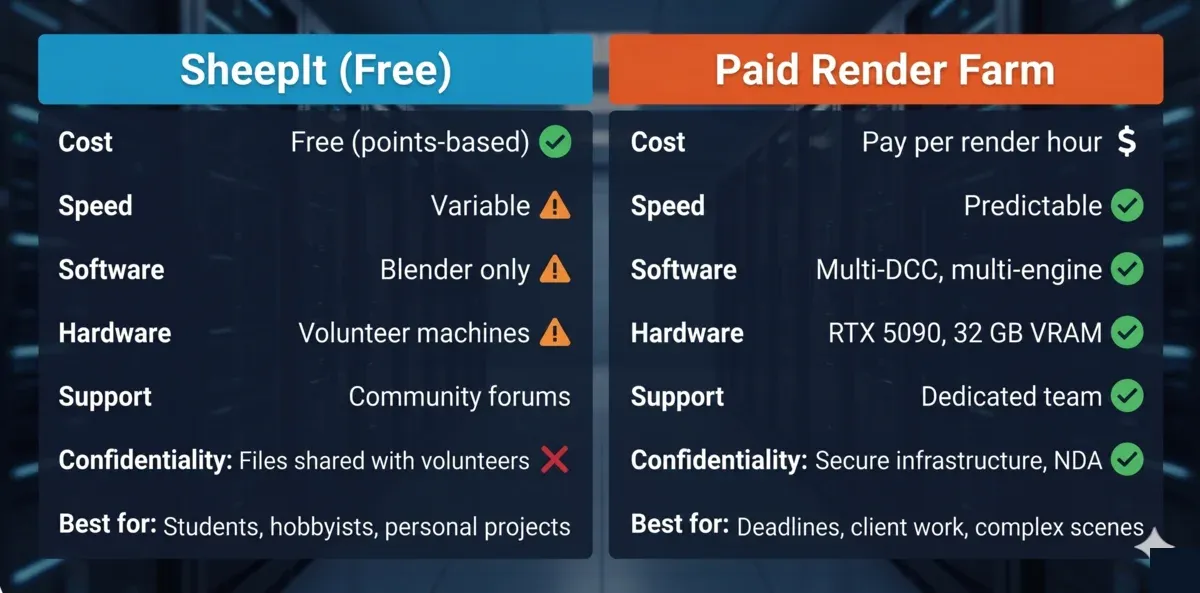 SheepIt free render farm vs paid render farm comparison — cost, speed, support, software, and confidentiality differences
On our farm, we support Blender cloud rendering with both Cycles and EEVEE, and we see many users who started with SheepIt and graduated to paid rendering when project scope changed. That transition is natural and speaks well of SheepIt's role as a starting point.
Other Free Rendering Options for Blender
SheepIt is the only free render farm with a true community point system, but it is not the only way to render a Blender project at zero cost. Most commercial render farms offer a free tier or trial, and the differences matter:
Community model (SheepIt): You earn rendering capacity by contributing your own hardware. No money changes hands. Render times depend on community activity and your point balance. This is an ongoing resource — as long as you contribute, you can render.
Commercial free trials: Services like Garagefarm, Render Pool, and Super Renders Farm offer free trial credit on professional data-center hardware. These run on standardized GPUs (not volunteer machines), so render times are predictable. The trial is typically one-shot — useful for benchmarking a real project before committing to a paid plan.
The practical distinction: Choose SheepIt when you have time to contribute and your project is non-urgent personal work. Choose a commercial free trial when you need to evaluate production hardware with predictable turnaround for a specific project. Many Blender artists use both — SheepIt for personal work, a commercial farm for client deadlines.
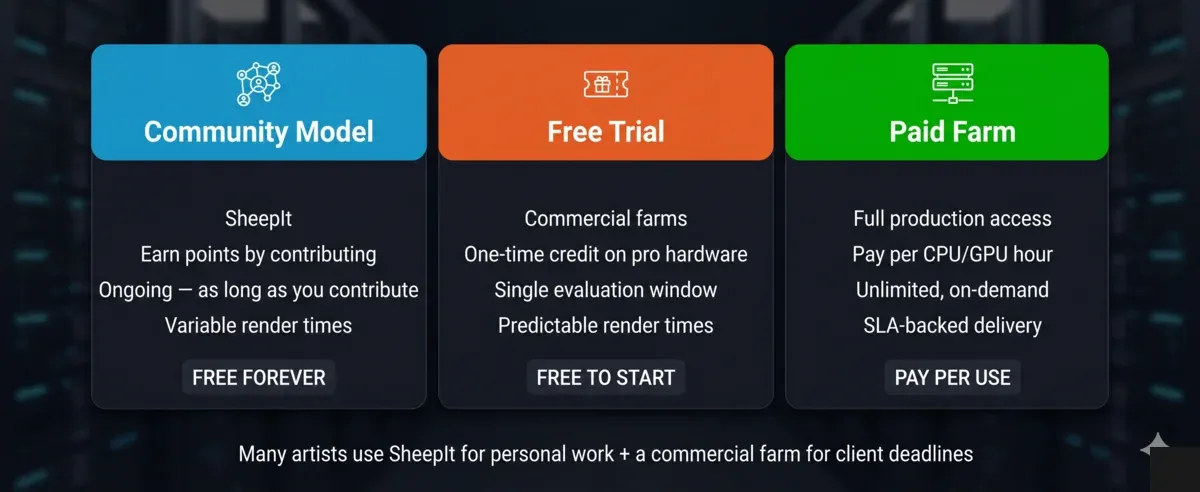 Three free rendering options for Blender users — SheepIt community points vs commercial free trials vs paid render farm
For a detailed side-by-side of every free option available in 2026, see our comprehensive free render farm comparison.
When to Move from SheepIt to a Paid Farm
Based on patterns we've observed from users who make this transition, these are the common triggers:
Your scenes exceed 8-10 GB VRAM. The pool of volunteer machines capable of rendering your frames shrinks dramatically above this threshold, and queue times become unpredictable.
You have a client deadline. The moment someone is paying you for a deliverable, rendering predictability becomes non-negotiable. A missed deadline due to volunteer availability is not a conversation you want to have with a client.
You need engines beyond Cycles. If your workflow involves V-Ray, Corona, Redshift, or Arnold — whether in Blender or another DCC — SheepIt cannot help. This is the most common trigger we see for the transition.
Your animation exceeds 500+ frames at production quality. Large animation jobs can sit in SheepIt's queue for days. On a paid farm with dedicated hardware, the same job completes in hours. Our pricing guide breaks down what those costs look like in practice.
You're working under NDA. Client work with confidentiality requirements needs a controlled rendering environment — not a peer-to-peer network distributing scene files to volunteer machines.
Making the Most of SheepIt
If SheepIt fits your situation, these practical tips help you get better results:
-
Build points before submitting. Run the client for 3-5 days on your most powerful machine before uploading your first project. A healthy point reserve improves queue priority significantly.
-
Optimize your scene. Lower sample counts, bake textures where possible, and keep VRAM usage under 8 GB. The more volunteer machines that can handle your frames, the faster results arrive. Our Blender render settings guide covers Cycles and EEVEE optimization in detail.
-
Submit during peak hours. European and North American evening hours tend to have the most active volunteers. Submitting during these windows can noticeably reduce queue times.
-
Use Cycles over EEVEE for distribution. While SheepIt supports both, Cycles frames are more consistently handled across the diverse hardware in the volunteer pool.
-
Check supported Blender versions first. Before starting a project you plan to render on SheepIt, verify your Blender version is supported. Rebuilding a scene in an older version wastes time.
Summary
SheepIt render farm fills an important role in the Blender ecosystem — it makes distributed rendering accessible to anyone willing to contribute their computing resources. The point system works as designed, rewarding contribution and keeping the platform running without any financial transactions.
The trade-offs are inherent to the volunteer model: unpredictable timing, hardware variability, Blender-only support, and no formal SLA or technical support. These matter less for personal projects and learning, and matter more when complexity, deadlines, or confidentiality enter the picture.
For a full overview of how cloud rendering works across different service models — including free, pay-per-use, and subscription — that guide covers the broader landscape beyond SheepIt specifically.
FAQ
Q: What is SheepIt render farm? A: SheepIt is a free, community-powered distributed rendering service built exclusively for Blender. Users contribute their idle CPU or GPU power to render other artists' frames and earn points, which they spend to get their own projects rendered. It has been operating since 2007 and supports Cycles and EEVEE engines.
Q: Is SheepIt completely free to use? A: Yes. SheepIt runs on a point-based economy where you earn points by contributing your machine's idle rendering capacity and spend points to render your own projects. There are no hidden fees, subscriptions, or credit card requirements. The platform is funded by donations and volunteer computing power.
Q: How does the SheepIt point system work? A: You earn points each time your machine finishes rendering a frame for another user. When you submit your own project, the farm deducts points based on the scene's complexity, frame count, and resolution. More contribution equals more render capacity. New users receive a small starter point balance so the first project doesn't require contributing first.
Q: How long does rendering take on SheepIt? A: Render times vary significantly depending on your point balance, scene complexity, time of day, and volunteer availability. Simple scenes with a healthy point balance may complete in hours; complex scenes during low-activity periods can take days. There is no guaranteed delivery time or SLA.
Q: Does SheepIt support GPU rendering? A: Yes. SheepIt supports both CPU and GPU rendering (CUDA/OptiX) through Blender's Cycles engine. However, your frames will only render on volunteer machines with compatible GPUs, which is a smaller subset of the volunteer pool than CPU-capable machines.
Q: Can I use SheepIt with V-Ray, Redshift, or Arnold? A: No. SheepIt only supports Blender's native render engines — Cycles and EEVEE. Third-party engines like V-Ray for Blender, LuxCoreRender, or any add-on renderer are not supported. For those engines, you need a commercial render farm that supports multiple engines and DCCs.
Q: Is SheepIt safe for commercial and NDA projects? A: SheepIt distributes scene files to volunteer machines, and contributors can see frames during rendering. This makes it unsuitable for NDA-bound or confidential commercial work. For client projects requiring confidentiality, a commercial render farm with private, secure rendering infrastructure is the appropriate choice.
Q: Are there other free render farms for Blender besides SheepIt? A: SheepIt is the only free render farm with a true community point system. However, most commercial render farms offer free trial credit for new users — these run on professional hardware with predictable render times. See our free render farms comparison for a detailed side-by-side of every free option in 2026.
Related Resources
- Free Render Farms Compared: What's Actually Free in 2026 — every free option side-by-side
- Blender Cloud Rendering on Super Renders Farm — supported versions, engines, and pricing
- Blender Render Settings: Complete Cycles and EEVEE Guide — optimize scenes before rendering
- Render Farm Pricing Guide 2026 — what paid rendering costs in practice
- Cloud Rendering Explained — how cloud rendering works across different service models
- Build vs Cloud Render Farm: Total Cost Breakdown — comparing DIY, free, and commercial options
- SheepIt Official Website — create an account and start contributing
About Thierry Marc
3D Rendering Expert with over 10 years of experience in the industry. Specialized in Maya, Arnold, and high-end technical workflows for film and advertising.