
Free Render Farms Compared: What's Actually Free in 2026
Overview
The "Free Render Farm" Problem
Search for "free render farm" and you will find dozens of lists promising free cloud rendering. Most of them blur a critical distinction: there is a difference between a service that is genuinely free and a commercial render farm that offers a limited free trial. Understanding that difference before you commit time to setting up a workflow saves you from hitting a wall mid-project.
We have processed render jobs from studios in over 50 countries since 2010, and a significant number of new users come to us after trying a free option that did not meet their production needs. This is not a criticism of free services — they serve a real purpose. But the mismatch between expectation and reality is where most frustration comes from.
This guide breaks down every free and freemium render farm option available in 2026 into two honest categories: truly free (no payment ever required) and free trial (limited credits on a commercial platform). We cover what each service actually delivers, where it falls short, and which option fits which workflow.
Truly Free Render Farms
These services let you render without ever entering a credit card. The trade-off is always in control, speed, or software support.
SheepIt Render Farm
SheepIt is a community-powered render farm built entirely around Blender. It operates on a point-based system: you earn points by contributing your own machine's idle CPU or GPU cycles to render other users' projects, then spend those points to render your own work.
What you get:
- Unlimited rendering (as long as you contribute back)
- Supports Blender Cycles and EEVEE
- No cost, no credit card, no subscription
What you do not get:
- Support for any software other than Blender — no 3ds Max, Maya, Cinema 4D, or Houdini
- No render engine choice — Cycles and EEVEE only (no V-Ray, Arnold, Redshift, or Corona)
- Predictable queue times — your job competes with every other user, and render speed depends on how many volunteers are online
- Privacy guarantees — your scene files are distributed to volunteer machines. For NDA-protected work (most archviz and VFX projects), this is a non-starter
- Technical support — community forums only, no dedicated support staff
Best for: Blender hobbyists and students working on personal projects with no deadline pressure and no confidentiality requirements.
For a deeper look at how SheepIt's point economy works, see our SheepIt point system guide.
Google Colab (DIY Rendering)
Google Colab is not a render farm — it is a cloud notebook environment designed for machine learning. But resourceful Blender users have found ways to run Cycles renders on Colab's free-tier GPU (typically an NVIDIA T4 with 15 GB VRAM).
What you get:
- Free GPU access (T4 tier) — roughly equivalent to a mid-range desktop GPU
- No queue — your session starts immediately when a GPU is available
What you do not get:
- Any managed rendering workflow — you must write or copy Python scripts, install Blender manually, and handle file transfer yourself
- Stability — sessions disconnect after idle timeouts (typically 30-90 minutes), and Google can terminate free-tier sessions at any time during peak demand
- Runtime — free tier is limited to roughly 12 hours per week of GPU time
- Support for anything other than Blender — no 3ds Max, Maya, or Cinema 4D (there is no way to install commercial DCC applications on Colab)
- Render engine variety — Cycles only (via Blender's headless mode)
- Production reliability — there is no SLA, no file management, no error recovery
Best for: Technical users comfortable with Python who need a quick GPU boost for a single Blender Cycles frame and have no other option.
Honest assessment: Colab rendering is a hack, not a workflow. It works for one-off experiments, but the setup time and instability make it impractical for anything beyond a personal test render.
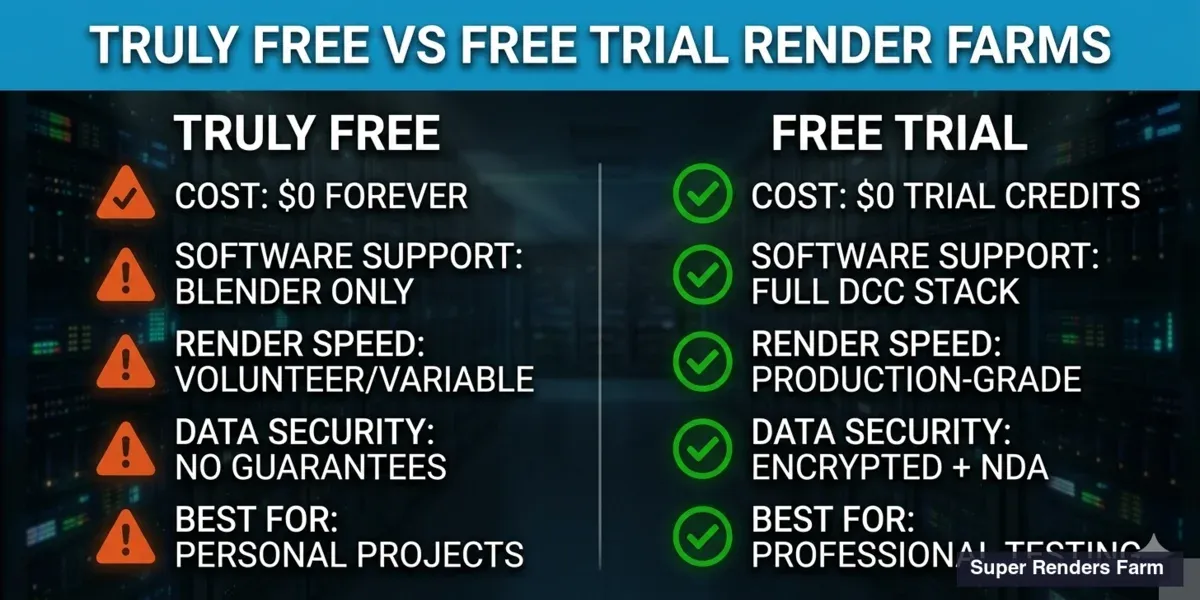 Comparison infographic — truly free render farms versus commercial free trial render farms
Free Trial Render Farms
Every major commercial render farm offers a free trial. These give you real credits on production-grade infrastructure — professional hardware, managed software stacks, technical support, and guaranteed render times. The catch: credits run out, and then you pay.
Here is what each service offers as of late April 2026 (verify current terms at each provider's website before signing up):
| Service | Free Credits | Supported Software | GPU + CPU | Trial Limits |
|---|---|---|---|---|
| Super Renders Farm | $25 | 3ds Max, Maya, C4D, Blender, Houdini, SketchUp | CPU + GPU (RTX 5090) | No expiration, no credit card required |
| RebusFarm | ~$29 | 3ds Max, Maya, C4D, Blender, Houdini | CPU + GPU | Expires after 21 days |
| GarageFarm | $25 | 3ds Max, Maya, C4D, Blender, Houdini | CPU + GPU | 30-day expiration |
| Fox Renderfarm | $25 | 3ds Max, Maya, C4D, Blender, Houdini | CPU + GPU | No expiration |
| Ranch Computing | 30 EUR | 3ds Max, Maya, C4D, Blender | CPU + GPU | 30-day expiration |
| Render Pool | $20 | GPU rendering (Blender focus) | GPU only | No credit card, watermarked output during trial |
What Free Credits Actually Buy You
Free trial credits are real money on the platform — they work exactly like paid credits. But understanding how far $25 goes matters:
CPU rendering example (V-Ray, Corona, Arnold): A typical archviz still image rendering for 30 minutes on a dual-Xeon node costs roughly $1.50-$3.00 depending on the farm's pricing model. With $25 in credits, you can render approximately 8-15 test frames — enough to verify that the farm handles your scene correctly, your plugins load, and output quality matches local renders.
GPU rendering example (Redshift, Octane): A single frame on an RTX 5090 GPU for 10 minutes costs roughly $0.50-$1.50. With $25, you get 15-50 GPU test frames depending on complexity. As a rough reference point, the RTX 5090 lands around 1,050–1,100 OctaneBench (driver-dependent, late April 2026), versus roughly 745 on the previous-generation RTX 4090 — meaningful when comparing trial credit value across farms still on RTX 4090 fleets.
Animation test: A 100-frame animation at 5 minutes per frame on CPU costs roughly $15-$25. Your free credits cover one short test sequence — enough to validate the workflow before committing budget.
The point is not to render your entire project for free. It is to verify compatibility, test upload workflows, and confirm output quality before you spend real money.
Super Renders Farm Free Trial
On our farm, the $25 free trial includes full access to the same infrastructure paying clients use: dual Intel Xeon E5-2699 V4 CPUs with 20,000+ cores for CPU rendering, and NVIDIA RTX 5090 GPUs with 32 GB VRAM for GPU workloads. As an official Chaos and Maxon render partner, we include V-Ray, Corona, Redshift, and Cinema 4D licensing in the rendering cost — there is no separate license fee.
What distinguishes our trial from others:
- No expiration on trial credits — use them whenever you are ready
- No credit card required to start
- Full plugin support — Forest Pack, RailClone, Phoenix FD, and other common production plugins are pre-installed
- Technical support included during the trial, not just after you pay
For a walkthrough of submitting your first job, see our getting started guide. For detailed pricing after the trial, see our pricing page.
RebusFarm Free Trial
RebusFarm offers approximately $29 in free rendering credits with a 21-day expiration window. They support a broad range of DCC applications and render engines, with a well-established desktop plugin (RebusDrop) for job submission. Their farm has been operating since 2006, making them one of the longest-running commercial render farms.
Considerations: the 21-day expiration means you need to test promptly. Their pricing structure uses "RenderPoints" rather than direct currency, which can make cost estimation less transparent until you familiarize yourself with the conversion.
GarageFarm Free Trial
GarageFarm provides $25 in free credits with a 30-day expiration. They support most major DCC applications and offer both CPU and GPU rendering. Their web dashboard and desktop application handle job submission and monitoring.
Considerations: the 30-day window is more generous than some competitors, but the credits still expire. GarageFarm positions itself as "fully managed," though the definition varies across providers. For a comparison of what fully managed actually means, see our fully managed render farm guide.
Fox Renderfarm Free Trial
Fox Renderfarm offers $25 in credits with no stated expiration. They support a wide range of software and operate a large GPU and CPU fleet, primarily serving the Asian and European markets. Their cloud rendering platform includes both a web submission portal and desktop clients.
Considerations: Fox Renderfarm is China-based, which may affect data transfer speeds for users in North America or introduce data residency considerations for NDA-protected projects.
Ranch Computing Free Trial
Ranch Computing provides 30 EUR (approximately $32) in free credits with a 30-day expiration. France-based, they support most major DCC applications and have been operating since 2007.
Considerations: pricing in EUR may introduce currency conversion complexity for non-European users. Their support is primarily during European business hours.
For a side-by-side breakdown of how Ranch Computing's tiered priority pricing compares to our flat managed model on real archviz and animation workloads, see our Ranch Computing vs Super Renders Farm comparison.
Render Pool Free Trial
Render Pool offers $20 in free credits focused on GPU rendering, primarily for Blender. No credit card is required to start the trial. During the trial period, rendered output includes a watermark.
Considerations: the watermark during trial makes it unsuitable for testing production output quality. The service is more limited in software support compared to full-service farms.
Choosing the Right Free Option
The right choice depends on three factors: what software you use, whether your project is confidential, and how much rendering you actually need.
| Your Situation | Recommended Option | Why |
|---|---|---|
| Blender personal project, no deadline | SheepIt | Truly free, unlimited, community-powered |
| Blender + Python skills, single frame test | Google Colab | Free GPU, but unstable and manual |
| 3ds Max / Maya / C4D production test | Commercial free trial | Only option — free farms don't support commercial DCC |
| NDA-protected archviz or VFX work | Commercial free trial | SheepIt distributes files to volunteers — not secure |
| Animation sequence (100+ frames) | Commercial free trial | SheepIt queue times are unpredictable for batch work |
| Evaluating multiple farms before committing | Sign up for 2-3 trials | $25 × 3 = $75 in free testing across platforms |
Our recommendation for production users: Start free trials on 2-3 commercial farms. Upload the same test scene to each, compare render times, output quality, and support responsiveness. The trial is not about getting free renders — it is about finding the farm that handles your specific scene correctly before you commit production budget.
A practical note on trial pacing. A $25 trial credit roughly covers 6–8 archviz still tests, 1–2 short animation test sequences, or 12–18 GPU lookdev frames at typical settings — enough variety to validate that your scene loads cleanly, plugin versions match, and output renders match expectations. Spending the full credit on one large render usually defeats the purpose of the trial; the goal during evaluation is variety across test cases — different scene types, different render engines, different output sizes — rather than maximum render volume on a single shot.
For a detailed checklist of what to evaluate during those trials — covering engine support, pricing transparency, hardware specs, and more — see our guide to choosing a render farm.
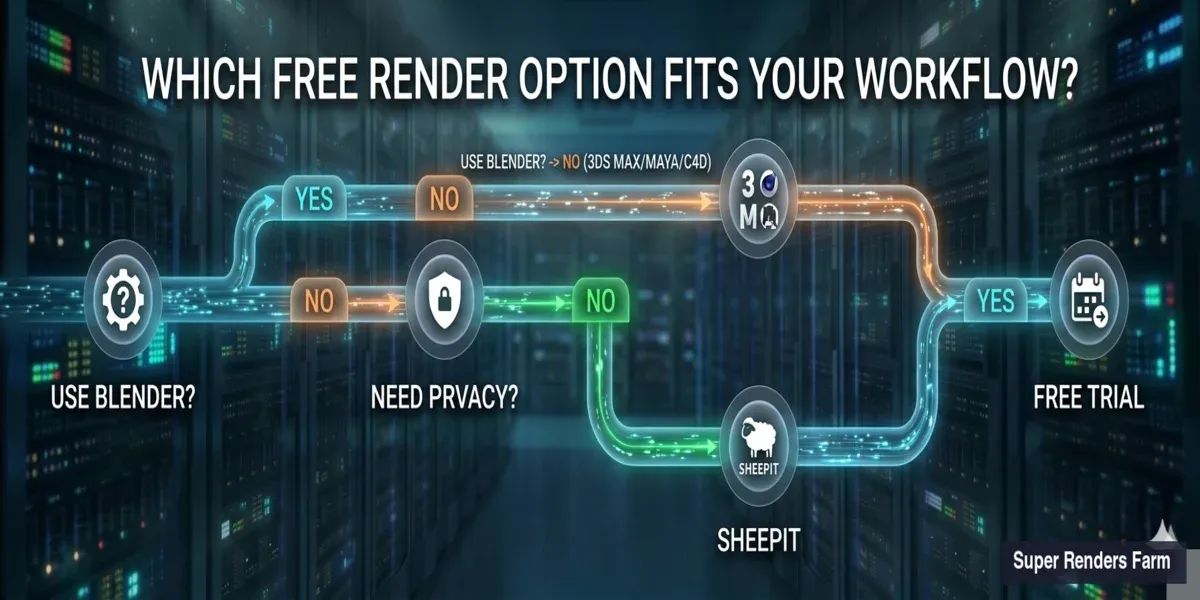 Decision flowchart for choosing the right free render farm option based on software, confidentiality, and project needs
What "Free" Actually Costs
Free render farms are not free in every sense. Here are the hidden costs people overlook:
Time cost: Setting up SheepIt requires installing the client, contributing render time, and waiting in queue. Google Colab requires scripting knowledge and session babysitting. Even free trials require account setup, scene uploading, and workflow testing. Budget 2-4 hours for each platform evaluation.
Opportunity cost: If a free render takes 8 hours in a SheepIt queue when a $5 commercial render would finish in 20 minutes, the "free" option costs you a working day.
Risk cost: SheepIt distributes your scene to volunteer machines. If your project is under NDA — and most professional archviz and VFX work is — using a service without data security guarantees puts your client relationship at risk.
Learning cost: Each render farm has its own submission workflow, plugin handling, and output format. Time spent learning a free platform you will outgrow is time not spent learning the platform you will actually use in production.
For a detailed cost analysis of cloud vs local rendering, see our build vs cloud cost breakdown.
Summary
| Category | Services | Cost | Software Support | Best For |
|---|---|---|---|---|
| Truly Free | SheepIt, Google Colab | $0 forever | Blender only (Cycles/EEVEE) | Personal projects, students, Blender hobbyists |
| Free Trial | Super Renders Farm, RebusFarm, GarageFarm, Fox, Ranch, Render Pool | $0 for trial credits ($20-$32) | Full DCC stack (3ds Max, Maya, C4D, Blender, Houdini) | Production testing, workflow evaluation, professional projects |
The honest answer: if you work with Blender on personal projects, SheepIt gives you genuinely free rendering with no strings attached. If you work with commercial DCC applications, need predictable render times, or handle confidential projects, a free trial on a managed render farm is the practical starting point.
FAQ
Q: Is there a completely free render farm for 3ds Max or Maya? A: No. SheepIt and Google Colab — the only truly free options — support Blender only. For 3ds Max, Maya, Cinema 4D, or Houdini, you need a commercial render farm's free trial. Most offer $20-$30 in free credits to test your workflow.
Q: How long do free render farm trial credits last? A: It varies. Super Renders Farm and Fox Renderfarm credits do not expire. RebusFarm credits expire after 21 days. GarageFarm and Ranch Computing credits expire after 30 days. Check each provider's terms before signing up.
Q: Can I render a full animation for free? A: On SheepIt, technically yes — but queue times are unpredictable and could stretch a 100-frame job over several days. Free trial credits on commercial farms typically cover 50-100 short test frames, not a full production sequence.
Q: Is SheepIt safe for professional work? A: SheepIt distributes your scene files to volunteer computers around the world. There are no data encryption or NDA guarantees. For personal projects this is fine, but for professional archviz or VFX work under NDA, a managed render farm with data security policies is necessary.
Q: Do free trials require a credit card? A: Not all. Super Renders Farm, Fox Renderfarm, and Render Pool do not require a credit card for their free trial. RebusFarm, GarageFarm, and Ranch Computing policies vary — check their signup pages for current requirements.
Q: How much can I actually render with $25 in free credits? A: For CPU rendering (V-Ray, Corona, Arnold), $25 covers approximately 8-15 test still images or one short animation test of 50-100 frames. For GPU rendering (Redshift, Octane), you can render 15-50 frames depending on scene complexity and GPU time per frame. On an RTX 5090 (~1,050–1,100 OctaneBench), each $1 of trial credit buys roughly 18–20 minutes of actual GPU rendering at typical archviz settings — useful for normalizing free credit value across farms running different GPU classes.
Q: Which free render farm is best for Blender? A: For truly free rendering, SheepIt is the clear option built specifically for Blender — there is no cost. For production Blender work needing faster turnaround, any commercial farm's free trial will give you access to professional GPU hardware. Our Blender render farm guide covers the options in detail.
Q: Can I use Google Colab as a render farm? A: Technically yes, but practically no. Colab's free tier gives you a single GPU (NVIDIA T4) with session time limits, idle disconnections, and no file management. It works for quick single-frame experiments but is not viable for production rendering. You need Python scripting skills just to set it up.
About Alice Harper
Blender and V-Ray specialist. Passionate about optimizing render workflows, sharing tips, and educating the 3D community to achieve photorealistic results faster.



