
Render Farm for Real Estate Animation and 3D Walkthroughs (2026)
Overview
Introduction
A real estate walkthrough looks simple from the outside — a smooth camera glide through a kitchen, out onto a terrace, up a staircase, ending on a hero shot of the living room at golden hour. What the finished clip hides is the frame count. A 60-second flythrough at 25 frames per second is 1,500 individual images, each one a full ray-traced render with global illumination, reflections, and enough anti-aliasing that the motion doesn't shimmer. On a single workstation, that's the kind of job you kick off on a Friday and pray finishes before the Monday listing goes live.
This guide is about where a render farm fits into real estate animation and 3D walkthrough work — and, just as importantly, where it doesn't. We run a fully managed cloud render farm at Super Renders Farm, so we see property flythroughs, listing-launch crunches, and last-minute revision passes come through the queue constantly. Before any of that, though, there's a terminology problem worth clearing up: a lot of people searching for "real estate rendering" don't actually want a render farm at all. They want a studio to make the renders for them. Those are two different products, and mixing them up wastes time on both sides. We'll sort that out first, then get into the workflow, the per-frame cost math, and the honest scope note about real-time engines.
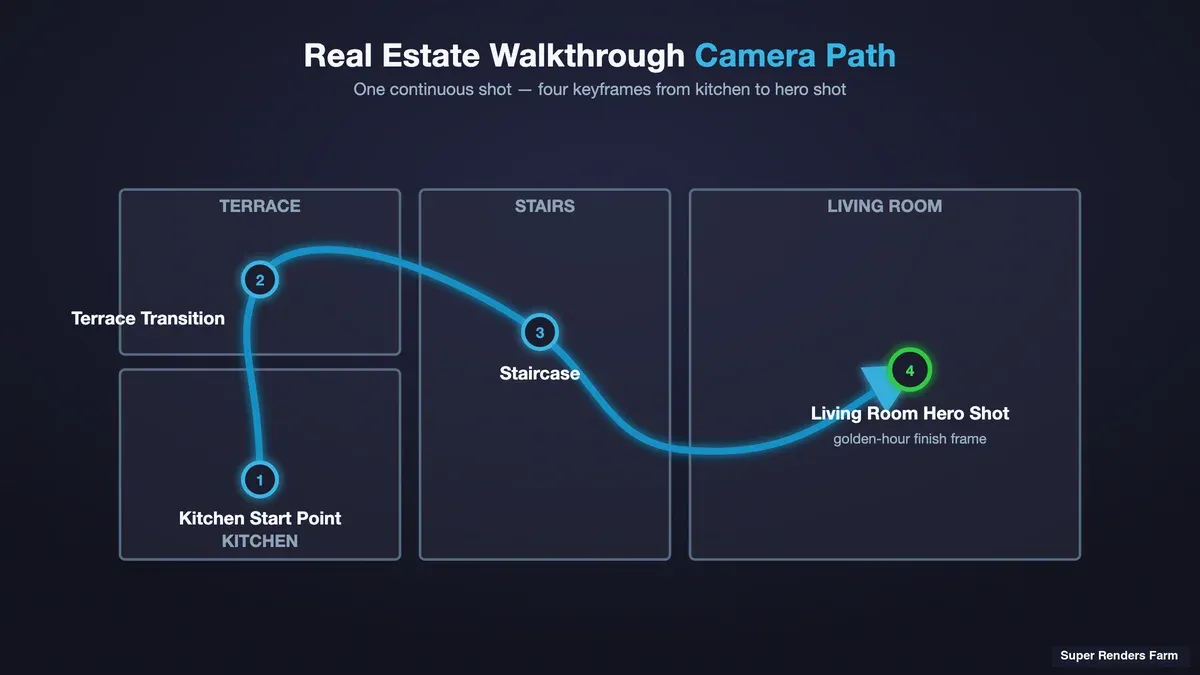 Camera path through a 3D architectural interior showing keyframes for a property walkthrough animation
Rendering Service Studio vs Render Farm: Which One Are You Actually Looking For
Search "real estate rendering services" and you'll get two completely different kinds of company on the same results page, described in nearly identical language. Knowing which one you need before you start comparing prices saves a lot of confused emails.
A rendering service studio is a creative shop. You send them a floor plan, some reference photos, maybe a SketchUp or Revit model, and a mood board — and they build the 3D scene, light it, set up the camera moves, and hand you a finished animation. You are buying labor and artistry. You don't touch a 3D application; the studio's artists do the modeling, texturing, and look development. This is what most "real estate renderings" and "3d walkthrough animation services" searches are really after — people who need someone to create the visuals from scratch.
A render farm is a compute service. You already have the finished 3D scene — you (or your artist) built it in 3ds Max, Blender, or Cinema 4D, set up the cameras, and dialed in the lighting. What you don't have is the horsepower to render 1,500 frames overnight. A render farm rents you that horsepower. You upload the scene, the farm distributes the frames across many machines, and you download the finished images. Nobody at the farm opens your scene to art-direct it — the creative decisions are already baked in.
Here's the honest test for which one you need: if you can open your scene and hit "render" yourself, and the only problem is that it would take your one computer three days, you want a render farm. If you're staring at a floor plan with no 3D model and no idea how to build one, you want a rendering service studio. Super Renders Farm is a render farm — the compute layer, not the creative studio. We don't build scenes; we render the ones you bring us. That distinction matters because the pricing models aren't comparable: a studio quotes per-project based on artist hours, while a farm bills per unit of compute consumed. Comparing a studio's $2,000 animation quote against a farm's per-frame rate is comparing two different purchases.
For a fuller breakdown of the compute-service side of this, our guide on render service versus render farm walks through the delivery-model differences in more depth. The short version for real estate work: if the render is made and just needs computing, keep reading.
Why Walkthroughs Break a Single Workstation
Real estate animation is deceptively heavy on the render side compared to a stack of still images. A brochure typically needs eight to twelve hero stills. A walkthrough needs every frame in between those beauty shots — and because the camera is moving, you can't cheat quality the way you sometimes can on a static image that will only ever be viewed at one resolution.
Three things stack up fast:
- Frame count. A one-minute clip at 25 fps is 1,500 frames. A two-minute property tour is 3,000. Each frame is a full render, not a variation on a cached one — the camera position, the reflections, and the soft shadows all shift frame to frame.
- Per-frame render time. An interior with realistic global illumination, glass, polished floors, and detailed furniture can easily take 10 to 40 minutes per frame on a capable workstation, depending on resolution and sampling. Exteriors with landscaping and vegetation can run longer.
- Motion quality. Stills tolerate a bit of noise you can touch up. Animation doesn't — residual noise crawls and flickers across frames, so walkthroughs usually need higher sample counts or a solid denoiser pass, which pushes per-frame times up further.
Multiply it out. At 1,500 frames and an optimistic 12 minutes per frame, a single machine rendering one frame at a time needs about 300 hours — twelve and a half days of continuous rendering — for one minute of footage. That's the math that quietly kills listing deadlines. A render farm solves it by rendering many frames in parallel: the same 1,500-frame job spread across a large pool of machines comes back in hours instead of days, because animation is embarrassingly parallel — frame 1 and frame 900 have no dependency on each other and can render simultaneously on different nodes.
Supported Walkthrough Pipelines: Ray-Traced Offline Rendering
The workflows that benefit most from an offline render farm are the ray-traced ones — the pipelines where each frame is computed with real light transport rather than rasterized in real time. On our farm, the supported combinations that come up most often for real estate and architectural animation are:
- 3ds Max with V-Ray or Corona. This is the archviz mainstream. Most exterior and interior real estate animation studios we see run 3ds Max as the host application and either V-Ray or Corona as the renderer. Both are CPU-strong ray tracers (V-Ray also has a GPU mode), and both handle the glass, GI, and material realism that property walkthroughs live on. Plugins common to this pipeline — scatter and vegetation tools for landscaping, for instance — need to match versions between your machine and the farm, so it's worth confirming plugin support before a big job.
- Blender with Cycles. Cycles is Blender's physically based path tracer, and it's a fully supported engine on the farm. Independent visualizers and smaller studios increasingly build real estate walkthroughs in Blender, and Cycles renders them with the same GI-accurate results as the commercial engines. If your animation is a Cycles project, it distributes across the farm the same way a V-Ray job does. (Note the honest scope: our Blender support covers Cycles offline rendering — this is about ray-traced animation, not real-time viewport engines, which we cover below.)
- Cinema 4D with Redshift, Corona, or Arnold. Motion-design-leaning studios often build property visuals in Cinema 4D. Redshift is GPU-based; Corona and Arnold cover the CPU side. All are supported for offline animation rendering.
Licensing for the commercial engines — V-Ray, Corona, Redshift, Arnold, Octane — is included in the per-hour render rate rather than billed separately, and Cycles is free and open-source so there's no license to carry at all. Because it's a fully managed farm, the submission model is upload-render-download: no remote desktop, no manual license-server setup, no installing your render engine on a rented virtual machine. You submit the scene through a client or plugin, the frames distribute across available nodes, and completed frames come back as they finish — so a long animation can start downloading its early frames before the last one is done.
For the broader architectural-visualization picture — not just animation but the whole discipline — our architectural visualization complete guide covers the workflow end to end, and the best cloud render farm for archviz piece gets specific about evaluating providers for this exact kind of work.
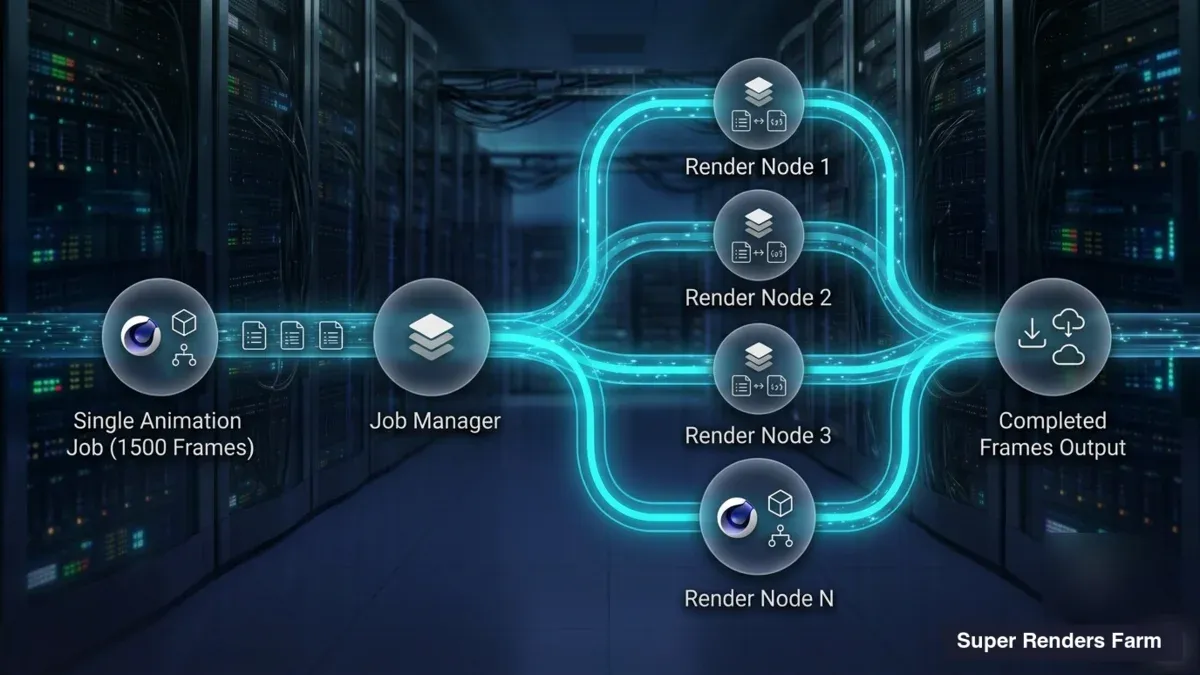 Diagram of a single 1,500-frame walkthrough job distributed across many render nodes in parallel
The Per-Frame Cost Math for a Real Walkthrough
Cost is the question everyone actually wants answered, so let's work a concrete example rather than hand-waving. Take a realistic listing-launch animation: a 60-second interior walkthrough at 25 fps, rendered at 1080p — 1,500 frames.
The farm bills CPU rendering at $0.004 per GHz-hour (the published base rate; priority tiers run higher, up to about $0.016/GHz-hr for faster turnaround). The formula for a CPU job is straightforward:
Cost = (render time per frame in hours) × (total GHz of the machine) × (number of frames) × (rate per GHz-hour)
The one input you need that isn't a fixed number is your machine's total GHz — that's roughly the number of CPU cores multiplied by their clock speed. Here's how it works with plausible numbers for our example scene:
| Input | Value |
|---|---|
| Frames | 1,500 |
| Render time per frame (1080p interior, GI) | 15 minutes = 0.25 hr |
| Effective machine size (worked example) | 100 GHz |
| CPU rate | $0.004 / GHz-hr |
| Per-frame cost | 0.25 × 100 × $0.004 = $0.10 |
| Full 1,500-frame job | 1,500 × $0.10 = $150 |
So a one-minute 1080p interior walkthrough in this scenario lands around $150 in render cost — and, because the frames render in parallel across many nodes, it comes back in a few hours rather than the twelve-plus days a single workstation would need. Change the assumptions and the number moves predictably: bump per-frame time to 30 minutes (heavier GI, higher samples) and it doubles to ~$300; render at 4K instead of 1080p and both the per-frame time and the cost climb further; drop to a 30-second clip and it halves. GPU jobs (Redshift, Octane, V-Ray GPU) bill on a different unit — $0.003 per OctaneBench-hour — so the arithmetic differs, but the principle is identical: you pay for the compute a job actually consumes.
We deliberately don't quote competitor prices here — those date quickly and vary by machine tier — but the method above is the one to apply to any farm: get their per-unit rate, estimate your per-frame time from a test render, and multiply. New accounts also get $25 in free trial credit, which is enough to render a short test sequence and measure your real per-frame time before committing a full job. For the full treatment of pricing models across the industry, the render farm cost-per-frame guide breaks down per-frame versus subscription math in detail.
The Listing-Launch Deadline Crunch
The reason render farms and real estate animation go together isn't only raw cost — it's deadline shape. Real estate work is bursty. A property comes to market, the listing has a fixed go-live date, and the walkthrough has to be finished, revised, and uploaded before that date, not a day after. Then the pipeline goes quiet until the next listing.
That pattern is a poor fit for owning hardware. If you buy a workstation powerful enough to render walkthroughs overnight, it sits mostly idle between listings — you've paid for peak capacity you use in short bursts. A render farm inverts that: you rent a large amount of compute for the few hours you need it, then pay nothing until the next crunch. The classic failure mode we see is the Friday-afternoon revision — the client wants the kitchen island moved and the whole animation re-rendered, and there's a Monday deadline. On one machine, that revision doesn't fit in the weekend. Distributed across a farm, a full re-render of 1,500 frames is an overnight job at worst.
This is also why the fully managed model matters for small teams specifically. If you're a solo visualizer or a three-person studio, you don't have a pipeline TD to babysit render nodes. Upload-render-download with no remote desktop means the operational layer — node health, failed-frame requeuing, license allocation — is handled on the farm's side rather than yours. You submit before you leave for the evening and pull finished frames in the morning. For studios in this size range specifically, the render farm guide for architecture studios under 10 people digs into the small-team economics.
Where Real-Time Tools Fit Instead: An Honest Scope Note
Here's the part a lot of "render farm for real estate" content skips, and it matters: a large and growing share of real estate walkthroughs don't need an offline render farm at all, because they're built in real-time engines.
Tools like Lumion, Twinmotion, and D5 Render are real-time rasterization engines. They render a walkthrough on your own GPU, live, at interactive or near-interactive speeds — a one-minute animation might export in minutes on a single capable graphics card, not days. That's a fundamentally different pipeline from the ray-traced, per-frame offline rendering a farm is built for. If your entire workflow lives in Lumion or Twinmotion, a render farm generally isn't part of the picture — the export happens on your machine, and there's no 1,500-frame overnight queue to distribute. These are excellent tools for fast, iterative real estate visualization, and pretending everyone needs an offline farm would be dishonest.
We want to be straight about our own scope here: our farm renders the offline ray-traced pipelines listed earlier — 3ds Max with V-Ray or Corona, Blender with Cycles, Cinema 4D with Redshift, Corona, or Arnold. It is not a render service for real-time engines. So the practical routing is:
- Building your walkthrough in Lumion, Twinmotion, or D5? Your GPU handles the export locally; a render farm typically isn't needed. Faster iteration, some tradeoff in ultimate photoreal quality versus a full path tracer.
- Building it in 3ds Max/V-Ray, Blender/Cycles, or C4D/Redshift for maximum photorealism? That's the offline path where a farm earns its place — the quality ceiling is higher, but the frames are expensive to compute, which is exactly the problem a farm solves.
Neither path is universally "better." A quick agent flythrough for a mid-market listing might be perfect in Twinmotion; a luxury development's hero film might justify a full V-Ray offline render. The point is to pick the pipeline that matches the job, and only reach for a render farm when you're on the offline side of that line. For the AI-and-visualization angle on this evolving space, our piece on 3D architectural rendering and AI visualization covers how newer tools are reshaping the workflow.
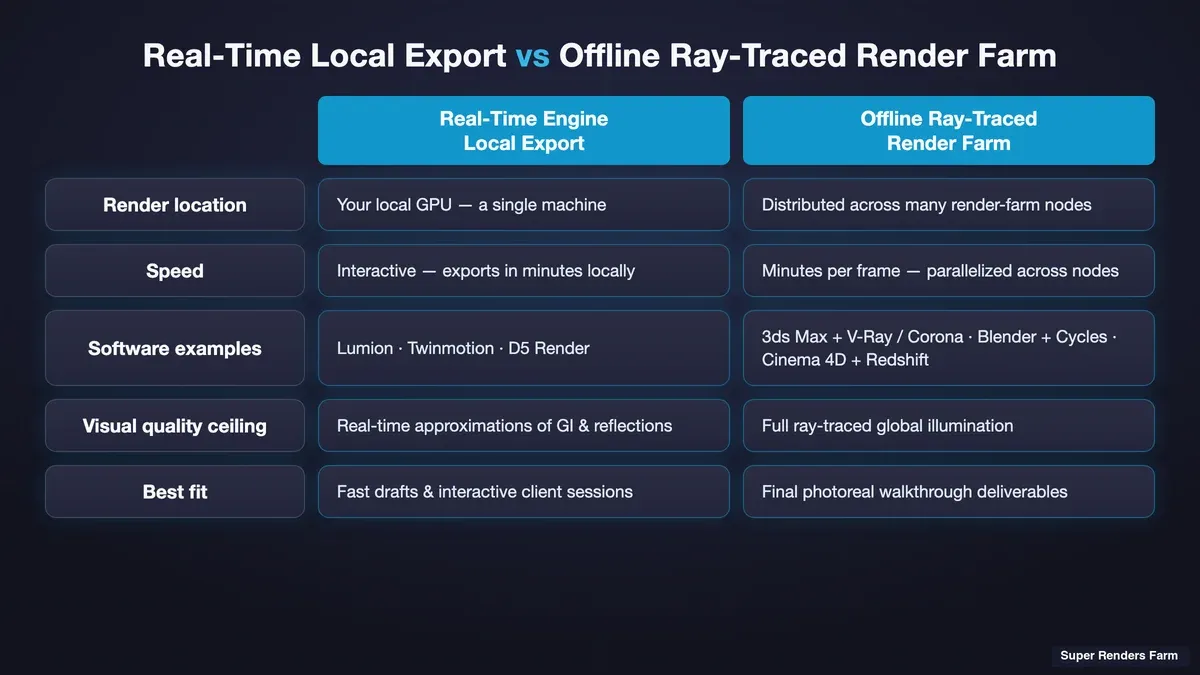 Comparison of a real-time engine local export workflow versus an offline ray-traced render farm workflow for real estate animation
A Practical Checklist Before You Send a Walkthrough to a Farm
If you've decided your project is on the offline side and a farm makes sense, a few checks up front save a lot of grief mid-job:
- Confirm engine and plugin versions match. A farm one version behind on V-Ray or a scatter plugin can silently change your output. Confirm your exact renderer version and any plugins your scene depends on are supported before uploading a full animation.
- Run a test frame or short sequence first. Render a handful of representative frames — one interior, one exterior, one tricky glass-heavy shot — to measure real per-frame time and catch missing textures or material surprises before committing the whole 1,500-frame job. The $25 trial credit is designed for exactly this.
- Check the output retention rules. Some farms delete frames after a fixed period; on our farm there is no fixed automatic deletion period, and frames are deleted on request. For a deadline job, either download promptly or configure auto-download so you're not racing a clock to retrieve files.
- Package assets correctly. Missing textures and broken asset paths are the most common cause of a re-render. Use the render engine's asset-collection tool so every texture and reference travels with the scene.
- Plan for the revision pass. Real estate clients revise. Budget render credit and calendar time for at least one full re-render after the first review — it's the norm, not the exception, on listing work.
For the Blender-specific side of setting up and exporting animation correctly, the Blender render animation complete guide walks through the frame-range, output, and sampling settings that most affect farm render time and cost.
Vegetation and Scatter: The Landscaping Cost Multiplier
One real-estate-specific gotcha deserves its own note, because it surprises people on their first exterior animation: landscaping is expensive to render. Exterior walkthroughs lean heavily on scattered vegetation — trees, hedges, grass, ground cover — often placed with scatter plugins that instance millions of polygons across a scene. Those instances are cheap in memory but not free in render time, especially with the soft shadows and global illumination that make an exterior look real. An exterior flythrough can easily run two to three times the per-frame render time of an interior of similar resolution, purely from the vegetation and the larger volume of light bouncing around an open scene.
The practical implication for cost estimation: don't assume your interior per-frame time carries over to the exterior shots. Test both. If your walkthrough moves from inside to outside — a common real estate beauty move, gliding from the living room out to the garden — the exterior portion may dominate your render bill. For the scatter-and-vegetation pipeline on a farm specifically, our Forest Pack animation render farm workflow covers how instanced vegetation behaves across distributed nodes and how to keep it from blowing up your render times.
Summary: When a Render Farm Belongs in Your Real Estate Pipeline
Pulling it together, here's the decision in one table:
| Your situation | What you need |
|---|---|
| No 3D model, need visuals created | A rendering service studio, not a farm |
| Scene built, walkthrough in Lumion / Twinmotion / D5 | Local GPU export; a farm usually isn't needed |
| Scene built in 3ds Max/V-Ray, Blender/Cycles, C4D/Redshift, offline | A render farm — this is the fit |
| Occasional listing bursts, no idle-hardware budget | A farm's rent-when-you-need-it model |
| Solo visualizer or small studio, no pipeline staff | A fully managed farm (upload-render-download, no RDP) |
A render farm isn't a universal answer for real estate animation — it's the right tool for the specific case where you have a finished, ray-traced scene and a frame count that overwhelms a single machine before your deadline. Match the pipeline to the job, run a paid-in-trial-credit test before the full render, and the twelve-day workstation problem turns into an overnight one.
FAQ
Q: Do I need a render farm for real estate animation and 3D walkthroughs? A: Only if your walkthrough is built in an offline ray-traced pipeline — 3ds Max with V-Ray or Corona, Blender with Cycles, or Cinema 4D with Redshift, Corona, or Arnold — and the frame count is too high to render on your own machine before your deadline. A one-minute clip is 1,500 frames, which can take a single workstation over a week. If you build your walkthrough in a real-time engine like Lumion, Twinmotion, or D5, your own GPU exports it locally and a render farm generally isn't needed.
Q: What's the difference between a real estate rendering service and a render farm? A: A rendering service studio creates the 3D visuals for you — you send a floor plan and references, their artists build, light, and animate the scene. A render farm only provides compute: you bring a finished scene you already built and the farm renders your frames in parallel. The simple test is whether you can open your scene and hit render yourself; if the only problem is that it would take your one computer too long, you want a render farm, not a studio.
Q: How much does it cost to render a 3D walkthrough animation on a render farm? A: It depends on frame count, per-frame render time, and resolution. As a worked example, a 60-second 1080p interior walkthrough (1,500 frames) at roughly 15 minutes per frame lands around $150 in CPU render cost at the $0.004 per GHz-hour base rate. Heavier global illumination, higher samples, or 4K resolution push per-frame time and cost up; a shorter clip lowers it. The reliable method for any farm is to test-render a few frames, measure your real per-frame time, and multiply by the frame count and rate.
Q: Can a render farm handle a listing-launch deadline crunch? A: Yes — that's the core use case. Because animation frames have no dependency on each other, a farm renders many at once across a large pool of machines, so a 1,500-frame job that would take a single workstation twelve-plus days comes back in hours. That makes even a Friday-afternoon full re-render feasible before a Monday go-live, which is why bursty, deadline-driven real estate work fits the rent-when-you-need-it model better than owning hardware that sits idle between listings.
Q: Which software and render engines are supported for real estate walkthroughs? A: The offline ray-traced combinations most common in real estate and archviz work: 3ds Max with V-Ray or Corona, Blender with Cycles, and Cinema 4D with Redshift, Corona, or Arnold. Licensing for the commercial engines is included in the per-hour render rate, and Cycles is free and open-source. Real-time engines like Lumion, Twinmotion, and D5 render on your own GPU and are a separate workflow, not part of an offline farm.
Q: Do I have to remote-desktop into machines or manage licenses to use a fully managed farm? A: No. A fully managed render farm uses an upload-render-download model — you submit your scene through a client or plugin, the farm handles license allocation, node health, and failed-frame requeuing, and completed frames download as they finish. There's no remote desktop step and no manual license-server setup, which is why the model suits solo visualizers and small studios without dedicated pipeline staff.
Q: Why do exterior real estate animations cost more to render than interiors? A: Exterior walkthroughs usually include scattered vegetation — trees, grass, hedges — often placed with scatter plugins that instance large amounts of geometry, plus more open-scene light bouncing. Both push per-frame render time up, so an exterior flythrough can run two to three times the per-frame time of a comparable interior. When estimating cost, test interior and exterior shots separately rather than assuming one per-frame time covers the whole animation.
Q: How long are my rendered walkthrough frames kept for download? A: On our farm, rendered output stays available for download after job completion; there is no fixed automatic deletion period, and you can ask us to delete a project at any time. For a deadline-driven listing job, download the finished frames promptly or configure auto-download to local storage so the animation is on your own storage as soon as it finishes.
About Alice Harper
Blender and V-Ray specialist. Passionate about optimizing render workflows, sharing tips, and educating the 3D community to achieve photorealistic results faster.



