
Best Cloud Render Farm for Archviz 2026: A Comprehensive Guide
Overview
For architectural visualization in 2026, the cloud render farms most worth evaluating are those that support V-Ray, Corona, and Forest Pack natively, handle large still-frame and walkthrough animation equally well, and meter per-GHz-hour so you only pay for the compute that hit your render. Super Renders Farm meets all three and is Chaos-certified for both V-Ray and Corona, with an RTX 5090 GPU fleet sitting alongside high-core-count CPU nodes for hybrid workloads. This guide compares the top archviz render farms side-by-side on plugin support, pricing transparency, turnaround time, and support quality — so you can pick the right fit before your next client deadline.
For a comprehensive overview of architectural visualization — from software choices and production pipelines to rendering strategies — see Super Renders Farm's complete archviz guide.
Preparing scenes for cloud rendering requires careful attention to optimization.
If you're new to the concept, our cloud rendering explained guide covers how the process works end to end before you get into scene-prep specifics. Our detailed resource on optimizing performance in large 3ds Max scenes ensures your archviz files render efficiently at scale.
The challenge has never been capability—modern render engines like V-Ray, Corona, Redshift, and Octane produce stunning results. The bottleneck is infrastructure.
For Corona users specifically, our Corona renderer on render farms guide covers the complete setup — from licensing configuration to distributed rendering and troubleshooting farm-specific issues. Local rendering on workstations is slow. DIY cloud solutions require IT expertise you may not have. Self-service render farms force you to rent virtual machines, install software, and manage licenses—tasks that pull architects and artists away from creative work.
This guide explores how to choose the right cloud render farm for archviz in 2026, what separates strong options from the rest, and why a fully managed service might be exactly what your studio needs. Our 3ds Max render farm handles V-Ray and Corona with Forest Pack and RailClone support — well suited for archviz freelancers who need fast turnaround without managing infrastructure.
Archviz teams on tight deadlines rely on our no-remote-desktop render process to keep iteration cycles short — no RDP session to maintain, no remote node to configure, just upload the scene and receive frames.
For DCC-specific render farm comparisons, we have detailed evaluations for 3ds Max render farms, Maya render farms, and Houdini render farms — each covering engine support, plugin compatibility, and pricing for that specific application.
Why Archviz Studios Need Cloud Rendering
Architectural visualization has evolved significantly. Clients now expect:
- Photorealistic static renders (resolution 2k–8k, sometimes with product integration)
- Animation sequences (1–5 minute flythrough walkthroughs)
- VR-ready deliverables (stereo 360° renders, interactive previews)
- Multiple design iterations (5–20 variations per project, each requiring re-render)
- Tight turnaround times (often 48–72 hours from brief to delivery)
A single high-resolution, fully-lit 3D scene can take 8–24 hours to render on a desktop workstation. A one-minute animation at 2k resolution might require 1,440 frames × 30 minutes per frame = 720 hours of compute. That's 30 days of round-the-clock rendering on a single GPU.
For the full ArchViz production pipeline — modeling through post — and an honest read on where AI fits in 2026, see our 3D architectural rendering and AI visualization guide.
Cloud rendering solves this by:
When managing animation sequences for urban visualization, ground-level traffic animation is often essential. The guide on creating realistic traffic animations in 3ds Max details workflow patterns that integrate with cloud render pipelines for seamless delivery.
- Parallelization — split a 1,440-frame job across 50 nodes, render in hours instead of weeks
- Hardware specialization — access cutting-edge GPUs (RTX 5090, 5080) without the $15,000+ capital cost
- Flexibility — scale from 1 to 100 nodes based on project size
- Cost efficiency — pay only for what you use; no idle hardware costs
But not all cloud solutions are created equal.
Many archviz projects include urban environments with traffic animation. For studios working with city scenes, our complete guide to City Traffic plugin for 3ds Max covers automation and optimization techniques that reduce iteration time before cloud rendering.
Types of Cloud Rendering Services: Managed vs. Self-Service
When evaluating render farms, understand the fundamental difference between fully managed and self-service (IaaS) models.
Fully Managed (SaaS Model)
How it works:
- You upload your scene (via web portal, desktop client, or API)
- The render farm's team configures everything on the backend
- You download rendered frames—no remote desktop, no software installation, no license management
- Pricing is straightforward: pay per-render or monthly subscription
Suitable for:
- Small studios (1–10 artists)
- Teams without dedicated IT staff
- Artists who want to focus on 3D work, not infrastructure
- Multi-software workflows (3ds Max + Maya + Cinema 4D)
Example platforms: SuperRenders Farm, RebusFarm, GarageFarm, Fox Renderfarm, Chaos Vantage Render Cloud
For a closer look at how three of these fully-managed platforms compare directly, our RebusFarm vs GarageFarm vs Fox Renderfarm comparison covers pricing, hardware, and DCC support side by side.
Self-Service (IaaS Model)
How it works:
- You rent a remote GPU machine (virtual desktop)
- You remote desktop in, install your software, manage your licenses
- You configure render jobs locally and submit them
- You're responsible for everything: software updates, license compliance, job orchestration
Suitable for:
- Large studios with IT infrastructure
- Teams using proprietary pipelines or custom software
- Complex render requirements (dependencies, custom plugins)
- Cost-sensitive operations (paying per minute of runtime)
Example platforms: iRender, AWS Deadline Cloud, Azure Batch, custom on-premise solutions
The hidden cost of self-service: You're saving money per compute-hour, but losing hours to administration. An artist earning $40–80/hour troubleshooting a remote desktop session instead of creating is a false economy.
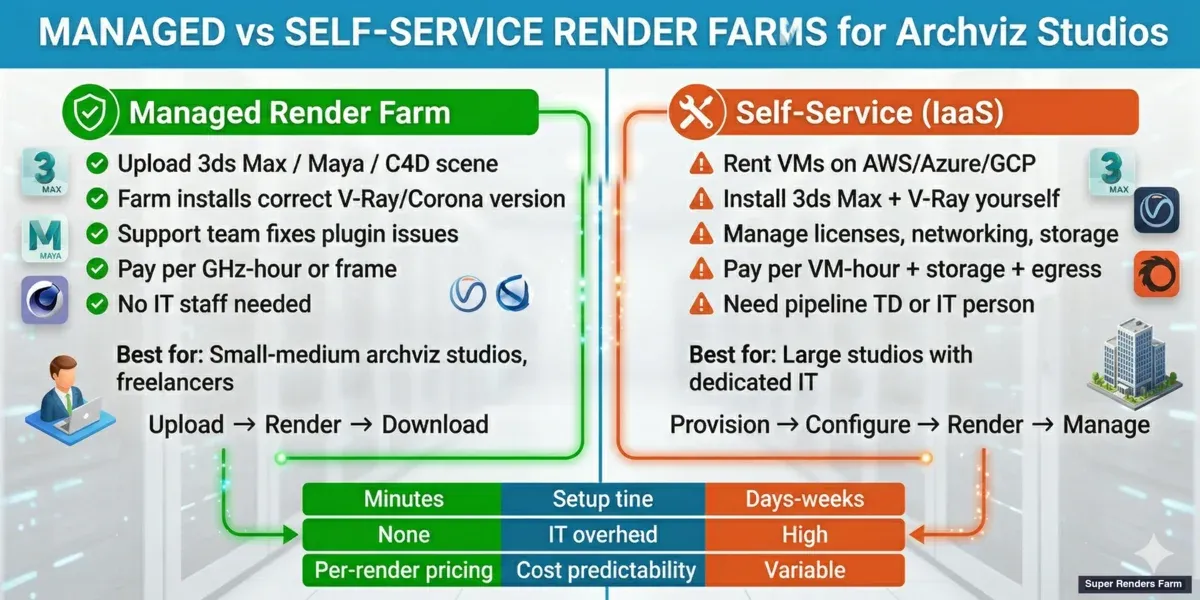 Managed vs self-service render farms for archviz — workflow, cost, and IT overhead comparison
Key Criteria for Choosing the Right Cloud Render Farm
When evaluating a render farm for archviz in 2026, assess these factors:
1. Hardware Specifications
Your render engine's performance depends directly on GPU and CPU hardware.
| Specification | What matters for archviz |
|---|---|
| GPU Model | RTX 5090 (32GB VRAM) is well suited for V-Ray and Redshift GPU rendering |
| CPU Cores | 22-core Xeons adequate for CPU rendering (Corona, NVIDIA Iray, traditional V-Ray CPU) |
| Memory | 24GB+ VRAM essential for complex scenes; 12GB bottlenecks high-polygon archviz models |
| Driver versions | Must support latest software versions (V-Ray 6.x, Corona 10.x, Redshift 3.5+) |
Per-card benchmark snapshot (driver-dependent, late April 2026): the RTX 5090 lands at approximately 1,050–1,100 OctaneBench, against the RTX 4090's typical ~745 baseline — roughly 41–48% per-card uplift on Octane and similar deltas on Redshift CUDA throughput in archviz-specific scene tests. The benchmark gap matters most for V-Ray GPU and Octane archviz interiors with heavy 8K textures, where the 5090's GDDR7 memory subsystem and 32 GB headroom prevent out-of-core fallbacks that the 24 GB RTX 4090 hits on dense scenes. Per-card scores fluctuate ±3–5% across driver releases — treat as a category reference rather than a fixed throughput contract.
What to ask: "What GPU model do you use? What's the VRAM? Can you handle 8k textures and 50M-polygon scenes without OOM errors?"
2. Software Support
Archviz studios typically use:
- 3ds Max + V-Ray (most common in North America/Europe)
- Cinema 4D + Redshift (motion design, smaller studios)
- Blender + Cycles or Redshift (freelancers, cost-conscious studios)
- Maya + Arnold (VFX-adjacent archviz, some studios)
Red flag: A render farm that doesn't explicitly list your software/engine combination. Assume compatibility issues until proven otherwise. For Cinema 4D users specifically, check our Redshift render farm guide for Cinema 4D to understand version compatibility in detail.
3. Ease of Use
For fully managed services, this means:
- One-click submission from your 3D software (plugin) or web interface
- No remote desktop required
- Automatic software detection (the farm recognizes your 3ds Max + V-Ray setup without manual configuration)
- Clear pricing upfront (no surprise fees)
For self-service platforms, this means:
- Fast remote desktop connection (low latency)
- Pre-installed software and licenses
- Clear documentation for your specific software
4. Reliability and Uptime
A missed deadline due to render farm downtime costs money and reputation.
What to check:
- Uptime SLA (99.9% is industry standard)
- Response time for support inquiries (archviz deadlines don't wait)
- Reviews on Reddit, industry forums, and sites like TrustPilot
- How long they've been in business (founded 2010 vs. 2024 is a significant difference)
5. Cost Structure
Cloud rendering pricing falls into a few models:
| Model | Best for | Example |
|---|---|---|
| Per-frame/per-minute | Variable workloads, one-off projects | $0.10–0.50 per minute of GPU time |
| Monthly subscription | Steady studio output, predictable budgets | $200–2,000/month for N render slots |
| Hybrid | Growing studios | Base subscription + overages |
| Per-hour VM rental | Self-service, on-demand compute | $2–8/hour per GPU node |
Pro tip: Request a trial project before committing. Most reputable farms offer a small free credit to test. When budgeting, also review our render farm pricing guide to understand long-term cost implications.
6. Support Quality
Rendering is technical. When something goes wrong—an OOM error, a missing plugin, a driver incompatibility—you need responsive, knowledgeable support.
What to look for:
- Email + chat support (not just ticketing)
- Response time guarantee (ideally <4 hours during business hours)
- Support engineers who understand 3D software, not just cloud infrastructure
- Community forums or Slack channel for peer support
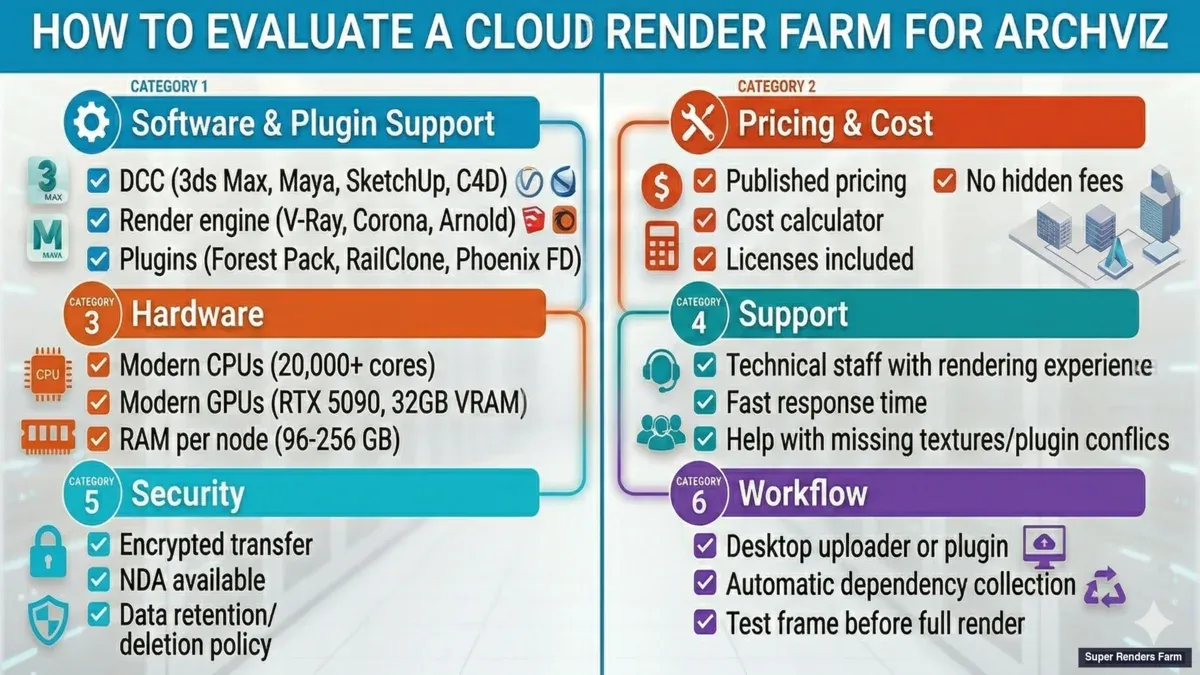 Cloud render farm evaluation checklist for archviz studios — software support, pricing, support quality, and security
How SuperRenders Farm Stands Out for Archviz
SuperRenders Farm (superrendersfarm.com) has served archviz studios globally since 2010, and the platform is purpose-built for this use case.
Fully Managed, No Remote Desktop
You upload your scene via web portal or desktop client. Super Renders Farm's team handles configuration:
- Detecting your 3D software and render engine
- Allocating the right hardware
- Managing software licenses
- Optimizing render settings for speed
You never remote desktop in. You never install software. You never wrestle with licensing. You upload, render, download—that's it.
For a 3-person archviz studio, this means 3–5 hours per project saved on infrastructure tasks. At $50/hour labor, that's $150–250 per project in pure efficiency gains.
Hardware Built for Archviz
Super Renders Farm runs 100+ render nodes with:
- GPU: NVIDIA RTX 5090 (32GB VRAM)—well suited for V-Ray and Redshift
- CPU: Dual Intel Xeon E5-2699 V4 (22 cores, 3.60 GHz)—for CPU render fallback
- Memory: 256GB system RAM per node—no OOM errors on complex scenes
This hardware is optimized for the high-polygon, high-texture scenes typical in archviz. A 50M-polygon model with 20GB of textures? No problem.
Comprehensive Software Support
Super Renders Farm supports the full archviz pipeline:
- 3D Software: 3ds Max, Maya, Cinema 4D, Blender, Houdini
- Render Engines: V-Ray, Corona, Arnold, Redshift, Octane, Cycles
- Provisioned on request: V-Ray and Octane for Blender; Arnold, V-Ray, and Octane for Houdini
And critically, Super Renders Farm supports archviz-specific plugins:
- Forest Pack (3ds Max vegetation library)
- RailClone (3ds Max architectural railings and patterns)
- Tyflow (3ds Max particles and dynamics)
- Notch (real-time motion graphics)
These plugins are common in archviz but missing from many render farms. When a farm doesn't support them, you're forced to pre-bake or workaround—eating time and quality.
For a complete walkthrough of running iToo Software's Forest Pack and RailClone on Super Renders Farm — including common problems, licensing coverage, and optimization tips — see our dedicated guide.
Transparent Pricing and Flexible Plans
Super Renders Farm offers:
- Pay-as-you-go for studios with unpredictable workloads
- Monthly credits for steady studios (better $/minute rates)
- Volume discounts for studios running 300+ hours/month
Example pricing (as of late April 2026):
- GPU hour (RTX 5090): $3.5–5.2
- CPU hour (22-core): $0.40–0.60
- Monthly subscription (unlimited, 5-node limit): $2,500
For a studio rendering 100 GPU hours/month: pay-as-you-go costs ~$200. A monthly plan costs $300 but includes overages. At 150 hours/month, monthly plans break even. At 200+ hours, they're 30% cheaper. To understand how this scales across different project types, see our detailed cost analysis.
Real Support from Real People
Super Renders Farm employs render engineers who understand archviz. Not chatbots, not tier-1 help desk staff. Response time: typically <2 hours during US/EU business hours.
For critical issues (render deadline looming), Super Renders Farm has emergency support.
This matters. When your 48-hour client deadline is live and your job fails mid-render due to a plugin conflict, you need someone who can debug it in minutes, not hours.
How Archviz Studios Use Cloud Rendering: Real Scenarios
Scenario 1: Single Archviz Freelancer
- Setup: Working from home, using 3ds Max + V-Ray. Projects range from single static renders to 2-minute animations.
- Challenge: Desktop workstation (RTX 3080) takes 16 hours for a 2k static render. Clients expect 48-hour turnarounds. Can't afford to buy a second GPU.
- Cloud solution: Freelancer uploads the 3ds Max file via web portal. Super Renders Farm's team configures it. 2k render completes in 45 minutes (15x faster). Freelancer downloads and delivers. Cost: ~$3–5 per render. Monthly revenue increases because turnaround time improves—more projects fit in the month.
Scenario 2: Boutique Archviz Studio (5 Artists)
- Setup: Mix of 3ds Max + V-Ray and Cinema 4D + Redshift. 10–15 projects/month. In-house infrastructure: 2 workstations with RTX 4080s.
- Challenge: Workstations are occupied by artists during the day. Rendering happens at night. Some nights, the render queue spills into the next day. Clients are frustrated by wait times. Upgrading to more workstations costs $50k and eats studio space
- Cloud solution: Super Renders Farm monthly subscription for 300 GPU hours/month (~$300). Large projects (animations, 8k renders) go to Super Renders Farm. Local workstations stay free for artist work. Bottleneck eliminated. Turnaround time drops from 72 hours to 24 hours. Studio books more projects. ROI on Super Renders Farm subscription is 3 months.
Scenario 3: Architecture Firm with In-house Viz Team (12 Artists)
- Setup: Large-scale projects: 40-minute VR animation, design iteration series, real-time walkthrough mockups. Mix of Unreal Engine renders and traditional archviz. Budget exists for infrastructure.
- Challenge: Needs predictable render capacity without over-provisioning hardware. Wants flexibility to burst to 50 parallel jobs for tight deadlines. IT staff doesn't want to manage licensing for dozens of software seats.
- Cloud solution: Super Renders Farm enterprise plan with unlimited node access (up to architecture firm's budget). Integrate Super Renders Farm's API into studio's submission pipeline. Artists upload scenes; jobs automatically queue on Super Renders Farm. Scales from 5 to 100 nodes based on demand. IT team offloads license management. Studio runs 1,000+ GPU hours/month—fully managed, predictable costs, zero in-house infrastructure.
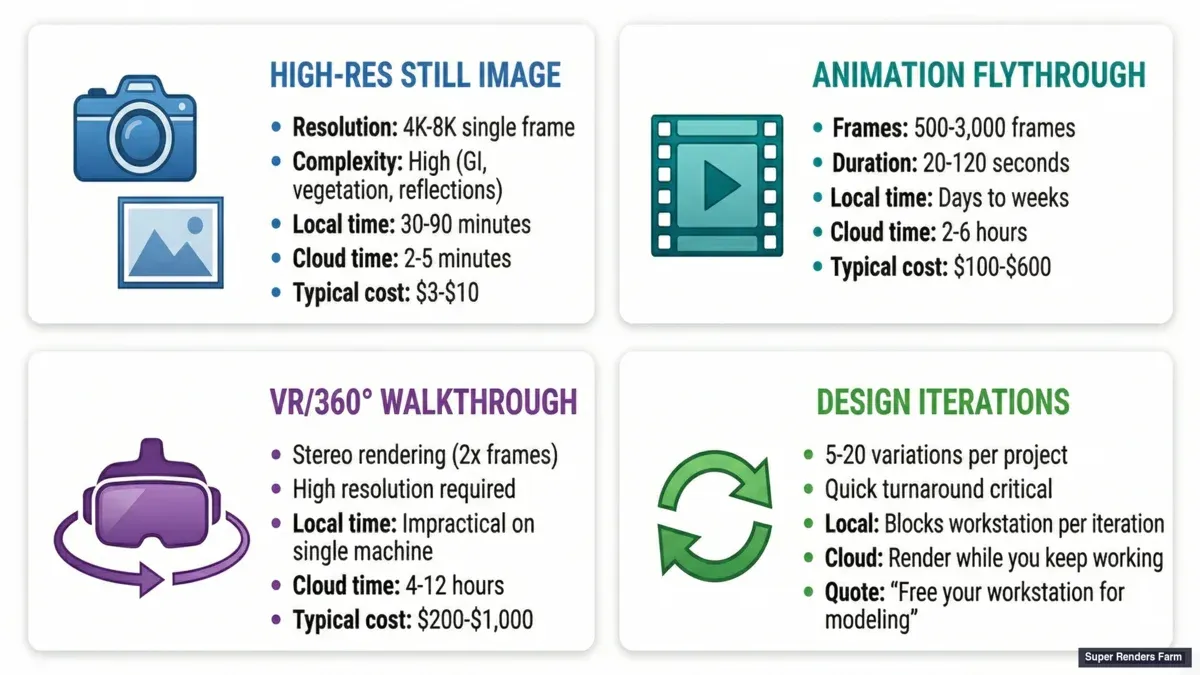 Archviz cloud rendering scenarios — single still, animation sequence, VR walkthrough, and design iterations
Super Renders Farm vs. Competitors: The Managed vs. Self-Service Trade-off
To illustrate why the fully managed model fits archviz studios well, here's a practical comparison:
| Factor | SuperRenders Farm (Managed) | iRender (Self-Service IaaS) | GarageFarm (Managed) | AWS Deadline (DIY) |
|---|---|---|---|---|
| Setup time | 10 minutes | 2–4 hours | 15 minutes | 1–2 days |
| Hidden costs | ~$0/project | ~$40–80/project | ~$0/project | ~$200+/project |
| Pricing (100 GPU hrs) | ~$200–250 | ~$300–400 | ~$200–300 | ~$150–200 |
| Total Cost of Ownership | ~$400–500 | ~$600–800 | ~$400–600 | ~$600–1,200 |
The per-compute-hour cost of iRender looks lower. But factor in artist time, expertise required, and support latency, and managed services often come out ahead on total cost of ownership.
Getting Started: 5 Steps to Your First Render on Super Renders Farm
- Create an account on superrendersfarm.com (free account, add payment method)
- Download Super Renders Farm's desktop client for your OS (Windows, Mac, Linux)
- Authenticate with your Super Renders Farm credentials in the client
- Open your 3D file in your software (3ds Max, Cinema 4D, Blender, etc.)
- Submit the job — the client auto-detects your software/engine, bundles the scene, uploads, and queues it for rendering
First job typically completes within 30–60 minutes. Download frames directly to your local machine.
FAQ: Common Questions About Cloud Rendering for Archviz
Q: What's the main difference between fully managed and self-service render farms? A: At Super Renders Farm, fully managed farms handle all configuration, licensing, and infrastructure for you. Self-service farms rent you a machine you manage yourself. For archviz studios without dedicated IT staff, fully managed saves time and eliminates operational complexity.
Q: Can I render my entire project on a cloud farm, or just overflow work? A: Either. Many studios use farms for all rendering (faster turnaround). Others use farms only for deadline crunch work. You can split workflows — use your workstations for artist preview renders, use the farm for final high-res and animation frames.
Q: Will my V-Ray scene render identically on a cloud farm compared to my local workstation? A: Yes, when driver versions and software versions match. Minor floating-point differences can occur due to GPU architecture (RTX 3090 vs RTX 5090 compute slightly differently), but render quality is visually identical.
Q: How long does a typical archviz project take to render on a cloud farm? A: A 2k static render (V-Ray or Corona): 30 seconds to 5 minutes depending on complexity. A 1-minute animation (2k, 24fps = 1,440 frames): 1–4 hours when distributed across 50 parallel nodes. Much faster than local workstations but not instantaneous.
For a deeper breakdown of frame counts and turnaround times specific to real estate walkthroughs, see our render farm guide for real estate animation and 3D walkthroughs.
Q: What happens if a frame fails mid-render? A: Fully managed farms automatically retry failed frames. If it fails again, support is notified. Most failures are resolved within 24 hours. Self-service/remote desktop requires you to diagnose and resubmit.
Q: What's the minimum job size worth using a cloud farm? A: Even a single static render is worth it if your turnaround is urgent. For ongoing work, once you're rendering 50+ hours per month, farm costs become very cost-effective compared to owning more local hardware.
Q: Can I use a cloud render farm if I don't have a render wrangler or pipeline TD? A: Yes—that's exactly what fully managed farms are designed for. No technical staff required. Just upload your scene and wait.
Q: How do I transition from DIY rendering to a managed render farm? A: Start with a test project. Package a recent scene and submit it to the managed farm for 5–10 frames. Compare output quality and turnaround time, then gradually move larger projects to the farm.
Last Updated: 2026-04-30



