
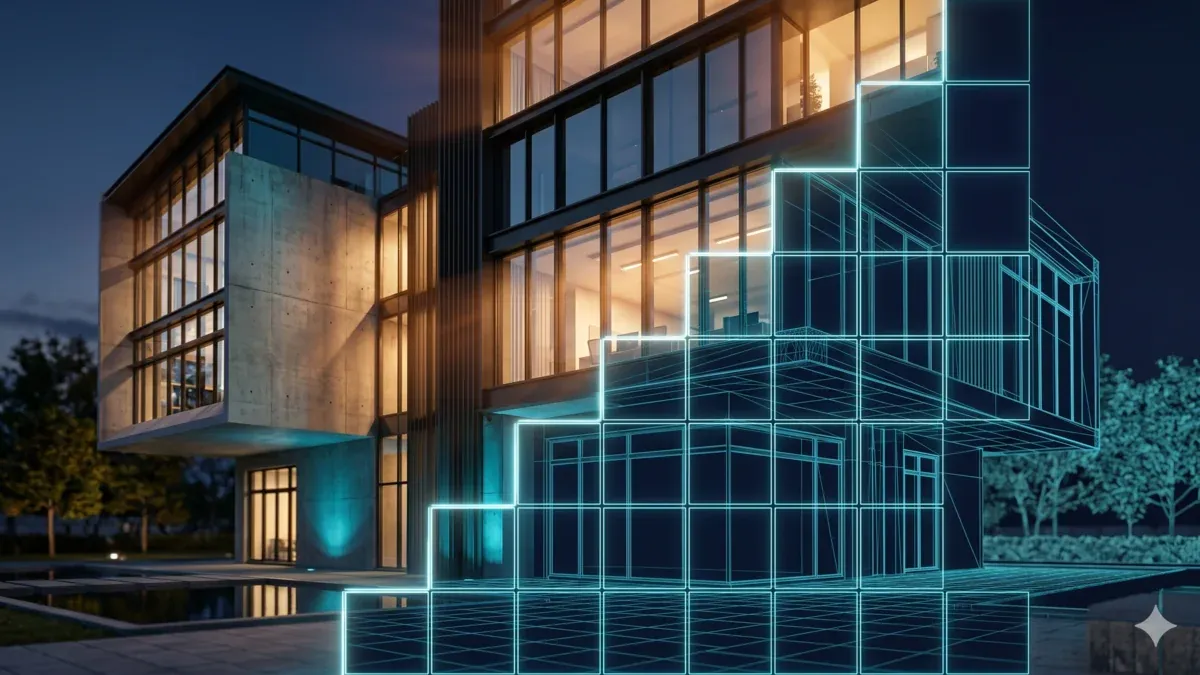
3D Architectural Rendering & AI Visualization: The Complete 2026 Workflow Guide
Overview
Introduction
3D architectural rendering is how a building that exists only as a CAD file or a 3D model becomes an image a client can actually react to. In 2026, architectural visualization spans far more than the photoreal still it used to be: exterior and interior stills, animated walkthroughs, 360° panoramas and VR tours, real-time interactive presentations, and increasingly AI-assisted concept iteration. The design and modeling side gets most of the attention, but the rendering side is usually where timelines live or die.
We've run distributed rendering for architectural visualization studios for years, and V-Ray and Corona scenes are the bread-and-butter of what crosses our farm
The same engines and pipeline carry over to vehicle work; our render farm for automotive rendering guide covers that niche. — so this guide is written from the operational side of the pipeline, not the brochure side. It covers what 3D architectural rendering actually is, the 2026 software landscape (offline renderers and real-time engines), where AI genuinely helps today and where it's still hype, and how studios scale rendering when local machines hit the wall. If your question is specifically "which cloud render farm should my ArchViz studio pick," that's a buying decision with its own answer — we point you to our dedicated render-farm-for-ArchViz comparison at the end rather than trying to cram it in here.
What is 3D architectural rendering (ArchViz)?
Architectural visualization — ArchViz for short — is the process of turning architectural, CAD, or 3D models into photorealistic or stylized imagery for design communication, client approval, and marketing. A model carries geometry and intent; a render carries feeling. That gap is why rendering matters: a developer signs off on a mood, a material, and a quality of light, not on a wireframe.
The deliverables vary more than people outside the field expect:
| Deliverable | What it's for |
|---|---|
| Exterior / interior stills | Hero shots for approvals, brochures, competition boards |
| Animated walkthroughs / flythroughs | Marketing and sales for developments, showing flow and scale |
| 360° panoramas + VR tours | Immersive client review, off-plan sales |
| Real-time interactive presentations | Live design meetings where the client wants to "walk" the space now |
| AI-assisted concept iterations | Fast early-stage mood and massing exploration |
The people producing this work range from in-house teams at architecture firms to dedicated ArchViz studios, real-estate developers, and freelance visualizers.
When that real-estate work moves from stills to animation, render times climb quickly; our render farm guide for real estate animation and 3D walkthroughs covers typical frame counts and turnaround windows for that work. The smaller the team, the more the rendering bottleneck hurts — a five-person studio can't afford to lock a workstation for a day on a single hero frame. (We cover that scale specifically in our guide for architecture studios under ten people.)
Why is rendering the bottleneck and not modeling? Because the things that make ArchViz look real — global illumination bouncing light around an interior, high-resolution textures, large vegetation and scatter scenes, and the sheer frame count of animation — are exactly the things that are computationally expensive. A still might take minutes; an interior with serious GI can take hours; a walkthrough multiplies that by hundreds or thousands of frames.
The 2026 ArchViz rendering pipeline
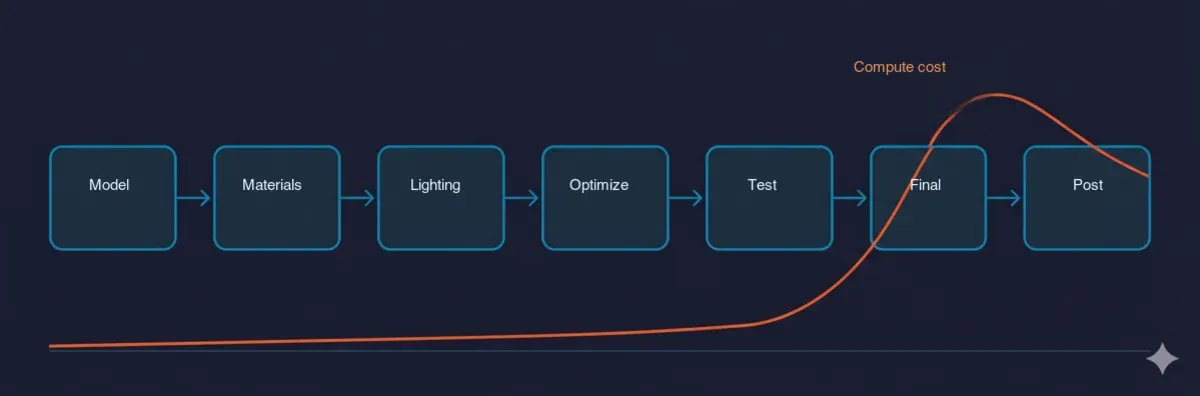 The seven-stage 2026 architectural visualization pipeline — model, materials, lighting, optimize, test, final render, and post — with compute cost rising sharply at the final-render stage.
A typical production ArchViz pipeline moves through the same honest stages whether you're producing one still or a full animation. Understanding the stages matters because the expensive part — and the part you can most control — isn't always where people look.
- Model / import. Geometry comes in from CAD (Revit, ArchiCAD, AutoCAD) or is built in a 3D app like 3ds Max, Cinema 4D, or SketchUp. Cleanup happens here: removing junk geometry, fixing normals, organizing the scene.
- Materials (PBR). Physically based materials get assigned — accurate diffuse, reflection, roughness, and bump so surfaces respond to light believably.
- Lighting. HDRI environments, physical sun-and-sky systems, and IES light profiles for accurate artificial lighting. Lighting is where an interior either reads as photoreal or as a video game.
- Scene optimization. Proxies for heavy assets, instancing for repeated objects, scatter systems like Forest Pack for vegetation, and clean asset paths. This is the high-leverage stage.
- Test renders. Low-resolution or region renders to check composition, lighting, and material response before committing to a long final render.
- Final render. The full-quality stills or animation. This is where compute demand peaks.
- Post. Denoising, color grading, and compositing to finish the image.
The single biggest render-time lever we see in ArchViz scenes isn't the renderer — it's scene prep. Proxies, instancing, and clean, node-accessible asset paths routinely move render times more than swapping engines does, especially on large scatter-heavy exteriors. We've watched a forest of individually-loaded trees bring a workstation to its knees, then drop to a fraction of the memory footprint once the same vegetation is handled as proxies and instances. If you want to go deep on that specific lever, our notes on Forest Pack scattering best practices and identifying Forest Pack bottlenecks cover it in detail.
It's also at the optimization stage that the CPU-versus-GPU decision gets made — which renderer, which hardware path, which trade-offs — and that sets up the next section.
The 2026 ArchViz rendering software landscape
There is no single "best" renderer for architecture, and any guide that declares one is selling something. The right renderer is the one your studio's pipeline and talent already speak fluently. What's useful is understanding what each category is genuinely good at in 2026.
Offline / production renderers
These are the engines that produce the accurate, photoreal final frames most ArchViz deliverables still require.
- V-Ray — the long-standing ArchViz default. It runs on both CPU and GPU, has the broadest material and feature ecosystem, and integrates deeply with 3ds Max, SketchUp, Rhino, and more. Its strength is breadth and control: if a scene needs something specific, V-Ray usually has a way to do it. (If you render V-Ray in the cloud, here's how V-Ray cloud rendering works without a manual license.)
- Corona — artist-friendly and CPU-leaning, hugely popular for interiors. Its strength is simplicity and speed-to-a-good-look — fewer knobs, fast iteration, and results that look right without a TD babysitting every setting. From the same Chaos family as V-Ray, so the two share an ecosystem.
- Redshift — GPU-first, built for speed. Where iteration velocity matters and the scene fits in GPU memory, Redshift's fast feedback loop is a real advantage, especially for studios already living in Cinema 4D. (See Redshift cloud rendering for the GPU side of an ArchViz pipeline.)
- Arnold, Octane, and Cycles — meaningful secondary options. Arnold is a robust path tracer common in VFX-adjacent work; Octane is a GPU renderer with a dedicated following; Cycles is Blender's capable, free, open-source engine.
A blunt honest framing: V-Ray gives you breadth and control, Corona gives you speed-to-good-look for interiors, and Redshift gives you GPU iteration speed. None of those is a winner in the abstract — they're winners for different studios.
Real-time / hybrid engines
This is the part most "2026" guides skip, and it's the most important shift in the field. Real-time engines have transformed client preview and iteration:
- Lumion — fast, library-rich, popular with architects who want strong results without a steep learning curve.
- D5 Render — GPU real-time with ray tracing, fast-growing for its quality-to-effort ratio.
- Enscape — plugs directly into Revit, SketchUp, and Rhino for live design-stage visualization.
- Twinmotion — Unreal-engine-based, strong for interactive and VR presentation.
The honest 2026 reality is hybrid: many studios use a real-time engine for iteration, client previews, and VR walkthroughs, then finish hero stills and final animation in an offline renderer like V-Ray or Corona where they need maximum accuracy and control. Real-time has not replaced offline rendering for final deliverables — it has changed where in the pipeline each tool earns its place.
| Use case | Real-time (Lumion / D5 / Enscape) | Offline (V-Ray / Corona / Redshift) |
|---|---|---|
| Live client design review | Strong fit | Overkill |
| Fast iteration on look | Strong fit | Slower |
| VR / interactive walkthrough | Strong fit | Limited |
| Hero photoreal still | Improving, often not final-grade | Strong fit |
| High-accuracy final animation | Situational | Strong fit |
One balance point worth stating plainly: most production ArchViz final-frame work we see is still CPU-based V-Ray and Corona. GPU and real-time are real and growing, but the "final frame is a CPU render job" pattern is still the majority of what comes through our farm.
AI in architectural visualization: the honest 2026 state
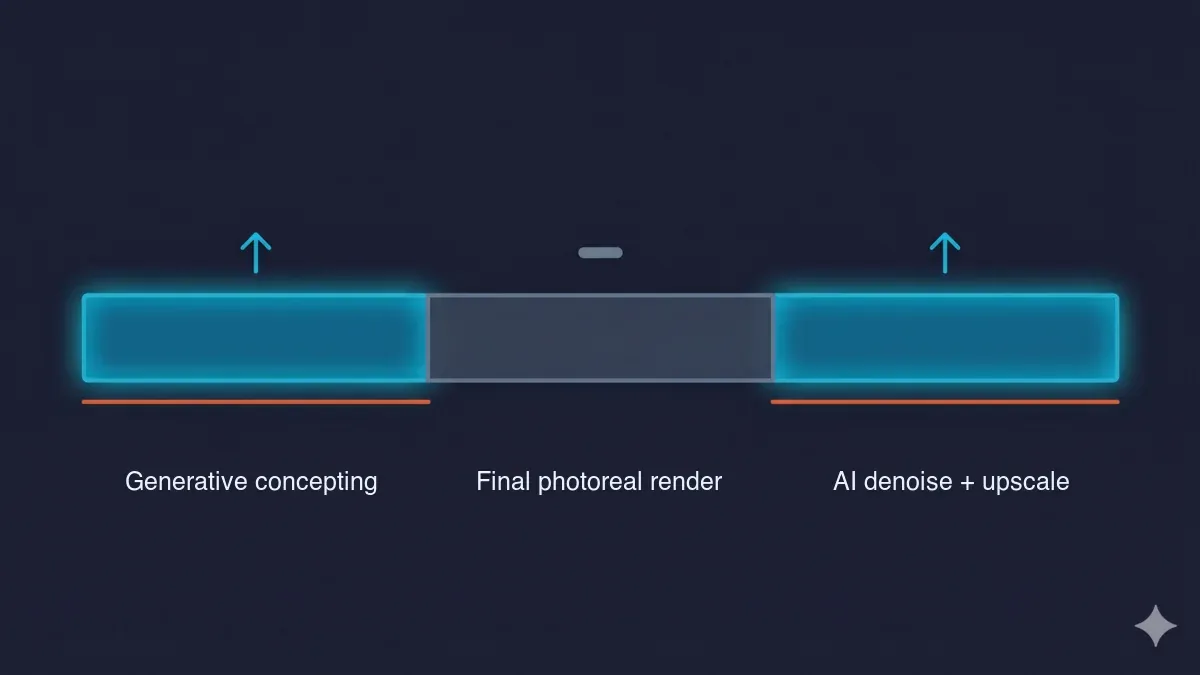 Where AI helps in the ArchViz pipeline — generative concepting at the front and AI denoising plus upscaling at the end, while the photoreal final-frame render in the middle stays a compute job AI does not replace.
AI is the most over-hyped and under-explained topic in ArchViz right now, so it's worth being precise about where it genuinely helps today versus where it's still a demo. There are three honest buckets.
1. AI denoising — mature and production-real. Denoisers like NVIDIA OptiX and Intel Open Image Denoise (OIDN) let you render fewer samples and clean the remaining noise, which cuts render time materially. This is the most production-proven AI use in architectural visualization, and it's already baked into the renderers above. The honest caveat: pushed too hard, denoising softens fine detail — fabric weave, foliage, high-frequency textures. The craft is tuning sample counts so the denoiser is cleaning a little noise rather than inventing missing detail.
2. AI upscaling — useful and situational. Render at a lower resolution, then upscale to 4K or 8K. For marketing stills this is a genuine time-saver. For animation it's riskier, because upscalers can introduce temporal instability — small frame-to-frame inconsistencies that read as shimmer. Used deliberately on the right deliverable, it's a real tool; used blindly on a walkthrough, it creates new problems.
3. Generative AI concepting — fast-moving, not a final-deliverable replacement. Tools that generate mood and concept imagery from text prompts or rough massing models (the MyArchitectAI-style category) are excellent for early ideation and client mood-setting. They are not yet a substitute for accurate, to-spec photoreal deliverables, because architectural sign-off depends on geometry and material fidelity — the client is approving this building with these materials, not a plausible-looking approximation. Generative AI is brilliant at "what could this feel like" and unreliable at "render exactly what we designed."
The pattern worth remembering: AI is changing the front of the pipeline (concepting) and the end (denoise and upscale) much faster than the middle. The accurate, photoreal final frame is still a render job. That honesty — not hype — is what actually helps studios plan, and it's the part competitors tend to skip in favor of a single AI product plug.
There's a rendering consequence here, too. AI denoising reduces the samples you need per frame, which is real savings — but it doesn't change the underlying math of a large animation or a 4K/8K still campaign. Fewer samples per frame, multiplied across thousands of frames, is still a lot of compute. Which brings us to scale.
When does an ArchViz studio need a render farm?
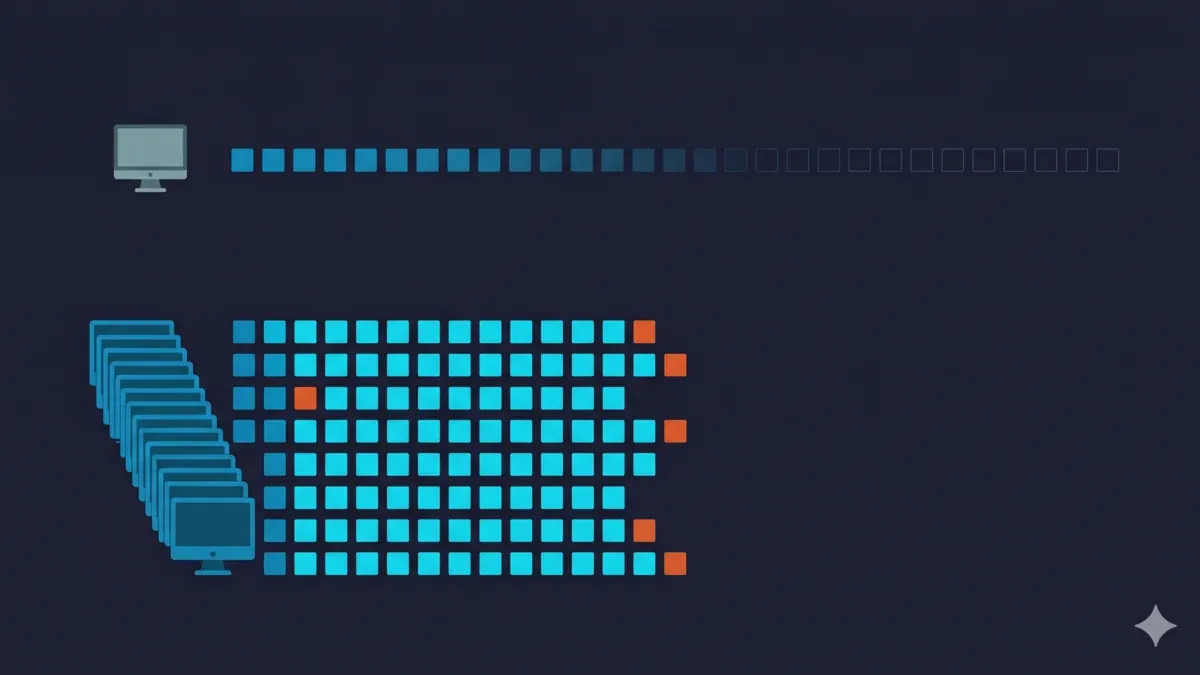 Serial versus parallel rendering — one workstation processing frames one at a time over a long timeline, versus a render farm processing many frames simultaneously in a fraction of the time.
A render farm isn't a default — it's an answer to specific pressure. The honest signals that a studio has outgrown local rendering:
- Animation. A 30-second walkthrough at 25–30fps is hundreds to thousands of frames. Rendered serially on one workstation, that's days; rendered in parallel, it's hours.
- Compressed deadlines. When the timeline is shorter than the serial render time, parallelism is the only lever left.
- Multiple concurrent projects. One workstation can't be the render machine and the work machine for three clients at once.
- Heavy GI or scatter scenes. Interiors with serious global illumination, or exteriors with large vegetation, can lock a workstation for hours per frame.
- 4K / 8K still campaigns. High-resolution stills at volume add up fast, even with AI denoise and upscale in the mix.
The math is plain: a local workstation renders frames one after another; a render farm renders many frames at once. That parallelism is the entire point, and it's why the cost conversation makes more sense per frame than per hour — our cost-per-frame guide breaks that down.
There's also a structural distinction worth knowing before you shop. A fully managed farm handles the machines, software, and licensing for you — you upload the project, render, and download, with no remote desktop and no manual license setup. A self-service (IaaS) farm gives you machines you configure and manage yourself: more flexible, more hands-on. Which one fits depends on your team's appetite for infrastructure work, and it's the kind of decision the dedicated comparison goes into properly.
And one honest counterpoint, because it builds trust: if you're producing single stills or light scenes on a reasonable timeline, a good local workstation is often enough. Not every studio needs a farm, and pretending otherwise would be a pitch, not advice.
Comparing render-farm options for ArchViz
If you've decided to render in the cloud, the options differ along a few axes that actually matter — and we go criteria-by-criteria in our dedicated ArchViz render-farm comparison, so the table below is an orientation, not the buying decision itself.
| Render farm | Model | Key engines for ArchViz | Free trial | Pricing model | Best fit for |
|---|---|---|---|---|---|
| Super Renders Farm | Fully managed | V-Ray, Corona, Redshift, Octane (licenses included) | $25 credit (never expires) | Render credits; CPU $0.004/GHz-hr, GPU $0.003/OBh | Studios that want V-Ray/Corona horsepower without managing machines or licenses |
| Managed render-farm peers | Fully managed | Typically V-Ray, Corona, Redshift | Varies by provider | Per-frame or credit-based | Studios wanting a hands-off managed workflow |
| Self-service / IaaS farms | Self-service (you manage) | Whatever you install / license yourself | Varies by provider | Hourly machine rental, bring-your-own-license | Technical teams comfortable provisioning and managing nodes |
| Real-time / AI-viz tools | Software (not a farm) | Lumion / D5 / Enscape / generative-AI category | Varies by product | Subscription | Iteration, client preview, early concepting |
A few things to read from that table honestly: a managed farm removes the infrastructure work, an IaaS farm trades convenience for control, and real-time/AI tools are a different category entirely — they speed up iteration and concepting rather than producing your final photoreal deliverable. We've kept the competitor cells general on purpose; current trial offers and exact rates change often, so confirm them at the source rather than trusting a number in a guide. We don't publish competitors' live prices here for that reason.
Where Super Renders Farm fits for ArchViz
We'll be specific about fit rather than make claims we can't stand behind. On the renderer side, Super Renders Farm runs the ArchViz core: as an official Chaos partner for V-Ray and Corona, and a Maxon partner for Redshift, with all engine licensing included in the render rate — no separate license to buy or install. The horsepower is CPU-first, which matches how most production ArchViz actually renders: 20,000+ CPU cores for V-Ray and Corona work, plus a GPU fleet (NVIDIA RTX 5090, 32 GB VRAM) for Redshift and Octane. Large scatter-heavy scenes — the Forest Pack exteriors that punish a single workstation — are exactly the kind of job an ArchViz render farm is built for. And it's fully managed: no remote desktop, no manual licensing — you upload, render, and download.
For US architecture firms specifically, there's a practical vendor-relationship angle worth stating plainly and honestly. Super Renders Farm LLC is a US company headquartered in Santa Ana, California, with US billing in USD, a US support phone line (001-714-383-0800) alongside 24/7 live chat, and US legal jurisdiction — which matters if you need a domestic vendor relationship, a US number to call, and clear legal recourse as a registered US entity. That's a real fit for US firms that want a US-company vendor, not a claim to be the only or the "best" US option — there are other capable US providers, and the right pick depends on your pipeline.
On cost, new accounts get $25 in free credit to test a real scene, credits never expire, and CPU rendering bills at $0.004/GHz-hr (rising by priority tier); the full breakdown lives on the pricing page. The honest way to evaluate any farm, including this one, is to render a representative frame on the trial and read the per-frame number for your actual scene — that tells you more than any rate card.
FAQ
Q: What is 3D architectural rendering? A: 3D architectural rendering is the process of turning architectural or 3D models into photorealistic or stylized images and animations — exterior and interior stills, animated walkthroughs, 360° panoramas, and VR tours — used for design communication, client approval, and marketing. It typically uses renderers like V-Ray, Corona, or Redshift inside tools such as 3ds Max, Cinema 4D, or SketchUp.
Q: What is the best software for architectural visualization in 2026? A: There is no single answer — it depends on your pipeline. V-Ray and Corona remain the production defaults for photorealistic final frames, Redshift is popular where GPU iteration speed matters, and real-time engines like Lumion, D5 Render, and Enscape have become standard for fast client previews. Many studios in 2026 run a hybrid: real-time for iteration, an offline renderer for the final deliverable.
Q: How is AI used in architectural visualization? A: In 2026, AI helps most reliably at two ends of the pipeline: AI denoising (OptiX, OIDN) lets you render fewer samples and clean the noise to cut render time, and AI upscaling lets you render smaller and enlarge stills to 4K or 8K. Generative AI is useful for early concepting and mood imagery but is not yet a replacement for accurate, to-spec photorealistic deliverables where geometry and material fidelity matter.
Q: Does AI denoising reduce render quality? A: Used moderately, AI denoising is production-proven and saves significant time. Pushed too hard, it can soften fine detail like fabric weave, foliage, and high-frequency textures, so most studios tune sample counts so the denoiser is cleaning a little noise rather than reconstructing missing detail. For animation, consistent denoiser settings across frames help avoid temporal flicker.
Q: When does an architecture studio need a cloud render farm? A: The usual triggers are animation (a 30-second walkthrough at 25–30fps is hundreds to thousands of frames), compressed deadlines, several concurrent client projects, heavy global-illumination or vegetation-scatter scenes that tie up a workstation for hours, and 4K or 8K still campaigns. A render farm renders frames in parallel instead of serially, which is what saves the timeline. For single light stills, a good local workstation is often enough.
Q: How do I render a large ArchViz scene with Forest Pack or heavy vegetation? A: The highest-leverage step is scene optimization before you render: use proxies and instancing for vegetation and repeated assets, keep texture paths clean and accessible to every render node, and bake or cache where you can. We consistently see scene preparation move render times more than swapping the renderer does, especially on large scatter-heavy exterior scenes.
Q: What is the difference between a fully managed and a self-service render farm for architecture? A: A fully managed farm handles the machines, software, and licensing for you — you upload your project, render, and download, with no remote desktop or manual license setup. A self-service (IaaS) farm gives you machines you configure and manage yourself, which is more flexible but more hands-on. For a deeper, criteria-by-criteria comparison of ArchViz render-farm options, see our dedicated render-farm-for-ArchViz guide.
Conclusion
Good architectural visualization in 2026 comes down to four things working together: a clean rendering process, the right renderer for your pipeline, honest use of AI where it genuinely helps, and the right horsepower when you scale. The process and the scene-prep discipline are where most render time is won or lost; the renderer choice is a fit decision, not a ranking; AI earns its place at the front and the end of the pipeline but not yet in the accurate final frame; and a render farm is the answer to parallel-scale pressure, not a default. If you're at the buying-decision stage and weighing cloud render farms specifically, our ArchViz render-farm comparison takes that question criteria by criteria.
About Thierry Marc
3D Rendering Expert with over 10 years of experience in the industry. Specialized in Maya, Arnold, and high-end technical workflows for film and advertising.



