
Render Service vs Render Farm: What's the Difference (and Which Do You Need)
Overview
Introduction
Search "render service" and "render farm" and you'll get largely the same results. Vendors use both terms on their homepages, sometimes in the same sentence, and most buyer's-guide content treats them as synonyms. They aren't quite the same thing, and the difference matters more than it looks like on the surface — because it changes what you're actually renting, how much setup work lands on your side, and what you should expect when a job goes wrong.
This guide breaks down where the two terms overlap, where they diverge, and which one you're actually looking for depending on how your studio works. We'll use "render farm" and "render service" the way the industry actually uses them in practice, not as strict dictionary definitions — because the confusion is real and worth untangling rather than pretending it doesn't exist.
The Short Answer
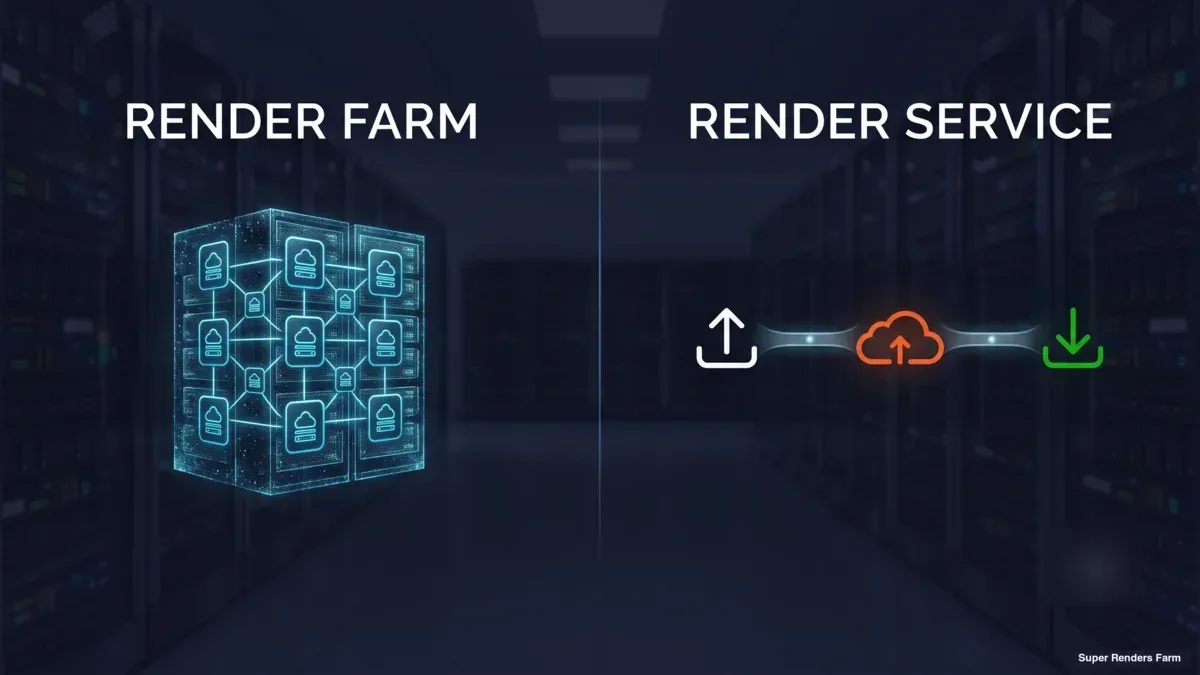
A render farm is the hardware layer — a cluster of machines (CPU, GPU, or both) built to process render jobs in parallel. A render service is the business layer — a company that sells you access to that hardware, wrapped in some combination of software, support, and workflow tooling.
Every render service runs on a render farm somewhere. Not every render farm is sold as a service — some are internal infrastructure a studio builds and operates for itself. So "render farm" is the more general, technical term, and "render service" is what you call it once someone is selling you access to one.
In casual use, though, the terms collapse into each other constantly. When someone asks "which render farm should I use," they usually mean "which render service should I use" — they're not planning to rack their own servers. That's the source of most of the confusion, and it's why disambiguating matters: the real decision buyers face isn't "farm vs service," it's which kind of service — because render services differ a lot more from each other than the terminology suggests.
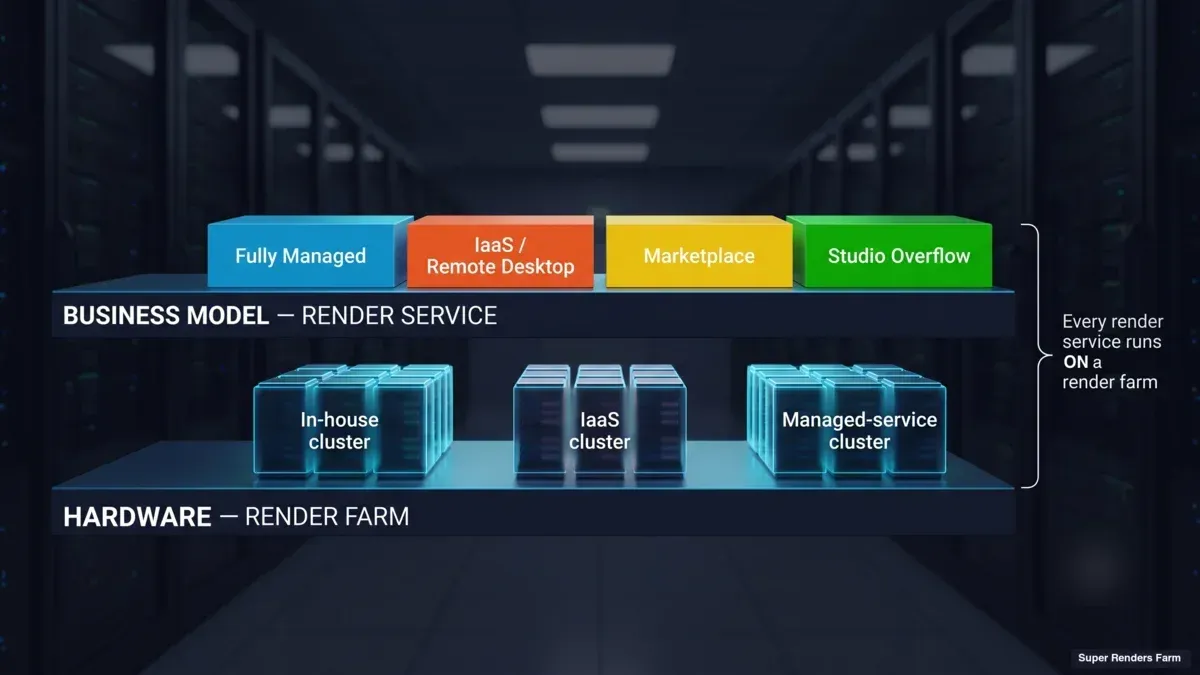 Two-layer diagram showing render services as business models built on top of render farm hardware
Render Farm: The Hardware Layer
A render farm, stripped down to its literal meaning, is a collection of networked machines dedicated to rendering — running a render manager (a job scheduler that distributes frames or tiles across available nodes) and reassembling the output as machines finish their assigned work.
Render farms exist in a few forms:
- In-house farms — A studio's own machines, often repurposed workstations or dedicated rack servers, running overnight or during off-peak hours. Full control, but capital cost, physical maintenance, and a hard capacity ceiling (you own exactly as many machines as you bought).
- Cloud-rented clusters (IaaS) — Providers like AWS, or specialized cloud-GPU vendors, rent you raw compute by the hour. You get a virtual machine or a batch of them; you install your own software, configure your own license servers, and manage the job submission yourself.
- Managed render farms sold as a service — A provider maintains the hardware, keeps software and licenses current, and exposes a submission interface (web portal, plugin, or client app) so you never touch the underlying machines directly.
The word "farm" on its own says nothing about which of these three you're getting. That's the gap "render service" is supposed to fill — and often doesn't, because vendors use the word loosely too.
Render Service: The Business Layer
A render service is what you're buying when a company sells you rendering capacity as a product, rather than you owning or directly administering the machines yourself. The term covers a wide range of actual delivery models, and this is where "which service do I need" becomes the real question:
Fully managed rendering service. You upload a project, the provider's infrastructure handles software installation, license allocation, and job scheduling, and you download completed frames. No remote desktop, no manual environment setup. This is the model we run at Super Renders Farm — the workflow is upload, render, download, with the operational layer (licensing, node health, job requeuing on failure) handled on our side rather than yours.
Remote-desktop / IaaS-style service. You get access to a virtual machine (or a pool of them) that you administer like your own workstation — installing your own render engine, managing your own license server, and troubleshooting configuration issues yourself. This suits studios with very specific or unusual pipeline requirements that a managed environment can't accommodate, at the cost of more hands-on setup and maintenance per job.
Freelance or peer-to-peer render marketplaces. Some platforms connect render jobs with individual machine owners rather than a dedicated data center. Availability and consistency vary more here than with a dedicated provider, since the underlying hardware pool isn't centrally managed.
Studio-to-studio overflow arrangements. Less formalized — one studio rents spare capacity from another during a crunch. Not really a "service" in the commercial sense, but it shows up in the same conversations.
None of these models is universally "better." They trade off differently on setup time, control, and cost — which is exactly why the disambiguation matters more than the terminology.
Render Service vs Render Farm: Side-by-Side
| Render Farm (the hardware) | Render Service (the business) | |
|---|---|---|
| What it is | A cluster of machines running a job scheduler | A company selling access to a farm, in some delivery model |
| Who administers it | Depends — you, if in-house; the provider, if managed | Varies by model (managed = provider; IaaS = you) |
| Setup on your end | N/A (it's just hardware) | None (managed) to full VM configuration (IaaS) |
| Billing | N/A (capital cost if you own it) | Usually consumption-based — per compute-hour or per-frame equivalent |
| Software/licensing | Whatever you install | Included (managed) or self-managed (IaaS) |
| Support when a job fails | Your own team, if in-house | Provider's operations team (managed) or your own troubleshooting (IaaS) |
The practical takeaway: if you're evaluating options and someone says "render service," ask which model they mean before comparing pricing. A managed service's per-hour rate and an IaaS provider's per-hour rate are not directly comparable numbers — one includes licensing, monitoring, and support; the other is closer to raw compute.
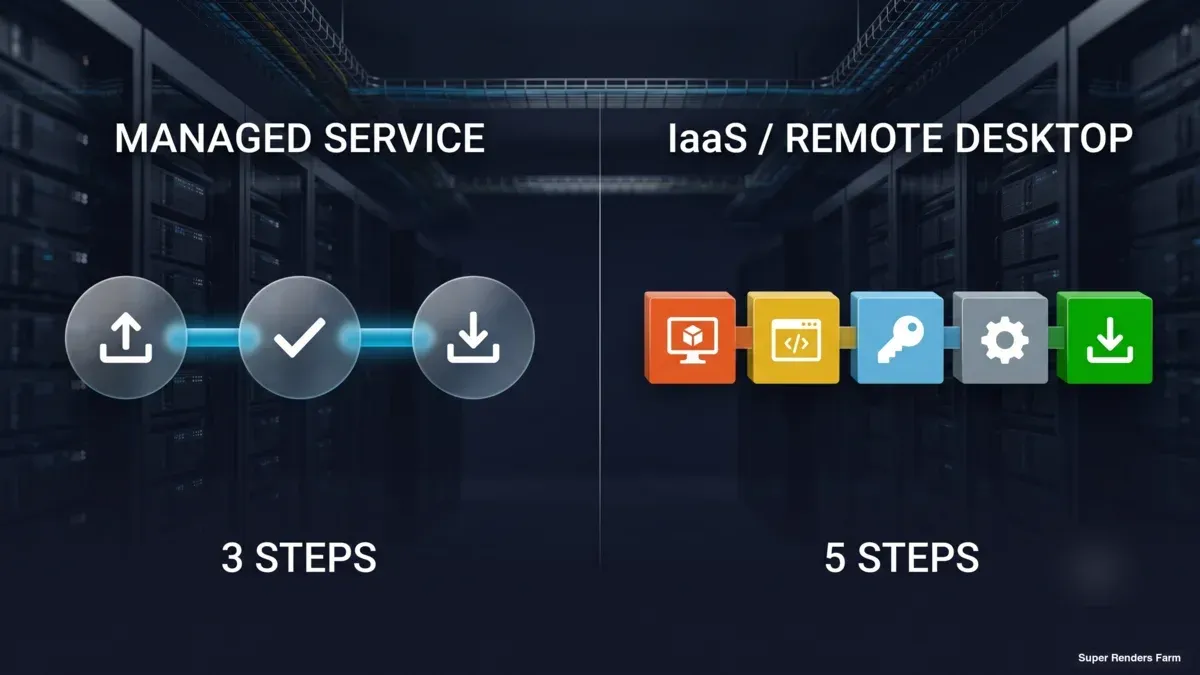 Icon comparison of managed render service steps versus IaaS remote-desktop setup steps
Which One Do You Actually Need?
You want a fully managed render service if: you'd rather submit a job and get frames back than spend time on server administration. This fits most production studios — archviz firms with a small team, VFX shops mid-deadline, motion design studios without a dedicated pipeline TD. The tradeoff is less low-level control over the render environment in exchange for near-zero setup overhead per job.
You want an IaaS/remote-desktop render farm if: your pipeline depends on a highly specific software stack, a plugin combination a managed provider doesn't pre-install, or custom OS-level configuration. You're trading setup time for full control.
You want to build your own in-house farm if: your render volume is large enough, consistent enough, and predictable enough that the capital cost of owning hardware amortizes below what any service would charge over the machine's useful life — and you have the staff to maintain it. This is a genuinely different calculation than "service vs no service," and it's covered in more depth in our SaaS render farm vs. dedicated cluster comparison, which walks through the breakeven math.
For most studios evaluating options today, the practical decision is between a fully managed service and an IaaS service — the in-house build-vs-rent math only becomes relevant at a render volume most studios haven't reached yet.
What a Managed Render Service Actually Looks Like Day-to-Day
Since "managed render service" is the model most buyers land on, it's worth being concrete about the actual mechanics rather than describing it abstractly.
On our farm, the workflow is upload, render, download — no remote desktop step in between. A project's scene file, textures, and referenced assets go up through a submission client or plugin; the job distributes across available nodes (we run 20,000+ CPU cores alongside dedicated GPU machines with NVIDIA RTX 5090, 32 GB VRAM); completed frames come back as they finish rendering, so large animation jobs can start downloading partial output before the whole sequence completes.
Software support spans the DCC applications and render engines a production pipeline is likely to touch — 3ds Max, Maya, Cinema 4D, Blender, and Houdini on the application side; V-Ray, Corona, Arnold, Redshift, Octane, and Cycles on the engine side, with licensing for the commercial engines included in the per-hour rate rather than billed separately. That licensing-included detail is one of the clearer practical differences between a managed service and IaaS: on IaaS, you typically bring or provision your own license.
For a deeper walkthrough of exactly how the upload-render-download cycle works, including a service-model breakdown of managed vs. IaaS, see our guide to how online rendering services work.
When the job is specifically a video render — a 3D animation or comp that needs frames rendered AND encoded into a playable file — the pipeline and cost math work a little differently than a standard frame-only render job. See our video rendering service breakdown for the full frame-render-plus-encode workflow and a worked cost example.
For current rates on this model, see Super Renders Farm pricing. Since managed-service fit varies by workload, our render farm by industry page breaks down archviz, VFX, animation, and motion design specifically.
Evaluating a Render Service: What to Actually Check
Whichever model you're leaning toward, a few things are worth verifying before submitting a real job — not the marketing copy, the operational details:
- Software and plugin version match — Confirm the service supports your exact DCC and render engine version, and any plugins (Forest Pack, RailClone, Anima, and similar) your scene depends on. A farm that's a version behind can silently change render output.
- What happens on node failure — Ask whether failed frames get automatically requeued, or whether that's on you to notice and resubmit. This is one of the clearest signals of "managed" vs. "you're still the operator."
- Pricing model clarity — Per-GHz-hour, per-frame, or flat monthly — and whether licensing is bundled into that number or billed separately. Comparing a bundled-licensing rate against an unbundled one without adjusting for that difference produces a misleading cost comparison.
- Data retention window — How long rendered output stays available for download before it's deleted, and whether there's an auto-download option so you're not racing a deadline to retrieve files.
- Support responsiveness — Whether support is reachable when a job is stuck at 2am before a deadline, not just during business hours in one timezone.
None of these show up clearly from a homepage. They're the questions worth asking directly, or testing with a small trial job before committing a production deadline to an untested service.
For a broader look at how the major providers in this space stack up against each other on these exact dimensions, our complete render farm comparison walks through a transparent, peer-set breakdown rather than a single-vendor pitch.
Common Mistakes When Comparing "Render Services"
Comparing per-hour rates without checking what's bundled. A $2/hour IaaS machine and a $2/hour managed-service rate are not the same purchase if one includes render-engine licensing and operational support and the other doesn't. Always normalize for what's included before comparing numbers.
Assuming "render farm" in a search result means a service you can just sign up for. Some results are hardware vendors, some are IaaS providers, some are managed services, and a few are genuinely just technical explainers about what a render farm is. The term alone doesn't tell you the delivery model — check the actual product page.
Treating setup time as a one-time cost. On an IaaS service, environment configuration isn't a one-time tax — every software update, license renewal, or plugin change is maintenance you're responsible for on an ongoing basis. That recurring cost is easy to underweight when comparing an hourly rate against a managed service's all-in rate.
Skipping the trial render. Whatever the service, a small test job before a real deadline is cheap insurance against surprises in output quality, render time, or submission friction.
FAQ
Q: Is a render service the same thing as a render farm? A: Not exactly. A render farm is the hardware — a cluster of machines built to process render jobs in parallel. A render service is a company selling access to that hardware, in one of several delivery models (fully managed, remote-desktop/IaaS, or marketplace-style). Every render service runs on a render farm, but not every render farm is sold as a service — some are internal infrastructure a studio operates for itself.
Q: What's the difference between a managed render service and an IaaS render farm? A: A managed service installs and maintains software, licensing, and job scheduling on the provider's side — you upload a project and download rendered frames with no environment setup on your end. An IaaS (Infrastructure-as-a-Service) render farm gives you a virtual machine you configure yourself: installing render engines, managing your own license server, and troubleshooting the environment when something breaks. Managed suits studios that want to skip server administration; IaaS suits pipelines with highly specific software requirements a managed environment can't accommodate.
Q: Which is cheaper, a render service or building an in-house render farm? A: It depends entirely on render volume. A render service has no capital cost and scales with usage, which is cheaper for intermittent or unpredictable workloads. An in-house farm has a large upfront hardware cost that only pays off if render volume is consistently high enough, over a long enough period, to beat the service's cumulative hourly cost — and that calculation also has to account for staff time spent on maintenance. Our SaaS vs. dedicated cluster comparison walks through the breakeven math in more detail.
Q: Do render services support all render engines? A: Support varies by provider. Established rendering services typically cover the major engines — V-Ray, Corona, Arnold, Redshift, Octane, and Cycles — across common DCC applications like 3ds Max, Maya, Cinema 4D, Blender, and Houdini. Plugin compatibility (Forest Pack, RailClone, Anima, and similar) varies more and should be confirmed directly with any provider before submitting a job that depends on them.
Q: What happens if a frame fails to render on a render service? A: On a managed service, node health and failed-frame requeuing are typically handled automatically by the provider's render manager — you don't need to notice or manually resubmit. On an IaaS setup, failure handling is generally your responsibility, since you're operating the machine directly. This is one of the more practical questions to ask before choosing a provider, since it directly affects how much monitoring falls on your side during a render.
Q: Is "online rendering service" different from "cloud rendering service"? A: In practice, no — both phrases describe the same thing: rendering compute accessed remotely over the internet rather than run on local hardware. The terminology varies by which phrase a particular vendor or search result prefers, not by any real difference in what's being offered.
Q: Can I use a render service for just one project, or do I need an ongoing subscription? A: Most render services (including consumption-based, per-GHz or per-frame pricing models) don't require a subscription — you pay for the compute a specific job consumes and can use the service for a single project without any ongoing commitment. This differs from software-subscription pricing and is one of the more buyer-friendly aspects of the render-service model compared to owning hardware outright.
About Alice Harper
Blender and V-Ray specialist. Passionate about optimizing render workflows, sharing tips, and educating the 3D community to achieve photorealistic results faster.



