
Architectural Visualization: The Complete Guide for 3D Artists and Studios
Overview
Introduction
Architectural visualization — archviz — is the process of creating photorealistic images, animations, and interactive experiences from architectural designs. It bridges the gap between blueprints and built reality, helping architects, developers, and clients see a project before construction begins.
Over the past decade, we've processed thousands of archviz projects on our farm.
For the automotive side of product visualization, which shares much of the same rendering workflow, see our render farm for automotive rendering guide. The work ranges from single-frame marketing stills for residential developers to full walkthrough animations for commercial real estate firms. What's changed most in recent years isn't the rendering itself — it's how deeply integrated visualization has become in architectural decision-making. Clients no longer treat archviz as an afterthought. They expect photorealistic visuals during the design phase, not after it.
This guide covers everything a 3D artist or studio needs to know about architectural visualization in 2026: the software landscape, production pipelines, rendering strategies, cloud workflows, and where the industry is heading. Whether you're starting your first archviz project or running a multi-person studio, the goal is to give you a practical, operationally grounded reference.
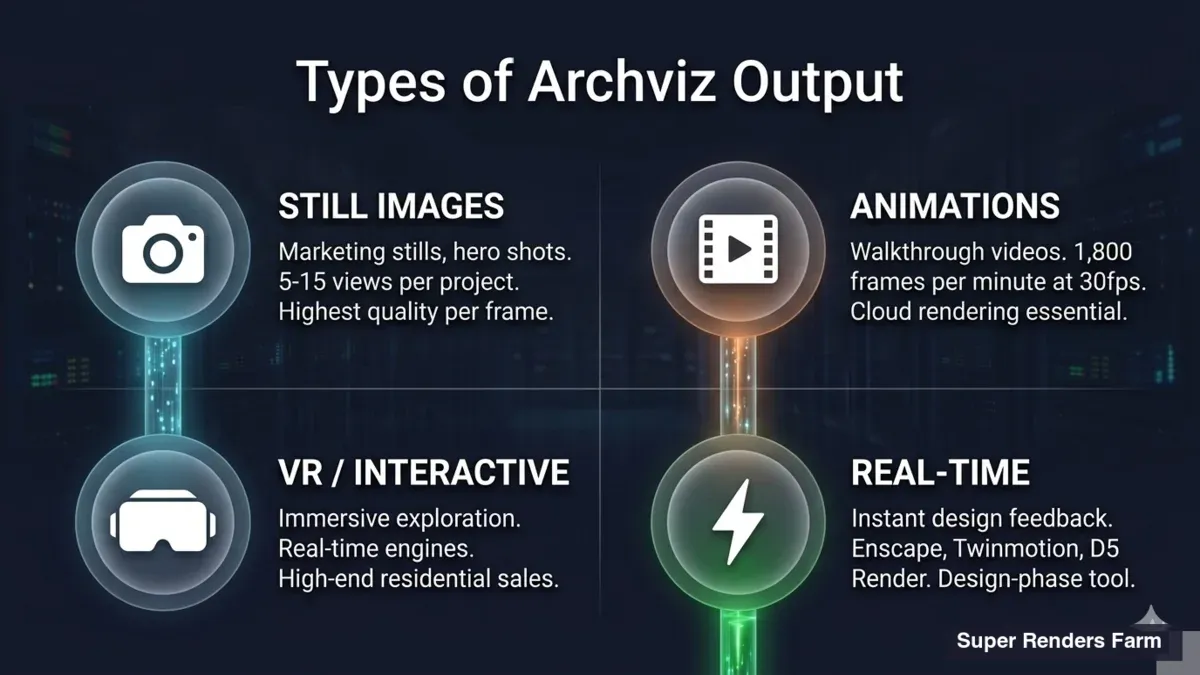 Four types of architectural visualization — still images, animations, VR and interactive, real-time visualization with use cases
What Is Architectural Visualization
Architectural visualization is the creation of 3D representations of buildings, interiors, and urban spaces based on architectural plans. The output can be a single photorealistic image, a camera animation, a virtual reality experience, or a real-time interactive model.
The purpose varies by audience. For architects, archviz validates design intent — does the space feel the way they envisioned? For developers and investors, it's a sales tool — pre-selling units in buildings that don't exist yet. For planning committees and municipal bodies, it's a communication tool — showing how a proposed development fits into the existing urban fabric.
What separates professional archviz from generic 3D rendering is the attention to physically accurate materials, natural lighting behavior, and environmental context. A convincing architectural image needs correct sun angles for the project's geographic location, materials that respond to light the way real concrete, glass, and wood do, and landscaping that feels alive rather than procedurally placed.
Types of Architectural Visualization
Archviz output falls into four broad categories, each with different production requirements and rendering demands.
Still Images remain the most common deliverable. A typical project involves 5–15 exterior and interior views rendered at high resolution (4K–8K) with extensive post-production. Render times per frame can range from 20 minutes to several hours depending on scene complexity, material detail, and the renderer being used. Still images are the bread and butter of most archviz studios.
Animations are increasingly requested by commercial clients. A 60-second architectural walkthrough at 30 fps requires 1,800 individual frames — each one needing the same quality as a still image. This is where rendering infrastructure matters most. A single workstation rendering one frame every 30 minutes would need 37.5 days for one minute of footage. Cloud render farms reduce this to hours by distributing frames across hundreds of machines simultaneously.
VR and Interactive Experiences use real-time engines like Unreal Engine or Unity to let clients explore spaces freely. The trade-off is visual fidelity — real-time rendering can't yet match the photorealism of offline renderers like V-Ray or Corona, though the gap narrows every year. VR walkthroughs are particularly effective for residential sales, where buyers want to feel the space rather than just see it.
Real-Time Visualization overlaps with VR but serves a different workflow. Tools like Enscape, Twinmotion, and D5 Render plug directly into modeling software (SketchUp, Revit, Rhino) and provide instant visual feedback during the design process. They're not replacing offline rendering for final deliverables, but they've fundamentally changed how architects iterate on designs.
The Software Landscape
The archviz industry has settled into a few dominant software combinations, though the landscape continues to evolve.
3ds Max + V-Ray or Corona is the dominant production pipeline. Industry surveys consistently show 3ds Max as the most-used modeling tool in archviz (roughly 59% of professionals), and V-Ray and Corona as the go-to render engines. This combination has decades of ecosystem support — libraries of architectural materials, plugins like Forest Pack and RailClone for scattering vegetation and parametric structures, and a deep talent pool. As an official Chaos render partner, we see more V-Ray and Corona jobs than any other renderer on our farm. For a deeper look at V-Ray specifically, see our V-Ray 7 features guide. For Corona workflows, our Corona render farm guide covers setup and optimization.
Blender + Cycles has grown significantly in archviz adoption. Blender's zero licensing cost and rapid development cycle (geometry nodes, EEVEE improvements) make it attractive for solo artists and smaller studios. Cycles produces physically accurate results, and the community has built impressive archviz-specific asset libraries. The main limitation is ecosystem maturity — fewer archviz-specific plugins compared to 3ds Max, and a smaller pool of archviz-experienced Blender artists in the job market.
SketchUp + Enscape fills a different niche. SketchUp is widely used by architects (not visualization specialists) for quick massing studies and design development. Enscape provides real-time rendering directly inside SketchUp, letting architects visualize materials and lighting without leaving their modeling environment. The results are good enough for design presentations but typically not for final marketing materials.
Cinema 4D + Redshift is popular in motion design and increasingly in archviz animation. Redshift's GPU-based rendering is fast, and Cinema 4D's motion graphics toolset (MoGraph) is particularly strong for animated sequences. For studios that do both archviz and motion design, this combination avoids maintaining two separate pipelines.
Unreal Engine occupies the real-time end of the spectrum. With Nanite (virtualized geometry) and Lumen (global illumination), Unreal Engine 5 can produce near-photorealistic results in real time. It's used for interactive configurators, VR experiences, and increasingly for final-frame rendering via Movie Render Queue. The learning curve is steep compared to traditional archviz tools, but the payoff is real-time interactivity.
For a broader comparison of rendering software options, see our rendering software comparison.
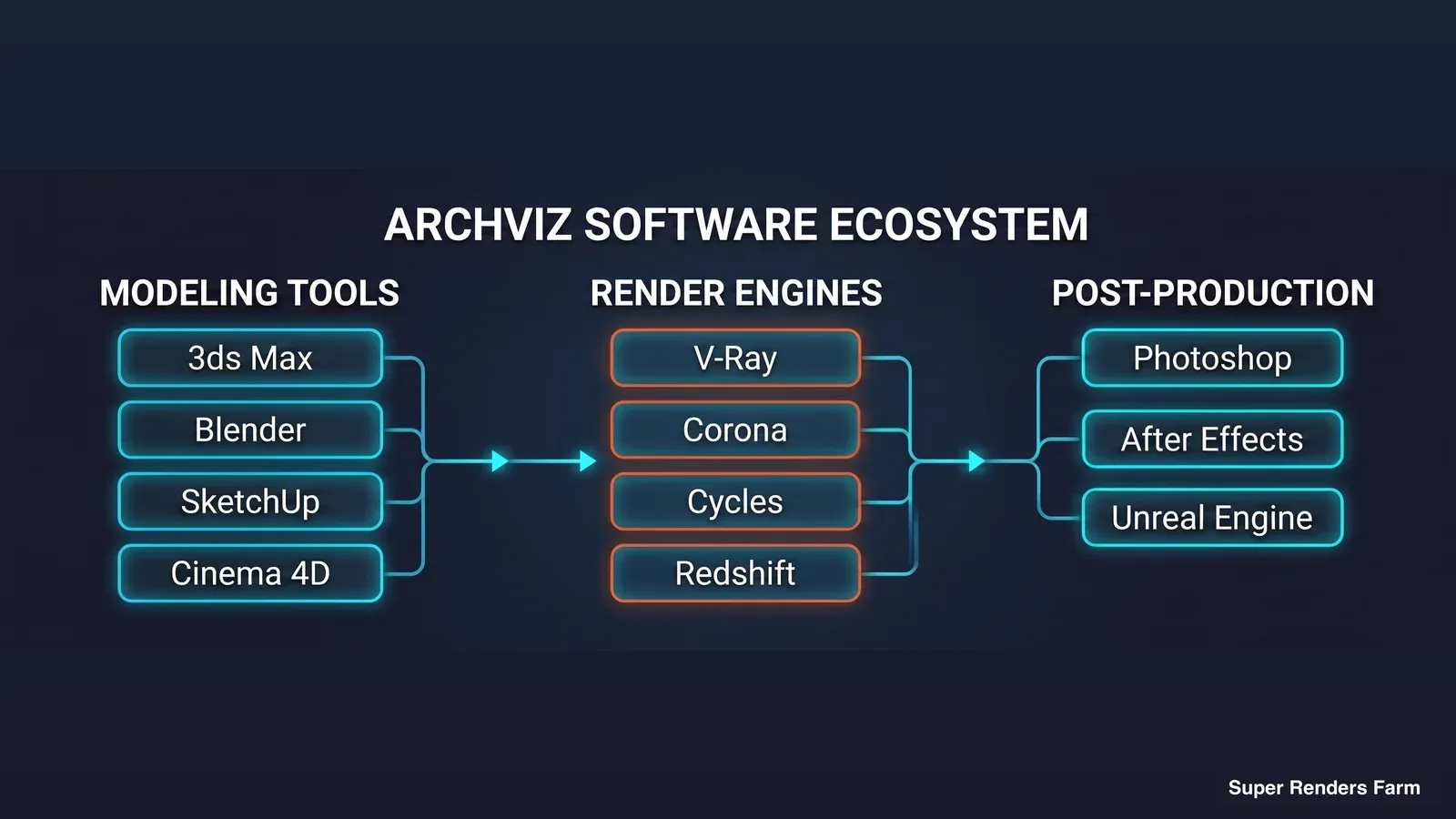 Architectural visualization software ecosystem — modeling tools connected to render engines and post-production applications
The Archviz Production Pipeline
A professional archviz project follows a predictable pipeline, though the specific steps vary by studio and deliverable type.
Modeling starts with importing architectural plans (DWG, RVT, IFC) into the 3D application. The base geometry comes from the architect's BIM model, but archviz artists typically rebuild or clean up this geometry for rendering — BIM models are optimized for construction documentation, not visual quality. Furniture, fixtures, and decorative elements are added from asset libraries or modeled from scratch.
Materials and Texturing define how surfaces look under light. Physically based rendering (PBR) materials use measured values for roughness, reflectivity, and index of refraction. Archviz-specific material libraries (like those from Poliigon, Quixel Megascans, or Chaos Cosmos) provide scan-based materials that are physically accurate out of the box. Getting materials right is often the difference between a render that looks "3D" and one that looks like a photograph.
Lighting is arguably the most critical step. Architectural images depend on natural light — sun position, sky conditions, interior bounce light, and the interplay between daylight and artificial lighting. V-Ray and Corona both support HDRI-based environment lighting and physical sun/sky systems that simulate accurate daylight for any geographic location and time of day. Interior scenes require careful balance between window light, fill lights, and practical fixtures.
Rendering converts the 3D scene into a 2D image by calculating how light interacts with every surface. This is the computationally expensive step. A single high-resolution archviz frame can take 15 minutes to several hours depending on scene complexity, resolution, and quality settings. For animations, multiply that by thousands of frames. We cover rendering optimization strategies in our render time optimization guide.
Post-Production refines the raw render output. Photoshop remains the dominant tool (roughly 68% of archviz professionals). Common post-production tasks include color grading, adding atmospheric effects (fog, lens flare), compositing people and vegetation from photo libraries, and adjusting exposure across different areas of the image. Many studios render multiple passes (diffuse, reflection, refraction, shadow) and composite them in post for maximum control.
Rendering for Architectural Visualization
Rendering is where hardware decisions directly impact project timelines and quality. Understanding the trade-offs between CPU and GPU rendering is essential for any archviz studio.
CPU Rendering (V-Ray, Corona, Arnold) uses the processor's cores to calculate light transport. CPU renderers have been the archviz standard for over a decade because they handle complex scenes with massive texture sets and detailed geometry without running into memory limitations. A dual-socket workstation with 44+ cores can handle most production scenes, and the same scene scales linearly across multiple machines in a render farm. For a detailed comparison, see our CPU vs GPU rendering guide.
GPU Rendering (Redshift, Octane, V-Ray GPU) uses graphics cards for rendering. GPUs are massively parallel — an NVIDIA RTX 5090 with 32 GB VRAM can render certain scenes 5–10x faster than a high-end CPU. The constraint is VRAM: if a scene's textures and geometry exceed the GPU's memory, it either falls back to slower system RAM or fails to render entirely. Archviz scenes with 8K textures across dozens of materials can easily exceed 24 GB VRAM.
Render Times in Practice: A typical archviz interior still at 4K resolution might take 30–90 minutes on a modern workstation with V-Ray or Corona. The same frame on a render farm with 50–100 machines finishes in 1–3 minutes. For animations, this difference is existential — 1,800 frames at 45 minutes each is 56 days on one machine versus under 2 hours distributed across a farm.
Quality Settings That Matter: Noise threshold (or noise limit) is the primary quality control. Lower thresholds produce cleaner images but take longer. Most production archviz renders target a noise level of 2–4% for stills and 4–6% for animation frames (where motion masks some noise). Denoising algorithms (V-Ray Denoiser, Corona Denoiser, NVIDIA OptiX) can reduce render times by 30–50% by allowing noisier base renders and cleaning them in post.
For where denoising and the rest of the AI-assisted toolset actually fit into a 2026 ArchViz pipeline, see our guide to 3D architectural rendering and AI visualization.
Cloud Rendering for Archviz Projects
For studios with tight deadlines or limited local hardware, cloud rendering transforms what's possible. Instead of being constrained by the 44 cores in a workstation, a cloud render farm distributes the work across hundreds of machines simultaneously.
How the workflow typically works on our farm: You prepare your scene locally — set up cameras, materials, lighting, and render settings. Package the scene file with all dependencies (textures, proxies, assets). Upload it through the farm's submission tool. The farm's job manager distributes frames across available machines. Results download automatically as frames complete. The entire process is managed — you don't remote into machines, install software, or configure licenses. We handle the infrastructure, including V-Ray and Corona licensing.
When cloud rendering makes the most sense for archviz:
| Scenario | Local rendering | Cloud rendering |
|---|---|---|
| 5 still images, no deadline pressure | Practical (overnight renders) | Optional |
| 15+ stills, 48-hour deadline | Tight, may miss deadline | Comfortable |
| 60-second animation (1,800 frames) | 20–50 days | 2–8 hours |
| Client revision at 5 PM, presentation at 9 AM | Risky | Reliable |
| Multiple projects in parallel | Bottleneck | Each project gets dedicated resources |
Cost considerations: Cloud rendering is a variable cost — you pay for what you render. A studio doing 2–3 projects per month might spend less on cloud rendering than on the electricity and depreciation of maintaining high-end local hardware. The pricing model is per-core-hour for CPU renders and per-GPU-hour for GPU renders, which means costs scale proportionally with render complexity.
For studios evaluating cloud rendering options, our archviz-specific cloud rendering guide covers what to look for in a render farm.
Archviz for Different Markets
Architectural visualization serves several distinct markets, each with different expectations and deliverable requirements.
Residential Development is the largest archviz market by volume. Developers need exterior hero shots, interior lifestyle images, aerial views, and increasingly animations or VR tours for sales galleries.
For teams producing those sales-gallery animations and walkthroughs at scale, our render farm guide for real estate animation and 3D walkthroughs covers frame counts, turnaround times, and cost for typical residential development projects. The visual style tends toward warm, aspirational imagery with styled interiors. Turnaround times are typically 2–4 weeks per project, though revisions can extend timelines significantly.
Commercial and Corporate projects — office buildings, retail spaces, hotels — often require more technical accuracy. Corporate clients want to see precise material finishes, lighting conditions at different times of day, and accurate spatial relationships. The approval process involves more stakeholders, which means more revision cycles.
Urban Planning and Public Projects use archviz to communicate large-scale development proposals to planning committees and the public. These visualizations often include existing building context (photomontage), accurate shadow studies, and environmental impact assessments. The requirements lean toward accuracy over aesthetics — showing what the development will actually look like, not an idealized version.
Interior Design focuses on material and finish visualization — showing clients exactly how a marble countertop, specific paint color, and lighting fixture will look together. Many interior designers use real-time tools (Enscape, Twinmotion) for client meetings and commission archviz studios only for final portfolio-quality images.
If you are an interior designer who renders in 3ds Max yourself, our guide to cloud rendering for interior designers using 3ds Max covers when a farm is worth it for final images.
Landscape Architecture is a growing sub-market, requiring vegetation rendering (Forest Pack, Scatter), terrain modeling, and environmental effects (water, atmospheric haze). These scenes tend to be geometry-heavy and benefit from distributed rendering infrastructure.
Industry Trends in 2026
Several trends are reshaping architectural visualization workflows and expectations.
AI-Assisted Rendering is the most discussed development. According to recent industry surveys, 44% of archviz professionals are using AI tools to generate concept images and early design variations. Tools like Stable Diffusion and Midjourney can produce compelling architectural concepts in seconds, but they lack the precision needed for final deliverables — you can't specify exact material finishes, accurate sun angles, or dimensionally correct spaces. Purpose-built AI ArchViz tools like MyArchitectAI apply the same generative approach specifically to sketch-to-render workflows, accelerating concept iteration before the precision-rendering phase. Across all of these, AI is supplementing the early design exploration phase, not replacing the production rendering pipeline.
Real-Time Rendering continues to mature. Unreal Engine 5's Nanite and Lumen have made real-time architectural visualization genuinely viable for certain use cases. The "lived-in look" trend — adding imperfections, worn surfaces, scattered personal items — is easier to iterate on in real-time engines where changes are instant. However, for final marketing materials requiring maximum photorealism, offline renderers still produce superior results.
VR Walkthroughs are becoming standard for high-end residential sales and hospitality projects. The technology has moved past the novelty phase — clients expect to walk through spaces before committing to purchases. The challenge remains content creation: building an optimized VR scene is a separate workflow from creating still images, requiring LOD management, baked lighting, and performance optimization that traditional archviz artists may not be familiar with.
Distributed and Cloud Rendering adoption is accelerating as project complexity grows and deadlines shrink. The shift from "rendering overnight on the office workstation" to "rendering in hours on a cloud farm" is driven less by technology and more by economics — client timelines don't accommodate multi-day render queues, and maintaining local render infrastructure at the scale needed for animation work is capital-intensive.
Sustainability Visualization is an emerging requirement. Clients increasingly want to show LEED certification elements, solar panel integration, green roof systems, and energy performance data overlaid on architectural visualizations. This adds complexity to the 3D scene and often requires specialized plugins or custom shaders.
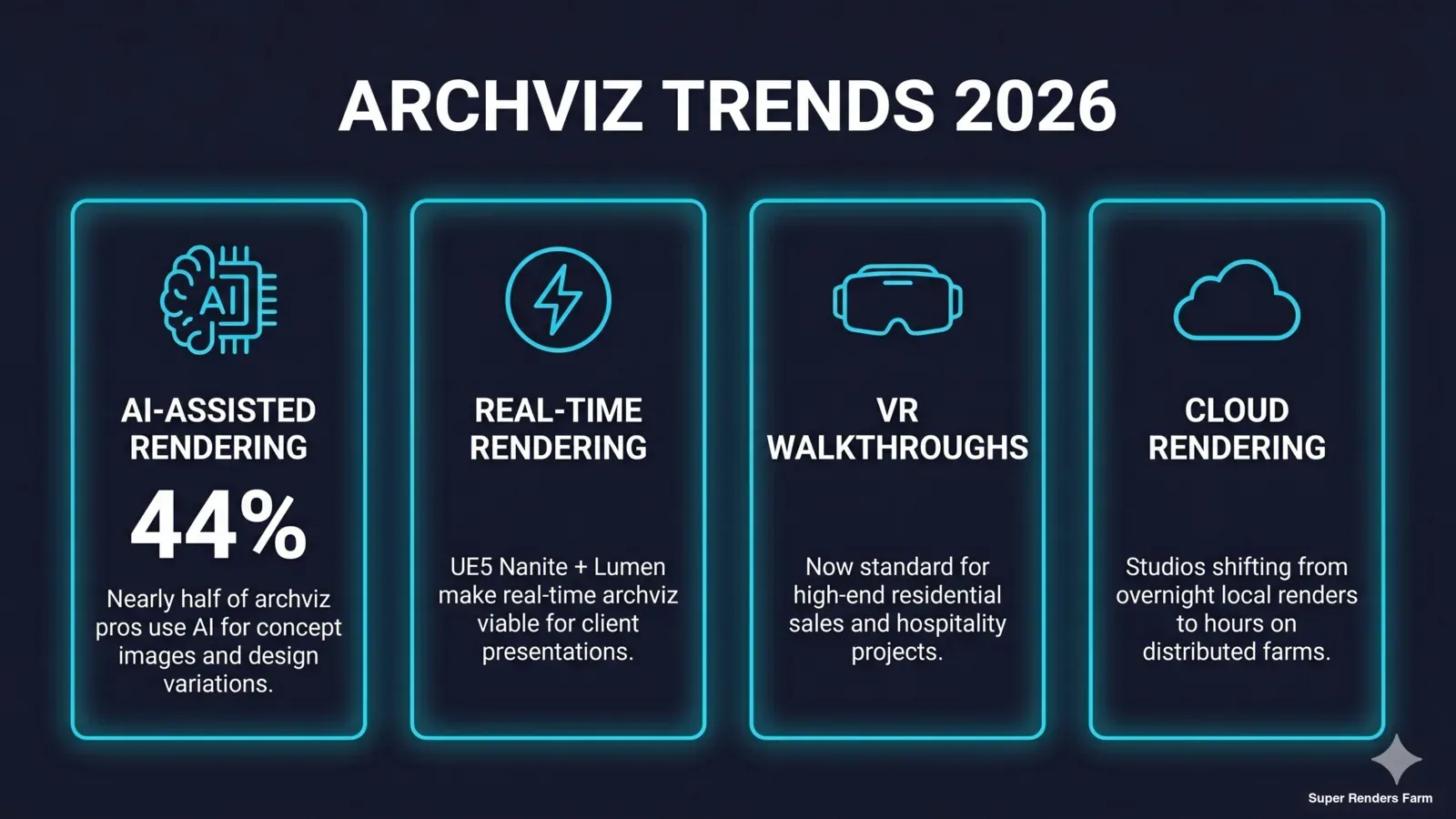 Architectural visualization trends 2026 — AI adoption at 44 percent, real-time rendering growth, VR walkthroughs standard, cloud rendering acceleration
Getting Started in Architectural Visualization
Breaking into archviz depends on your background and budget. Here are practical recommendations by experience level.
Beginners (zero 3D experience): Start with Blender — it's free, has excellent tutorials (Blender Guru's archviz course is a common starting point), and teaches fundamental 3D skills that transfer to any software. Use Cycles for rendering. Focus on learning lighting and materials before worrying about render speed. Your first project should be a simple interior scene: one room, natural light, 5–6 materials.
Intermediate (some 3D experience, moving to archviz): If your target market uses 3ds Max (most of the industry), invest in learning it. Add V-Ray or Corona — both have free trial periods. Start building a library of go-to materials and assets. Learn Forest Pack for exterior vegetation. At this stage, rendering speed starts to matter: a single workstation will limit your iteration speed, and this is when cloud rendering becomes worth exploring.
Studios (established workflow, scaling up): Focus on pipeline optimization rather than learning new tools. Standardize your material library, template your render settings, and establish a consistent post-production workflow. For animation projects, integrate cloud rendering into your pipeline — the math almost always favors cloud over buying and maintaining additional local hardware. Consider real-time tools (Enscape, Twinmotion) for design-phase client communication, keeping offline rendering for final deliverables.
| Level | Modeling | Renderer | Real-Time | Budget |
|---|---|---|---|---|
| Beginner | Blender | Cycles | — | Free |
| Intermediate | 3ds Max or Blender | V-Ray / Corona / Cycles | Enscape (trial) | $200–500/mo |
| Professional Studio | 3ds Max | V-Ray + Corona | Enscape or Twinmotion | $500–2,000/mo + cloud rendering |
| Animation-Focused | 3ds Max or C4D | V-Ray / Corona / Redshift | Unreal Engine | Variable |
FAQ
Q: What software do most archviz professionals use? A: 3ds Max combined with V-Ray or Corona Renderer is the dominant combination, used by roughly 59% of architectural visualization professionals. Blender with Cycles is growing in adoption, particularly among solo artists and smaller studios who benefit from its zero licensing cost.
Q: How long does it take to render an architectural visualization image? A: A single high-resolution archviz still (4K) typically takes 30–90 minutes on a modern workstation with V-Ray or Corona. Complex scenes with detailed vegetation, glass reflections, and caustics can take several hours. Cloud render farms reduce this to minutes by distributing the work across hundreds of machines.
Q: What is the difference between CPU and GPU rendering for archviz? A: CPU rendering (V-Ray, Corona, Arnold) handles complex scenes with large texture sets without VRAM limitations and has been the archviz standard for years. GPU rendering (Redshift, Octane, V-Ray GPU) is faster per-frame but limited by GPU memory — archviz scenes with many 8K textures can exceed available VRAM. Most archviz studios use CPU rendering for production work.
Q: How much does architectural visualization cost per image? A: Pricing varies widely depending on market and experience level. Based on industry rates, freelancers typically charge roughly $200–800 per exterior still and $150–500 per interior. Established studios generally charge $500–3,000+ per image depending on complexity, revisions included, and turnaround time. Animation projects can range from $2,000–20,000+ per minute depending on quality requirements and scene complexity.
Q: Can Blender produce professional-quality archviz? A: Yes. Blender's Cycles renderer produces physically accurate results comparable to V-Ray and Corona. The main challenges are a smaller ecosystem of archviz-specific plugins compared to 3ds Max and fewer archviz-experienced Blender artists in the job market. For portfolio work and smaller studio production, Blender is fully capable.
Q: What resolution should archviz images be rendered at? A: Most production archviz stills are rendered at 4K (3840×2160) or higher for print applications. Marketing stills for web use can be rendered at 2K–3K and still look sharp. Animation frames are typically rendered at 1920×1080 (Full HD) or 2560×1440 (2K) to keep render times manageable across thousands of frames.
Q: How does a cloud render farm help with archviz animation projects? A: A 60-second archviz animation at 30 fps requires 1,800 frames. If each frame takes 30 minutes locally, that's 37.5 days of continuous rendering on one machine. A cloud render farm distributes these frames across hundreds of machines simultaneously, reducing total render time to hours instead of weeks. This makes animation deadlines feasible for studios without massive local hardware.
Q: What is the most important skill for architectural visualization? A: Lighting. Getting natural, physically accurate lighting is what separates amateur archviz from professional work. Understanding how sunlight behaves at different times of day, how light bounces between surfaces, and how artificial lights interact with daylight is more important than advanced modeling or material techniques. In our experience working with archviz studios, lighting is consistently cited as the single skill that most improved their output quality.
About Alice Harper
Blender and V-Ray specialist. Passionate about optimizing render workflows, sharing tips, and educating the 3D community to achieve photorealistic results faster.



