
How We Benchmark Render-Farm GPUs: A Reproducible Cost-per-Frame Method (2026)
Overview
Introduction
TL;DR: A trustworthy render-farm GPU benchmark reports cost-per-frame on a production-representative scene, not a synthetic leaderboard score — lock the render settings, hold the hardware matrix constant, require matched task pairs, and aggregate with median-of-medians plus a bootstrap confidence interval. Our own study filtered 1,419 raw render tasks down to 38 matched-pair scenes before publishing a number. The eight-step replication recipe below lets a third party reproduce the result on their own hardware.
A benchmark score is easy to publish and hard to trust. Anyone can post "RTX 5090: X points," but the number that decides whether a render job is worth running on one card or another is not a synthetic score — it is cost per finished frame. That figure depends on your scene, your render settings, the engine, the driver, and how you do the arithmetic, and almost none of those are visible in a leaderboard entry.
This page is the method, not the leaderboard. It documents how we at Super Renders Farm benchmark render-farm GPUs so the result means something: how we choose a benchmark scene, which render settings we lock, what we hold constant across the hardware matrix, how we turn raw per-frame times into a defensible cost-per-frame number, and — the part most write-ups skip — the explicit steps so a third party can reproduce the whole thing on their own hardware. We have published the outputs of this method already; this is the recipe behind them. Where a number appears below, it is a real figure from one of those studies, cited as a worked example rather than re-derived here.
Synthetic benchmarks versus production cost-per-frame
There are two layers to GPU benchmarking, and conflating them is where most confusion starts.
The first is the synthetic layer: standardized tools that render one fixed scene and emit a score. Cinebench R24, the Chaos V-Ray Benchmark, and OctaneBench all live here. They are useful for relative ranking — a single repeatable workload, the same on every machine, so you can line cards up against each other. We explain how to read those scores in our V-Ray benchmark guide and our Cinebench scores for cloud rendering write-up. What a synthetic score deliberately strips out is everything that varies in production: your geometry, your sampling, your denoiser, your output resolution, and the per-job overhead that a real queue carries.
The second is the production layer: how long a representative real frame actually takes, and what that costs. This is the layer this methodology targets. A synthetic score is an input to it — a way to extrapolate a starting estimate — but it is not the answer. The bridge between the two is straightforward in principle: a machine that scores roughly twice another on the same benchmark build will, very roughly, render a comparable frame in about half the time. We walk through that estimation arithmetic (efficiency = frame time ÷ benchmark score) in the V-Ray guide. The point of a benchmarking method, as opposed to a score, is to make that extrapolation honest — to measure on a scene close to production and report the spread, not just a midpoint.
The metric that matters: cost-per-frame
Cost-per-frame is the unit a methodology should resolve to, because it is the unit a render budget is actually written in. The formula is simple:
Cost per frame = per-frame wall-clock time × node cost-per-hour
Per-frame wall-clock is task time divided by frame count, measured — not the engine's internal "render time" readout, which excludes scene load, acceleration-structure build, and device coordination. Node cost-per-hour is whatever the hardware costs to run for an hour, however you account for it. On our farm, GPU rendering is billed at $0.003 per OctaneBench-hour, and a single RTX 5090 (32 GB) carries a hardware basis of roughly $5.2 per card-hour; our cost-per-frame guide and the pricing guide cover the customer-facing model in full.
Combining the two inputs is just unit arithmetic: convert the per-frame wall-clock time into hours and multiply by the node cost-per-hour, so seconds-per-frame and dollars-per-hour resolve to dollars-per-frame. A short frame on an inexpensive node lands low; a heavy frame on a costly one lands high. We deliberately keep the worked-out rate out of this methodology page — the actual cost depends on your scene complexity, sampling, queue wait, and the billing model you run under, and our cost-per-frame guide and pricing guide are where the customer-facing numbers belong. The point here is that the formula is auditable: keep the units explicit and anyone can check the figure rather than take it on faith.
The reason cost-per-frame, and not a synthetic score, is the load-bearing metric: two cards can score similarly on a benchmark and still differ sharply in cost-per-frame on your scene, because the scene decides how much of each frame is parallelizable work versus fixed overhead the faster silicon cannot touch.
The benchmark scene and render settings
The scene is the single biggest lever on whether a benchmark transfers to production, so we run two kinds deliberately.
Vendor-standard scenes for cross-machine ranking. When the goal is a clean apples-to-apples comparison, we use published reference scenes — Blender's Open Data scenes (bmw27, classroom, junkshop), Maxon's Vultures scene for Redshift, the Chaos V-Ray Benchmark, and OctaneBench. These are repeatable and independently verifiable, which is exactly what a ranking needs. Their weakness is that they are not your scene, so absolute times do not transfer to production directly.
Production-representative scenes for cost-per-frame. When the goal is a number an operator can plan against, the scene has to look like real work — real geometry, real texture sets, real sampling, real output resolution. In our multi-GPU scaling study we ran Blender Cycles at 200% resolution specifically so each render lasted long enough to produce a stable, trustworthy ratio — which also means those raw Cycles times are not comparable to public Open Data scores. That trade-off is the method working as intended: tune the scene to the question.
Whatever the scene, the render settings must be locked and recorded: sample count (or noise threshold), denoiser on/off and which one, output resolution, tile or bucket size, and the engine build. A benchmark where any of these drifts between machines is measuring the drift, not the hardware.
The hardware matrix
A benchmark matrix is a grid: the cards you are testing on one axis, the engines and scenes on the other. The discipline is in what you hold constant across the grid.
Hold constant: operating system, render-engine version and build, denoiser, scene, and settings. Record but cannot always match: the GPU driver — a current-generation card sometimes requires a newer driver than an older one can run, so an exact driver match is impossible. When that happens, name it. In our multi-GPU study every run used the same RTX 5090 machine on driver 596.36, so each scaling ratio compares the same card and driver on both sides.
Our GPU fleet standardizes on NVIDIA RTX 5090 cards with 32 GB of VRAM, which is what makes our matrix internally consistent — a uniform inventory means an estimate from one node transfers to the next. As a worked example of the per-card axis, here are the single-card RTX 5090 results from our multi-GPU study:
| Engine / scene | Metric | RTX 5090 |
|---|---|---|
| Cycles — bmw27 | seconds (lower better) | 49.45 |
| Cycles — classroom | seconds | 23.09 |
| Redshift — Vultures | seconds | 57 |
| V-Ray GPU (RTX) | vpaths (higher better) | 15,333 |
| Octane | OctaneBench score | 1,690.78 |
Two metric types appear in that table — seconds (lower is better) and benchmark score (higher is better) — which is the whole reason absolute numbers never compare across engines. Only a comparison within a single engine is apples-to-apples.
Controls that make a benchmark trustworthy
The difference between a number and a trustworthy number is the controls. These are the ones our method enforces.
- Single task per GPU. Our scheduler runs one render task per card, so every figure is a clean per-card number — the value you multiply to plan capacity, not a blurred average across a shared device.
- Matched pairs for any comparison. When we compared hardware generations in production, a scene only counted if the same scene, same user ran on both sides, with at least three tasks per side before it qualified. In the RTX 5090 field study, 38 scenes cleared that bar out of 1,419 tasks — 38 is not the size of the data, it is what survives a deliberately strict filter.
- One driver per window. For the field study, a single driver (581.80, CUDA 13.0) ran the entire seven-week window with zero churn, so no mid-window swap could contaminate the result.
- Denoiser parity. About 83% of Cycles jobs ran an AI denoise pass on both the new and the previous-generation hardware — so the denoiser was a constant, not a variable hiding inside the speedup.
- Warm versus cold. Fixed per-task cost — scene load, sync, acceleration-structure build — is a larger fraction of a short frame than a long one, which is why short, overhead-bound frames understate a faster card. The method accounts for this by reporting the distribution, not assuming one multiplier.
From raw times to a defensible number
Once the times are collected, the statistics decide whether the headline number is honest.
 RTX 5090 versus our previous-generation RTX 3080-class farm nodes, single-card speedup across 38 paired scenes: median 3.2x, 95% confidence interval 3.0 to 3.3x, interquartile range 2.7 to 3.4x, full range 1.6 to 5.1x
We use a median of medians: each scene contributes the median of its own per-frame times on each side, and the headline is the median of those per-scene ratios — so one slow frame cannot tilt the result. Around that midpoint we report a bootstrap confidence interval (the field study used a 20,000-sample bootstrap, giving a 95% CI of 3.0–3.3x around the median 3.2x speedup) and the dispersion — interquartile range 2.7–3.4x, full range 1.6–5.1x across those 38 scenes.
That spread is not noise to be averaged away; it is the result. A 3.2x typical speedup and a 1.6x worst-case scene are both true at once, and a benchmark that reports only the midpoint hides the half of the story an operator needs. The rule we hold to: report the median and the range, and tie each claim to the sample that backs it — speedup from 38 paired scenes, VRAM from 57 logged jobs, power from a separate controlled bench run, never one sample borrowed to support another.
How to replicate this benchmark
This is the part that makes a benchmark an earn-able signal rather than a marketing line: anyone can run it. The steps below reproduce the method on any queue or test bench.
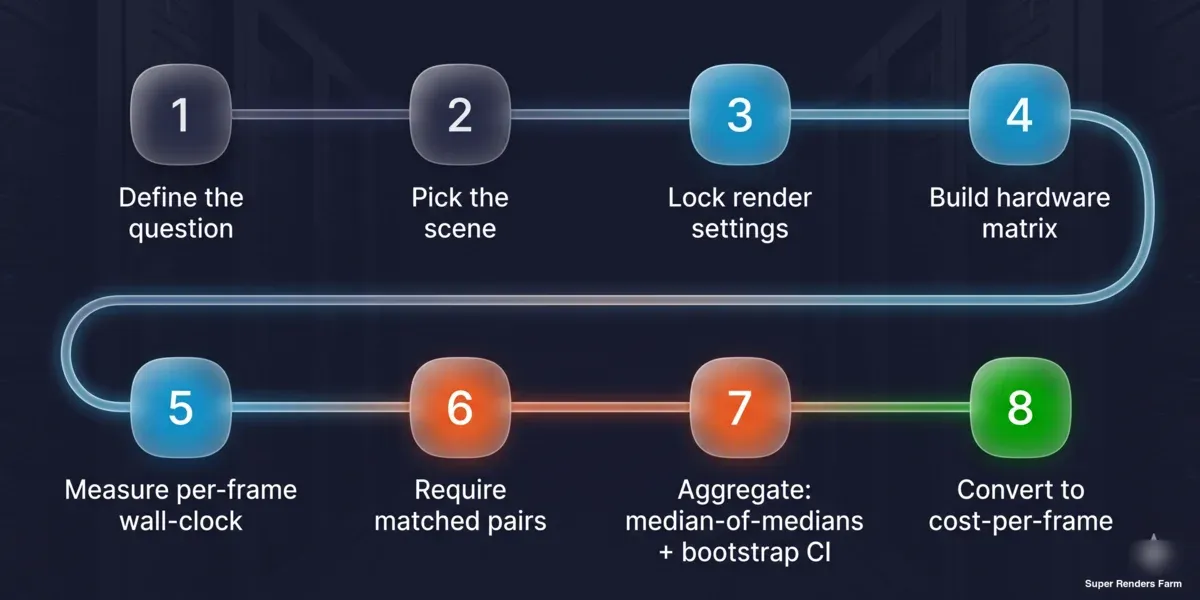 Eight-step reproducible cost-per-frame benchmarking method: define the question, pick the scene, lock render settings, build hardware matrix, measure per-frame wall-clock, require matched pairs, aggregate with median-of-medians and bootstrap confidence interval, convert to cost-per-frame
- Define the question. Cross-machine ranking, or production cost-per-frame? The answer chooses your scene type — vendor-standard for ranking, production-representative for cost.
- Fix the scene and settings. Lock sample count or noise threshold, denoiser choice, output resolution, tile/bucket size, and engine build. Write them down; they are part of the result.
- Build the matrix. List the cards on one axis, engine/scene combinations on the other. Decide what is held constant (OS, engine build, denoiser, scene) and record what cannot be (driver).
- Measure per-frame wall-clock. Use task time ÷ frame count from the scheduler or a stopwatch on the whole job — not the engine's internal render-time readout, which omits load and build overhead.
- Require matched pairs and a minimum sample. For any A-versus-B claim, run the same scene on both sides, at least three tasks per side, before it counts.
- Aggregate with median-of-medians. Take each scene's median per side, then the median of the per-scene ratios. Compute a bootstrap confidence interval and report the interquartile range and full range alongside it.
- Convert to cost-per-frame. Multiply measured per-frame time by node cost-per-hour. Keep the units explicit so the figure is auditable.
- Publish the caveats with the number. State the sample size behind each claim, the driver situation, whether the data is observational or controlled, and the scope it does and does not cover.
A studio that runs these eight steps on its own hardware will get a number it can defend — and can check ours against, which is the whole point of publishing the method.
Honesty notes: what a benchmark can and cannot claim
A method is only as trustworthy as the claims it refuses to make. Three lines we hold:
Observational is not controlled. Production field data — jobs users ran in the normal course of business — is real and useful, but users adjust their own scenes between re-renders, so it is observational. A clean same-host head-to-head (for instance, an RTX 5090 against a current RTX 4090 on identical hardware) is a separate controlled exercise. We do not let one masquerade as the other.
Node-versus-node carries setup, not just silicon. When one side runs bare-metal and the other runs virtualized, some of the measured gap is the setup, not the chip. That belongs in the headline caveat, not a footnote.
No number we did not measure. We do not extrapolate power or thermal figures we did not bench. Where our field study reports roughly 360–375 W per card, that comes from a controlled bench run under sustained load — and the energy-per-frame figure derived from it is labeled an inference, not a measurement. If a number was not measured, the method does not invent it. That discipline is the reason a published benchmark can be cited at all.
Worked examples from our farm
This method produced the studies below; each is a dataset you can read alongside the recipe, and the place to look for the actual numbers rather than re-derive them here.
| Study | What the method produced | Sample |
|---|---|---|
| Multi-GPU scaling | 1x→2x scaling per engine on vendor-standard scenes | 2 nodes, 4 engines, 7 scene/benchmark combos |
| RTX 5090 field notes | Production cost/speedup distribution, VRAM percentiles | 38 paired scenes / 1,419 tasks, 7 weeks |
| V-Ray benchmark guide | Synthetic-score-to-render-time estimation | Reference tables + worked estimate |
| Cinebench for cloud rendering | Synthetic-score interpretation for hardware tiers | Reference scores |
The same approach underpins how we plan capacity on our GPU cloud render farm, and the Blender-specific numbers feed our Blender cloud rendering work — GPU is a minority of our overall job mix (most farm work is still CPU rendering), so we scope these GPU figures as exactly that, not as a farm-wide claim.
For current rates once you have a cost-per-frame estimate, check render farm pricing.
FAQ
Q: What is the right way to benchmark a render farm GPU? A: Decide first whether you want cross-machine ranking or production cost-per-frame. For ranking, use a repeatable vendor-standard scene and a fixed benchmark build. For cost-per-frame, use a production-representative scene, measure per-frame wall-clock (task time ÷ frame count), and multiply by node cost-per-hour. Lock the render settings and report the spread, not just a single number.
Q: Why is cost-per-frame better than a benchmark score? A: A synthetic score strips out everything that varies in production — your geometry, sampling, denoiser, and resolution — so two cards can score alike yet differ in real cost-per-frame on your scene. Cost-per-frame is the unit a render budget is actually written in, which is why a methodology should resolve to it rather than to a leaderboard point.
Q: How do I convert a benchmark score into a render-time estimate? A: Use the ratio of scores as a rough speed ratio: a machine scoring twice another on the same benchmark build renders a comparable frame in roughly half the time. Compute your machine's efficiency as frame time divided by benchmark score, then scale by the target machine's score. Keep the benchmark build constant, since scores from different builds are not comparable.
Q: What controls make a GPU benchmark trustworthy? A: Run a single render task per card for clean per-card numbers, require matched pairs (same scene on both sides, a minimum number of tasks before a result counts), hold the driver and engine build constant within a measurement window, and keep the denoiser setting identical across the comparison. Then aggregate with a median of medians and report the confidence interval and range.
Q: How many test scenes do I need for a reliable result? A: Fewer high-quality matched pairs beat many loosely controlled ones. In our production study, 38 scenes survived a strict inclusion filter (same scene and user on both hardware sides, at least three tasks per side) out of 1,419 tasks. The sample size that matters is what clears your filter, not the raw task count — and you should report both.
Q: Can I reproduce your render-farm GPU benchmark myself? A: Yes — that is the intent. Fix a scene and its settings, build a hardware matrix holding OS, engine build, and denoiser constant, measure per-frame wall-clock, require matched pairs, aggregate with median-of-medians plus a bootstrap confidence interval, convert to cost-per-frame, and publish the caveats with the number. The eight replication steps above lay out the full sequence.
Q: Why do you report a range instead of one speedup number? A: Because the range is part of the result. The same hardware can show a 1.6x gain on a short, overhead-bound scene and over 5x on a heavy compute-bound one, since fixed per-frame overhead is a bigger fraction of a short render. Reporting only the midpoint hides the variation an operator needs to plan capacity, so we publish the median, the interquartile range, and the full range together.
About Richard Ta
Richard Ta is co-founder and technical lead of Super Renders Farm (superrendersfarm.com), a fully managed cloud render farm that supports Maya, 3ds Max, Cinema 4D, Blender, and Houdini across the major render engines. He has spent over a decade building and running large-scale CPU and GPU render infrastructure for studios in more than 50 countries.



