
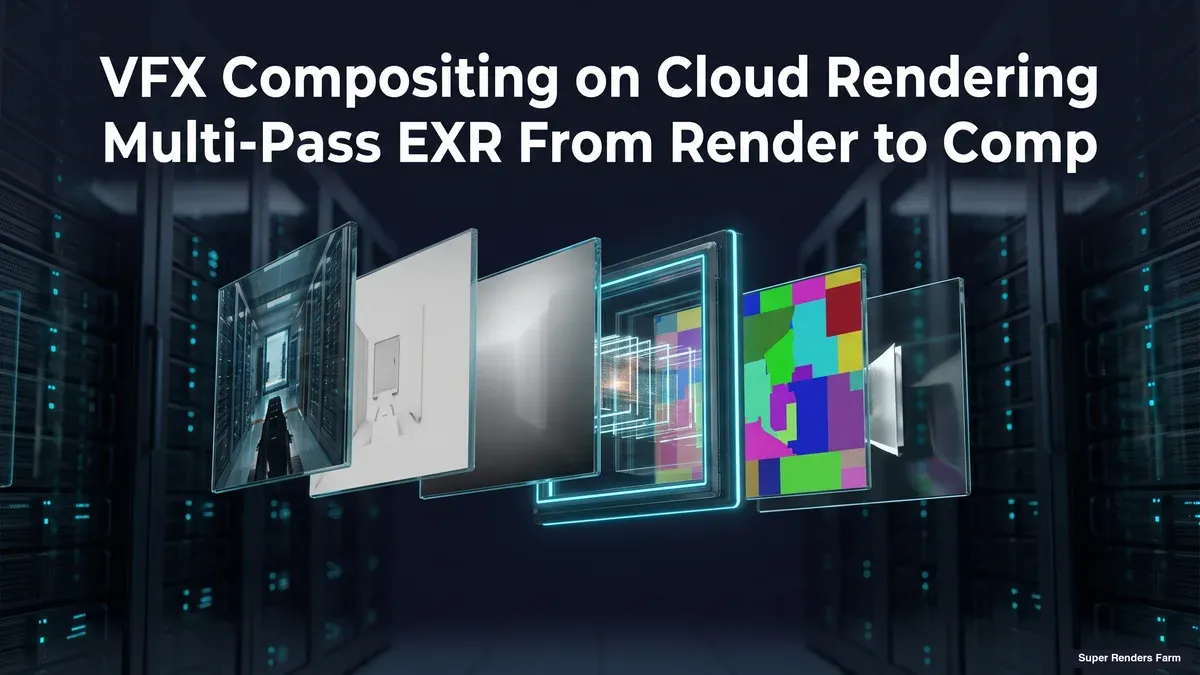
VFX Compositing and Cloud Rendering: Why Comp Renders Are a Different Workload Than 3D
Overview
Introduction
Most cloud rendering content is written for one workload: a 3D scene going through a path tracer, bucket by bucket, until noise clears and a frame is done. That framing is accurate for a Redshift or V-Ray job, and it is close to useless for a compositing render. A comp is not sampling light paths. It is evaluating a node graph against footage and passes that already exist, and the thing that determines how long it takes and how much it costs is almost never GPU sample count.
That distinction matters more than it looks like on the surface, because the two workloads get lumped together constantly in generic "cloud rendering" advice.
For a grounded look at what cloud rendering actually is, see our cloud rendering explained guide. A compositor moving a Nuke script or an After Effects project onto a farm for the first time, expecting the same GPU-bound behavior as a 3D render, ends up confused about why a comp with no simulations and no ray tracing is still slow, or why it is fast in a way that has nothing to do with the GPU tier they picked. This guide is about that gap: what a comp render actually does on a farm, how it differs mechanically from a 3D render, and when moving compositing work to the cloud is worth doing rather than a workstation running overnight.
We work with both sides of this pipeline daily on our farm at Super Renders Farm, from the 3D render that produces the beauty pass and AOVs to the compositing render that assembles them into a final shot. The two share hardware but not much else in terms of render behavior, and understanding that difference is what makes a comp render job predictable instead of a mystery.
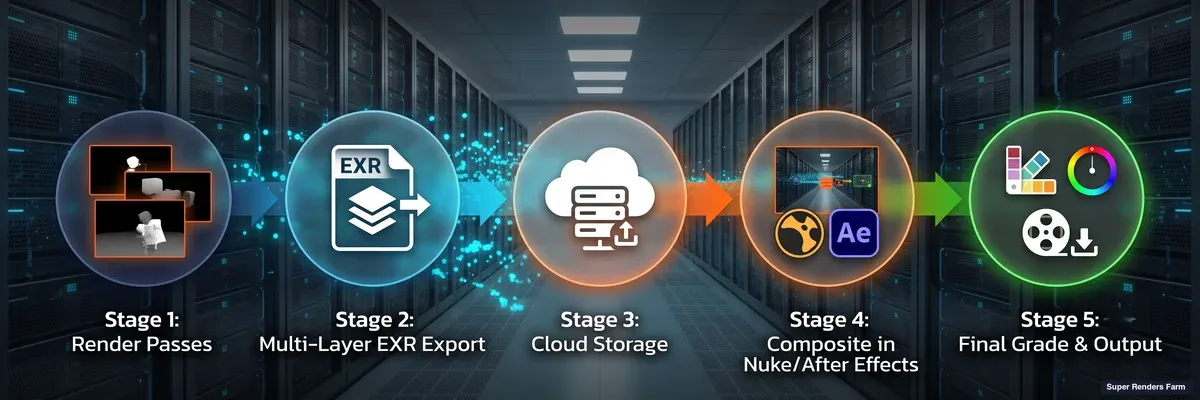 Pipeline diagram showing the multi-pass EXR compositing flow: 3D render passes combine into a multi-layer EXR file, then move to compositing software and final grade
Compositing Is a Different Render Workload Than 3D Rendering
A 3D renderer like V-Ray, Redshift, or Arnold does light transport: it traces rays, samples materials, and accumulates noise reduction over time until an image converges. That work is genuinely compute-intensive per pixel, which is why 3D rendering is CPU-heavy or GPU-heavy depending on the engine, and why GPU acceleration has such a large effect on 3D render times.
A compositing render does none of that. Nuke, After Effects, Fusion, and similar tools evaluate a node graph: read an image, apply a color correction, merge two layers, apply a transform, write the result. There is no sampling and no convergence. Each operation is a deterministic, mostly linear-algebra pass over pixel data, and the majority of those operations (merges, grades, keyers, transforms, most filters) run on the CPU rather than the GPU. A handful of specific node types (heavy retimes, some denoise operations, certain machine-learning tools) are GPU-accelerated, but they are the exception in a typical comp, not the rule.
What actually determines how long a comp render takes is closer to a data-movement problem than a compute problem:
- Read throughput. A comp script reads footage and render passes, often several multi-layer EXR sequences at once, for every frame.
- CPU threading. Compositing operations parallelize across CPU cores within a single frame, and the render manager parallelizes across frames by handing chunks of the frame range to different workers.
- Memory. Holding several full-resolution, multi-channel frames in memory at once (a beauty pass, a handful of AOVs, a cryptomatte matte, maybe a deep pass) is far more memory-hungry than it looks, and running out of RAM mid-frame is a more common cause of a failed comp render than raw CPU speed.
- Write throughput. The final composited frame, or an intermediate precomp, has to be written back out, and for VFX-pipeline deliverables that output is usually another EXR sequence rather than a single video file.
None of that is a criticism of compositing software. It is a different kind of workload, built around moving and combining existing image data rather than generating it from scratch, and a render farm that treats a comp job like a 3D render, provisioning heavy GPU capacity and skimping on RAM and storage throughput, will underperform on exactly the machines that should handle the job well.
What a Comp Render Actually Reads and Writes
The input and output shape of a compositing job is where the difference from 3D rendering shows up most concretely.
Multi-layer, multi-pass EXR in. A comp typically opens one or more OpenEXR files per frame that already carry many channels: a beauty render, separate diffuse and specular passes, lighting AOVs, a Z-depth pass, motion vectors, and cryptomatte mattes for object, material, and asset ID isolation, all in a single file read through one Read node and split apart with Shuffle nodes for per-pass work. Reading that file is not one small file access; it is pulling every channel a frame carries, even if a given comp only touches a few of them, which is why storage read bandwidth is a real bottleneck on comp-heavy farm nodes in a way it rarely is for a 3D render that is writing, not reading, most of its EXR data.
Cryptomatte as an input, not an output. Cryptomatte data (procedurally generated ID mattes that let a compositor isolate individual objects, materials, or asset instances after the fact, without re-rendering) is written by the 3D render and consumed by the comp. That means a compositing farm job inherits whatever cryptomatte channels the upstream 3D render produced, and a comp that leans on cryptomatte isolation is reading more channels per frame than one that does not. Our guide to EXR-IO and cryptomatte covers how that data is structured and how to work with it efficiently, which is worth reading before sending a cryptomatte-heavy comp to any farm.
A small number of outputs, at high bit depth. Where a 3D render often writes several passes per frame, a comp render typically collapses those passes down to one, or a small handful, of final composited outputs, usually 16-bit half-float EXR for HDR linear deliverables headed further down a VFX pipeline, occasionally 32-bit for data passes that need full precision. The write is smaller in channel count than the read, but it is still a full-resolution frame, and for a deep-compositing job (holding multiple depth samples per pixel to solve holdouts without re-rendering the 3D scene) both the read and the write get considerably heavier.
Video encodes are a separate step, not the render itself. When the final deliverable is H.264 or HEVC rather than an image sequence, that encode generally happens as a distinct pass after the frame-by-frame comp render, not as part of it, because video codecs are not cleanly splittable across workers the way an independent image sequence is. Our H.264 vs H.265 encoding guide covers the tradeoffs on that final step in more depth.
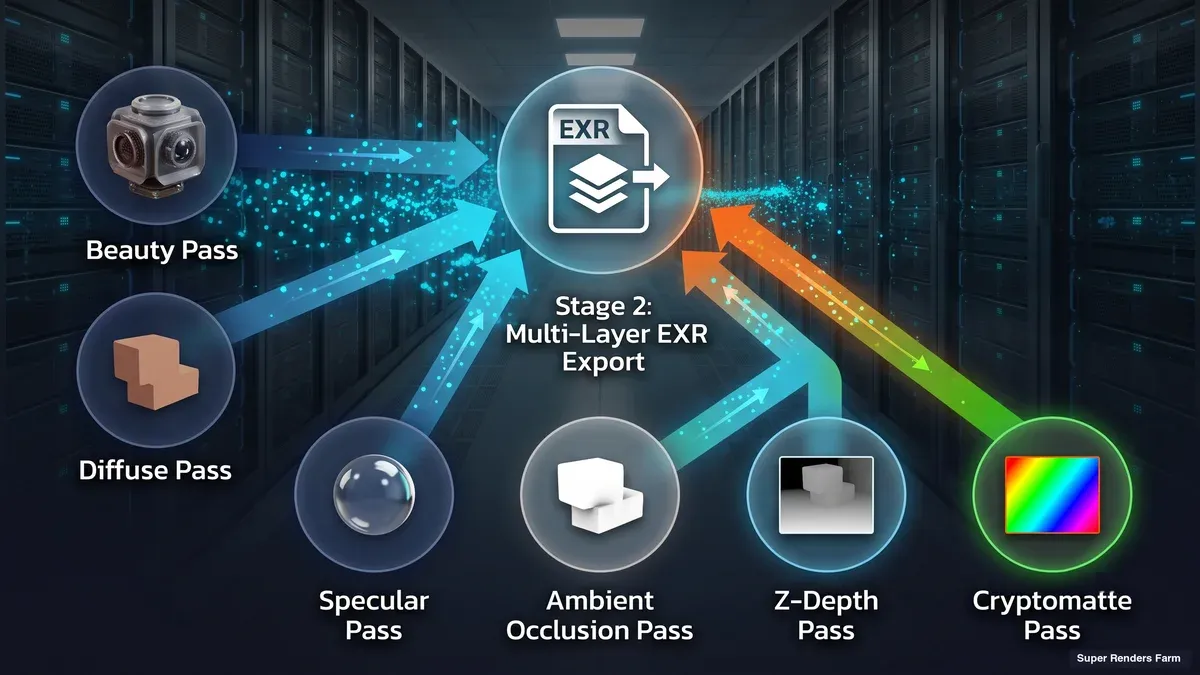 Six render passes (beauty, diffuse, specular, cryptomatte, depth, ambient occlusion) converging into a single multi-layer EXR file
How Comp Renders Distribute Across a Cloud Farm
The distribution model for compositing work is closer to Nuke's than to a 3D renderer's, and it is worth being precise about why.
A 3D renderer can split a single frame spatially: buckets or tiles handed to different threads or machines, because the pixels in one region genuinely do not depend on pixels in another. A comp generally cannot be split that way. The value of a pixel at frame N depends on that frame's inputs running through the full node tree, which makes most compositing work embarrassingly parallel by frame, not by image region. A render manager does not subdivide a comp frame; it subdivides the frame range, handing chunks of frames to different workers, each running its own instance of the compositing application headless (no GUI) for its slice.
That is the model our Nuke cloud render farm guide walks through in detail for Nuke specifically, including the exact command-line flags and licensing mechanics. After Effects behaves similarly for most production comps (title sequences, motion graphics, archviz reveals) but with one caveat worth flagging here: AE compositions that depend on temporal state across frames (motion blur with cross-frame sampling, particle simulations that accumulate, some tracking operations) are not cleanly frame-parallel, and splitting them naively across workers can produce visible seams at chunk boundaries. Our After Effects cloud rendering setup guide covers which AE workflows parallelize cleanly and which need a single-worker pass instead.
The practical shape of a comp render job on a farm looks like this: the script or project, plus everything it references, goes up as a self-contained bundle; the render manager splits the total frame range into chunks; each worker pulls its chunk, resolves the same footage paths, color config, fonts, and plugin dependencies the artist's machine had, and renders headless; completed frames land in shared or cloud storage as each chunk finishes, so a long sequence can start returning usable output well before the last worker is done.
Common Problems in Cloud Compositing
The overwhelming majority of comp renders that fail or come back wrong on a farm are not compositing-math problems. They are dependency and environment problems that a local workstation quietly masked.
| Problem | Cause | Fix |
|---|---|---|
| Wrong colors, render "succeeds" but looks off | A different OCIO/color config resolves on the farm than the artist used locally | Pin the project to one deployed color config; confirm the render environment uses exactly that config, not a default |
| Missing footage or placeholder blocks | Absolute local paths (a Windows drive letter, a mapped network drive) that mean nothing on a remote worker | Collect all referenced media into a self-contained, network-reachable bundle before submission |
| Out-of-memory failure mid-frame | Several full-resolution, multi-channel EXR passes and a cryptomatte matte held in memory at once | Provision comp-render nodes for RAM headroom, not just CPU core count; this is a more common failure cause than raw compute |
| Visible seams at chunk boundaries | A temporal-dependent operation (motion blur, particle sim, some tracking) split across workers as if it were frame-independent | Identify temporal-dependent comps and route them to single-worker rendering instead of frame-range distribution |
| Missing plugin, gizmo, or font | A custom gizmo, third-party plugin, or font installed locally but not on the render worker | Bake custom nodes/gizmos into the script where possible; confirm plugin and font matrices with the farm before submitting |
| Slower than expected on a GPU-tier node | The comp is dominated by merges, grades, and transforms, which are CPU operations, not the GPU-accelerated node subset | Right-size the job to CPU capacity; reserve GPU nodes for comps that actually lean on GPU-accelerated retimes, denoise, or ML nodes |
None of this is unique to any one application. It is the general shape of what breaks when a compositing script leaves the machine it was authored on, and it is why "test small before committing the full sequence" (render a handful of frames first, compare against the local result) is a low-cost insurance step worth taking on any comp render, on any farm.
When Cloud Rendering Actually Helps a Compositing Pipeline
Not every comp needs a farm. A short sequence that renders locally in a few minutes gains little from the upload and queue overhead of moving to the cloud. Cloud compositing earns its keep in a specific set of situations:
Deadline-driven bursts. A deliverable due in hours, not days, where the frame count and complexity would tie up a workstation for longer than the deadline allows. Distributing a 1,000-frame sequence across dozens of workers turns an overnight render into something that can come back in an hour or two, because throughput scales close to linearly with the number of workers available.
For how this plays out on broadcast spots, see our guide to render farms for TV commercials and VFX.
Overnight batch work that would otherwise block an artist. Even without a hard deadline crunch, a comp that would occupy an artist's own machine for several hours is time that artist cannot iterate, review, or work on the next shot. Sending it to a farm frees the workstation immediately instead of waiting for a local render to clear.
Large sequences with heavy per-frame data. Deep compositing, 4K-plus multi-channel EXR, and cryptomatte-heavy comps are exactly the workloads where per-frame render time accumulates most, and where distributing across many CPU-heavy workers pays off more than it would for a lightweight, low-channel-count comp.
Mixed 3D-and-comp pipelines already using a farm. If the 3D render for a shot already runs on a cloud farm, keeping the compositing stage on the same infrastructure avoids a round trip back to a local machine between the two stages, and keeps the passes (beauty, AOVs, cryptomatte) close to where the comp will read them.
Where cloud compositing earns its keep least: a handful of short, simple comps with no deadline pressure, where local render time is already well under the time it takes to prepare and upload a self-contained project bundle. The upload and dependency-audit overhead is real, and for a small job it can exceed the time saved.
Cost: What a Comp Render Job Actually Costs
Because compositing is a CPU- and memory-bound workload for the large majority of nodes in a typical comp, the CPU rate is what usually governs cost, with the GPU rate applying only to the specific nodes (heavy retimes, some denoise, machine-learning tools) that actually use GPU acceleration.
On our farm, CPU compute bills per GHz-hour, with a base rate of $0.004/GHz-hr (priority tiers run $0.004 to $0.016/GHz-hr depending on queue priority), and GPU compute bills per OctaneBench-hour (OBh) at a base of $0.003/OBh, with an RTX 5090 (32 GB VRAM) card running around $5.2/card-hour at full utilization. Render credits do not expire, and there is no machine-rental minimum, so a comp job is billed for the compute it actually consumes rather than a block of reserved time.
To make that concrete with an illustrative worked example (not a benchmark figure, since actual render time per frame varies enormously with resolution, channel count, and node complexity): a compositing batch that consumes 5,000 GHz-hours of aggregate CPU compute, a plausible order of magnitude for a multi-thousand-frame 4K sequence distributed across dozens of workers overnight, costs roughly $20 in compute at the base rate before any priority-tier multiplier. If a portion of that same job leans on GPU-accelerated nodes, that slice bills separately at the OBh rate rather than the GHz-hour rate. The mechanic that matters for budgeting is simple even when the exact numbers vary job to job: cost tracks total compute consumed, not wall-clock render time, so distributing a job across more workers to finish faster does not by itself change what it costs.
Comp Rendering vs 3D Rendering: Side-by-Side
| Category | 3D Rendering | Compositing Rendering |
|---|---|---|
| Core operation | Light transport: sampling, ray tracing, noise convergence | Node-graph evaluation: read, combine, transform, write |
| Primary bottleneck | GPU or CPU compute (engine-dependent) | CPU threading, memory capacity, storage I/O |
| Parallelism unit | Often spatial (tiles/buckets) plus frame | Almost always by frame, not by image region |
| GPU relevance | Central to the render for GPU engines (Redshift, Octane) | Opt-in for a specific node subset; most operations are CPU-only |
| Typical input | Scene geometry, materials, textures | Multi-layer, multi-pass EXR sequences (beauty, AOVs, cryptomatte) |
| Typical output | Beauty pass plus AOVs, often several files per frame | A small number of composited outputs, usually one final EXR sequence |
| Failure pattern | Convergence/noise, memory on complex scenes, license contention | Path/asset dependencies, color-config drift, out-of-memory on multi-channel reads |
Where Compositing Fits a Wider Cloud Rendering Pipeline
Compositing is usually the last stage in a chain that starts with a 3D render, and treating the two stages with the same assumptions about hardware and bottlenecks is the most common mistake we see in support tickets from teams new to cloud compositing. If your pipeline is entirely 3D-side and you have not yet worked out the broader service model, our guide to what a cloud render farm is and our VFX and product-visualization cloud rendering guide cover that ground. For the compositing stage specifically, the Nuke cloud rendering guide and the After Effects cloud rendering setup guide cover the application-specific mechanics (licensing, submission flags, plugin matrices) that this article deliberately kept general. On the After Effects side, our After Effects cloud render farm page covers the supported workflow and pricing directly.
For canonical reference on the file format underlying most VFX compositing pipelines, the OpenEXR project documents the multi-channel, multi-part format most comp renders read and write, and the Cryptomatte specification documents how ID-matte data is encoded into those files.
FAQ
Q: Is compositing rendering the same thing as 3D rendering on a cloud farm? A: No. A 3D render does light transport, sampling and tracing rays until an image converges, and that work is genuinely compute-intensive per pixel. A compositing render evaluates a node graph over image data that already exists (footage, render passes) and is dominated by CPU threading, memory capacity, and storage I/O rather than sampling. The two workloads share farm hardware but have different bottlenecks and different failure modes.
Q: Why is compositing more I/O-bound than 3D rendering? A: A comp typically reads one or more multi-layer, multi-pass EXR files per frame, pulling every channel a file carries (beauty, AOVs, cryptomatte mattes, depth), and holds several of those full-resolution frames in memory at once while evaluating the node graph. That read volume, combined with writing the composited frame back out, makes storage throughput and RAM capacity a bigger factor in comp render time than raw compute speed for the majority of nodes in a typical comp.
Q: Does a compositing render farm need GPU nodes? A: For most comps, no. The majority of compositing operations (merges, grades, keyers, transforms, most filters) run on the CPU. A specific, smaller set of node types (heavy retimes, some denoise operations, machine-learning tools) are GPU-accelerated, and comps that lean heavily on those nodes benefit from GPU capacity. For a typical merge-and-grade-heavy comp, CPU cores and RAM matter more than GPU tier.
Q: What is cryptomatte and why does it matter for cloud compositing? A: Cryptomatte is procedurally generated ID-matte data, written by a 3D render, that lets a compositor isolate individual objects, materials, or asset instances after the fact without re-rendering the 3D scene. For a cloud compositing job, cryptomatte data is an input the comp reads, not something the comp render generates, and cryptomatte-heavy comps read more channels per frame, which increases the I/O and memory load on the render node.
Q: Can Nuke and After Effects comps both render on the same cloud farm? A: Yes, on a farm that supports both applications, though the distribution model differs slightly. Nuke comps are almost always frame-parallel by design (each frame is fully self-contained). After Effects comps are frame-parallel in most production cases, but compositions that depend on temporal state across frames, such as certain motion blur or particle-simulation setups, need single-worker rendering rather than frame-range distribution to avoid seams. Our Nuke and After Effects guides cover the application-specific mechanics.
Q: When does it make sense to send a compositing job to a cloud farm instead of rendering locally? A: Cloud compositing pays off most on deadline-driven bursts, overnight batch work that would otherwise tie up an artist's workstation, and large or heavy-per-frame sequences (deep compositing, 4K-plus multi-channel EXR, cryptomatte-heavy comps). It pays off least on a handful of short, simple comps with no deadline pressure, where local render time is already shorter than the time it takes to prepare a self-contained project bundle for upload.
Q: How is compositing rendering billed on a cloud farm? A: On our farm, CPU compute (which governs cost for most compositing work) bills per GHz-hour at a base rate of $0.004/GHz-hr, with priority tiers up to $0.016/GHz-hr. GPU-accelerated nodes bill separately per OctaneBench-hour at a base of $0.003/OBh. Cost tracks total compute consumed rather than wall-clock time, so distributing a job across more workers to finish faster does not by itself change the total cost.
Q: What file formats does a compositing render farm typically handle? A: Multi-layer, multi-part OpenEXR is the standard for VFX-pipeline input and output, carrying beauty passes, AOVs, cryptomatte mattes, and depth data at 16-bit half-float (or 32-bit for data passes needing full precision). When the final deliverable is a video file (H.264, HEVC, ProRes) rather than an image sequence, that encode typically runs as a separate pass after the frame-by-frame comp render, since video codecs generally are not splittable across workers the way an independent image sequence is. Our H.264 vs H.265 guide covers that final encoding step.
About Thierry Marc
3D Rendering Expert with over 10 years of experience in the industry. Specialized in Maya, Arnold, and high-end technical workflows for film and advertising.



