
RTX 5090 in Production: 7 Weeks of Render Farm Field Notes (38-Scene Study)
Overview
Launch benchmarks for the RTX 5090 are over a year old, and they all describe the same thing: one card, one staged scene, ideal conditions. What almost no one publishes is the sequel — what the card does once it is buried in a production queue, rendering other people's scenes on a schedule it does not control. So we pulled the logs. What follows is the queue-level field notes: the same production data we plan capacity from, laid out as numbers you can check.
This same data set is also the basis of our feature in Computer Graphics World's SIGGRAPH digital edition — read "Seven Weeks of RTX 5090" in CGW's April/May/June 2026 issue.
This is seven weeks of that. From April 1 to May 22, 2026 — 51 days — we ran one dual-RTX-5090 node inside our live render farm and let it take whatever the queue handed it. No staged tests, no cherry-picked frames. The short video below walks through the headline numbers; the full field notes follow.
The node itself is unremarkable: two RTX 5090s, 128 GiB of RAM, 32 logical cores at 4.3 GHz, Windows 11. One detail shapes every figure here — the scheduler runs a single render task per GPU, so each card renders its own job and every number is a clean per-card number, the figure you multiply to plan capacity. Across the window the node finished 99.6% of its tasks — 4,890 of roughly 4,900 completed, 18 failed. The scheduler logs the failure, not the cause, so we won't guess at one.
For what changes when both cards work a single job instead of one task per GPU, see our 1-vs-2 GPU render scaling benchmark.
Key numbers
- Window: April 1 – May 22, 2026 (51 days, ~7 weeks), one dual-RTX-5090 node
- Completion: 99.6% — 4,890 of ~4,900 tasks finished, 18 failed (cause not logged)
- Speedup: median 3.2x per-frame on Blender Cycles vs previous-gen RTX 3080/2080-class nodes (median per-frame time down ~69%); 95% CI 3.0–3.3x
- Spread: IQR 2.7–3.4x, full range 1.6x–5.1x across 38 paired scenes — one multiplier never describes a queue
- AI denoise: ~83% of Cycles jobs ran an AI denoise pass — the same rate on the old hardware
- VRAM: median 5.6 GB, 90th percentile 11.5 GB, heaviest job ~37 GB
- Driver: one driver (581.80 / CUDA 13.0) the entire window, zero churn
- Power: ~360–375 W/card under load (controlled bench), peaking ~400 W, at 68–83 °C — well under the ~575 W rated class
What 38 paired scenes show
The comparison we trust most is not a synthetic test but the jobs that ran on both generations in the normal course of business — same scene, same user, at least three tasks per side before a scene counted. Per-frame time is task wall-clock divided by frame count, straight from the queue. From the window, 38 scenes cleared that bar, drawn from 1,419 individual render tasks (503 on the 5090 node, 916 on the previous generation). Thirty-eight is not the size of our data; it is what survives a deliberately strict filter.
| Metric | Value |
|---|---|
| Median per-frame speedup | 3.2x (≈69% time drop) |
| Bootstrap 95% CI (median) | 3.0–3.3x |
| Interquartile range | 2.7–3.4x |
| Full range | 1.6–5.1x |
| Scenes / tasks | 38 scenes / 1,419 tasks |
| Baseline | previous-gen RTX 3080/2080-class (10–12 GB) |
We use a median of medians: each scene contributes the median of its own per-frame times on each side, and the 3.2x is the median of those 38 ratios, so one slow frame cannot tilt the result. The dispersion matters as much as the midpoint — the middle half of scenes land between 2.7x and 3.4x, and the full range runs 1.6x to 5.1x.
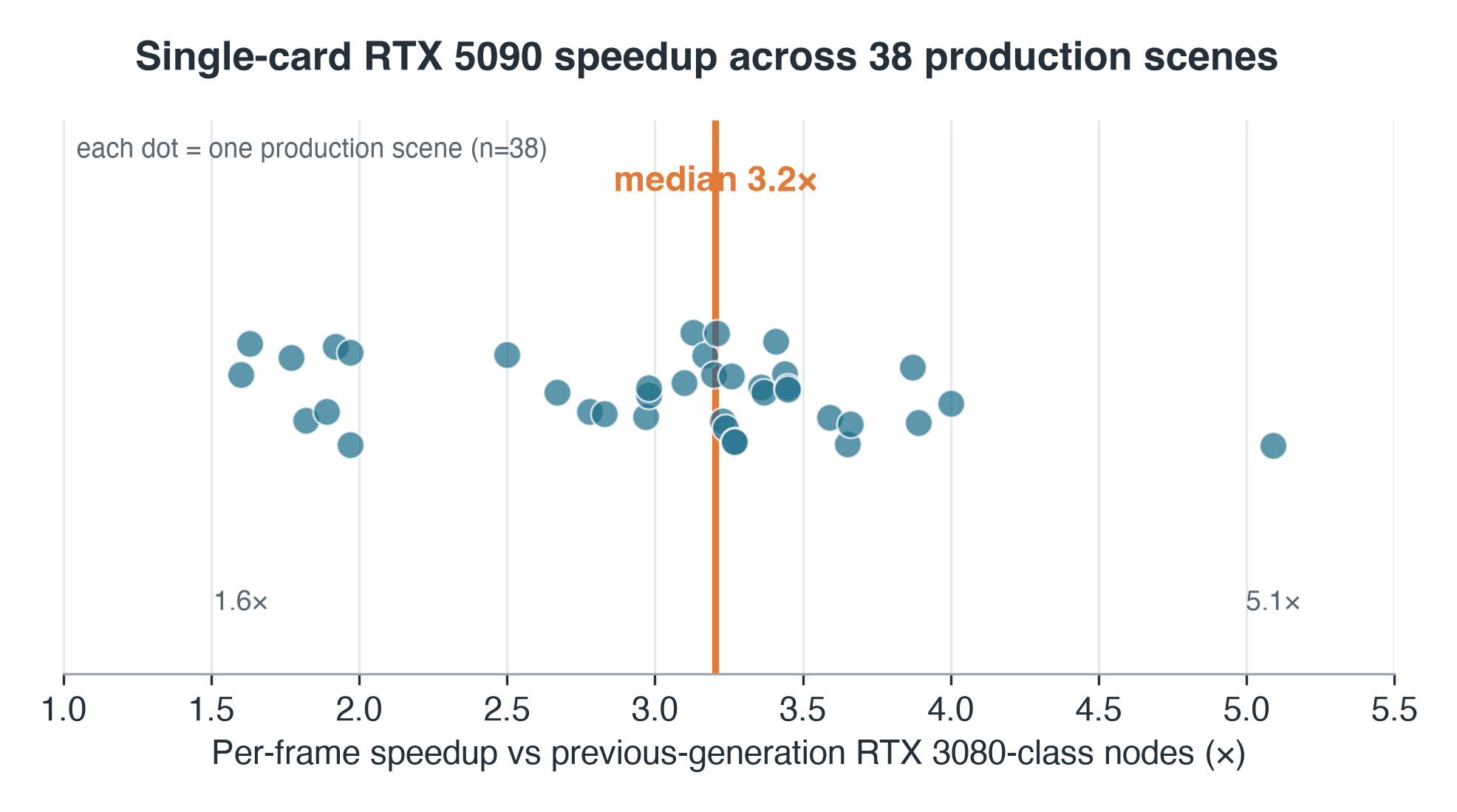 Per-scene RTX 5090 speedup across 38 Blender Cycles production scenes, median 3.2x with a 1.6 to 5.1x spread
Per-scene speedup, RTX 5090 vs the previous-generation nodes these jobs ran on — 38-scene production sample. Median 3.2x; range 1.6–5.1x.
Two caveats belong with that number, not in a footnote. First, the previous-generation side ran virtualized — GPU passthrough inside a VM — so an unmeasured share of this 3.2x is virtualization overhead, not raw silicon; the clean same-host comparison, an RTX 5090 against a current RTX 4090, is the controlled follow-up we owe and have not yet run. Second, the 38 are not a random draw from the queue: they are the jobs a user happened to re-render on both generations, which skews the sample toward longer, iterated work — so read the distribution as the matched pairs', not the whole queue's.
Three honesty notes are load-bearing here. This is observational data — users sometimes adjust settings between re-renders, and we did not freeze their scenes. The comparison is node-vs-node: the 5090 side is one bare-metal card, the previous-generation side runs as GPU passthrough inside virtual machines, so some of the gap is setup, not silicon. And the baseline is the RTX 3080/2080-class cards these jobs actually ran on — not a current RTX 4090; a clean current-card head-to-head is a separate, controlled exercise we have not run. These are single-node, Cycles-only numbers; they describe our queue and should not be generalized to other engines or hardware.
What separates a 1.6x scene from a 5.1x one is partly visible in the data. Plot each scene's speedup against how long its frames took on the old hardware and a loose positive trend appears — Spearman ρ ≈ 0.34 (two-sided p ≈ 0.04). Short, overhead-bound frames sit at the bottom: when a frame finishes in five seconds, fixed per-task cost — scene load, sync, the old virtualization layer — eats most of the clock, and a faster card has little to act on. Heavier, compute-bound frames gain more. But there is real scatter: one heavy scene held at just 1.6x because its bottleneck was not the GPU but, plausibly, storage or a CPU-bound stage. The median says one thing; the range says it depends on the scene.
AI denoising was already the default
Ask where AI actually sits in a production rendering pipeline in 2026, and our logs give an unglamorous answer: in the denoiser. About 83% of Cycles jobs on the 5090 node ran an AI denoise pass — OptiX or Intel Open Image Denoise — and the rate on our previous-generation nodes is essentially identical. The new card did not start the habit; it was already standard on the old hardware and stayed standard on the new. For a denoise-heavy pipeline, a generation jump isn't buying you "AI" that was already there — it is buying path-tracing throughput around an already-routine step. This figure is Cycles-scoped on purpose; be skeptical of any farm-wide "AI %" not tied to one engine.
VRAM in the wild
Cycles writes its peak device-memory figure into the render log — a humble but usable proxy for what production actually demands of VRAM. Across the 57 Cycles jobs where that line was recorded, peak render-device memory was about 5.6 GB at the median and 11.5 GB at the 90th percentile. Our previous-generation cards are 10–12 GB parts, so the median job would have fit — but the 90th-percentile job was already brushing their ceiling. And the tail runs further: the heaviest job logged roughly 37 GB, past even the 5090's own 32 GB — the kind of scene that on a GPU means a CPU fallback or no render at all. The log carries no scene metadata, so we can't tell you what kind of scene that was — only its class: a 37 GB working set is the signature of heavy geometry, high-resolution texture sets, or volumetrics, the kind of job that outgrows even a 32 GB card and, on a single GPU, simply stops. The operator rule still holds: you size VRAM for the tail, not the median. That is why both oversized on-card memory and shared GPU cloud render farm capacity exist — so you can reach for a larger card per job instead of buying one.
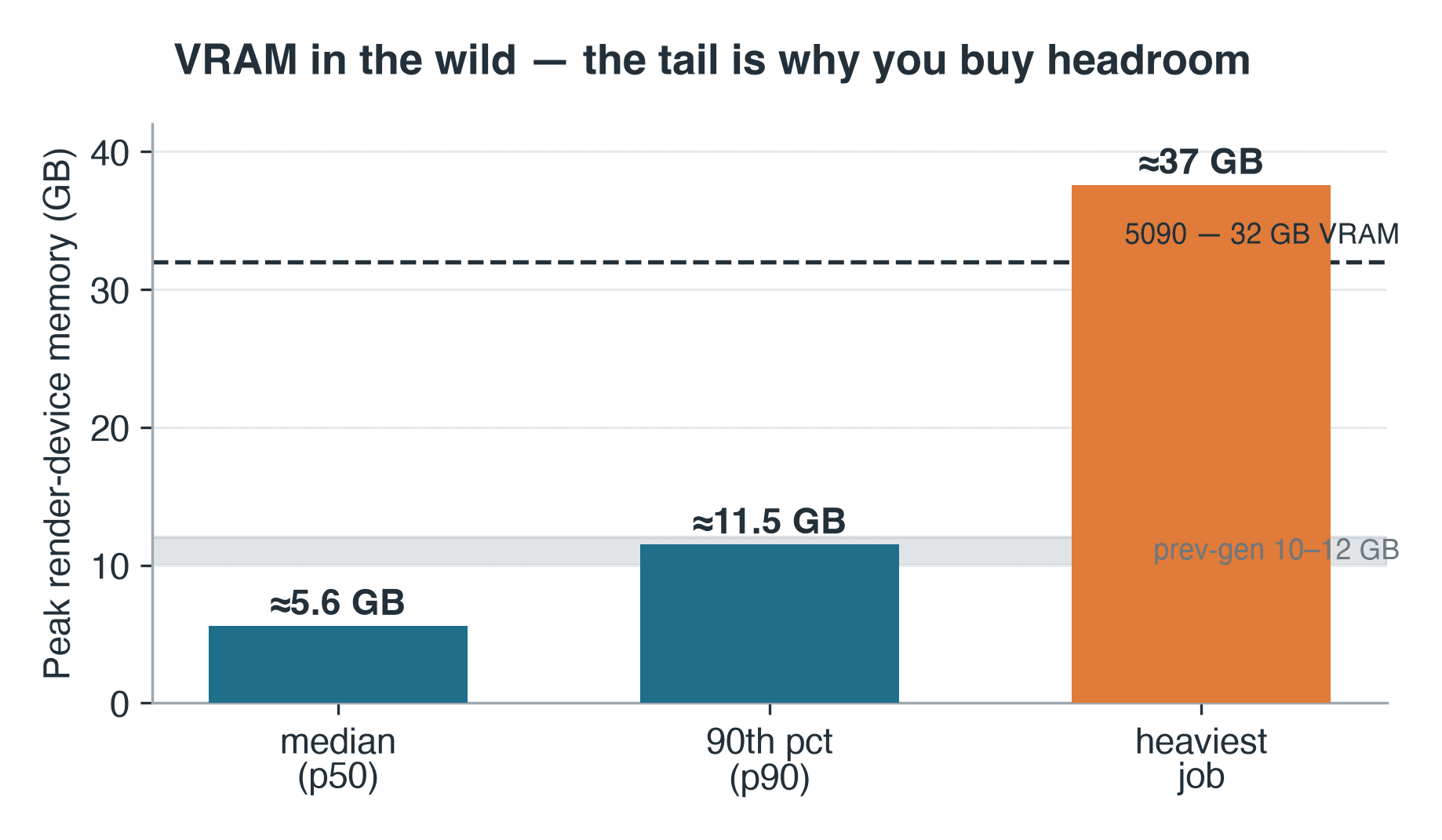 Peak render-device memory for Blender Cycles jobs on the RTX 5090 node: median 5.6 GB, 90th percentile 11.5 GB, heaviest 37 GB
Peak render-device memory across 57 logged Cycles jobs. The heaviest job exceeded even the 5090's own 32 GB.
One driver, and bounded power
The least dramatic finding is the one we'd most want before buying. One driver — 581.80, on CUDA 13.0 — ran the entire window with zero churn: no rollbacks, no mid-window swaps. For early-cycle hardware on a production queue, a boring driver log is the compliment.
Power was similarly calm. On a controlled bench run of the same cards under sustained load, each drew about 360–375 W (peaking near 400) at 68–83 °C — the top card in a stacked pair running hottest, but well under the ~575 W rated class. Budget for that sustained draw, not the rated peak. Energy per finished frame works out to roughly 2.5 Wh at a median Cycles frame of about 24 seconds — but treat that as an inference: it rests on the bench draw and was computed for the 5090 alone, not measured against the older nodes.
Why these notes lead with Blender
Over the trailing 90 days, GPU jobs were roughly a quarter of everything our farm rendered — the rest is CPU work. Within the GPU mix, Cycles is about 74% of jobs and Redshift a clear second at about 15%, which is why a render-farm RTX 5090 write-up leads with Blender cloud rendering. For how multiple of these cards behave together, see our companion notes on RTX 5090 cluster performance, and for the memory edge specifically, where VRAM limits bite on complex scenes.
For the Redshift share of that mix specifically, our Cinema 4D Redshift render farm guide covers that workflow in more depth.
Two things travel out of this queue. First, production is not a benchmark — a card that posts a clean lab number still has to absorb virtualization overhead, mixed workloads, and scenes it was never tuned for, and the result is a distribution, not a point. Second, the median is not the tail. A 3.2x typical speedup and a one-job 37 GB memory spike are both true at once, and you plan capacity around both. The card is genuinely fast where the work is heavy. Where it isn't, the queue tells you why.
Method, in brief
Every figure here comes from our scheduler's own task records, not a staged test. Per-frame time is task wall-clock divided by frame count; the headline speedup is a median of per-scene medians across the 38 matched pairs, and the confidence interval is a 20,000-sample bootstrap. Note which sample backs which claim: 38 paired scenes for speedup, 57 logged jobs for VRAM, and a separate controlled bench run for power and thermals — not the production queue. The 18 tasks that failed (of roughly 4,900) are counted as failures, not dropped; the scheduler logs the state but not the cause, so we leave them uninvestigated rather than guess. None of this is hard to reproduce in spirit — it is what any operator can pull from their own queue logs, and we're glad to walk a studio through the method in more detail.
For how this production-data approach compares to our broader benchmark methodology, see our render farm benchmark methodology.
FAQ
Q: How much faster is the RTX 5090 than the previous generation for Blender Cycles? A: Across 38 paired production scenes (same scene and user on both generations), median per-frame time dropped about 69% — a median 3.2x speedup, with a bootstrap 95% confidence interval of 3.0–3.3x. Individual scenes ranged from 1.6x to 5.1x. This is observational, node-vs-node data, not a controlled benchmark.
Q: Why do the speedups vary so much between scenes? A: Speedup tracks per-frame workload as a loose positive trend (Spearman ρ ≈ 0.34). Short, overhead-bound frames gain the least because fixed per-task cost — scene load, sync, the old virtualization layer — dominates; heavier, compute-bound frames gain more. One heavy scene held at 1.6x because its bottleneck was storage or a CPU-bound stage, not the GPU.
Q: Is this a controlled benchmark I can compare to my own hardware? A: No. These are observational field notes from one live production node, Blender Cycles only. Users adjusted their own scenes between re-renders, and the comparison is node-vs-node — a bare-metal 5090 against virtualized previous-generation nodes — so some of the gap is setup, not silicon. The baseline is RTX 3080/2080-class hardware, not a current RTX 4090.
Q: How much VRAM did production scenes actually use? A: Across 57 logged Cycles jobs, peak render-device memory was about 5.6 GB at the median and 11.5 GB at the 90th percentile. The heaviest single job logged about 37 GB — past the 5090's own 32 GB — which on a GPU means a CPU fallback or no render. Size VRAM for the tail, not the median.
Q: Did the RTX 5090 change how often AI denoising was used? A: No. About 83% of Cycles jobs on the 5090 node ran an AI denoise pass (OptiX or Intel Open Image Denoise) — and the rate was essentially the same on the previous generation. AI denoising was already standard; the new card only changed the speed of everything around it.
Q: How stable was the driver during the seven weeks? A: One driver — 581.80 on CUDA 13.0 — ran the entire 51-day window with zero churn: no rollbacks, no mid-window swaps. For early-cycle hardware on a production queue, that stability is a meaningful result on its own.
Q: What was the power draw and temperature under load? A: On a controlled bench run under sustained load, each card drew about 360–375 W, peaking near 400 W, at 68–83 °C — comfortably under the card's ~575 W rated class. Energy-per-frame works out to roughly 2.5 Wh, which is an inference from that bench measurement, computed for the 5090 only.
Q: Do these numbers apply to other render engines? A: No. This study is Blender Cycles GPU only, on a single node. Other engines log denoising, memory, and timing differently. Treat these as Cycles-specific field notes, not a farm-wide or cross-engine claim.
About Richard Ta
Richard Ta is co-founder and technical lead of Super Renders Farm (superrendersfarm.com), a fully managed cloud render farm that supports Maya, 3ds Max, Cinema 4D, Blender, and Houdini across the major render engines. He has spent over a decade building and running large-scale CPU and GPU render infrastructure for studios in more than 50 countries.



