
Multi-GPU Scaling: What 1 vs 2 GPUs Actually Does for Rendering (2026 Benchmark)
Overview
Introduction
TL;DR: A second GPU rarely doubles render speed, and how much it helps depends on the render engine. On a dual RTX 5090 machine, throughput benchmarks (V-Ray, Octane) scaled close to 2.00x, while render-time engines scaled lower (Cycles 1.31x to 1.59x, Redshift 1.68x), because fixed per-render overhead eats into what the second card can speed up. Two GPUs is a practical ceiling for one machine; beyond that, speed comes from running more frames on more machines, not from stacking more cards into one box.
A second GPU does not make a render twice as fast. That sounds obvious once you say it out loud, but a lot of hardware decisions get made on the assumption that two cards mean double the speed. In June 2026 we took one of our dual RTX 5090 machines and measured what actually happens when you go from one card to two, across four render engines and seven scene/benchmark combinations.
The short version: it depends on the engine, and on the scene. Throughput-style benchmarks (V-Ray, Octane) scaled almost perfectly, around 2x. Render-time engines (Cycles, Redshift) scaled lower, and the larger the share of a render that is fixed overhead, the less the second card helped. We will walk through the numbers, explain why the curve bends the way it does, and be clear about where this stops. Two cards is the ceiling on a single machine. Going beyond that is a different architecture, not a bigger version of this one.
This is a hardware/benchmark piece, so it leans GPU-heavy. Worth saying up front that GPU is the minority of what runs across our farm; most production work here is still CPU rendering (V-Ray, Corona, Arnold on CPU). But when someone asks "is a second GPU worth it," they deserve measured numbers, not a sales pitch. So here are the measured numbers.
How We Tested (and What These Numbers Are Not)
The test machine ran Windows 11 Pro with two RTX 5090 cards on NVIDIA driver 596.36. Every ratio in this article compares one card against two cards on that same machine, with the same driver and the same software versions, so nothing else changes between the two runs.
Every scene is a vendor-standard benchmark: Blender's Open Data scenes (bmw27, classroom, junkshop), Maxon's "Vultures" scene for Redshift, the Chaos V-Ray Benchmark 6.00.02, and OctaneBench 2025.2.1. No customer projects, no production assets. We are not publishing per-frame minutes, dollars-per-frame, or electricity figures here, because this dataset does not contain them and we do not invent them.
One method note that affects how you read the Cycles rows: we ran Blender Cycles (4.5 LTS, OptiX) at 200% resolution, heavier than the Open Data default, so each render lasts long enough to produce a stable scaling ratio. That means our raw Cycles times are not comparable to public Open Data scores; they are tuned for measuring scaling, not for leaderboards. Cycles and Redshift are measured in render time (seconds, lower is better; median of three runs); V-Ray and Octane are measured as a benchmark score (vpaths or OctaneBench points, higher is better). Those are two different metric types, so absolute numbers never compare across engines. Only the scaling ratio within an engine is apples-to-apples.
The Core Result: 1x to 2x Scaling, Per Engine
Here is the headline data: what a second identical RTX 5090 actually buys you, by engine and scene.
| Engine | Scene | 1x RTX 5090 | 2x RTX 5090 | Scaling |
|---|---|---|---|---|
| Cycles | bmw27 | 49.45 s | 32.06 s | 1.54x |
| Cycles | classroom | 23.09 s | 14.54 s | 1.59x |
| Cycles | junkshop | 19.71 s | 15.00 s | 1.31x |
| Redshift | Vultures | 57 s | 34 s | 1.68x |
| V-Ray GPU (CUDA) | benchmark | 11,051 vpaths | 21,728 vpaths | 1.97x |
| V-Ray GPU (RTX) | benchmark | 15,333 vpaths | 30,641 vpaths | 2.00x |
| Octane | OctaneBench suite | 1,690.78 | 3,380.72 | 2.00x |
Read that top to bottom and a clear split appears. V-Ray and Octane land at or just under 2.00x: a second GPU very nearly doubles output. Cycles sits between 1.31x and 1.59x. Redshift lands at 1.68x.
So "does adding a second GPU double my speed?" has three different honest answers depending on what you render: basically yes for V-Ray and Octane, roughly a 1.3x to 1.6x bump for Cycles, and somewhere in between for Redshift. Anyone who tells you a single multiplier covers all of rendering has not actually measured it.
Why Throughput Engines Scale Better Than Render-Time Engines
The pattern is not random; it comes from how each benchmark spends its time. V-Ray Benchmark and OctaneBench are throughput tests. They push a workload across whatever compute is available and report a score, and the fixed setup cost (loading the scene, building acceleration structures, initializing the device) is a tiny sliver of the total run. Add a second card and almost all of that extra silicon goes straight into useful work, so you get close to 2x. The V-Ray RTX result hitting a clean 2.00x is exactly what you would expect from a workload where overhead is essentially noise.
Render-time engines behave differently. When you measure a Cycles or Redshift render as wall-clock seconds, you are timing the whole job, and every job carries a fixed chunk of work that does not split across cards: scene parse, BVH/acceleration-structure build, kernel compilation and warm-up, device coordination, the final pixel resolve. A second GPU speeds up the part that is actually splittable. It does nothing for the fixed part. The more of your total render time is fixed overhead, the further below 2x your scaling lands.
How Much of Each Render Is Fixed Overhead
The two timings per scene let us estimate that fixed part directly. If a render takes T1 seconds on one card and T2 on two, and only the splittable part gets faster, the fixed part is roughly 2 x T2 minus T1. This is a simple two-point estimate, not a profiler reading, but it lines up with the scaling numbers:
| Scene | 1 card | 2 cards | Estimated fixed part | Share of the 1-card render |
|---|---|---|---|---|
| Cycles junkshop | 19.71 s | 15.00 s | about 10.3 s | about 52% |
| Cycles bmw27 | 49.45 s | 32.06 s | about 14.7 s | about 30% |
| Cycles classroom | 23.09 s | 14.54 s | about 6.0 s | about 26% |
| Redshift Vultures | 57 s | 34 s | about 11 s | about 19% |
That is why Cycles junkshop (1.31x) scales worse than Cycles classroom (1.59x): roughly half of the junkshop render is work a second card cannot touch, while classroom spends most of its time in the splittable part. Same engine, same hardware; the scene decides how much the second card matters.
It also tells you something practical about faster hardware. A faster card shortens the splittable part of a render, but the fixed part stays roughly the same number of seconds. So the faster your single-card render already is, the larger the fixed share becomes, and the less a second card can add in proportion. The second card still makes the render faster; it just cannot deliver a clean 2x when there is little slow work left to split. That is worth knowing before you spend money stacking identical cards expecting linear returns.
Two GPUs Is the Per-Machine Ceiling, and Why That Is Fine
Here is where we draw a hard line, because it is the part most multi-GPU content quietly skips. The machine in this benchmark holds two GPUs, and so do the other GPU machines on our farm. Two cards is the per-machine ceiling. We are not going to show you a 4x or 8x single-machine scaling curve, because that is not a configuration we run, and we are not going to imply otherwise.
Pushing past two GPUs on a single frame means multi-node distributed rendering: splitting one image across several machines, with all the network coordination, bucket/tile management, and overhead that implies. That is a separate architecture, not a bigger version of a two-card box. It is not something we offer today for a single frame, so we are not going to dangle it as a "coming soon" feature with a date attached.
And for most production work, the two-GPU ceiling is not the constraint that matters. The constraint that bites first is almost always VRAM, not card count: a scene that does not fit in 32 GB will not render regardless of how many GPUs you point at it, which is a different problem entirely (we cover it in RTX 5090 VRAM limits for complex scenes).
How Rendering Scales Beyond One Machine: Frames, Not Cards
This is the distinction worth internalizing. There are two completely different things people mean by "render faster on more hardware":
- Splitting one frame across many GPUs or machines (tile/bucket distributed rendering). This is what the 1x to 2x numbers measure at the two-card scale. It hits diminishing returns fast on render-time engines, as the data shows, because of fixed per-render overhead, and the coordination cost only grows as you add machines.
- Spreading many frames across many machines (frame-parallel rendering). Each machine renders a whole frame on its own, and an animation's frames are handed out in parallel. There is no single-frame coordination overhead to fight, so this scales cleanly.
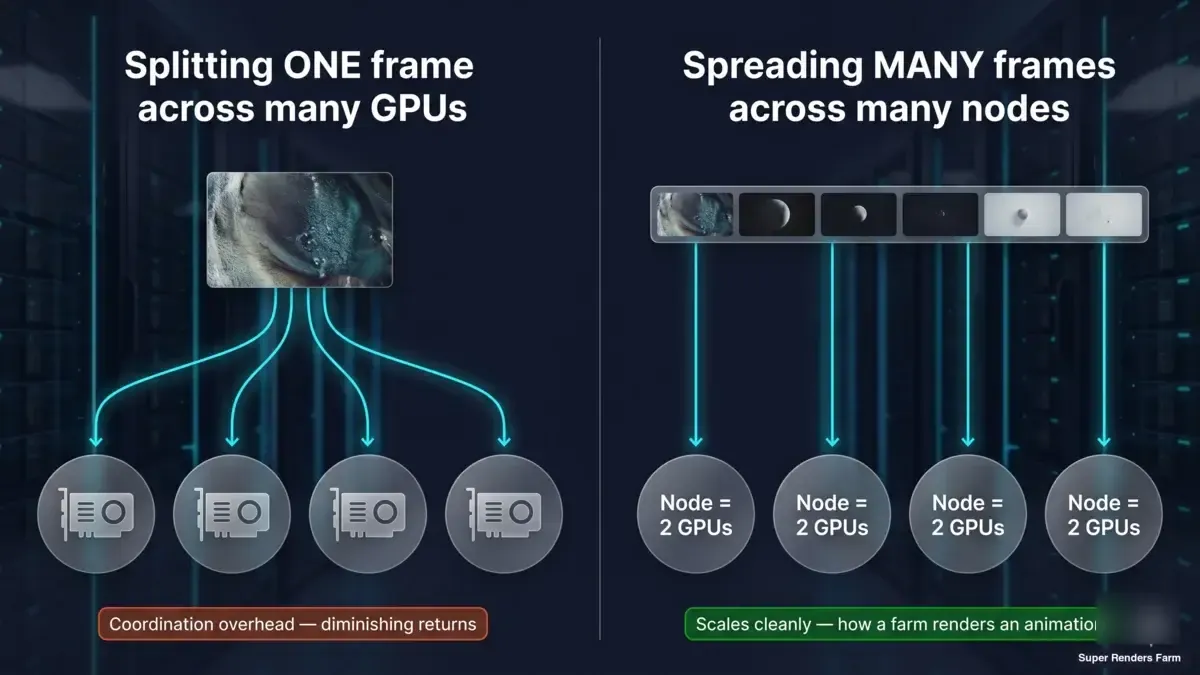 Two-panel concept diagram: one frame split across several GPUs runs into coordination overhead and diminishing returns; many whole frames, each rendered on its own machine in parallel, scale cleanly
On our farm, CPU animations are rendered the second way: their frames are spread across many CPU machines at once. GPU animations are spread the same way, across whichever RTX 5090 cards are free; our GPU fleet is smaller, so a GPU job spreads across fewer machines than a CPU job. Each frame still renders at the per-card speed and scene overhead measured here. Billing is per card-hour, so spreading a job mainly changes how long you wait; each extra card loads the scene once, which can add a little to the total on short jobs.
So the honest framing of multi-GPU is narrower than the marketing version. Two cards in one machine gives you a real, measurable boost: close to 2x on V-Ray and Octane, more modest on Cycles and Redshift. Beyond that, the answer is not "stack more cards in the box," it is "run more frames on more machines."
What This Means When You Choose How to Render
If you are deciding between one card and two for a workstation, the engine you live in should drive the call. V-Ray or Octane users get close to a full doubling and the second card is easy to justify. Cycles and Redshift users should expect roughly a 1.3x to 1.7x bump on scenes like these, and should weigh whether a faster single card is the better spend. If you are deciding whether to render locally or hand work to a farm, remember that the farm advantage is parallel throughput on many frames, not a magic single-frame multiplier: a single hero still frame will not render dramatically faster on a farm than on a comparable workstation.
For context on the managed-vs-do-it-yourself tradeoff (who handles drivers, licensing, and node configuration), our fully managed vs DIY render farm breakdown covers it. On our farm, render-engine licensing (V-Ray, Redshift, Octane) is included in the rendering rate and node configuration and drivers are maintained for you, so they are not something you assemble or tune yourself. For the Redshift-on-Cinema-4D side specifically, where the 1.68x scaling figure lands, see our Redshift render farm for Cinema 4D guide.
The measurements here are deliberately un-hyped. A second GPU is a real lever with real limits, renders gain less from it the more of their time is fixed overhead, and speed beyond one machine is a frame-distribution story, not a card-stacking one. Knowing which lever applies to your workload is most of the decision.
If you're pricing out a job from these multipliers, check current render farm pricing or read the cost-per-frame benchmarking methodology. For the CPU side of hardware comparison, see our Cinebench scores for cloud rendering or the V-Ray Benchmark guide. For single-card RTX 5090 behavior, see our RTX 5090 GPU cloud rendering performance write-up.
FAQ
Q: Does adding a second GPU double rendering speed? A: Not usually. In our 2026 benchmark on a dual RTX 5090 machine, throughput engines like V-Ray and Octane scaled close to 2.00x with a second identical card, but render-time engines scaled lower: Cycles landed between 1.31x and 1.59x and Redshift hit 1.68x. The gain depends on the engine and the scene, because every render carries fixed overhead that a second card cannot speed up.
Q: Why do some renders gain less from a second GPU than others? A: Because part of every render is fixed work (scene parse, acceleration-structure build, kernel warm-up) that takes about the same time on one card or two. From our one-card and two-card timings, that fixed part was roughly 19% of the Redshift Vultures render and about 52% of the Cycles junkshop render, which is why junkshop scaled only 1.31x. The bigger that fixed share, the less the second card can add.
Q: Why do V-Ray and Octane scale better than Cycles and Redshift across two GPUs? A: V-Ray Benchmark and OctaneBench are throughput tests where the fixed setup cost is a tiny fraction of the run, so a second card goes almost entirely into useful work and scaling approaches 2.00x. Cycles and Redshift are measured as total render time, which includes non-parallel overhead a second card cannot accelerate, so their scaling lands below 2x.
Q: Can a render farm make a single frame render faster on many machines? A: Splitting one frame across multiple machines is multi-node distributed rendering, which is a separate architecture with its own coordination overhead and is not something we offer today for a single frame. Farm speed comes from frame-parallel rendering instead, many whole frames rendered at the same time on different machines, so an animation finishes faster while a single hero frame renders at roughly single-machine speed.
Q: How many GPUs do I actually need for rendering? A: For a single machine, two GPUs is a sensible ceiling and is what our benchmark machine used; beyond that the practical constraint is usually VRAM, not card count, since a scene that does not fit in memory will not render no matter how many cards you add. If you render animations, real throughput comes from running more frames on more machines rather than stacking more cards into one box.
Q: Are these benchmark numbers comparable to public Blender Open Data scores? A: No. We ran Blender Cycles at 200% resolution, heavier than the Open Data default, so each render lasts long enough to produce a stable scaling ratio. That makes our raw Cycles times intentionally non-comparable to public Open Data leaderboards; the scenes were tuned for measuring scaling, not for matching standard scores.
Q: Do I need to manage GPU drivers and licenses to use a managed render farm? A: No. On a fully managed farm, node configuration, drivers, and render-engine licensing (V-Ray, Redshift, Octane) are handled for you and included in the rendering rate, so they are not something you assemble or tune. Cycles is free and open-source, so it carries no separate license.
About Thierry Marc
3D Rendering Expert with over 10 years of experience in the industry. Specialized in Maya, Arnold, and high-end technical workflows for film and advertising.



