
iRender vs Super Renders Farm: A 2026 Side-by-Side Comparison
Overview
Introduction
If you've been pricing cloud render farms for a 2026 GPU project — Redshift, Octane, V-Ray GPU, or Blender Cycles on 4K scenes — iRender and Super Renders Farm almost always come up side by side. Both operate out of Vietnam, both are aggressive on GPU pricing, and both publish their rates openly. But the two services solve the rendering problem in very different ways, and the right fit usually depends less on sticker price and more on how much of the render pipeline you actually want to run yourself.
In short, Super Renders Farm is a fully managed cloud render farm: you submit a scene through a web dashboard, operators handle the machines, and billing runs per second of render time with no remote desktop session. iRender is an infrastructure-as-a-service provider: you rent a whole GPU machine by the hour and drive it yourself over Remote Desktop Protocol.
We've been operating Super Renders Farm since 2010 (legal entity 2017), and iRender has been a visible competitor the whole time. We've had clients come to us after running into RDP-workflow fatigue on iRender, and we've had clients leave for iRender when they wanted more direct control over the rendering environment. Neither is a universally better option — they're built for different kinds of users.
Everything in this comparison is sourced from each company's public pricing and documentation pages. The iRender hardware, pricing, partnership and data-center details were re-checked against iRender's live pages on September 15, 2026; the rest of the snapshot dates from late April 2026. Pricing — especially iRender's GPU rates and top-up bonuses — changes frequently, so check the live pages before committing to a project. For broader context on how cloud farm pricing actually works, our render farm pricing models guide covers the main billing units and why two farms can quote wildly different numbers for the same job.
Quick Answer: Which Fits Your Use Case?
In one line: if you want to submit a scene and get frames back without managing a machine, Super Renders Farm is built for that; if you want full control of a rented GPU machine over RDP, iRender is built for that. The deep dive below covers pricing, hardware, and workflow in full, and the table below maps common production profiles to the service that usually fits better. All claims are evidence-backed against the detailed sections that follow. The last row is the one place where the two farms publish clearly different trust signals: iRender states a certified Tier III data center with ISO 27001, ISO 20000 and ISO 9001:2000 certifications, while Super Renders Farm does not claim any named accreditation.
| Your situation | iRender is the better fit if... | Super Renders Farm is the better fit if... |
|---|---|---|
| Archviz studio (V-Ray / Corona) | You bring your own V-Ray or Corona license and want RDP control over plugin builds like Forest Pack or RailClone. | V-Ray and Corona licenses are included (no per-engine surcharge), operators validate scene assets and plugin versions before render, and idle iteration time stays off the meter. |
| Game cinematics studio | You need bespoke pipeline integration or custom DCC builds (Unreal Movie Render Queue, experimental Karma) installed directly on the rendering host, or you want up to eight RTX 5090 cards on one machine for a multi-GPU Redshift or Octane shot. | You want explicit Maxon (Cinema 4D / Redshift) and Chaos (V-Ray / Corona) partner-authorized licensing, with operators handling scene validation while your team focuses on shot work. |
| VFX studio (Houdini simulation) | You need specific node-RAM configuration or want to ship a custom workstation image with your own Mantra / Karma / Redshift build for the sim cache pipeline. | You need cost-controlled multi-engine pipeline access (Houdini + Redshift + Karma XPU + V-Ray for Houdini) on the RTX 5090 fleet with operator-managed cache handoff. See Houdini cloud render farm. |
| Cinema 4D motion design | You're running niche C4D plugin builds (experimental Octane releases or custom Redshift versions) that require direct install access on the rented machine, or you want Cinema 4D and Redshift pre-installed on the multi-GPU nodes of a farm that announced an official Maxon partnership in 2023 (pre-activated licences on Prime-tier accounts, bring-your-own otherwise). | You're on production Cinema 4D + Redshift release builds, want Maxon-partner authorization, included Octane / Redshift licensing, and per-second render-time billing rather than per-machine-hour. |
| Indie or single artist (Blender / Cycles) | You're comfortable in RDP, prefer to install Blender add-ons yourself, and your batch jobs fully saturate the rented hour. | You want non-expiring credits ($25 free on signup), per-second render-time billing so iteration time isn't billed, and don't want to maintain a remote workstation. |
| Enterprise / compliance-driven (named ISO 27001 / SOC 2 / TPN accreditation) | Your procurement checklist asks for a certified facility: iRender states that its data center is Uptime Tier III certified and holds ISO 27001 (BS7799), ISO 20000 (ITIL) and ISO 9001:2000 certifications. Request the certificates and confirm which entity holds them before committing. | Super Renders Farm does not hold or claim ISO 27001, SOC 2 or TPN accreditation. We handle NDA-covered commercial and archviz work with encryption in transit and at rest (server-side AES-256 on storage), and we support a custom security review on request. |
The rest of the article unpacks the reasoning behind each row — pricing math, hardware deltas, workflow trade-offs, and trust signals — so you can sanity-check the recommendation against your own scene profile.
At-a-Glance Comparison
| Dimension | iRender | Super Renders Farm |
|---|---|---|
| Headquarters | Hanoi, Vietnam (+ Singapore data center) | United States (Santa Ana, CA) |
| Data center and certifications | Uptime Tier III certified data center; ISO 27001 (BS7799), ISO 20000 (ITIL) and ISO 9001:2000 stated for the facility | Datacenter location not published; no ISO / SOC 2 / TPN claimed; encryption in transit and at rest, NDA and security review on request |
| Team operating since | Founded June 2019 | 2010 (team), 2017 (legal entity) |
| Service model | IaaS — self-serve GPU machine rental over RDP | Fully managed render farm (no RDP, scene submit workflow) |
| CPU rendering (dedicated CPU nodes) | Not offered as a separate service — CPU rendering runs on rented GPU machines | $0.004 per GHz-hour on dedicated CPU nodes (20,000+ cores) |
| GPU hardware (current fleet) | NVIDIA RTX 4090 (24 GB) and NVIDIA RTX 5090 (32 GB GDDR7), 1 / 2 / 4 / 8 cards per machine on both generations | NVIDIA RTX 5090, 32 GB VRAM per card |
| Baseline GPU rate | RTX 4090: $8.2/hour (1 card) → $52/hour (8 cards); RTX 5090: $10.8/hour (1 card) → $62/hour (8 cards); 10% off on bookings of 3 hours or more | $0.003 per OctaneBench-hour (≈ $5.2/hour per RTX 5090 card at 1,731 OB, one GPU price, billed per second) |
| Machine types | Fixed configurations: 3S / 4S / 5S / 9S with 1 / 2 / 4 / 8 RTX 4090, and 3i / 4i / 5i / 9i with 1 / 2 / 4 / 8 RTX 5090 | Per-job allocation across managed RTX 5090 fleet |
| Free signup credit / first deposit bonus | +100% bonus on the first top-up made within 24 hours of registering, plus rotating promotions on the iRender promotion page | $25 credit, credits never expire |
| Volume / deposit discounts | Top-up bonuses run as dated promotions rather than a fixed ladder; check the live promotion page for the current offer | 5% at 100 credits → 30% at 10,000 credits |
| Time-based discounts | 10% off any booking of 3 hours or more (published on every machine tier) | Not offered — per-job billing by render time, metered per second |
| Render engine licenses | User installs and licenses own software on the rented machine; Cinema 4D and Redshift come pre-installed, with pre-activated licences for Prime-tier accounts and bring-your-own-license otherwise | V-Ray, Corona, Arnold, Redshift, Octane, Cycles licenses included |
| Supported DCCs | Any software the user installs on the machine (Cinema 4D, Blender, Houdini, Maya, 3ds Max, Unreal Engine, Lumion, D5 Render, Twinmotion, KeyShot, etc.) | 3ds Max, Maya, Cinema 4D, Blender, Houdini, After Effects, NukeX |
| Workflow differentiator | User controls full environment via RDP session | Operators validate scene, configure renderer, run job |
| Published partnerships and recognition | Official Maxon render-farm partner (announced July 2023); Gold Stevie International Business Award (2021), SME100 Asia Awards (2021, 2024), the 2021 Top 10 Vietnam Companies Award and the 2021 Sao Khue Award | Chaos (V-Ray / Corona), Maxon (Cinema 4D / Redshift / Red Giant), AXYZ design (Anima) |
| Support channels | 24/7 elite support (hotline, Skype, email) | Live chat + email (proactive monitoring during active jobs) |
| Primary client regions | Asia-Pacific concentration, global reach | Americas + EU concentration, global reach |
Two caveats worth flagging before the deep dive.
First, iRender and Super Renders Farm are not the same kind of product. iRender is an IaaS (Infrastructure-as-a-Service) provider — you rent a whole GPU machine by the hour, connect over Remote Desktop Protocol, install your own software, and drive the render session yourself. Super Renders Farm is a fully managed render farm — you upload a scene to a dashboard and our team takes it from there. Comparing them on sticker price alone misses the point; the services include different amounts of work.
Second, iRender's pricing is billed per whole machine, including idle time while you're configuring the scene, installing plugins, or troubleshooting. Super Renders Farm's GPU billing is per second of actual render time (about $5.2 per RTX 5090 card-hour, with $0.003 per OctaneBench-hour as the published reference rate), so you pay for what actually renders, not for the setup time around it. Both models have rational use cases — they just produce very different total bills on the same job.
Pricing Deep Dive
This is the core of the comparison, and the section most readers skim straight to. We'll try to be precise about what each rate covers, since that's where the real cost difference lives.
iRender: per-machine-hour rates
iRender's pricing is simple on the surface. Machines are rented by the hour on a pay-as-you-go basis, billed per minute after the first hour, and every tier carries a published USD node-hour rate, drawn from a prepaid credit balance. As of September 15, 2026 the price list runs two GPU generations side by side.
RTX 4090 tiers (24 GB VRAM per card, AMD Threadripper PRO, 256 GB RAM, 2 TB NVMe):
- GPU Cloud Workstation 3S — 1× RTX 4090 — $8.2/hour
- GPU Cloud Workstation 4S — 2× RTX 4090 — $15/hour
- GPU Cloud Workstation 5S — 4× RTX 4090 — $30/hour
- GPU Cloud Workstation 9S — 8× RTX 4090 — $52/hour
RTX 5090 tiers (32 GB GDDR7 per card, same CPU, RAM and storage class):
- GPU Cloud Workstation 3i — 1× RTX 5090 — $10.8/hour
- GPU Cloud Workstation 4i — 2× RTX 5090 — $20/hour
- GPU Cloud Workstation 5i — 4× RTX 5090 — $38/hour
- GPU Cloud Workstation 9i — 8× RTX 5090 — $62/hour
Note on multi-GPU VRAM: production GPU renderers (Redshift, Octane, V-Ray GPU) replicate the scene across each card rather than pooling VRAM. The per-frame VRAM ceiling is therefore 24 GB on the RTX 4090 tiers and 32 GB on the RTX 5090 tiers — the extra cards add rendering throughput (more frames in parallel, or faster per-frame distribution), not extra per-frame memory. Moving from a 4090 tier to the matching 5090 tier costs 19–33% more per hour and lifts that ceiling by a third, which is often the cheaper fix for a scene that is spilling out of 24 GB.
On top of the baseline hourly rate, iRender publishes a 10% discount on any booking of three hours or more, and newly registered accounts get a 100% bonus on their first top-up if it is made within 24 hours of signing up. Beyond that, iRender runs rotating top-up promotions through its promotion page rather than a fixed volume ladder — among the more aggressive offers in the category while a promotion window is open, so check the current terms before budgeting.
Super Renders Farm: per-second render-time billing
Super Renders Farm uses a different model. CPU rendering is billed at $0.004 per GHz-hour on dedicated CPU nodes. GPU rendering is published at $0.003 per OctaneBench-hour on the RTX 5090 fleet. At the RTX 5090's OctaneBench 2025.2.1 score of 1,731 OB, that works out to about $5.2 per card-hour of actual render time, billed per second. GPU has one price, with no priority tiers. Render credits are purchased at 1 credit = $1 USD, don't expire, and volume discounts scale from 5% at 100 credits up to 30% at 10,000 credits. All render engine licenses (V-Ray, Corona, Arnold, Redshift, Octane, Cycles) are included — no per-software surcharge. Memory up to 256 GB per node is available without a separate RAM charge.
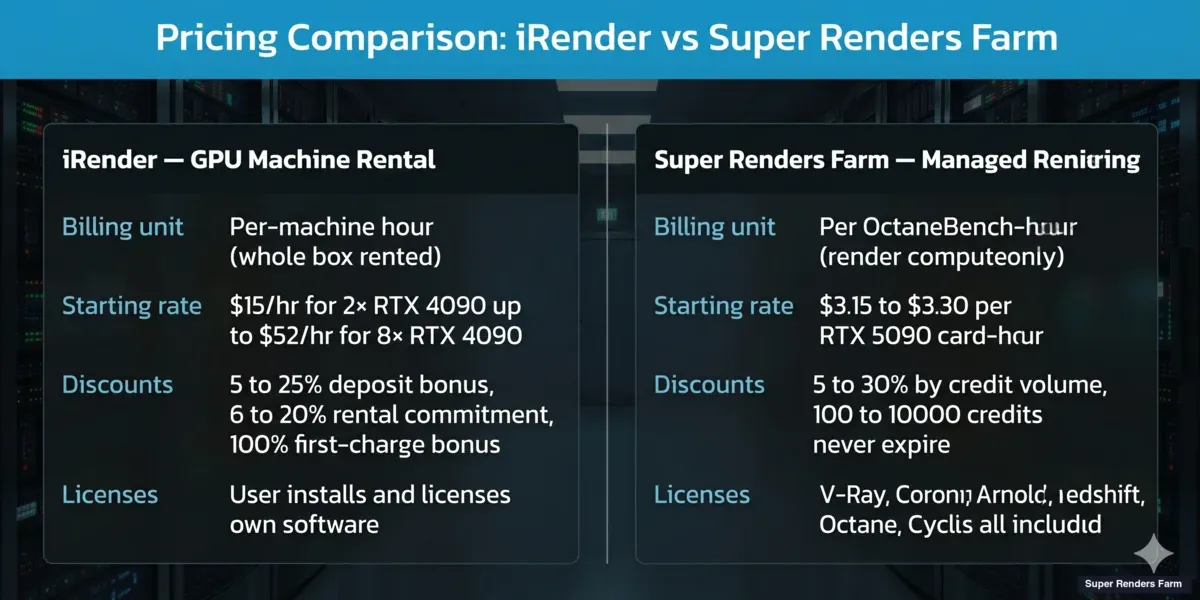 iRender GPU machine pricing as charted in April 2026, $15/hour for 2× RTX 4090 to $52/hour for 8× RTX 4090 (the September 2026 price list starts at $8.2/hour for 1× RTX 4090 and adds RTX 5090 tiers up to $62/hour), versus Super Renders Farm per-OctaneBench-hour billing on the RTX 5090 fleet with volume credits from 5 percent at 100 credits to 30 percent at 10,000 credits
Which model is cheaper?
The honest answer is: it depends heavily on what fraction of the rented time is actually spent rendering.
Consider a one-frame Redshift test. On an iRender 5S (4× RTX 4090 at $30/hour), a client who opens RDP, launches Cinema 4D, tweaks materials, re-saves the scene, and starts the render is paying for the whole session — not just the render itself. Total billed time depends on how prepared the scene is: experienced users with a reusable machine image can be rendering within minutes, while fresh sessions that need plugin reinstalls or scene adjustments run longer. On Super Renders Farm, that same test submits through a web dashboard, operators validate the scene, and billing only counts the time the render actually runs — typically a small multiple of the raw render time on an equivalent class of GPU.
For batch animation jobs, the gap narrows. A user who submits a 500-frame Redshift animation on iRender and walks away will use close to 100% of the rented hour on rendering, making the per-machine rate competitive. For hero-frame archviz or lookdev iteration, where the user is actively tweaking between renders, the managed model is usually much cheaper because setup and iteration time isn't billed.
A concrete 100-frame example (April 2026 snapshot)
Take a typical 1080p Redshift archviz animation: clean geometry, GI cached, standard sample quality. Per-frame render time on a single RTX 5090 generally lands in the 8–12 minute range (varies with materials, AOVs, and resolve settings). Across 100 frames, that adds up to roughly 13–20 GPU-hours of actual render compute on Super Renders Farm's managed fleet — about $69–$104 at $5.2 per RTX 5090 card-hour before any volume discount. The same animation on iRender's 5S tier (4× RTX 4090 at $30/hour) parallelizes 4 frames at a time, and the 5i tier (4× RTX 5090 at $38/hour) does the same on the same card generation we run. Pure render wall-clock can be similar or shorter depending on per-card throughput and card count, but the billed hours include session overhead — RDP login, scene transfer, plugin verification, and any in-session scene fixes — which on a fresh machine can add 30–90 minutes of metered time on top of the render itself. The two totals are usually closer than sticker pricing suggests; the structural difference is whether overhead time is on or off the meter, not which GPU rate is "lower." Numbers above are a category-level estimate and shift meaningfully with scene complexity, sample count, and AOV stack — a 4K hero-frame archviz with heavy displacement or volumetrics will move both totals up several-fold.
For a frame-by-frame cost breakdown across project types and farms, see our cost per frame guide and the broader cost per frame breakdown for 2026, which normalizes across the main farms including iRender, Fox, GarageFarm, RebusFarm, and Ranch.
For a comparison on the managed-vs-managed side instead — both farms fully managed, both with open OctaneBench-hour and GHz-hour pricing — our GarageFarm vs Super Renders Farm comparison applies the same use-case-segmented framework to a same-category pairing, including the Houdini and After Effects support delta and the GPU fleet generation difference.
Hidden-cost checklist
Worth verifying on either farm before budgeting:
| Cost factor | iRender | Super Renders Farm |
|---|---|---|
| Software licenses (V-Ray, Redshift, Octane, etc.) | User brings own license or uses a free tier; Cinema 4D and Redshift come pre-installed, with pre-activated licences on Prime-tier accounts | Included in render rate |
| RAM upgrades beyond baseline | Not applicable — 256 GB standard on all tiers | Included up to 256 GB per node |
| Storage egress / download | Included | Included |
| Setup time before render | Billed (machine is rented) | Not billed (only render time counts) |
| Machine idle time during scene load | Billed | Not applicable |
| Priority / rush surcharges | Not applicable (user controls scheduling) | None for GPU (one price); CPU priority tiers are Standard 1×, Fast 2×, Fastest 4× |
The practical takeaway: iRender tends to be cheaper when a user can saturate the rented machine with active rendering and has existing software licenses to bring. Super Renders Farm tends to be cheaper when the workflow involves scene setup, plugin troubleshooting, and iteration time that would otherwise be billed on an IaaS clock.
GPU Hardware: RTX 4090 and RTX 5090 on Both Farms
GPU hardware is where the two farms have converged most in 2026: both publish the exact card model at the billing tier, and both now offer the RTX 5090.
iRender's RTX 4090 and RTX 5090 tiers
iRender's current price list runs two generations side by side: NVIDIA RTX 4090 cards with 24 GB VRAM and NVIDIA RTX 5090 cards with 32 GB GDDR7, each available as 1, 2, 4 or 8 cards per machine. iRender describes its farm as 1,000+ RTX 4090 and RTX 5090 cards on AMD Threadripper PRO hosts with 256 GB of RAM. The card count per machine is the main lever for matching hardware to a multi-GPU render like Redshift or Octane, and the 9i tier puts eight 32 GB RTX 5090 cards on one machine. iRender's positioning as a multi-GPU IaaS is genuinely useful for workflows where one user wants to saturate 4–8 cards simultaneously on a single rented box; for single-GPU workflows, the same user can rent the 3S or 3i single-card tier.
Super Renders Farm's RTX 5090 fleet
Super Renders Farm runs a GPU fleet of NVIDIA RTX 5090 cards with 32 GB VRAM each. The 5090's 32 GB headroom is meaningful for archviz with 8K textures, VFX scenes with heavy volumetrics, and any production where a 24 GB VRAM ceiling has been forcing out-of-core fallbacks. Because the farm is managed rather than single-tenant, users don't rent a fixed number of cards — jobs are scheduled across the fleet based on the scene's actual GPU needs.
Per-card benchmark reference (OctaneBench 2025.2.1)
On OctaneBench 2025.2.1 the RTX 5090 scores 1,731 OB, the score our cost calculator uses to turn the published $0.003 per OctaneBench-hour into about $5.2 per card-hour. We do not list an RTX 4090 score here, so the card-to-card gap is best judged on your own scenes: it tends to matter most on bandwidth-bound and texture-heavy scenes where the 5090's GDDR7 memory subsystem is doing the work, and less on compute-dominated scenes. For multi-GPU comparisons, throughput scaling on iRender's 8× RTX 4090 (9S tier) lands ahead of fewer 5090 cards on linearly-scaling renderers like Redshift, but trails on per-frame VRAM-bound scenes that hit the 24 GB ceiling; iRender's 8× RTX 5090 (9i tier) removes that trade-off by putting eight 32 GB cards on one box, at $62/hour. Per-card OctaneBench scores fluctuate ±3–5% across driver releases, so treat these as a category-level reference rather than a fixed throughput contract.
Card count vs card VRAM: which matters more?
It depends on the pipeline. A Redshift artist rendering a scene that fits comfortably in 20 GB will see better wall-clock performance on 8× RTX 4090 (iRender 9S) than on fewer RTX 5090s, because Redshift scales almost linearly with GPU count. A V-Ray GPU or Octane user rendering a 4K archviz interior with heavy textures may hit the 24 GB VRAM wall on an RTX 4090 and see the scene either fail or fall back to slower CPU paths — in which case the RTX 5090's 32 GB is a meaningful safety margin, whether that card is rented by the machine on iRender's 3i–9i tiers or scheduled per job on Super Renders Farm. As a rough rule: count matters more for animation throughput, VRAM matters more for single-frame hero shots.
Both farms support the mainstream GPU renderers: Redshift, Octane, V-Ray GPU, Blender Cycles (CUDA/OptiX), Arnold GPU, and newer entries like NVIDIA Iray. For hybrid pipelines that mix CPU-first and GPU-first workloads, Super Renders Farm's separate CPU fleet (20,000+ Xeon cores) handles the CPU side of the job; iRender users rendering CPU-heavy scenes would typically do it on the rented GPU machine's Threadripper (a reasonable but not always optimal fit for production-scale CPU animation).
Workflow: Self-Serve RDP vs Fully Managed
This is the single biggest operational difference between the two services — and the one that usually decides which fits a given team.
iRender: self-serve IaaS over RDP
iRender's model is self-serve IaaS over Remote Desktop Protocol. After topping up credits, a user launches a machine from the iRender web portal, receives an RDP file with login credentials, and opens a remote Windows or Ubuntu desktop. From there, it's effectively a blank remote workstation: install 3ds Max, Blender, Cinema 4D, Houdini, or whatever DCC the project uses; install the render engine and any plugins; copy the scene up via the portal's file transfer tool (which stays available even when the machine is shut down); configure output paths; and run the render. Work sessions can be saved as a reusable "image" so the software install doesn't need to happen every time, and Cinema 4D and Redshift come pre-installed on iRender's machines (with pre-activated licences for Prime-tier accounts, bring-your-own otherwise), so those users skip the install step.
The RDP model has real upsides. Users get full control over software versions, plugin builds, GPU driver versions, and environment variables. Pipelines that depend on very specific toolchains — niche Blender add-ons, experimental Houdini builds, Unreal Engine's Movie Render Queue, real-time tools like Lumion or D5 Render — often work better when the user can configure the box directly. iRender's support for a wider range of DCCs (including Lumion, Enscape, Twinmotion, KeyShot, Omniverse) is a direct consequence of the IaaS model: if the user can install it, the service can run it.
The trade-off is that the user owns the rendering environment, including the failure modes. Missing textures, mismatched plugin versions, wrong service packs, incorrect license activation, network path issues — all of these are the user's problem to debug, and the clock is running the whole time.
Super Renders Farm: fully managed scene submission
Super Renders Farm's model is fully managed. The user uploads the scene to a Render Dashboard, our operators validate the scene file against the target DCC and render engine, check for missing assets, verify plugin versions, configure the render on the appropriate hardware, monitor progress, and flag issues before they waste hours of render time. Users don't remote desktop into a machine, don't install render licenses, and don't hand-tune submission parameters. Frames appear in the output folder when the job completes. We unpack this model in more detail in our what is a fully managed render farm explainer.
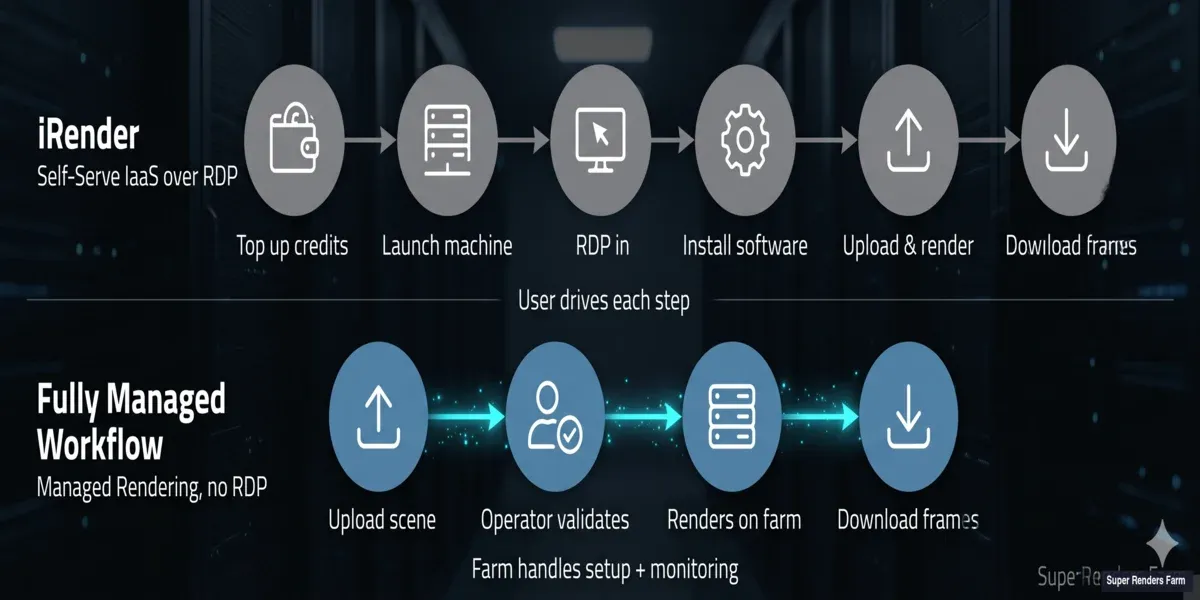 Cloud rendering workflow comparison — iRender self-directed RDP six steps (top-up, launch machine, RDP in, install software, upload and render, download frames) versus Super Renders Farm fully managed four steps (upload, operator validates, renders on farm, download frames)
The managed model eliminates a whole class of common failure modes we see in archviz and motion-design pipelines — missing Forest Pack textures, wrong V-Ray version mismatches, scenes built in a newer Max service pack than the target worker, render element naming collisions. It's slower to feel "in control," but the operator-led workflow is the reason we can quote a per-second render-time rate instead of a per-machine-hour rate.
Neither model is universally better
The right answer depends on the team:
- Choose self-serve RDP (iRender) if your pipeline relies on specific software versions or less-common DCCs, you want full control over the rendering environment, your team has the engineering capacity to debug submission issues, or you're renting multi-GPU machines for batch animation where setup time is small relative to render time.
- Choose fully managed (Super Renders Farm) if you want to submit a scene and walk away, your team doesn't want to maintain render-side infrastructure, your pipeline is built around the mainstream DCCs and engines we support natively, or your workflow involves significant scene iteration where idle-time billing would compound quickly.
Supported DCCs and Render Engines
Because iRender is IaaS, its "supported software" list is more accurately described as "software users commonly install on rented machines" — effectively anything with a Windows or Ubuntu installer. The published list includes 3ds Max, Maya, Cinema 4D, Blender, Houdini, Unreal Engine 4/5, Lumion, Enscape, D5 Render, Twinmotion, KeyShot, Omniverse, Rhinoceros, Modo, SketchUp, and Daz Studio. For render engines: Redshift, Octane, V-Ray GPU, Arnold GPU, Maxwell, NVIDIA Iray, Blender Cycles, Corona, FStorm, LuxCore, RenderMan, and Indigo.
Super Renders Farm supports 3ds Max, Maya, Cinema 4D, Blender, Houdini, After Effects, and NukeX natively, with render engines V-Ray, Corona, Arnold, Redshift, Octane, and Cycles. Because we handle the installation and licensing internally, the published DCC list is narrower than iRender's — it reflects what we actively maintain on the farm, not a superset of what's theoretically installable.
For After Effects specifically, the supported-DCC question becomes more selective: GarageFarm has formally deprecated AE per its own FAQ, and Drop & Render does not list AE in its supported software at all. Our 2026 After Effects cloud render farm comparison compares six vendors — including iRender and Super Renders Farm — on AE support status, plugin coverage, hardware, and pricing model.
For a closer look at Drop & Render specifically, our Drop & Render vs Super Renders Farm comparison covers where its software support, hardware, and pricing model differ from ours.
Practical guidance by pipeline
- If your pipeline is Lumion, D5, Twinmotion, Enscape, KeyShot, or Unreal (Movie Render Queue) — iRender's self-serve model is a better structural fit; we don't currently support these as managed workflows.
- If your pipeline is 3ds Max + V-Ray, Maya + Arnold, Cinema 4D + Redshift, Blender + Cycles, or Houdini + Mantra — either service works, and the choice comes down to workflow preference and pricing math.
- If your pipeline mixes heavy CPU animation rendering (V-Ray CPU, Corona, Arnold CPU) — Super Renders Farm's 20,000+ CPU cores is a better fit than rendering on iRender's Threadripper-equipped GPU machines.
Trust Signals and Certifications
On the trust-signal side, the published records differ.
Software-partner certifications
Both farms are Maxon partners. Super Renders Farm is listed as an authorized V-Ray render partner on the Chaos partner page and a Maxon partner (Cinema 4D / Redshift / Red Giant), with a historical AXYZ design partnership for Anima archviz workflows. iRender announced its official Maxon render-farm partnership in July 2023 and still presents itself as a Maxon partner; its machines come with Cinema 4D and Redshift pre-installed, and Prime-tier accounts get pre-activated official licences on the instance (other accounts bring their own Maxon licence or use a studio floating licence). On the Chaos side, iRender's V-Ray support runs through the user's own license on the rented machine rather than a render-partner listing. iRender also holds third-party industry recognition — a Gold Stevie International Business Award (2021), SME100 Asia Awards (2021 and 2024), the 2021 Top 10 Vietnam Companies Award and the 2021 Sao Khue Award — and sponsors community initiatives such as 3dmodels.org's Renovation Archviz Challenge. Match the signal type to what matters for your production: software-version certification and license coverage on one side, independently judged business awards on the other.
Compliance accreditation
For projects with compliance requirements (ISO 27001, TPN accreditation, studio-mandated security frameworks), the two farms publish different things. iRender states on its pricing and service pages that its servers sit in an Uptime Tier III certified data center holding ISO 27001 (BS7799) for information security, ISO 20000 (ITIL) for IT service management and ISO 9001:2000 for quality management; its FAQ page adds 24/7 CCTV monitoring and biometric access control, and its Cinema 4D page a 99.982% uptime figure for the facility. Those are facility-level certifications stated by the vendor on its commercial pages and not repeated on its terms or legal pages, with no certifier or certificate number published; if your contract names ISO 27001 specifically, iRender is the farm of the two that publishes that standard, and the sensible next step is to request the certificate and confirm which entity holds it. Super Renders Farm does not hold or claim ISO 27001, SOC 2 or TPN accreditation. We provide encryption in transit and at rest (server-side AES-256 on storage) and support a custom security review under NDA. Both farms handle NDA-covered work routinely for commercial and archviz projects; neither currently publishes the studio-level TPN assessment that pre-release film VFX productions sometimes require.
Regional infrastructure
Both companies operate out of Vietnam (iRender in Hanoi, Super Renders Farm with Vietnamese engineering roots; legal entity US). Both have global client bases, but iRender's infrastructure is concentrated in Asia-Pacific (Hanoi + Singapore data centers), while Super Renders Farm's client concentration leans Americas + EU. Upload speed and latency can differ meaningfully depending on where your workstation sits. iRender additionally states that its data center is powered by solar energy, which is worth noting if sustainability sits on your procurement checklist.
When to Choose iRender
- Your pipeline relies on software that needs direct install control — Lumion, D5 Render, Enscape, Twinmotion, KeyShot, Unreal Engine Movie Render Queue, or niche Blender/Houdini builds.
- You want RDP-level control over the rendering environment, including GPU driver versions, plugin builds, and environment variables.
- Your workflow is batch animation rendering where setup time is small relative to total render time, so the per-machine-hour billing model is cost-efficient.
- You're running a multi-GPU Redshift, Octane, or V-Ray GPU workload and want to saturate 4–8 RTX 4090 or RTX 5090 cards on a single rented box — up to eight RTX 5090s on the 9i tier.
- Your procurement checklist asks for a certified facility: iRender states an Uptime Tier III data center with ISO 27001, ISO 20000 and ISO 9001:2000 certifications.
- You're a Cinema 4D + Redshift user who wants the software pre-installed on the rented node from a farm that announced an official Maxon partnership in 2023 (pre-activated licences on Prime-tier accounts).
- You're based in Southeast Asia and want geographic proximity to the iRender infrastructure in Hanoi or Singapore.
- You already own software licenses and want to bring them to the cloud without paying for embedded licensing.
- Your team has the engineering capacity to debug submission issues, missing assets, and license activation on a remote machine.
When to Choose Super Renders Farm
- You want to submit a scene and walk away — fully managed workflow with no RDP, no license setup, no plugin troubleshooting.
- Your GPU scenes regularly push past 24 GB VRAM and you want the 32 GB headroom of the RTX 5090 scheduled per job, without renting and managing a whole machine to get it.
- Your project is CPU-heavy (V-Ray CPU, Corona, Arnold CPU for animation) and benefits from a dedicated 20,000+ core CPU fleet.
- Your workflow involves significant scene iteration where idle-time billing on an IaaS clock would compound quickly.
- You're running a Cinema 4D + Redshift pipeline and want explicit Maxon-partner support alongside the Chaos V-Ray authorization.
- You'd rather have operators proactively validate your scene and catch missing textures before the render runs, rather than debug them after the job fails.
- You're based in the Americas or Europe and want a US-registered vendor for contracts, billing, and support.
Alternatives to iRender for Archviz Studios
If you're comparing iRender against other options for architectural visualization work, iRender isn't the only established name in the category. Several render farms serve V-Ray and Corona archviz pipelines, each with a different trade-off than iRender's self-serve RDP model:
- GarageFarm — a UK-registered (Companies House, incorporated 2010) fully managed farm with a Polish ISO 27001 datacenter operated through sister company Copernicus Computing. Broad DCC and render-engine coverage. See our GarageFarm vs Super Renders Farm comparison.
- RebusFarm — a German GmbH based in Leverkusen, NRW, one of the longer-running names in the category, billed through its own RenderPoints currency. Strong V-Ray/Corona focus, though without native Houdini or Karma support. See our breakdown of RebusFarm alternatives.
- Ranch Computing — a French SAS (Paris, founded 2006) running a single own-premises datacenter with EUR-only pay-as-you-go pricing, and one of the few farms in the category that publishes its GPU SKUs (RTX 3090 / 4090 / 5090) at the billing tier. See our Ranch Computing vs Super Renders Farm comparison.
- Fox Renderfarm — a China-based farm with a broad DCC list spanning animation, VFX, and archviz work. See our Fox Renderfarm vs Super Renders Farm comparison.
- Super Renders Farm — one option among the farms above, not a default pick. For archviz specifically: V-Ray and Corona licenses are included in the render rate, we're an authorized Chaos render partner and a Maxon partner, and the fully managed workflow means operators validate the scene and plugin versions before a job runs rather than leaving that to a rented RDP session. That fits studios that don't want to own the rendering environment; it's a worse fit for studios that specifically need RDP-level control over plugin builds — see "When to Choose iRender" above.
None of these is the universal answer. GarageFarm, RebusFarm, and Ranch Computing compete in the same generalist archviz space as iRender and Super Renders Farm, and the right fit depends on region (EU-based pricing and datacenters vs. US-registered/Vietnam-rooted operations), the exact render-engine mix your studio standardizes on, and whether your team wants a managed workflow or a rented machine it configures itself.
FAQ
Q: How does Super Renders Farm compare with iRender? A: Super Renders Farm is a fully managed cloud render farm billed per second of render time, with scenes submitted through a web dashboard and no remote desktop session. iRender rents whole GPU machines by the hour that you drive yourself over RDP. Super Renders Farm suits teams that would rather not manage machines, and iRender suits teams that want direct control of the rendering environment; the sections above compare pricing, hardware, and workflow in detail.
Q: Which has better pricing — iRender or Super Renders Farm? A: Neither is universally cheaper. iRender's per-machine-hour rate ($8.2–$52/hour on RTX 4090 tiers and $10.8–$62/hour on RTX 5090 tiers, depending on card count) can work out to less than Super Renders Farm's per-second render-time rate on long batch animations where the rented machine runs close to 100% utilization. Super Renders Farm is usually cheaper for workflows with significant scene-setup, iteration, or plugin-troubleshooting time, because that idle time isn't billed. Use each farm's cost calculator with your actual scene data before committing.
Q: Do I need RDP access to use a render farm? A: No — and it's worth understanding why. iRender's model requires RDP because you're renting a whole GPU machine and driving the render session yourself. Super Renders Farm's fully managed model doesn't use RDP at all; scenes are submitted through a web dashboard and operators handle the machine side. If you specifically need remote-desktop control over the rendering environment, iRender (or another IaaS provider) is the right category; if you'd rather not manage machines at all, managed farms are a better fit.
Q: Which render farm is Vietnam-based? A: Both have Vietnamese engineering roots. iRender is headquartered in Hanoi with a Singapore data center. Super Renders Farm is registered in the United States (Santa Ana, CA) with a legal entity formed in 2017, though the team has been operating since 2010 and includes Vietnamese engineering staff. iRender publishes its infrastructure locations (Hanoi, plus a Singapore data center); Super Renders Farm doesn't publish its datacenter locations. For Americas/EU client bases, Super Renders Farm is usually a better match.
Q: Does iRender support Cinema 4D and Redshift? A: Yes, and iRender announced an official Maxon render-farm partnership in July 2023 and still presents itself as a Maxon partner. Its machines come with Cinema 4D and Redshift pre-installed on 1 to 8 RTX 4090 or RTX 5090 cards; Prime-tier accounts get pre-activated official licences on the instance, and other accounts bring their own Maxon licence. Super Renders Farm is a Maxon partner with explicit Cinema 4D / Redshift / Red Giant authorization, and Redshift runs on our RTX 5090 GPU fleet with licensing included in the render rate. Feature support itself is similar; what differs is whether the user or the farm handles the install and licensing.
Q: What GPU does each farm use? A: iRender offers both NVIDIA RTX 4090 cards (24 GB VRAM) and NVIDIA RTX 5090 cards (32 GB GDDR7), in machines with 1, 2, 4 or 8 cards of either generation. Super Renders Farm runs NVIDIA RTX 5090 cards with 32 GB VRAM each, scheduled per job rather than rented by the machine. The VRAM difference between the two generations matters for scenes that exceed 24 GB (common in 4K archviz with heavy textures, dense scatter scenes, and VFX with volumetric effects); the multi-GPU card count on iRender is an advantage for batch animation rendering that scales linearly across GPUs. In OctaneBench terms, the RTX 5090 scores 1,731 on OctaneBench 2025.2.1, which is how the published $0.003 per OctaneBench-hour becomes about $5.2 per RTX 5090 card-hour on Super Renders Farm.
Q: Does iRender have ISO 27001 or a Tier III data center? A: iRender states that its servers are hosted in an Uptime Tier III certified data center that holds ISO 27001 (BS7799), ISO 20000 (ITIL) and ISO 9001:2000 certifications, and its FAQ page describes 24/7 CCTV monitoring and biometric access control at the facility. These are data-center certifications published on iRender's pricing and service pages (not on its terms or legal pages, and without a certifier or certificate number); if your contract requires a named standard, ask iRender for the certificate and the certified entity. Super Renders Farm does not claim ISO 27001, SOC 2 or TPN accreditation.
Q: Are render engine licenses included in the price? A: Super Renders Farm includes V-Ray, Corona, Arnold, Redshift, Octane, and Cycles licenses in the render rate — there's no per-engine surcharge. iRender's IaaS model requires the user to bring their own license (or use a free tier where available), since the user installs and activates the renderer on the rented machine. For Redshift or Octane users without an owned license, this is a real cost difference to factor into the comparison.
Q: Can I remote desktop into a Super Renders Farm machine? A: No. Super Renders Farm is intentionally a fully managed render farm without RDP access — our operators handle machine setup, scene validation, and render configuration on the user's behalf. If RDP-level control is a hard requirement for your pipeline, iRender (or another IaaS provider) is the right category to evaluate. The managed model is the source of the per-second render-time billing and the proactive scene-validation workflow; removing RDP is the trade-off that makes both of those possible.
Q: Can I use both iRender and Super Renders Farm on the same project? A: Yes — there's no lock-in on either side. Some studios use iRender for rendering sessions that require specific software or multi-GPU RDP workflows (Lumion, Unreal MRQ, experimental plugin builds) and Super Renders Farm for the bulk of their managed CPU and GPU animation work. If you split a project, confirm that render engine versions match exactly across both farms — identical V-Ray, Corona, or Redshift build numbers — otherwise frames can differ subtly and cause compositing issues downstream.
About Alice Harper
Blender and V-Ray specialist. Passionate about optimizing render workflows, sharing tips, and educating the 3D community to achieve photorealistic results faster.



