Fox Renderfarm vs Super Renders Farm: A 2026 Side-by-Side Comparison
Overview
Introduction
If you're evaluating cloud render farms for a 2026 project — especially a V-Ray workload — Fox Renderfarm and Super Renders Farm come up in almost every shortlist. Both are V-Ray authorized partners listed on the official Chaos Group render-farm directory at chaos.com/render-farms, both support the major DCCs most studios run, and both offer 24/7 support. On paper they look interchangeable. In practice they approach the service very differently, and the right choice usually depends on where your team is based, how your pipeline is set up, and how much of the rendering workflow you want to hand off versus keep under your own control.
We've been operating Super Renders Farm since 2010 (the legal entity dates to 2017), and over that time we've had clients migrate to us from Fox — and, honestly, we've had clients migrate away from us to Fox. Neither is a universally better option. We've also watched both farms evolve through several pricing revisions, GPU hardware refreshes, and DCC additions, so this comparison reflects where the two services actually stand rather than where they stood two years ago. This article walks through the concrete differences so you can match the service to the project instead of picking on reputation alone.
Everything below is sourced from public pricing pages, the Chaos Group authorized-partner list, and the two companies' own documentation, current as of late May 2026. We've kept the language neutral on purpose: comparison content tends to over-claim, and cloud rendering is an operational decision, not a hype decision. Where Fox is the stronger fit we say so plainly, and where the data is ambiguous — pricing in particular — we explain why instead of declaring a winner. If you want broader context on pricing mechanics before diving in, our render farm pricing guide covers the four main pricing models in more detail, and our archviz render farm guide frames the broader shortlist this decision sits inside.
If you're also weighing a European option with TPN Gold Shield accreditation, our Ranch Computing vs Super Renders Farm comparison covers the other common archviz head-to-head and how it differs from this Fox-versus-SuperRenders decision.
At-a-Glance Comparison
| Dimension | Fox Renderfarm | Super Renders Farm |
|---|---|---|
| Headquarters | China (Shenzhen) | United States (Santa Ana, CA) |
| Team operating since | Early 2010s | 2010 (team), 2017 (legal entity) |
| V-Ray authorized partner (Chaos Group) | Yes (China region) | Yes (USA region) |
| Workflow model | Self-serve web portal + desktop plugin | Fully managed (no RDP, no license setup) |
| CPU pricing (baseline → lowest tier) | $0.0255 → $0.0153 per thread-hour (≈ $0.051 → $0.0306 per core-hour at ~2 threads/core; tier-based) | $0.004 per GHz-hour (compute-based), 5–30% volume credits |
| GPU hardware (publicly documented) | Mixed fleet; specific cards not published per host | NVIDIA RTX 5090, 32 GB VRAM per card |
| Free signup credit | $25 trial (plus first-recharge coupons + 90-day Gold membership at higher top-ups) | $25 (credits never expire) |
| Supported DCCs | 3ds Max, Maya, Cinema 4D, Houdini, Blender, Unreal Engine | 3ds Max, Maya, Cinema 4D, Blender, Houdini, After Effects, NukeX |
| Supported renderers | Arnold, V-Ray, Redshift, RenderMan, Octane, Corona (+ Nuke/Katana pipeline) | V-Ray, Corona, Arnold, Redshift, Octane, Cycles |
| Published certifications | ISO 27001, TPN-Accredited Vendor | Not currently published |
| Industry partnerships | Chaos Group (V-Ray), Blender Development Fund (Corporate Bronze Member) | Chaos Group (V-Ray), Maxon (C4D / Redshift / Red Giant), AXYZ design (Anima) |
| Support channels | WhatsApp, email, live chat, Telegram (15-min target) | Live chat + email (proactive operator monitoring during active jobs) |
| Content / education footprint | Very large public content library, broad keyword reach | Smaller, focused on operational and decision-stage guides |
| Primary client regions | Asia-Pacific concentration, global reach | Americas + EU concentration, global reach |
A few things are worth flagging before we go deeper.
First, both farms are on the official Chaos Group authorized V-Ray partner list. That means neither one has a "V-Ray credibility" edge — they have equal authorization status for running V-Ray CPU licenses at scale. What differs is the regional listing and the broader partnership footprint, not the legitimacy of either as a V-Ray render farm.
Second, pricing is genuinely hard to compare because the two farms quote it in different units. Fox quotes per-thread-hour (a per-core figure is roughly double, since each core runs about two threads) with a tiered discount based on accumulated spend. Super Renders Farm uses a GHz-hour compute model with volume credit discounts. Neither is automatically cheaper; it depends on your scene, your CPU utilization, your RAM needs, and how much you typically spend per month. We dig into exactly where the math flips later in this article.
Third — and this is where Fox's genuine strength shows — Fox has built one of the largest public content footprints in the render-farm category. Their site carries thousands of indexed pages of tutorials, glossary entries, software guides, and news. For a buyer doing early research, that breadth means Fox shows up constantly in search and in AI answers. It's a real brand-reach advantage, and we'll come back to what it does and doesn't tell you about the underlying service.
Pricing Deep Dive
Pricing is the dimension buyers ask about first and the one that's hardest to answer cleanly, so it's worth spending real time on.
How Fox prices
Fox's published pricing is straightforward to read. As of May 2026 Fox quotes per thread-hour; the "Ordinary" tier is $0.0255 per thread per hour (≈ $0.051 per core-hour at ~2 threads per core), with tiered reductions triggered by cumulative recharge:
- Ordinary: $0.0255 per thread-hour (≈ $0.051 per core-hour)
- Silver ($500+ recharged): $0.02295 (≈ $0.0459 per core-hour)
- Gold ($2,000+): $0.0204 (≈ $0.0408 per core-hour)
- Platinum ($5,000+): $0.01785 (≈ $0.0357 per core-hour)
- Diamond ($10,000+): $0.0153 (≈ $0.0306 per core-hour)
The headline mechanic here is that the discount is cumulative and permanent within your account — once you've recharged enough to hit Diamond, you stay there. That rewards high-volume studios with steady throughput, and at Diamond the per-core rate gets genuinely competitive for standard-RAM CPU work.
The default server ships with 64 GB RAM. If your scene needs more memory — which happens with heavy Forest Pack scatters, large V-Ray proxy trees, or archviz scenes with 4K+ textures — additional RAM is billed separately. Some render engines also carry software surcharges that are quoted at submission time. Fox's $25 welcome credit plus first-recharge coupons (and a 90-day Gold membership at higher first top-ups) is one of the more generous first-time offers in the category, and for a studio testing the waters on a single project those incentives can materially lower the effective cost of the first few hundred frames.
How Super Renders Farm prices
Super Renders Farm uses a different model. CPU rendering is quoted at $0.004 per GHz-hour, and GPU rendering is quoted per compute-hour on RTX 5090 cards. Render credits are denominated 1 credit = $1 USD, they never expire, and volume discounts scale from 5% at 100 credits up to 30% at 10,000 credits. The new-account free trial grants $25 in credits, and those trial credits follow the same no-expiry rule as paid credits.
The structural difference that matters most for forecasting: all render engine licenses — V-Ray, Corona, Arnold, Redshift, Octane — are included with no per-software surcharge, and memory up to 256 GB per node is available without a separate RAM charge. So the number you estimate at submission is much closer to the number you actually pay, because there are fewer line items that get added at runtime.
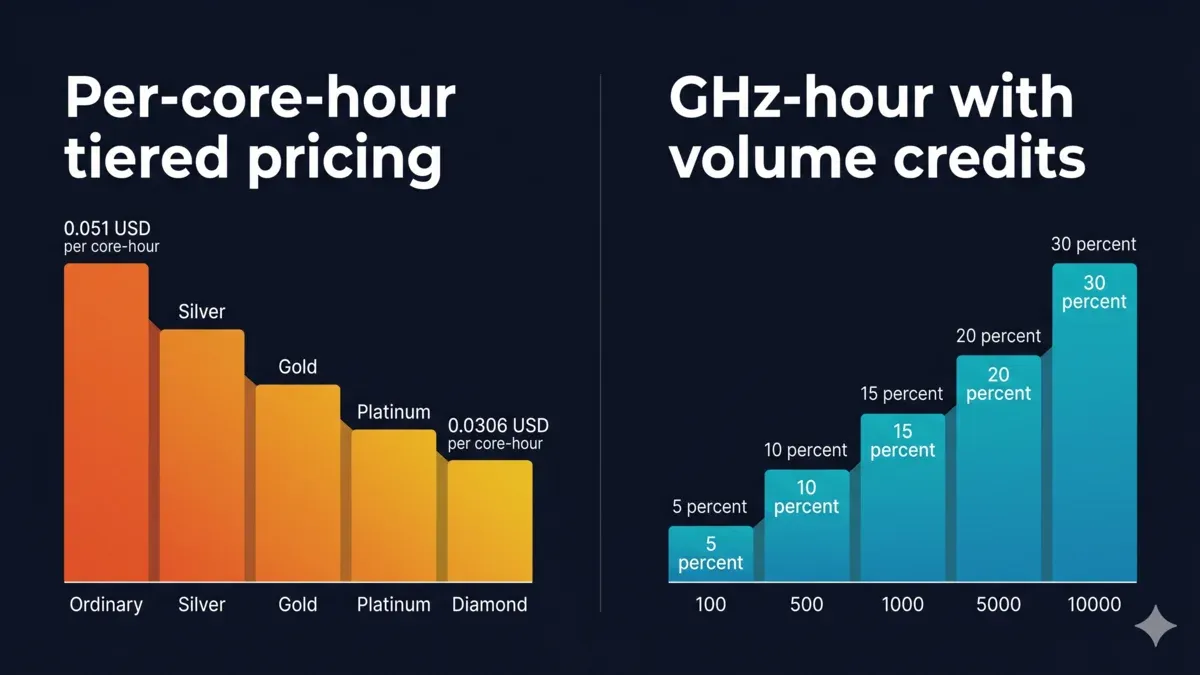 Fox Renderfarm five-tier pricing shown as per-core-hour equivalent from $0.051 (Ordinary) down to $0.0306 (Diamond) — Fox now publishes the same rates per thread-hour — versus Super Renders Farm volume credits from 5% at 100 credits up to 30% at 10,000 credits
Which one ends up cheaper?
It depends entirely on the scene, and any honest comparison has to say that out loud. A CPU-heavy archviz frame that fully utilizes all cores on a 2.2 GHz Xeon lands near the same effective cost on both platforms at baseline tiers. A scene that's bottlenecked on single-thread work, or that needs extra RAM, typically costs less at SuperRenders because the RAM and license surcharges don't apply. A very high-volume studio that has already recharged past $10,000 on Fox and sits at the Diamond tier will often find Fox extremely competitive for standard-RAM CPU jobs. For a frame-by-frame cost breakdown across project types, see our render farm cost per frame guide.
Volume thresholds where the math actually flips (May 2026 snapshot). For a small archviz studio billing under roughly $500 per month in CPU rendering, both farms' baseline tiers and signup bonuses sit close enough that month-over-month total bills typically land within about 10–15% of each other on standard-RAM scenes. The crossover points are roughly:
- Fox tilts cheaper once a studio has accumulated past the Gold threshold ($2,000+ recharge) and runs primarily standard-RAM CPU jobs with engines Fox doesn't surcharge. At Diamond, on plain V-Ray CPU animation that fits inside 64 GB, Fox's per-core rate is hard to beat.
- Super Renders Farm tilts cheaper once any single render needs more than 64 GB RAM, runs an engine that Fox surcharges, or involves scene iteration time that would inflate billed hours under a self-serve model where a failed submission still consumes machine time before it errors out.
Run two or three of your typical scenes through each farm's cost calculator before committing — sticker rates rarely match per-frame totals, and the right answer depends on your specific scene mix more than on either company's marketing.
The practical takeaway: if you're a small studio or freelancer doing occasional work, the two feel similar at baseline. If you render constantly and will clear Fox's Diamond tier, Fox's per-core pricing gets aggressive. If you routinely need more than 64 GB of RAM per node, or you want a bill that's easy to forecast because surcharges don't surprise you, the SuperRenders model tends to be easier to plan around.
GPU Hardware and GPU Renderers
GPU is the area where the two farms diverge most on what's publicly documented — and documentation transparency is itself a meaningful axis when you have a hard VRAM requirement.
Super Renders Farm runs a GPU fleet built on NVIDIA RTX 5090 cards with 32 GB VRAM each. That matters for Redshift, Octane, and V-Ray GPU users who are hitting VRAM walls on 24 GB cards — especially in archviz with many 8K textures, or VFX with heavy volumetrics, where exceeding VRAM forces out-of-core rendering and frame times spike. For Redshift Cinema 4D workloads specifically — a meaningful share of GPU jobs we run — the 32 GB headroom means fewer out-of-core fallbacks and more predictable frame times. If your pipeline is built on Redshift for C4D, our Redshift render farm for Cinema 4D guide goes deeper on that specific setup.
Per-card benchmark snapshot (driver-dependent, May 2026). On OctaneBench (2025.2.1, single-GPU, as of June 2026), the RTX 5090 averages about 1,730 against the RTX 4090's ~1,308 — roughly a 32% per-card uplift on Octane workloads, with similar deltas showing up on Redshift CUDA throughput in scene-by-scene testing. For V-Ray GPU specifically, the gap depends heavily on scene type: bandwidth-bound interiors with many 8K textures benefit most from the 5090's GDDR7 memory and 32 GB headroom; compute-bound exterior scenes narrow the gap. Per-card scores fluctuate ±3–5% across driver releases, so treat these as a category reference rather than a fixed throughput contract. We keep our running notes on this card in the RTX 5090 cloud rendering performance article.
Fox supports GPU rendering across a mixed fleet. Their main site advertises a large combined CPU + GPU server count, but the specific GPU card model per host isn't documented on their public pages. That's not a knock on the hardware — Fox almost certainly runs capable GPUs — but it means that if you have a hard VRAM requirement, the responsible move is to confirm with Fox's sales team which card family will be assigned before committing to a VRAM-bound project. The transparency difference is the point here: SuperRenders publishes the exact card and VRAM, Fox asks you to confirm at quote time.
Both farms support the major GPU renderers: Redshift, Octane, and V-Ray GPU. Blender Cycles GPU runs on both. If your pipeline is CPU-first — Corona, V-Ray CPU, or Arnold CPU for animation, which is still the majority of production archviz and broadcast work — then GPU hardware isn't the decisive factor between the two, and you should weight pricing and workflow more heavily.
Supported DCCs and Render Engines
The DCC support lists are nearly identical. Both run 3ds Max, Maya, Cinema 4D, Blender, and Houdini. A few details differ in ways that can decide a pipeline-specific choice:
- Fox publicly lists Unreal Engine as a supported DCC, which is useful if you're doing real-time or Movie Render Queue work and want that under the same roof as your offline renders.
- Super Renders Farm lists After Effects and NukeX explicitly for compositing workflows, which matters for studios that want to render and composite without moving assets to a second vendor.
- Both support the Forest Pack and RailClone plugins from iToo Software — the scatter and parametric-geometry tools most archviz pipelines depend on.
On render engines, Fox's published list includes RenderMan, Nuke, and Katana — which tips their platform toward episodic VFX pipelines that use those tools at scale. If your shop is built on a RenderMan/Katana spine, that's a genuine reason to favor Fox; SuperRenders does not run those. Super Renders Farm lists Cycles alongside the main Chaos / Autodesk / Maxon engines.
For V-Ray specifically — the focus of this comparison — both farms run V-Ray for 3ds Max, V-Ray for Maya, and V-Ray for Cinema 4D. Super Renders Farm additionally runs V-Ray for Blender; Fox additionally runs V-Ray for SketchUp and Chaos Scans. Pick the one that matches the plugins you actually use, and verify the exact engine and plugin builds before a deadline-critical job, because version drift between your local setup and the farm is the single most common cause of frames that render "wrong." Our V-Ray cloud render farm page lists the V-Ray builds and host applications we keep current.
Workflow: Managed vs. Self-Serve
This is the single biggest operational difference and usually the one that decides which farm fits a given studio. It's also the difference most likely to be mis-weighted by buyers who fixate on the per-core sticker price and ignore the cost of their own time.
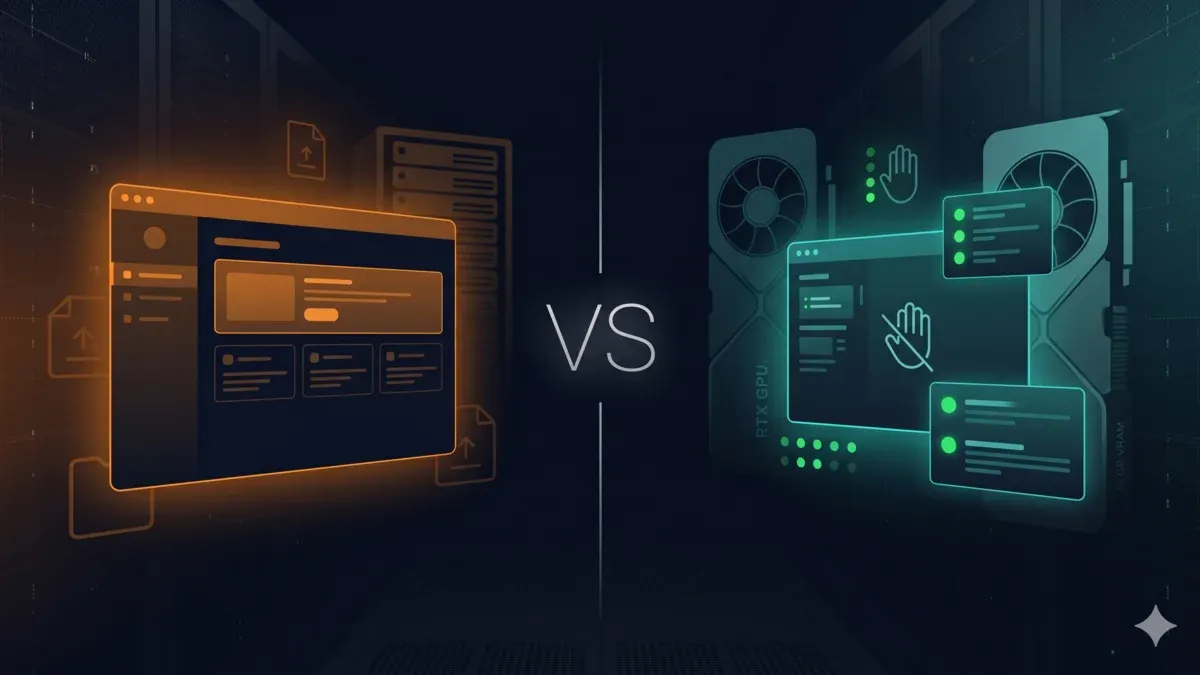
Fox's model is self-serve. You install a desktop plugin or use the web portal, upload your scene, configure the render settings, and submit. The plugin handles asset packaging for most DCCs. You configure per-frame parameters yourself and download frames when the job completes. Batch submission and automatic download are both supported. For a technically fluent pipeline TD, or a studio that already has a scripted submission workflow, self-serve is faster and more flexible — you're not waiting on anyone, and you have direct control over every submission parameter. This is a real advantage, and for the right team it's the deciding one.
Super Renders Farm's model is fully managed. You upload the scene to your Render Dashboard, and our team takes over: we validate the scene, check for missing assets, set up the render on the appropriate hardware, monitor progress, and flag issues before they waste hours of billed compute. You don't remote desktop into a machine, you don't install render licenses, and you don't hand-tune submission parameters. This feels slower to "control," but it eliminates most of the common failure modes we see in archviz — missing textures, the wrong V-Ray version, scenes expecting a different Max service pack, render-element naming collisions. We unpack this model in more depth in our what is a fully managed render farm explainer.
The honest framing is that these are two different philosophies, not a better-and-worse pair:
- Choose self-serve (Fox) if you have pipeline engineering capacity, want maximum flexibility, run a high volume of similar jobs where you've already ironed out the submission kinks, and your team is comfortable debugging submission issues without help.
- Choose managed (Super Renders Farm) if you want to ship frames without becoming an expert on the farm itself — common for small archviz studios, solo VFX artists, and teams where the lead artist is also the render wrangler and doesn't have spare hours to troubleshoot a failed batch at 11pm.
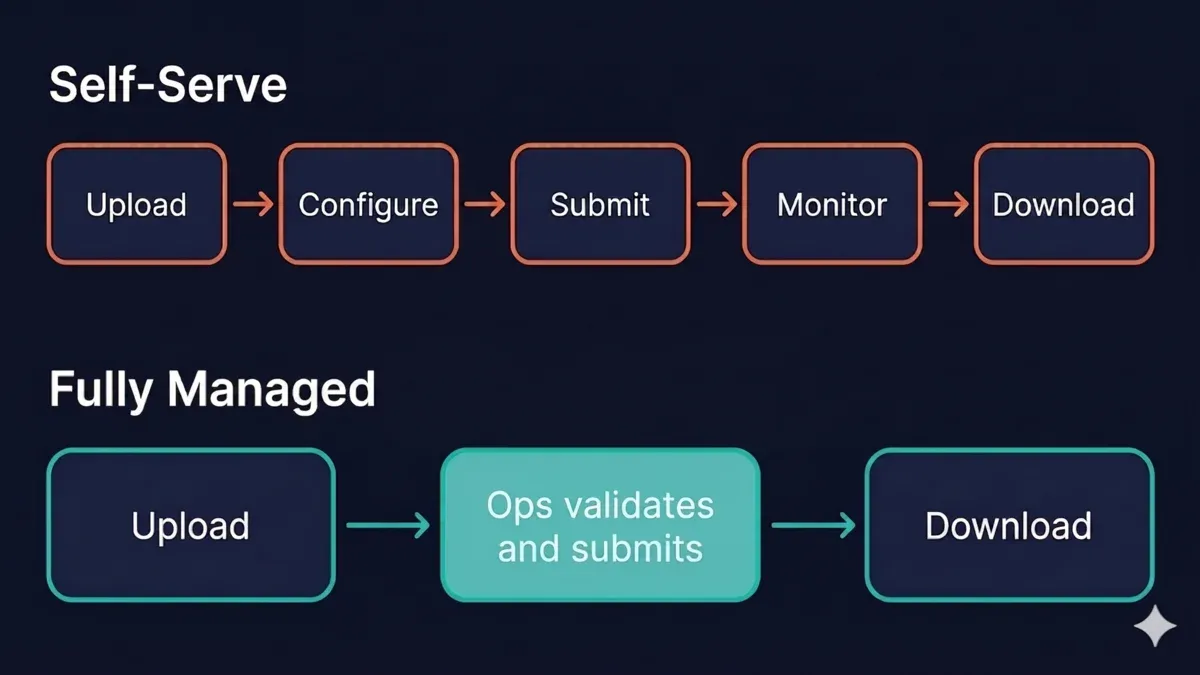 Cloud rendering workflow comparison — Fox Renderfarm self-directed five steps (Upload, Configure, Submit, Monitor, Download) versus Super Renders Farm fully managed three steps with operator-led support
A useful way to think about it: self-serve optimizes for control and throughput once your pipeline is dialed in; managed optimizes for predictability and low operational overhead when your time is the scarce resource. A studio with a dedicated render wrangler and a battle-tested submission script will often be happier self-serve. A four-person archviz shop where everyone wears five hats will usually get frames out the door faster on a managed farm, even if the raw per-core rate is identical, because the failure modes that eat a self-serve day get caught before they cost anything.
Support, SLA, and Response Times
Fox publicly commits to a 15-minute response target on 24/7 support, available through WhatsApp, email, live chat, and Telegram. That's a strong stated SLA, and the multiple channels are genuinely useful for teams distributed across Asia, Europe, and the Americas. WhatsApp and Telegram in particular meet a lot of artists where they already are, which lowers the friction of getting help.
Super Renders Farm runs 24/7 support through live chat and email. We don't publish a minute-level SLA the way Fox does, and a buyer who values a contractual response target should weigh that honestly. What we offer instead is coupled to the managed workflow: because our operators are already looking at your scene while it runs, a problem often gets caught inside the active job rather than after you've opened a support ticket. That's a different model — proactive engagement during the render versus a fast reactive response after — and it only makes sense because the workflow itself is managed. Neither is strictly better; a self-serve farm with a sharp 15-minute SLA and a managed farm with operators watching the job are solving the same problem from opposite ends.
If your team is in a time zone far from either the US or China, the practical question is which company's overnight shift handles your queries well in practice. Both claim global coverage; both generally deliver it. If responsiveness during your working hours is critical, it's worth a low-stakes test job on each before a deadline-bound project.
Trust Signals and Certifications
Both farms carry Chaos Group V-Ray authorization, so that line item is even. Several other certifications differ, and this is an area where Fox has clear, documented advantages worth stating plainly.
Fox publishes ISO 27001 certification for information security management and holds TPN (Trusted Partner Network) accreditation, which is the Motion Picture Association's content-security framework. TPN matters specifically if you're doing pre-release VFX for episodic TV or streaming platforms that mandate TPN vendor sign-off — in that situation it's not a nice-to-have, it's a hard requirement, and Fox having it is a decisive advantage. Fox is also a contributor to the Blender Development Fund, which is a quiet but meaningful signal of good standing in the Blender community.
Super Renders Farm holds V-Ray authorization from Chaos Group and Cinema 4D / Redshift / Red Giant partnership from Maxon, with a historical AXYZ design partnership for Anima archviz workflows. We do not currently publish ISO 27001 or TPN certifications. We'd rather be transparent about that than imply a compliance posture we haven't formally certified: if your project specifically mandates TPN vendor sign-off or an ISO 27001 attestation, confirm those requirements against whichever farm you're evaluating, and on that specific axis Fox is the one with the published credentials today. We handle NDA-covered work routinely for studios whose contracts don't mandate a named accreditation, but we won't pretend a signed NDA is the same thing as a TPN audit.
On the general partnership axis, the two farms have roughly comparable ecosystem presence — Fox is deeply embedded in the Chinese VFX and animation scene, and Super Renders Farm has a strong Western archviz and motion-design footprint. Neither is "more legitimate"; they sit in different ecosystems with different center-of-gravity clients.
Content Footprint and Brand Reach — Reading the Signal Correctly
One thing a buyer notices immediately when researching is that Fox seems to be everywhere — in search results, in roundups, in AI-generated answers about render farms. That's not an illusion. Fox has invested heavily in a very large public content library: tutorials, software guides, a glossary, news, and education spanning thousands of indexed pages. It's a legitimate brand-reach advantage, and it's why Fox surfaces so often during early-stage research.
It's worth understanding what that footprint does and doesn't tell you, because it's easy to over-read. A large educational content library is excellent for discovery — it puts Fox in front of buyers early and builds familiarity. But the breadth of someone's blog is a marketing signal, not a service-quality signal. The questions that actually determine whether a farm fits your project — does it have the VRAM your scene needs, does it surcharge your engine, does its workflow match your team's capacity, does it hold the certification your contract requires — are answered by the comparison points above, not by how many glossary entries a site has indexed.
Our own approach has been narrower on purpose: fewer pages, focused on operational and decision-stage questions, written from what we see running the farm day to day. That's a deliberate trade-off, and it means SuperRenders shows up less often in broad "what is rendering" type searches than Fox does. For a buyer, the right move is to use Fox's content for learning the landscape and then evaluate both farms on the concrete operational fit — which is exactly what the rest of this article is for.
For a wider look at how Fox Renderfarm, RebusFarm, and GarageFarm compare against each other, our RebusFarm vs GarageFarm vs Fox Renderfarm comparison covers all three side by side.
When to Choose Fox Renderfarm
Fox is the stronger fit when one or more of these is true:
- Your studio is based in China or Asia-Pacific and network proximity to Fox's infrastructure matters for upload speed and latency.
- You need TPN accreditation for a specific production pipeline that mandates it — this is the clearest single reason to choose Fox.
- Your pipeline relies on RenderMan at scale, or on Katana / Nuke integration alongside your renderer — Fox publicly lists support for those tools; SuperRenders does not.
- You have pipeline engineering capacity and prefer a self-serve model with direct plugin control over submissions.
- You're a high-volume studio that will clear Fox's $10,000 cumulative recharge threshold and benefit from Diamond-tier per-core pricing on standard-RAM CPU jobs.
- You want the biggest up-front first-recharge bonus offer in the category.
- You value a large public knowledge base and an established global brand presence as part of your vendor due diligence.
When to Choose Super Renders Farm
Super Renders Farm is the stronger fit when one or more of these is true:
- You want a fully managed workflow with no remote desktop and no manual render-license setup — common for archviz studios, freelance motion designers, and small VFX teams.
- Your GPU scenes need 32 GB VRAM per card (Redshift, Octane, V-Ray GPU on dense scenes) and you want the exact card and VRAM published rather than confirmed at quote time.
- You're based in the Americas or Europe and want a US-registered vendor for contracts, billing, and support.
- Your projects routinely exceed 64 GB RAM per node (Forest Pack scatters, 4K+ archviz, complex VFX) and you'd rather not be surcharged for memory.
- You're running a Cinema 4D + Redshift pipeline and want explicit Maxon-partner support alongside the Chaos V-Ray authorization.
- You want pricing that's easy to forecast because engine licenses are included and there are no per-software surcharges.
- You'd rather have operators proactively watch your render than open support tickets after something fails.
A Practical Decision Framework
If you only remember one thing from this comparison, make it this: don't decide on the per-core sticker price, decide on the combination of VRAM needs, RAM needs, engine surcharges, workflow capacity, and compliance requirements. Those five factors swing the real cost and the real outcome far more than the headline rate.
Here's a quick way to route yourself:
- Do you have a hard compliance requirement (TPN / ISO 27001)? If yes, and your contract names it, Fox is the documented option today. Confirm the specific accreditation before signing either way.
- Is your pipeline built on RenderMan, Katana, or Unreal? If yes, Fox publicly supports those; SuperRenders does not.
- Do your scenes regularly exceed 64 GB RAM, or need 32 GB GPU VRAM? If yes, SuperRenders avoids the memory surcharge and publishes the card.
- Does your team have spare engineering hours to debug submissions? If yes, self-serve (Fox) gives you control and throughput. If no, managed (SuperRenders) absorbs the operational overhead.
- Will you spend past $10,000 cumulatively on a single farm? If yes, Fox's Diamond tier is hard to beat on standard-RAM CPU work. If you're a smaller or occasional renderer, the two are close at baseline.
Run a real test scene through both before a deadline-critical job. Both farms make this cheap with the $25 signup credit, and an hour of hands-on testing tells you more than any comparison table — including this one.
FAQ
Q: Is Fox Renderfarm or Super Renders Farm better for V-Ray? A: Both are authorized V-Ray partners on the Chaos Group render-farm list, so licensing and V-Ray version support are equivalent — neither has a credibility edge. The choice comes down to workflow (self-serve vs fully managed), region (China vs USA), and pricing structure (per-core tiered vs GHz-hour with credits). For V-Ray CPU jobs with standard RAM, both are viable; for scenes requiring more than 64 GB RAM, Super Renders Farm is usually easier to forecast because RAM isn't a separate charge.
Q: Which render farm has lower pricing overall in 2026? A: There's no universal answer, and any comparison that gives you one is oversimplifying. At baseline tiers, a typical V-Ray archviz frame costs roughly the same on both platforms. Fox gets aggressive at the Diamond tier ($10,000+ cumulatively recharged) on standard-RAM CPU jobs. Super Renders Farm's included-license model and larger default RAM tend to be more cost-effective when scenes need more memory or use engines that Fox surcharges. Run your own scenes through each calculator before deciding.
Q: Does Fox Renderfarm support Cinema 4D and Redshift? A: Yes, Fox supports Cinema 4D and Redshift rendering. Super Renders Farm is a Maxon partner with specific C4D / Redshift authorization, so studios running a C4D pipeline sometimes prefer SuperRenders for that ecosystem alignment and the 32 GB VRAM headroom on Redshift GPU jobs. Core feature support is similar on both farms.
Q: Can I remote desktop into a machine on either farm? A: Neither farm is RDP-based. Fox's model is self-serve through a plugin or web portal, and Super Renders Farm is fully managed with operators handling machine setup on your behalf. If you specifically need remote desktop access to a rendering machine, look at IaaS providers instead. For a direct look at one of the RDP-adjacent IaaS-style providers, our iRender vs Super Renders Farm comparison covers how a self-serve remote model compares with a fully managed farm on GPU pricing, workflow, and hardware.
Q: Is Fox Renderfarm safe for NDA-protected work? A: Fox holds ISO 27001 certification and TPN-Accredited Vendor status, which is the relevant accreditation for pre-release film and episodic VFX productions that mandate it — on that specific axis Fox has the documented edge. Super Renders Farm operates under standard NDA protocols and does not currently publish ISO 27001 or TPN certifications. Both farms handle NDA-covered work routinely for studios whose contracts don't mandate a named accreditation; match the farm to your contract's specific compliance requirements rather than to general reassurance.
Q: How long does it take to get rendering started on each farm? A: Fox's self-serve portal lets you submit within minutes of funding your account, which feels faster on day one. Super Renders Farm adds a brief scene-review step upfront — on jobs where that review catches missing assets or plugin version mismatches, it can actually deliver a first completed frame sooner than a self-serve submission that runs, fails, and needs a retry. On subsequent projects the two are roughly comparable.
Q: Which farm has more GPU VRAM per card? A: Super Renders Farm publishes its GPU fleet as NVIDIA RTX 5090 at 32 GB VRAM per card. Fox does not publicly document its exact GPU model per host, so you'd need to confirm available GPU hardware with their sales team before committing to a VRAM-bound project. In OctaneBench terms (2025.2.1, single-GPU), the RTX 5090 averages around 1,730 versus the RTX 4090's ~1,308 — about a 32% per-card uplift on Octane and similar deltas on Redshift CUDA workloads (driver-dependent).
Q: Can I use both Fox Renderfarm and Super Renders Farm on the same project? A: Technically yes — there's no lock-in. Some studios split workload across two farms to diversify capacity risk during crunch. Just be aware that render engine versions should match exactly (identical V-Ray build, identical plugins) across farms, otherwise frames can differ subtly and cause compositing issues downstream. Test a few matching frames on each before splitting a large job.
About Alice Harper
Blender and V-Ray specialist. Passionate about optimizing render workflows, sharing tips, and educating the 3D community to achieve photorealistic results faster.