
Ranch Computing vs Super Renders Farm: A 2026 Side-by-Side Comparison
Overview
Introduction
If you're shortlisting cloud render farms for an archviz or VFX project in 2026 — particularly a V-Ray workload — Ranch Computing and Super Renders Farm come up alongside each other regularly. Both appear on the Chaos Group authorized V-Ray partner list, both support the major DCCs and renderers used in architecture and motion design, and both offer volume credit structures for studios that render at scale. But they sit on different continents, run very different workflow models, and target somewhat different kinds of compliance requirements.
We've been operating Super Renders Farm since 2010 (legal entity 2017), and we've had clients come to us after trying Ranch, and — honestly — we've had archviz clients migrate the other direction when European data residency or TPN accreditation became a hard requirement. Neither is a universally better option. This article walks through the concrete differences so you can match the service to the project instead of picking on reputation alone.
Everything below is sourced from Ranch Computing's public pricing pages, the Chaos Group authorized partner list, and the two companies' own documentation as of April 2026. If you want broader context on pricing mechanics before diving in, our render farm pricing guide covers the four main pricing models in more detail.
At-a-Glance Comparison
| Dimension | Ranch Computing | Super Renders Farm |
|---|---|---|
| Headquarters | Paris, France | Santa Ana, CA, USA |
| Team operating since | 2006 (20 years) | 2010 (team), 2017 (legal entity) |
| V-Ray authorized partner (Chaos Group) | Yes (France region) | Yes (USA region) |
| Workflow model | Self-serve plugin with automated preflight (RANCHecker + RANCHSync) | Fully managed with operator-led scene review (no RDP, no license setup) |
| CPU pricing | Not on the current public price list (GPU-led pricing; CPU by quote, as of August 2026) | $0.004 per GHz-hour (compute-based) |
| GPU pricing | €0.005 → €0.009 per OctaneBenchmark-hour (priority-tiered) | Per compute-hour on RTX 5090 (32 GB VRAM) |
| Free signup credit | €30 (first project) | $25 (credits never expire) |
| Volume credit bonus (top tier) | Up to +128% at €13,000 recharge (as of August 2026) | Up to 30% at 10,000 credits |
| Supported DCCs | 3ds Max, Cinema 4D, Blender, Maya, Houdini, Maxwell, Indigo | 3ds Max, Maya, Cinema 4D, Blender, Houdini, After Effects, NukeX |
| Supported renderers | Octane, Arnold, V-Ray, Redshift, Corona, Cycles/Eevee, FStorm, Mantra/Karma, RenderMan | V-Ray, Corona, Arnold, Redshift, Octane, Cycles |
| Published certifications | TPN Gold Shield, Ecoprod label, 100% renewable energy (since 2009) | Not currently published |
| Industry partnerships | Chaos Group (V-Ray) | Chaos Group (V-Ray), Maxon (C4D / Redshift / Red Giant), AXYZ design (Anima) |
| Academic discount | 50% off for non-commercial student/instructor projects | Not published |
| Primary client regions | Europe concentration, global reach (17,000+ clients, 150+ countries) | Americas + EU concentration, clients in 50+ countries |
A few things are worth flagging before we go deeper.
First, both farms are on the official Chaos Group authorized V-Ray partner list — Ranch Computing under the France region and Super Renders Farm under the USA region. That means neither has a "V-Ray credibility" edge: they have equal authorization status for running V-Ray licenses at scale. What differs is regional listing and the broader partnership footprint.
Second, pricing comparison across these two farms is unusually hard because they quote in different units. Ranch uses euros per GHz-hour for CPU and euros per OctaneBenchmark-hour (OB.h) for GPU, both with a priority-tiered structure — Low priority is the cheaper, slower-queue tier; High priority is the pricier, shorter-queue tier. Super Renders Farm uses a dollar-based GHz-hour model for CPU with volume credit discounts and a per-compute-hour model for GPU. Neither is automatically cheaper; it depends on your scene, your priority tolerance, and how much you typically spend per recharge.
Pricing Deep Dive
Ranch's published pricing is straightforward to read once you understand the "priority" concept. For CPU, the three tiers map to queue priority:
- CPU Low: €0.011 / GHz-hour (longer queue, 24 nodes allocated)
- CPU Medium: €0.013 / GHz-hour (48 nodes allocated)
- CPU High: €0.015 / GHz-hour (64 nodes allocated, shortest queue wait)
GPU follows the same pattern, quoted per OctaneBenchmark-hour (OB.h):
- GPU Low: €0.005 / OB.h (40 cards)
- GPU Medium: €0.007 / OB.h (80 cards)
- GPU High: €0.009 / OB.h (120 cards)
Ranch layers substantial volume credits on top of those rates. A €1,000 recharge yields 1,340 credits (+34%), €5,000 yields 8,200 credits (+64%), €10,000 yields 20,400 credits (+104%), and €13,000 yields 29,640 credits (+128%) — as of August 2026. That +128% tier is one of the most aggressive volume structures in the category and materially benefits high-volume archviz studios that render continuously. There's also a €30 free trial credit for first projects and a 50% academic discount for non-commercial student and instructor projects — useful if you're a school or teaching institution.
Super Renders Farm uses a different model. CPU rendering is quoted at $0.004 per GHz-hour, and GPU rendering is quoted per compute-hour on RTX 5090 cards. Render credits are 1 credit = $1 USD, they don't expire, and volume discounts scale from 5% at 100 credits up to 30% at 10,000 credits. All render engine licenses (V-Ray, Corona, Arnold, Redshift, Octane) are included — no per-software surcharge. Memory up to 256 GB per node is available without a separate RAM charge.
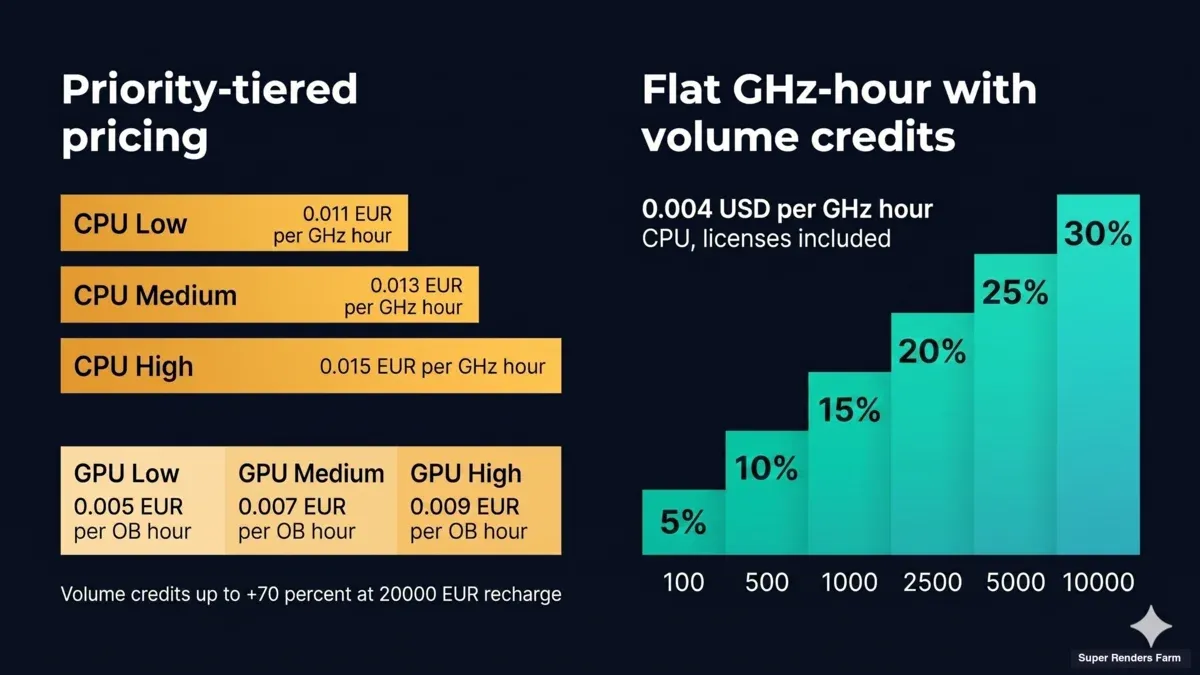 Ranch Computing priority-tiered GPU pricing (€0.005-€0.009 per OctaneBenchmark-hour) versus Super Renders Farm flat $0.004 per GHz-hour with 5-30% volume credits and 32 GB VRAM per RTX 5090
Which one ends up cheaper? It depends on your scene, your priority tolerance, and your recharge volume. For a CPU-heavy V-Ray archviz frame running at Ranch's Medium priority versus SuperRenders' baseline, the effective per-frame cost can land within a few percent of each other once currency conversion is factored in. Ranch becomes aggressive for very high-volume studios: once you're regularly hitting €10,000+ recharges, the +104% and +128% credit tiers push effective rates far below list. For smaller or more occasional studios, SuperRenders' included licensing and no-surcharge RAM tend to be easier to forecast because you're not separately budgeting for priority queue allocation.
For a frame-by-frame breakdown across project types, see our render farm cost per frame guide.
The practical takeaway: if you render constantly and can commit to €20,000+ recharges, Ranch's volume bonus structure is hard to beat on pure per-unit cost. If you render in smaller bursts, need predictable RAM headroom, or prefer USD invoicing, SuperRenders' model is easier to plan around.
GPU Hardware and GPU Renderers
GPU is where the two farms diverge on what's publicly documented.
Super Renders Farm runs a GPU fleet built on NVIDIA RTX 5090 cards with 32 GB VRAM each. For Redshift, Octane, and V-Ray GPU users hitting VRAM walls on 24 GB cards — especially archviz scenes with many 8K textures or VFX with heavy volumetrics — that 32 GB headroom means fewer out-of-core fallbacks and more predictable frame times. For Redshift C4D workloads, which are a significant portion of our job volume, the extra VRAM is a meaningful operational difference.
Ranch documents its GPU capacity in aggregate terms (the site references "5 million GPU Cores" and tier-based card counts of 40 / 80 / 120 across Low / Medium / High priority pools) but does not publish the specific GPU card model in its public pricing pages. Ranch's GPU pricing unit — OctaneBenchmark-hours — is a performance-normalized metric rather than a per-card-hour figure, so if you have a hard VRAM requirement or a specific card-family dependency, it's worth confirming with Ranch's team which GPUs will be assigned before committing to a project.
Both farms support the major GPU renderers: Redshift, Octane, and V-Ray GPU. Blender Cycles GPU runs on both. If your pipeline is CPU-first (Corona, V-Ray CPU, Arnold CPU for animation), GPU hardware isn't a decisive factor between the two.
Supported DCCs and Render Engines
The DCC support lists overlap heavily. Both run 3ds Max, Maya, Cinema 4D, Blender, and Houdini. A few details differ:
- Ranch publicly lists Maxwell Render and Indigo Renderer support — both are less common choices in mainstream production but matter for specific archviz pipelines that committed to those engines.
- Super Renders Farm lists After Effects and NukeX explicitly for compositing workflows.
- Both support the Forest Pack and RailClone plugins from iToo Software.
On render engines, Ranch's published list is notably broad: Octane, Arnold, V-Ray, Redshift, Corona, Cycles, Eevee, FStorm, Mantra/Karma, and RenderMan. Super Renders Farm lists V-Ray, Corona, Arnold, Redshift, Octane, and Cycles. For V-Ray specifically (the focus of this comparison), both farms run V-Ray for 3ds Max, V-Ray for Maya, V-Ray for Cinema 4D, and V-Ray for Houdini. If your pipeline depends on FStorm (a 3ds Max-focused GPU renderer popular in French and Eastern European archviz studios) or on Mantra/Karma in Houdini, Ranch publishes explicit support where SuperRenders does not.
Workflow: Self-Serve Plugin vs Fully Managed
This is the single biggest operational difference and usually the one that decides which farm fits a given studio.
Ranch's model is self-serve with an automated preflight toolchain. You install RANCHecker as a plugin inside 3ds Max, Cinema 4D, Blender, Maya, Houdini, or Maxwell. RANCHecker automatically collects textures, adapts file paths for the farm, checks render parameters, and flags scene-version incompatibilities before upload. You then submit the packaged scene through RANCHSync (their uploader/downloader client), which handles the transfer, detects rendering errors automatically, and pulls completed frames back to your workstation. There's no RDP access — you don't remote into a render node — and you retain control over render parameters, queue priority, and any issue the automation doesn't catch. For a technically-fluent pipeline TD or a studio that already has submission scripts, this combination of automated validation plus hands-on control is fast and flexible.
Super Renders Farm's model is fully managed. You upload the scene to your Render Dashboard, and our team takes over: we validate the scene, check missing assets, set up the render on the appropriate hardware, monitor progress actively, and flag issues before they waste hours. You don't remote desktop into a machine, you don't install a plugin inside your DCC, and you don't hand-tune queue parameters. The difference from a plugin-based self-serve model isn't whether validation happens — both approaches validate — it's who owns the validation and fix loop. With RANCHecker, automated checks catch a defined list of known-issue patterns before upload; with a managed workflow, a human operator is available during the render to diagnose edge cases the automation wasn't built for (unusual plugin combinations, scenes that expect a specific service pack, render-element naming collisions). We unpack this model in more depth in our what is a fully managed render farm explainer.
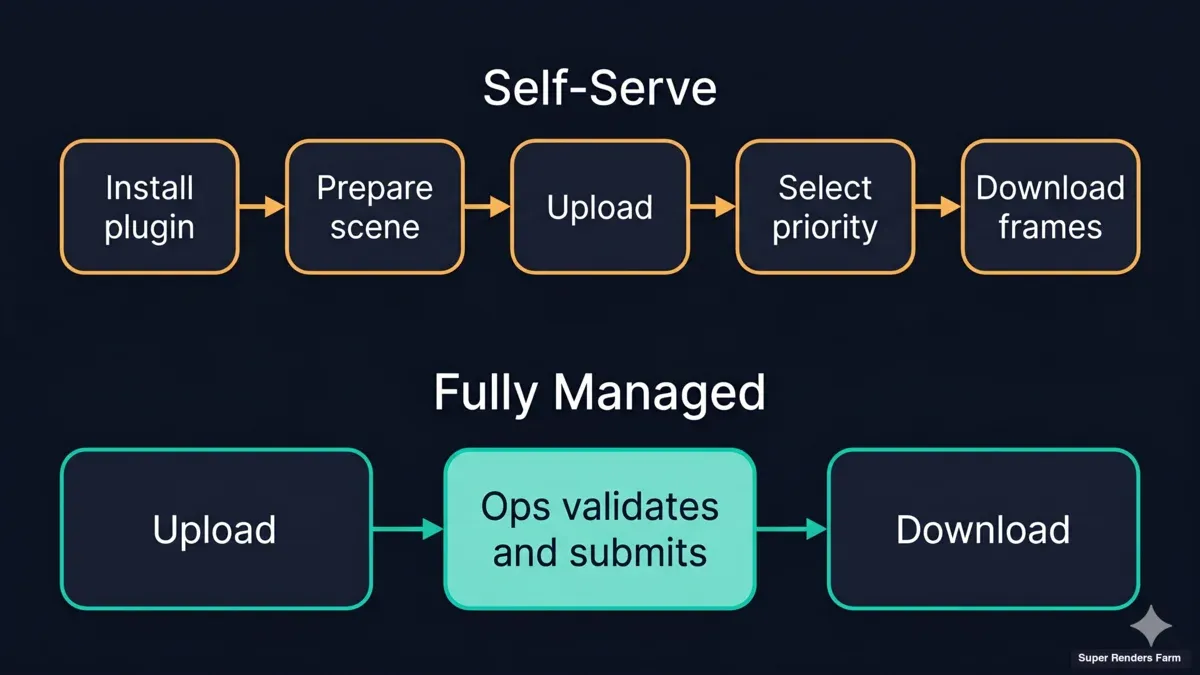 Rendering workflow comparison — Ranch Computing self-serve five steps (Install RANCHecker, Prepare scene, Upload via RANCHSync, Select priority, Download frames) versus Super Renders Farm fully managed three steps with operator-led scene validation
Which is the right model depends on your team:
- Choose self-serve (Ranch) if you have pipeline engineering capacity, want plugin-level integration inside your DCC, and are comfortable tuning submission parameters and queue priority yourself.
- Choose managed (Super Renders Farm) if you want to ship frames without debugging the farm itself — common for small archviz studios, solo VFX artists, and teams where the lead artist is also the render wrangler.
Support, SLA, and Response Times
Ranch runs support out of Paris via email, phone, and Skype / chat. For European studios in the CET / CEST timezone, that means local-hours responses without the timezone lag of asking a US or Asian support team. Ranch doesn't publish a minute-level SLA the way some farms do, but the combination of phone + chat channels is useful for studios that prefer voice escalation over ticket-based support.
Super Renders Farm runs 24/7 support through live chat and email. We don't publish a minute-level SLA either, but our support model is coupled to the managed workflow: because our operators are already looking at your scene when it's running, a problem gets caught inside the active job rather than after a support ticket is opened. That's a different philosophy — proactive engagement during the render versus reactive response after — and it makes sense only because the workflow itself is managed.
If your team is in Western Europe and values French-language support during business hours, Ranch's Paris base is a practical advantage. If your team is distributed across time zones or rendering overnight from the Americas, SuperRenders' 24/7 chat coverage is closer to the operational reality.
Trust Signals and Certifications
Both farms carry Chaos Group V-Ray authorization, so that line-item is even. A few other certifications differ significantly.
Ranch publishes TPN Gold Shield accreditation, which is the Motion Picture Association's Trusted Partner Network content-security framework at the Gold Shield tier. TPN matters specifically if you're doing pre-release VFX for episodic TV, streaming platforms, or theatrical projects that mandate TPN vendor sign-off. Ranch also publishes the Ecoprod label (an environmental certification recognized in the French film and audiovisual industry) and commits to 100% renewable energy sourcing since 2009. For studios evaluating vendors on sustainability criteria, these are concrete, audited claims rather than marketing language.
Super Renders Farm holds V-Ray authorization from Chaos Group, Cinema 4D / Redshift / Red Giant partnership from Maxon, and authorized render partner status from AXYZ design for Anima. We don't currently publish TPN accreditation or ISO27001. If your project specifically mandates TPN vendor sign-off, confirm accreditation requirements with whichever farm you're evaluating — different productions have different compliance bars, and TPN in particular is a hard gate for certain streaming-platform deliverables.
On the general partnership axis, the two farms sit differently. Ranch has the stronger film-industry compliance stack (TPN Gold Shield + French audiovisual ecosystem). Super Renders Farm has deeper DCC-vendor partnerships (Chaos + Maxon + AXYZ design) — which matters if your project leans on Cinema 4D, Redshift, or Anima plugin licensing within the render. Neither is "more legitimate"; they sit in different ecosystems.
When to Choose Ranch Computing
- Your studio is based in the EU and data residency matters for GDPR compliance or contractual obligations — Ranch's servers are in Paris.
- You need TPN Gold Shield accreditation for a specific production pipeline that mandates it (pre-release VFX for major streaming platforms, episodic TV with MPA compliance requirements).
- Your pipeline depends on FStorm, Maxwell Render, Indigo Renderer, or Mantra / Karma — Ranch publicly lists these; SuperRenders does not.
- You're a high-volume archviz studio committing to €10,000+ recharges regularly and want the +104% to +128% volume credit bonus.
- You prefer plugin-integrated submission from inside your DCC via RANCHecker.
- You're an educational institution — Ranch offers 50% off non-commercial academic work.
- Sustainability certification (Ecoprod, 100% renewable) is a procurement requirement for your client.
When to Choose Super Renders Farm
- You want a fully managed workflow with no DCC plugin install and no queue-priority tuning — common for archviz studios, freelance motion designers, and small VFX teams.
- Your GPU scenes need explicit 32 GB VRAM per card (Redshift, Octane, V-Ray GPU on dense scenes).
- You're based in the Americas and want a US-registered vendor with USD invoicing for contracts, billing, and support.
- You're running a Cinema 4D + Redshift pipeline and want explicit Maxon-partner support alongside the V-Ray authorization.
- Your render uses AXYZ design Anima crowds and you want to run against a farm that is listed as an AXYZ authorized render partner.
- You'd rather have a human operator actively monitoring your render and resolving edge-case issues than handle error diagnosis yourself when automated validation doesn't catch everything.
FAQ
Q: Is Ranch Computing or Super Renders Farm better for V-Ray? A: Both are authorized V-Ray partners on the Chaos Group render-farm list, so licensing and V-Ray version support are equivalent. The choice comes down to workflow (self-serve plugin vs fully managed), region (France vs USA), and pricing structure (priority-tiered euros with up to +128% volume credits vs flat GHz-hour dollars with up to 30% credits). For V-Ray archviz jobs on a CET-timezone team, Ranch's local support hours are an operational plus; for managed workflow with AXYZ Anima authorization, SuperRenders is the explicit fit.
Q: Which render farm is cheaper for archviz overall? A: There's no universal answer. At Medium priority and baseline credit tiers, a typical V-Ray archviz frame costs roughly comparable amounts on both platforms once currency is factored in. Ranch becomes materially cheaper for studios committing to €10,000+ recharges (where the +104% and +128% credit bonuses kick in). Super Renders Farm's included license model and larger default RAM tend to be cheaper when scenes need more memory or when you'd rather not budget for queue-priority tuning separately.
Q: Does Ranch Computing support Cinema 4D and Redshift? A: Yes, Ranch supports Cinema 4D and Redshift rendering. Super Renders Farm is a Maxon partner with specific C4D + Redshift authorization, so studios running a C4D pipeline sometimes prefer SuperRenders for that ecosystem alignment. Feature support itself is similar on both.
Q: Can I remote desktop into a machine on either farm? A: Ranch's model is self-serve via the RANCHecker plugin and RANCHSync uploader — not remote-desktop-based. Super Renders Farm is fully managed and also does not offer remote desktop; our operators handle machine setup on your behalf. If you specifically need RDP access to a rendering machine, neither farm is the right fit — look at IaaS providers instead.
Q: Does Ranch Computing have TPN accreditation? A: Yes, Ranch publishes TPN Gold Shield accreditation, which is the Motion Picture Association's Trusted Partner Network certification at the Gold Shield tier. That matters specifically for pre-release VFX on productions that mandate TPN vendor sign-off (many streaming platforms and episodic TV deliverables). Super Renders Farm does not currently publish TPN accreditation, so if your contract mandates it as a hard requirement, Ranch is the compliant choice.
Q: How long does it take to get rendering started on each farm? A: Ranch's RANCHecker + RANCHSync workflow front-loads scene preparation locally before upload — the first submission takes a bit longer because you're installing the plugin and going through RANCHecker's validation, but subsequent submissions are quick once it's configured. Super Renders Farm adds a brief operator scene-review step after upload; on jobs where that review catches missing assets or plugin version mismatches, it can actually deliver a first completed frame sooner than a self-serve submission that runs, fails, and needs a retry. On subsequent projects the two are roughly comparable.
Q: Which farm is better for a European archviz studio? A: Ranch Computing has clear advantages for European studios: Paris-based servers (data residency and GDPR alignment), EU timezone phone + chat support, euro invoicing, and the 100% renewable / Ecoprod certification that some EU public-sector clients require. Super Renders Farm serves European clients globally but operates from the USA, so the practical considerations are invoicing currency, support-hour overlap, and data-residency requirements on your specific project.
Q: Can I use both Ranch Computing and Super Renders Farm on the same project? A: Technically yes — there's no lock-in. Some studios split workload across two farms to diversify capacity risk during crunch or to take advantage of geographic data residency on specific deliverables. Just be aware that render engine versions should match exactly (identical V-Ray build, identical plugins) across farms; otherwise frames can differ subtly and cause compositing issues downstream.
About Alice Harper
Blender and V-Ray specialist. Passionate about optimizing render workflows, sharing tips, and educating the 3D community to achieve photorealistic results faster.



