What Is Subsurface Scattering? How Light Inside a Surface Shapes 3D Renders
Overview
Introduction
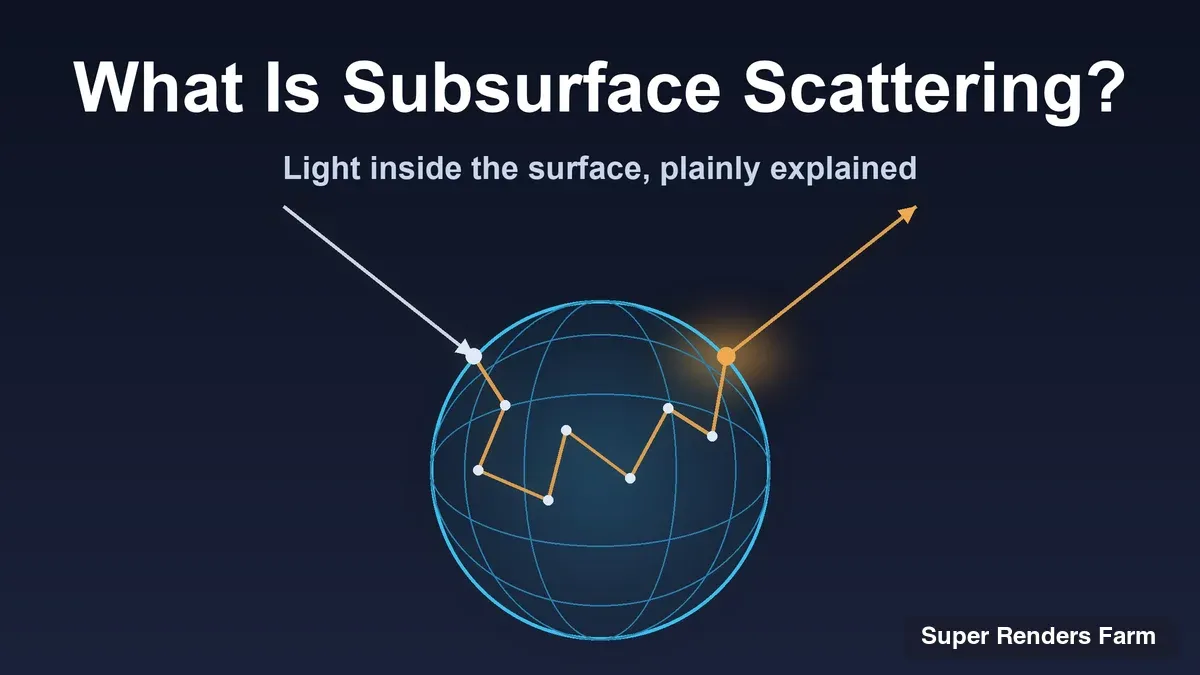
What is subsurface scattering? It is what happens when light does not simply bounce off a surface but enters it, wanders around inside the material and leaves from a different spot. Skin, wax, marble and milk all look the way they do because of it, and a renderer that ignores it tends to produce materials that read as plastic or metal.
This guide explains the physics in plain terms, what separates a BSSRDF from the BRDF most shaders use, and the two families of methods renderers use to approximate it. It then shows where Cycles, Arnold, V-Ray, Redshift and Corona put the controls, why subsurface scattering (SSS) raises render time and noise, and which settings keep it affordable on a long animation. How a renderer traces light in the first place is in ray tracing vs path tracing; if rendering itself is new to you, start with what is rendering.
 Side by side cross-sections: with a BRDF light leaves at the same point where it entered, with a BSSRDF light enters at one point, scatters inside the material and leaves at a different point
What Subsurface Scattering Is, Physically
A basic shader treats a surface as a boundary: light arrives at a point and reflects, or is absorbed, or for clear glass passes straight through. Many real materials behave differently. Part of the light crosses the boundary, scatters off particles inside, loses some energy to absorption, and the rest comes back out of the surface, usually some distance from where it went in.
Chaos describes SSS in its subsurface scattering explainer (read 10 November 2026) as light entering a translucent surface, scattering internally and re-emerging at a different point. It separates the effect from refraction, which describes clear materials such as glass, and from translucency, which describes thin materials such as lampshades or leaves. SSS is for the thick, dense case: skin, wax, marble, milk.
You can see it in four places:
- Soft shadow edges. Light that enters the lit side leaks into the shadowed side, so the line between light and shadow looks softer than on plastic.
- Colour bleed. The light that comes back out carries the colour of the material's interior, so shadowed skin picks up a warm tint instead of going neutral grey.
- Glow through thin parts. Ears, fingers and candle wax light up when a strong light sits behind them.
- Lost fine detail. Scattering blurs the lighting, so small bumps read more gently than on an opaque surface.
The cost of that realism is bookkeeping: the renderer has to account for light that is no longer at the point being shaded.
BRDF Versus BSSRDF in Plain Terms
Most shaders describe a surface with a BRDF, a bidirectional reflectance distribution function. For one point it answers a narrow question: if light arrives from this direction, how much leaves in that direction? The built-in assumption is that light enters and leaves at the same point.
A BSSRDF, a bidirectional scattering-surface reflectance distribution function, drops that assumption and relates light arriving at one point to light leaving at another. The textbook Physically Based Rendering (third edition, section 11.4, read 10 November 2026) describes it as an eight-dimensional function: two surface dimensions and two angular dimensions for each of the two points. Integrating that for every shading point is too expensive, so renderers use a separable form made of three parts: a term for light leaving the surface, a term for light entering, and a spatial profile that says how far light travels between the two points.
That spatial profile is the "how far does the light spread" curve, and it is where the material's radius setting goes. The textbook notes that the simplest versions assume a locally flat surface and a fairly uniform material, and that accuracy drops on strongly curved geometry. That is why the second family of methods below exists.
Mean Free Path and Radius: The Number That Sets the Look
Every SSS shader asks one core question: how far does light travel inside this material before it scatters or leaves? The physical term is the mean free path, the average distance between scattering events. Shaders expose it as a radius, usually with a scale multiplier and a colour.
- Autodesk's Arnold documentation for the subsurface parameters (read 10 November 2026) describes the radius as the approximate distance up to which light can scatter below the surface, also known as the mean free path, and states that SSS is very scale-dependent.
- The Blender manual's Subsurface Scattering node page (read 10 November 2026) calls the radius the average distance light scatters below the surface, with separate red, green and blue values, and the scale a global factor on it.
- Maxon's Redshift Standard Material documentation (read 10 November 2026) sets the radius in centimetres and multiplies it by Scale to get the total scattering distance.
Two consequences follow. Because each colour channel can carry its own radius, a shader can scatter some wavelengths further than others, which is how artists give skin its warm bleed. And because the radius is a real distance, scene scale decides the look: the value that reads as soft wax on a model built in centimetres turns into a glowing blob on one built in metres. Chaos makes the same point for V-Ray (check scene scale, because the scatter radius uses real-world units) and suggests a radius of roughly 5 to 20 mm for skin.
Diffusion Versus Random Walk
Renderers approximate the BSSRDF in two broad ways, and most engines offer both.
Diffusion and profile methods replace the interior with a mathematical profile. The classic example is the dipole diffusion model from the 2001 SIGGRAPH paper "A Practical Model for Subsurface Light Transport" (Jensen, Marschner, Levoy and Hanrahan, read 10 November 2026), validated on milk, marble and skin. A later one is Pixar Technical Memo 15-04 by Per Christensen and Brent Burley (July 2015), which builds the profile from empirical curves driven by albedo and mean free path; Blender names its version Christensen-Burley. These methods are cheap and smooth, but they assume the surface is locally flat, so thin parts, sharp curvature and small features can look wrong.
Random walk methods use no profile. They trace light paths through the inside of the mesh, scattering at random distances and directions until a path leaves. Arnold's documentation says randomwalk, unlike the empirical method based on diffusion theory, actually traces below the surface, so it handles concave and thin geometry better. The price is sensitivity to meshes that are not closed: holes, "mouth bags" and stray internal geometry can cast unwanted shadows. Blender's 2.80 release notes introduced Random Walk as giving more accurate results for thin and curved objects, and the 2.93 notes added that it now uses Dwivedi guiding to reduce noise, a sign that noise was a known weakness.
 Two panels: diffusion replaces the interior with a smooth profile around the entry point, while random walk traces a jagged scattering path inside the mesh until it exits
It is the trade-off found everywhere in rendering: the profile is fast, smooth and approximate; the random walk is slower, noisier and closer to what the geometry does. Neither is right for every shot.
How Cycles, Arnold, V-Ray, Redshift and Corona Expose SSS
The names differ but the controls map onto each other. Each row comes from the vendor documentation linked in this article, read on 10 November 2026.
| Renderer | Where the control lives | What you choose |
|---|---|---|
| Cycles (Blender) | Principled BSDF subsurface inputs, or the Subsurface Scattering node | Method: Christensen-Burley, Random Walk, Random Walk (Skin); radius, scale, IOR, anisotropy |
| Arnold | standard_surface subsurface group | Weight, colour, radius, scale, anisotropy; type: diffusion, randomwalk or randomwalk_v2 |
| V-Ray | VRayMtl volumetric translucency, VRayFastSSS2, VRayAlSurface | Scatter radius, subsurface and scatter colour, phase function |
| Redshift | Standard Material, Subsurface group | Mode: Point-Based Diffusion, Ray-Traced Diffusion, Random Walk; radius, scale, samples |
| Corona | Physical Material, Subsurface Scattering and Volumetric Scattering groups | Fraction, radius, scatter colour; directionality for volumetric scattering |
Cycles. The Blender manual describes Christensen-Burley as less accurate than Random Walk but able to resolve noise faster in some situations. Random Walk suits thin and curved objects and works best on closed meshes; Random Walk (Skin) adjusts the radius based on the colour texture.
Arnold. The default type is randomwalk. Diffusion is described as an approximation much cheaper to evaluate than a full randomwalk, while randomwalk can be substantially faster for a large mean free path and slower in dense media with a small one. randomwalk_v2 renders more costly and noisier than the original method, and the anisotropy control works only with randomwalk.
V-Ray. Chaos lists VRayMtl with refraction enabled and translucency set to volumetric, VRayFastSSS2 with its scatter radius and phase function, and VRayAlSurface built for skin. It recommends VRayFastSSS2 for background objects and reserving volumetric SSS for close-up hero materials.
Redshift. The Standard Material documentation describes Point-Based Diffusion as the quickest and cleanest but least accurate mode, which does not work in progressive rendering. Ray-Traced Diffusion is more accurate but slower and noisier. Random Walk is the default and most accurate, and can be slower than the others. The Samples control applies to Ray-Traced Diffusion and Random Walk only.
Corona. The Corona Physical Material documentation for Cinema 4D (read 10 November 2026) lists a Subsurface Scattering fraction, radius and scatter colour, plus a separate volumetric group with absorption colour, scattering colour, directionality and distance. It warns that directionality values close to 1 or minus 1 increase image noise.
Why SSS Adds Render Time and Noise
Chaos states that SSS does increase render time and calls volumetric SSS in VRayMtl computationally expensive, though it adds that the increase is not large when SSS is used selectively. Two mechanisms sit behind the cost, and how much each one matters changes with the method, which is why a test frame beats a rule of thumb.
More paths per pixel. A random walk is a path traced inside the object. Each camera ray that hits an SSS surface can spawn a walk of several scattering steps before it exits, so one sample does more work and varies more from sample to sample. Higher variance shows as grain, which takes more samples to clean up. The general version of this trade-off is in ray tracing vs path tracing.
Larger radius, more samples. Maxon's documentation says that for Ray-Traced Diffusion the higher the scatter radius, the more samples are needed for clean results, and that raising the SSS Samples setting reduces grain at the cost of render time.
SSS also rides on global illumination. Chaos advises enabling GI because materials can look plastic without it, and notes that backlighting is what reveals scattering. If you have been tuning a scene with ambient occlusion, note the two are unrelated: occlusion approximates how much ambient light a point can see, while SSS is about where light goes after it enters the material.
Every one of these costs repeats on every frame. A ten-second shot at 24 frames per second is 240 frames, so a few extra minutes per frame adds up to many machine-hours.
Keeping SSS Affordable on a Long Animation
These changes most often cut cost without changing the look. Each is a judgement about what the viewer can see, so check it against your own frames.
- Get scale right first. Work in real-world units, or set the scale control deliberately, before judging noise or tuning samples.
- Fix the mesh. Blender says Random Walk works best on closed meshes, Arnold warns that randomwalk is sensitive to non-closed meshes and internal geometry, and Redshift notes artifacts with overlapping geometry.
- Match the method to the shot. Use the expensive method where the camera is close and the cheaper one where it is not: VRayFastSSS2 or Arnold diffusion for mid-distance and background characters, Redshift Point-Based Diffusion where progressive rendering is not needed, and Random Walk for hero close-ups with thin features.
- Switch SSS off where it cannot be seen. SSS blurs light over the radius distance. If that distance is smaller than a pixel at your render resolution, you pay for scattering nobody sees. Arnold's subsurface weight defaults to 0 and blends between diffuse and SSS, so setting it per material is normal.
- Keep anisotropy near zero. Corona notes that directionality near 1 or minus 1 increases noise, and Arnold's anisotropy applies only to randomwalk.
- Spend samples where the noise is. Raise SSS samples on the materials that show grain instead of raising global sampling for the whole frame.
- Measure the heaviest frame twice. Render one demanding close-up with SSS weight 0 and again with final settings. The difference is your SSS cost per frame; multiplied by the frame count it is the number you need.
 Chain showing how to estimate SSS cost: render one hero frame with SSS off and on, subtract the times, then multiply the difference by the frame count
For the wider picture of cutting render time across a scene, the render time optimization guide covers sampling, denoising, geometry and lighting.
Rendering SSS Scenes on Super Renders Farm
SSS is a material setting, not a separate feature, so a scene that uses it renders on a farm like any other: frames are processed in parallel as batch jobs. What changes is the cost per frame, which is why a test render before a full sequence is worth the few minutes.
On Super Renders Farm, a fully managed farm, you upload the scene and the farm handles the software, plug-ins and render licences. Cycles and EEVEE in Blender, Arnold, V-Ray and Corona in 3ds Max, and Redshift in Maya and Cinema 4D are ready without a setup request. Other host and engine combinations, for example V-Ray for Blender or Redshift for 3ds Max, are provisioned on request, so contact us to confirm before you upload a scene that depends on them.
Corona, and Arnold or V-Ray in their CPU modes, render on our CPU nodes. Redshift renders on our GPU nodes, which carry two RTX 5090 cards per node with 32 GB of VRAM per card; memory is per card and is not pooled, so a Redshift scene has to fit in 32 GB. New accounts receive $25 free render credits, so you can render test frames of your heaviest SSS shot before committing a sequence. Current rates are on our pricing page.
Summary: Which SSS Approach for Which Shot
| Shot or material | Likely approach | Why |
|---|---|---|
| Hero close-up, thin or curved features (ears, fingers) | Random walk | Does not assume a flat surface |
| Mid-distance or background character | Diffusion or a fast SSS shader | Smooth and cheap; the difference is hard to see |
| Wax, marble, milk | Diffusion first; random walk if edges look wrong | Thick materials suit the profile approach |
| Noisy SSS after a test frame | Check scale, mesh, anisotropy, then samples | Cheaper fixes first |
FAQ
Q: What is subsurface scattering in simple terms? A: Subsurface scattering is light entering a translucent material, bouncing around inside it and leaving from a different spot. It is why skin, wax, marble and milk look soft and slightly glowing instead of flat and plastic. A subsurface shader models that spread of light.
Q: What is the difference between a BRDF and a BSSRDF? A: A BRDF describes light that leaves a surface at the same point where it arrived. A BSSRDF also covers light that enters at one point, scatters inside the material and leaves at another. Because it relates two points, renderers use approximations such as diffusion profiles or random walks.
Q: What is mean free path in SSS? A: The mean free path is the average distance light travels inside the material between scattering events. Renderers expose it as the SSS radius, usually with a scale multiplier. A larger radius gives a softer, waxier look, and because it is a real distance it depends on scene scale.
Q: Does subsurface scattering increase render time? A: Yes. Chaos states that SSS increases render time, and Maxon documents that larger scatter radii need more samples for clean results. The increase comes from extra light paths inside the material and the noise they add, so it varies with the method, the radius and how much of the frame the material covers.
Q: Should I use random walk or diffusion for SSS? A: Use random walk where accuracy matters, such as close-ups with thin or curved geometry, and diffusion where speed matters, such as background objects. Arnold, Blender and Redshift offer both, and Arnold notes neither is always faster, so render one test frame with each.
Q: Why is my subsurface scattering render noisy? A: Random walk methods trace paths inside the mesh, which adds variance. Common causes are a large radius, a mesh that is not closed, extreme anisotropy and too few SSS samples. Fix scale and geometry first, then lower anisotropy, then raise samples on the affected material.
Q: Can subsurface scattering scenes be rendered on a render farm? A: Yes. SSS is a material setting, so the scene renders as batch frames like any other. On Super Renders Farm, Cycles and EEVEE in Blender, Arnold, V-Ray and Corona in 3ds Max, and Redshift in Maya and Cinema 4D are ready without a setup request. Other host and engine combinations are provisioned on request, so contact us to confirm before you upload.
About Thierry Marc
3D Rendering Expert with over 10 years of experience in the industry. Specialized in Maya, Arnold, and high-end technical workflows for film and advertising.