

Rendering Maya Scenes That Use USD on a Render Farm
Overview
Universal Scene Description has moved from a Pixar in-house format to the backbone of a lot of Maya pipelines. If your studio composes shots out of layered USD stages, references published assets across departments, and hands the result to a renderer through a procedural, you already know USD is no longer a side experiment — it is the spine of the scene. What is less obvious until a deadline is on the line is that a scene rendering perfectly on a workstation does not guarantee it renders on someone else's farm. The farm has to have the right MayaUSD build, the right render-engine USD support, and a way to resolve every asset path the stage points at. When one of those is missing, you do not get a clear error — you get failed frames, silent fallbacks, or geometry that simply is not there.
We run a managed render farm, and Maya-plus-USD jobs are one of the workflows we see studios struggle to move off their workstations. This guide walks through why USD is harder to render remotely than a self-contained .ma, what actually has to line up for it to work, and how we handle it on our side — including the parts that are easy to get wrong.
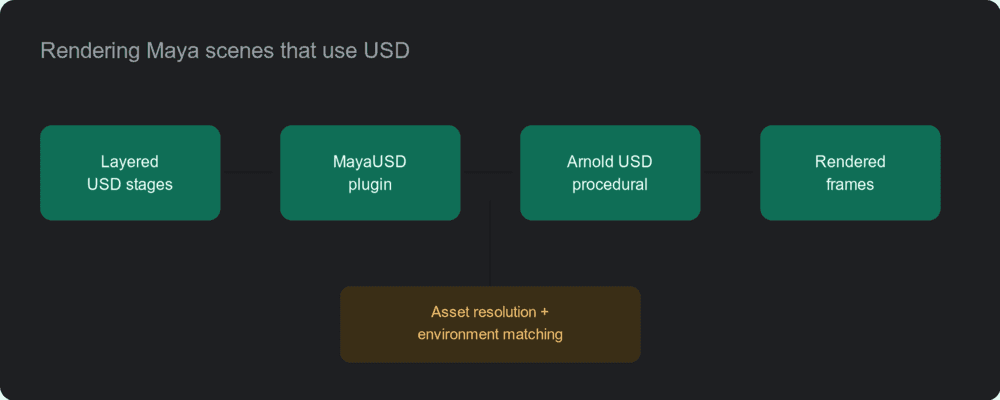 Maya USD render pipeline: layered USD stages to the MayaUSD plugin to the Arnold USD procedural to rendered frames, with asset resolution and environment matching.
Why USD is harder to render remotely than a self-contained scene
A traditional Maya scene is largely self-describing: open it, the meshes and materials are there, point the renderer at it, and frames come out. A USD-driven scene is closer to a recipe than a finished dish. The .usd, .usda, or .usdc files are a set of layered instructions — sublayers, references, payloads, and variants — that compose into a final stage at load time. That composition is powerful, but it means three separate things all have to be present and compatible on the machine that renders it.
The first is the MayaUSD plugin itself. MayaUSD is the bridge that lets Maya read, compose, and pass USD stages through to rendering. If the farm's Maya does not have MayaUSD loaded, or has a version that composes the stage differently than the one your artists authored in, the scene either fails to open or opens missing the parts that came in through USD.
The second is asset path resolution. A USD stage references other files — geometry, textures, nested USD layers — by path. On your workstation, those paths resolve because the data sits where the stage expects it. On a farm, unless the same directory structure and the same resolver behaviour are reproduced, half of those references resolve to nothing. This is the single most common reason a USD scene that "works at home" comes back empty from a farm: the pixels rendered fine, the references just were not found.
The third is the renderer's USD support. The render engine has to understand the USD data Maya hands it. For Arnold, that path runs through the Arnold USD procedural, which reads the USD content at render time rather than expanding the whole stage into Maya first. If the procedural is not installed, or its version does not match the data, the renderer skips what it cannot read — quietly.
This is also where the well-publicised gap in some cloud render services shows up. AWS's own Deadline Cloud for Maya tracker has an open issue (aws-deadline/deadline-cloud-for-maya#409) covering MayaUSD support in their submitter, which is exactly the kind of plumbing that has to be solved end to end before USD scenes render reliably. It is a fair illustration of the problem: USD rendering is not one feature you switch on, it is a chain of versions and paths that all have to agree.
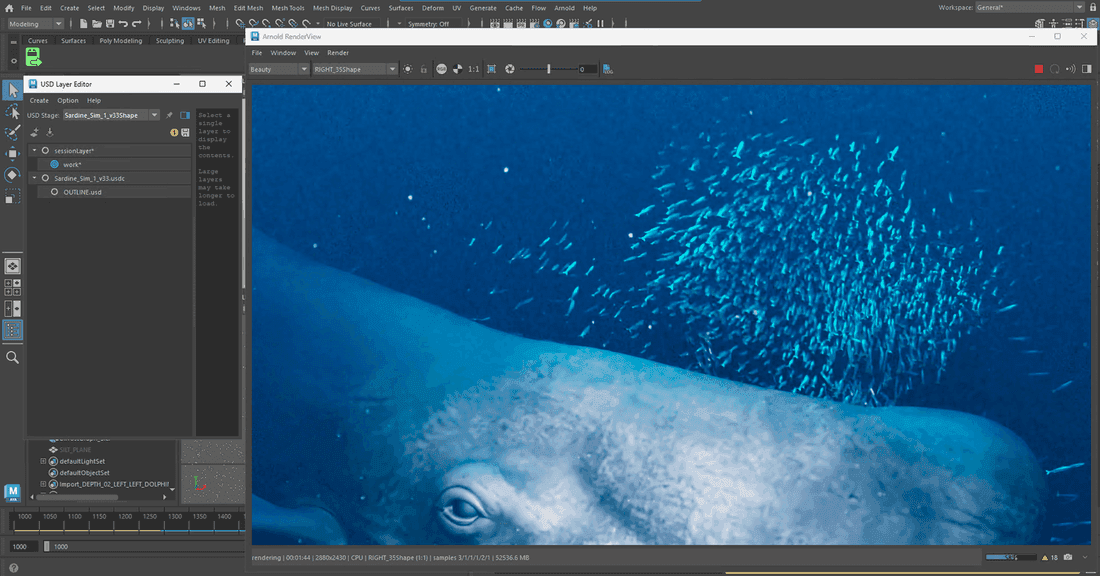 A layered USD stage in Maya's USD Layer Editor — sublayers and references visible — beside the Arnold RenderView output.
How we render Maya + USD on our farm
Our approach starts before a single frame is queued: we match the environment to your scene rather than asking your scene to match a fixed farm image. When a studio sends us a USD-based Maya job, we confirm the Maya version, the MayaUSD build, the renderer, and the USD version the assets were authored in, then stand the nodes up to match. The goal is that the stage composes on our nodes exactly the way it composes on your artists' machines — same plugin behaviour, same resolution, same procedural.
On the rendering side, the two pieces that matter most for Maya USD with Arnold both have to initialise cleanly: MayaUSD to compose the stage inside Maya, and the Arnold USD procedural to read the USD content at render time. We have rendered production Maya jobs where both load and run correctly across the node pool, which is the practical test that matters — not "does the farm claim USD support" but "does this stage, with these references, produce the frames the artist expects." Arnold here runs on our CPU nodes, which suits the way a lot of studios use Arnold for final-quality USD work; the same scenes can run on GPU where the project calls for it.
A detail worth calling out, because it trips people up: USD scenes that have lived through a few pipelines often carry leftover plugin references and stray node attributes from renderers the project no longer uses. We see scenes that still ask for a plugin the studio dropped months ago, or carry attributes from an engine that is not in the final render path. On our nodes those leftovers are harmless — Maya loads straight past them and renders with the engine you are actually using. If you want tidy logs you can strip the unknown plugin requests and leftover nodes in Maya before sending, but it is cosmetic; it is not what stops a render. Knowing the difference between "harmless leftover" and "the thing that is actually failing" is most of what makes a USD render go smoothly.
One honest constraint to set expectations on hardware: our GPU nodes are built on RTX 5090 cards with 32 GB of memory per GPU, and that memory is per card — it is not pooled across the two cards in a machine. For the CPU-Arnold USD work most studios bring us that ceiling rarely comes up, but if you are running a GPU path on scenes with very large textures or heavy volumetrics, it is worth checking the per-GPU memory footprint up front. We would rather qualify that with you before a job than have a frame fail to fit mid-run.
Render from your existing filespace, instead of re-uploading
The asset-resolution problem described earlier has a clean solution when a studio already keeps its project on a mounted filespace. If your assets live on LucidLink, we can mount that same filespace onto the render nodes, so the USD stage resolves its references against the exact data your artists see — no re-uploading a multi-gigabyte asset library, and no rebuilding the directory structure by hand. The stage composes against the real paths because the real paths are mounted.
This matters more for USD than for a packaged single-file scene precisely because USD leans on those external references. Mounting the source of truth removes a whole class of "reference not found" failures, because there is nothing to copy incorrectly — the farm reads the same tree the studio reads. For teams that are already LucidLink-native, this tends to be the difference between a fiddly upload-and-pray cycle and a render that just resolves.
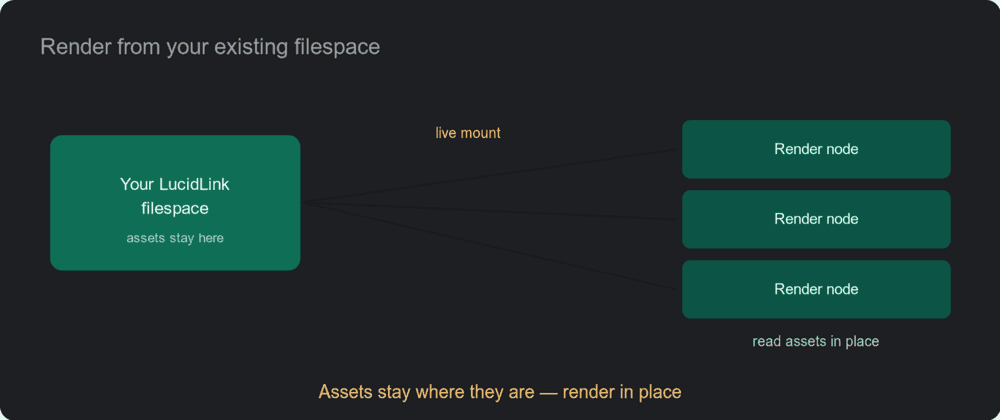 A studio LucidLink filespace mounted live onto the render nodes, which read the assets in place — no re-upload.
What is included — licenses and DCC, not just machines
When you rent dedicated capacity from us, the render-engine licenses and the DCC applications come with it. Maya, the renderer — Arnold, V-Ray, Redshift, Octane, Cycles — and the supporting plugins are part of what we provision, rather than something you bring and license per node yourself. For a USD job that usually means the Arnold licensing is handled on our side as part of the run, so you are not separately sourcing render licenses for every node in the block.
This is worth weighing against a bare-metal or build-your-own approach, where the per-machine rate can look lower until you add the render-engine licenses back on top — those run a few hundred to well over a thousand dollars per node, per year, per engine on a bring-your-own host.
For the specifics of what one of these dedicated nodes includes out of the box, see our dedicated RTX 5090 render server breakdown. Bundling them is the part of the model that does the quiet work: the scene that renders is the one where Maya, MayaUSD, the procedural, and the engine license are all present at once, and provisioning them together is how you keep that chain intact.
A real migration: USD on Maya, off a cloud scheduler that could not run it
To make this concrete: we recently worked with a UK visual-effects studio that came to us because their existing cloud-scheduler setup was failing on exactly this problem — Maya could not work with their USD assets in that environment. Their pipeline was Maya with Arnold, on a LucidLink filespace. We mounted their filespace onto the nodes, matched the environment to their scene, and confirmed in the logs that MayaUSD and the Arnold USD procedural both initialised and rendered correctly across the machines. The scene carried some leftover references from earlier in its life; those loaded straight past, and the frames came out. The studio moved from "our USD renders keep failing" to a clean run, and scaled up from there. We are keeping the studio anonymous, but the workflow — Maya, USD, Arnold, LucidLink — is increasingly the norm rather than the exception.
A readiness checklist before you send a USD job to any farm
Whether you render with us or anywhere else, these are the things worth confirming up front so a USD scene does not surprise you on a farm:
| Check | Why it matters |
|---|---|
| MayaUSD build matches your authoring version | The stage has to compose the same way it does on your artists' machines |
| Render engine has USD support (e.g. Arnold USD procedural) | The renderer must read the USD data, not silently skip it |
| Asset paths resolve on the render side | Mount the source filespace, or reproduce the exact directory tree |
| USD version of the assets is known | Version mismatches change how layers and variants compose |
| Render-engine license is available per node | A node without a license renders watermarked or not at all |
| Leftover plugin references identified | So you know what is harmless versus what is actually failing |
| Per-GPU memory checked (if rendering on GPU) | USD scenes with heavy data can exceed a single card's memory |
Most failed USD renders trace back to one of the first three rows. The reason we walk through them before a job rather than after is that, with USD, the difference between a clean run and an empty frame is usually a single mismatched version or unresolved path — and it is far cheaper to catch that on a test frame than on frame 480 of a deadline.
Because of exactly that, the way we typically start a Maya USD engagement is with a representative frame: we run one before the full block so the studio can see the stage compose and the frames land on our nodes, and confirm the pipeline end to end, before any larger commitment. With USD, proving the chain on one frame is worth more than any feature checklist.
If you want the broader picture of how Maya rendering works on a farm beyond USD specifically, our Maya cloud rendering guide covers the general workflow, and our overview of choosing a render farm for Maya covers how to evaluate one. The dedicated-node rental that this USD work runs on is described on our render farm rental page. For the format itself, Pixar's OpenUSD documentation is the canonical reference for how stages compose.
FAQ
Q: Does your render farm support Maya scenes that use USD? A: Yes. We render Maya jobs that use USD by matching the MayaUSD build and the renderer's USD support to your scene. In production runs we have confirmed in the logs that MayaUSD and the Arnold USD procedural both initialise and render correctly across the node pool. The key is that the same MayaUSD build, USD version, and asset paths your artists used are reproduced on the render side.
Q: Which Maya and USD versions do you support? A: Rather than pin you to one fixed image, we match the Maya version, the MayaUSD build, and the USD version your assets were authored in. USD composition is sensitive to version differences in how layers, references, and variants resolve, so matching the authoring environment is what keeps the stage composing the same way it does on your workstations.
Q: Do you support the Arnold USD procedural? A: Yes — for Maya plus Arnold, the Arnold USD procedural is the path that reads USD content at render time, and we provision it alongside Arnold. It has to be present and version-compatible with your data, otherwise the renderer skips what it cannot read. We confirm it initialises before running a full block.
Q: Do I need to bring my own Arnold license? A: No. Render-engine licenses, including Arnold, are part of the dedicated capacity we provision — they are included rather than something you license per node yourself. On a bring-your-own-host setup you would add those licenses back on top of the machine cost; bundling them is part of how we keep the render chain intact.
Q: Can you mount our LucidLink filespace so we do not have to re-upload assets? A: Yes. If your project lives on LucidLink, we can mount that filespace onto the render nodes so the USD stage resolves its references against the exact data your artists see. For USD specifically this removes a common failure mode, because the farm reads the same asset tree you do rather than a copy that might be structured differently.
Q: We are on a cloud scheduler that cannot run our Maya USD scenes. Can we migrate? A: That is a common reason studios move to us. We match the environment to your scene, mount your filespace if you use one, and verify on a representative frame that the USD stage composes and renders before committing to a full run. The migration is mostly about reproducing your authoring environment faithfully on the render side.
Q: Our scene has leftover references from a renderer we no longer use — is that a problem? A: Usually not. USD scenes that have been through a few pipelines often carry stray plugin requests and leftover node attributes. On our nodes Maya loads straight past them and renders with the engine you are actually using. You can strip them in Maya for tidy logs, but it is cosmetic — leftovers are rarely what stops a render.
Q: Should we render Maya USD on CPU or GPU? A: Both are available, and the right answer depends on your renderer and scene. A lot of studios run Arnold for final-quality USD work on CPU, which our CPU nodes are built for. GPU is available where the project calls for it — just note our GPU cards carry 32 GB of memory each, not pooled, so for very heavy GPU scenes it is worth checking the per-GPU memory footprint first.
About Thierry Marc
3D Rendering Expert with over 10 years of experience in the industry. Specialized in Maya, Arnold, and high-end technical workflows for film and advertising.



