
What Is a Render Server? (And When You Need a Render Farm Instead)
Overview
Introduction
If you've searched "render server," you've probably noticed the results pull in three different directions at once. Some pages mean a physical machine sitting under a desk, dedicated to rendering. Some mean a rack-mounted box in a data center you rent by the month. And some mean a full cloud rendering platform with hundreds of machines behind it. They're all called a "render server" by someone, and the overlap is where the confusion lives.
The distinction matters because it changes what you actually buy and how far it scales. A single server rendering a still image on a deadline is a very different purchase from a cluster chewing through a 3,000-frame animation overnight — even though both get described with the same two words. This guide draws the line clearly: what a render server is at its literal level, how it differs from a render farm, when one machine is genuinely enough, and the honest, specific thresholds where a single server stops keeping up and you need to step up. We've run distributed rendering infrastructure for years, and the point where "one strong machine" quietly becomes "not enough" is more predictable than most people expect — so we'll be concrete about where it sits.
The Short Answer: Server vs. Farm vs. Service
Three terms get tangled together constantly, so it's worth separating them before going deeper:
- A render server is a single machine dedicated to rendering. One computer — CPU, GPU, or both — whose job is to process render tasks rather than to be someone's daily workstation. It might be a headless tower in the corner of a studio, a rack node in a colocation facility, or a dedicated box you rent from a provider.
- A render farm is many render servers plus a job scheduler. The scheduler (a render manager) splits work across the machines — handing out frames, tiles, or tasks — and reassembles the output. The defining feature of a farm isn't the count of machines; it's the coordination layer that makes them act as one pool.
- A render service is the business layer — a company that sells you access to a server or a farm, wrapped in some mix of software, licensing, and support. We cover that distinction in depth in our companion piece on the difference between a render service and a render farm; here the focus stays on the hardware question — one server versus many.
So the progression is straightforward: one machine is a render server; a coordinated group of them is a render farm; and whoever sells you access to either is running a render service. Most of the real-world confusion comes from vendors using "render server" to mean any of the three, so throughout this guide we'll keep "server" strictly to the single-machine sense.
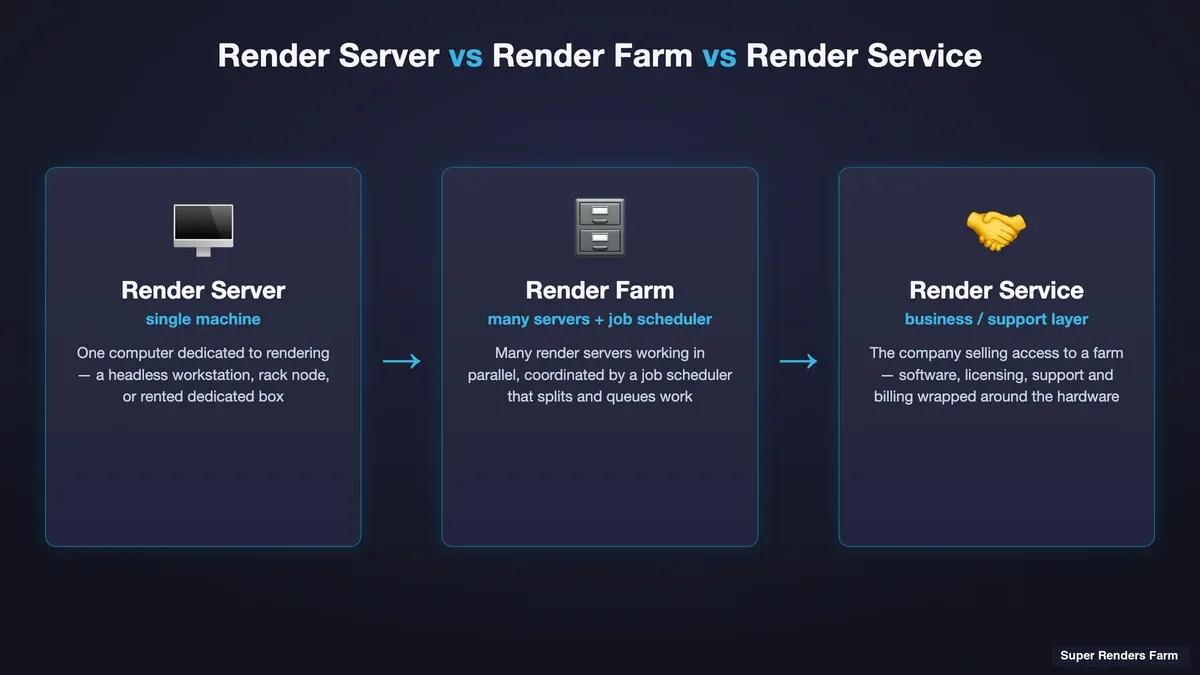 Diagram contrasting a single render server, a render farm of many coordinated servers, and a render service business layer
What a Render Server Actually Is
Strip a render server down to its essentials and it's a computer with three traits: it's dedicated to rendering rather than interactive work, it's usually run "headless" (no monitor, driven remotely), and it's built to sustain full load for hours or days without needing to also be usable for anything else.
In practice, a render server takes one of a few forms:
- A headless workstation. A studio takes a spare tower — often a former primary workstation — strips it to the OS and the render engine, and dedicates it to overnight or background rendering. No GUI session in active use; jobs are submitted remotely and the box just grinds.
- A rack-mounted node. A purpose-built server chassis (1U/2U/4U) with server-grade CPUs or GPUs, sitting in a rack in a studio machine room or a colocation facility. Built for density, cooling, and 24/7 duty rather than for sitting on a desk.
- A rented dedicated server. A provider gives you exclusive use of one physical machine — you don't share its CPU or GPU with anyone else — billed monthly or hourly. You typically administer it yourself: install the render engine, manage the license, submit jobs.
The common thread across all three is singularity. One render server is one unit of throughput. It processes one frame (or one bucket) at a time per available thread or GPU, and its ceiling is fixed by its own silicon. That single-unit nature is exactly what defines both its strengths — simplicity, predictability, full control — and its hard limits, which we'll get to.
A quick note on what a render server is not: it isn't automatically "in the cloud," and it isn't automatically a farm. A dedicated GPU box you rent monthly is a render server (one machine), not a farm — the difference is the scheduler and the machine count. If you want the full picture of what happens when many servers get coordinated together, our complete guide to render farms walks through the architecture in detail.
In-House Render Server Realities
Running your own render server — whether a repurposed workstation or a bought rack node — is appealing on paper: buy the hardware once, render for free forever. The reality has more texture, and it's worth being honest about the parts that don't show up in the purchase price.
The machine you can't use while it renders. This is the single most underrated cost of a one-server setup. If your render server is also your workstation, then every hour it's rendering is an hour you're not modeling, texturing, or comping. Artists solve this by dedicating a second machine to rendering — which is the moment "one computer" quietly becomes "two computers," and the free-rendering fantasy starts acquiring a hardware budget.
Power and heat. A render server at full tilt pulls serious wattage — a high-core-count CPU box or a multi-GPU machine can draw several hundred watts continuously, for hours. That's a real electricity line item, and it's heat that has to go somewhere. A single box in a home office will warm the room noticeably; a couple of them need genuine ventilation. Sustained thermal load also matters for hardware longevity — consumer components running at 100% for days behave differently than they do in bursty interactive use.
Licensing. Your render engine's license terms govern whether you can even legally run it headless on a dedicated box, and how many simultaneous instances you're entitled to. Commercial engines like V-Ray, Corona, Redshift, Arnold, and Octane each have their own render-node licensing rules; some bundle a number of render nodes with a workstation license, others require separate node licenses. This is easy to overlook when you're just adding "one more machine," and it's a real constraint on how far a DIY server setup can grow. (Cycles, Blender's built-in engine, is open-source and free of per-node licensing — one reason it shows up so often in DIY render-server setups.)
Maintenance is now your job. Driver updates, OS patches, a failed drive, a render that hangs at 2am — on your own server, all of that is your team's responsibility. It's manageable for one box. It scales badly.
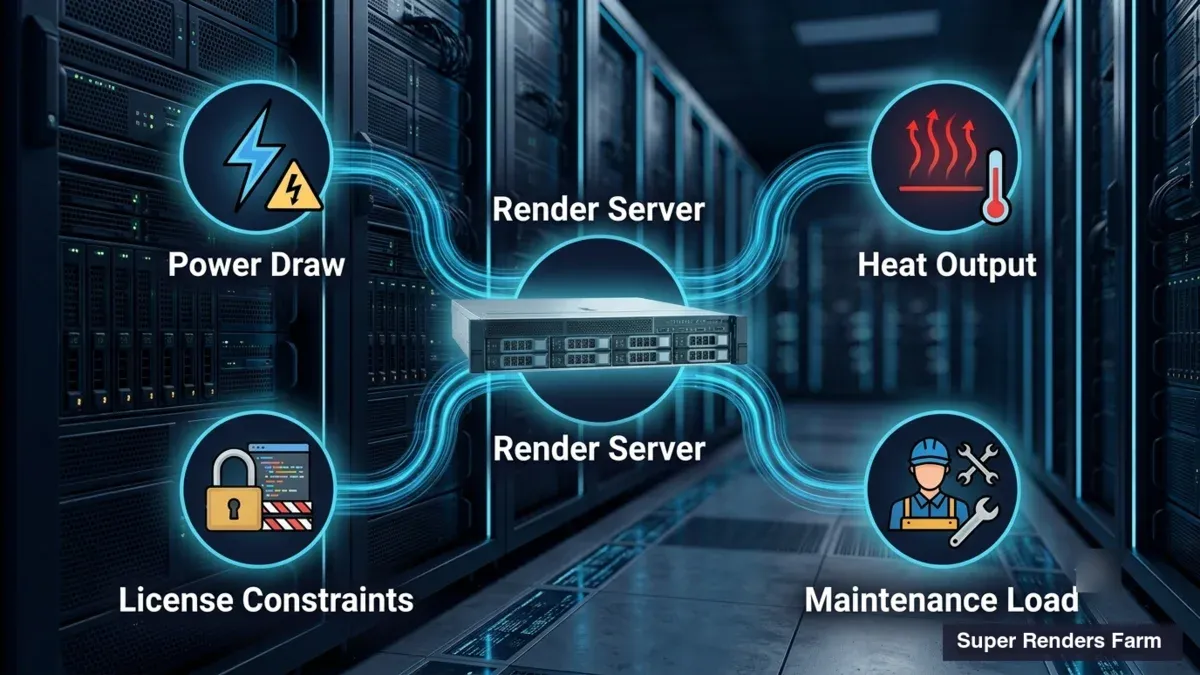 Illustration of an in-house render server showing the hidden costs — power draw, heat output, license constraints, and maintenance load
None of this makes an in-house render server a bad idea. For the right workload it's a perfectly sound choice — the point is just that "buy a machine and render for free" understates the real, ongoing cost. Where that math tips is covered thoroughly in our build vs. cloud total-cost breakdown, which puts numbers on the crossover.
Dedicated Render Server Rental vs. Per-Job Cloud Farm
If you don't want to own hardware, there are two very different ways to rent it — and conflating them is one of the more expensive mistakes in this space.
Renting a dedicated render server means you get exclusive use of one physical machine, typically month to month. It's yours for the duration: you install what you want, it's always available, and you're not sharing its compute. This suits a predictable, steady workload — an artist or small studio that renders most days and wants a known, fixed monthly cost. The catch is that you pay for it whether it's rendering or idle. A dedicated box you use four hours a day is billed for the other twenty too. It's also still one machine — renting doesn't remove the single-server throughput ceiling, it just moves the hardware off your desk. For teams that specifically want a dedicated GPU box, our dedicated RTX 5090 render server guide covers what that hardware actually delivers.
A per-job cloud render farm flips the model. Instead of one always-on machine, you submit a job and it fans out across many machines in parallel, you pay only for the compute the job actually consumes, and when the job's done, the meter stops. A cloud render farm is fundamentally a farm — many servers plus a scheduler — sold on consumption. The advantage is elasticity: a 500-frame sequence that would take one server all night can finish in a fraction of the time when 50 machines each take 10 frames, and you're billed for the total compute, not for idle capacity.
The honest trade-off between them comes down to your utilization pattern, not raw hourly rate:
| Dedicated render server (rented) | Per-job cloud render farm | |
|---|---|---|
| What you rent | One exclusive machine | Elastic pool of many machines |
| Billing | Fixed monthly (idle or not) | Per compute consumed (job-based) |
| Throughput | One machine's ceiling | Scales with the job |
| Best for | Steady, near-daily rendering | Bursty, deadline-driven, or variable load |
| Idle cost | You pay for downtime | None — meter stops between jobs |
| Setup | You administer the box | Managed provider handles the environment |
The rule of thumb: if your rendering is constant and predictable, a dedicated server can be cost-effective because you're keeping it busy. If it's bursty — quiet weeks then a deadline crunch — a per-job farm almost always wins, because you're not paying for the machine to sit idle between crunches. For the deeper managed-vs-do-it-yourself trade-off underneath both options, see our fully managed vs. DIY render farm comparison.
Using a Render Server vs. a Farm for Blender
Blender is worth calling out specifically, because the "render server" question comes up constantly in Blender workflows and the answer depends heavily on which of Blender's two engines you're using.
Cycles is Blender's physically-based path tracer. It's compute-heavy and scales beautifully across machines — every frame is independent, so a farm can render frame 1 on one machine and frame 240 on another with no coordination cost. Cycles runs on both CPU and GPU. On a single render server, a heavy Cycles animation is exactly the kind of job that pins the machine for hours; it's also exactly the kind of job that a farm collapses from an overnight render into a coffee break, because the frames parallelize so cleanly. Cycles being open-source (no per-node license) also makes it the friendliest engine for scaling out — whether onto your own second machine or onto a cloud farm.
EEVEE is Blender's real-time rasterization engine, and it's GPU-accelerated. Because EEVEE is fast per frame, single-machine rendering is often perfectly adequate for stills and short sequences — a render server may be all you need. Where EEVEE benefits from a farm is high frame counts (long animations) or heavy per-frame passes where even "fast" adds up across thousands of frames. EEVEE is supported on our farm — it runs on our dedicated GPU machines (NVIDIA RTX 5090, 32 GB VRAM), so an EEVEE animation can be distributed across GPU nodes rather than tying up your one local card. This is worth stating plainly because there's a persistent myth that render farms are "Cycles-only" — that's not the case here.
The Blender decision, then, isn't really "server or farm" in the abstract — it's a function of engine and frame count. A single still, or a short EEVEE loop? One render server (yours or rented) is usually enough. A long Cycles animation on a deadline, or a heavy EEVEE sequence with thousands of frames? That's where a farm's parallelism earns its keep, and where one machine — however strong — becomes the bottleneck.
When One Render Server Is Enough
A single render server is genuinely the right tool for a real set of jobs. You do not need a farm just because farms exist. One server holds up well when:
- You're a single artist or a very small team. One person can only feed so much work to render at once. If you're not generating render jobs faster than one strong machine can clear them, a farm's capacity sits idle.
- You're rendering stills or short sequences. A handful of high-quality still images, or a 5–10 second clip, is well within one machine's reach overnight. The parallelism of a farm doesn't help much when there are only a few frames to spread around.
- Your deadlines have slack. If "by next week" is the bar and the job finishes overnight on one box, one server is sufficient. Farms buy speed; if you don't need the speed, you don't need the farm.
- Your license or pipeline is constrained to one machine. Some plugin or license setups are genuinely simpler to keep on a single, controlled environment. A managed multi-machine environment isn't always a fit for an unusual stack.
- Your workload is steady and predictable. As covered above, near-daily rendering keeps a dedicated server busy enough to justify its fixed cost.
The honest version of this section: most solo artists and many small studios never actually outgrow a single well-specced render server. The step up to a farm is driven by specific, measurable pressures — not by a vague sense that "real studios use farms."
If the answer is Blender specifically, our guide to running Blender on a dedicated render server covers the version-matching and add-on gotchas that generic server advice skips.
The Honest Thresholds: When You've Outgrown One Server
Here's where a single render server stops being enough. These are the concrete pressures — not marketing triggers, the actual ceilings:
Frame count and deadline math. This is the clearest one, and it's arithmetic. Take your per-frame render time, multiply by your frame count, and compare it to the time you have. A 1,000-frame animation at 6 minutes per frame is 100 hours of rendering on one machine — over four days of continuous compute. If your deadline is three days out, one server mathematically cannot finish, no matter how strong it is. A farm splits that 100 hours across many machines; 50 machines turn four days into roughly two hours of wall-clock time. When the frames × per-frame time exceeds your available window, you've hit the ceiling.
VRAM (or RAM) ceilings. A render server can only load a scene that fits in its memory. If your scene needs more VRAM than a single GPU has — heavy geometry, 4K/8K textures, dense volumetrics — the render either fails, falls back to slower out-of-core memory, or forces you to gut the scene. This is a hard wall, not a speed issue: a bigger scene doesn't render slower on an undersized machine, it doesn't render at all. Access to machines with more headroom (or the ability to distribute) is sometimes the only fix. Our piece on RTX 5090 VRAM limits in complex scenes digs into exactly where that wall sits.
Sustained throughput demand. When your team is generating render jobs faster than one machine can clear them — multiple artists submitting overnight, iterative look-dev cycles, revisions stacking up — a single server becomes a queue everyone waits behind. The bottleneck stops being any one job and becomes contention for the one resource.
The idle-vs-burst mismatch. If you own or rent one server sized for your peak workload, it sits mostly idle between peaks — you've paid for capacity you rarely use. If you size it for your average, it can't handle the crunches. One fixed machine can't be both. That's precisely the mismatch a per-job farm resolves: burst capacity on demand, no idle cost between.
Notice what these thresholds share: they're all measurable. You can calculate your frame-count math, check your scene's memory footprint against your card's VRAM, and count how many jobs are queued behind each other. The decision to move from a server to a farm should come from those numbers, not from a feeling that you're "supposed to" scale up.
A Simple Decision Framework (With Per-Frame Math)
Put it all together into a short checklist. Start with one render server, and step up to a farm when the numbers say so.
- Do the frame-count math first.
per-frame time × frame count = total render hours.Compare that against your deadline window. If total hours comfortably fit on one machine within your deadline, a server is fine. If not, you need parallelism. - Check your memory ceiling. Does your heaviest scene fit in one GPU's VRAM (or one machine's RAM)? If it doesn't, that's a hard wall independent of speed.
- Assess your utilization pattern. Steady daily rendering → a dedicated server (owned or rented) can be cost-effective. Bursty, deadline-driven load → a per-job farm avoids paying for idle time.
- Count the queue. Is more than one job routinely waiting? Contention is a throughput signal that one machine can't keep up.
To make the per-frame math concrete, here's a worked example using our published rates. Our GPU rendering is billed at $0.003 per OctaneBench-hour (OBh), and a dedicated RTX 5090 (32 GB VRAM) costs $5.17 per card-hour of rendering, the same at every priority level. Say a Cycles or Octane animation runs 240 frames at 90 seconds per frame on that class of card:
- Total GPU time:
240 frames × 90 s = 21,600 s = 6 card-hours. - At $5.17/card-hour, that's roughly $31 of GPU compute for the whole sequence (6 × $5.17 = $31.02).
- On one server, those 6 hours run back-to-back: your animation is done in about 6 hours of wall-clock time.
- On a farm spreading the 240 frames across, say, 12 GPU machines, the same ~$31 of compute finishes in roughly 30 minutes of wall-clock time — you pay for the same total work, but you get it back 12× faster.
That's the essence of the server-vs-farm trade in one example: a farm rarely changes the total compute cost much — you're billed for the work either way — what it buys is wall-clock speed by running that work in parallel. So the decision is really "do I need it faster than one machine can go?" For CPU rendering the same logic applies with our CPU rate of $0.004 per GHz-hour; the arithmetic differs but the principle is identical. Our cost-per-frame guide breaks these worked examples down further, and if you're weighing a single owned card against renting, the single 5090 workstation vs. cloud rendering cost comparison runs the ownership math side by side.
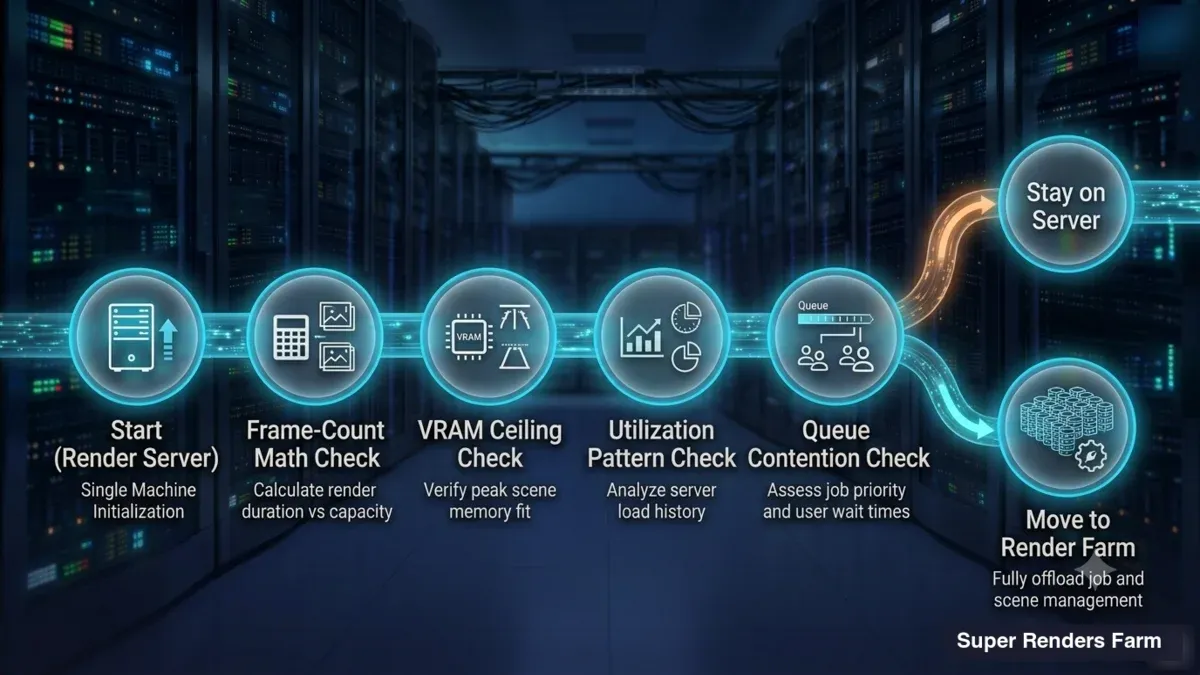 Decision flowchart: start with a render server, then branch to a render farm based on frame-count math, VRAM ceiling, utilization pattern, and queue contention
What the Step Up Looks Like
Moving from one render server to a farm doesn't have to mean building your own cluster. There are, broadly, three ways to add throughput once you've outgrown a single machine:
- Add machines yourself. Buy or rent a second (and third) server and run your own render manager to coordinate them. This is a real farm, self-operated — full control, and now full responsibility for the scheduler, the licensing across nodes, the power, and the maintenance of every box.
- Rent a bigger dedicated setup. Some providers rent multiple dedicated servers; you still administer them but skip the hardware ownership. This scales the throughput ceiling without solving the idle-cost or operational-overhead problem.
- Use a per-job cloud farm. Submit to a farm that fans your job across many machines and bills for what the job consumes. On a fully managed service, the licensing, node health, and job requeuing on failure are handled on the provider's side — the workflow is upload, render, download, with no remote-desktop step and no server administration on yours. On our farm that managed model runs across 20,000+ CPU cores alongside dedicated GPU machines (NVIDIA RTX 5090, 32 GB VRAM), with licensing for the commercial engines included in the per-hour rate rather than billed separately.
Which of these fits depends on the same variables from the framework above — utilization pattern, control requirements, and how much operational overhead you want to own. There's no single right answer; there's only the one that matches your numbers. If you're renting transactional GPU capacity rather than working through the definitional question, a dedicated cluster is a different purchase entirely — but for most people, the honest starting point is a single render server, and the move to a farm only when the frame-count math, the VRAM ceiling, or the queue says it's time.
FAQ
Q: What is a render server? A: A render server is a single machine dedicated to processing render jobs rather than being used for interactive work. It can be a headless workstation, a rack-mounted node in a data center, or a dedicated box you rent from a provider. The defining trait is that it's one machine focused on rendering — which distinguishes it from a render farm, which is many render servers coordinated by a job scheduler.
Q: What's the difference between a render server and a render farm? A: A render server is one machine; a render farm is many render servers plus a job scheduler that distributes work across them. The scheduler is the key difference — it splits frames or tiles across the machines and reassembles the output, so a farm acts as a single, larger pool of throughput. A farm's advantage is parallelism: work that runs back-to-back on one server runs simultaneously across many, finishing far faster in wall-clock time.
Q: When is a single render server enough? A: One render server is usually enough for a single artist or small team rendering stills and short sequences on deadlines with some slack. If your total render time (per-frame time multiplied by frame count) fits within your deadline on one machine, and your scene fits in that machine's memory, a server is sufficient. The move to a farm is driven by frame-count math, VRAM ceilings, or job contention — not by studio size alone.
Q: Can I use a render server for Blender? A: Yes. For Blender stills or short EEVEE sequences, a single render server is often all you need, since EEVEE is fast per frame. For long Cycles animations — which are compute-heavy but parallelize cleanly across frames — a farm turns an overnight render into a much shorter job. EEVEE is GPU-accelerated and is supported on our farm's GPU machines, so heavy EEVEE animations can also be distributed rather than tying up a single local card.
Q: Is renting a dedicated render server cheaper than a cloud render farm? A: It depends entirely on your utilization pattern. A rented dedicated server has a fixed monthly cost whether it's rendering or idle, which is cost-effective for steady, near-daily rendering that keeps it busy. A per-job cloud farm bills only for the compute a job consumes, which is cheaper for bursty or deadline-driven workloads where a dedicated machine would sit idle between crunches. Compare your actual utilization, not just the headline hourly rates.
Q: How do I calculate whether one render server can meet my deadline? A: Multiply your average per-frame render time by your total frame count to get total render hours, then compare that to your available deadline window. For example, 1,000 frames at 6 minutes each is 100 hours — over four days of continuous rendering on one machine. If that exceeds your deadline, one server can't finish in time regardless of how powerful it is, and you need the parallelism of a farm.
Q: Does a render farm cost more than a single render server for the same job? A: Not usually for the compute itself — you're billed for the total render work either way, so the same job costs roughly the same in compute whether one machine runs it slowly or many machines run it quickly. What a farm buys is wall-clock speed: the same total cost delivered far faster by running frames in parallel. The real cost difference comes from idle time — a dedicated server you're paying for while it sits unused, versus a per-job farm that stops billing between jobs.
Q: What are the hidden costs of running an in-house render server? A: Beyond the hardware purchase, an in-house render server carries ongoing costs: electricity for a machine running at full load for hours, heat that needs ventilation, render-engine license terms that govern headless and multi-node use, and the maintenance burden of driver updates, patches, and hardware failures. There's also the opportunity cost of a machine you can't use for creative work while it's rendering — which often pushes studios toward a dedicated second machine, quietly doubling the hardware footprint.
About Alice Harper
Blender and V-Ray specialist. Passionate about optimizing render workflows, sharing tips, and educating the 3D community to achieve photorealistic results faster.



