Build vs Cloud Render Farm: A Análise Real de Custos para Decidir
Visão geral
Introdução
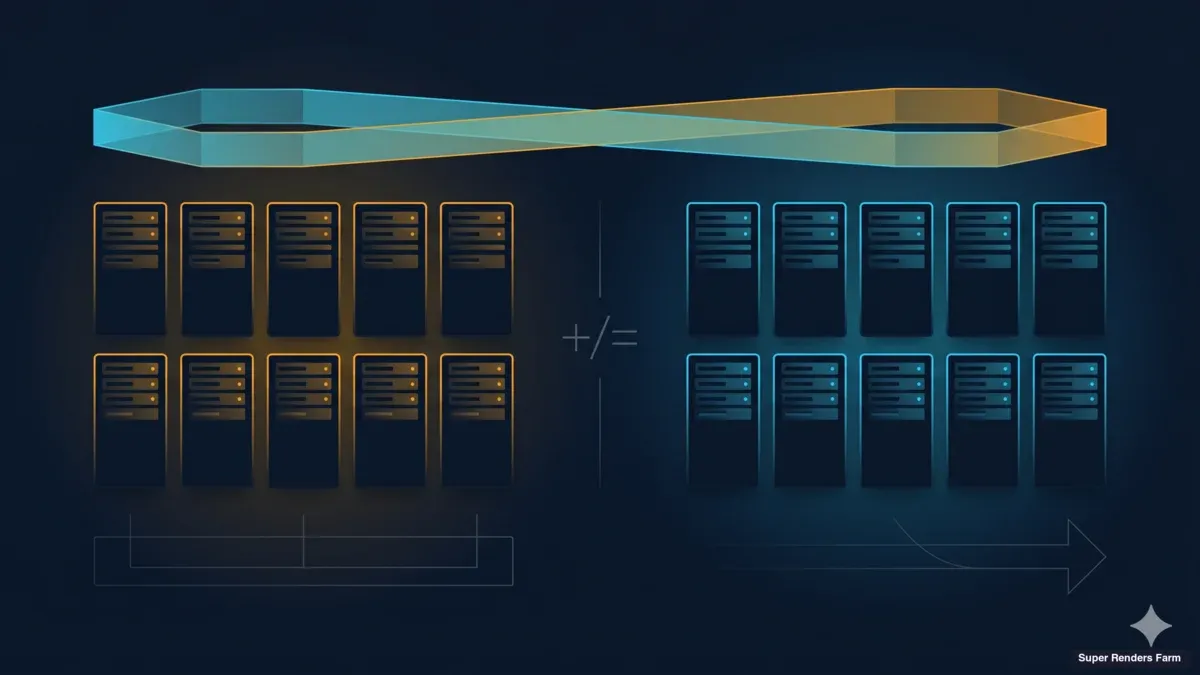
Todos os anos, os estúdios enfrentam a mesma decisão: construir uma render farm local ou pagar pela renderização na nuvem? A resposta parece simples — analisar os números e escolher a opção mais económica. Mas a maioria das comparações de custos deixa metade do quadro de fora.
Operamos uma render farm de produção há mais de 15 anos, com suporte a V-Ray, Corona, Redshift, Arnold e todas as principais aplicações DCC. Nesse tempo, assistimos a estúdios construírem farms, superarem a sua capacidade, substituí-las e, por vezes, abandoná-las por completo. O padrão é consistente: a compra inicial de hardware parece ser a grande decisão, mas são os custos contínuos — licenças de motor de renderização, manutenção de software, energia, arrefecimento, tempo de IT — que determinam se construir valeu realmente a pena.
Este guia analisa cada categoria de custo envolvida na construção de uma render farm local em 2026 e compara com a renderização na nuvem. Utilizamos números reais: preços actuais de GPU no mercado (não MSRP), tarifas eléctricas reais, taxas de licenciamento retiradas directamente das páginas de preços dos fornecedores, e overhead operacional com base no que os estúdios realmente gastam. Sem hipóteses, sem cenários escolhidos a dedo.
Quer seja um estúdio de archviz de 5 pessoas renderizando 50 horas por mês ou uma produtora VFX de 30 pessoas com mais de 500 horas, a matemática funciona de forma diferente. O objectivo aqui é fornecer o enquadramento para calcular os seus próprios números com precisão — não dizer o que deve fazer.
O Custo Real de Construir uma Render Farm em 2026
Os custos de hardware dependem inteiramente de estar a construir uma farm baseada em CPU (para fluxos de trabalho V-Ray, Corona, Arnold CPU) ou uma farm GPU (para Redshift, Octane, V-Ray GPU). Ambas ficaram mais caras em 2026.
Render Farm CPU (10 Nós)
Um nó de renderização CPU de grau profissional em 2026 tem tipicamente processadores Intel Xeon duplos com 96–256 GB de RAM. O custo por nó varia entre $5.000 e $7.300 dependendo da configuração.
| Componente | Por Nó | 10 Nós |
|---|---|---|
| Dual Xeon E5-2699 V4 (44 núcleos) | $3.000–$4.500 | $30.000–$45.000 |
| 128 GB ECC RAM | $800–$1.200 | $8.000–$12.000 |
| 1 TB NVMe + caixa + PSU | $700–$1.000 | $7.000–$10.000 |
| Switch de rede + cablagem | — | $500–$1.000 |
| Total | $4.500–$6.700 | $45.500–$68.000 |
Render Farm GPU (5 Nós)
As farms GPU são onde os preços de 2026 mudaram significativamente. A NVIDIA RTX 5090 foi lançada com um MSRP de $1.999, mas os preços reais de venda em Abril de 2026 variam entre $2.500 e $3.800 devido a escassez de memória GDDR7 e procura de computação para IA. Variantes personalizadas e com arrefecimento líquido ultrapassam os $5.000.
| Componente | Por Nó (1 GPU) | 5 Nós |
|---|---|---|
| RTX 5090 (32 GB VRAM) | $2.500–$3.800 | $12.500–$19.000 |
| CPU + motherboard + 64 GB RAM | $2.000–$2.800 | $10.000–$14.000 |
| PSU 1200W + caixa + arrefecimento | $500–$800 | $2.500–$4.000 |
| Rede + armazenamento partilhado | — | $3.000–$5.000 |
| Total | $5.000–$7.400 | $28.000–$42.000 |
Para uma configuração de dois GPUs por nó — comum em produção com Redshift e Octane — multiplique os custos de GPU em conformidade. Uma farm de 5 nós e 10 GPUs pode ultrapassar os $60.000 apenas em hardware.
Estes são custos do primeiro dia. O hardware começa a depreciar imediatamente, com as farms GPU a perderem cerca de 25 % do seu valor anualmente. Uma farm RTX 5090 construída hoje terá aproximadamente um terço da produtividade daquilo que chegar ao mercado em 2029, tal como as farms RTX 3090 de 2022 entregam agora cerca de um terço do desempenho actual de RTX 5090 em cargas de trabalho V-Ray GPU.
A Armadilha do Licenciamento
O hardware recebe toda a atenção, mas o licenciamento é o custo que mais surpreende os estúdios. Cada motor de renderização cobra licenciamento por nó para uso em farm, e estas taxas recorrem anualmente.
Com base nos preços dos fornecedores no T1 de 2026:
| Motor | Licença Anual | Custo para 10 Nós |
|---|---|---|
| V-Ray | $208/ano (individual); $167–$188/ano (volume) | $1.670–$2.080 |
| Corona | $172/ano (individual); $140–$154/ano (volume) | $1.400–$1.720 |
| Redshift | $264/ano (individual); $299/ano Teams (mín. 3 lugares) | $2.640–$2.990 |
| Arnold | $415/ano (inclui 5 nós de renderização) | $830+ (2 pacotes) |
| Octane | Preços Enterprise necessários para uso em farm | Variável |
Uma farm GPU de 10 nós com Redshift Teams custa $2.990 por ano apenas em licenciamento de motor de renderização — antes de renderizar um único frame.
O licenciamento de aplicações DCC acrescenta mais uma camada. O 3ds Max e o Maya permitem renderização gratuita em linha de comandos nos nós da farm. O Cinema 4D requer licenças Team Render por nó. O After Effects requer uma subscrição completa por nó de renderização, excepto quando se usa um motor de renderização dedicado.
Para uma farm mista de 10 nós, o licenciamento total de software corre tipicamente entre $2.000 e $5.500 anuais — uma despesa recorrente que nunca para, independentemente de a farm estar a renderizar ou inactiva.
Custos Operacionais Ocultos
Os custos abaixo são reais, documentados e consistentemente subestimados pelos estúdios que constroem a sua primeira farm.
Electricidade e Arrefecimento
Uma farm CPU de 10 nós consumindo 500W por nó a 50 % de utilização média, usando a tarifa eléctrica comercial média dos EUA de $0,17/kWh:
- Electricidade anual: 10 nós x 500W x 0,5 utilização x 8.760 horas x $0,17/kWh = $3.723
- Overhead de arrefecimento (tipicamente 30–40 % do custo de energia de computação): $1.100–$1.500
- Total: $4.800–$5.200/ano
Os nós GPU consomem mais energia. Uma RTX 5090 em carga total consome 575W para a GPU isolada, mais CPU e energia do sistema. Uma farm GPU de 5 nós a 50 % de utilização custa aproximadamente $3.500–$4.800/ano em electricidade e arrefecimento.
Estes custos escalam linearmente com a utilização — e aplicam-se mesmo durante cargas não produtivas, como renders falhados, frames de teste e actualizações de software.
Administração de IT
Alguém tem de manter a farm. Actualizações de software, patches de drivers, resolução de problemas em jobs falhados, gestão de armazenamento, gestão de servidores de licenças — este trabalho não é opcional.
Os estúdios reportam tipicamente 5–10 horas por semana de manutenção de farm. A uma taxa conservadora de $50/hora de IT, isso representa $13.000–$26.000 por ano em mão-de-obra. Para estúdios sem pessoal de IT dedicado, este trabalho recai sobre os artistas, o que acarreta um custo de oportunidade ainda maior — um artista 3D sénior a passar tempo a resolver problemas nos nós de renderização em vez de trabalho facturável.
Gestão de Versões e Armazenamento
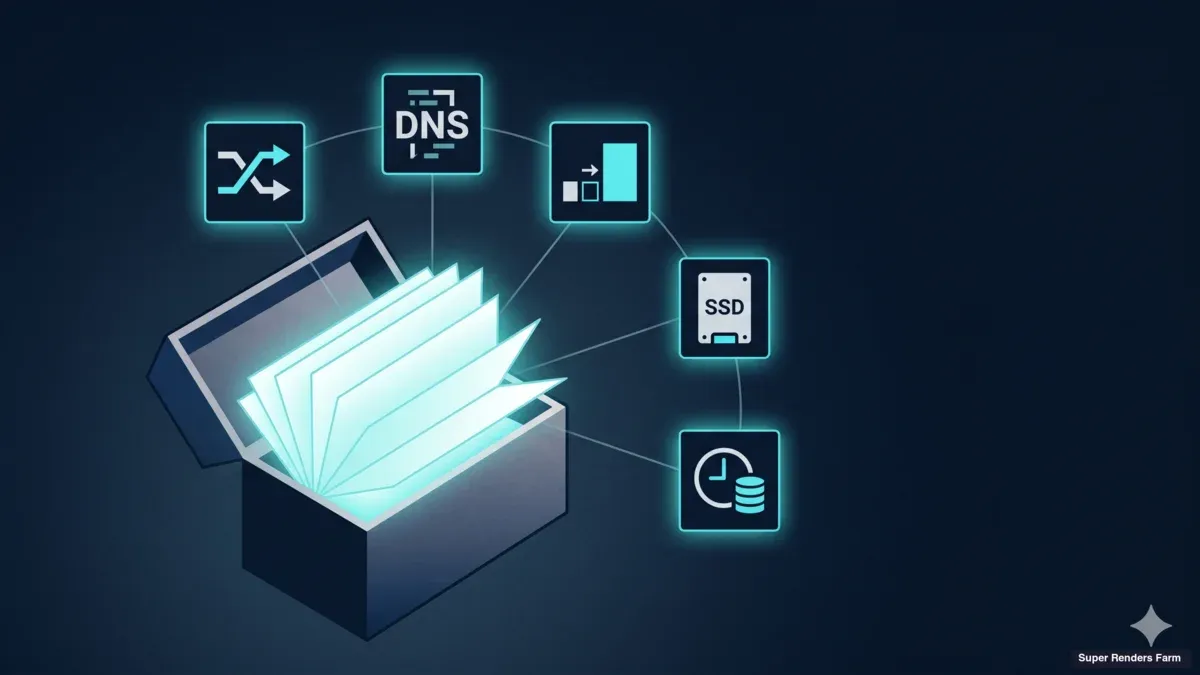
Manter versões idênticas de software, plugins e assets sincronizados em 10 nós requer coordenação. Uma actualização de versão do V-Ray ou uma actualização do Forest Pack necessita de ser testada num nó antes de ser implementada em todos — e versões incompatíveis entre nós produzem output de renderização inconsistente.
Armazenamento partilhado rápido (NAS 10 GbE ou superior) custa $3.000–$8.000 inicialmente mais manutenção contínua. Sem isso, os artistas copiam manualmente os ficheiros de projecto para cada nó, o que é lento e propenso a erros.
Custo Total de Propriedade: Um Exemplo Real
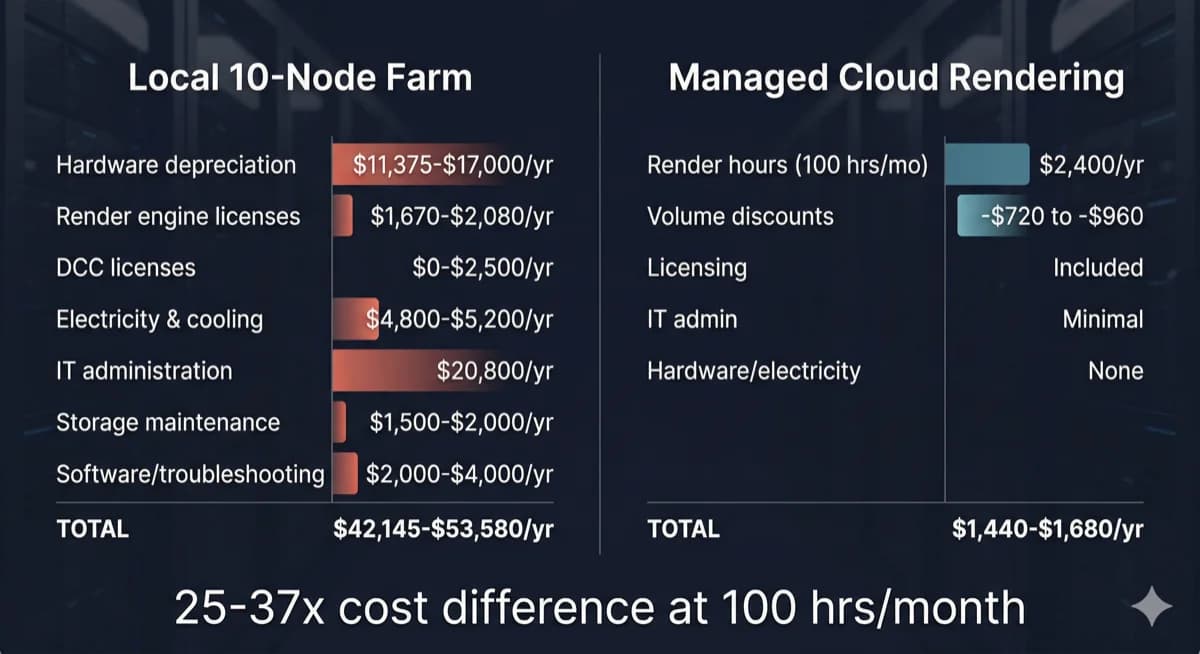
Comparação do custo total de propriedade entre uma render farm local de 10 nós e renderização na nuvem gerida
Considere um estúdio de visualização arquitectónica de 12 pessoas renderizando 80–120 horas de CPU V-Ray mensalmente — um perfil comum entre os nossos clientes.
Opção A: Construir uma Farm CPU de 10 Nós
| Categoria de Custo | Custo Anual |
|---|---|
| Hardware (depreciado ao longo de 4 anos) | $11.375–$17.000 |
| Licenças V-Ray (10 nós) | $1.670–$2.080 |
| Licenças DCC (se aplicável) | $0–$2.500 |
| Electricidade e arrefecimento | $4.800–$5.200 |
| Administração de IT (8 h/semana) | $20.800 |
| Manutenção de armazenamento partilhado | $1.500–$2.000 |
| Resolução de problemas de software, actualizações | $2.000–$4.000 |
| Total Anual | $42.145–$53.580 |
Opção B: Renderização na Nuvem Totalmente Gerida
| Categoria de Custo | Custo Anual |
|---|---|
| Horas de renderização (100 h/mês x $2/h média) | $2.400/ano |
| Descontos por volume (30–40 % típico) | -$720 a -$960 |
| Licenciamento de motor de renderização | Incluído |
| Administração de IT | Mínima |
| Hardware, electricidade, arrefecimento | Nenhum |
| Total Anual | $1.440–$1.680 |
A diferença não é marginal. A 100 horas de CPU por mês, a renderização na nuvem custa aproximadamente 3–4 % do que uma farm local custa quando se inclui o TCO completo. Mesmo que triplique a utilização da nuvem para 300 horas por mês, o custo anual da nuvem ($4.320–$5.040) continua a ser uma fracção dos $42.000–$54.000 da farm local.
Para uma análise detalhada do custo por frame em diferentes motores de renderização e complexidades de cena, consulte o nosso guia de custo por frame de render farm.
Mas Já Tenho a Minha Workstation
Esta é a objecção mais comum que ouvimos, e merece uma resposta directa.
Se já possui hardware de renderização, o custo de aquisição é um custo irrecuperável — foi gasto independentemente do que se faça a seguir. A questão não é "desperdicei dinheiro?" mas "qual é o uso mais produtivo deste hardware daqui para a frente?"
Três factores são relevantes:
A depreciação é contínua. O hardware perde valor todos os meses. Uma RTX 3090 adquirida em 2022 por $1.500 vale cerca de $400 hoje e entrega uma fracção do desempenho da geração actual. Manter hardware envelhecido não preserva o investimento — estende-o para além do ponto de retornos competitivos.
O custo de oportunidade é real. Cada hora que a workstation passa a renderizar é uma hora em que não pode ser usada para modelação, texturização ou configuração de cenas. Para um artista a solo, isto significa escolher entre produtividade e renderização. A renderização na nuvem elimina completamente este compromisso — a workstation fica disponível para trabalho interactivo enquanto os renders correm em infra-estrutura dedicada.
Os custos de manutenção continuam. Electricidade, arrefecimento, actualizações de software e resolução de problemas não param porque o hardware está pago. Um nó de renderização "gratuito" ainda custa $1.500–$3.000 por ano em despesas operacionais quando se contabiliza energia, licenciamento e o tempo gasto a geri-lo.
A abordagem mais prática para estúdios com hardware existente: usar as máquinas locais para renders de teste rápidos e pré-visualizações de viewport, depois enviar os renders finais de produção para infra-estrutura na nuvem. Este modelo híbrido maximiza o valor do hardware já existente, evitando as limitações de escalabilidade e o peso de manutenção de uma farm local completa.
Quando Construir a Sua Própria Farm Faz Sentido
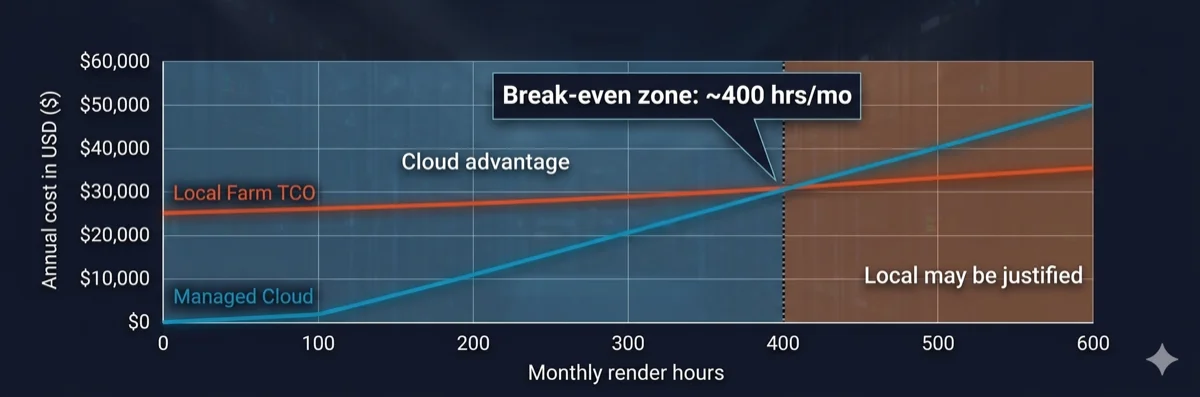
Gráfico de análise de break-even mostrando que a renderização na nuvem é mais económica abaixo de 400 horas de renderização mensais
As render farms locais nem sempre são a escolha errada. Fazem sentido económico em condições específicas:
- Volume elevado e consistente: O estúdio renderiza 400+ horas por mês, todos os meses, com variação sazonal mínima. Neste volume, o custo por hora do hardware próprio cai abaixo das tarifas da nuvem.
- Requisitos de segurança de dados: Mandatos de conformidade (contratos governamentais, projectos de entretenimento com NDA intenso) exigem que todos os dados permaneçam nas instalações sem transferência externa.
- Fluxos de trabalho iterativos em tempo real: Renders de teste em rápida sucessão onde a latência de rede para uma farm na nuvem atrasaria os ciclos de iteração — embora isto se aplique tipicamente a workstations individuais, não à renderização em escala de farm.
- Infraestrutura de IT existente: Já possui pessoal de IT dedicado, espaço em rack, capacidade de energia e arrefecimento — reduzindo o custo marginal de adicionar nós de renderização.
Se menos de três destas condições se aplicarem ao estúdio, os números quase sempre favorecem a renderização na nuvem. Para uma análise mais aprofundada de como as render farms processam jobs e onde a nuvem se enquadra nos pipelines de produção, consulte o nosso guia técnico sobre como funcionam as render farms.
Renderização na Nuvem: O Que se Paga Realmente
Nem todos os serviços de renderização na nuvem funcionam da mesma forma. A distinção que mais importa é entre plataformas IaaS (Infrastructure as a Service) e farms totalmente geridas.
Renderização na nuvem IaaS dá acesso remoto a hardware — essencialmente alugar uma máquina. Instala-se o próprio software, gere-se as próprias licenças, resolve-se os próprios problemas. A tarifa horária parece mais baixa, mas absorve-se o overhead operacional: custos de licenças, configuração de software, gestão de jobs e depuração. Os estúdios que usam plataformas IaaS reportam tipicamente 5–15 horas por mês de tempo de configuração e resolução de problemas — o mesmo peso de IT de uma farm local, apenas no hardware de outra pessoa.
Renderização na nuvem totalmente gerida inclui tudo: software pré-instalado, licenças de motor de renderização incluídas na tarifa por hora, gestão de jobs pela equipa da farm, e suporte técnico quando as cenas falham. O overhead operacional que custa aos operadores de farms locais $13.000–$26.000 por ano em mão-de-obra de IT é absorvido pelo serviço.
Na nossa farm, incluímos V-Ray, Corona, Redshift, Arnold e todas as principais aplicações DCC no custo de renderização. Não existem taxas de licença separadas, etapas de instalação de software nem encargos de licenciamento por nó. Carrega a sua cena, renderizamos, e faz download do resultado. Para os estúdios que comparam opções, compreender esta distinção é fundamental — uma tarifa IaaS de "$1,50/hora" com $3.000/ano em licenciamento e 10 horas/mês de administração não é mais barata do que uma tarifa totalmente gerida de "$2,00/hora" com tudo incluído.
Para compreender em detalhe as diferenças entre modelos geridos e self-service, leia a nossa comparação entre renderização na nuvem gerida e DIY. Para uma análise mais detalhada de como as cargas de trabalho GPU influenciam os custos de renderização, consulte a nossa visão geral sobre renderização na nuvem.
Farm na Nuvem Gerida vs Aluguer de Ambiente de Trabalho Remoto: A Matemática Oculta
A secção anterior introduziu a distinção entre IaaS e gerido. Mas a diferença de custos entre estes dois modelos é maior do que a maioria das comparações sugere — porque as páginas de preços padrão mostram a tarifa horária anunciada, não a tarifa horária efectiva. Compreender a diferença exige analisar o que acontece durante uma sessão típica de renderização em ambiente de trabalho remoto.
Consumo de Licenças
Ao renderizar num ambiente de trabalho remoto, a própria licença DCC ocupa essa máquina. Um lugar de subscrição Autodesk a correr numa VM na nuvem significa um artista a menos a trabalhar localmente. Para um estúdio com cinco lugares Maya, enviar dois para máquinas de renderização remotas deixa três disponíveis para trabalho interactivo — uma redução de capacidade de 40 % durante as sessões de renderização.
As farms na nuvem geridas tratam o licenciamento de forma diferente. As licenças de motor de renderização (V-Ray, Corona, Redshift, Arnold) estão incluídas no serviço — a farm opera o seu próprio conjunto de licenças. Os lugares locais ficam disponíveis para os artistas continuarem a modelar, texturizar e preparar cenas enquanto os renders correm na infra-estrutura da farm.
Tempo Inactivo Facturado
A facturação de ambiente de trabalho remoto começa quando a máquina arranca, não quando a renderização começa. Uma sessão típica inclui tempo de não-renderização que ainda é cobrado:
- Upload da cena: Transferência de ficheiros de projecto, texturas e assets para a máquina remota (5–20 minutos dependendo do tamanho do projecto e velocidade da ligação)
- Configuração de software: Verificação da versão do motor de renderização, carregamento de plugins, verificação de compatibilidade da cena (5–15 minutos)
- Download pós-renderização: Transferência dos frames finalizados de volta para o armazenamento local (5–15 minutos)
Numa farm gerida, submete-se um ficheiro de cena através do sistema de upload da farm. A farm trata da distribuição de ficheiros, configuração de software e gestão de filas internamente. A facturação é pelo tempo real de renderização — o contador começa quando os frames começam a ser processados, não quando o upload começa.
Overhead de Configuração por Sessão
A maioria das plataformas de ambiente de trabalho remoto requer verificação de versões de software, reinstalação de plugins caso tenham sido actualizados, e configuração das definições de renderização em cada sessão. Os estúdios reportam 30–60 minutos de configuração sem renderização por sessão — tempo totalmente facturado à tarifa horária anunciada.
Este overhead acumula-se com a frequência. Um estúdio com 20 sessões de renderização por mês a 30 minutos de configuração cada passa 10 horas mensais apenas em configuração — antes de renderizar um único frame.
Tarifa Horária Efectiva: A Matemática Real
Eis como a tarifa anunciada se traduz na tarifa efectiva para uma sessão típica de renderização GPU numa plataforma de ambiente de trabalho remoto:
| Componente | Tempo | Custo a $9/h |
|---|---|---|
| Arranque da máquina + verificação de software | 10 min | $1,50 |
| Upload da cena e configuração | 15 min | $2,25 |
| Renderização efectiva | 60 min | $9,00 |
| Download pós-renderização | 5 min | $0,75 |
| Total da sessão | 90 min | $13,50 |
Tarifa horária efectiva para renderização real: $13,50 — 50 % superior à tarifa anunciada de $9/hora. E este cálculo pressupõe que tudo corre bem à primeira tentativa. Renders falhados, conflitos de plugins ou incompatibilidades de versão acrescentam mais tempo não produtivo facturado.
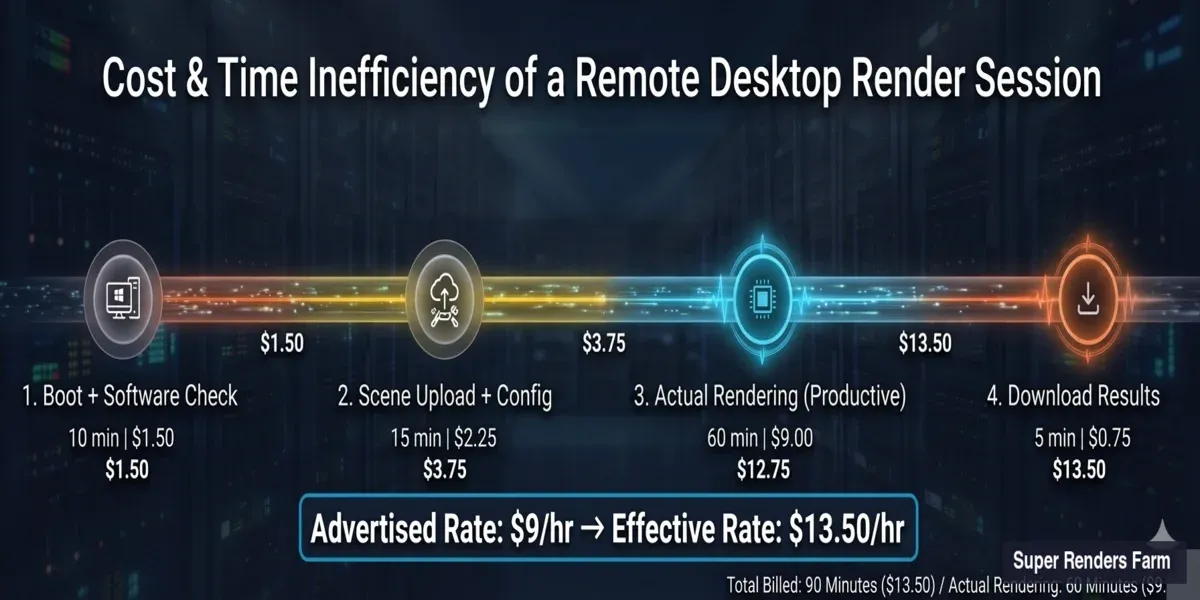
Análise detalhada do custo efectivo de uma sessão de renderização em ambiente de trabalho remoto — tarifa anunciada de $9 por hora passa a $13,50 efectivo incluindo arranque, upload e download
Três Modelos em Comparação
| Factor | Construção Local | Ambiente de Trabalho Remoto (IaaS) | Farm na Nuvem Gerida |
|---|---|---|---|
| Custo inicial de hardware | $28.000–$68.000 | $0 | $0 |
| Custo mensal (100 horas de renderização) | $3.500–$4.500 (TCO amortizado) | $900–$1.350+ (tarifa efectiva) | $120–$200 (tarifa por hora) |
| Licenças de motor de renderização | A adquirir ($2.000–$5.500/ano) | A adquirir (os seus lugares) | Incluídas |
| Impacto das licenças DCC | Sem impacto (nós dedicados) | Consome os seus lugares | Sem impacto (licenças da farm) |
| Overhead de IT por mês | 20–40 horas | 10–20 horas | Mínimo (submeter e descarregar) |
| Tempo de configuração por sessão | Uma vez (mas manutenção contínua) | 30–60 min por sessão | Nenhum (pré-configurado) |
| Controlo do hardware | Total | Parcial (especificações do fornecedor) | Nenhum (gerido pelo fornecedor) |
| Escalabilidade | Comprar mais hardware | Alugar mais VMs | Automática (a farm escala) |
| Indicado para | Estúdios com 400+ h/mês, IT dedicado, mandatos de segurança de dados | Estúdios com competências DevOps, requisitos de pipeline personalizados, escala de 50+ nós | Estúdios com menos de 20 pessoas, sem IT, volume de renderização variável |
A escolha certa depende da dimensão da equipa, capacidade técnica e volume de renderização. Cada modelo serve um perfil operacional diferente — não existe uma resposta universalmente correcta.
Enquadramento de Decisão
| Factor | Favor da Farm Local | Favor da Renderização na Nuvem |
|---|---|---|
| Horas de renderização mensais | 400+ consistentes | Abaixo de 300 ou variável |
| Dimensão da equipa | 20+ com IT dedicado | 3–15 sem pessoal de IT |
| Padrão de utilização | Estável, previsível ao longo do ano | Sazonal, baseado em projectos |
| Requisitos de dados | Air-gapped, nas instalações obrigatório | NDA padrão suficiente |
| Modelo de orçamento | CapEx elevado aceitável | Prefere OpEx, pagamento por uso |
| Renovação de hardware | Aceita ciclos de depreciação de 3–4 anos | Quer hardware de geração actual |
| Staffing de pipeline | TD ou administrador de IT dedicado disponível | Sem engenheiro de pipeline na equipa |
| Licenciamento do motor de renderização | Já possui licenças perpétuas | Prefere licenciamento incluído |
Os estúdios que renderizam 150–300 horas mensais com variação sazonal frequentemente descobrem que um modelo híbrido funciona bem: os nós locais tratam dos renders de teste iterativos enquanto a infra-estrutura na nuvem escala para prazos finais de produção. Para mais informações sobre como avaliar opções de render farm na nuvem, consulte o nosso guia para escolher uma render farm na nuvem.
Para compreender como diferentes render farms na nuvem cobram — e como calcular o custo efectivo em relação às taxas anunciadas em seis modelos de preços — consultem a nossa comparação dos modelos de preços render farm.
Custos Frequentemente Ignorados: Tabela Resumo (Farm de 10 Nós)
| Categoria de Custo | Intervalo Anual | Aplica-se a |
|---|---|---|
| Licenças de motor de renderização | $1.670–$2.990 | Local + IaaS |
| Licenças DCC (nós de renderização) | $0–$2.500 | Local + IaaS |
| Electricidade e arrefecimento | $4.800–$10.000 | Apenas local |
| Mão-de-obra de administração de IT | $13.000–$26.000+ | Local + IaaS |
| Gestão de plugins/versões | $2.000–$5.000 | Local + IaaS |
| Desperdício de capacidade inactiva (60–75 %) | 60–75 % do valor do hardware | Apenas local |
| Depreciação de hardware | ~25 % anualmente (ciclo de 3–4 anos) | Apenas local |
TCO anual total para uma farm local de 10 nós: $42.000–$54.000+ — com mão-de-obra de IT e depreciação de hardware como os dois maiores itens. A renderização na nuvem com utilização equivalente (100 h/mês) custa $1.440–$2.400/ano numa plataforma totalmente gerida.
Consulte a nossa página de preços para tarifas actuais e escalões de desconto por volume.
FAQ
Q: Quanto custa construir uma render farm de 10 nós em 2026? A: Uma farm CPU de 10 nós (Xeon duplo, 128 GB RAM por nó) custa $45.500–$68.000 em hardware. Uma farm GPU de 5 nós com placas RTX 5090 custa $28.000–$42.000 aos preços actuais de retalho. Estes valores não incluem custos contínuos como licenciamento ($2.000–$5.500/ano), electricidade ($4.800–$10.000/ano) ou mão-de-obra de IT ($13.000–$26.000/ano).
Q: Qual é o maior custo oculto de gerir uma render farm local? A: O tempo de administração de IT. Os estúdios subestimam consistentemente as 5–10 horas semanais necessárias para actualizações de software, patches de drivers, resolução de problemas de jobs, gestão de armazenamento e manutenção de servidores de licenças. A $50/hora, isso representa $13.000–$26.000 anuais — muitas vezes superior ao custo de electricidade e licenciamento combinados.
Q: A partir de que ponto é que construir uma render farm local atinge o break-even face à renderização na nuvem? A: Para a maioria dos estúdios, o ponto de break-even situa-se em cerca de 400 horas de renderização mensais consistentes quando comparado com uma farm na nuvem totalmente gerida. Abaixo desse limiar, a renderização na nuvem é substancialmente mais económica quando se inclui o custo total de propriedade — depreciação de hardware, licenciamento, electricidade, arrefecimento e mão-de-obra de IT.
Q: Os motores de renderização requerem licenças separadas para cada nó da farm? A: Sim. V-Ray, Corona, Redshift, Arnold e Octane exigem todos licenciamento por nó para uso em render farm. Os custos anuais variam entre $140 e $415 por nó dependendo do motor e do escalão de preços por volume. Esta é uma despesa anual recorrente que se aplica independentemente de o nó estar a renderizar ou inactivo.
Q: A renderização na nuvem é mais cara do que usar a minha própria workstation GPU? A: Para renderização ocasional (menos de 200 horas por mês), a renderização na nuvem é significativamente mais económica quando se contabiliza o custo total de propriedade. Uma workstation RTX 5090 custa $5.000–$8.000 para construir, mais $1.500–$3.000 anuais em electricidade, licenciamento e manutenção. A renderização na nuvem a 50 horas por mês custa cerca de $1.200/ano numa plataforma gerida com todo o licenciamento incluído.
Q: Qual é a diferença entre renderização na nuvem IaaS e renderização na nuvem totalmente gerida? A: O IaaS dá acesso a hardware remoto — instala-se o software, gere-se as licenças e resolve-se os problemas autonomamente. As farms totalmente geridas incluem todo o software, licenças de motor de renderização e suporte técnico na tarifa por hora. A tarifa horária do IaaS parece mais baixa, mas o overhead operacional (licenciamento, configuração, depuração) acrescenta tipicamente $3.000–$8.000 por ano em custos ocultos.
Q: Com que rapidez deprecia o hardware de uma render farm? A: O hardware de renderização GPU deprecia cerca de 25 % anualmente, com uma vida útil prática de 3–4 anos antes de o desempenho ficar significativamente aquém das alternativas da geração actual. Uma farm RTX 3090 construída em 2022 entrega agora aproximadamente um terço da produtividade dos nós RTX 5090 actuais em cargas de trabalho de renderização GPU como V-Ray GPU e Redshift.
Q: Posso usar uma abordagem híbrida — hardware local mais renderização na nuvem? A: Sim, e muitos estúdios consideram este o modelo mais prático. As workstations locais ficam reservadas para renders de teste rápidos e pré-visualizações de viewport, enquanto os frames finais de produção são enviados para uma render farm na nuvem. Esta abordagem mantém a workstation disponível para trabalho interactivo, evita a despesa de capital de construir uma farm completa, e permite escalar a capacidade de renderização para prazos sem manter hardware inactivo ao longo do ano.
Q: Alugar um ambiente de trabalho remoto é mais barato do que uma render farm gerida? A: A tarifa horária anunciada para aluguer de ambiente de trabalho remoto é tipicamente mais baixa, mas o custo efectivo é mais elevado. Uma sessão de ambiente de trabalho remoto a $9/hora inclui tempo inactivo facturado para upload da cena, configuração de software e download pós-renderização — transformando uma renderização de 60 minutos numa sessão de 90 minutos facturada a $13,50 de tarifa horária efectiva. As farms geridas facturam apenas o tempo real de renderização, incluem todas as licenças de software e não requerem configuração por sessão. Para estúdios que renderizam menos de 300 horas por mês, o custo total de uma farm gerida é tipicamente mais baixo do que o aluguer de ambiente de trabalho remoto quando se consideram licenciamento, overhead de configuração e lugares DCC perdidos.
Q: Preciso das minhas próprias licenças de software para renderizar numa render farm na nuvem? A: Depende do tipo de serviço de renderização na nuvem. Numa plataforma de ambiente de trabalho remoto ou IaaS, sim — as próprias licenças DCC e de motor de renderização ocupam a máquina remota, reduzindo os lugares disponíveis para artistas locais. Numa render farm na nuvem totalmente gerida, não — a farm disponibiliza o seu próprio conjunto de licenças para os motores de renderização suportados (V-Ray, Corona, Redshift, Arnold, entre outros). As licenças locais ficam disponíveis para trabalho interactivo enquanto a farm trata da renderização com o seu próprio stack de software.
About Alice Harper
Blender and V-Ray specialist. Passionate about optimizing render workflows, sharing tips, and educating the 3D community to achieve photorealistic results faster.