
What Is a Video Rendering Service? How Cloud Video Rendering Works
Overview
Introduction
"Video rendering service" is a term that gets used loosely - sometimes it means a farm that turns a 3D animation into a finished MP4, sometimes it means a cloud transcoding tool that just re-encodes a video file you already have, and sometimes it's a marketing label for something closer to a general-purpose render farm. The confusion is understandable, because a real video render job actually involves two very different kinds of work stitched together: rendering frames from a 3D scene or comp, and encoding those frames into a playable video file.
This guide breaks down what a video rendering service does end to end - from project upload through distributed frame rendering to final H.264/H.265 encoding and download - and where the actual compute cost comes from. We'll walk through a worked cost example using standard per-GHz-hour rates, then cover when using a service makes sense versus rendering locally on your own machine. We're not covering the render-farm-vs-render-service terminology question here (that's a separate, more definitional topic - see our render service vs render farm breakdown if that's what brought you here) or the general online-rendering-service business model (covered in how online rendering services work). This article is specifically about the video pipeline: what happens between hitting "submit" and getting a finished video file back.
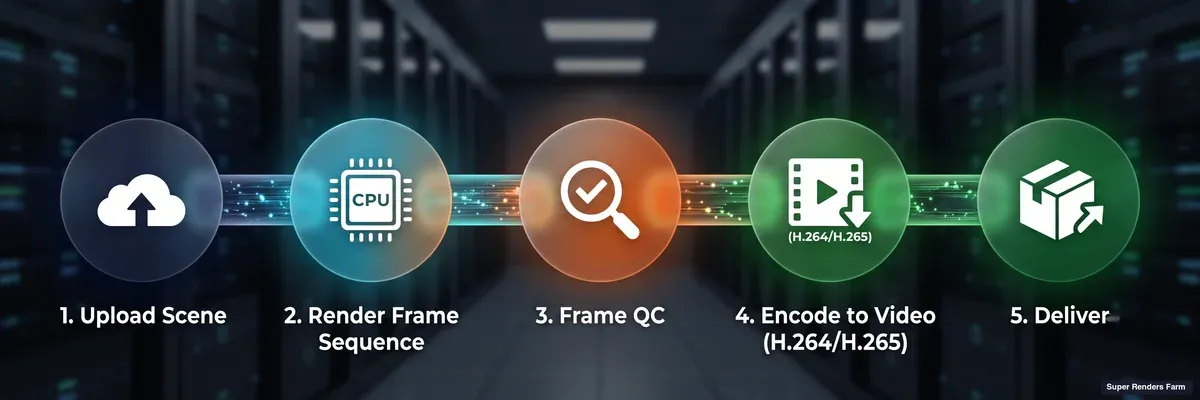 Video rendering pipeline: upload scene, render frame sequence, frame QC, encode to H.264/H.265, deliver
What "Video Rendering" Actually Means
Before the pipeline breakdown, it helps to be precise about what's being produced. "Video rendering" in a 3D or motion-design context almost always means one of two output types:
- An animation or image sequence rendered from a 3D scene (3ds Max, Maya, Cinema 4D, Blender, Houdini) or a motion-graphics comp (After Effects) - a walkthrough, a product spot, a title sequence, a VFX shot.
- A frame sequence that then needs to become a single video file - a container format (MP4, MOV) wrapping a codec (H.264, H.265/HEVC) that a browser, editor, or client playback device can actually play.
A video rendering service, in the sense this article covers, handles both halves: it renders the frames from your scene or comp across a cluster of machines, then encodes those frames into the deliverable video format. That's distinct from a pure transcoding service, which only does the second half (you already have a video file and just want it re-encoded to a different codec or bitrate) - we cover the codec side of that separately in our H.264/H.265 video encoding guide.
How Cloud Video Rendering Works: The Pipeline
The mechanics break into four stages, and the middle two are where the actual engineering happens.
1. Project upload. You upload your scene file (or After Effects project), along with every asset it references - textures, HDRIs, geometry caches, fonts, plugin-dependent elements, footage plates. This is the step most render failures trace back to: a missing texture, a relative file path that only resolves on your local drive, a font the farm doesn't have installed. On a fully managed farm, the submission client or plugin scans for referenced assets and flags anything that looks unresolved before the job goes out, which catches a meaningful share of these errors before they burn compute time on a job that would have failed partway through anyway.
2. Distributed frame rendering. This is the part that makes cloud rendering worth using in the first place. A video's frame sequence is inherently parallel - frame 400 doesn't depend on frame 399 finishing first (with a couple of exceptions covered below) - so a render manager splits the total frame range across however many worker nodes are available and dispatches chunks to each one. A 1,200-frame sequence split across 30 workers means each node renders roughly 40 frames, and the whole sequence finishes in roughly the time one worker would take to render its 40-frame slice, not the time it would take to render all 1,200 frames on a single machine. This is the core mechanism that turns an overnight local render into something that finishes in an hour or two.
3. Encoding. Here's the part that surprises people who assume the whole pipeline parallelizes the same way: video codecs generally don't split across workers the way frame rendering does. H.264 and H.265 use temporal compression - later frames reference earlier ones (P-frames and B-frames predict from neighboring frames rather than storing every frame independently) - which means an encoder generally needs the full frame sequence in order to produce a clean, artifact-free output. Splitting an encode across many workers and stitching the pieces back together risks visible seams at the chunk boundaries. The practical pattern, and the one we run on our own farm for video jobs, is: render the frame sequence across the full worker pool (fast, because it's frame-parallel), then run the encode as a single pass, either on one worker or locally after download. Encoding is typically far faster than rendering the frames in the first place, so this single-pass step doesn't erase the time savings from parallel rendering - it just means the "encode" line item on your job doesn't scale down the same way the "render" line item does when you add more workers.
4. Download. Completed output - whether that's the final encoded video or, for pipelines that need it, the underlying frame sequence for a compositing or color-grading stage downstream - comes back via web download or an auto-download client, depending on file size and workflow.
Why Frame Rendering and Encoding Behave Differently at Scale
The distinction in stage 2 vs stage 3 above is worth dwelling on, because it's the single most common source of confused expectations when someone assumes a "video rendering service" scales linearly across its entire pipeline just because the render half does.
Adding more worker nodes to a frame-rendering job cuts wall-clock time close to proportionally, up to the point where you run out of independent frames to hand out (a 200-frame job split across 300 workers has 100 idle workers). Adding more workers to an encoding job does close to nothing, because there's usually only one encode job, not many. This is why a submission that looks "GPU-heavy" or "CPU-heavy" on paper can still bottleneck on a single-worker encode step if the frame count is small relative to the sequence's runtime, or if the deliverable list includes several different encode targets (a 4K master plus a compressed web cut plus a vertical social crop) that each have to run their own single pass.
There are exceptions on the rendering side too. Effects with temporal dependencies - motion blur that samples across frame boundaries, particle simulations that accumulate state frame-to-frame, fluid or cloth simulation caches - don't parallelize as cleanly as a purely frame-independent render, because a worker rendering frame 500 may need simulation state computed at frame 499. Farms handle this by running the simulation/caching pass first (often single-threaded or on fewer workers) and then distributing the purely-rendering pass across the full pool once the cache exists. If your project uses After Effects specifically, our After Effects cloud rendering setup guide covers this two-stage pattern (image-sequence render across the fleet, then a single-worker Adobe Media Encoder pass) in more detail, including the exact aerender command structure. For motion-design pipelines more broadly - Cinema 4D, After Effects, and the plugin stacks common to title sequences and commercial spots - our motion design render farm guide covers workflow-specific considerations.
What Does It Cost? A Worked Example
Render-service pricing is usually built on compute-time units rather than a flat per-video rate, because a 10-second title card and a 60-second VFX-heavy commercial consume very different amounts of compute even at the same resolution and frame count. On our farm, CPU rendering bills at $0.004 per GHz-hour and GPU rendering bills at $0.003 per OctaneBench-hour (OBh) - an RTX 5090 (32 GB VRAM) runs at roughly $5.2 per card-hour at that base rate. Render-engine licensing (V-Ray, Corona, Arnold, Redshift, Octane) is included in the rate rather than billed separately; Cycles is free/open-source.
Here's an illustrative example so the numbers mean something concrete. Assume a 30-second product-visualization video at 1920×1080, 24fps - that's 720 frames.
CPU path (V-Ray or Corona, standard priority): Assume, for illustration, an average of 6 minutes of render time per frame on one of our CPU nodes (dual Intel Xeon E5-2699 V4, 44 cores at a 2.2 GHz base clock - roughly 96.8 GHz-equivalent of aggregate clock speed per node).
- Compute per frame: (6 minutes ÷ 60) × 96.8 GHz = 9.68 GHz-hours
- Cost per frame: 9.68 × $0.004 = $0.0387
- Total for 720 frames: 720 × $0.0387 ≈ $27.90
GPU path (Redshift or Octane, RTX 5090): Assume, for illustration, an average of 2 minutes of render time per frame on one GPU card.
- Compute per frame: 2 minutes ÷ 60 = 0.033 card-hours
- Cost per frame: 0.033 × $5.2 ≈ $0.173
- Total for 720 frames: 720 × $0.173 ≈ $124.80
Two things worth noting about this comparison. First, the GPU line item comes out higher in this particular illustration, which cuts against the reflexive assumption that GPU rendering is automatically the cheaper option - it depends heavily on how much faster (or not) your specific scene renders on GPU relative to CPU, and on how well your render engine's GPU path handles the scene's specific feature set (heavy displacement, certain shader graphs, and out-of-VRAM scenes can all erase a GPU speed advantage). Second, neither total changes if you distribute the job across more or fewer worker nodes - parallelism changes turnaround time, not total compute consumed, because you're paying for GHz-hours or card-hours actually used, not wall-clock time. Running 720 frames across 30 nodes finishes roughly 30× faster than running them on one node, but the bill is the same either way.
Encoding cost is typically a small addition on top of the render total - encoding a 720-frame sequence to H.264 runs meaningfully faster than rendering those same frames from a 3D scene, since it's a much lighter compute operation per frame. The render line item is the one worth optimizing; the encode step is close to a rounding error on the total for most jobs, unless a deliverable list requires several separate encode passes at different resolutions or codecs.
These are illustrative numbers to show how the math works, not a quote for any specific project - actual frame times depend heavily on scene complexity, resolution, sampling settings, and which effects are in play. For a broader table of per-frame time ranges across archviz and animation scene types, see our cost-per-frame guide. Our cost calculator gives a project-specific estimate, and a small test-frame submission before a full job is the most reliable way to validate real numbers for your own scene.
When a Video Rendering Service Makes Sense vs. Rendering Locally
Rendering locally makes sense when: the job is short enough that local render time doesn't block your schedule, your workstation has enough VRAM or CPU headroom for the scene, and you're iterating on look-dev where fast local feedback loops matter more than final-quality throughput. Local rendering also avoids upload time for large asset libraries, which can matter on a slow connection.
A video rendering service makes sense when: the frame count or per-frame complexity means local render time would eat into the schedule (an overnight local render that finishes at noon the next day is a real production risk, not a hypothetical), you need more render capacity than your local hardware provides without buying additional machines, or you're rendering final-quality output while your workstation stays free for the next project's look-dev work. It also matters when a deadline requires several deliverables in parallel - a 4K master, a compressed web cut, and a vertical social crop, each of which is its own render-plus-encode pass and adds up fast on a single local machine.
The two aren't mutually exclusive within one project: a common pattern is look-dev and iteration locally, then a single final-quality render pushed to the farm once the scene is locked - getting fast local feedback during the creative phase and distributed throughput for the deliverable phase.
Common Problems in Cloud Video Rendering
Missing or unresolved assets. The most frequent cause of a failed or partially-failed video render job. Textures referenced by an absolute local path, fonts not installed on the worker fleet, or a plugin-dependent effect the farm doesn't have licensed all surface here. A pre-submission asset scan catches most of these before compute time is spent.
Simulation-dependent frames rendered out of order. If a scene has a fluid, cloth, or particle simulation baked into the render (rather than pre-cached to disk), distributing frames across workers without first generating the simulation cache can produce inconsistent results frame-to-frame, since each worker computes its slice independently. The fix is caching the simulation first, then distributing the purely-visual render pass.
Encoding artifacts at chunk boundaries. If an encode job does get split across workers (some pipelines attempt this to save time), visible seams or brightness/color shifts can appear where the segments join. This is the reason the encode step is usually run as a single pass rather than distributed the same way frame rendering is.
Frame-rate or color-space mismatches on delivery. A render set up at the wrong frame rate, or an encode that doesn't match the color space the frames were rendered in, produces a technically-complete video that still doesn't match what the client expects. Confirming frame rate, resolution, and color space (and whether the deliverable needs to be broadcast-safe) before submission avoids a re-render.
Summary Checklist
| Stage | What to verify before submitting |
|---|---|
| Project upload | All referenced assets included; no absolute local file paths; fonts and plugins confirmed supported |
| Distributed rendering | Simulation caches pre-generated if the scene has temporal effects (fluid, cloth, particles) |
| Encoding | Correct codec (H.264 for broad compatibility, H.265 for smaller files with narrower device support), correct frame rate and color space |
| Cost estimate | Test-frame render submitted first to validate actual per-frame compute before committing the full sequence |
| Download | Output pulled down through the web or the Client App auto-download, with no fixed automatic deletion period |
FAQ
Q: What is a video rendering service? A: A video rendering service is a provider that renders video output from a 3D scene or motion-graphics project on remote hardware rather than your own workstation, handling both the frame-by-frame rendering and the final encoding into a playable video file (typically H.264 or H.265). It differs from a pure transcoding service, which only re-encodes a video file you already have rather than rendering frames from a scene.
Q: How does distributed video rendering actually work? A: A render manager splits the total frame count across available worker nodes, since most frames in a video render independently of each other. Each worker renders its assigned frame range in parallel, so a sequence that would take hours on one machine finishes much faster across many. The encoding step that turns the finished frames into a single video file generally runs as a single pass afterward rather than distributed the same way, because video codecs use temporal compression that doesn't split cleanly across workers.
Q: Why doesn't encoding speed up the same way rendering does when I add more workers? A: Because there's typically one encode job per deliverable, not one per frame. Frame rendering parallelizes because each frame can (mostly) be computed independently. Encoding a frame sequence into H.264 or H.265 generally needs the whole sequence available in order, since later frames are predicted from earlier ones in the compressed output. Splitting an encode across workers risks visible seams where the pieces are stitched back together, so most farms run it as a single pass instead.
Q: How much does cloud video rendering cost? A: Cost is driven by total compute consumed (GHz-hours for CPU, OctaneBench-hours for GPU), not a flat per-video rate. On our farm, CPU rendering bills at $0.004 per GHz-hour and GPU rendering at $0.003 per OBh (an RTX 5090 runs about $5.2 per card-hour at that rate), with render-engine licensing included. A 30-second, 720-frame video can range from roughly $25 to well over $100 depending on scene complexity, engine, and whether it renders faster on CPU or GPU for that particular scene - there's no single number that applies across projects. A test-frame render is the most reliable way to estimate a specific job.
Q: Does rendering across more machines change the total cost? A: No. Distributing a job across more worker nodes changes turnaround time, not total compute consumed - you're billed for the GHz-hours or card-hours actually used to render the frames, regardless of how many nodes processed them in parallel. Running 100 frames on 10 nodes instead of 1 finishes roughly 10× faster but costs the same in total compute.
Q: Should I render video locally or use a cloud video rendering service? A: It depends on frame count, deadline pressure, and hardware. Short renders that don't block your schedule, or active look-dev iteration where fast local feedback matters more than throughput, are usually fine locally. Long sequences, tight deadlines, or multiple simultaneous deliverables (a 4K master plus several compressed cuts) are where a cloud service's distributed capacity earns its cost, since local rendering ties up your workstation for the full duration.
Q: What video formats and codecs does cloud video rendering typically support? A: Most video rendering services support H.264 and H.265/HEVC as the standard delivery codecs, alongside lossless intermediate formats (EXR, PNG, DPX image sequences) for pipelines that need to hand off to a downstream compositing or color-grading stage rather than a finished video file. Codec licensing and encoder availability (ProRes in particular) vary by provider and by platform (Windows vs. macOS workers) - worth confirming directly if your deliverable requires a specific codec. Our video encoding guide covers the practical differences between H.264, H.265, and AV1 for delivery.
Q: Can a video rendering service handle simulations like fluids or particles? A: Yes, but the workflow differs from a purely frame-independent render. Simulations with temporal dependencies (each frame depends on the state of the frame before it) are typically cached to disk first - often on fewer workers, sometimes a single one - and then the visual rendering pass, which reads from that cache, distributes across the full worker pool the same way a non-simulated scene would. Attempting to distribute the simulation itself across independent workers without a pre-generated cache can produce inconsistent results between frames.
About Thierry Marc
3D Rendering Expert with over 10 years of experience in the industry. Specialized in Maya, Arnold, and high-end technical workflows for film and advertising.



