
Render Farm for Motion Design: After Effects, Cinema 4D, and the Revision Economy (2026)
Overview
Introduction
Motion design has a rendering problem most render-farm guides skip past, because it doesn't look like the archviz or VFX workflows those guides are written for. A mograph project isn't one big beauty render at the end — it's a moving target that gets re-rendered five, six, ten times as a client works through revisions, and the cost lands squarely on the delivery date every time. The question a motion designer actually asks isn't "which farm has the highest peak throughput," it's "how do I stop rendering from blowing my deadline when the client changes their mind at 4pm the day before delivery."
This guide is about where a render farm fits into a motion design pipeline specifically — the Cinema 4D-to-After-Effects handoff, the revision economics that make per-frame cost math matter more than raw speed, and the cache-and-proxy discipline that keeps a farm useful instead of a bottleneck. We run After Effects and Cinema 4D work on our farm every day, so a lot of this comes from watching where mograph jobs actually stall. If you're comparing providers head-to-head, that's a different question — we've written separately about the After Effects farm comparison and the Cinema 4D farm comparison. This piece is about the workflow underneath those decisions.
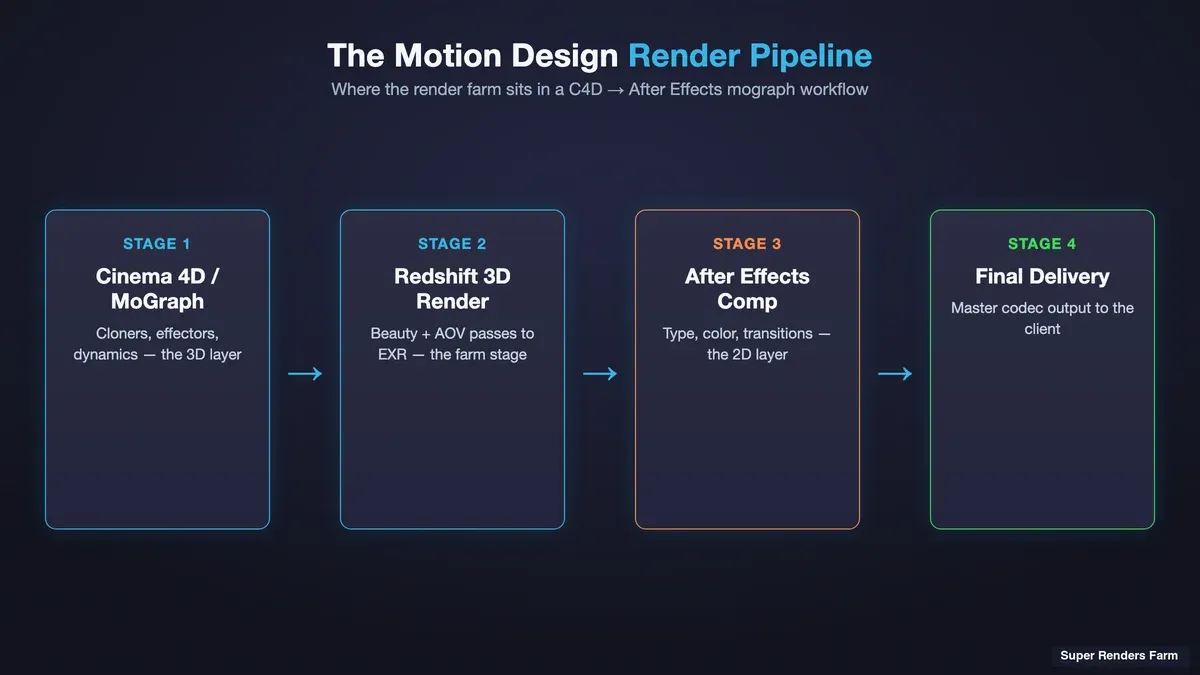 Motion design pipeline diagram showing Cinema 4D MoGraph and Redshift 3D layers flowing into After Effects for compositing before final delivery
Which Render Farm Fits Motion Design Work in Cinema 4D?
The honest answer is that "motion design render farm" isn't a distinct product category — it's a use pattern sitting across two more common ones. Most motion design work splits into a 3D layer built in Cinema 4D (often with MoGraph and a GPU engine like Redshift) and a 2D/comp layer assembled in After Effects. A render farm that fits motion design has to serve both sides of that split without you re-architecting your project for it.
Concretely, that means three things. First, it needs to support Cinema 4D with your actual render engine — for most mograph artists in 2026 that's Redshift, which is GPU-only, so the farm needs a real GPU fleet rather than CPU nodes repurposed as an afterthought. Second, it needs to support After Effects rendering, because the comp layer is where the 3D passes get assembled with type, effects, and 2D animation. Third — the part specific to motion design — the per-project economics have to survive a revision cycle, because a mograph job is never rendered once.
On our farm the fully-managed model handles the first two directly: Cinema 4D and Redshift are supported with licensing included in the render rate, and After Effects renders through the same submit-and-download flow with no remote-desktop step. The third point is where the workflow discipline in the rest of this guide comes in — how you set up your caches and proxies decides whether a revision costs you an hour or a night.
The Motion Design Pipeline: Where the Render Farm Actually Sits
"Render farm for motion design" means different things depending on which layer you're talking about. A typical broadcast or social mograph piece breaks down like this:
- Cinema 4D — the 3D layer. MoGraph cloners, effectors, dynamics, and lighting, rendered in Redshift to multi-pass EXR sequences (beauty plus AOVs — depth, motion vectors, cryptomatte, and whatever the comp needs). This is the compute-heavy layer that most benefits from a farm, because Redshift is GPU-bound and a single workstation renders a 10-second cloner animation at 30fps far too slowly to iterate on.
- After Effects — the comp layer. The C4D passes come in as footage, get combined with 2D type animation, glows, color, and transitions, and render out to the delivery codec. AE rendering is a different compute profile — it leans on CPU and RAM for most effects, with some GPU-accelerated effects on top — and it's where the final master comes from.
- The handoff between them. The seam where mograph pipelines most often get tangled: the C4D layer has to finish its passes before the AE comp can render final, and a change in the 3D layer re-renders the whole chain downstream.
The render farm's job is to compress the slow part — usually the Cinema 4D/Redshift layer — so the AE comp isn't waiting on it. When we see mograph jobs run smoothly, it's almost always because the artist rendered the C4D passes to a farm overnight, pulled the EXR sequences down, and did the AE comp locally where the interactive back-and-forth is faster. When they stall, it's usually because the two layers weren't decoupled — one 3D-layer change forced a full re-render of everything.
For the mechanical setup of getting an After Effects project onto a farm — the aerender handoff, collect-files, plugin parity — we've written a dedicated After Effects cloud rendering setup guide. Here we're staying at the pipeline level.
The Revision Economy: Why Per-Frame Cost Matters More Than Speed
Here's what makes motion design rendering economically different from a one-shot render job. In archviz, you render a hero frame, the client approves it, you render the animation once, you're done. In motion design, the client iterates on motion — timing, easing, the exact moment the logo lands — and every iteration re-renders a frame range, not a still. A 10-second piece at 30fps is 300 frames; five rounds of revisions each re-rendering the full sequence is 1,500 frames rendered to deliver 300.
So for motion design, the number that matters is per-frame cost across the whole revision cycle, not peak render speed on a single pass. A farm that renders each frame faster but costs more per frame can easily be more expensive over a real project than a slower, cheaper one — you're paying for the frames five times over, not once.
Our pricing is consumption-based and published per unit: GPU rendering (Redshift, Octane, V-Ray GPU) bills at $0.003 per OctaneBench-hour, and CPU rendering starting at $0.004 per GHz-hour, with render-engine licensing included in that rate. The practical way to estimate a mograph project isn't the per-unit rate in isolation — it's the compute for one full pass of your sequence, multiplied by your realistic revision count. If a full 300-frame Redshift pass costs a certain amount, budget for four or five passes, not one.
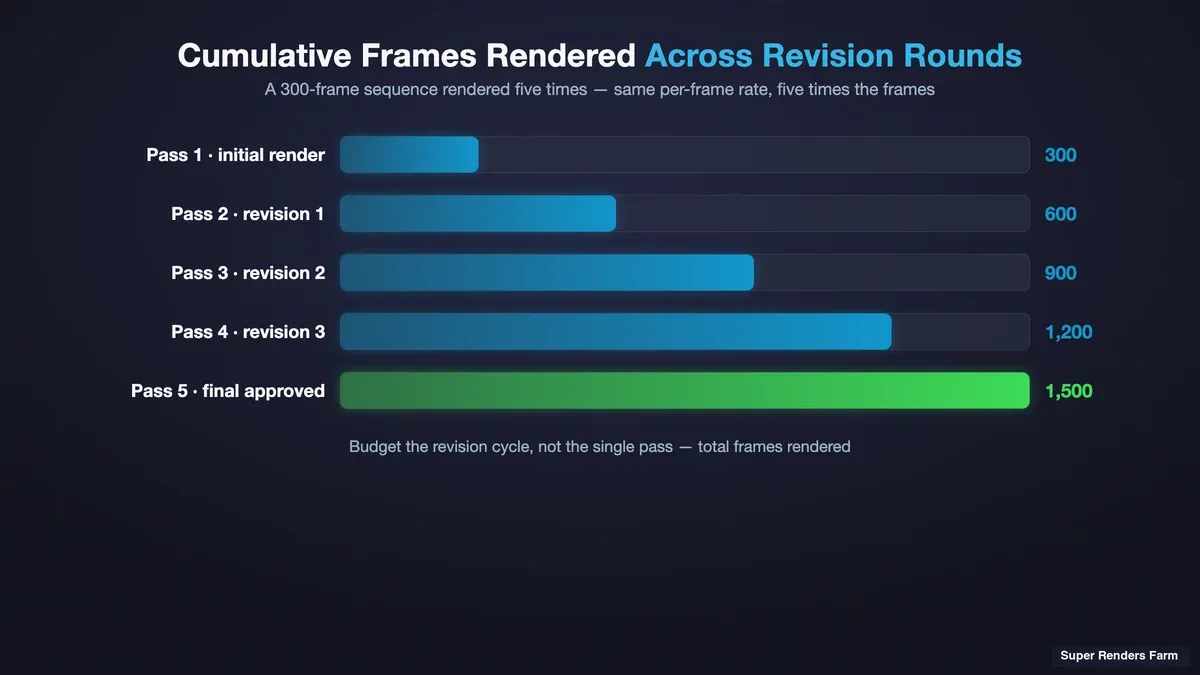 Bar chart comparing single-pass render cost versus total render cost across a five-round motion design revision cycle
The revision economy also changes what you should send to the farm. If a client is early and the 3D layer is still moving, there's no point rendering full-quality 4K multi-pass EXRs — render a lower-sample or proxy-resolution pass for approval, and only commit to the expensive full-quality render once the motion is locked. Rendering the expensive version of something that's about to change is the single most common way we see mograph budgets evaporate.
Cache and Proxy Discipline: The Part That Separates a Smooth Job From a Painful One
A render farm distributes your scene across many machines, and every one has to reproduce your scene exactly. In motion design that reproducibility hinges on caches and proxies more than in most workflows, because MoGraph and dynamics are simulation-driven — and a simulation that isn't cached will re-solve differently, or fail entirely, on a worker node. The discipline that keeps a mograph job clean comes down to a few habits:
- Cache your MoGraph dynamics and simulations before you submit. Cloner dynamics, soft-body sims, particle systems — anything that solves over time needs baking to a cache file that travels with the scene (Maxon's Cinema 4D simulation documentation covers the caching workflow for each system). Left live, each render node re-solves independently, and you get non-deterministic results across the frame range: a cloner that settles one way on frames 1–150 and another on 151–300 because two machines solved it. Bake the cache, include it in your collected assets, verify it's referenced.
- Prerender or proxy your heavy 3D geometry. Redshift proxies for high-poly instanced geometry keep scene load times down on every node and cut memory pressure. A cloner distributing a million-poly object is far lighter as a proxy than as live geometry re-evaluated per node.
- Keep your After Effects comps referencing rendered 3D passes, not live C4D files. The Cineware live-link between Cinema 4D and After Effects is convenient for design, but it's the wrong thing to send to a farm — render the C4D layer to EXR sequences first, and have the AE comp reference those as footage. That decouples the two layers and removes a live 3D solve from the AE render path entirely.
Get these three right and a mograph job behaves predictably. Get them wrong and you hit the classic failure mode: the render "completes," but the output is subtly wrong — a sim that jumps, geometry missing on some frames, a proxy that didn't travel — and you don't notice until compositing at midnight.
The Mechanical Handoff: Cinema 4D Export Settings for a Clean After Effects Comp
The pipeline-level guidance above settles the shape of the handoff — render the C4D/Redshift layer to EXR passes, keep After Effects out of the live 3D solve. What it doesn't cover is the settings themselves, and that's where most first-time mograph handoffs actually break. Three things to get right on the Cinema 4D side before you submit:
AOV selection. Render Beauty plus whatever the comp actually needs, not everything Redshift can output. For a typical mograph comp that's Cryptomatte (isolates individual MoGraph clusters or objects for a matte without a separate render), a Depth AOV (for comp-side depth of field or atmospheric fog), and Motion Vectors (for comp-side motion blur if the C4D render doesn't already bake it in, or for optical-flow-based effects). Add Diffuse, Specular, Reflection, or GI AOVs only if the comp is doing real relight work — every extra AOV is more render time and a heavier EXR to move around, and "whatever the comp needs" is doing real work in that sentence.
Multi-part EXR, one file per frame. Write the AOVs into a single multi-part OpenEXR per frame rather than a separate flat EXR per AOV. Every After Effects version SRF supports (2024 and later) reads a multi-part EXR natively and lists each part as a selectable layer on import, so you get one clean file sequence instead of managing several parallel ones that have to stay frame-aligned by hand.
Naming that survives a Take. If the project uses C4D's Take System — separate takes for camera angles, lighting variants, or client-requested alternates — render each take to its own subfolder, named for the take, not just the shot. A shared naming convention across takes (shotName_takeName.####.exr, zero-padded frame number, no spaces) is what lets After Effects auto-detect the full sequence on import instead of you hand-picking frame ranges, and it's what keeps two takes' frame 0001 from silently overwriting each other in a shared output folder.
One thing this doesn't cover: camera data for a matchmoved or tracked shot. That's a separate, local interchange step — export the C4D camera through a dedicated camera-export path, not the live Cineware link — and it happens on your machine before anything goes to the farm, so it doesn't change any of the render-side guidance above.
The Mechanical Handoff: Importing Multi-Pass EXR and Rendering the Comp With aerender
Once the C4D passes are back from the farm, the After Effects side has its own set of settings worth getting right the first time:
Import. Bring in the first frame of the sequence through File > Import > File with the sequence option checked, not a drag-and-drop of the whole folder — that's what triggers AE's sequence auto-detect against the naming convention above. On a multi-part EXR, AE prompts to extract the individual layers as separate footage items; do that once per shot rather than re-extracting per revision. Check Interpret Footage against how the C4D side wrote alpha (straight vs. premultiplied) before you build the comp — a mismatch here is the most common cause of a dark or light fringe around MoGraph elements that nobody notices until the client does.
Comp setup. Beauty goes in as the base layer; AOVs come in above it as needed, not all of them by default — a Cryptomatte layer with the Cryptomatte effect for isolating clusters without a re-render, a Depth layer feeding a depth-of-field or fog effect, Motion Vectors feeding a comp-side motion blur. Keep the AOV layers switched off until the shot actually needs them; an idle multi-pass comp with everything turned on renders slower for no benefit.
Rendering the comp with aerender. The comp itself renders through the same aerender-based submit flow as any other After Effects job on the farm. The flags that matter for a mograph comp specifically: -comp "CompName" to target the right composition when the project has more than one, -s and -e for a frame range (useful for the progressive-render pattern described above — render the locked early frames while the tail of the shot is still moving), -RStemplate and -OMtemplate to pin the exact render and output-module settings rather than whatever was last active in the project file, and -output to control where the master lands. Pin the templates explicitly; a comp that renders with the wrong output module because someone had a preview preset active is a wasted render pass.
Plugin parity before you submit. Element 3D, Trapcode, Sapphire, and similar third-party After Effects plugins are not pre-installed and only run on request — if the comp uses one, confirm it's provisioned before the deadline crunch, not during it.
Where Cavalry Fits: The Fast-Local Layer in a Mograph Stack
Motion design in 2026 isn't only Cinema 4D and After Effects. Cavalry has become a genuinely popular tool for 2D and data-driven motion design — procedural, fast to iterate, and strong for infographic and UI-motion work that doesn't need a full 3D pipeline. It's worth being clear about where it sits relative to a render farm, because the honest answer is: mostly, it doesn't need one.
Cavalry's strength is fast local rendering — it's built to preview and export 2D procedural work quickly on your own machine, and for a lot of Cavalry projects the local export is the whole render step. That's a feature, not a gap. A render farm enters a Cavalry-inclusive pipeline in the same place it enters any mograph pipeline: the heavy lifting lives in the 3D and comp layers. If a piece combines Cavalry-built 2D elements with a Redshift-rendered Cinema 4D layer and a final After Effects comp, the farm handles the C4D/Redshift passes and the AE master, while the Cavalry layer stays local and comes into the AE comp as footage alongside everything else — each part doing what it's good at.
Deadline Crunch: Rendering Against an Agency Delivery Date
Agency and broadcast mograph work runs on hard, externally-set deadlines — a spot airs on a date, a launch event happens on a date — and the render is the last thing between "approved" and "delivered." When a client approves the final motion at 6pm for a next-morning delivery, the entire remaining render has to fit in the overnight window.
For the broadcast side of that schedule pressure, see our guide to render farms for TV commercials and VFX.
This is where a farm earns its place, and where the cache/proxy discipline pays off, because a farm only compresses render time if the job runs clean on the first try. The pattern that works under deadline pressure:
- Render passes progressively, not monolithically. Submit the Cinema 4D/Redshift layer as soon as the motion is locked, even if the comp isn't final. On our farm, completed frames come back as they finish, so a long sequence downloads partial output before the whole range is done — and you can composite the early frames while the later ones render.
- Have your proxies and caches already baked. Under a deadline there's no time to discover a simulation wasn't cached; that verification belongs earlier, not at 6pm.
- Know your realistic frame-range render time before you commit. The worst deadline failures come from agreeing to a delivery time without measuring how long a full-quality pass actually takes. Render a short test range early, measure it, extrapolate.
A managed farm helps here because you're not administering machines under deadline pressure — you submit, and licensing, node health, and requeuing-on-failure are handled on the farm side. Under a normal deadline that's a convenience; under a 6pm-approval-for-morning-delivery crunch, it's the difference between rendering and troubleshooting an environment while the clock runs.
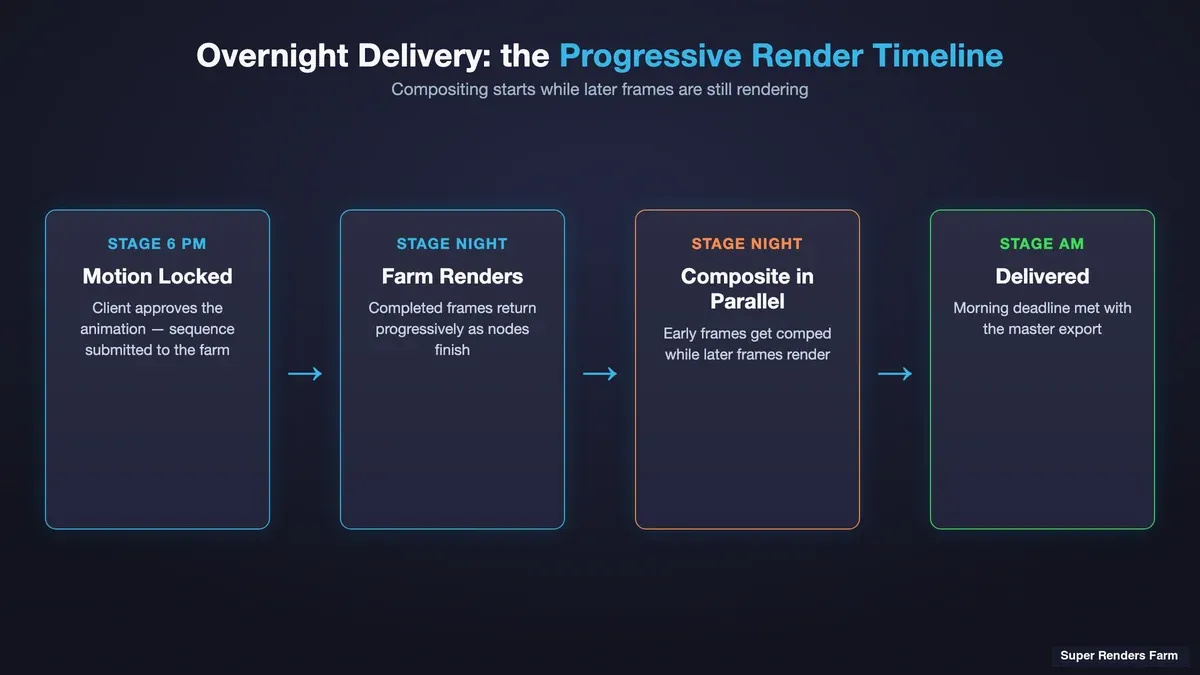 Timeline showing progressive frame rendering starting to download partial output while later frames continue rendering against an overnight delivery deadline
A Practical Checklist for Motion Design on a Render Farm
Here's what a mograph job that runs cleanly on a farm tends to have in place before submission:
| Stage | What to verify | Why it matters for motion design |
|---|---|---|
| 3D layer (C4D/Redshift) | Render engine supported, GPU fleet real, licensing included | Redshift is GPU-only; a CPU-first farm doesn't serve the 3D layer |
| Caches | MoGraph dynamics, sims, particles all baked to cache and collected | Live sims re-solve non-deterministically across nodes |
| Proxies | Heavy instanced geometry proxied (Redshift proxy) | Cuts per-node load time and memory pressure |
| Passes | Beauty + AOVs rendered to EXR sequences, not Cineware live-link | Decouples 3D from comp; removes live solve from AE render path |
| Comp layer (AE) | Comp references rendered EXR footage; plugins parity-checked | AE renders the master; live 3D links break on a farm |
| Revision stage | Proxy/low-sample pass for approval, full-quality only when locked | The revision economy — don't render the expensive version of a moving target |
| Deadline | A measured test-range render time before committing to a delivery date | Agreeing to a deadline the render can't hit is the classic failure |
None of this is exotic — it's the ordinary discipline of decoupling the layers, baking what needs baking, and rendering the cheap version until the motion is locked. A render farm rewards that discipline and punishes its absence.
If your work leans toward the high-end 3D end of motion design — title sequences, game cinematics, trailer work where the 3D layer is the whole show — the calculus shifts toward the 3D pipeline, and our guide to render farms for game cinematics and trailers goes deeper there.
FAQ
Q: Which render farm fits motion design work in Cinema 4D? A: A render farm fits motion design in Cinema 4D when it supports your actual render engine — for most mograph artists that's Redshift, which is GPU-only, so the farm needs a real GPU fleet — and when it also handles After Effects rendering for the comp layer. "Motion design render farm" isn't a separate product category; it's a use pattern spanning the Cinema 4D/Redshift 3D layer and the After Effects comp layer. On our farm both are supported through a fully-managed submit-and-download flow, with render-engine licensing included in the rate.
Q: Can I use an After Effects render farm and a Cinema 4D render farm together? A: Yes, and for most motion design pipelines you effectively are using both. The common pattern is to render the Cinema 4D/Redshift 3D layer to EXR passes on the farm, pull those down, then render the After Effects comp — locally or on the same farm — with the 3D passes as footage. The two layers have different compute profiles (Redshift is GPU-bound, After Effects leans on CPU and RAM), so decoupling them lets each render where it's most efficient rather than as one monolithic render.
Q: Which Cinema 4D render settings do I need for a clean After Effects comp?
A: Export Beauty plus only the AOVs the comp actually uses — typically Cryptomatte for isolating elements, Depth for comp-side depth of field or fog, and Motion Vectors for comp-side blur — written to a multi-part EXR sequence per frame rather than one flat file per AOV. Name each frame consistently by shot and take (shotName_takeName.####.exr) so After Effects auto-detects the full sequence on import instead of you assembling it by hand, and match the Interpret Footage alpha setting to how the AOVs were written to avoid fringing around MoGraph elements.
Q: Why does per-frame cost matter more than render speed for motion design? A: Because motion design is a revision-heavy workflow — a client iterates on timing and motion, and each round re-renders a frame range rather than a single still. A 10-second piece at 30fps is 300 frames, and five revision rounds means rendering 1,500 frames to deliver 300. Across that cycle, per-frame cost times your realistic revision count matters far more than peak speed on any single pass — a farm that's slightly faster but costs more per frame can end up more expensive over a real project.
Q: How much does it cost to render a motion design project on a render farm? A: It depends on scene complexity, resolution, sample count, and — critically for motion design — how many revision rounds you render. Our pricing is consumption-based: GPU rendering bills at $0.003 per OctaneBench-hour and CPU rendering starting at $0.004 per GHz-hour, with render-engine licensing included in the rate. The practical way to estimate a mograph job is to work out the compute for one full pass of your sequence, then multiply by your expected revision count — because you'll render the sequence several times over, not once.
Q: How do I keep MoGraph dynamics and simulations from breaking on a render farm? A: Bake them to a cache before submitting. A render farm distributes your scene across many machines, and any live simulation — cloner dynamics, soft bodies, particles — re-solves independently on each node, producing non-deterministic results across the frame range. Cache the simulation to a file, include that cache in your collected assets, and verify it's referenced by the scene. This is the single most common cause of mograph jobs that "render" but come back subtly wrong.
Q: Does a render farm support Cavalry for motion design? A: Cavalry is built for fast local rendering of 2D and data-driven motion design, and for most Cavalry projects the local export is the whole render step — it generally doesn't need a farm. Where a farm enters a Cavalry-inclusive pipeline is the same place it enters any mograph stack: the compute-heavy 3D and comp layers. A typical setup keeps the Cavalry layer rendered locally and fast, then brings it into an After Effects comp as footage alongside a Redshift-rendered Cinema 4D layer, with the farm handling the C4D passes and the final master.
Q: What's the best way to render motion design against a tight agency deadline? A: Render progressively rather than monolithically — submit the Cinema 4D/Redshift 3D layer as soon as the motion is locked, so those passes render while you finish the comp, and start compositing the early frames as completed frames come back. Have your caches and proxies already baked before the crunch, and measure a short test-range render early so the delivery date you agree to is one the render can actually meet.
Q: Should I render the full-quality version for client review, or a proxy? A: For anything the client hasn't locked yet, render a proxy-resolution or lower-sample pass for approval, and only commit to the full-quality render once the motion is final. Rendering the expensive, full-quality version of something that's still going to change is the most common way motion design render budgets evaporate. The revision economy rewards rendering the cheap version until the motion is locked, then rendering the expensive version once.
About Thierry Marc
3D Rendering Expert with over 10 years of experience in the industry. Specialized in Maya, Arnold, and high-end technical workflows for film and advertising.



