
Render Farm for Automotive Rendering: A Practical Guide for 2026
Overview
Introduction
Automotive rendering occupies a demanding corner of the 3D world: scenes are heavier than most archviz projects, output resolutions run higher than most VFX deliverables, and deadlines anchor to reveal dates that cannot move. That combination is why a render farm shows up in automotive pipelines earlier than in most others. Whether you are a visualization studio serving an automaker, a creative agency running an automotive account, or an in-house marketing team turning CAD data into campaign assets, the pattern repeats — long stretches of look development on workstations, then a compressed window in which dozens of hero stills, turntables, and animation shots must come out at final quality.
This guide covers how a render farm fits that pattern for offline automotive work: car stills for print and web campaigns, 360-degree turntables for product pages, and launch animations. Real-time configurators are a different pipeline built on game-engine technology; we note where that world connects, but everything below concerns offline rendering — submit a scene, compute frames at full quality, get finished images back.
We operate Super Renders Farm, a fully managed cloud render farm serving studios in 50+ countries across archviz, VFX, animation, and motion design since 2017, with team experience in distributed rendering going back to 2010. What follows is the operational view: why automotive scenes consume so much compute, how CAD data becomes a farm-ready scene, which engines fit which jobs, what the work costs at public rates, and a checklist that keeps a first submission out of debugging.
Why Automotive Scenes Are Render-Heavy
Five properties separate a car scene from a typical product shot; each multiplies render time.
Tessellated CAD surfaces. Production car models do not begin as polygon meshes. They come from surface modelers — NURBS patches built in Alias, or engineering data from CATIA and SolidWorks — and have to be tessellated into triangles before a render engine can trace rays against them. Bodywork is unforgiving here: a Class-A surface reflects its environment like a curved mirror, and any faceting from coarse tessellation shows up immediately as banding in the reflection line. So automotive teams tessellate densely: a single exterior routinely lands in the tens of millions of polygons before the interior or engine bay is added. Dense geometry raises memory pressure and slows every ray intersection.
Car-paint and clearcoat shaders. Automotive paint is a layered material: a base color coat, a metallic-flake layer with thousands of microscopic glinting particles, and a smooth clearcoat on top. Render engines model this with multi-layer shaders — V-Ray ships a dedicated car-paint material, Corona and Arnold build the same stack from layered or coated materials, and Cycles exposes a coat lobe in its Principled shader. Every layer adds sampling work: flake glints are high-frequency detail that needs many samples per pixel, and the clearcoat adds a second reflection evaluation across the whole body.
Studio HDRI lighting. Studio automotive shots are lit the way physical car photography is lit — a light tent or studio HDRI with carefully placed softbox panels, so the reflection line flows unbroken along the body. Glossy reflections under HDRI lighting are expensive to sample, and interreflections between paint, chrome, and glass stack additional bounces. Interiors push harder still: leather, brushed metal, piano-black trim, and glass instrument panels in a confined space demand more from global illumination than most exteriors.
4K to 8K marketing output. Campaign assets are not 1080p. Web hero images render at 4K; print, out-of-home, and showroom screens push 8K — 7680 × 4320, roughly 33 million pixels per frame, four times the pixel count of 4K and sixteen times 1080p. Render time scales close to linearly with pixel count, so a scene that takes an hour at 1080p can take a workday at 8K.
Denoising tension. Denoisers cut render time dramatically, but automotive work exposes their weak point: metallic-flake glints look exactly like the noise a denoiser is built to remove. Aggressive denoising smears flake sparkle into a soft sheen — something paint-accurate clients notice immediately. Teams compensate with higher base sample counts and conservative denoiser settings, which puts much of the compute back in.
Added up, an automotive hero still can consume an order of magnitude more compute than most other product shots — the baseline this guide budgets for.
From CAD to DCC to Render Farm: The Automotive Pipeline
A render farm renders DCC scenes, not raw CAD. The pipeline that takes a vehicle from engineering data to finished frames has five stages, and most submission problems trace back to shortcuts in stage two.
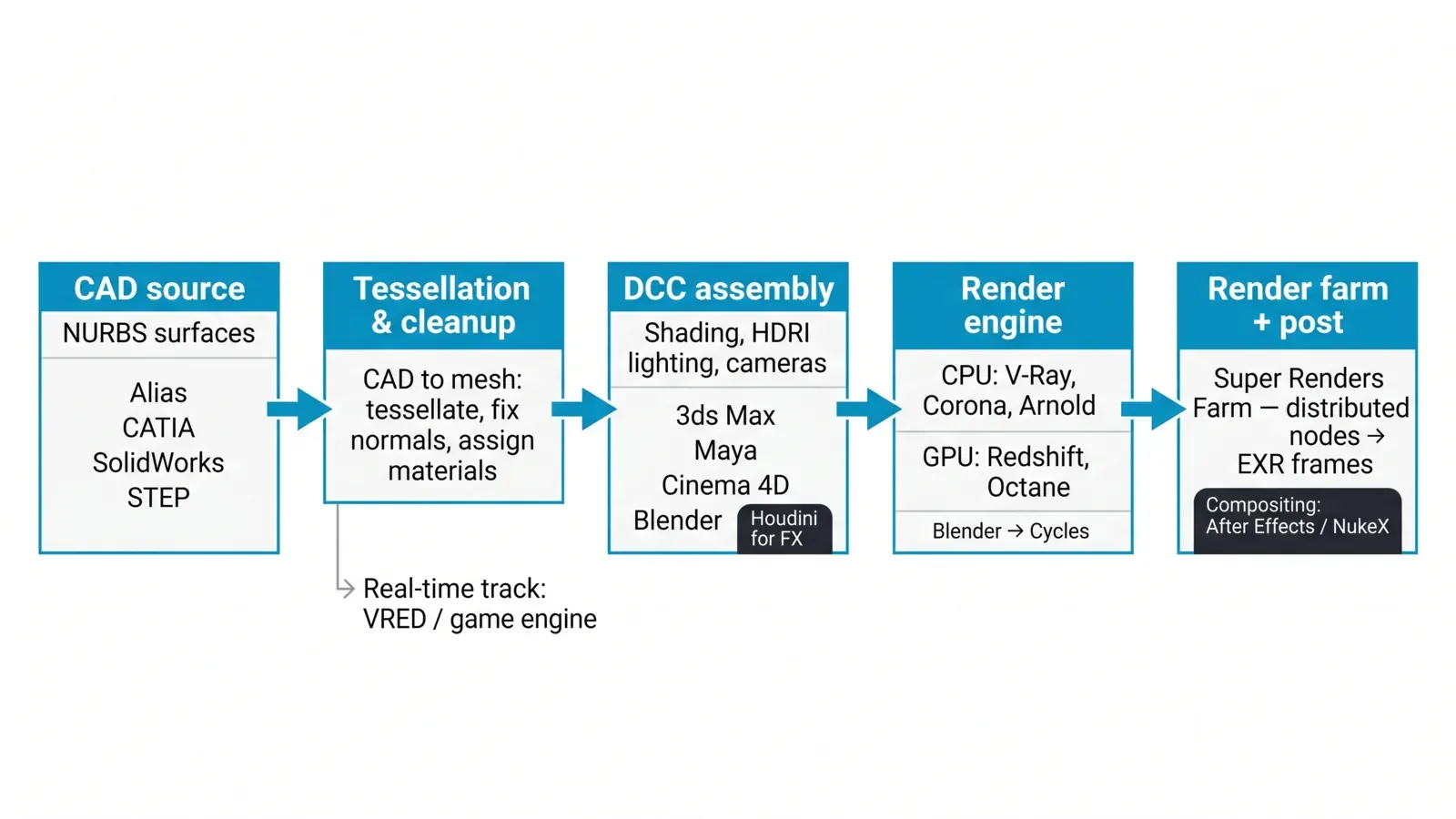 CAD to DCC to render farm workflow for automotive rendering: design surfaces from Alias, CATIA, SolidWorks, or STEP files are tessellated and cleaned, assembled and shaded in 3ds Max, Maya, Cinema 4D, or Blender, rendered with V-Ray, Corona, Arnold, Redshift, or Cycles on the farm, then composited.
Stage 1 — CAD source. Design surfacing lives in tools like Autodesk Alias; engineering data comes from CATIA, SolidWorks, or another parametric system; suppliers and agencies usually receive neutral exchange files, most often STEP (ISO 10303-21). These are mathematically exact NURBS surfaces — ideal for manufacturing, but a production path tracer works on meshes.
Stage 2 — Tessellation and cleanup. The CAD data is tessellated at a density chosen for the shot distance, normals are unified, gaps between panels are checked, and a part hierarchy named by part number is collapsed into something an artist can manage. Materials are assigned here too — paint, chrome, rubber, glass, trim. This is also where the real-time track splits off — design-review and configurator teams move the prepared model into Autodesk VRED or a game engine for interactive use, while the offline marketing pipeline carries it into a general-purpose DCC.
Stage 3 — DCC assembly. The cleaned model lands in 3ds Max, Maya, Cinema 4D, or Blender, where shading is finalized, the studio environment or backplate is built, HDRI lighting is placed, cameras are framed, and turntable or animation moves are keyed. Houdini joins when launch films need FX passes — dust, rain, particles.
Stage 4 — Render engine. Most offline automotive work renders in V-Ray, Corona, or Arnold on CPU, or in Redshift and Octane on GPU; Blender scenes render with Cycles. Engine choice usually follows the DCC and the team's history more than any technical absolute — the tradeoffs are in the next section.
Stage 5 — Farm and post. The packaged scene uploads to the farm, frames render distributed across nodes, and finished EXRs come back for grading and compositing in After Effects or NukeX — both on our supported application list, so comp-heavy deliverables stay in one pipeline.
Choosing a Render Engine for Automotive Work
All five engines below are supported on our farm — licensing is handled in the rate, with the commercial engines' licenses included and Cycles needing none — so the choice comes down to fit rather than licensing logistics.
V-Ray is the long-standing workhorse of automotive visualization in 3ds Max and Maya. Its dedicated car-paint material models the base-flake-clearcoat stack directly, its CPU bucket mode distributes large stills across many nodes cleanly, and its feature depth suits studios that need exact control over every reflection. Pixel-critical 8K print work tends to land here; a V-Ray render farm pipeline carries it without license juggling.
Corona built its base in archviz and appears increasingly in product and automotive stills, mostly through 3ds Max and Cinema 4D shops that value its lighting workflow. Layered materials build convincing car paint, the interactive preview suits look development, and the CPU-only architecture means the same scene scales onto Corona render nodes without GPU memory concerns.
Redshift is the GPU pick for turntables and animation, especially out of Cinema 4D, Maya, and Houdini. Per-frame times on modern GPUs make 300-frame turntables practical overnight, and its sampling controls keep flake and clearcoat noise manageable at animation budgets. Long 4K sequences are its sweet spot; at 8K with full interiors the scene must fit in GPU memory, which is where texture discipline — or a CPU engine — comes in. GPU jobs on our fleet run on RTX 5090 nodes with 32 GB of VRAM.
Arnold appears mostly in Maya pipelines with VFX overlap — launch films mixing car shots with environment or character work. Its standard surface shader covers coat layers, and its CPU mode behaves predictably on very heavy geometry.
Cycles handles the Blender track. The Principled BSDF's coat layer plus a flake normal map gets automotive paint convincingly close, and because Cycles is open-source there is no engine license in the cost at all. Blender scenes on our farm render with Cycles.
For a wider look at how these engines compare across hardware tiers, see our high-performance 3D rendering comparison.
Deadline Patterns: Campaign Launches and Auto-Show Crunches
Automotive render demand is not flat; it spikes around dates that do not negotiate.
Campaign launches multiply assets late in the cycle. A stills program that sounds small — hero angle, front three-quarter, rear, interior — multiplies across colorways, trim levels, and regional variants: twelve colorways across six angles is seventy-two finished 8K frames. Design tweaks routinely land weeks before the deadline and invalidate finished renders, so volume concentrates in the final fortnight.
Reveal events and show season are stricter. An unveiling at an international auto show or a standalone digital reveal pins the date completely: assets are embargoed until the cover comes off, and late styling changes are common because the vehicle itself is still being finalized. Teams often render the program two or three times as surfaces update.
The arithmetic that pushes this work to a render farm is plain: seventy-two 8K stills at several workstation-hours each does not fit into the final two weeks on a five-seat workstation fleet artists also need for look development. Burst capacity absorbs the spike — the stills render concurrently across farm nodes overnight instead of serially over a month — and the cost returns to zero when the campaign ships. The same burst logic drives agencies juggling several client accounts at once; our guide for creative agencies covers that side, and our product visualization rendering article covers programs beyond automotive.
Confidentiality rides along with every pre-reveal job, because unreleased designs are embargoed assets. We handle that contractually — prospective customers can request an NDA before sharing any scene data — and operationally: render output is used only for your job and is deleted on request at any time.
What Automotive Rendering Costs on a Cloud Render Farm
Two billing units cover everything on our farm, which runs 20,000+ CPU cores alongside a dedicated GPU fleet. CPU rendering is metered in GHz-hours — cores × clock speed × hours — from $0.004 per GHz-hour at the base priority tier, with priority tiers ranging up to $0.016. GPU rendering is metered in OctaneBench-hours at $0.003 per OBh, where OctaneBench is the published benchmark that normalizes GPU performance. In planning terms, that works out to roughly $2 per server-hour for a 44-core dual-Xeon node (96–256 GB RAM), and roughly $5.20 per card-hour for an RTX 5090 node with 32 GB of VRAM. Render-engine licenses for V-Ray, Corona, Redshift, Arnold, and Octane are included in those rates; Cycles is open-source and carries no license component.
The estimating method for any job is the same: render one test frame, multiply, and add margin for revisions. Here is the arithmetic on two representative automotive jobs, with assumptions stated — your test frame replaces them.
| Scenario | Output | Engine and hardware | Test-frame assumption | Billed compute | Estimated cost |
|---|---|---|---|---|---|
| Hero still program: one angle, three colorways | 3 frames at 7680 × 4320 (8K) | V-Ray CPU, 44-core nodes | ≈ 5 server-hours per final frame | ≈ 15 server-hours + ≈ 2 in test frames | ≈ $34 at ≈ $2 per server-hour |
| 15-second turntable at 24 fps | 360 frames at 3840 × 2160 (4K) | Redshift GPU, RTX 5090 nodes | ≈ 6 minutes per frame on one card | ≈ 36 card-hours | ≈ $187 at ≈ $5.20 per card-hour |
| Same turntable on the CPU path | 360 frames at 4K | Corona CPU, 44-core nodes | ≈ 20 minutes per frame on one node | ≈ 120 server-hours | ≈ $240 at ≈ $2 per server-hour |
Three things to read out of that table. First, distribution changes wall-clock time, not cost: the turntable billed at 36 card-hours finishes in about ninety minutes across two dozen GPUs, or overnight on four — billed compute is the same either way. Second, the CPU-versus-GPU comparison is scene-specific, not a general law: per-frame times depend on paint setup, interior, and resolution, and the only trustworthy comparison is your own test frame run both ways. Third, revisions belong in the budget: automotive programs re-render. A surface update two weeks before reveal can mean running the stills program again, so treat the table's figures as per-pass numbers and budget two to three passes.
Every new account includes $25 in trial credits, which covers a meaningful set of test frames before any commitment. For the deeper method — reasoning about per-frame cost across engines and resolutions — see our cost-per-frame guide.
Your First Automotive Submission: A Practical Checklist
Automotive scenes hit farm edge cases more often than typical scenes do — heavy geometry, deep material stacks, big texture sets. This list is what we wish every first-time automotive submission had checked in advance.
- Package the scene completely. Use your DCC's collection tool — Archive or Resource Collector in 3ds Max, "Save Project with Assets" in Cinema 4D, Pack Resources in Blender, Archive Scene in Maya — so every dependency travels with the file.
- Relink textures to relative paths. Absolute paths pointing at local drives are the most common first-submission failure we see. Flake normal maps, decal sheets, backplates, and HDRIs all need to resolve on a machine that is not yours.
- Include the HDRI and backplates explicitly. Environment maps assigned in override slots slip through packaging more often than regular texture maps; confirm they are inside the package folder, not just referenced.
- Match engine and plugin versions. A scene saved in a newer engine build than the farm runs will fail — or quietly render differently. The same applies to scatter, shader, and material plugins. On a fully managed farm this is a support conversation, not a self-install: state your exact versions and confirm parity before uploading.
- Render one test frame. One frame at final resolution — or a representative crop at final sampling — validates the look, exposes missing assets, and produces the timing number the cost arithmetic above runs on.
- Set output deliberately. EXR for anything headed to compositing, correct frame padding for sequences, and color management (sRGB or ACES) confirmed before the run, not after.
- Upload the folder, not an archive. The farm does not extract archives (.zip, .rar, .7z, .tar, .tar.gz), so upload the packaged folder unpacked.
- Pick the right upload path. Web upload is comfortable up to around 2 GB and gets unreliable above about 5 GB; beyond 2 GB, the Client App is the safer route because it is resumable, which matters when 8K texture sets push an automotive project past that line. S3 access (Cloud Direct Connect) is the other option.
- Plan the download step. Render output stays available with no fixed automatic deletion period; download promptly, or set the Client App to auto-download output, then ask us to delete the project if the title is embargoed.
Because the farm is fully managed, there is no remote-desktop step and no software installation from your side — submission, monitoring, and download run through the web interface and Client App, and support picks up when stage two of the CAD pipeline left something odd in the scene.
FAQ
Q: Which render engines can I use for automotive rendering on Super Renders Farm? A: V-Ray, Corona, Arnold, Redshift, Octane, and Blender Cycles are supported, across 3ds Max, Maya, Cinema 4D, Blender, Houdini, After Effects, and NukeX. Render-engine licenses for V-Ray, Corona, Redshift, Arnold, and Octane are included in the rendering rate, and Cycles has no license cost.
Q: Can the farm render directly from Alias, CATIA, SolidWorks, or STEP files? A: No. The farm renders scenes from 3ds Max, Maya, Cinema 4D, Blender, and Houdini, so CAD data needs tessellating and preparing in one of those applications first. The CAD-to-DCC stage stays on your side; the rendering stage is what the farm takes over.
Q: Does Super Renders Farm support VRED or KeyShot? A: No — VRED and KeyShot are not on the supported application list. Both are common in automotive workflows; teams using them typically render those projects on local hardware while routing their DCC-based marketing work from 3ds Max, Maya, Cinema 4D, or Blender through the farm.
Q: Can a render farm handle 8K automotive stills? A: Yes. Our CPU nodes run dual Xeon processors with 96–256 GB of RAM, which is the comfortable path for 8K frames with full interiors and dense tessellation. On the GPU side, RTX 5090 nodes carry 32 GB of VRAM each — ample for most 4K automotive work, while extreme-resolution stills with heavy texture sets usually sit better on CPU nodes for memory headroom.
Q: How do I estimate the cost of an automotive render job before committing to it? A: Render one test frame at final settings, then multiply: frame count × per-frame time × the public rate ($0.004 per GHz-hour CPU at base priority, $0.003 per OctaneBench-hour GPU — in planning terms, roughly $2 per server-hour and $5.20 per RTX 5090 card-hour). Every new account includes $25 in trial credits, which covers test frames on a real scene before any spend.
Q: Should I render automotive turntables on CPU or GPU? A: Run the test frame both ways if your engine allows it. Redshift and Octane on RTX 5090 nodes typically post shorter per-frame times on 4K turntables; V-Ray and Corona on CPU nodes offer larger memory headroom and predictable behavior on very heavy scenes. The comparison is scene-specific — the table method in this guide gives the honest answer for your particular scene.
Q: How is an unreleased vehicle design protected on the farm? A: Two mechanisms are standard for embargoed work: an NDA can be signed before any scene data is shared — requests go through our render farm NDA page — and render output is deleted on request as soon as you have pulled your frames. Teams under strict embargo typically download deliverables immediately and ask us to delete the job output straight away.
About Alice Harper
Blender and V-Ray specialist. Passionate about optimizing render workflows, sharing tips, and educating the 3D community to achieve photorealistic results faster.



