What Is a Shader? How Shaders Decide What a Surface Looks Like
Overview
Introduction
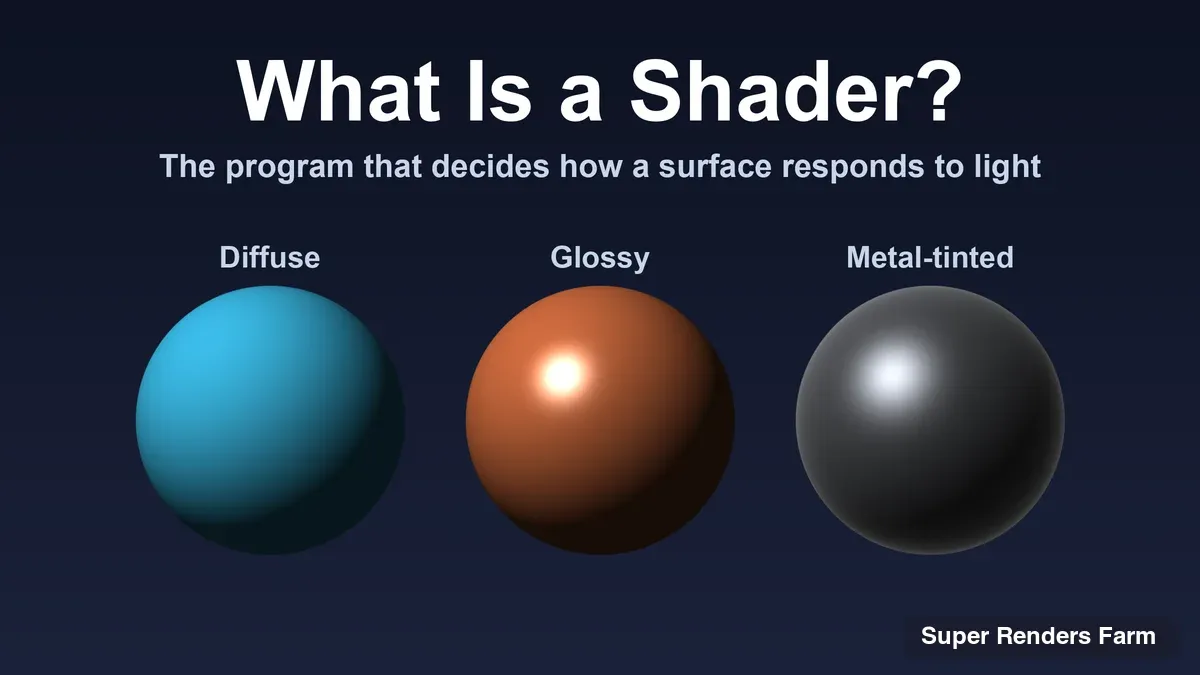
What is a shader? A shader is a small program that decides how a surface, or a single pixel, should look. It receives inputs such as the position of a point, its surface normal, texture colors and the direction of the light, and it returns a color or a description of how the surface responds to light. Every visible result in 3D graphics, from a glossy car body to a matte wall to skin, comes from some shader doing that calculation millions of times.
The word covers two working worlds. In a game engine, shaders are programs that run on the GPU inside a frame budget of milliseconds. In an offline renderer such as Cycles or Arnold, a "shader" is usually a material description, often built from nodes, that the renderer evaluates wherever a ray lands on a surface.
This guide explains the definition, what shaders take in, how real-time and offline shaders differ, how shaders differ from materials and textures, and why a heavy shader raises render time. Two neighbours cover adjacent ground, so we link to them instead of repeating them: what is a normal map for the texture that feeds a shader its surface direction, and what is subsurface scattering for one specific light behavior a shader can model. For the wider picture of what rendering is, see what rendering is in computer graphics.
A Shader in One Paragraph
Wikipedia's article on shaders (read 23 November 2026) describes a shader as a programmable operation applied to data as it moves through the rendering pipeline, acting on vertices, primitives and fragments and calculating the colors of the rendered image. It records that Pixar introduced the term "shader" with version 3.0 of the RenderMan Interface Specification, published in May 1988, and that the Nvidia GeForce 3 (NV20) was the first video card with a programmable pixel shader, in 2001. Unity's shader introduction (read 23 November 2026) puts it plainly: a shader program is a program that runs on a GPU, and its graphics-pipeline shaders perform the calculations that determine the color of pixels on the screen.
What a Shader Takes In and Gives Back
A shader is easiest to understand as a function. It does not draw anything by itself. The renderer finds a point on a surface, hands the shader what it knows about that point, and uses what comes back.
Typical inputs:
- Position. Where the point is in the scene.
- Surface normal. The direction the surface faces at that point. Lighting depends on it more than on almost anything else.
- UV coordinates. Where the point sits on the 2D texture space of the model.
- Textures. Images the shader looks up using the UVs: color, roughness, metalness, and normal maps.
- Light and view direction. Where the light comes from and where the camera is.
- Parameters. Numbers set by the artist, such as roughness or a tint.
The output depends on the world. A real-time fragment shader returns a color for a pixel. A material shader in an offline renderer returns a description of how light interacts with the surface, which the renderer then uses to decide where to send more rays.
A tiny worked example makes the dependency on the normal concrete. In the simplest diffuse model, brightness is the base color multiplied by the cosine of the angle between the surface normal and the direction to the light. With a light 60 degrees away from a flat normal, that cosine is 0.50. Tilt the normal by 20 degrees toward the light, which is what a normal map does at a single point without changing the geometry, and the angle becomes 40 degrees and the value 0.77. The geometry did not move; the shader got a different input and gave a different answer.
 Diagram of the same surface point shaded twice: a flat normal with the light 60 degrees away gives a diffuse value of 0.50, a normal tilted 20 degrees toward the light gives 0.77
The numbers come from the cosine rule above and show the dependency, not a full material. Real materials add specular reflection, roughness and layers, but start from the same kind of inputs.
Real-Time Shaders: Vertex, Fragment and Compute
In a game or any real-time engine, shaders are separate programs for separate stages of the GPU pipeline. Wikipedia's list (read 23 November 2026) gives the common ones:
- Vertex shaders run once per vertex. They map 3D positions to 2D screen coordinates plus a depth value, and cannot create new vertices.
- Fragment (pixel) shaders compute color and other attributes for each fragment, which affects at most one pixel.
- Geometry shaders take whole primitives as input and can emit new points, lines or triangles. They arrived with Direct3D 10 and OpenGL 3.2.
- Tessellation shaders subdivide meshes at run time and were added in OpenGL 4.0 and Direct3D 11.
- Compute shaders are kernels written in a shading language that run general calculations on the GPU outside the drawing pipeline; Unity describes them the same way.
- Ray tracing shaders are supported through DirectX Raytracing, Vulkan and Metal.
Each GPU API has its own shading language. Wikipedia names GLSL for OpenGL, HLSL for Direct3D and the Metal Shading Language for Apple's Metal, and notes that shaders are increasingly compiled into the SPIR-V intermediate language before distribution.
The practical consequence is the deadline: a real-time shader runs for every vertex and every pixel, every frame, so it has to be small and cheap. We cover the difference between that world and offline production in our real-time vs offline rendering guide.
Offline Shaders: BSDFs, Closures and Node-Based Materials
An offline renderer has no frame deadline, so its shaders can be richer, and they usually look different. Instead of a separate vertex and fragment program, an artist builds a material, often as a graph of nodes.
The Blender manual's shader nodes introduction (Blender 5.2 LTS, read 23 November 2026) says materials, lights and backgrounds in Blender are defined by a network of shading nodes. Its key idea is the shader socket: the output of a surface or volume shader is a shader, which describes the lighting interaction at the surface or in the volume rather than the surface's color. The manual lists four kinds of shader node:
- BSDF shaders model how light is reflected, refracted and absorbed at a surface.
- Emission shaders model light emitted from a surface or volume.
- Volume shaders model light scattering inside a volume.
- Background shaders model light emitted by the environment.
Shaders can be combined with Mix and Add Shader nodes, and the manual states that no other operations on them are allowed. The renderer then uses the resulting network to compute light interactions for direct lighting and global illumination. BSDF stands for bidirectional scattering distribution function: a description of how a surface scatters incoming light toward outgoing directions.
Most artists meet this through one all-purpose node. The Principled BSDF page (read 23 November 2026) says it combines multiple layers into a single node, is based on the OpenPBR Surface shading model, and aims to be compatible with similar physically based shaders such as Disney and Standard Surface. Its main inputs include Base Color, Roughness, Metallic, IOR, Alpha and Normal, and it has groups for diffuse, subsurface, specular, transmission, coat, sheen, emission and thin film. Normal is an input, and Base Color, Roughness and Metallic are typically fed by textures. A subsurface input is how a skin or wax material gets the soft look we describe in the subsurface scattering article.
Open Shading Language
Node graphs are not the only way to author an offline shader. Wikipedia's article on Open Shading Language (read 23 November 2026) says Sony Pictures Imageworks developed OSL for its Arnold renderer, that the first release was on 12 October 2011, and that it is supported by renderers including 3Delight, Octane, V-Ray 3, Redshift (from April 2021) and Cycles in Blender (since Blender 2.65). The Blender manual's OSL page (Blender 5.2 LTS, read 23 November 2026) describes it as a programmable shading system for advanced rendering engines, usable in Cycles to write custom surface, volume and displacement shaders as plain text. That makes procedural effects and custom lighting models possible beyond the built-in nodes.
The same page lists limits worth knowing. OSL works on the CPU; GPU rendering supports it only with the OptiX backend, and even then some features are unavailable, such as the trace function and some noise functions. OSL also has no access to scene lights: materials are built from closures that the renderer implements, which limits what a script can do but lets the renderer optimize and importance-sample every shader.
 Two pipelines side by side: a real-time pipeline with vertex shader, rasterization and fragment shader on the GPU, and an offline pipeline where a camera ray hits a surface and a material shader returns a BSDF that the renderer uses to choose the next rays
Shader Types at a Glance
| Where | Typical form | What it returns | Runs |
|---|---|---|---|
| Real-time vertex shader | GLSL, HLSL or Metal program | Screen position and depth for each vertex | Once per vertex, every frame |
| Real-time fragment shader | GLSL, HLSL or Metal program | Color and other attributes per fragment | Once per fragment, every frame |
| Compute shader | Shading-language kernel | General GPU calculation | Outside the drawing pipeline |
| Offline BSDF or material shader | Node graph in the DCC (digital content creation) app | A description of how light interacts with the surface | At every ray hit the renderer evaluates |
| Offline OSL shader | Plain-text script | Closures the renderer can sample | At every ray hit the renderer evaluates |
Shader, Material and Texture: Three Different Things
- A texture is data. An image, such as a color map, a roughness map or a normal map, that a shader reads at a UV coordinate.
- A shader is logic. The program or node network that turns inputs, including textures, into a surface response.
- A material is the assignment. In everyday DCC usage it means the shader plus its settings applied to an object.
If a surface looks wrong, ask which one is at fault. A missing texture file gives wrong inputs to a correct shader. A wrong shader setup gives odd results from perfect textures. A bad normal map gives wrong lighting from a correct shader. Our guide to bitmap nodes that render black in Arnold shows how a texture that never reaches the renderer's shader looks on screen.
Why Shaders Change Render Time
A shader is evaluated every time a ray hits a surface, so shader cost multiplies with the number of hits. That is the whole reason a heavy shader can matter more than it looks in the viewport.
Here is a hypothetical example, with settings chosen to show scale and not to recommend values. A 1920 x 1080 frame has 2,073,600 pixels. At 64 camera samples per pixel that is 132,710,400 paths. If every path hit four surfaces before ending, that is 530,841,600 shader evaluations for one frame. Real paths often end earlier, so treat this as an upper bound for the hypothetical. Now give one scene a simple shader that costs 1 unit per evaluation and another a layered, procedural one that costs 4 units: the shading part of the second frame is 4 times larger, 2,123,366,400 units against 530,841,600. The unit is invented, and shading is only part of render time, since finding the surface also costs. What carries over is the multiplication.
 Chain of hypothetical arithmetic: 2,073,600 pixels, 64 samples per pixel gives 132,710,400 paths, 4 hits per path gives 530,841,600 shader evaluations, and a shader that costs 4 units instead of 1 gives 2,123,366,400 units
Shaders tend to get expensive with many active layers (coat, sheen, subsurface, transmission), procedural patterns computed from noise instead of read from an image, several texture lookups per evaluation, and displacement or volume effects. You pay for each of them per sample, so the same scene can render much longer after a material swap.
For how sampling and bounce limits set the other half of the cost, see what is ray tracing, and for noise handling see what is denoising. Our render time optimization guide covers practical ways to bring per-frame cost down, including material simplification.
Shaders on a Render Farm
On a farm, a shader is one more thing the render node must be able to run. A shader that ships with the renderer, such as the built-in nodes of Cycles in Blender or the materials of Arnold, V-Ray and Corona in 3ds Max, is part of the software the node already has. Custom shaders are the case to plan for: an OSL script, a third-party shader plugin or a studio's own shader library has to exist on the node, or the job fails or renders wrong. In Blender, the manual describes an Internal OSL script as read from a text data-block and an External one as a .osl or .oso file loaded from disk, so an external file path has to resolve on every node. The OSL limits above matter too: if your material relies on OSL, check whether it runs on the CPU or on GPU with OptiX before choosing the node type.
Super Renders Farm is a fully managed farm: you upload the scene and do not set up machines, install software or manage render licenses yourself. Cycles and EEVEE in Blender, Arnold, V-Ray and Corona in 3ds Max, and Redshift in Maya and Cinema 4D are ready without a setup request. Other engine and host pairings vary: some are ready without a request, some are provisioned on request, and some do not exist as products. The supported software page shows the engines for each host. Where your engine is provisioned on request, or your scene depends on a custom shader, shader plugin or shader library, contact us to confirm before you upload.
Corona, and Arnold or V-Ray in their CPU modes, render on our CPU nodes. Redshift renders on our GPU cloud render farm, where each node carries two RTX 5090 cards with 32 GB of VRAM per card; memory is per card and is not pooled, so a GPU scene, textures included, has to fit in 32 GB. New accounts receive $25 free render credits, which you can use on test frames of your heaviest material setup before you commit a sequence, and our team is on 24/7 live chat for scene checks. Current rates are on the pricing page.
Common Misunderstandings
"A shader is a texture." A texture is an image. A shader is the logic that reads textures and other inputs and returns a surface response.
"Shaders only exist in games." The term came from film rendering, with RenderMan in 1988, and offline renderers still use shaders in the form of material nodes and languages such as OSL.
Summary: What to Remember
| If you are asking | Short answer |
|---|---|
| What is a shader? | A program or node network that decides how a surface responds to light |
| What goes in? | Position, normal, UVs, textures, light and view direction, and artist settings |
| What are real-time shaders? | Programs such as vertex and fragment shaders that run on the GPU every frame |
| What are offline shaders? | Material networks or scripts, such as BSDF nodes and OSL, evaluated at ray hits |
| Why do shaders affect render time? | They are evaluated at every hit, so cost multiplies by samples and bounces |
| What matters on a farm? | Custom shaders and plugins must exist on the node; confirm before you upload |
FAQ
Q: What is a shader in simple terms? A: A shader is a small program that decides how a surface looks. It takes inputs such as the surface direction, texture colors and the direction of the light, and returns a color or a description of how the surface reflects and absorbs light. Wikipedia describes it as a programmable operation applied to data as it moves through the rendering pipeline.
Q: What are shaders in games? A: In games, shaders are programs that run on the GPU. Vertex shaders place each vertex on the screen, fragment shaders compute the color of each pixel, and compute shaders handle general calculations outside the drawing pipeline. They run every frame, so they must be cheap enough to fit the frame budget.
Q: What are shaders in game development? A: Developers write shaders in a shading language such as GLSL, HLSL or the Metal Shading Language, depending on the graphics API. Each shader stage has a defined job, from placing vertices to coloring fragments, and the developer controls the look by changing the code or the inputs.
Q: What are the main types of shader? A: The common types are vertex, fragment (pixel), geometry, tessellation, compute and ray tracing shaders. Vertex shaders run per vertex, fragment shaders per fragment, and compute shaders outside the drawing pipeline. Offline renderers add material shaders such as BSDF nodes and Open Shading Language scripts.
Q: What does compiling shaders mean? A: Compiling a shader means translating its source code into a form the hardware or renderer can run. Wikipedia notes that shaders are increasingly compiled into the SPIR-V intermediate language before distribution, and Blender compiles OSL source into precompiled .oso files automatically. The pages we read do not explain why some games compile shaders during play, so we do not make claims about that here.
Q: Is a shader the same as a material? A: Not exactly. A shader is the program or node network that calculates how light interacts with a surface. A material is that shader plus its settings applied to an object. Some applications use the two words for the same thing, and in Blender a material is defined by a network of shading nodes.
Q: Do shaders affect render time? A: Yes. A shader is evaluated each time a ray hits a surface, so layered or procedural shaders cost more on every sample. The same scene can render noticeably longer after a material change with no change in geometry or lighting. Testing the heaviest frame shows the real cost.
Q: Can custom shaders be rendered on a render farm? A: They can if the render node has what the shader needs. A custom OSL script, shader plugin or shader library must exist on the node, or the job fails or renders wrong. If your scene depends on a custom shader, or on an engine that is provisioned on request, contact us to confirm before you upload.
About Thierry Marc
3D Rendering Expert with over 10 years of experience in the industry. Specialized in Maya, Arnold, and high-end technical workflows for film and advertising.