What Is Anti-Aliasing? Jagged Edges, Samples and Render Time Explained
Overview
Introduction
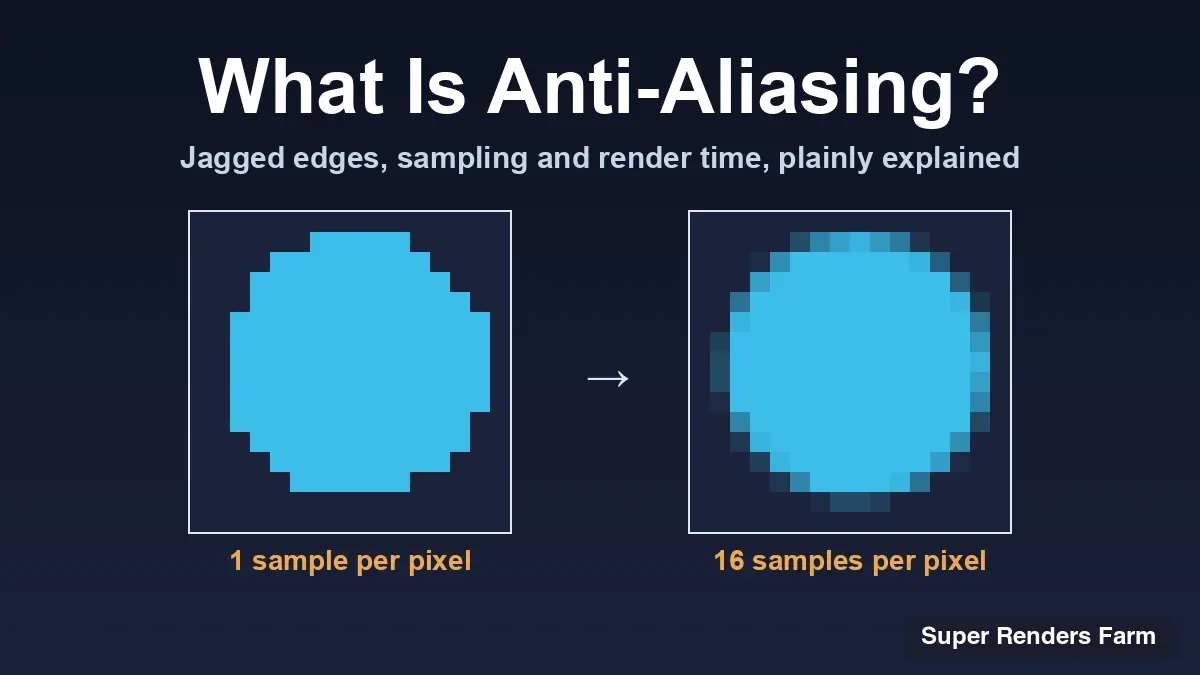
What is anti-aliasing? It is a set of techniques that smooth the jagged, stair-stepped edges and the shimmering patterns that appear when a scene is drawn on a grid of pixels. The usual idea is to take more than one sample inside each pixel and blend the results, so a pixel on the edge of an object gets a shade between object and background instead of being forced to one or the other.
The phrase means two slightly different things depending on where you meet it. In a game's graphics menu, anti-aliasing is a choice between named methods such as MSAA, FXAA and TAA, each with a different cost to the graphics card. In an offline renderer such as Arnold or Cycles, there is usually no separate switch at all: the number of samples per pixel is the anti-aliasing, and it is also a large part of the render time.
This guide explains the general idea, then the game-menu methods, then the offline view. One boundary keeps it focused: how denoisers remove the grain from a low-sample render is covered in what denoising is, so we link to it instead of repeating it. For how rays find pixel colors, see what ray tracing is.
Aliasing and Anti-Aliasing in One Paragraph
Wikipedia's article on spatial anti-aliasing (read 23 November 2026) describes it as a technique for minimizing the distortion artifacts, called aliasing, that appear when a high-resolution image is represented at a lower resolution. It uses the term "jaggies" for the jagged polygon edges that anti-aliasing smooths, and it explains that the technique works by removing frequency components that are too high for the sampling device to resolve, before the image is resampled.
The idea to hold onto: a screen is a grid and a real edge is not. When a pixel's color comes from a single spot, the pixel has to choose a side, and a diagonal edge turns into a staircase.
Why Pixels Make Jagged Edges: Sampling in Plain Words
Aliasing is not only a graphics problem. Wikipedia's article on aliasing (read 23 November 2026) defines it, for signals in general including computer graphics, as a reconstructed signal that "contains low frequency components that are not present in the original one." It happens when the original has components above the Nyquist frequency, which the article gives as half the sampling frequency; sampling music at 32,000 Hz, for example, gives a Nyquist frequency of 16,000 Hz.
Here is that idea with numbers small enough to check by hand. These numbers are a hypothetical example, not taken from a source. Imagine a wave that repeats 9 times per second, and a sensor that measures it 12 times per second. Half of 12 is 6, so the Nyquist limit is 6 cycles per second, and the wave is above it. Every one of the 12 measurements lands exactly where a slower wave of 3 cycles per second would also land, so the data cannot tell the two apart. The sampled result shows a slow wave that was never there.
 Diagram of a hypothetical wave of 9 cycles per second sampled 12 times per second, where the 12 samples also fit a false wave of 3 cycles per second, illustrating aliasing below the Nyquist limit
An image is the same problem in two dimensions. The pixel grid samples the scene at regular spacing. Detail finer than that spacing, such as a thin diagonal edge, a distant fence or a repeating texture, cannot be recorded faithfully. It comes out as stair-steps along edges, or as a moire pattern, which Wikipedia's aliasing article names as the form aliasing takes when image resolution is reduced without proper filtering.
How Supersampling Fixes It
The most direct fix is to sample more often than the pixel grid does. Supersampling takes several samples inside every pixel and averages them. The Wikipedia article on spatial anti-aliasing describes supersampling (SSAA, also called full-scene anti-aliasing) as usually rendering each frame at 2 or 4 times the display resolution and then downsampling it, often by simple averaging.
Consider what that does to an edge pixel. With one sample, the pixel is either fully object or fully background, so the edge steps. With 4 samples in a 2 by 2 pattern, the pixel can be 0, 1, 2, 3 or 4 samples inside the object, which is 5 possible shades. With 16 samples in a 4 by 4 pattern, it can be anything from 0 to 16, which is 17 shades. A pixel with 7 of its 16 samples inside the object shows the object at 7/16, about 44 percent, which is what a pixel that is mostly background with a slice of object should look like.
 Three panels showing the same disc drawn with 1 sample per pixel, 4 samples (2 by 2) and 16 samples (4 by 4), with edge pixels able to take 2, 5 and 17 grey levels
The cost is plain too. Wikipedia's article says supersampling is no longer widely used in real-time applications because of its computational cost, and that anti-aliasing in general incurs a performance cost for the graphics card and uses more video memory. Games therefore grew a family of cheaper methods.
Anti-Aliasing in Games: the Settings Menu Decoded
If you arrived here from a graphics menu, these are the names you will see. Each one is a different trade between edge quality, blur and cost. The descriptions below come from the Wikipedia articles read on 23 November 2026; those sources give no performance numbers, so none are stated.
- MSAA (multisample anti-aliasing). Wikipedia's MSAA article calls it an optimization of supersampling, where only the necessary parts are sampled more. It runs the shading calculation once per pixel for each triangle covering any of its sample locations, instead of once per sample, which is why it is cheaper than full supersampling. Most modern GPUs support 2x, 4x and 8x, with higher counts giving better quality and running slower. It smooths polygon edges, but the article says interior aliasing from shader output and alpha-tested transparency can stay aliased.
- FXAA (fast approximate anti-aliasing). A screen-space method developed by Timothy Lottes at NVIDIA (the Wikipedia article cites his February 2009 whitepaper). It works on the finished image, not on geometry, so it also smooths edges inside alpha-blended textures and shader effects that MSAA cannot reach. The price, according to the article, is that high-contrast textures can come out blurred.
- TAA (temporal anti-aliasing). Wikipedia's TAA article describes it as reusing data from earlier frames. Each frame samples every pixel at a slightly different sub-pixel offset, and motion vectors let the engine carry the previous result forward. The article names ghosting and blurriness as its two specific disadvantages, and says its formal name is temporally-amortized supersampling. It is, in effect, supersampling spread over time instead of paid for in one frame.
- DLAA and DLSS (NVIDIA). Wikipedia's article on DLAA describes it as NVIDIA's neural-network anti-aliasing at the screen's native resolution, which is DLSS without the upscaling, and says it needs Tensor Cores. DLSS is the part that upscales frames. The TAA article calls DLSS an advanced TAA implementation.
The menu names are not interchangeable: some work on geometry edges, some on the final image, some across frames.
Anti-Aliasing in Offline Rendering: Samples Are Render Time
An offline renderer does not have a real-time frame deadline, so it can afford many samples per pixel, and it treats anti-aliasing as one more use of the same samples. The clearest statement comes from Autodesk's Arnold documentation. Its sampling page (read 23 November 2026) says the actual number of samples for each sampling rate is the square of the input value, and gives the example that Camera (AA) samples of 3 means 3 x 3 = 9 samples used for anti-aliasing. It adds that diffuse, specular, transmission, SSS and volume sampling rates are expressed for each Camera (AA) sample, so the AA rate acts as a global multiplier for the others. In its worked example the total Diffuse Samples per pixel is 9 x 4 = 36.
Two consequences follow. The first is that a small change on the slider is a large change in work. These settings are hypothetical, chosen to show scale:
 Bar chart of Arnold's squared Camera (AA) rule: AA 1 to 5 gives 1, 4, 9, 16 and 25 camera samples per pixel, with AA 3 and AA 4 on a 1080p frame equal to 18,662,400 and 33,177,600 camera samples
A 1920 x 1080 frame has 2,073,600 pixels. At Camera (AA) 3, that is 2,073,600 x 9 = 18,662,400 camera samples. At 4 it is 2,073,600 x 16 = 33,177,600, which is about 78 percent more, for one step on the slider.
The second consequence is that the same samples do two jobs. Arnold's page states that increasing the sampling rates reduces noise in the image, but at the expense of increased rendering time. More camera samples smooth edges, and they also average out the random variation of light sampling. In Cycles the control is named differently but the meaning is the same: the Blender manual's Sampling page (Blender 5.2 LTS, read 23 November 2026) defines Render samples as the number of paths to trace per pixel in the final render, with higher values giving a cleaner image and taking longer.
Pixel Filters: Sharpness Against Smoothness
Samples are only half of the story. Once a renderer has samples around a pixel, it has to decide how to weight them, and that is the pixel filter. The Blender manual's Film page (Blender 5.2 LTS, read 23 November 2026) says pixel filters are needed to avoid aliasing because of the limited resolution of images and screens, and that they work by slightly blurring the image to soften edges. It lists three types:
- Box: described as "No filter."
- Gaussian: described as a smooth filter.
- Blackman-Harris: the default, described as a better balance between smoothness and detail preservation.
Filter Width then sets how far the blur reaches. The manual says lower values give more crisp renders, while higher values are softer and reduce aliasing. The practical lesson is that anti-aliasing is partly a taste decision. A narrower filter keeps fine texture sharp and leaves more risk of crawling edges in animation, and a wider one hides edge problems by softening the picture.
How Anti-Aliasing and Denoising Trade Off
A path-traced frame carries two kinds of error at once. One is aliasing, the stair-step and shimmer along edges. The other is noise, the grain from random light sampling. Both shrink when you add samples, which is why they are easy to confuse.
Denoising attacks only the second. The Cycles manual says denoising "uses a specialized algorithm to get a less noisy image without requiring more samples," and it offers OpenImageDenoise and OptiX as options. The same page recommends using at least the Albedo pass, because denoising with no guide passes can blur out details, especially at lower sample counts. So lowering samples and relying on a denoiser can save render time, but it asks the denoiser to keep edges and fine texture that fewer samples describe less accurately. The mechanics of how denoisers decide what is noise and what is detail, and where they smear or flicker, are in what denoising is.
A sensible order: first check that edges and thin geometry look clean at 100 percent zoom, then judge how much of the remaining grain a denoiser can remove. For a wider look at where render time goes and which settings to adjust first, our render time optimization guide covers sampling, denoising and scene preparation.
Motion blur is the time version of the same averaging problem, and our what is motion blur guide covers that side.
What Changes on a Render Farm
A render farm does not change what anti-aliasing is. It changes how much a sample-heavy setting hurts, because frames are independent and can render at the same time on different machines.
Here is a hypothetical example, for illustration only. Suppose a 1080p frame spends its time in proportion to its camera samples, which is a simplification, since lighting, geometry and shading also cost time. If the frame takes 10 minutes at Camera (AA) 3, moving to 4 would raise that to about 17.8 minutes, 7.8 minutes more. Over a 750-frame shot, the extra is about 5,833 minutes, roughly 97 machine-hours. A farm does not remove those hours. It spreads them across machines, so the wait is shorter while the total compute stays.
That is why a test frame matters: render one with thin geometry, hair or a distant fence, and check the edges at full size before you commit a sequence.
Super Renders Farm is a fully managed farm: you upload the scene and do not set up machines, install software or manage render licenses yourself. Cycles and EEVEE in Blender, Arnold, V-Ray and Corona in 3ds Max, and Redshift in Maya and Cinema 4D are ready without a setup request. Some other engine and host pairings are provisioned on request, and some do not exist as products, so check the supported software page or contact us to confirm before you upload. Interactive viewports and game-engine output are not rendered on the farm; it renders frames as batch jobs, EEVEE final renders included.
Redshift renders on our GPU cloud render farm, where each node carries two RTX 5090 cards with 32 GB of VRAM per card. Memory is per card and is not pooled, so a GPU scene has to fit in 32 GB. New accounts receive $25 free render credits, which you can use on test frames of your hardest shot at different AA settings, and our team is on 24/7 live chat for scene checks. Current rates are on the pricing page.
Common Misunderstandings
"Anti-aliasing is just blur." Blur is one way to hide aliasing, and some methods do soften the picture, for example FXAA and wide pixel filters. Supersampling works differently: it takes more samples, so an edge pixel holds real in-between information instead of a smeared guess.
"Game and offline anti-aliasing are unrelated." They solve the same sampling problem. Games spend a few samples per pixel, spread over space or over frames, inside a tight deadline. Offline renderers spend many samples per pixel and have minutes per frame.
Summary: What to Remember
| If you are asking | Short answer |
|---|---|
| What is anti-aliasing? | Techniques that reduce jagged edges and shimmer by sampling more than once per pixel and blending |
| Why do edges look jagged? | A pixel grid samples a continuous scene, so detail finer than the grid is recorded wrongly |
| What do MSAA, FXAA and TAA do? | MSAA adds samples at geometry edges, FXAA smooths the finished image, TAA reuses earlier frames |
| How does it work offline? | Many samples per pixel; in Arnold the Camera (AA) value is squared, so cost grows quickly |
| Does it affect render time? | Yes, samples per pixel are a major part of it |
| How does it relate to denoising? | More samples help both; a denoiser filters noise, it does not replace edge sampling |
| What does a farm change? | Frames render in parallel, so the wait shrinks; the total compute stays |
FAQ
Q: What is anti-aliasing in simple terms? A: Anti-aliasing is a way of smoothing the jagged, stair-stepped edges that appear when a scene is drawn on pixels. Instead of letting each pixel pick a single color, the image takes several samples inside the pixel and blends them, so edge pixels show a shade between object and background.
Q: What is anti-aliasing in games? A: In games, anti-aliasing is a graphics setting with named methods such as MSAA, FXAA and TAA. MSAA adds extra samples at polygon edges, FXAA smooths the finished image, and TAA reuses information from earlier frames. They trade edge smoothness against blur and graphics card cost differently.
Q: What is the difference between MSAA, FXAA and TAA? A: MSAA works on geometry and samples edges more, FXAA is a post-process filter applied to the finished image, and TAA combines slightly shifted samples across several frames. MSAA leaves shader and alpha-tested edges aliased, FXAA can blur textures, and TAA can show ghosting or blur on moving objects.
Q: What is aliasing? A: Aliasing is the false pattern that appears when a signal or image is sampled too coarsely to capture its detail. In pictures it shows up as stair-stepped edges and moire patterns. It happens when the original contains detail above the Nyquist frequency, which is half the sampling frequency.
Q: Does anti-aliasing reduce performance? A: Generally yes. Anti-aliasing costs the graphics card extra work and video memory, and supersampling costs the most because it renders the frame at a higher resolution. Cheaper methods such as FXAA and MSAA reduce that cost but handle edges differently. In offline rendering the cost is render time.
Q: How does anti-aliasing work in offline rendering? A: An offline renderer takes many samples per pixel and averages them. In Arnold the Camera (AA) value is squared, so 3 means 9 samples per pixel, and other sampling rates apply per camera sample. In Cycles, Render samples set the number of paths per pixel and a pixel filter weights them.
Q: Is anti-aliasing the same as denoising? A: No. Anti-aliasing is about sampling edges and fine detail at the pixel level, while denoising filters the grain that random light sampling leaves in a render. More samples help both, but a denoiser cannot replace sampling that was never taken.
Q: Can anti-aliased scenes be rendered on a render farm? A: Yes. Anti-aliasing settings are part of the scene's render settings, and frames render in parallel as batch jobs, so a farm shortens the wait without reducing the total compute. On Super Renders Farm, Cycles and EEVEE in Blender, Arnold, V-Ray and Corona in 3ds Max, and Redshift in Maya and Cinema 4D are ready without a setup request. Some other pairings are provisioned on request and some do not exist, so contact us to confirm before you upload.
About Thierry Marc
3D Rendering Expert with over 10 years of experience in the industry. Specialized in Maya, Arnold, and high-end technical workflows for film and advertising.