

High-Performance 3D Rendering: A 2026 Comparison of Cloud, GPU, and Render-Farm Options
Overview
Introduction
The phrase "high-performance 3D rendering" gets used two ways, and the difference matters more than most buying guides admit. One sense is the hardware inside a single machine — the GPU, the VRAM, the CPU cores you can throw at a frame. The other is throughput: how many frames a fleet of machines can finish per hour while you keep working. Which one you actually need depends entirely on where your current setup stops keeping up.
We run distributed rendering infrastructure for studios in more than 50 countries, and the questions we get most are rarely about which single GPU wins a benchmark. They're "my scene maxes out my VRAM" or "I have 400 frames due Friday and one workstation." Those are different problems with different answers, and conflating them is how people end up buying the wrong thing.
This guide compares the three practical ways to get high-performance compute in 2026 — a high-end local workstation, raw cloud GPU (IaaS) you manage yourself, and a fully managed cloud render farm — across the hardware that matters (GPU class, VRAM, CPU, throughput) and the costs that follow. It is a hardware-and-throughput comparison, not a software shoot-out: for which 3D application or render engine to use, we link out to the dedicated comparisons rather than re-litigate them here. The aim is a decision you can defend, sized to your real scenes and your real deadlines.
What "high-performance" actually means for 3D modeling and rendering
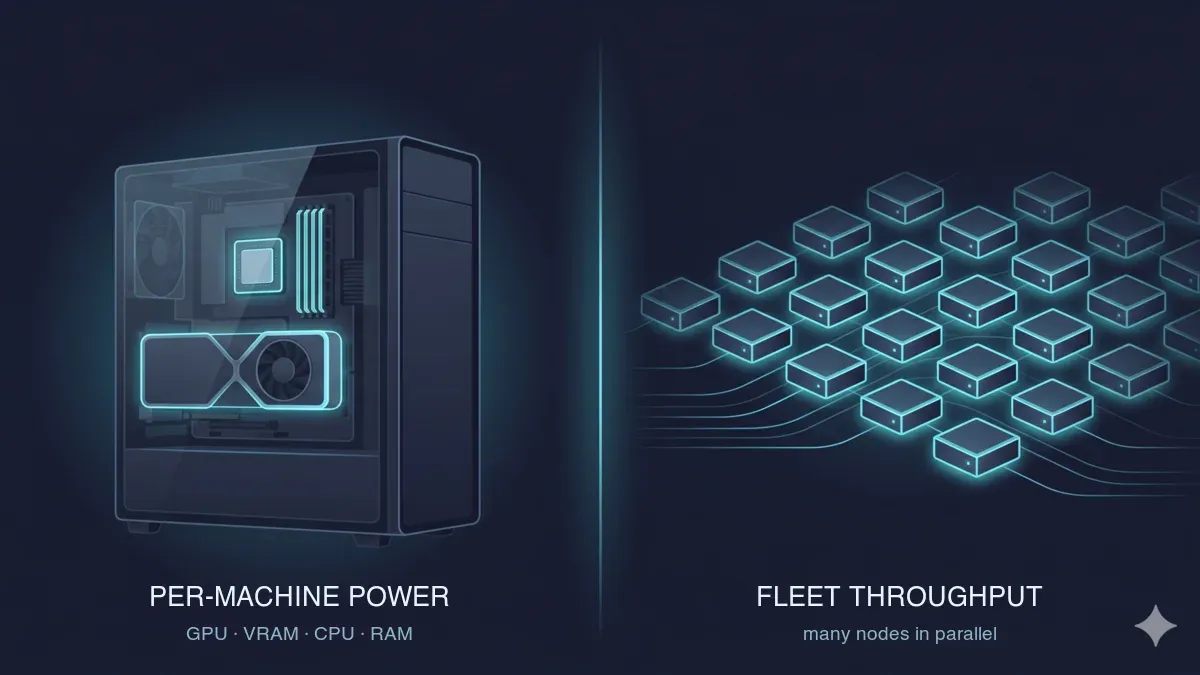 The two axes of high-performance 3D rendering — per-machine power (GPU, VRAM, CPU, RAM) in a single workstation on the left, and fleet throughput across many parallel compute nodes on the right.
The whole comparison hinges on splitting performance into two axes, because no single number captures both.
Per-machine performance is what governs modeling, look-dev, simulation, and any single frame. Four things set the ceiling here. GPU class and VRAM are the hard limit for GPU renderers — a scene that exceeds available VRAM either falls back to slow out-of-core memory or fails to render at all, so VRAM is the first spec to check, not the last. CPU core count and clock drive CPU render engines, simulation, scene preparation, and viewport responsiveness. System RAM matters for heavy scenes, simulations, and high-resolution textures. And storage I/O affects asset loading and cache behavior, which quietly becomes the bottleneck on large projects more often than people expect.
Throughput performance is the rendering-at-scale axis: how many frames per hour you can finish across a queue or a fleet. The practical reality is simple — one workstation renders a frame range serially, one frame after another, while a render farm renders them in parallel across many machines. A scene that takes ten minutes a frame is forty hours of wall-clock time for 240 frames on one box; spread across a fleet, it can be done before lunch. Throughput is the axis that decides whether you stay local or move to the cloud.
It helps to anchor the GPU side to the VRAM tiers buyers actually see in 2026. Consumer-flagship cards now sit at roughly 24–32 GB (the NVIDIA RTX 5090 carries 32 GB, for example), which comfortably handles most production Redshift, Octane, and Cycles scenes. Workstation-class cards reach 48–96 GB (L40S at 48 GB, RTX 6000-class up to 96 GB), and that headroom is what very heavy VFX, large volumetrics, and feature-film-scale assets push toward. More VRAM does not make a frame render faster; it determines whether the frame fits at all.
Finally, keep the modeling-versus-rendering distinction explicit, because the topic is both. Modeling and look-dev want a high single-thread clock and a capable local GPU — this work happens on your desk, and the cloud does not help with it. Rendering is where throughput and where it runs start to dominate. That hand-off is exactly where this comparison earns its keep. If you want the deeper background on how benchmark scores translate to real jobs, our render farm hardware benchmark guide covers what Cinebench and OctaneBench numbers do and do not tell you.
The workflow, stage by stage — and where the bottleneck actually is
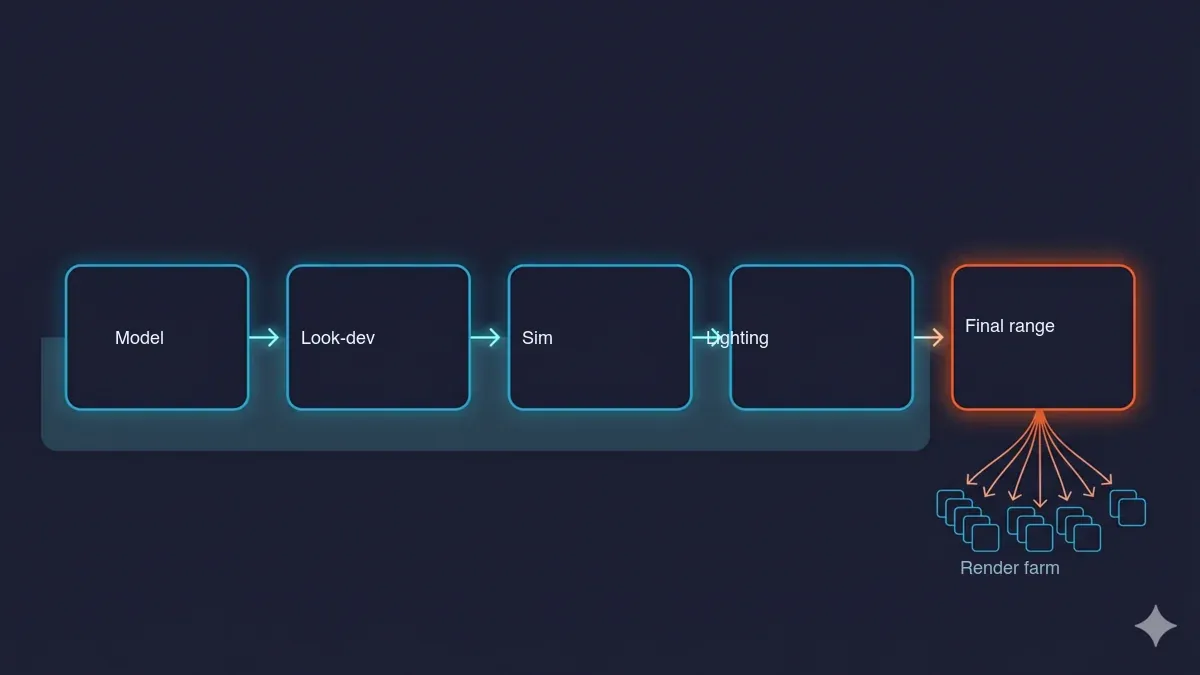 The 3D production pipeline — model, look-dev, simulation, lighting and test renders, then the final frame range — with the first stages running locally and the final range fanning out to a parallel render farm at the bottleneck.
Walking a real pipeline makes it obvious where high-performance compute matters and where it does not.
Modeling and look-dev / shading run interactively on your workstation. A capable local GPU and a fast single-thread clock matter; the cloud is irrelevant here. Spending on distributed compute to speed up modeling is spending in the wrong place.
Simulation — Pyro, FLIP, Vellum, cloth, particles — is RAM- and CPU/GPU-hungry and usually runs locally or on a simulation-capable node. This is a genuine differentiator between providers: not every render farm runs native simulation, so if your pipeline bakes sims in the cloud, confirm support before you commit. For most teams, sims are cached locally and only the final frames are offloaded.
Lighting and test renders sit in between. You iterate locally on low samples or small regions, then graduate to full-quality frames once the look is locked.
The final frame range is the bottleneck that pushes people to the cloud. This is where serial-on-one-box loses decisively to parallel-on-many. It is the single most common reason a studio that has been "fine" on local hardware suddenly needs more.
So when is local hardware actually the bottleneck? The honest signals — not a sales pitch — are these. You hit the wall when a single frame exceeds your local VRAM; when a frame range will not finish before the deadline on one machine; when your workstation is locked rendering and you cannot keep working on the next shot; or when you would be buying expensive hardware you only need for occasional spikes. Conversely, you do not need the cloud when a single capable workstation comfortably finishes your typical job within deadline and you render only occasionally. If that describes you, buying or keeping one good machine is the right call, and we say so plainly — our piece on whether a single RTX 5090 is worth it walks through that math for solo artists.
If you have decided you need more than one machine's worth of compute, the next question is which kind of "more" — a bigger workstation, raw cloud GPUs you manage yourself, or a managed farm. Here is how those three compare.
Comparison: high-performance compute options
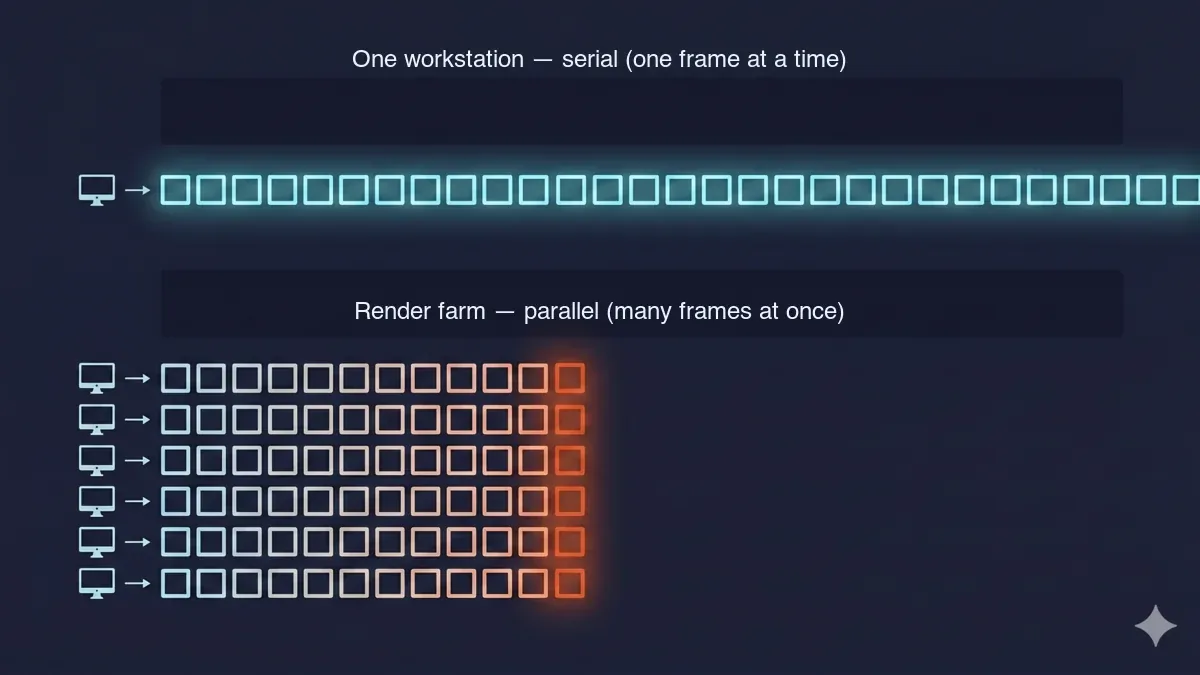 One workstation rendering frames serially versus a render farm rendering the same frames in parallel — the throughput difference that pushes large jobs to the cloud.
Before the table, it is worth framing the three categories honestly, because they are genuinely different products, not three flavors of the same thing.
A high-end local workstation is hardware you own and control end to end. You buy it, configure it, license your software on it, and it is "free" to run after the capital outlay — but it renders one frame at a time and you maintain everything.
Cloud GPU / IaaS means you rent machines by the hour and do the rest yourself: install your DCC and render engine, manage your own licenses, set up the queue or orchestration, and remote in. It offers maximum control and scales if you build the tooling, but you are the system administrator, and you pay for idle time if you do not manage it tightly. This is the AWS / CoreWeave / Vast.ai model, and some farms position here too — iRender, for instance, describes its own service as IaaS in the AWS/Azure mould, where you connect to a machine and configure it yourself.
A managed cloud render farm inverts that: you upload your scene file, the farm renders it across many nodes with engines and licenses already installed, and you download the result.
For teams whose volume justifies owning a slice of that fleet outright rather than metering per job, our dedicated GPU cluster rental page covers the enterprise-retainer version of the same hardware. There is no remote desktop, no software installation, and no license juggling on your side. This is the model we operate, and it suits teams that render in bursts and would rather not run a render pipeline as a second job.
| Dimension | High-end workstation (own) | Cloud GPU / IaaS (rent + self-manage) | Managed cloud render farm |
|---|---|---|---|
| What you manage | Everything (hardware, drivers, licenses) | OS, software install, licenses, queueing | Just your scene file (upload, render, download) |
| Setup time | Hours to days (build and config) | Moderate (provision, install, license) | Minimal (engines and licenses pre-installed) |
| Parallelism (throughput) | One machine, frames serial | Scales if you orchestrate it | Many nodes, frames in parallel by default |
| Best for | Continuous daily rendering, full control | Teams with DevOps who want raw control | Burst / deadline rendering without ops overhead |
| Cost shape | High up-front capex, then "free" | Per-hour metered (you pay idle if unmanaged) | Per-job metered, no idle cost |
| GPU you actually get | Whatever you bought | Varies by instance type | Varies by provider — ask for exact SKU and VRAM |
The takeaway the table understates: the managed-farm row trades a modest metered premium over raw IaaS for zero setup, pre-installed engines, and managed licenses, which is why it fits studios that render in bursts rather than continuously. The IaaS row rewards teams who already have the DevOps muscle to keep utilization high. And the workstation row is hard to beat on cost if and only if your render volume is steady and a single machine keeps up.
One buyer-checklist item applies across all three managed-farm options and is worth stating directly: ask any provider exactly which GPU and how much VRAM your job will run on. Several render farms describe their fleet only as "hundreds of NVIDIA RTX nodes" without naming the GPU model or VRAM. Because VRAM is the hard ceiling for GPU rendering, that ambiguity matters — a job that fits a 32 GB card may not fit an older 8 GB one. We publish our fleet specs (NVIDIA RTX 5090, 32 GB VRAM, plus 20,000+ CPU cores); the reasonable move is to ask anyone who does not.
On pricing, the only fair way to compare is to convert everything to cost per unit of compute, because providers express it differently. We bill directly in USD: GPU rendering at $0.003 per OctaneBench-hour and CPU rendering at $0.004 per GHz-hour (rising with priority), with all render-engine licenses included and a $25 sign-up credit that never expires. Other providers use other models. RebusFarm prices in an internal credit called RenderPoints. GarageFarm uses its own internal credit system. iRender uses an IaaS hourly model where you also manage your own licenses. None of these is inherently wrong, but the only way to compare them is to take your real frame, get a quote in each model, and look at the all-in number — and to check what is bundled, since a low compute rate plus separately-purchased engine licenses is not the bargain it first appears.
For the full mechanics of per-GHz-hour and per-GPU-hour math, including worked examples, our cloud render farm pricing guide goes deeper than a comparison table can.
| Provider (type) | GPU class / VRAM (disclosed?) | Pricing model | Free trial | Licenses managed | Company |
|---|---|---|---|---|---|
| Super Renders Farm (managed) | NVIDIA RTX 5090, 32 GB VRAM (disclosed); 20,000+ CPU cores | Direct USD per GHz-hour (CPU) and per OctaneBench-hour (GPU); engine licenses included | $25 on sign-up (credits never expire) | Fully managed — engines and licenses pre-installed, no remote desktop | US company (Santa Ana, CA) |
| GarageFarm (managed) | Workstation-class GPUs per public materials; exact SKUs not publicly disclosed | USD credit (direct) | Yes (sign-up credit) | Managed | UK-registered; data center in Poland |
| RebusFarm (managed) | Described as "NVIDIA RTX nodes"; exact SKUs not disclosed | Internal credit system (RenderPoints) | Yes (credit-based) | Managed | German company (Leverkusen) |
| iRender (IaaS) | GPU-first; you remote in and configure the machine | Per-hour metered (IaaS); you manage licenses | Varies | Self-managed — you install software and manage licenses | Vietnamese company |
Specs and pricing models are as published by each provider as of 2026; verify current figures and exact rates with each provider before purchase. Where a provider does not publish its GPU models, the table marks them "not disclosed" rather than guess. The iRender row is included to illustrate the IaaS (self-managed) model alongside managed farms, not as a head-to-head ranking.
High-performance by use case
There is no single "best" hardware tier — there is the right one for your engine and your workflow. Here is what to prioritize per common setup, with links down to the deeper per-engine guides.
Blender (Cycles, GPU or CPU). Cycles runs on GPU (via OptiX on NVIDIA) or CPU, and on the GPU path, VRAM is the ceiling. For bursty Blender frame ranges, a farm with disclosed, modern VRAM avoids the out-of-core slowdown you hit on an older 8 GB card — and lets you keep modeling while the final range renders elsewhere. (Note that Cycles is the production renderer to plan around here; Blender's EEVEE is a real-time viewport engine, not what render farms run for final frames.) The practical question for Blender is usually VRAM plus "can I keep working," and both point toward offloading the final range. For the software-choice question of Blender versus other DCCs, see our Blender vs Maya comparison.
Cinema 4D + Redshift (GPU). Redshift is GPU-first and VRAM-bound; out-of-core exists but costs speed, so scenes that overflow an 8–12 GB card are exactly where a 32 GB fleet earns its keep. This is a well-trodden pairing for us. For the deeper fleet behavior on C4D and Redshift, see our RTX 5090 cluster performance write-up, and for the conversion-side details our Redshift cloud render farm page. If you are weighing GPU engines, the Octane vs Redshift comparison covers that choice.
Maya + Arnold (CPU-strong, GPU optional). Arnold is historically CPU-heavy — a GPU mode exists, but many studios still ship final frames on CPU — so throughput here is measured in core-hours, and many CPU cores in parallel matter more than one flagship GPU. This is the case that most rewards a large CPU fleet, which is also where the majority of render jobs sit in practice. See our Arnold cloud render farm page for the engine specifics.
3ds Max + V-Ray (CPU, GPU, or hybrid). V-Ray runs in CPU, GPU (CUDA/RTX), or hybrid mode, so the "high-performance" answer genuinely depends on your mode — decide CPU versus GPU V-Ray first, and the right hardware tier follows from that. For the speed-and-cost deep dive, see our V-Ray GPU render farm speed test; for the DCC-choice angle, the V-Ray on Blender vs 3ds Max comparison.
Feature-film and heavy VFX (simulation, volumetrics, high VRAM). This is the most demanding case, and the constraints stack: large VRAM (48 GB and up for the heaviest volumetrics), simulation-capable nodes, and serious frame-count throughput, all at once. A real buyer-checklist item here is that some farms do not run native simulation — confirm it. At this scale, "high-performance" means a fleet rather than a card, and the honest planning move is to size for your single heaviest frame and your full frame count together.
How to choose: a six-point buyer framework
Turning all of the above into a decision you can act on:
- VRAM ceiling. Does your heaviest single frame fit in the GPU's VRAM? This drives the GPU tier and is the first thing to check, because nothing else matters if the frame will not fit.
- Deadline math. Multiply frames by per-frame render time, divide by the number of machines you can run in parallel. If one machine misses the deadline, that is the case for a farm.
- Engine and DCC fit. Is your renderer GPU- or CPU-bound, and are the engine and its licenses pre-installed where you plan to render? This drives managed versus IaaS.
- Setup tolerance. Do you want to manage machines, drivers, and licenses (IaaS), or upload and go (managed)? Be honest about how much ops time you actually have.
- Spend pattern. Continuous, daily rendering can justify owned hardware or reserved cloud; bursty, deadline-driven rendering favors a managed farm you pay per job, with no idle cost between projects.
- Company, support, and jurisdiction fit. For some studios — particularly in the US — a vendor's company domicile matters for procurement, contracts, and legal recourse, which is why a US-registered company with US-based support and a US phone line can be a relevant factor. Super Renders Farm operates as a US company (Super Renders Farm LLC, headquartered in Santa Ana, California) with 24/7 live-chat support and a US support line. This is a company-and-support consideration, separate from raw hardware specs, so weigh it alongside VRAM, throughput, and price rather than in place of them.
There is no single right answer here — there is the right answer for your VRAM ceiling, your deadline, and how often you render.
FAQ
Q: What counts as "high-performance" for 3D rendering in 2026? A: Two things, depending on the job. Per-machine power means a modern GPU with enough VRAM to hold your scene — roughly 24–32 GB handles most production Redshift, Octane, and Cycles work, while very heavy VFX pushes toward 48 GB and up — plus enough CPU cores and RAM for modeling, simulation, and CPU renderers. Throughput means how many frames you can finish per hour across multiple machines working in parallel, rather than one machine rendering frames one at a time. Most buyers need to think about both, not just the spec sheet of a single card.
Q: Is a high-end workstation or a cloud render farm better for high-performance rendering? A: A single high-end workstation is the better value if you render frequently and your typical job comfortably finishes before deadline on one machine. A cloud render farm wins when a single frame exceeds your local VRAM, when a frame range will not finish in time on one machine, or when you render in bursts and would rather not buy hardware that sits idle between projects. Many studios use both — a workstation for daily work and a farm for crunch.
Q: What's the difference between a cloud GPU (IaaS) service and a managed render farm? A: With cloud GPU or IaaS, you rent the machines and do the rest yourself: install your software, manage your licenses, set up the queue, and remote in. With a managed render farm, the render engines and licenses are already installed, so you upload your scene, it renders across the fleet, and you download the result, with no remote desktop or license management on your side. IaaS gives you more control; a managed farm removes the operations work.
Q: How much VRAM do I need for high-performance GPU rendering? A: It depends on scene complexity, but the practical rule is to size VRAM to your heaviest single frame. Many production scenes in Redshift, Octane, or Cycles fit comfortably in 24–32 GB; once a scene exceeds the card's VRAM, GPU renderers fall back to slower out-of-core memory or fail to render, so the ceiling is hard rather than gradual. Heavy volumetrics and feature-film-scale VFX are where 48 GB and larger become worthwhile.
Q: How do I compare render-farm pricing when providers use credits or power tiers? A: Convert everything to a direct cost per unit of compute before comparing. Some providers bill in internal credits and others in multi-tier power sliders, which makes headline numbers hard to read at a glance. Ask each provider for the effective rate per GHz-hour for CPU and per GPU-hour or OctaneBench-hour for GPU, confirm what is bundled — engine licenses in particular — and then compute the all-in cost for one of your real frames in each model.
Q: Why do some render farms not list their exact GPU models? A: Several providers describe their fleet only as "NVIDIA RTX nodes" without naming the GPU model or VRAM, and a few list specs only intermittently. Because VRAM is the hard ceiling for GPU rendering, this matters: a job that fits a 32 GB card may not fit an older 8 GB one. A reasonable buyer-checklist item is to ask any provider exactly which GPU and how much VRAM your job will run on. Super Renders Farm publishes its fleet specs (NVIDIA RTX 5090, 32 GB VRAM), so the figure is available up front.
Q: Which render farm setup is best for Blender, Redshift, Arnold, or V-Ray specifically? A: It comes down to whether your engine is GPU-bound or CPU-bound. Blender Cycles and Redshift are GPU-first, so VRAM and modern GPUs matter most; Arnold is traditionally CPU-heavy, so core count and parallel nodes matter more; V-Ray runs in CPU, GPU, or hybrid mode, so decide your mode first and size hardware to it. The right provider is the one that discloses the relevant hardware for your engine and includes the licenses you need.
Q: Does it matter whether a render farm is a US company? A: For some studios it does — a vendor's domicile can affect procurement, contracts, billing, and legal recourse, which is why buyers sometimes prefer a US-registered company with US-based support. Super Renders Farm operates as a US company (Super Renders Farm LLC) headquartered in Santa Ana, California, with 24/7 live-chat support and a US phone line. Note that more than one render farm is US-based, so this is one factor among several: weigh it alongside VRAM, throughput, and price rather than treating company location as a stand-in for performance.
About Thierry Marc
3D Rendering Expert with over 10 years of experience in the industry. Specialized in Maya, Arnold, and high-end technical workflows for film and advertising.



