

Cheapest Render Farm in 2026: An Honest Multi-Provider Price Comparison
Overview
Introduction
"Which render farm is the cheapest?" is the wrong question — and we say that as people who run one. We have been operating cloud rendering infrastructure since 2017, and the answer always depends on what you are rendering, how often, and on what hardware your scene actually performs well. A farm with the lowest published per-hour rate can still deliver more expensive frames than a competitor charging four times as much, simply because the underlying machine is slower or the licensing model is different.
This guide does the apples-to-apples work for you. We pulled current published pricing (verified April 2026) from eight cloud render farms — Super Renders Farm, GarageFarm, RebusFarm, Ranch Computing, Fox Renderfarm, Drop & Render, RenderStreet, and iRender — and grouped the answers by use case. Stills, animations, heavy VFX, scaling archviz studios, and Blender freelancers all have a different "cheapest" in 2026. By the end of this article you will know which farm to test first for your specific workload, and how to validate the cost on a real frame before committing budget.
We have included our own pricing in the matrix because hiding it would be dishonest. We are not going to tell you that Super Renders Farm is the cheapest for every scenario — that is not true, and the providers below all have legitimate use cases where they win. What we can tell you is how the billing units compare, where the hidden costs hide, and how to interpret a "1.41 cents per GHz-hour" claim against an "$0.004 per OctaneBench-hour" claim without getting fooled by vanity numbers.
Why "Cheapest" Is a Trap Question
Render farms publish rates in different units, on different hardware, with different things included. A naïve comparison of two headline numbers is almost always misleading. Here are the four reasons most "cheapest" comparisons go wrong.
Different billing units measure different things. GHz-hour normalizes for clock speed across CPU rendering. OctaneBench-hour normalizes for raw GPU power. Cinebench-point-hour (used by Drop & Render) is hardware-agnostic but only meaningful inside their own benchmark. Per-core-hour (used by Fox) ignores clock speed entirely. Server-hour (used by RenderStreet) is the simplest unit but completely opaque about how much compute you actually get. You cannot directly compare "$0.004 per OB-hour" against "$3.00 per server-hour" without running a real scene through both.
Hardware speed multiplies the rate. A render farm quoting $0.024 per GHz-hour on AMD EPYC 3rd-gen nodes can produce the same frame faster than one quoting $0.004 per GHz-hour on older silicon — meaning the headline-cheaper farm is effectively more expensive per frame. Always look at hardware generation alongside the rate.
Licensing is bundled differently. Some farms include V-Ray, Corona, Redshift, and Octane licenses in the per-hour price. Others charge separately for high-priority engines. iRender, as an IaaS provider, hands you a remote desktop where you bring your own licenses (Cinema 4D and Redshift come pre-installed, with licences pre-activated on Prime-tier accounts) — that means lower base rates but real licensing costs to budget for separately for everything else. Always ask which engines are included before comparing rates.
Volume bonuses move the real price by 30–70%. Almost every farm has a credit-purchase bonus tier. Buying $10,000 of credits at Drop & Render yields 55% bonus credits, and RebusFarm gives 40% on the same purchase. GarageFarm's bonus scales to 50% at its $12,500 ceiling. The published rate is what you pay if you spend a few hundred dollars; serious users always negotiate effective rates 20–60% lower than the sticker.
The takeaway: the only honest comparison is dollars per finished frame on your actual scene. Every farm in this list offers free trial credits ($25 or 25 RenderPoints typical) precisely because they know this. Use them.
 https://res.cloudinary.com/dl8ovyusd/image/upload/v1777946746/strapi-uploads/inline_01_price_matrix_2e368ecfa6.webp
Published Rates Across Eight Providers (April 2026)
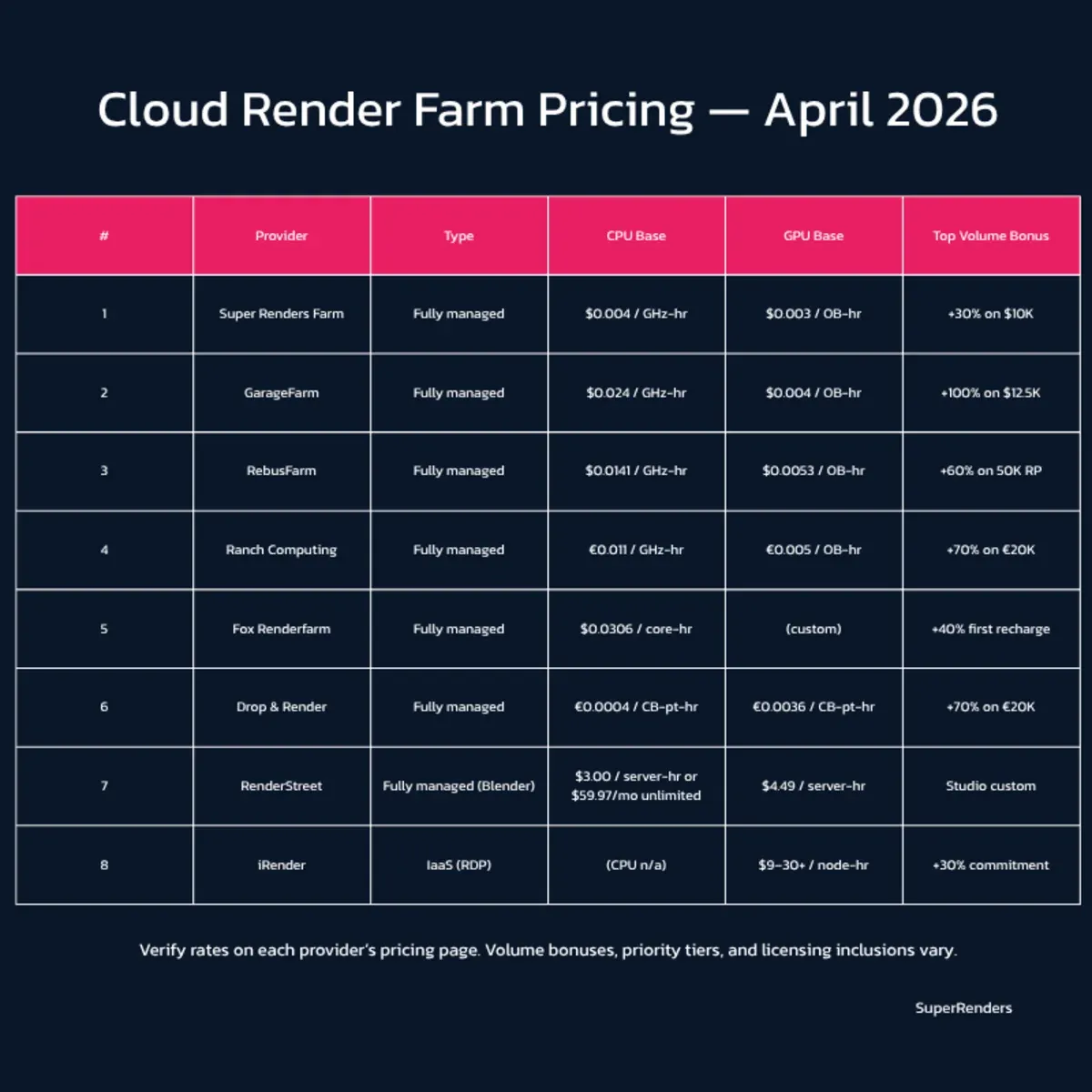
The table below shows CPU and GPU base rates as published on each provider's pricing page, verified April 2026. We have noted whether the farm is fully managed (you upload, it renders) or IaaS (remote desktop, you install everything yourself), because that distinction changes both the price and the workflow significantly.
| Provider | Type | CPU Base | GPU Base | Free Trial | Top Volume Bonus |
|---|---|---|---|---|---|
| Super Renders Farm | Fully managed | $0.004 / GHz-hour | $0.003 / OB-hour | $25 | +30% on $10K credits |
| GarageFarm | Fully managed | $0.024 / GHz-hour (Low) | $0.004 / OB-hour (Low) | $25 | +50% on $12.5K credits |
| RebusFarm | Fully managed | $0.0141 / GHz-hour | $0.0053 / OB-hour | 25 RP (~$30) | +60% on 50K RP |
| Ranch Computing | Fully managed | €0.011 / GHz-hour (Low) | €0.005 / OB-hour (Low) | €30 | +128% on €13K credits |
| Fox Renderfarm | Fully managed | $0.0306–$0.051 / core-hour | Custom GPU rate | $25 | +40% on first recharge |
| Drop & Render | Fully managed | €0.0004 / Cinebench-pt-hour (Quartz) | €0.0036 / CB-pt-hour | €25 | +70% on €20K credits |
| RenderStreet | Fully managed (Blender / Modo) | $3.00 / server-hour or $59.97 / month unlimited | $4.49 / server-hour | Variable | Custom Studio plan |
| iRender | IaaS (remote desktop) | (CPU not primary offering) | $8.20–$52 / node-hour (RTX 4090, 1–8 cards) or $10.80–$62 (RTX 5090, 1–8 cards) | +100% on first top-up within 24 h | No volume ladder published (10% off bookings of 3 hours or more instead) |
Reading the table: the lowest CPU GHz-hour rate is ours at $0.004, but Drop & Render's Cinebench-point billing and RenderStreet's flat server-hour or monthly subscription cannot be directly compared without normalizing through a benchmark scene. Fox's $0.0306 per core-hour at the Diamond tier requires $10K in cumulative spend, which only makes sense for production studios. Ranch and GarageFarm both publish three priority tiers — the Low rate is what you get when the queue is quiet; expect to pay the Medium or High rate during deadline crunch.
For external pricing-page reference, see the GarageFarm pricing page, RebusFarm products page, and Fox Render Farm pricing page. Each updates a few times per year — always verify before quoting a rate to a client.
Use Case 1 — Single Stills and One-Off Archviz Batches
If you render a handful of high-resolution stills per month — typical for an archviz freelancer or small studio — you want pay-per-frame economics with no commitment, on hardware fast enough that one image does not block your queue for hours.
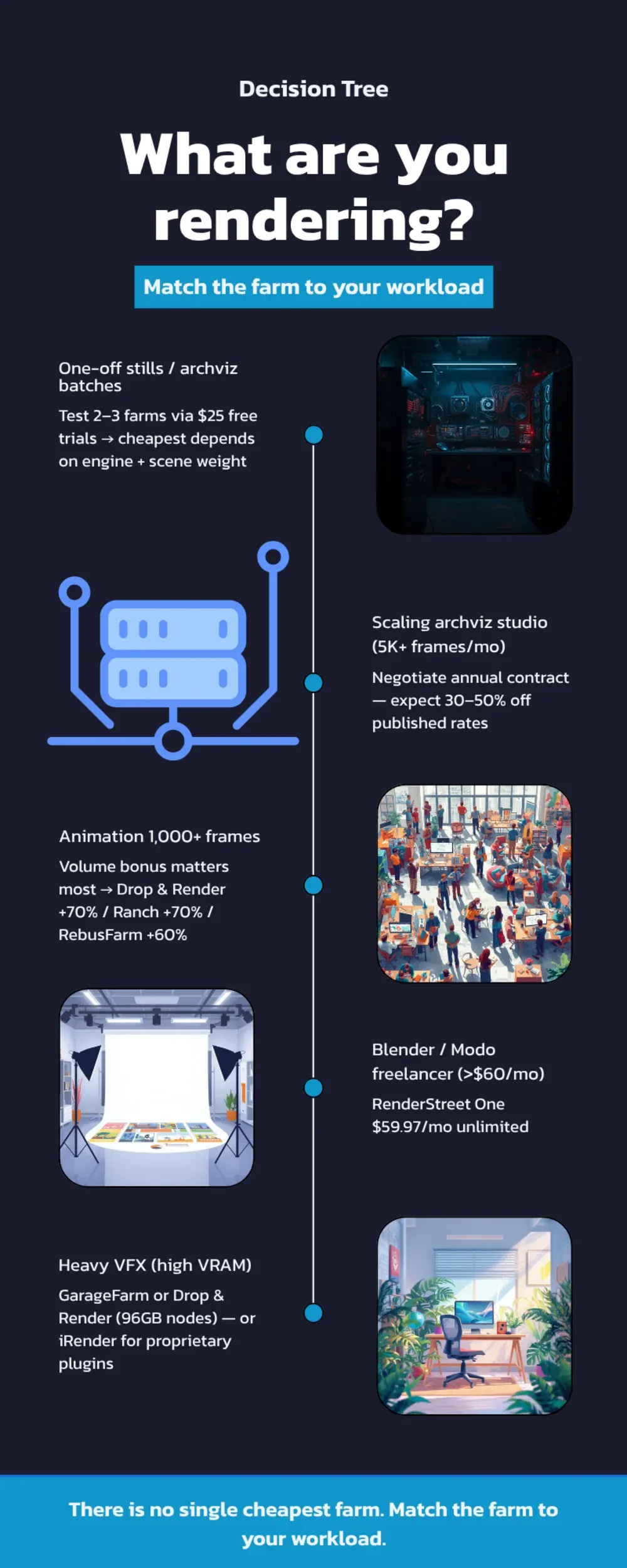
Cheapest for this use case: the answer depends on engine. For V-Ray and Corona archviz on CPU, RebusFarm's $0.0141 per GHz-hour on modern silicon is competitive once you factor in their pricing-calculator transparency — you can preview the cost before submitting. GarageFarm's Low priority at $0.024 per GHz-hour is more expensive per unit but their hardware (up to 88 cores) often finishes the frame faster, partially offsetting the premium. Our own $0.004 per GHz-hour on dual Xeon E5-2699 v4 (44 physical cores) is the lowest published CPU rate but the hardware is older, so the time saved on a faster farm sometimes makes the per-frame cost roughly equivalent.
If you are weighing RebusFarm specifically against our farm on archviz pricing, the Super Renders Farm vs RebusFarm comparison sets both side by side.
Honest recommendation: submit the same scene to two or three farms using their free trial credits. The first $25 buys you genuine data on your actual workload — far more useful than any spreadsheet. For a deeper walkthrough of how stills cost out at different farms, see our cost-per-frame breakdown, and for archviz-specific provider rankings see our archviz render farm guide.
Use Case 2 — Animation Sequences and Heavy Frame Batches
For animation work — 1,000+ frames at 1080p or higher — three things dominate the cost: the per-GHz-hour rate, the volume bonus you can unlock, and how many concurrent nodes the farm allocates to your job.
Cheapest for this use case: Ranch Computing's bonus reaches +128% on a €13,000 purchase, an effective rate about 56% lower, and Drop & Render offers +70% on €20,000, about 41% lower. For a studio rendering 1,000+ hours per month, that bonus alone matters more than the headline GHz-hour number. RebusFarm's 60% bonus at 50,000 RenderPoints is similar territory. Our credit top-ups carry an automatic volume discount of up to 30% (at 10,000 credits or more), which is meaningful but less aggressive at the high end than the European farms.
Watch out for priority queues. Both Ranch and GarageFarm publish their Low priority rates as the headline number. Low priority can mean 6–12 hour queue waits during peak periods. If you have a Friday deadline, you will end up paying the Medium or High rate, which is 1.5x to 3x the Low. Factor a realistic priority mix into your budget, not just the cheapest tier.
For a deeper look at how subscription versus per-frame versus credit-pack pricing compare on long animations, see our pricing models guide.
Use Case 3 — Heavy VFX and Complex GPU Scenes
Heavy VFX work — Redshift, Octane, or V-Ray GPU on dense scenes with simulations and high VRAM requirements — is where GPU node hourly rates and VRAM ceilings dominate the math. A cheap GPU farm with 24GB VRAM is not cheap when half your shots crash and need to be re-rendered on a 48GB or 96GB node.
Cheapest for this use case: GarageFarm's Low priority at $0.004 per OB-hour with up to 96GB VRAM is hard to beat for credit-pack-discounted users. Ranch's €0.005 at Low priority is similar territory in euros. Our own $0.003 per OB-hour on RTX 5090 with 32GB VRAM is the lowest base rate for managed GPU rendering, but the 32GB ceiling means scenes pushing past that need to use V-Ray or Redshift's out-of-core features. For VRAM-heavy production work, an RTX 6000 Pro or L40s machine at GarageFarm or Drop & Render handles the scene without the overflow penalty.
For full machine control with proprietary plugins or custom render setups, iRender's IaaS model — $8.20 to $62 per node-hour depending on card generation (RTX 4090 or RTX 5090) and card count (1 to 8) — gives you remote desktop access and the ability to install whatever you need. That is more expensive per hour than managed alternatives, but if your pipeline depends on plugins managed farms do not preinstall, you save on workaround time. The 100% first-top-up bonus essentially halves your real cost during evaluation. We cover the managed-versus-IaaS tradeoff in detail elsewhere.
Use Case 4 — Repeat ArchViz Studios at Scale
If you are an archviz studio rendering 5,000+ frames per month consistently, the volume bonus tier is the entire game. The base rate barely matters when bonuses can more than double the credits on a single purchase.
Cheapest for this use case: Ranch Computing tops out at +128% bonus on a €13,000 credit purchase, and Drop & Render at +70% on €20,000. Those are the highest bonuses on this list. GarageFarm reaches +50% at $12,500, and that bonus sits in their highest-difficulty tier with credits expiring under different rules than competitors. RebusFarm's +60% at 50,000 RenderPoints is more conservative but their pricing calculator is the most predictable in the industry, which matters when you are quoting clients fixed prices.
The hidden lever: annual commitment contracts. Most farms in this list will negotiate custom rates for studios committing to 1,000+ hours per month. The published bonus tiers are starting points, not ceilings. If you are at this scale, contact each farm directly and request a custom quote.
Use Case 5 — Blender and Modo Freelancers with Consistent Volume
If you render Blender or Modo projects most weeks and your monthly cloud rendering bill is consistently above $60, you have one option that flat-out wins on dollars-per-rendered-hour.
Cheapest for this use case: RenderStreet One at $59.97 per month for unlimited CPU rendering. RenderStreet is the only commercial render farm offering a true unlimited subscription, and for Blender artists with consistent workloads the math is hard to beat — even one full eight-hour render submission per week pays for the entire month. The catch is that the subscription is software-locked: Blender, Modo, V-Ray, and LuxRender only. If you also work in Cinema 4D or 3ds Max, the unlimited plan does not apply and you would need a different farm for those engines.
Watch the priority queue. Unlimited subscriptions universally throttle queue position to keep the economics working — your jobs get less aggressive node allocation than per-hour customers. For a freelancer this is fine; for a studio with a deadline it is not.
 https://res.cloudinary.com/dl8ovyusd/image/upload/v1777946754/strapi-uploads/inline_02_decision_tree_0cd5932b0e.webp
How to Calculate Real Cost Before You Commit
The five-minute version of cost validation: take a single representative frame from your project — ideally the heaviest frame, not an easy hero shot — and submit it to the two or three farms shortlisted above using their free trial credits. Compare three numbers: total render time, total cost charged, and effective cost per frame.
For an animation, multiply that single-frame cost by your frame count and add 10–15% buffer for retries. For stills, average across three to five representative frames at the actual final resolution. The trial credits ($25 typical) easily cover this evaluation on most scenes, and the data you get is more accurate than any pricing-page spreadsheet because it tests your actual project on real hardware.
If you want to budget before testing, our cost-per-frame guide walks through the back-of-envelope math, and our pricing pillar guide covers the full pricing-model landscape including subscription, credit, and pay-per-frame structures. We also break down the actual hourly numbers in cloud render farm pricing explained. For the build-it-yourself comparison — when does cloud actually beat owning hardware — see our build-versus-cloud total cost analysis.
Where SuperRenders Fits in This List
Honest disclosure: we do not claim to be the cheapest render farm in 2026. Our $0.004 per GHz-hour CPU rate and $0.003 per OB-hour GPU rate are the lowest published base rates among the fully managed farms in this comparison, and we include all major engine licenses (V-Ray, Corona, Redshift, Arnold, Octane) in that price. For pure pay-per-hour CPU rendering with no commitment, the math works out in our favor on most projects we have benchmarked.
Where we do not win: against RenderStreet One's flat unlimited subscription for Blender artists, against Ranch Computing and Drop & Render on high-volume credit bonuses at the very high end, and against iRender if you genuinely need full IaaS control. Those farms have legitimate use cases where they are the cheapest option, and pretending otherwise would not be useful to you.
What we offer that matters in the cost equation: 20,000+ CPU cores on dual Xeon E5-2699 v4 hardware, a GPU fleet on RTX 5090 with 32GB VRAM, all licenses included, $25 trial credit, no card required, per-second billing, and credits that never expire. The full breakdown is on our pricing page, and our fully managed farm explainer covers what "fully managed" actually means in practice — no remote desktop, no software install, no license headaches. If your workload fits that mode, we are likely on your shortlist; if not, one of the providers above is probably a better fit and we would rather you know that than have a bad first project with us.
FAQ
Q: Which render farm is genuinely the cheapest in 2026? A: There is no single answer. For pay-per-hour CPU on managed farms with no commitment, Super Renders Farm has the lowest published GHz-hour rate at $0.004. For unlimited Blender or Modo rendering, RenderStreet One at $59.97/month is hard to beat for consistent users. For the highest volume bonuses on big credit purchases, Ranch Computing reaches +128% on €13,000 and Drop & Render +70% on €20,000. For VFX with high VRAM, GarageFarm and Drop & Render offer 96GB nodes. The cheapest for you depends on engine, workload size, and how often you render.
Q: How do I compare $0.004 per GHz-hour against $3.00 per server-hour fairly? A: You cannot, on paper. Submit the same scene to both farms using free trial credits and compare total cost charged. GHz-hour scales with clock speed times core count; server-hour is a flat rate per machine regardless of internal specs. The only honest comparison is dollars per finished frame on your actual project, which is why every farm in this list offers $25 in trial credits.
Q: Do cheaper render farms cut corners on hardware or licensing? A: Not necessarily. The price differences mostly reflect different infrastructure economics — older versus newer silicon, location, license bundling, and operating overhead. RebusFarm and Fox have been operating for 20+ years on optimized infrastructure; their rates reflect mature scale. We run dual Xeon E5-2699 v4 nodes with 64–256GB RAM each, which is older than the latest EPYC chips but extremely reliable for V-Ray and Corona archviz workloads. The trick is matching the farm's hardware to your scene's actual bottleneck.
Q: Are volume discounts worth it for small projects? A: Usually not. Most volume bonus tiers start meaningfully scaling at $1,000+ credit purchases. If you only render once or twice a month, paying for credits you may not use within a few months is a worse deal than paying full rate as you go. The exception is farms where credits never expire — Super Renders Farm and Drop & Render both allow this — where buying once at a small bonus tier and drawing down over time can make sense for occasional users.
Q: What about using Amazon AWS, Google Cloud, or other general cloud providers for rendering? A: General-purpose cloud providers are almost always more expensive than dedicated render farms once you factor in storage, bandwidth, idle time, and the engineering effort to set up a working render pipeline. AWS Deadline Cloud, the closest equivalent to a managed render farm offered by a hyperscaler, charges premium rates and still requires more configuration than a dedicated farm. For most 3D artists and studios, a dedicated render farm wins on both cost and time-to-render.
Q: Why does iRender cost more per hour but show up in "cheapest" lists? A: iRender is IaaS — you rent a remote desktop machine and install your own software. The per-hour rate looks higher than managed farms because you are renting the entire machine, but you control everything: install custom plugins, run scripts, batch-launch jobs your own way. For users with proprietary pipelines or custom render setups that managed farms cannot easily support, the IaaS model can be cheaper end-to-end despite the higher hourly rate, because you avoid plugin-compatibility workarounds and licensing surprises.
Q: How often do render farm prices change? A: Most farms adjust pricing once or twice a year. Volume bonus tiers and promotional credits change more frequently — quarterly is common. The numbers in this article are verified for April 2026; we recommend checking each farm's pricing page directly before committing budget for a specific project. Bookmarking each farm's pricing URL and comparing every six months is good practice for studios with annual production planning.
Q: Which farm is best for first-time cloud rendering users? A: Pick a fully managed farm with strong free trial credits, transparent pricing, and good support — RebusFarm's pricing calculator is the most predictable for beginners; GarageFarm has thorough documentation; Super Renders Farm includes all engine licenses with $25 trial credit and no card required. Try the same project on two farms during your trial period and pick the one whose workflow feels less frustrating — that matters more for first-time users than saving a few dollars on the first job.
About Alice Harper
Blender and V-Ray specialist. Passionate about optimizing render workflows, sharing tips, and educating the 3D community to achieve photorealistic results faster.



