
Corona vs V-Ray in 2026: A Render Farm Comparison for Archviz Teams
Overview
Introduction
The Corona vs V-Ray question is unusual among render engine comparisons because both engines belong to the same company. Chaos develops and sells both, so the choice is not a bet on a vendor — it is a pick between two product philosophies maintained side by side. Corona is built on the idea that defaults should carry you to a finished image with minimal setup; V-Ray, that every stage of rendering should be controllable when you need it.
We render both engines daily on our farm: Corona jobs skew heavily toward interior and residential archviz out of 3ds Max and Cinema 4D
For V-Ray submissions specifically, including version support, our V-Ray 6 cloud render farm guide covers the farm side. , while V-Ray jobs span a wider mix — archviz, product visualization, VFX shots, and GPU-accelerated animation pipelines. That vantage point shapes everything below, because the engine you choose also determines the compute you rent: Corona is a CPU-only production renderer, while V-Ray runs on CPU, GPU, or both at once.
This guide is not a verdict on which engine wins. Both are mature, both produce production-grade archviz imagery, and both render on managed cloud farms — including ours, where each license is bundled into the render rate. The sections below cover what actually separates them in 2026: host support, rendering architecture, distributed rendering, licensing, farm cost profile, and a decision framework for your own pipeline.
One vendor, two philosophies
Corona started life at Render Legion, a Prague studio founded in 2014, and joined Chaos through a 2017 acquisition. Rather than merging the renderers, Chaos kept developing them in parallel — nearly a decade later, the split is still intentional. Current releases: Chaos Corona 15, shipped late May 2026, and V-Ray 7, Update 3 as of mid-2026.
Corona's philosophy is simplicity-first. Chaos's own positioning is that Corona's default render settings are generally the right choice in most situations, so there is usually no need to change them. Artists set up materials and lights, press render, and the progressive CPU engine resolves the image without sampling rituals. Post work happens largely inside the frame buffer: LightMix re-balances light intensity and color after the render, tone mapping is built in, and a dedicated caustics solver handles reflective and refractive effects.
V-Ray's philosophy is control-first. It exposes global illumination engine choices, sampling controls, render elements, and per-feature switches that Corona deliberately hides. That control surface is why V-Ray shows up across VFX, animation, automotive, and product work — and why it carries a steeper learning curve. V-Ray also gives you a choice Corona does not: where rendering happens. You can select CPU, GPU, or hybrid mode per project, with direct consequences for farm cost, covered below.
Neither philosophy is a quality ceiling. Interiors rendered in Corona and V-Ray are routinely indistinguishable to clients. The difference is how much of your team's time goes into reaching that image, and how much room you have to optimize once you are there.
Host application support: the first filter
Before any philosophical preference, host support decides the question for many teams.
Corona runs in two host applications only: 3ds Max and Cinema 4D. Corona 15 supports 3ds Max 2016 and newer and Cinema 4D R17 and newer. There is no Corona for Maya, Houdini, SketchUp, Rhino, or Revit — Chaos has kept the product focused on those two hosts throughout.
V-Ray covers a much wider DCC surface. Chaos ships V-Ray integrations for 3ds Max, Maya, Cinema 4D, Houdini, SketchUp, Rhino, Revit, and several more hosts, with 3ds Max and Maya the longest-established production integrations. For multi-DCC studios, V-Ray is the only one of the two that can standardize rendering across the whole pipeline.
The practical rule: if your studio lives entirely in 3ds Max or Cinema 4D, both engines are candidates. If even one critical seat sits in Maya, Houdini, SketchUp, Rhino, or Revit, V-Ray follows you there and the decision is largely made.
How each engine renders: CPU-only vs CPU+GPU hybrid
This is the deepest technical difference between the two, with the most direct render farm consequences.
Corona is a CPU renderer. All production ray tracing runs on processor cores; there is no GPU rendering mode. The one place a GPU helps Corona is denoising: the optional NVIDIA AI denoiser runs on an NVIDIA GPU for fast cleanup during interactive sessions, while Corona's own high-quality denoiser runs purely on the CPU on any machine that can run Corona. The precise framing matters — a GPU accelerates denoising in Corona, never the rendering. Even Corona's interactive rendering is, in Chaos's words, fully featured CPU-based scene exploration.
The upside of CPU-only is predictability. Memory is whatever system RAM the machine has — a heavy interior with dense scatter vegetation and 8K textures simply uses more of it, with no VRAM ceiling to manage. Scenes behave identically on a workstation and a farm node, just at different speeds.
V-Ray renders on CPU, GPU, or both at once. The classic V-Ray CPU engine remains the reference for feature completeness. Alongside it, V-Ray GPU is a separately developed engine with three interchangeable back ends — CUDA on NVIDIA GPUs, an RTX engine that leverages NVIDIA's dedicated ray tracing cores, and CUDA-x86, which runs the same CUDA code on CPU cores. That last piece enables hybrid rendering: the GPU and CPU work on the same frame simultaneously. V-Ray 7, Update 3 also reinstated AMD GPU support via the HIP framework.
The caveat: V-Ray and V-Ray GPU are distinct engines, engineered toward perceptually matching output rather than bit-identical frames. Production teams pick one mode per project and do lookdev there; pipelines built on unusual shaders or plugins should validate in the target mode before committing a full sequence.
Image quality and the archviz workflow
Both engines are physically based path tracers, and for the archviz work that dominates both user bases, final image quality is effectively a tie — the differences are in how you get there.
Corona's strength is the distance between a default scene and a presentable image. Interior lighting resolves cleanly without GI engine selection, the Corona Physical Material follows PBR conventions, and Chaos Scatter, Corona Pattern, and Corona Decal cover standard archviz dressing inside the host app. LightMix deserves specific mention for client work: re-balancing every light group's intensity and color in the frame buffer after the render collapses what used to be an overnight re-render into a slider session during the review call.
V-Ray counters with range. Its GI options let you trade accuracy for speed explicitly on animations, its render elements and AOV workflow runs deeper for teams that finish in post, and the GPU path makes lookdev iteration on a strong workstation card much quicker than CPU progressive refinement.
The honest operational summary from our queue: Corona teams spend less time configuring and more time waiting on renders; V-Ray teams spend more time configuring and have more levers to pull when a deadline compresses. Which trade is better depends on who is sitting at the workstation.
Distributed rendering: scaling beyond one machine
Both engines can put multiple machines on one job — which is where farm rendering enters.
Corona ships distributed rendering for single images. Multiple machines contribute passes to the same frame, and scaling is close to linear — Chaos's guidance notes that two identical machines finish in roughly half the time of one. Requirements are strict: every participating machine needs the exact same Corona version and host application version. For animations, Chaos recommends per-frame distribution through a render manager instead of Corona DR — which is what a managed farm does at scale, assigning each frame to a different node.
V-Ray's distributed rendering is a long-standing fixture in archviz. Like Corona, it can split a single image across multiple machines; unlike Corona, it can do so in CPU mode or GPU mode.
On a managed cloud farm, the engine-level DR distinction matters less than people expect, because farm parallelism operates at the frame level: a 600-frame walkthrough occupies hundreds of nodes simultaneously regardless of which engine rendered it. Where the engines do differ on a farm is hardware routing — every Corona job is a CPU job by definition, while a V-Ray job can target either fleet. On our farm, Corona scenes run on the CPU fleet — 20,000+ cores, nodes carrying 96–256 GB of RAM — while V-Ray scenes go to the same CPU fleet or to dedicated GPU machines with NVIDIA RTX 5090 cards and 32 GB of VRAM, depending on the scene's mode. Our Corona render farm setup guide covers submission specifics.
Licensing and pricing in 2026
Chaos sells both engines as subscriptions with parallel tier structures. Prices below are Chaos's published annual-billing rates as of June 2026 — verify current figures at chaos.com before budgeting.
| Licensing factor | Corona | V-Ray |
|---|---|---|
| Current version | Corona 15 (May 2026) | V-Ray 7, Update 3 |
| Host applications | 3ds Max, Cinema 4D | 3ds Max, Maya, Cinema 4D, Houdini, SketchUp, Rhino, Revit, and more |
| Compute | CPU only (GPU for AI denoising only) | CPU, GPU (CUDA / RTX), or hybrid |
| Entry tier | Corona Solo — $414/year, named user | V-Ray Solo — $540/year, personal license |
| Mid tier | Corona Premium — $562.80/year, floating | V-Ray Premium — $778.80/year, floating |
| Top tier | Corona Collection — $994.80/year | V-Ray Collection — $1,210.80/year |
| Distributed rendering | Included (single-image DR; per-frame via render managers) | Included (CPU and GPU modes) |
| Scene conversion | Corona Converter ingests V-Ray scenes | V-Ray scene converter handles Corona materials |
Two observations from the farm side. First, Corona's tiers are priced consistently below the equivalent V-Ray tiers — roughly 18-28% depending on tier — which compounds across a multi-seat studio. Second: on a managed farm, the engine license question largely disappears for the rendering itself. On our farm, Corona and V-Ray licenses are both bundled into the render rate — along with Redshift, Arnold, and Octane — so the subscription you maintain covers your artists' workstations, not render capacity. As an official Chaos render partner (verifiable on Chaos's render farm partner list), we run current engine builds without customers bringing their own credentials. The broader picture across engines is covered in our render farm software licensing guide.
What each engine costs to run on a render farm
Because Corona is CPU-only and V-Ray can go either way, the two engines meter differently on a farm — a comparison most generic engine guides skip.
Corona jobs bill on the CPU meter. On our farm that is $0.004 per GHz-hour at base priority, with options up to $0.016/GHz-hr when a deadline demands queue-jumping. The arithmetic is transparent: a Corona animation that meters 6,000 GHz-hours costs $24 at the base rate. For a per-machine reference, one hour of CPU rendering at Standard priority costs $0.99 on a 48-vCPU worker, $1.17 on a 56-vCPU worker and $1.27 on a 72-vCPU worker.
V-Ray jobs bill on whichever meter matches the scene's mode. A V-Ray CPU scene meters identically to Corona — same fleet, same $0.004/GHz-hr base. A V-Ray GPU scene bills at $0.003 per OctaneBench-hour, and one RTX 5090 costs $5.17 per hour at every priority level: a GPU job that occupies one card for 20 hours runs roughly $103 (20 × $5.17 = $103.40).
Which path is more economical for V-Ray depends entirely on the scene. GPU mode typically finishes frames in a fraction of the wall-clock time but on a pricier per-hour unit; CPU mode runs slower per frame on a less expensive unit and is immune to VRAM limits. The dependable way to decide is empirical: submit a 5-10 frame test in each mode, compare per-frame cost, and scale. Our cost calculator turns test timings into a full-sequence estimate, and our V-Ray render farm overview covers V-Ray farm support more broadly.
For Corona teams the cost story is simpler — one meter, with scene-side levers: noise-limit settings, denoising to cut passes, and resolution discipline.
Migrating and mixing: Corona and V-Ray in one pipeline
Because both engines live under one vendor, the wall between them is lower than between most competing renderers.
Scene conversion exists in both directions, with caveats. Corona installs with a built-in Corona Converter that switches a 3ds Max scene's renderer to Corona and converts V-Ray materials, HDRI maps, and proxies to Corona equivalents — both renderers must be installed, and it handles V-Ray 3 and newer scenes. In the opposite direction, V-Ray's scene converter in 3ds Max processes Corona materials toward V-Ray equivalents. Chaos's own documentation is candid that converted materials approximate the originals and may need manual adjustment — renderer-specific setups like LightMix or V-Ray-specific render elements do not survive untouched. Treat conversion as a strong head start on a migration, not a lossless port.
Mixing engines across a studio is routine. A pattern we see regularly: Corona for interior stills where the frame-buffer workflow shines, V-Ray for animation work or projects inherited from V-Ray-based partners. Both submit to the same farm account, output frames land in the same delivery pipeline — the EXRs do not care which engine produced them — and there is no licensing penalty to the mix, since both licenses ride along with the job.
Teams weighing a GPU-first future can set this pair against our Octane vs Redshift comparison and Arnold vs Redshift production comparison to see how the trade-offs shift outside the Chaos ecosystem.
Choosing between Corona and V-Ray: a decision framework
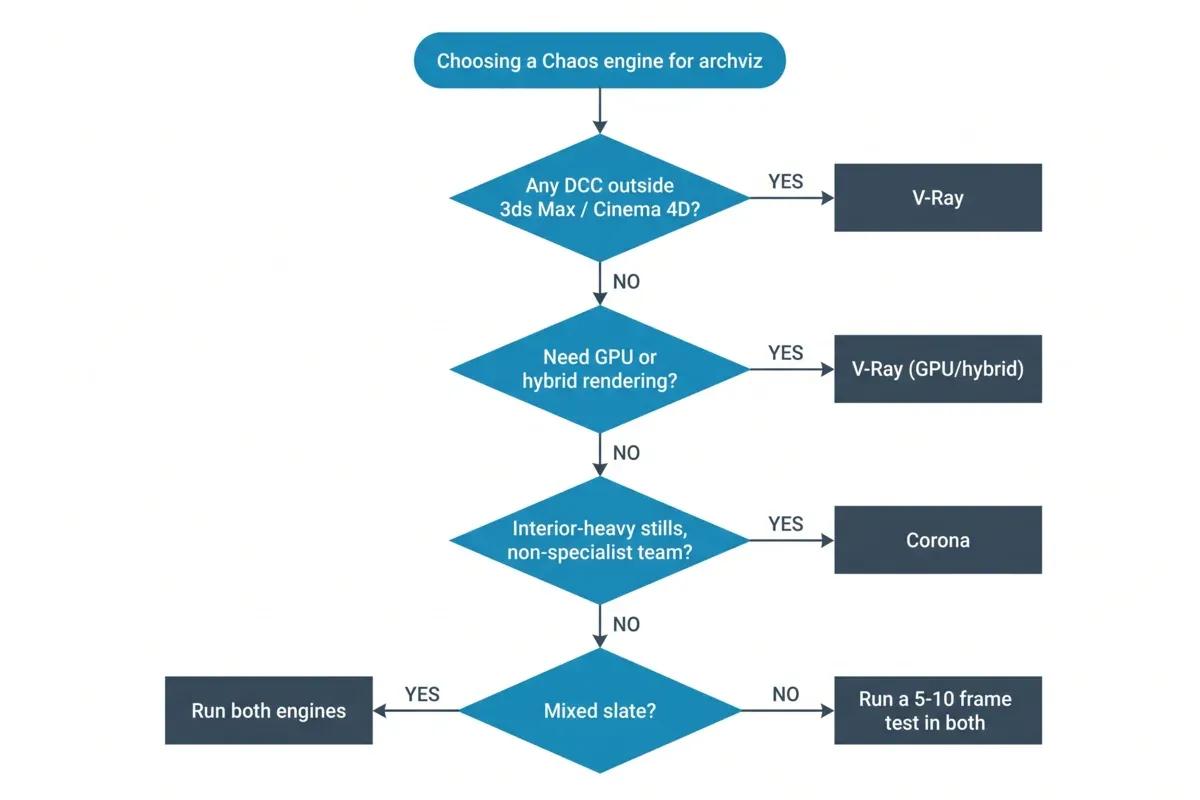 Decision flowchart for choosing between Corona and V-Ray: host application check first, then GPU requirement, team rendering experience, and project mix, ending in an engine recommendation or a mixed-pipeline path.
There is no universal answer, but there is a reliable sequence of questions — the framework we suggest when studios ask which engine to standardize on.
Corona is often the better fit when:
- Your pipeline lives in 3ds Max or Cinema 4D and has no near-term plans beyond them.
- The work is interior-heavy archviz — stills, residential, hospitality — where Corona's lighting defaults and LightMix re-balancing remove the most iteration cost.
- Your team includes artists who are not rendering specialists, and you want the engine's defaults doing the sampling decisions.
- You want predictable CPU memory behavior on very heavy scenes — no VRAM budgeting, ever.
- License cost matters and Corona's 18-28% lower tier pricing is meaningful across your seat count.
V-Ray is often the better fit when:
- Your studio spans multiple DCCs — Maya, Houdini, SketchUp, Rhino, or Revit anywhere in the pipeline ends the debate.
- You need GPU or hybrid rendering for lookdev speed or for animation throughput on GPU hardware.
- Your deliverables lean on deep render elements and post-heavy compositing, where V-Ray's AOV toolset is broader.
- Projects arrive from outside partners on V-Ray and conversions in volume are not worth the friction.
- The work mixes archviz with product, automotive, or VFX shots that benefit from V-Ray's wider feature surface.
The mix is legitimate. If your studio splits between interior stills and multi-DCC animation work, running both engines is not indecision — it is matching tools to jobs, and the shared Chaos ecosystem (converters, similar material logic, one farm account) keeps the overhead manageable.
If you are still torn, the empirical route costs an afternoon: build one representative scene in both engines and submit both as short farm tests. The per-frame cost and the artist-hours each version consumed will tell you more than any comparison article — including this one. Trial credit on managed farms, ours included, exists for exactly this kind of evaluation; the Corona cloud render farm and V-Ray cloud render farm pages cover engine-specific submission details.
FAQ
Q: Is Corona really CPU-only in 2026? A: Yes. Corona 15 renders exclusively on CPU cores, and Chaos has not announced any GPU rendering mode. The only GPU involvement is optional denoising — the NVIDIA AI denoiser uses an NVIDIA GPU to clean up noise, primarily during interactive rendering — while the rendering itself and Corona's own high-quality denoiser run entirely on the CPU.
Q: Are Corona and V-Ray made by the same company? A: Yes. Chaos develops both engines. Corona was created by Render Legion, which Chaos acquired in 2017, and the two renderers remain separate products with distinct philosophies — Corona prioritizing minimal-setup archviz rendering, V-Ray prioritizing control and breadth.
Q: Which host applications does each engine support? A: Corona 15 supports 3ds Max (2016+) and Cinema 4D (R17+) only. V-Ray 7 covers 3ds Max, Maya, Cinema 4D, Houdini, SketchUp, Rhino, Revit, and additional hosts. If your pipeline includes any DCC outside 3ds Max and Cinema 4D, V-Ray is the only one of the two that can render there.
Q: Can I convert a V-Ray scene to Corona, or a Corona scene to V-Ray? A: Yes, in both directions, with caveats. Corona ships with the Corona Converter, which converts V-Ray materials, maps, and proxies to Corona equivalents (both renderers must be installed; V-Ray 3+ scenes). V-Ray's scene converter in 3ds Max handles Corona materials in the other direction. Converted materials approximate the originals, so plan for manual touch-up on complex shaders.
Q: Do I need my own Corona or V-Ray license to render on a managed farm? A: Not on our farm. Both Corona and V-Ray licenses are bundled into the render rate, along with the other supported engines, so your Chaos subscription only needs to cover your artists' workstations. This differs from self-managed cloud setups, where render-node licensing is your responsibility.
Q: Which engine costs less to render on a farm? A: Corona always bills on the CPU meter ($0.004/GHz-hr base on our farm). V-Ray bills on the CPU meter in CPU mode or the GPU meter ($0.003/OBh) in GPU mode, and which works out lower per finished frame depends on the scene — GPU finishes frames quicker on a pricier unit, CPU runs slower on a less expensive one. A 5-10 frame test in each mode gives you the real per-frame cost.
Q: Does V-Ray GPU produce the same image as V-Ray CPU? A: Chaos engineers V-Ray's CPU and GPU engines toward perceptually matching results, and for most archviz scenes the outputs are visually consistent. They remain separate engines, so teams pick one mode per project, do lookdev there, and validate plugin-heavy or unusual shader setups in the target mode before rendering a sequence.
Q: Is Corona good for animation, or is it only for stills? A: Corona handles animation, and Corona 15 specifically reduced animation render times in 3ds Max by processing only what changes between frames. On a farm, Corona animations distribute per-frame across many CPU nodes — the approach Chaos itself recommends for sequences. Teams with heavy animation slates sometimes prefer V-Ray for GPU throughput, but Corona animation is a normal production workload — a large share of the Corona jobs on our farm are walkthroughs.
About Thierry Marc
3D Rendering Expert with over 10 years of experience in the industry. Specialized in Maya, Arnold, and high-end technical workflows for film and advertising.



