
V-Ray 6 on a Cloud Render Farm: A Practical 2026 Guide
Overview
Introduction
V-Ray has been a fixture in production rendering for over two decades, and V-Ray 6 is still the version a large share of studios run day to day. New major releases land, pipelines validate them slowly, and a 4K archviz job that has to ship next week does not wait for a version migration. So even with V-Ray 7 now available, plenty of the scenes that reach a V-Ray 6 cloud render farm are built, lit, and signed off in version 6 — and they need to render the same way on a thousand cores as they do on a single workstation.
That last part is where most of the trouble lives. A V-Ray 6 scene that renders perfectly on the machine it was built on can flicker, drop assets, or quietly fall back to the wrong engine the moment its frames are spread across worker nodes that have never seen your project folder. At Super Renders Farm, we have spent years watching exactly which steps survive that jump and which ones break it. This guide walks through what changed in V-Ray 6 for the people who actually press render, how the version behaves across the host applications we support, when V-Ray GPU beats V-Ray CPU (and when it does not), and how to package a scene so distributed frames come back clean. None of it assumes you bought your own render licenses or want to remote into a machine to babysit a queue.
What V-Ray 6 changed for the people who actually render
A lot of the V-Ray 6 conversation focuses on modeling and look-dev conveniences. What matters on a farm is narrower: which features change the work a render node does, the size of the file it has to ship, or the plugins it needs installed. A few from the V-Ray 6 cycle are genuinely farm-relevant.
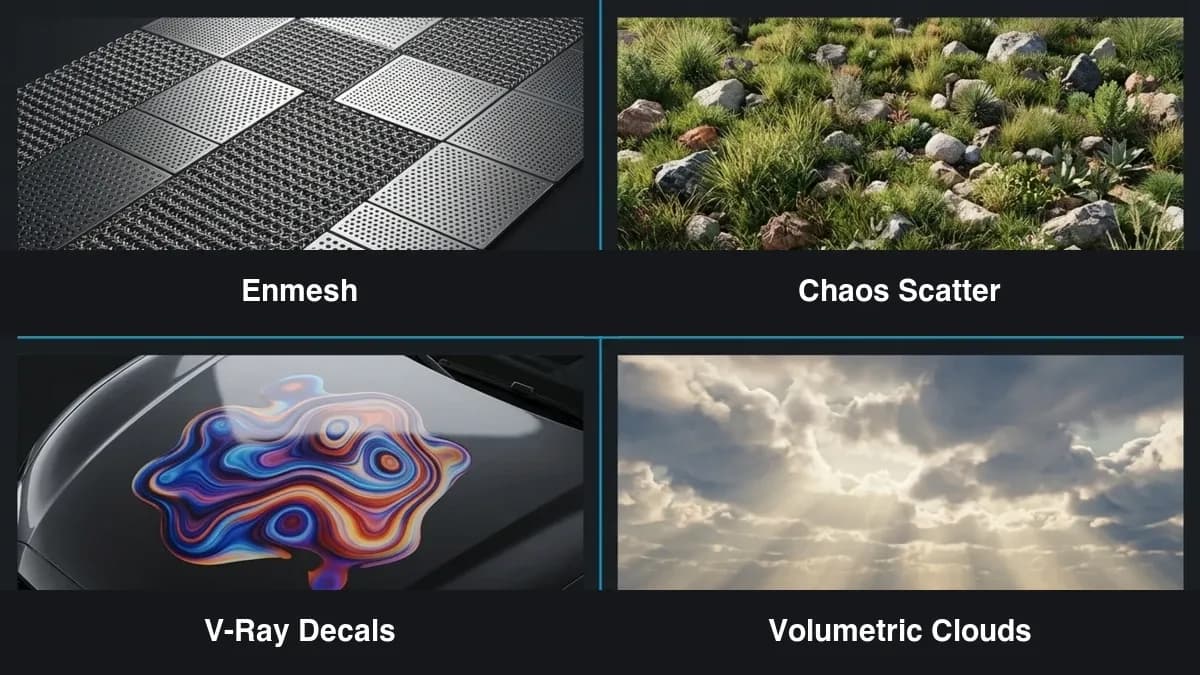 V-Ray 6 render features — Enmesh, Chaos Scatter, V-Ray Decals, and volumetric clouds
Enmesh tiles a source mesh across a surface at render time instead of baking that geometry into the scene. Think chainmail, perforated facades, woven fabric, grating. Because the geometry is generated on the node during rendering rather than stored in the file, the .vrscene that travels to each worker stays small and the heavy geometry only ever exists in render memory. That is a real win on a farm: less network transfer, and RAM that scales with the render rather than with the saved file.
Chaos Scatter brought native scattering into V-Ray itself — vegetation, rocks, ground cover — resolved procedurally at render time. The farm-side benefit is dependency reduction: a scene scattered with Chaos Scatter does not need a third-party scatter plugin licensed and installed on every node, which is one fewer thing that can be missing when a frame lands on a worker.
V-Ray Decals project a material onto a surface without touching its UVs or topology — labels, stickers, surface wear, signage. They resolve entirely inside V-Ray's own pipeline, so the only thing a node needs is access to the decal's texture maps.
Procedural sky and volumetric clouds let you build a sky as parameters rather than a fixed HDRI, with clouds that behave as real volumes in the scene. These renders are heavier per frame, but they are fully frame-parallel — each node computes its own frames with no dependency on its neighbors — so they distribute cleanly. The caveat is V-Ray GPU memory: dense volumetric skies push VRAM, and a complex sky is often safer on CPU.
The V-Ray Frame Buffer also keeps earning its place in a farm pipeline. Its Light Mix lets you separate and rebalance individual lights or light groups after the render is finished, straight from the saved render elements, with no re-render. When a director asks to "warm up the key and pull the fill down" the day after a sequence finished, that adjustment happens in compositing rather than going back through the queue — which is the least costly change you can make. And Chaos Cosmos, the built-in asset library, is convenient in the viewport but introduces the single most common farm failure we see; more on that in the workflow section, because it is worth getting right.
V-Ray 6 across the DCCs we render
V-Ray 6 ships as separate integrations for separate host applications, and the farm-relevant fact is that they all converge on the same dispatch format: a .vrscene file rendered by V-Ray Standalone. The host you model in matters for your workflow; it matters far less to the node, which just runs the exported scene.
On our farm, the host applications we run V-Ray through are 3ds Max, Maya, and Cinema 4D, with Houdini provisioned on request. 3ds Max with V-Ray is the archviz workhorse and the most common path we see — interiors, exteriors, product visualization. Maya with V-Ray covers the same ground for VFX and animation pipelines. Cinema 4D with V-Ray serves motion and design studios. Houdini with V-Ray for Houdini rounds it out for procedurally built scenes, where VEX- and node-driven geometry is resolved into the exported scene at export time. If you want the per-application detail, we keep landing pages for 3ds Max, Maya, Cinema 4D, and Houdini, and a V-Ray-specific overview at the V-Ray cloud render farm page.
For Redshift users in that same Cinema 4D motion-design pipeline, see our Cinema 4D Redshift render farm guide.
Two honest boundaries are worth stating plainly. SketchUp has its own V-Ray integration, but SketchUp is not one of the host applications we run on the farm. SketchUp users still have a clean path: V-Ray for SketchUp can export a .vrscene directly, and that file renders on V-Ray Standalone the same as one exported from 3ds Max — so the scene reaches the farm without us needing SketchUp installed anywhere. The alternative is bringing the model into 3ds Max, relinking materials, and exporting from there, which is more work but gives you the full 3ds Max toolset for cleanup. Either way, the rendering happens through a supported host's export, not inside SketchUp.
The other boundary is Blender. On our farm, Blender scenes render in Cycles — Blender's native production renderer — not in V-Ray. So if your pipeline is V-Ray, your hosts are the four above; if it is Blender, you are in Cycles, and that is a different workflow.
V-Ray GPU vs V-Ray CPU on a farm: the real decision
V-Ray 6 gives you two rendering engines that share materials and lighting but behave very differently once you scale them out. Picking the wrong one is one of the more expensive mistakes on a farm, because you usually do not notice until the frames come back.
Start with the boring truth: most V-Ray work is still CPU work. Across the jobs we see, roughly 70% of rendering is CPU — V-Ray (CPU), Corona, Arnold CPU — and the bulk of that is archviz. V-Ray CPU scales close to linearly with physical cores, which is why high-core-count servers suit it so well. Our CPU fleet is built on dual Intel Xeon E5-2699 V4 machines with 96–256 GB of RAM each, totaling 20,000+ CPU cores, and a single 4K interior that takes hours on a workstation gets chopped across that pool frame by frame. Crucially, CPU rendering addresses system RAM, not VRAM, so a texture-heavy interior with 4K and 8K PBR materials across the whole set does not hit a memory wall the way a GPU can. For final-quality archviz at scale, CPU is usually the safe default.
V-Ray GPU is the other 30%, and it is genuinely faster — when the scene fits. It runs in two modes: a broadly compatible CUDA mode, and an RTX mode that uses the hardware ray-tracing cores on RTX-class NVIDIA GPUs for a scene-dependent speedup. Our GPU machines are RTX 5090 cards with 32 GB of VRAM each, and that VRAM number is the whole story. VRAM is the primary constraint on GPU rendering: if a scene's geometry and textures fit, V-Ray GPU is excellent for iteration and for moderately complex interiors. The jump from 24 GB (a typical high-end workstation card) to 32 GB is the difference between a scene sitting entirely in memory and a scene that has to page data in and out via out-of-core, which costs performance. For scenes that were paging on a 24 GB card, simply having the headroom can be the larger share of the speedup. We benchmarked exactly this on RTX 5090 hardware in our V-Ray GPU speed test and in the broader RTX 5090 rendering performance write-up; the GPU cloud render farm page covers how those nodes are set up.
For a broader set of V-Ray benchmark numbers across scene types, see our V-Ray benchmark guide.
The decision, stripped down:
| Choose V-Ray GPU when… | Choose V-Ray CPU when… |
|---|---|
| Scene geometry + textures fit in VRAM (or mostly fit) | Scene exceeds VRAM even with out-of-core (large urban sets, 100 GB+ of textures) |
| You want fast iteration and quick test frames | You need the most mature feature set for final delivery |
| Interior/product viz of moderate complexity | The render uses anything still missing from GPU parity |
| You are rendering on GPU nodes specifically | You want predictable behavior on a primarily CPU pool |
V-Ray 6 also supports a hybrid mode where CPU cores and the GPU on the same node contribute to one render, which is useful when a GPU scene is right at the edge of its memory budget. The thing to avoid is assuming "GPU is always faster." For a large, texture-heavy archviz scene, V-Ray CPU is frequently faster overall because it is not fighting a memory ceiling. Match the engine to the scene, not to the hype.
Getting a V-Ray 6 scene to render cleanly on a farm
This is the part that decides whether your frames come back usable. The mechanics are not complicated, but a few of them fail silently, which is the worst way to fail.
The dispatch path. The canonical way to render V-Ray on a farm is to export your scene as a .vrscene and let V-Ray Standalone render it on each node. The important consequence is licensing: a worker running V-Ray Standalone does not need a 3ds Max, Maya, or Cinema 4D license to render — it needs V-Ray. On our farm those render licenses are included in what you pay to render; you do not bring your own license and you do not install anything. That is the practical meaning of "fully managed" — no remote desktop, no license server to babysit, no per-node software setup on your side. It is also the clean line between this and an infrastructure-rental model, where you would rent bare machines and supply your own licenses.
Super Renders Farm is an official Chaos Group partner for V-Ray — every CPU and GPU render node carries a covered V-Ray license, so there's no floating license server to configure and no Multi-User License to install before a render can start.
Frame distribution, not Distributed Rendering. These two get conflated constantly. A render farm spreads whole frames across nodes — node A renders frame 1, node B renders frame 2, and so on. V-Ray's Distributed Rendering (DR) is a different thing: multiple machines collaborating on a single frame, splitting buckets over the network in real time. DR is a studio tool for one enormous hero frame; it adds network latency, demands identical V-Ray versions everywhere, and is less efficient at scale. For essentially every animation and image sequence, frame distribution is the right model, and it is what a farm does by default.
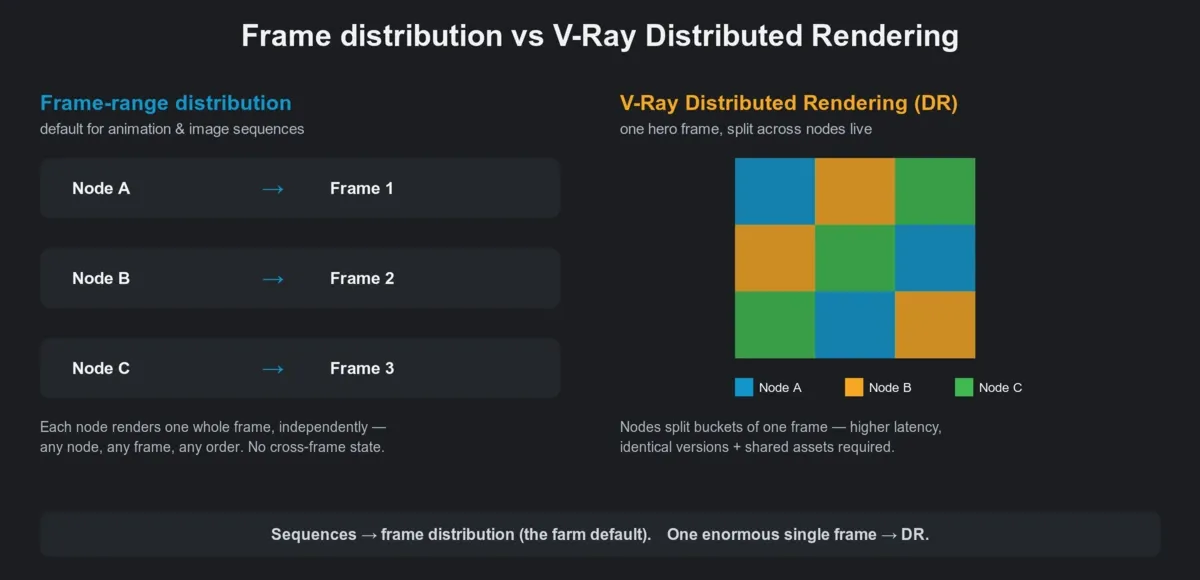 Frame-range distribution versus V-Ray Distributed Rendering on a render farm
GI without flicker. For animation, this is the choice that bites people. Brute Force GI plus a per-frame Light Cache computes lighting independently for every frame — slower per frame, but zero flicker and no inter-frame dependency, so any node can render any frame in any order. That is the flicker-safe default we recommend for distributed animation. The Irradiance Map approach is faster per frame because it precomputes a GI solution and reuses it, but it only works for camera-flythrough animations with static lights and objects, and every node has to read the same precomputed map from a shared path. The classic failure: the map is saved to a local path like C:\Users\artist\scene.vrmap, the nodes cannot find it, and every frame silently recomputes GI — producing the exact flicker you were trying to avoid. If you use Irradiance Map, bake it once, ship the file with the job, and repath it. If you are not sure, use Brute Force.
Denoising. V-Ray 6 gives you the V-Ray Denoiser (CPU), the NVIDIA AI Denoiser (needs an NVIDIA GPU on the node), and Intel Open Image Denoise (CPU, runs anywhere). All three work per frame with no cross-frame state, so they are safe for fully parallel rendering. Our standard advice: always save the raw, un-denoised beauty pass alongside the denoised output. If the denoiser smears a detail, you re-denoise in post instead of re-rendering the sequence.
Chaos Cosmos assets — the silent killer. This is the most common V-Ray 6 farm failure for new users, and it fails quietly. Cosmos assets download into your local Cosmos cache. When you export the .vrscene, those assets are referenced by their local paths. The nodes do not have your Cosmos cache, so they get a scene pointing at files that are not there — and the result is missing foliage, grey props, or a blank sky, with no hard error. The fix is to collect assets before you submit: use V-Ray's asset-collection / "pack project" tooling to gather every Cosmos and texture file into one folder beside the scene and repath everything to relative paths. Do that and the job is self-contained. Skip it and you will be re-rendering. The same discipline applies to plain textures — anything referenced by an absolute local path is a missing asset waiting to happen.
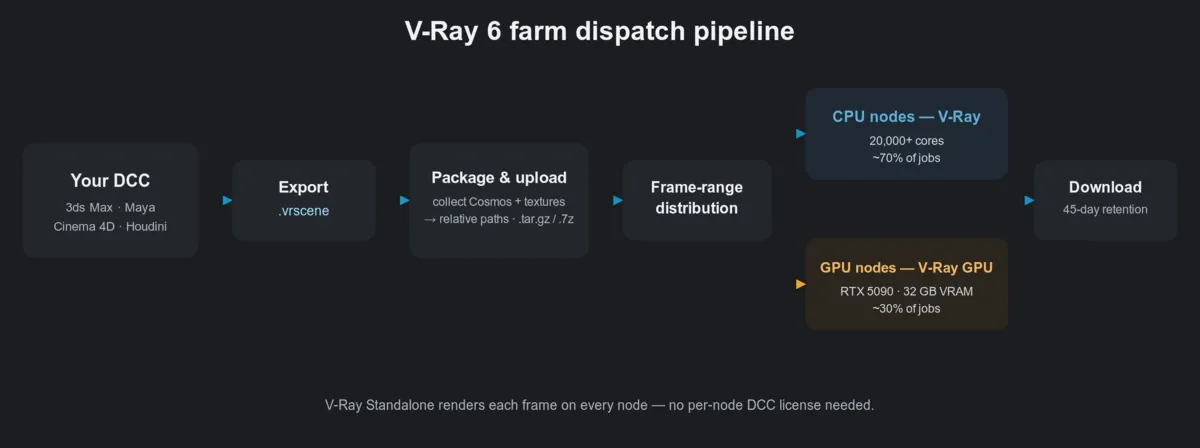 V-Ray 6 farm dispatch pipeline from DCC export to V-Ray Standalone render nodes
Uploading. Upload the project folder unpacked; the farm does not extract archives (.zip, .rar, .7z, .tar, .tar.gz), so extract a zipped project before you send it. For very large scenes, the desktop client is steadier than a browser upload. Render output stays available with no fixed automatic deletion period; still, pull finished frames down promptly or let the client auto-download them.
A pre-flight checklist before you submit
Most failed farm renders trace back to four or five repeatable causes. Running a single test frame through the farm before you commit a 2,000-frame sequence costs a few minutes and catches almost all of them. Here is the short version we hand people:
| Check | Why it matters on a farm | Quick fix |
|---|---|---|
| Assets collected + repathed | Absolute local paths (textures, Cosmos) = missing assets on nodes | Pack project / collect assets to relative paths |
| GI method chosen deliberately | Irradiance Map on a moving scene = flicker | Brute Force + Light Cache for animation by default |
| Engine matches the scene | GPU scene over VRAM stalls; CPU scene on GPU wastes the node | Check VRAM demand in the frame buffer first |
| Raw + denoised passes saved | A bad denoise otherwise means a re-render | Output both beauty and denoised elements |
| One test frame rendered on the farm | Local success ≠ farm success | Submit frame 1, confirm, then submit the range |
| Project uploaded as a folder | The farm does not extract archives | Extract before upload |
Costs follow the same per-unit logic across engines, which makes estimating straightforward: CPU rendering is billed at $0.004 per GHz-hour, and GPU rendering at $0.003 per OctaneBench-hour, with all render-engine licenses already included in those rates. New accounts start with $25 of free render credit to run exactly the kind of single-frame test above, and credits do not expire. The full breakdown lives on the pricing page, and if you are weighing providers rather than engines, our comparison of render farms for V-Ray lays out what to look for.
FAQ
Q: Can I render V-Ray 6 on a cloud render farm without upgrading to V-Ray 7?
A: Yes. V-Ray 6 scenes render through V-Ray Standalone from an exported .vrscene, and there is no requirement to migrate to a newer major version first. Many production pipelines stay on V-Ray 6 deliberately, and a farm renders the version your scene was built and approved in.
For a broader look at how cloud rendering works and what it costs across engines, see our cloud rendering explained guide.
Q: Do I need to buy my own V-Ray license for cloud rendering? A: No. On our farm the V-Ray render license is included in the per-unit render rate, so you are not bringing or paying for a separate license to render. This is the difference between a fully managed farm and an infrastructure-rental model, where you would rent machines and supply your own software licenses.
Q: V-Ray GPU or V-Ray CPU — which should I use on a render farm? A: Use V-Ray GPU when your scene's geometry and textures fit in VRAM and you want speed for interiors or iteration; use V-Ray CPU when the scene is large and texture-heavy or needs the most mature feature set for final delivery. CPU addresses system RAM rather than VRAM, so it handles oversized archviz scenes that would force a GPU into slower out-of-core paging.
Q: How do I stop GI flicker in a V-Ray 6 animation rendered across many nodes? A: Use Brute Force GI with a per-frame Light Cache as your default — it computes lighting independently for each frame, so distributed nodes never disagree. Reserve the Irradiance Map method for camera-only flythroughs with static lights and objects, and make sure the precomputed map sits on a shared path every node can read.
Q: Why are my Chaos Cosmos assets missing when the frames come back from the farm? A: Cosmos assets are referenced by local paths that exist only in your own cache, so render nodes cannot find them and the objects render grey, missing, or blank with no hard error. Collect and repath all assets into a self-contained project folder before submitting — V-Ray's asset-collection tooling does this — so the scene carries everything it needs.
Q: Can I render a V-Ray for SketchUp scene on the farm?
A: Yes, by way of an export. SketchUp is not a host application we run, but V-Ray for SketchUp can export a .vrscene that renders on V-Ray Standalone directly, or you can bring the model into 3ds Max and export from there. The rendering happens through a supported host's exported scene rather than inside SketchUp.
Q: What's the difference between a render farm and V-Ray Distributed Rendering? A: A render farm distributes whole frames across many machines, which is the efficient model for animations and image sequences. V-Ray Distributed Rendering (DR) instead splits a single frame's buckets across machines in real time — useful for one very large hero frame, but slower and more fragile at scale, and not how sequences are rendered on a farm.
About Alice Harper
Blender and V-Ray specialist. Passionate about optimizing render workflows, sharing tips, and educating the 3D community to achieve photorealistic results faster.



