

Cinema 4D 2027 on a Cloud Render Farm: Engines, Submission, and Version Compatibility
Overview
Introduction
Every September, Maxon ships a new Cinema 4D version, and every year the same question lands in our support queue a few weeks ahead of it: "Can I render the new version on your farm yet?" With Cinema 4D 2027 on the horizon, we're already fielding it. The team at Super Renders Farm runs Cinema 4D jobs across a distributed render farm every day — Redshift, Octane, V-Ray, Corona, and Arnold — so the answer is grounded in how the pipeline actually behaves during a version transition rather than in a launch keynote.
This article is the render-farm production lens on Cinema 4D 2027. It is not a feature roundup, and it is not a renderer-specific submission tutorial. If you want the full feature roadmap and what Maxon's 2026 release cycle signals about 2027, we cover that separately in our Cinema 4D 2027 features preview. If you want the detailed Redshift-on-Cinema-4D submission workflow, that lives in our Cinema 4D and Redshift render farm guide. Here, the focus is the three things that decide whether your render actually completes: which engines run where, how you prepare a scene for distributed rendering, and why version compatibility quietly determines which nodes can touch your job.
Where Cinema 4D 2027 Stands Today
As of mid-2026, Maxon has not officially announced Cinema 4D 2027. The current shipping line is Cinema 4D 2026 — most recently the 2026.3 update on June 10, 2026, running alongside Redshift 2026.7. Everything we say about 2027 specifically is therefore an expectation, not a confirmed feature list, and we will flag it that way.
The expectation is well grounded. Maxon has released a major Cinema 4D version every September for several years running — 2025.0 on September 10, 2024, and 2026.0 on September 10, 2025 — which makes a September 2026 release the most likely window for 2027, with the usual December and April point releases following. The render-relevant threads to watch are the ones the 2026 cycle has been investing in: Redshift Live (the real-time render engine that replaced Redshift RT in Redshift 2026.4, released in March 2026), the ACEScg and OpenColorIO color pipeline that became default in 2026.0, continued Pyro and simulation hardening, and OpenUSD scene interchange. Cinema 4D 2027 will inherit all of that and add its own features when Maxon publishes the release notes.
There is a practical lag worth planning around. A new Cinema 4D version shipping does not mean it is farm-ready the same day. Third-party renderers and bundled plugins need builds compiled against the new SDK, and that typically takes four to eight weeks after a stable release. So even if 2027 lands in September 2026, the realistic "production-ready on a render farm with Redshift or Octane" window is closer to late 2026.
Render Engines for Cinema 4D on a Cloud Farm
Cinema 4D is engine-agnostic, and the engine you choose decides whether your job runs on CPU hardware or GPU hardware — which in turn decides a lot about cost and throughput on a farm. This is the single most useful thing to get straight before you submit, so here is the landscape as it runs on our nodes.
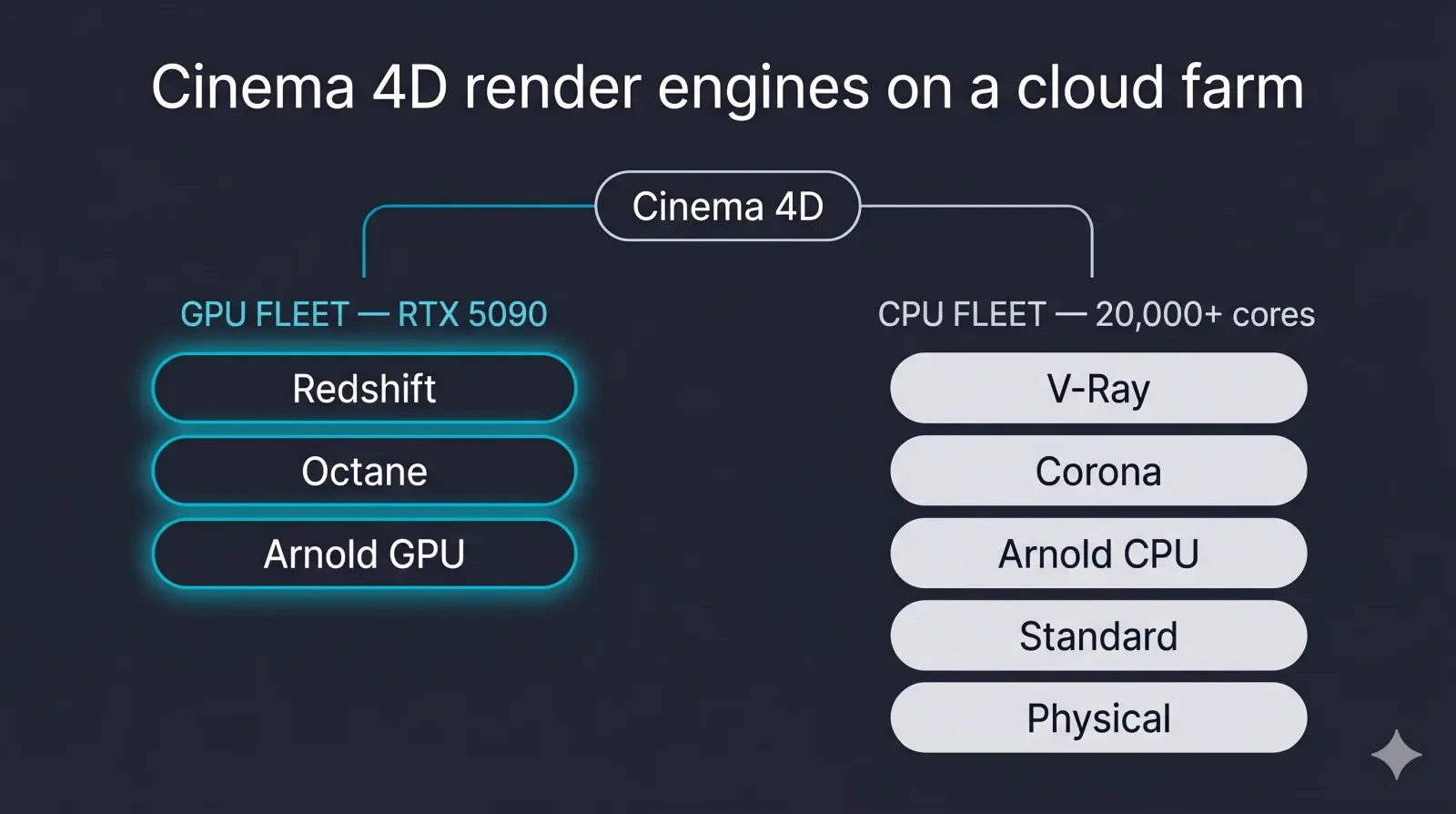 Diagram mapping Cinema 4D render engines to GPU or CPU compute on a cloud render farm: Redshift, Octane, Arnold GPU on the GPU fleet; V-Ray, Corona, Arnold CPU, Standard and Physical on the CPU fleet
| Render engine | Primary compute | Where it runs on our farm | Before you submit |
|---|---|---|---|
| Redshift | GPU | GPU fleet (NVIDIA RTX 5090, 32 GB VRAM) | Match the Redshift build to your Cinema 4D version; include .rs proxies |
| Octane | GPU only (NVIDIA CUDA) | GPU fleet | Match the OctaneRender plugin version; billed in OctaneBench-hours |
| V-Ray | CPU and GPU | CPU fleet (20,000+ cores) or GPU fleet | Confirm V-Ray version parity; CPU is the production-standard path for archviz |
| Corona | CPU only | CPU fleet | CPU-only — never route to a GPU pool; match the Corona major version |
| Arnold (C4DtoA) | CPU and GPU | CPU fleet or GPU fleet | Match the C4DtoA plugin version; check procedural versions |
| Standard / Physical | CPU only (built into Cinema 4D) | CPU fleet | No separate renderer license needed; most compatible across versions |
A few things are worth drawing out. CPU rendering is still the larger share of real Cinema 4D farm work — V-Ray and Corona archviz and animation jobs run on the CPU fleet, and that is where most studios spend their compute. GPU engines like Redshift and Octane are a real and growing slice, especially for motion design, and they run on our dedicated GPU machines, but they are not the whole story, so do not assume "render farm" means "GPU only."
On licensing, we're an official Maxon partner — the company behind Cinema 4D and Redshift — and an official Chaos partner for V-Ray and Corona, so that licensing is verified through the partnership. Across all the engines, the render engine licenses — Redshift, V-Ray, Corona, Arnold, and Octane — are covered on our nodes as render-only utilization. That means you do not supply or manage renderer licenses for the rendering side of the job; you keep managing your own workstation licenses through their vendors as normal. One honest exclusion: we do not support Cycles 4D, the INSYDIUM plugin that brings the Cycles renderer into Cinema 4D. That is a different product from Blender's built-in Cycles, which we do run for Blender jobs — the two share a name and nothing else.
Preparing a Cinema 4D Project for the Farm
Most failed Cinema 4D farm jobs fail for the same handful of reasons, and almost all of them are caught in scene prep. A fully managed farm handles the licenses, the installs, and the node configuration, but it cannot guess at assets that never left your workstation. The prep below is the version-agnostic foundation; the Redshift render farm guide has the step-by-step submission detail if you want it.
Start with Save Project with Assets (File menu). This collects every referenced asset — textures, XRef sub-scenes, IES profiles, cache files — into a relative-path folder structure beside the .c4d file. Copying the .c4d alone is the most common mistake, because absolute texture paths like C:\Users\... do not resolve on a node with a different filesystem. After saving, audit the Asset Inspector to confirm no absolute paths remain. Upload that project folder unpacked; the farm does not extract archives (.zip, .rar, .7z, .tar, .tar.gz), so skip the zip step.
Two preparation steps cause more distributed-rendering grief than any others. The first is baking simulations. Pyro, cloth, and MoGraph dynamics are not deterministic frame to frame, so when farm nodes render frames in parallel rather than in sequence, an unbaked simulation produces a different result on every node — flickering, popping, caches that disagree with each other. Bake every simulation to disk and confirm the cache folder is included in the Save Project output before you submit. The second is color management. With ACEScg and OpenColorIO as the default pipeline since Cinema 4D 2026, a custom OCIO config that lives only on your machine means the node falls back to a default config and your colors shift. Include the .ocio file in the bundle and point your submission settings at it.
Finally, if you use the Takes system to hold multiple render setups in one file, specify which Take you want rendered at submission rather than assuming the default. Templated MoGraph work especially benefits from this, and the Xpresso Command Line Argument node added in the 2026 cycle makes parameter-driven batch jobs more robust.
Version Compatibility: Why It Decides Where Your Job Renders
This is the part that surprises people, and it matters more during a version transition than at any other time. Cinema 4D plugins — Redshift, Octane, Arnold, V-Ray — are compiled against a specific Cinema 4D SDK. The binary interface changes between major versions, so a plugin built for Cinema 4D 2026 will not load in 2027. Not "render incorrectly" — it will not load at all, and the scene opens with missing materials and objects. A Redshift build compiled against the 2026 SDK behaves exactly the same way: it needs a 2027-compatible Redshift release before it will run under Cinema 4D 2027.
Scene files have their own rule. Cinema 4D's long-standing pattern is forward-compatible opening — a scene saved in 2026 opens in 2027 — but there is no backward saving. A file saved in Cinema 4D 2027 format cannot be opened in 2026, with no workaround short of re-exporting from the newer version. If your team runs mixed versions during a transition, keep backups in the older format until the whole pipeline has moved.
A fully managed farm absorbs this complexity by maintaining several Cinema 4D versions in parallel, each with matching renderer builds, and letting you pick the version at submission. That is why version selection is a job parameter and not an afterthought. When Cinema 4D 2027 ships and a stable 2027-compatible Redshift build is verified, we add 2027 nodes to the pool; your 2026 jobs keep rendering on 2026 nodes uninterrupted. The transition runs on your schedule as a parallel-pool migration, not a forced cutover.
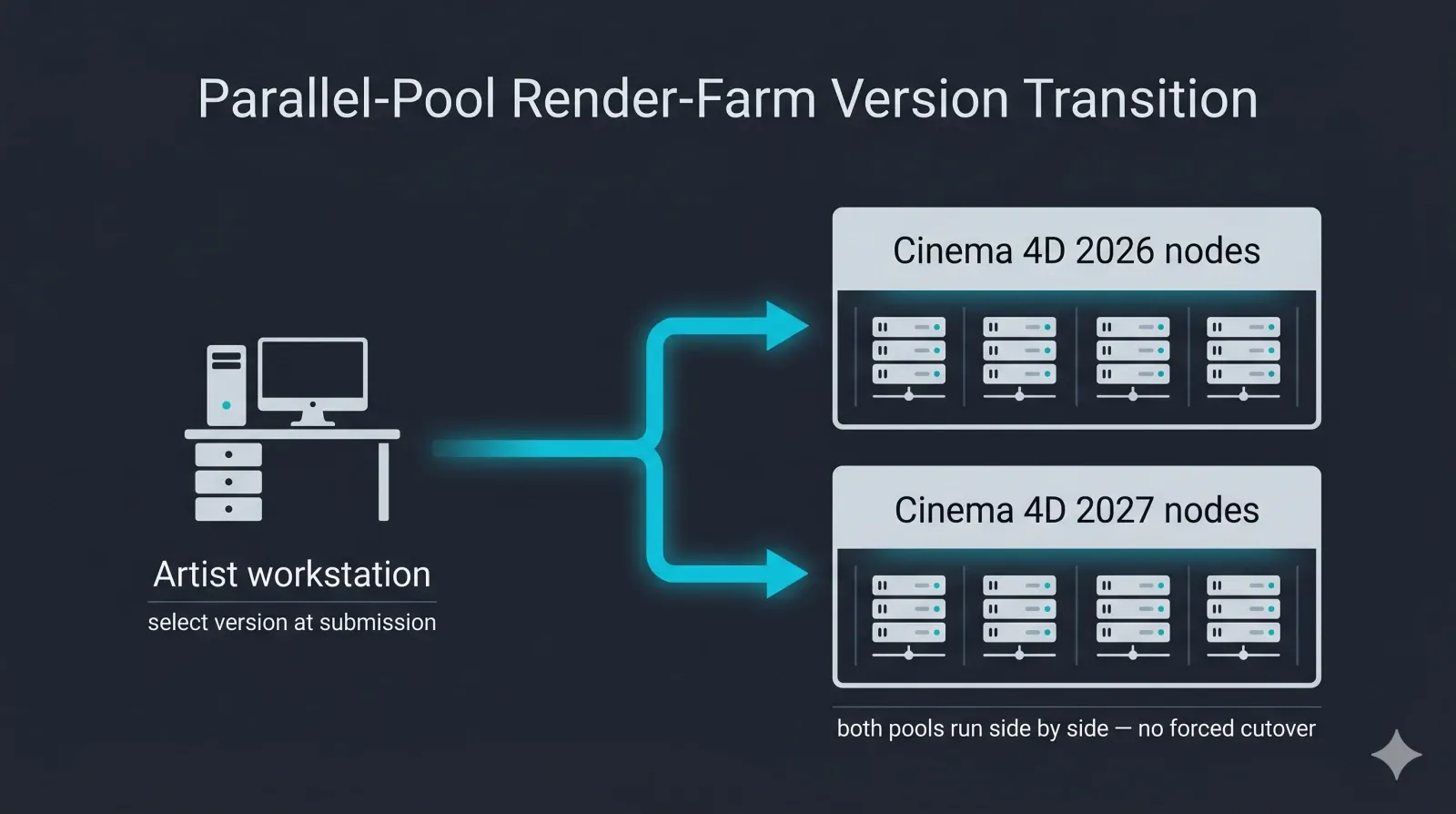 Diagram of a parallel-pool version transition on a cloud render farm: Cinema 4D 2026 node pool and Cinema 4D 2027 node pool running side by side, with the artist selecting the matching version at job submission
Before you send a Cinema 4D 2027 job to any farm, run through this short check:
- Confirm the farm has Cinema 4D 2027 nodes available (during the launch lag, it may not yet)
- Confirm the renderer plugin version on the nodes matches your workstation build exactly
- Confirm the project was packaged with Save Project with Assets and uses relative paths
- Confirm every simulation is baked and the cache is in the bundle
- Confirm a custom OCIO config, if any, is included and its path is set in submission
- Select the exact Cinema 4D version in the job form — do not rely on "latest"
- Submit one or two test frames before the full sequence, to catch a plugin-load or missing-asset error cheaply
Fully Managed vs. Self-Managed for the 2027 Transition
The version-matching problem is exactly where the fully managed model earns its keep. On a fully managed farm you do not remote-desktop into machines, install Cinema 4D or the renderer yourself, or hand-manage licenses — the farm installs and validates each Cinema 4D version and its matching renderer builds, and you select what you need at submission. During a release transition, that is the difference between waiting on a vendor to test compatibility for you and doing that testing yourself on rented hardware.
That is the practical line between a managed render farm and an infrastructure-rental (IaaS) model, where you get raw machines and own the software setup, the plugin versions, and the license juggling. IaaS gives you more control and asks for more of your time; a managed farm trades some control for not having to babysit a 2027 toolchain across a node fleet. Neither is universally right — it depends on whether your team would rather configure machines or prepare scenes.
On the hardware itself, our CPU fleet runs to 20,000+ cores for V-Ray, Corona, and Arnold CPU work, and our dedicated GPU machines use NVIDIA RTX 5090 cards with 32 GB of VRAM each for Redshift and Octane. For the heaviest Cinema 4D scenes — dense displacement, large Pyro VDBs, high proxy counts — the thing to check is not a marketing number but whether your scene fits within a node's VRAM and RAM, which is a quick conversation with support before you commit a big sequence. You can read more about the GPU side on our GPU cloud render farm page and the Redshift side on the Redshift cloud render farm page.
Planning Your Cinema 4D 2027 Render Pipeline
If you are scheduling Q3 and Q4 2026 production around Cinema 4D, a few takeaways fall out of all this. Assume a September 2026 release window for 2027, but plan for the four-to-eight-week renderer-compatibility lag before it is genuinely farm-ready with Redshift or Octane. Treat the upgrade as staged rather than all-at-once: move a few workstations first, validate that every plugin and renderer your pipeline depends on has a 2027 build, then expand. Keep Cinema 4D 2026 available on both workstations and farm nodes through the transition, and run real test frames on 2027 nodes before you migrate a live show.
The honest summary is that Cinema 4D 2027 is, for now, a well-grounded set of expectations rather than a published feature list — and on the render-farm side, the mechanics that will actually govern your jobs are the stable ones: engine-to-hardware mapping, disciplined scene prep, and version matching.
For the fundamentals of cloud rendering itself, outside the Cinema 4D 2027 specifics above, see our cloud rendering explained guide. Those do not change with the launch keynote. For more on Cinema 4D itself, see Maxon's Cinema 4D product page and CG Channel's coverage of the Cinema 4D 2026.3 release; for our day-to-day Cinema 4D rendering, the Cinema 4D cloud render farm page is the place to start. If you are also tracking the other autumn releases, our What's New in Maya 2027 and What's New in 3ds Max 2027 write-ups follow the same pattern.
FAQ
Q: Can I render Cinema 4D 2027 on a cloud render farm? A: Not the moment Maxon ships it. A render farm needs the new Cinema 4D version installed and validated, and the renderers you use — Redshift, Octane, Arnold, V-Ray — need builds compiled against the new SDK before they will load. That compatibility work usually takes four to eight weeks after a stable release, so if Cinema 4D 2027 arrives in September 2026, realistic farm support with GPU renderers lands closer to late 2026. We add 2027 nodes once the stable release and matching renderer builds are verified.
Q: Which render engines does Super Renders Farm support for Cinema 4D? A: Redshift, Octane, V-Ray, Corona, and Arnold (C4DtoA), plus Cinema 4D's built-in Standard and Physical renderers. Redshift and Octane run on the GPU fleet; V-Ray, Corona, Arnold CPU, and the built-in renderers run on the CPU fleet. We do not support Cycles 4D, the INSYDIUM Cinema 4D plugin — that is a separate product from Blender's built-in Cycles, which we do run for Blender jobs.
Q: Do I need my own Redshift or V-Ray license to render on the farm? A: Not for the rendering side. Redshift, V-Ray, Corona, Arnold, and Octane licenses are covered on our nodes as render-only utilization, so you do not supply or manage them for farm rendering. You continue to manage your own workstation licenses through the respective vendors as usual.
Q: Will my Cinema 4D 2026 scenes still render after 2027 launches? A: Yes. A fully managed farm keeps multiple Cinema 4D versions running in parallel pools, so your 2026 jobs continue rendering on 2026 nodes while 2027 nodes come online separately. You pick the version at submission, and Cinema 4D opens 2026 files in 2027 if you do choose to move them forward — though it cannot save back to 2026 format afterward.
Q: Why does the render farm need the same Cinema 4D version I used? A: Because Cinema 4D plugins are compiled against a specific version's SDK. A Redshift, Octane, or Arnold build made for Cinema 4D 2026 will not load in 2027 at all — the scene would open with missing materials and objects. Matching the node's Cinema 4D and renderer versions to your workstation is what guarantees the scene loads and renders the way you authored it.
Q: How do I prepare a Cinema 4D scene for cloud rendering? A: Use Save Project with Assets so every texture, XRef, and cache is collected with relative paths, then upload the folder unpacked rather than as an archive. Bake all Pyro, cloth, and MoGraph dynamics to disk and include the cache, or parallel nodes will produce flickering results. Include any custom OCIO config in the bundle, and specify the correct Take at submission. The Redshift render farm guide walks through the full submission sequence.
Q: Is GPU or CPU better for Cinema 4D rendering on a farm? A: It depends on your engine, not on a blanket rule. V-Ray and Corona archviz and animation work runs on CPU and is the larger share of real farm jobs; Redshift and Octane run on GPU and suit a lot of motion design and lookdev. Both fleets are available, so the right choice is whichever your renderer and scene are built for. If you are unsure, a test frame on each tells you more than any spec sheet.
About Alice Harper
Blender and V-Ray specialist. Passionate about optimizing render workflows, sharing tips, and educating the 3D community to achieve photorealistic results faster.



