

Best Cinema 4D Render Farm in 2026: A Full Comparison for Redshift, Octane, Arnold, and V-Ray
Overview
Introduction
Cinema 4D in 2026 is a very different tool than it was three years ago. Maxon's consolidation of Redshift, ZBrush, Red Giant, and Universe into a single subscription ecosystem has changed how motion designers, broadcast studios, and product visualization teams plan their pipelines. For render-heavy work, that consolidation has pushed an increasing number of C4D jobs off the workstation and onto cloud render farms.
The question we hear most often now isn't whether to use a render farm for Cinema 4D — that decision has mostly been made. The question is which one, and specifically which farm fits your engine stack, your budget model, and your production schedule.
We've been running Cinema 4D jobs on our farm since 2010, across every major C4D render engine and across use cases from broadcast animation to archviz interiors to product visualization VFX. This guide compares the render farms that Cinema 4D users most commonly evaluate in 2026 — Super Renders Farm, Drop & Render, RebusFarm, GarageFarm, Fox Renderfarm, and iRender — across the factors that actually matter: which engines they support, what GPU hardware they run, whether they have an in-app plugin, their pricing model, and whether they're official Maxon partners.
The goal isn't to pick a winner. It's to help you shortlist the two or three farms that genuinely fit your workflow, then run your own test renders to confirm.
If you are new to cloud rendering and want to understand what a render farm is before comparing Cinema 4D services, our complete render farm guide covers the core concepts.
If Cinema 4D itself is new to you, what Cinema 4D is, who uses it and what hardware it needs explains the software in plain language before you compare farms.
Cinema 4D Render Engines: Which Ones Run on a Cloud Farm?
Cinema 4D supports a broader range of render engines than most DCCs, and that variety matters when you're choosing a farm.
Choosing Cinema 4D over Blender, Maya, or 3ds Max in the first place is a separate decision
When the 2027 release arrives, render-farm compatibility shifts with it; we track that in our Cinema 4D 2027 cloud render farm guide. ; our 3D modeling software comparison weighs all four on license cost, strengths, and render-farm fit. Some farms only handle a subset, and the choice can lock you into an engine before you're ready to commit.
The six engines we see across the vast majority of Cinema 4D jobs on our farm in 2026:
- Redshift — Maxon's GPU biased renderer, now bundled with Cinema 4D subscriptions. Dominant in motion design and broadcast.
- Octane — OTOY's unbiased GPU renderer. Strong in product visualization and high-end motion work.
- Arnold — Solid Angle's CPU/GPU renderer. Preferred in VFX and high-end archviz where physical accuracy matters.
- V-Ray — Chaos's production-proven renderer. CPU and GPU modes, widely used in archviz and product visualization.
- Corona — Chaos's simpler-to-configure renderer, CPU-only historically (GPU still in active development). Popular in archviz.
- Physical/Standard — Cinema 4D's built-in renderers. Less common in production now but still used for stills and simple animations.
This is where multi-engine support starts to matter. A C4D studio that does both Redshift motion work and V-Ray archviz shouldn't have to move between two different render farms. Farms that support only a subset of engines (for example, Drop & Render focuses heavily on Redshift and Octane as their headline engines, while the others are listed as supported) force you to either split pipelines or standardize on fewer engines.
On our farm, we support V-Ray, Corona, Arnold, Redshift, Octane, and Cycles
Because we hold the renderer and plugin licenses at the farm level, C4D studios do not manage those seats themselves; our render farm software licenses included guide explains what is covered. — so C4D studios can keep their engine flexibility without switching farms when the project type changes. As both an official Maxon partner (covering Cinema 4D, Redshift, Red Giant, and Universe) and an official Chaos partner (covering V-Ray and Corona), the licensing side is handled at the farm level rather than pushed onto the user.
Cinema 4D Render Farm Comparison (2026)
The table below reflects each farm's publicly documented positioning as of April 2026, with the iRender row re-checked against its live pages in September 2026. Engine support lists come from each farm's current C4D service pages; pricing models are summarized, not quoted — always check the farm's site for current rates before committing.
| Farm | Maxon partner? | Engines supported (C4D) | GPU hardware | Pricing model | In-app C4D plugin? | Free trial |
|---|---|---|---|---|---|---|
| Super Renders Farm | Yes (official) | V-Ray, Corona, Arnold, Redshift, Octane, Cycles, Physical/Standard | NVIDIA RTX 5090, 32 GB VRAM | Pay-per-frame and subscription | Yes — C4D submission plugin | Yes |
| Drop & Render | Yes (official) | Redshift, Octane, Arnold, V-Ray, Corona, Physical/Standard (plus Houdini engines) | Latest NVIDIA RTX | Pay-as-you-go credits | Yes — C4D plugin with auto scene check | €25 starting credits |
| RebusFarm | Not explicitly claimed on current C4D page | Redshift, Octane, Arnold, V-Ray, Corona, Physical | NVIDIA Quadro RTX 6000 (GPU jobs) | Per GHz-hour | Yes — Farminizer plugin | ~$29 trial credit |
| GarageFarm | Not claimed | Cinema 4D supported; engine specifics vary by queue | NVIDIA A5000, L40S, RTX 6000 Pro (24–96 GB VRAM) | Per GHz + per-object hour | Yes — C4D submission from UI | $25 starter credit |
| Fox Renderfarm | Not claimed | Redshift, Octane, Arnold, V-Ray, Corona, RenderMan | Mixed CPU + GPU servers | Volume-tiered hourly | API + pipeline integrations | $25 free trial + bonus |
| iRender | Announced by iRender (July 2023); not shown on Maxon's partner page | Redshift, Octane, Arnold GPU, V-Ray GPU, Maxwell, Corona | Up to 8× RTX 5090 (32 GB GDDR7) or 8× RTX 4090 (24 GB) per machine | Per-hour IaaS (RDP); Cinema 4D and Redshift pre-installed | No — remote desktop workflow | Promotional bonuses only |
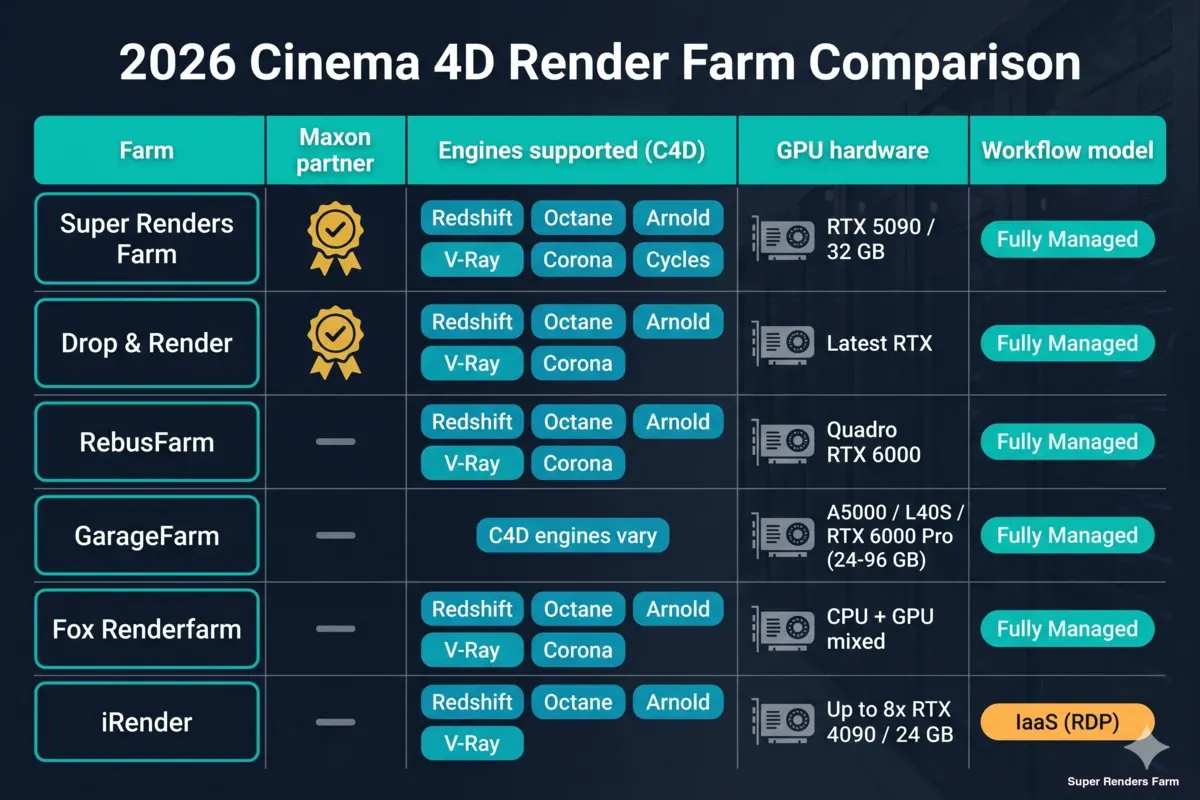 Infographic comparing six Cinema 4D render farms in 2026 — Maxon partnership status, supported render engines, GPU hardware specs, and workflow model
A few things worth pointing out about this table, because the positioning claims from each farm can blur what's actually different:
Maxon partnership isn't exclusive. As of 2026, both Super Renders Farm and Drop & Render are listed under Maxon's official partner program, and iRender announced its own official Maxon render-farm partnership in July 2023 (it is not shown on Maxon's partner page). Being an official partner matters for licensing clarity — you don't have to worry about whether the farm's Redshift instances are properly licensed — but it's not a differentiator between those two specific farms.
Engine breadth varies more than most comparison pages admit. Drop & Render leans heavily into Redshift and Octane branding, but does support the full Maxon and Chaos stack. RebusFarm and Super Renders Farm cover the full production range. iRender's model is different — because it's an IaaS (infrastructure-as-a-service) remote desktop model, you can in principle install any engine yourself, but the out-of-the-box supported configurations are more limited.
The fully managed vs. IaaS distinction is the biggest split. Five of the six farms in this comparison use a fully managed model: you upload a scene file, and the farm's system handles the rest. iRender uses an IaaS / remote desktop model: you rent a virtual workstation that comes with Cinema 4D and Redshift pre-installed (licences pre-activated on Prime-tier accounts, bring-your-own otherwise), and you install any further plugins and drivers yourself. Both models have legitimate use cases, but they produce very different day-to-day workflows. We covered this split in more detail in Managed vs. DIY cloud rendering.
Redshift on a Render Farm
Redshift in 2026 is still the default GPU renderer for most Cinema 4D studios, and it's the engine we see most frequently in production. Bundled with Cinema 4D subscriptions since 2022, it has a tight integration with C4D's MoGraph, Takes, and native material system that reduces the conversion work other engines require.
For a cloud farm, the factors that matter for Redshift specifically — VRAM capacity, driver version matching, plugin availability, and how scene preparation is handled — are the same regardless of which farm you pick. What changes is the farm's specific hardware (is it RTX 5090 with 32 GB VRAM, or older 24 GB cards?), how strict their version support is, and whether they provide a C4D submission plugin that handles asset packing for you.
We've covered the operational details — VRAM bottlenecks, Redshift Proxy files, Takes, and driver version matching — in our dedicated guide. Rather than repeat that content here, start with Redshift render farm for Cinema 4D in 2026 for the full workflow. The comparison matters more than the workflow for this article, so we'll focus on how the six farms differ for Redshift specifically.
GPU hardware is the cleanest comparison point. Super Renders Farm runs NVIDIA RTX 5090 cards with 32 GB VRAM. Drop & Render describes their fleet as "latest NVIDIA RTX." GarageFarm's GPU queue mixes A5000, L40S, and RTX 6000 Pro Blackwell nodes with VRAM ranging from 24 to 96 GB. iRender's C4D-optimized configurations run RTX 4090 (24 GB) or RTX 5090 (32 GB GDDR7) in configurations from one to eight cards per machine, topping out at 8× RTX 5090. RebusFarm's GPU queue historically centered on Quadro RTX 6000 hardware.
For most Redshift scenes, the 32 GB VRAM threshold is the practical line. Below 24 GB, you'll hit out-of-core rendering on heavy scenes. Above 32 GB, the returns diminish unless you're specifically doing 8K product renders with high-resolution textures.
Plugin support is where the "official Maxon partner" status starts to show. Partner farms generally maintain current Redshift versions within days of release and support a wider plugin ecosystem (X-Particles, Forester, Greyscalegorilla, TurbulenceFD). Non-partner farms can fall behind, especially on breaking-change Redshift releases.
For C4D teams committing to Redshift specifically, the farm-side setup has its own GPU-allocation, licensing, and texture-collection considerations beyond the comparison above. Our Cinema 4D Redshift render farm guide covers GPU hardware selection, the Redshift licensing model on farm nodes, and the scene-prep workflow that keeps C4D + Redshift projects moving through the queue without surprises.
For C4D users specifically considering Arnold — whether as a complement to Redshift for VFX work or as the primary renderer — Solid Angle's farm-side workflow has its own shape: C4DtoA plugin pinning, license check-out behavior, AOV setup, and the CPU-default-with-GPU-mode trade-off. Our Solid Angle Arnold render farm guide covers each of these so a C4D + Arnold submission lands predictably on managed nodes.
Octane and Arnold for Cinema 4D
Outside of Redshift, the two engines we're asked about most for Cinema 4D are OTOY's Octane and Solid Angle's Arnold.
Octane is an unbiased GPU renderer with a different philosophy than Redshift: physically accurate results by default, at the cost of longer render times on comparable hardware. It's popular for product visualization work where material realism matters, and for high-end motion work where the creative team prefers Octane's look.
Octane's licensing for render farms is separate from its local subscription. OctaneRender has its own farm licensing program, and most render farms that support Octane have either purchased a license pool or bundle the cost into per-frame pricing. Before committing to a large Octane job, check with the farm whether their Octane version matches your local version exactly — mid-version jumps in Octane have historically caused noticeable shading differences.
GPU requirements for Octane are similar to Redshift: VRAM capacity matters more than raw throughput. Octane's scalability across multiple GPUs on a single frame is strong, so boxes with many cards (iRender sells up to eight per machine; GarageFarm also offers multi-GPU nodes) can deliver meaningful speedups for single high-resolution renders. Super Renders Farm runs two RTX 5090 cards per node and typically distributes frames across many nodes for animations instead, which is the more efficient pattern for high-frame-count work.
Arnold in Cinema 4D has a different profile. Originally a CPU renderer, Arnold GPU has matured considerably and is now a real option for C4D users working in VFX and high-end archviz. The typical use case is: scenes that are too heavy for biased GPU rendering (Redshift, Octane) but where unbiased accuracy matters more than raw speed.
Arnold's C4D plugin is maintained by Autodesk directly. For cloud rendering, the main operational question is whether the farm supports Arnold GPU, Arnold CPU, or both. CPU rendering on Arnold still has its place — scenes with heavy hair/fur, complex volumetrics, or very high polygon counts often run better on CPU nodes than GPU. Farms with dual-mode support (Super Renders Farm, Drop & Render, RebusFarm, Fox Renderfarm) can route Arnold jobs to whichever mode fits the scene. On our farm specifically, Arnold GPU is available for lookdev, previews, and GPU-suitable finals up to roughly 28 GB VRAM per frame, while Arnold CPU is the recommended path for heavy finals, deep-EXR output, and custom shaders.
Motion Design and Broadcast: Cinema 4D on a Farm
Cinema 4D's dominant use case in 2026 is still motion design and broadcast work (our render farm guide for motion design looks at the frame-count and turnaround patterns that kind of work brings) — title sequences, channel branding, short-form animations, explainer content. That work has specific render farm implications: short render times per frame (often under a minute) but massive frame counts (thousands per project), tight turnaround windows (overnight deliverables are common), and heavy use of MoGraph, effectors, and Takes.
For short-per-frame high-count jobs, the farm's job scheduling matters more than raw per-frame speed. A farm that queues your frames efficiently across many nodes will often beat a farm with faster individual nodes but worse queue management. Ask any farm you're evaluating about concurrent node allocation — specifically, how many nodes can your job occupy at peak, and whether there are per-user or per-job caps.
Redshift has become the workhorse for this kind of work because of its MoGraph-native performance. We covered the detailed Redshift + MoGraph workflow — including cloner handling, effector behavior, and Takes — in the Redshift render farm for Cinema 4D guide. For this comparison, the relevant point is that all six farms in the table above can handle MoGraph scenes; the differences show up in driver version support and plugin compatibility rather than MoGraph itself.
How to Submit a Cinema 4D Project
The submission workflow is where the fully managed vs. IaaS split becomes most visible.
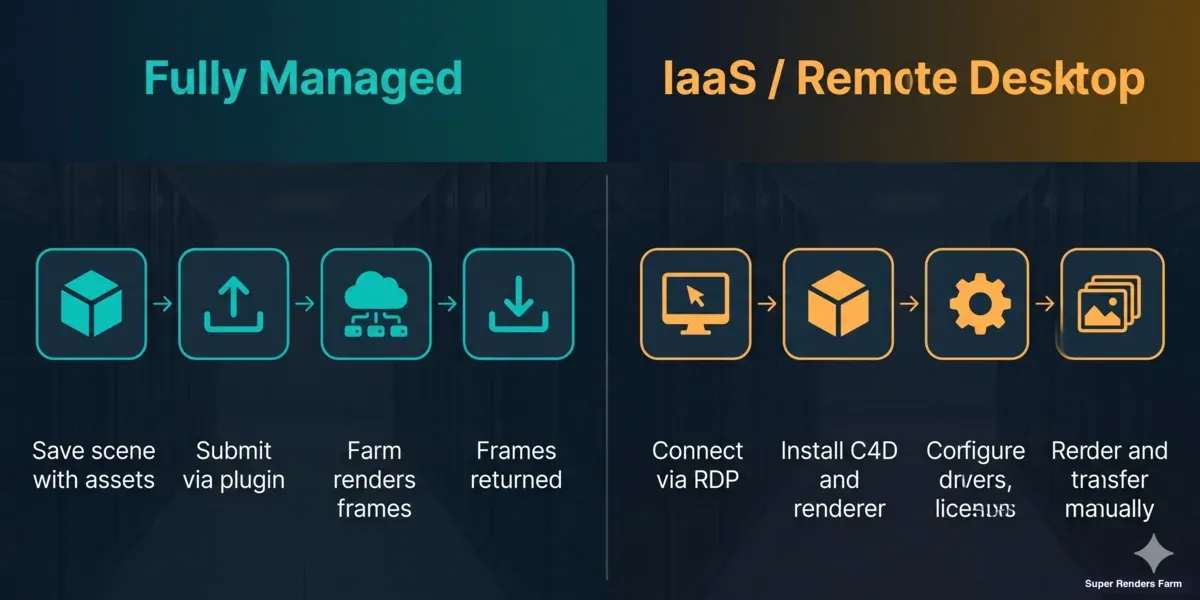 Workflow comparison between fully managed Cinema 4D render farm submission and IaaS remote desktop model
On a fully managed farm, the process is approximately:
- Prepare your scene with "Save Project with Assets" (Cinema 4D's built-in function that consolidates textures, HDRIs, and caches).
- Use the farm's C4D plugin or web uploader to submit. The plugin typically checks render settings, flags missing assets, and estimates cost.
- Monitor progress through the farm's dashboard. Failed frames are usually retried automatically.
- Download the finished frames.
On an IaaS farm (iRender being the main example in this comparison), the workflow is closer to managing a remote workstation: connect via RDP to a machine that already has Cinema 4D and Redshift installed, transfer your scene, configure, and render. More control, more operational overhead.
We cover the full managed-farm submission workflow — plugin installation, account setup, asset checks, and the first test render — in Getting started with Super Renders Farm. The same general pattern applies to any managed farm; specific plugin UIs differ.
Pricing: What Does Cinema 4D Cloud Rendering Cost?
Pricing across the six farms follows three broad models:
- Pay-per-frame or pay-as-you-go credits — Drop & Render, Super Renders Farm, and GarageFarm all offer models where you pay for the rendering you actually do. This suits variable project loads and freelancers.
- Per GHz-hour or per GPU-hour — RebusFarm and Fox Renderfarm charge based on measured render time on the farm's hardware. This can be cost-effective for long per-frame jobs but less predictable for estimating.
- Per-machine hourly (IaaS) — iRender charges for the virtual workstation by the hour, whether you're rendering or not. Cost scales with time rather than output.
For a typical Cinema 4D + Redshift motion design job (1,000 frames at ~45 seconds per frame on a current-gen GPU), the real-world cost across farms tends to land within a 2–3x spread rather than an order of magnitude apart. The variance comes more from billing granularity, queue efficiency, and hidden costs (file transfer, storage, license add-ons) than from the headline rate.
For a detailed breakdown of how to estimate cost per frame on different farm models — including the math behind pay-per-frame vs. subscription vs. GHz-hour comparisons — see our render farm cost per frame guide.
Free trial credits across the farms are in a similar range ($25–€25 equivalent, enough for a handful of test frames), which is meaningful because it lets you run a real comparison before committing. For a project of any size, running the same test scene across two or three shortlisted farms is the only reliable way to compare.
FAQ
Q: What's the best render farm for Cinema 4D in 2026? A: There isn't a single answer — it depends on your engine stack, budget model, and workflow preference. For most multi-engine C4D studios, the shortlist comes down to Super Renders Farm, Drop & Render, and RebusFarm, because all three support the full Maxon + Chaos engine range with fully managed workflows. For Redshift-heavy motion design work specifically, farms with current-gen GPU hardware (RTX 5090 or equivalent) have an advantage. For IaaS-style workflows where you want full workstation control, iRender is the most common choice.
Q: Is Super Renders Farm an official Maxon partner? A: Yes. Super Renders Farm is listed on Maxon's official partner directory covering Cinema 4D, Redshift, Red Giant, and Universe. Drop & Render is also listed as an official partner. Being an official partner means licensing for Maxon products on the farm is handled at the farm level.
Q: Can I use Redshift on any Cinema 4D render farm? A: Most C4D-focused render farms support Redshift because it's bundled with Cinema 4D subscriptions and widely used. The practical differences are GPU hardware (VRAM capacity, generation), version support (current Redshift version within days of release), and how licensing is handled (farm-provided vs. bring-your-own).
Q: What GPU hardware do Cinema 4D render farms use in 2026? A: The current generation most C4D-oriented farms are deploying is NVIDIA RTX 5090 (32 GB VRAM) or RTX 6000 Pro Blackwell (96 GB VRAM) for the newest fleets. RTX 4090 (24 GB) remains common, and L40S (48 GB) appears in some queues. Older Quadro RTX 6000 and A5000 hardware is still in production at some farms. For Redshift and Octane, 32 GB VRAM is the practical threshold for handling most motion and product scenes without out-of-core rendering.
Q: Can I render Cinema 4D with V-Ray or Corona on a cloud farm? A: Yes — all major C4D render farms support V-Ray for C4D. Corona support for Cinema 4D is also widely available. As an official Chaos partner, Super Renders Farm handles V-Ray and Corona licensing at the farm level, so you don't need to supply your own license for cloud rendering.
Q: What's the difference between fully managed and IaaS C4D render farms? A: Fully managed farms (Super Renders Farm, Drop & Render, RebusFarm, GarageFarm, Fox Renderfarm) handle software installation, licensing, driver versions, and plugin compatibility — you upload a scene and receive finished frames. IaaS farms (iRender) rent you a virtual workstation with Cinema 4D and Redshift pre-installed; you add plugins yourself and handle the operational work. Managed farms are simpler for standard workflows; IaaS gives more control for custom pipelines.
Q: How do I estimate the cost of a Cinema 4D render farm job? A: Render a representative frame locally, note the render time, and multiply by your frame count. Apply the farm's per-frame or per-hour rate to that total. Free trial credits from most farms are enough to run a test batch of 5–10 frames, which is the most accurate way to confirm cost before committing. Our cost per frame guide walks through the math for different pricing models.
Q: Do render farms support X-Particles, Forester, or Greyscalegorilla plugins for Cinema 4D? A: Major C4D-focused farms generally support the main plugin ecosystem, but specific version coverage varies. Before committing to a large job that depends on a plugin, confirm the farm has the exact version installed. On Super Renders Farm, plugin availability is handled as part of the fully managed setup — if you need a specific plugin version, our operations team can confirm or add it.
Last Updated: 2026-09-22
About Alice Harper
Blender and V-Ray specialist. Passionate about optimizing render workflows, sharing tips, and educating the 3D community to achieve photorealistic results faster.



