
Nuke Cloud Render Farm: Rendering Comps at Scale in 2026
Overview
Rendering Nuke comps on a cloud render farm
Compositing is the last mile of a visual-effects shot. By the time a sequence reaches Nuke, the 3D renders are done, the plates are graded, and the artist is assembling the final image — merges, keys, deep holdouts, lens work, grain. The catch is that this "final image" is rarely cheap to write out. A 200-frame 4K sequence with a stack of multi-channel EXR inputs and a few GPU-eligible nodes can pin a single workstation for hours, and the artist can't keep working while it renders. That is exactly the kind of work a cloud render farm exists to absorb.
The same offloading logic applies to motion-graphics compositing; our After Effects cloud rendering farm setup guide walks through the After Effects side.
We run NukeX across our render fleet at Super Renders Farm, and over the years we've watched the same handful of details decide whether a Nuke comp renders cleanly on a farm or stalls halfway through a sequence. It is almost never the compositing math that breaks. It is a missing gizmo, an OCIO config that doesn't match, an absolute Windows path that means nothing on a Linux worker, or a misunderstanding about which Nuke edition can even render off-machine. This guide walks through how Nuke comp rendering distributes across a farm, the edition and licensing landscape you need to understand before you submit, where GPU acceleration actually helps (and where it doesn't), and how to package a comp so nothing goes missing. The same operational thinking applies to broader VFX and product-visualization workflows, but Nuke has its own specific gotchas, and those are what we'll focus on here.
Why a Nuke comp is parallel by frame, not by tile
To understand how Nuke distributes across a farm, it helps to compare it with a 3D renderer. A path tracer like V-Ray or Arnold can split a single frame into buckets or tiles and hand each region to a different thread — or, with distributed rendering, a different machine. The pixels in the top-left corner don't depend on the pixels in the bottom-right, so the frame can be carved up spatially.
A 2D comp works differently. The value of any pixel at frame N depends only on that frame's inputs running through the node tree. Each frame is fully self-contained, which makes a Nuke comp embarrassingly parallel by frame: you can render frame 1 on one machine and frame 200 on another with no coordination between them. What Nuke does not do is split one frame into spatial tiles farmed to separate machines — a Write node renders a complete frame in a single process. Within one machine, Nuke parallelizes across CPU threads and uses a scanline/region engine, but across machines the unit of distribution is the frame.
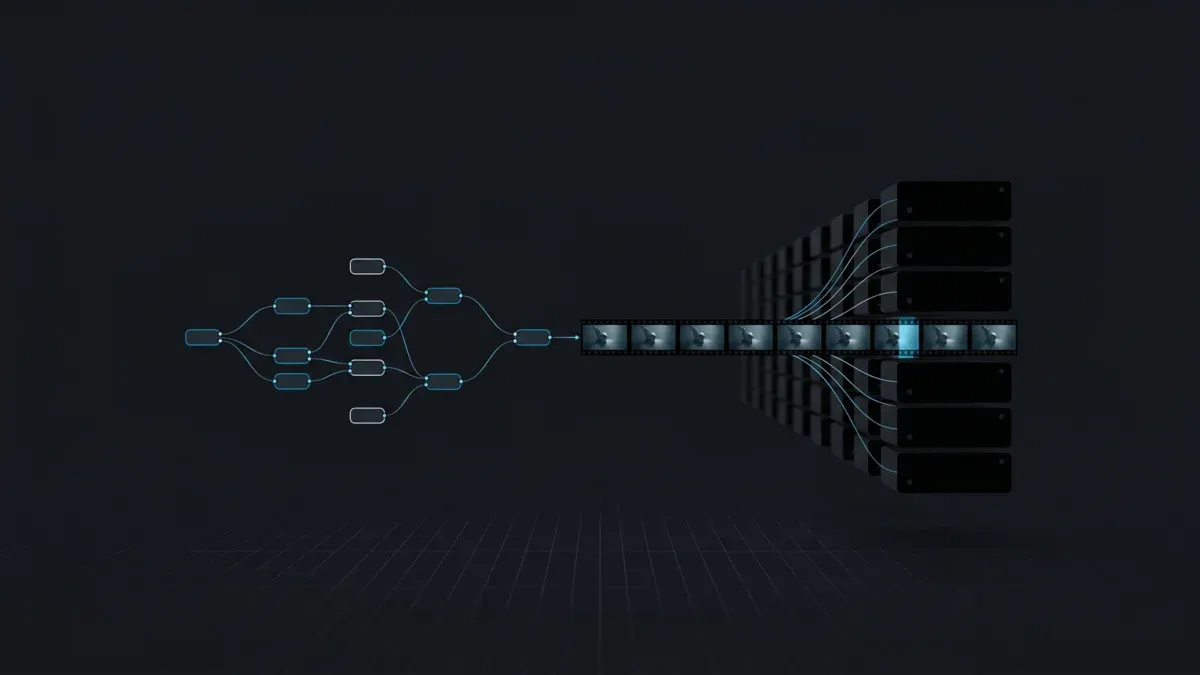
That single fact shapes everything about farm rendering for Nuke. The render manager doesn't subdivide images; it subdivides the frame range. A 1,000-frame sequence becomes a set of smaller frame-range "chunks," each chunk is handed to a worker, and every worker launches its own headless Nuke render for its slice. The diagram below shows the shape of it.
1,000 frames
(one Write node)
splits range into chunks
-F 1-50-F 51-100-F 101-150written to shared storage
Because frames are independent, throughput scales close to linearly with the number of workers you can put on the job — which is the whole reason rendering a long comp sequence in the cloud is worth doing.
The headless render: how Nuke runs on a worker
On a farm there is no GUI. Each worker runs Nuke in terminal (batch) mode, which renders all active Write nodes for a given frame range and then exits. The base command looks like this:
nuke -x -F 1-50 comp.nk
-x puts Nuke into execute mode. -F sets the frame range, and it accepts single frames (-F 7), inclusive ranges (-F 1-50), and stepped ranges (-F 1-100x2 renders every second frame). You can pass several -F arguments in one command for non-contiguous ranges. A few more flags matter once you move from a single comp to production sequences:
| Flag | What it does | Why it matters on a farm |
|---|---|---|
-x | Execute (render) all active Write nodes | Standard batch-render switch |
-F a-bxc | Frame range with optional step | The render manager fills this in per chunk |
-X node | Render only the named Write node | Render one output when a comp has several Writes |
--sro | Obey Write-node render order | Required when a downstream Read depends on an earlier Write's output |
--cont | Continue past a frame error | One corrupt frame doesn't abort a whole chunk |
-m N | Set the number of render threads | Tune per-worker concurrency to the machine's cores |
A render started this way requests a render license by default rather than an interactive seat — more on that in the next section. Nuke also returns useful exit codes that a render manager reads to mark a task succeeded, failed, or needs a retry: 0 is success, 1 is a render error, and 100 signals a licensing failure. On a managed farm you rarely type these commands yourself; the submission tooling builds them. But knowing what runs under the hood explains most of the behavior you'll see in a render log.
There is one more distribution mechanism worth naming so it isn't confused with farm rendering: Nuke's internal Frame Server. The Frame Server spins up multiple background render processes to accelerate a single render — useful on a busy workstation or a small group of helper machines. It is a different tool from farm-scale frame-range distribution, which is what you want when a full sequence needs to come back overnight rather than over a long weekend.
Nuke editions and licensing for farm rendering
This is the part that trips up the most people, because "Nuke" is a family, not a single product, and the editions do not all behave the same way on a farm.
| Edition | What it is | Can it render on a farm? |
|---|---|---|
| Nuke (Commercial) | The base node-based compositor | Yes — with a render license |
| NukeX | Nuke plus advanced nodes (CameraTracker, denoise, deblur, lens distortion, PointCloudGenerator, ParticleSystem) | Yes — with a render license |
| Nuke Studio | NukeX toolset plus an editorial/conform timeline | Yes — with a render license |
| Nuke Indie | Low-cost single-artist edition | No — external and cloud render farms are not supported |
| Nuke Assist | A restricted node subset for paint, roto, and tracking | No — it's an interactive assist seat, not a render license |
That table describes the Nuke family in general against the requirements of any render farm — not our fleet specifically; on our own farm, the render-side application is NukeX, as the rest of this guide describes. Two things are worth pulling out of the table.
First, Nuke Indie cannot render on a farm at all. Foundry's Indie edition is built for solo artists under a revenue cap, and its terms explicitly exclude external third-party render farms, cloud rendering services, and remote Frame Server rendering. Indie also saves to its own encrypted script formats that the commercial parser can't read. So if you're on Indie and you've been wondering why farm submission won't work, it isn't a configuration problem — it's a licensing boundary. Farm rendering needs the Commercial, NukeX, or Nuke Studio editions.
Second, on a farm you render with render licenses, not interactive seats. A render license is a headless, GUI-less Nuke that exists specifically to render — when you launch a terminal render, Nuke requests one by default. Render licenses are independent of the interactive seats your artists use, which is what lets a studio put a comp on fifty machines without buying fifty full interactive Nuke seats. A useful detail for mixed pipelines: a render license can render any nodes created in the NukeX edition or below, so a NukeX-equipped render node will happily render a script an artist built in base Nuke. NukeX is a superset of Nuke — it adds nodes, it doesn't remove the ability to read standard ones. The reverse is the only real constraint: base Nuke cannot evaluate NukeX-only nodes.
For licensing model, Foundry moved the Nuke family to annual subscription in early 2023, with login-based licensing that can run online or offline; perpetual and rental options also exist. The mechanics differ from studio to studio, which is the point of the next section.
How licensing works on our farm
Super Renders Farm is not a Foundry partner, and we don't claim to be — our verified vendor partnerships are with the render-engine makers, not with compositing-software vendors. What our farm runs is a render-only utilization model, the same approach we use for the other applications on the fleet that aren't tied to a partnership.
In practice that means you do not provision or manage a render-license seat per worker yourself. The worker fleet runs NukeX, version-pinned to a supported build, and the compositor launches headless to render your script. Because SuperRenders is a fully managed farm, you do not remote-desktop into machines, install Nuke, or hand-configure license servers — the render-side environment is already in place when your job lands. That is the operational difference between a managed farm and a do-it-yourself IaaS setup, where bringing Nuke and its licensing online is your problem to solve on every instance.
On cost, comp rendering is billed the way the rest of our CPU work is — per GHz-hour of compute used, with no machine-rental minimums and render credits that don't expire. New accounts start with a $25 credit, which is enough to render a short test sequence end to end and confirm your comp behaves the same on the farm as it does on your workstation before you commit a full job. The current rates and a cost calculator live on the pricing page.
Frame-range distribution in practice
Knowing that a farm chunks the frame range is one thing; getting clean, predictable renders out of it is another. A few practices come up again and again on our support side.
Chunk size is a trade-off. Small chunks (a few frames each) spread the work across more machines and recover faster from a failed task, but they pay Nuke's startup cost — script load, license checkout, plugin init — more often. Large chunks amortize startup but leave stragglers when one slow machine holds the tail of a sequence. For most comps, a moderate chunk that keeps each worker busy for several minutes is a sensible default; very heavy per-frame comps (deep, 4K-plus, many GPU nodes) lean toward smaller chunks.
Mind Write-node dependencies. If your script has a downstream Read that depends on a file an earlier Write produced — a precomp baked to disk, for example — those Writes must execute in order. That's what --sro is for. Without it, a worker can attempt the dependent Write before its input exists, and you get sporadic missing-frame errors that look random because they depend on machine timing.
Plan for the occasional bad frame. A single unreadable input or a transient storage hiccup shouldn't kill an entire chunk. --cont lets a render continue past a failed frame so you can re-queue just the gaps afterward rather than re-rendering everything. Pairing that with a render manager's automatic task-retry keeps long sequences moving without babysitting.
The payoff of getting this right is straightforward: a sequence that would tie up an artist's machine for a full day comes back in the time it takes the slowest single chunk to render, because every other chunk renders alongside it.
GPU vs CPU for Nuke on the farm
Here is a point that surprises people coming from GPU-first 3D rendering: Nuke is fundamentally a CPU application. The vast majority of compositing operations — merges, color corrections, transforms, keys, most filters — run on the CPU.
For the fuller picture of why comp renders don't scale the same way 3D renders do — and what that means for farm sizing and cost — see our VFX compositing on cloud render farms guide. GPU acceleration in Nuke is opt-in on a specific subset of nodes, exposed through a "use GPU if available" control; nodes without that control are CPU-only.
| Workload | Where it runs | Examples |
|---|---|---|
| General compositing | CPU | Merge, Grade, ColorCorrect, Transform, Keyer, most filters |
| GPU-accelerated nodes | GPU (opt-in, with CPU fallback) | Kronos and MotionBlur retimes, Denoise, VectorGenerator, Convolve, ZDefocus |
| BlinkScript / machine learning | GPU | BlinkScript kernels, CopyCat training (needs an NVIDIA GPU) |
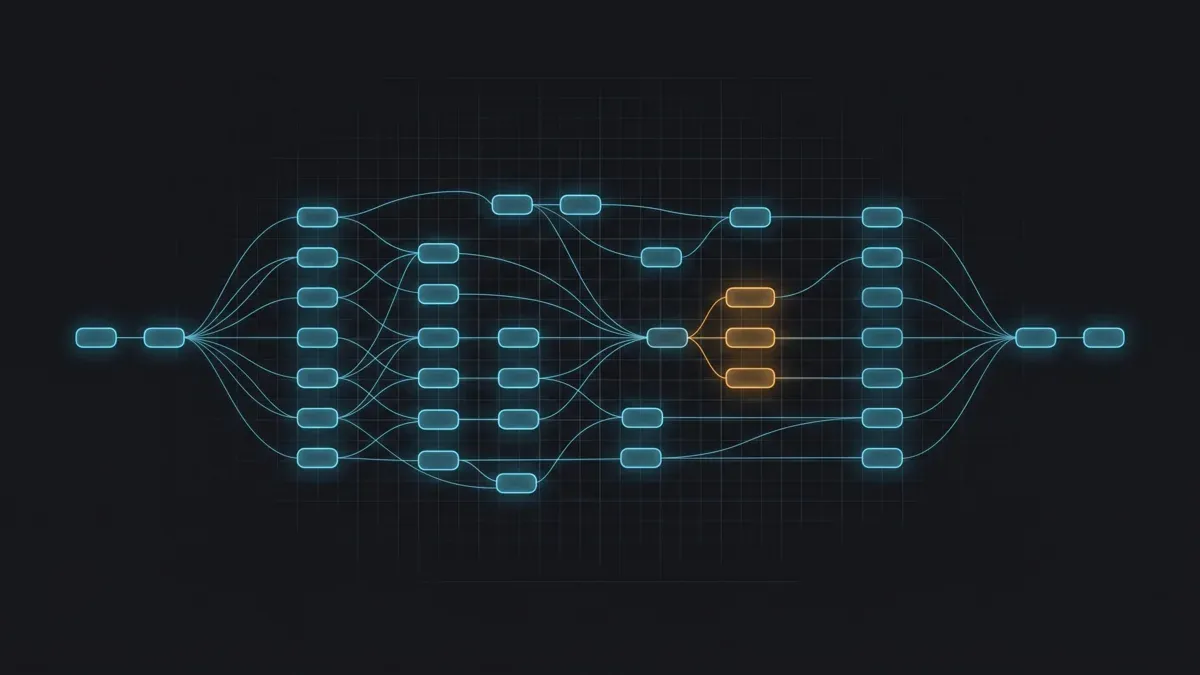 Conceptual Nuke node tree showing most compositing nodes running on CPU with a few GPU-accelerated nodes highlighted
What this means for hardware is that a comp dominated by grades, merges, and transforms sees little benefit from a GPU — it wants CPU cores and memory. A comp leaning on a heavy Kronos retime, a big ZDefocus, Denoise, or custom BlinkScript work can speed up substantially on a GPU. Most production comps sit somewhere in between, which is why we lead with CPU capacity and treat the GPU as an accelerator for the nodes that actually use it.
Our fleet reflects that. The bulk of compositing work runs on CPU machines built on dual Intel Xeon E5-2699 V4 processors with 96–256 GB of RAM each — collectively 20,000+ CPU cores — and that memory headroom is the part people underestimate. Deep compositing and high-resolution multi-channel EXR plates are memory-hungry; a single deep frame at 4K can hold many samples per pixel, and running out of RAM mid-frame is a far more common cause of farm render failures than raw CPU speed. For the comps that genuinely benefit from GPU nodes, we also run a dedicated GPU cloud render farm on NVIDIA RTX 5090 cards with 32 GB of VRAM each. If you want to see how that GPU tier performs on heavier workloads, our RTX 5090 cloud rendering benchmarks cover it in detail.
For the fundamentals of cloud rendering itself, our cloud rendering explained guide is a useful starting point. The honest guidance for Nuke specifically, though, is to right-size to the comp: don't pay for GPU time a merge-heavy script will never touch.
File and asset handling: the part that actually breaks
If a Nuke render fails on a farm, the odds are overwhelming that it's a dependency problem, not a compositing problem. A comp script is mostly a set of references — to footage, to gizmos, to a color config — and every one of those references has to resolve identically on a worker that is not the artist's machine.
| Dependency | Failure mode | What to check |
|---|---|---|
| Footage / Read nodes | Missing frames, "file not found" | Network-reachable, OS-agnostic paths — not local Z:\ drive letters that only exist on the artist's PC |
| Gizmos / OFX plugins | Script won't load, unknown node | Installed on every render node, or grouped/baked into the script before submission |
| OCIO color config | Wrong colors, mismatched grade | The same config is deployed and selected on the farm as the artist used |
| Fonts | Substituted or wrong glyphs in Text nodes | The fonts used are present on render nodes |
| LUTs / .cube files | Failed color transform | Standalone LUT files referenced by the comp are sent with it |
| Nuke version | Node incompatibility | Render build matches (or is newer than) the build the artist used |
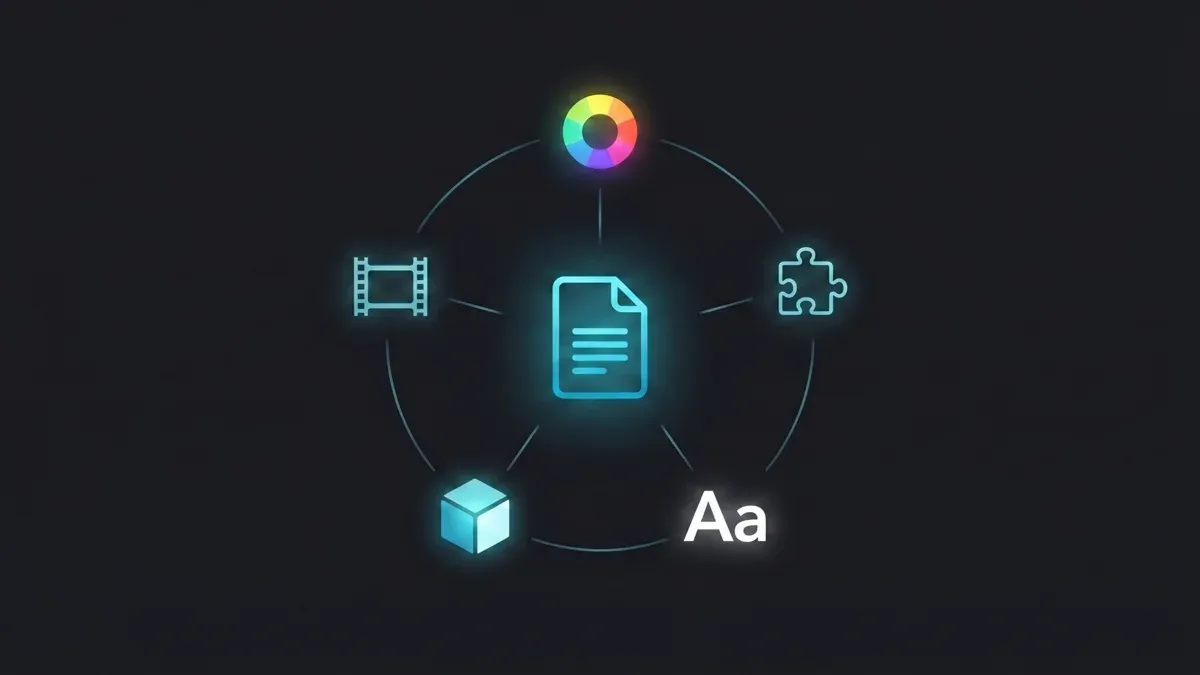 Diagram of a Nuke comp script and the dependencies that must travel with it to a render farm: footage, gizmos, OCIO config, fonts, and LUTs
A few of these deserve a closer look. Paths are the classic one: an artist on Windows referencing Z:\project\plates\ will produce a script that means nothing to a Linux worker. Consistent, network-accessible project paths — or a render manager that rewrites paths on the way to the farm — solve this. Gizmos and custom OFX must exist on the render node; the safest habit before submitting is to convert any custom gizmos into Groups so they're baked into the script and carry no external dependency.
OCIO config drift is the subtlest one and worth dwelling on, because it produces a render that succeeds but looks wrong. Nuke's color management is driven by an OpenColorIO config; if the farm resolves a different config than the artist used — a different file path, a custom config that was never deployed, or an environment variable pointing somewhere else — the color transforms diverge and the farm render won't match the viewer the artist approved. The fix is discipline: pin the project to a specific, deployed config and make sure the render environment uses exactly that one. A managed farm keeps Nuke's standard, bundled OCIO configs in place by default, but a studio's custom OCIO config still has to travel with the job.
On the output side, Nuke comps typically read and write multi-channel EXR. A single OpenEXR file can carry many channels — a beauty pass plus diffuse, specular, lighting AOVs, a Z-depth pass, and cryptomatte mattes — all read through one Read node and split out with Shuffle nodes for per-pass work in comp. For deep compositing, Nuke reads and writes deep EXR via DeepRead and DeepWrite, storing multiple depth samples per pixel to solve holdout and edge problems without re-rendering 3D. Most of this data is stored as 16-bit half-float, the standard for HDR linear plates, with 32-bit full float reserved for data passes like world position or motion vectors that need full precision. None of that is exotic — but every one of those channels is more data to move and more memory to hold, which loops straight back to why RAM and storage throughput matter as much as core count for comp rendering.
A pre-submission checklist for Nuke comps
Before you send a comp to any farm — ours or your own in-house queue — a quick pass over these points prevents the large majority of failed renders:
- Paths: all Read and Write nodes use network-reachable, OS-agnostic paths, not local drive letters.
- Gizmos: custom gizmos are converted to Groups (baked in) or confirmed installed on render nodes.
- Color: the OCIO config is the one the farm will resolve; any custom config travels with the job.
- Fonts and LUTs: every font used by a Text node and every referenced
.cube/LUT file is present. - Version: the render build matches the build the comp was created in.
- Edition: the script is from Commercial Nuke, NukeX, or Nuke Studio — not Indie, which can't farm-render.
- Render order: if a downstream Read depends on an earlier Write, render with
--sro. - Test small: render a handful of frames first and compare against the artist's local output before committing the full range.
That last point is inexpensive insurance. A five-frame test render catches a path, color, or version mismatch for the cost of a few minutes — far better than discovering it 800 frames into an overnight job.
Where Nuke rendering fits a wider pipeline
Final-frame EXR output is the most common endpoint for a Nuke comp, but it isn't the only one. If your shot is headed into a real-time engine rather than a flat rendered sequence — virtual production or in-engine review — the integration questions are different, and we cover that path separately in our Nuke to Unreal Engine pipeline guide. Keep the distinction clear: this article is about rendering comp frames at scale on a farm, while the Unreal path is about moving Nuke work into a real-time context. If you're still mapping out how distributed rendering works in general, our guide to what a render farm is is a good starting point.
For an authoritative reference on the mechanics described here, Foundry's own documentation on command-line operations and render farms and its Nuke family licensing FAQs are the canonical sources, and the OpenEXR and OpenColorIO project sites document the file and color standards a comp depends on.
FAQ
Q: Can I render Nuke on a cloud render farm with a Nuke Indie license? A: No. Foundry's Nuke Indie edition explicitly does not support external third-party render farms, cloud rendering services, or remote Frame Server rendering, and it saves to encrypted script formats the commercial parser can't read. Farm rendering requires the Commercial Nuke, NukeX, or Nuke Studio editions.
Q: Do I need a separate Nuke render license to use a cloud render farm? A: On a farm, renders run headless using render licenses rather than interactive seats — that's how a studio can render on many machines without buying a full interactive seat for each one. On our farm you don't provision these yourself; the worker fleet runs NukeX under a render-only utilization model, so the render-side licensing is handled farm-side.
Q: Is Nuke rendering faster on GPU or CPU? A: For most comps, CPU. Nuke is fundamentally a CPU application; only a specific subset of nodes — Kronos, Denoise, ZDefocus, Convolve, BlinkScript, and machine-learning tools like CopyCat — are GPU-accelerated. A comp built mostly from merges, grades, and transforms wants CPU cores and RAM, while a comp leaning on those heavy nodes benefits from a GPU.
Q: How does a render farm split a Nuke comp across machines? A: By frame range, not by image region. Because each frame of a comp is independent, the render manager divides the total frame range into chunks and hands each chunk to a worker, which renders its slice headless. Throughput scales close to linearly with the number of workers on the job.
Q: Why does my Nuke comp render with the wrong colors on the farm? A: The most common cause is OCIO config drift — the farm resolved a different OpenColorIO config than the artist used, whether through a different file path, an environment variable, or a custom config that was never deployed to the render nodes. Pin the project to a specific config and make sure that exact config is what the render environment uses.
Q: What files do I need to send with a Nuke script to render remotely? A: The script plus everything it references: footage and image sequences, any custom gizmos or OFX plugins (or bake them into Groups), the OCIO color config, fonts used by Text nodes, and any standalone LUT files. The render build should also match the version the comp was created in.
Q: Does NukeX render a standard Nuke comp? A: Yes. NukeX is a superset of base Nuke — it adds nodes rather than removing the ability to read standard ones — so a NukeX render node renders scripts built in base Nuke without issue. A render license can render any node created in the NukeX edition or below. The only constraint is the reverse: base Nuke can't evaluate NukeX-only nodes.
Q: How much does it cost to render Nuke comps on your farm? A: Comp rendering is billed per GHz-hour of CPU compute used, with no machine-rental minimums and render credits that don't expire. New accounts get a $25 credit, which covers a short test sequence end to end. Current rates and a cost calculator are on our pricing page.
About Thierry Marc
3D Rendering Expert with over 10 years of experience in the industry. Specialized in Maya, Arnold, and high-end technical workflows for film and advertising.



