Maya 2027 Cloud Render Farm: Rendering Arnold, V-Ray, and Redshift at Scale
Overview
Introduction
Autodesk shipped Maya 2027 in late March 2026, and within a day the questions started landing in our support chat: will my renderer load, will the farm have 2027 nodes ready, and do I have to re-package every scene? We have been running distributed rendering infrastructure for over fifteen years, and a new Maya release is one of the few moments that touches every part of a render pipeline at once — the application binary, the renderer plugin, the color pipeline, and the way assets resolve across worker machines on a render farm.
This guide is the rendering-and-farm companion to the Maya 2027 release. If you want the full feature roundup — MotionMaker, the modeling updates, the AI tooling — we covered that separately in What's New in Autodesk Maya 2027. Here we focus on the part that decides whether a deadline gets met: how Maya 2027 scenes actually render at scale, which engines (Arnold, V-Ray, Redshift) are ready and when, how unattended farm submission works, and what to verify before you push a job to the cloud. Super Renders Farm runs Maya 2027 alongside the older releases studios are still shipping on, so most of what follows is written from what we see on the queue rather than from a press release.
What Maya 2027 Changes for Rendering
Most of the headline Maya 2027 features are about modeling and animation, but a few changes matter directly once a scene leaves your workstation and lands on a farm.
The most render-relevant is the continued push on MaterialX and LookdevX. Maya 2027's LookdevX (version 2.0, as named in the release) leans further into MaterialX as a portable, renderer-agnostic way to author and exchange shading graphs. The practical win for distributed rendering is relative-path texture references. Historically a lot of farm failures trace back to a material that points at C:\Users\artist\textures\… — an absolute path that only exists on the artist's machine. When a MaterialX document references its textures relative to its own location, and you submit the material file and its textures together, every worker node resolves them correctly regardless of where the farm mounts the project. That one discipline removes a whole category of "renders fine locally, fails on the farm" tickets.
Maya 2027 also continues the USD and Hydra trajectory that recent releases established. The bundled mayaUSD plugin and Hydra render delegates let a scene be exported as a USD stage and rendered per-frame by whichever engine implements a delegate. We are not going to claim brand-new 2027 USD features here — the trajectory is the point: USD-based farm rendering is a first-class path, not an experiment.
A couple of changes are indirect but real. MotionMaker and the rigging and skinning improvements (the ngSkinTools integration) mean more animation gets finished inside Maya, which usually translates into more frames and longer sequences to render — exactly the workload a farm exists to absorb. And the Flow Studio button now surfaced in Maya 2027 is Autodesk steering users toward its own cloud service, which we'll address directly further down, because it genuinely changes the buying decision.
Arnold, V-Ray, and Redshift on Maya 2027
Here is the single most important thing to understand about any new Maya release: the application shipping does not mean your renderer is ready.
Every third-party renderer is a compiled plugin built against a specific Maya SDK. A plugin built for Maya 2026 will simply refuse to load in Maya 2027 — the vendor has to recompile and test against the 2027 SDK, then publish a compatible build. In practice the major vendors get an early SDK from Autodesk and ship a 2027-compatible build within a few weeks of general availability, but "day one" is not guaranteed for anything except the engine Autodesk bundles itself.
Arnold (MtoA) is the exception that ships with Maya. The Maya-to-Arnold (MtoA) plugin is bundled and available the moment you install Maya 2027 — we are deliberately not pinning a specific MtoA build number here, because the point releases move continuously; check Autodesk's Arnold notes for the exact version. Arnold's strength is CPU path tracing, with a CUDA-based Arnold GPU mode for the scenes that suit it. Because Arnold is licensed through the Maya entitlement, there is no separate Arnold license to chase; on a managed farm that licensing is handled as part of the render rather than something you provision per node. Our dedicated Arnold cloud render farm page covers the engine in more depth.
V-Ray for Maya (Chaos) is the workhorse for a lot of archviz and a growing share of VFX. It runs both on the CPU — the production V-Ray engine — and on the GPU (V-Ray GPU / RTX), with the V-Ray Denoiser available either way. For farm work the reliable pattern is exporting .vrscene files and rendering them with the V-Ray standalone per frame, which decouples the render from a live Maya session. V-Ray's own Distributed Rendering (many machines contributing to one frame) is a different mechanism from how a farm distributes whole frames across nodes — for most jobs, per-frame distribution is the more efficient path. Run the current V-Ray for Maya build that matches your Maya 2027 install; Chaos publishes the compatible release on its own cadence after each Maya version.
Redshift for Maya (Maxon) is GPU-first and a common choice for motion design, product visualization, and lookdev-heavy work that benefits from fast iteration. There is also a Redshift CPU mode for nodes without suitable GPUs, although most studios run Redshift on the GPU. As with V-Ray, you want the Redshift build that matches Maya 2027, published after the release — see our Redshift cloud render farm page for the GPU side of this.
Octane (OTOY) is worth a mention for GPU-only pipelines. It has no CPU mode — every node rendering Octane needs an NVIDIA GPU — and OctaneBench is the benchmark people use to gauge per-GPU throughput, which also maps neatly onto how GPU rendering tends to be billed.
We go into more detail on how OctaneBench and similar benchmarks factor into our own testing in our render farm benchmark methodology.
The readiness picture at a glance:
| Renderer | Ready on Maya 2027 | CPU / GPU | Licensing on a managed farm |
|---|---|---|---|
| Arnold (MtoA) | Bundled, day one | CPU (+ GPU) | Included in the render rate |
| V-Ray (Chaos) | Vendor build, ~weeks after GA | CPU + GPU | Included in the render rate |
| Redshift (Maxon) | Vendor build, ~weeks after GA | GPU only | Included in the render rate |
| Octane (OTOY) | Vendor build, ~weeks after GA | GPU only | Included in the render rate |
A note on balance: despite all the GPU attention, a large share of production Maya rendering is still CPU work. Arnold and V-Ray on the CPU handle the heavy, memory-hungry VFX and archviz scenes that often won't fit inside a GPU's VRAM. Our fleet reflects that reality, with substantial CPU capacity — 20,000+ CPU cores on Dual Xeon machines — alongside a GPU tier built on NVIDIA RTX 5090 cards with 32 GB of VRAM each. Render-engine licensing for Arnold, V-Ray, Redshift, and Octane is included in the per-hour rate, so on our side "ready for 2027" is an operational task, not something you license yourself. We run these engines under render-only utilization — we are not speaking for Autodesk, Chaos, or Maxon, only describing what executes on the nodes.
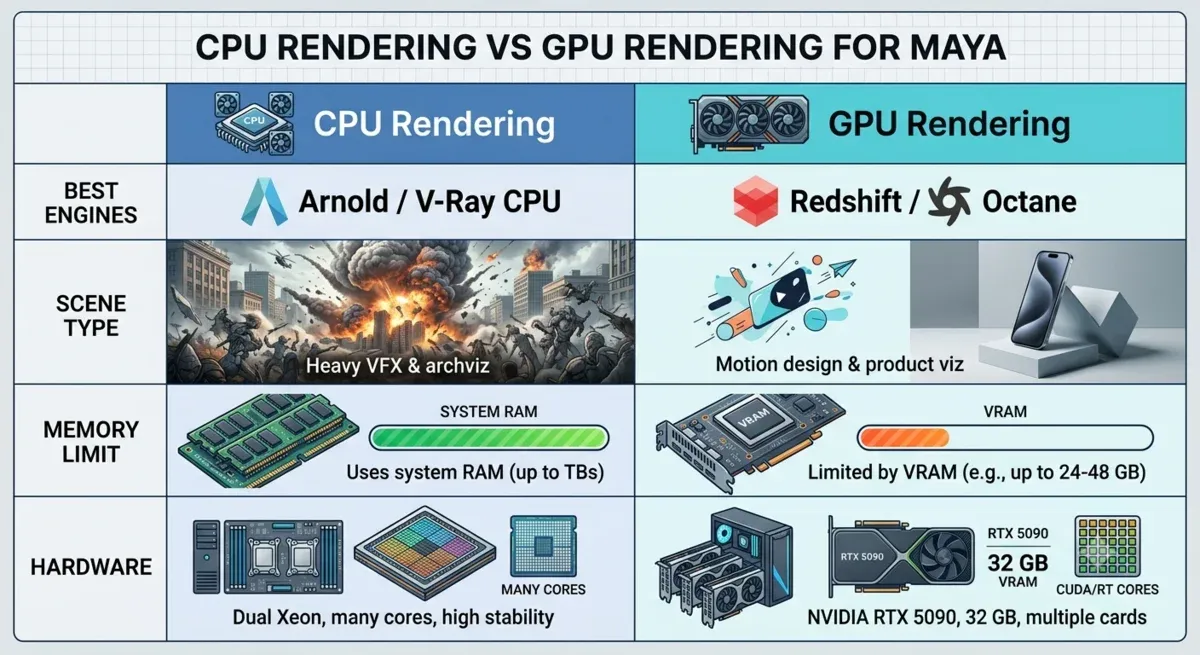 CPU versus GPU rendering for Maya: Arnold and V-Ray on the CPU for heavy VFX and archviz, Redshift and Octane on the GPU for motion design and product visualization
How Maya 2027 Scenes Render on a Cloud Farm
A cloud render farm distributes work at the frame level. A 480-frame shot is split into chunks, each chunk goes to a worker node, and each node opens the scene and renders its frames independently. There is no shared render state between nodes during the job, which is exactly why every node has to resolve the entire scene on its own.
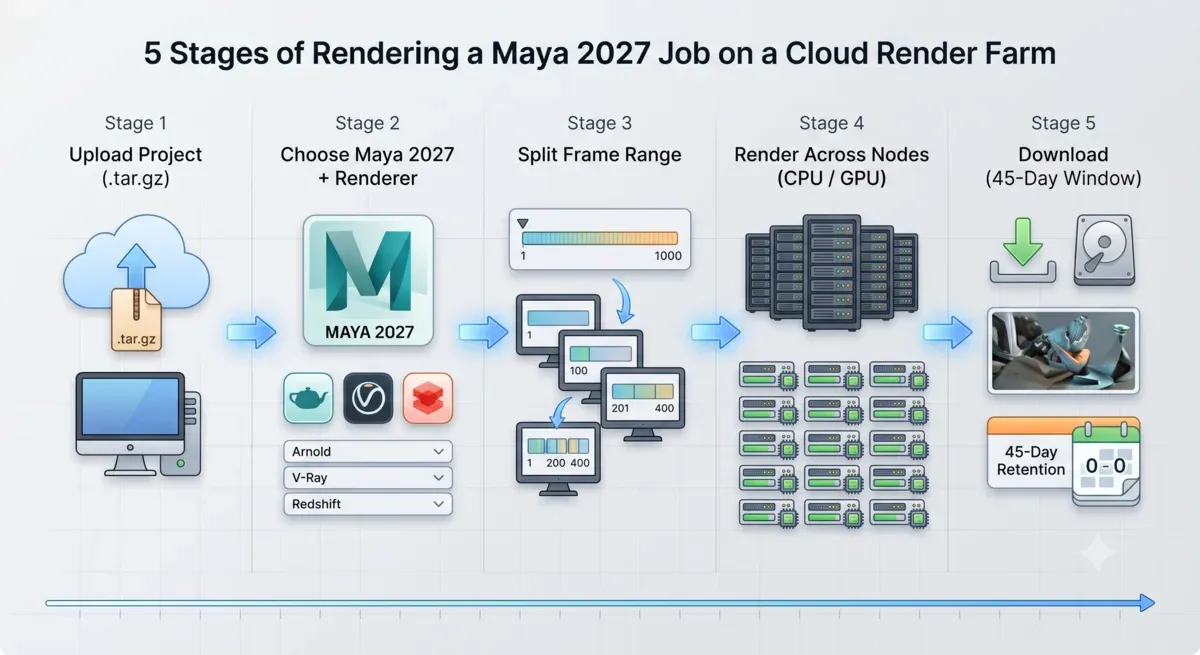 Maya 2027 render farm pipeline: upload the project, choose Maya 2027 and a renderer, split the frame range, render across CPU and GPU nodes, then download your frames
That independence is the source of most farm-specific issues, and almost all of them come down to path resolution. The scene file, every referenced file (Maya references, Alembic and VDB caches), every texture, and every plugin has to be reachable from the node. Absolute paths baked from a local drive are the classic failure; UNC paths, or a packaged project that resolves relatively, are what survive the trip. The Maya 2027 MaterialX relative-path workflow described above is one piece of this, but the same discipline applies to caches and references.
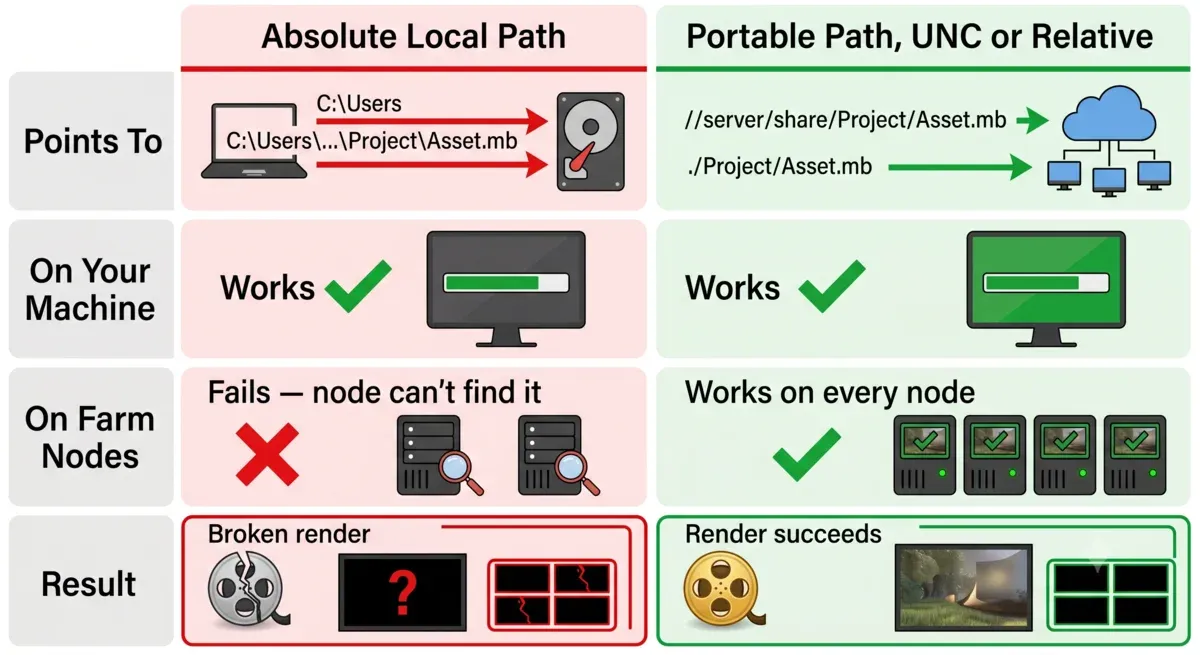 Render farm path resolution: an absolute local path fails on worker nodes, while a portable UNC or relative path resolves on every node
Two more things travel with the scene and quietly break renders when they don't. Color management — Maya ships ACES via OpenColorIO, and if the OCIO config sits at a path that only exists on the submitting workstation, nodes silently fall back to a default and the colors drift. And render layers — the Render Setup system carries per-layer overrides for materials, lights, and visibility, and the farm has to render the correct layers, which on the command line is the -rl flag. Under the hood, unattended rendering is just Maya's batch renderer invoked per frame — Render.exe -r arnold|vray|redshift -s <start> -e <end> and so on — the same mechanism whether you render one frame locally or ten thousand across a farm.
The part studios feel most is what they don't have to do. Super Renders Farm is a fully managed farm: you don't remote-desktop into machines, you don't install Maya 2027 or the renderer plugins yourself, and you don't manage engine licenses per node. You upload the project, choose the Maya version and renderer, and the nodes are already provisioned. Upload the project folder unpacked, since the farm does not extract archives, and for projects beyond roughly 2 GB the Client App is steadier than a browser upload because it resumes an interrupted transfer (S3 access through Cloud Direct Connect is the other option); a browser upload does not resume, and it becomes unreliable above about 5 GB. The Maya cloud render farm page walks through the Maya-specific setup.
Version Coverage: Running Maya 2027 Next to Older Releases
One of the most practical reasons to render in the cloud during a version transition is that you don't have to upgrade everything at once.
Maya's file format is forward-incompatible: a scene saved in Maya 2027 will not open in Maya 2024. That cuts both ways for a studio mid-project — you can't casually move a shipping show onto a brand-new Maya, and you can't render a 2027 scene on a node that only has 2026 installed. A professional farm solves this by keeping a range of Maya versions installed side by side, each in its own version-specific location, and letting the job specify which one to use. We keep multiple Maya releases available, so a team finishing a project on an older version isn't forced to migrate just to get frames out, while a team that has already jumped to 2027 can submit immediately.
The same version discipline applies one level down, to the renderer. A V-Ray or Redshift plugin is tied to a specific Maya version — the 2027 build of a renderer is a different binary from the 2026 build — so the farm matches the renderer build to the Maya build for the job. When you submit, what matters is that your Maya version and your renderer version line up with what you authored in. If they don't, scenes either fail to open or render subtly wrong, and that mismatch is one of the few problems a farm can't paper over for you.
Maya 2027 and Autodesk's Bundled Cloud Rendering
Maya 2027 makes Autodesk's own cloud rendering more visible — the Flow Studio button is right there in the interface — so it's worth being straight about what it is and where its limits sit.
Autodesk bundles a cloud rendering service (part of the Flow platform; the rendering piece runs Arnold in the cloud) that gives subscribers an allotment of cloud rendering hours.
For how cloud rendering works more generally, outside Autodesk's bundled option, see our cloud rendering explained guide. For a Maya user who renders only in Arnold and stays inside the bundled allotment, it's a genuinely low-friction option — there is nothing to set up. The constraints show up the moment a pipeline is bigger than that:
| Dimension | Autodesk's bundled cloud rendering | Multi-engine cloud render farm |
|---|---|---|
| Render engines | Arnold only | Arnold, V-Ray, Redshift, Octane, and more |
| Cross-application (3ds Max, Houdini, Cinema 4D) | Not via this path | Yes — one farm, many applications |
| Hours / capacity | Bundled allotment, then overage | Pay-as-you-go, no fixed cap |
| Hardware choice | Managed by Autodesk | Choose CPU or GPU (RTX 5090) tiers |
| Custom plugins / shaders | Limited to what's exposed | Full plugin support where builds match |
We are not going to put a specific number on Autodesk's bundled hours — that allocation changes with subscription tiers and dates quickly, so check Autodesk's current pricing if it's central to your decision. The honest summary is narrow versus broad: if you live entirely in Arnold and your volume fits the bundle, the built-in option is convenient; the moment you need V-Ray or Redshift, cross-application rendering, or capacity past the allotment, that is the gap a full farm fills.
What It Costs and What to Check Before You Submit
Cloud rendering pricing is easier to reason about when it's tied to the work done rather than a monthly seat. Super Renders Farm bills CPU rendering at $0.004 per GHz-hour and GPU rendering at $0.003 per OctaneBench-hour, with render-engine licensing already inside that rate. New accounts start with $25 in trial credit, and credits don't expire, so a test render this month and a real deadline next quarter draw from the same balance. Finished frames stay available after a job completes with no fixed automatic deletion period, so you can pull everything down through the web or the Client App's auto-download without racing a clock.
Before you push a Maya 2027 job, the short pre-flight below catches the issues we see most:
| Check | Why it matters | How |
|---|---|---|
| Paths resolve off your machine | Absolute local paths fail on every node | Use UNC paths or a relatively-packaged project |
| Renderer build matches Maya 2027 | A 2026 plugin won't load in 2027 | Confirm the V-Ray / Redshift build is the 2027 release |
| OCIO config travels with the job | A missing config means silent color drift | Point OCIO at a path that exists farm-side |
| Render Setup layers are correct | The wrong layers render the wrong output | Verify the enabled layers before submitting |
| Project uploaded as a folder, not an archive | The farm does not extract .zip, .7z or .tar.gz | Extract locally, then upload via web or Client App |
| Output is mirrored locally | The farm is not your archive; keep your own copy | Download or auto-pull promptly |
If you're new to the cloud-rendering workflow end to end — scene prep through retrieval — that's a longer subject than a checklist. It's also the part a managed farm absorbs: the Maya install, the renderer licensing, and the node provisioning happen on the farm side rather than yours. What matters in practice isn't a slogan; it's that the farm runs the same Maya 2027, and the same Arnold, V-Ray, and Redshift builds you author in, on hardware sized for production scenes.
FAQ
Q: Does Maya 2027 work on a cloud render farm? A: Yes. Maya 2027 renders on a farm the same way earlier versions do — scenes are distributed by frame and rendered with Maya's batch renderer on nodes that have Maya 2027 installed. The main requirement is that your renderer (Arnold, V-Ray, or Redshift) has a build matching Maya 2027, and that your assets resolve through portable paths rather than absolute local ones.
Q: Is Arnold included with Maya 2027 for rendering? A: Arnold ships bundled with Maya 2027 through the Maya-to-Arnold (MtoA) plugin, and it's licensed through the Maya entitlement, so there's no separate Arnold license to manage. On a fully managed farm that licensing is handled as part of the render, so you don't provision it per node.
Q: When are V-Ray and Redshift compatible with a new Maya release? A: Third-party renderers are compiled plugins, so they need a build recompiled against the new Maya SDK — they don't load day one automatically. Major vendors such as Chaos (V-Ray) and Maxon (Redshift) typically publish a compatible build within a few weeks of a Maya release, so you match the renderer build to your Maya 2027 install before submitting.
Q: Should I render Maya scenes on CPU or GPU? A: It depends on the engine and the scene. Arnold and V-Ray on the CPU handle large, memory-heavy VFX and archviz scenes that may not fit in GPU VRAM, while Redshift and Octane are GPU-first and excel at fast iteration for motion design and product visualization. A farm with both CPU and GPU tiers lets you match the hardware to the renderer rather than the other way around.
Q: Can I still render older Maya versions if my studio hasn't upgraded to 2027? A: Yes. A render farm keeps multiple Maya versions installed side by side, and each job specifies which version to use. Because Maya's file format is forward-incompatible, this matters — a 2027 scene needs a 2027 node — but it also means you're never forced to upgrade a shipping project just to get frames rendered.
Q: How is cloud rendering for Maya 2027 priced? A: Super Renders Farm bills CPU rendering at $0.004 per GHz-hour and GPU rendering at $0.003 per OctaneBench-hour, with render-engine licensing included in that rate. New accounts get $25 in trial credit to test with, and credits don't expire.
Q: How is a render farm different from Autodesk's built-in cloud rendering? A: Autodesk's bundled cloud rendering runs Arnold only and gives subscribers a set allotment of hours, which suits Arnold-only pipelines that stay within the bundle. A multi-engine farm adds V-Ray, Redshift, and Octane, cross-application rendering for 3ds Max or Houdini, a choice of CPU or GPU hardware, and pay-as-you-go capacity beyond a fixed allotment.
Q: What's the most common reason a Maya render fails on a farm? A: Path resolution. A material, cache, or reference pointing at an absolute local path — like a personal drive letter — works on the artist's machine but fails on every worker node. Using UNC paths, or a relatively-packaged project that includes MaterialX relative-path textures in Maya 2027, prevents the large majority of "works locally, fails on the farm" problems.
About Alice Harper
Blender and V-Ray specialist. Passionate about optimizing render workflows, sharing tips, and educating the 3D community to achieve photorealistic results faster.