
Best GPU for 3D Rendering in 2026: A Practical Tier List for Artists
Overview
Introduction
Choosing a GPU for 3D rendering in 2026 is more nuanced than picking the card with the highest core count. VRAM capacity, render engine compatibility, driver stability, and your specific workflow all matter — and the "right" GPU for an archviz studio running V-Ray looks very different from the right GPU for a motion designer in Redshift.
At Super Renders Farm, we've been running GPU rendering infrastructure for over a decade, and the questions we hear most often from artists aren't about raw TFLOPS — they're about whether a specific card will handle their scene without running out of memory. This guide reflects what we've observed across thousands of production jobs: which GPUs reliably handle real workloads, where VRAM limits actually bite, and how different render engines interact with specific hardware.
This isn't an affiliate review. We don't sell GPUs. What we can offer is operational data from running mixed GPU fleets at scale — including the RTX 5090 cards in our GPU rendering infrastructure — combined with publicly available benchmarks and engine documentation.
How GPU Rendering Works (Brief Overview)
GPU rendering leverages the massively parallel architecture of graphics cards to trace light paths simultaneously. Where a CPU might process rays across 16-64 cores, a modern GPU throws thousands of CUDA cores (NVIDIA) or Stream Processors (AMD) at the same task. For the embarrassingly parallel nature of path tracing, this translates directly into speed.
Three types of cores matter for rendering in 2026:
- CUDA/Shader cores — handle general ray tracing calculations
- RT cores — dedicated hardware for ray-triangle intersection tests (BVH traversal)
- Tensor cores — accelerate AI denoising, which is now standard in production pipelines
The practical result: a single RTX 5090 can render frames that would take a dual-Xeon workstation 15-20 minutes in just 2-4 minutes. But this speed advantage comes with a hard constraint — your entire scene (geometry, textures, displacement, light cache) must fit within the GPU's VRAM. That's what makes GPU selection for rendering fundamentally different from GPU selection for gaming.
For a deeper comparison of GPU vs CPU rendering approaches, see our GPU rendering vs CPU rendering guide.
GPU Tier List for 3D Rendering (2026)
Based on production performance data, driver maturity, and price-to-VRAM ratio, here's how current GPUs stack up for professional 3D rendering:
Tier S — Production Workhorse
| GPU | VRAM | CUDA Cores | RT Cores | TDP | Street Price (USD) | Best For |
|---|---|---|---|---|---|---|
| NVIDIA RTX 5090 | 32 GB GDDR7 | 21,760 | 170 | 575W | $1,999 | Heavy production rendering, large scenes |
| NVIDIA RTX 4090 | 24 GB GDDR6X | 16,384 | 128 | 450W | $1,599-1,799 | Production rendering, excellent price/VRAM |
The RTX 5090 is the current ceiling for consumer-class GPU rendering. 32 GB of GDDR7 handles scenes that would overflow on 24 GB cards — dense archviz interiors with 4K textures, moderate vegetation scatters, and multi-light setups. The jump from 24 GB (4090) to 32 GB (5090) matters more than the raw compute uplift for most production scenarios.
The RTX 4090 remains exceptional value. At 24 GB, it handles the majority of production scenes, and its CUDA core count delivers rendering performance that would have required workstation cards two generations ago.
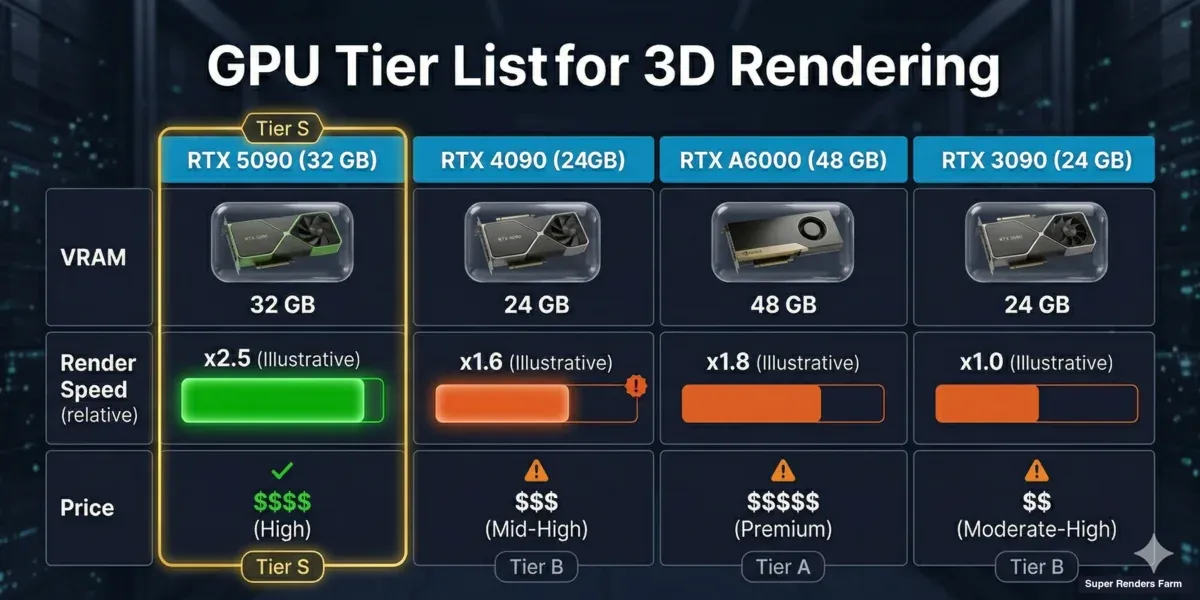 GPU comparison chart showing RTX 5090, RTX 4090, RTX A6000, and RTX 3090 with VRAM and performance ratings for 3D rendering
Tier A — Professional / Multi-GPU
| GPU | VRAM | CUDA Cores | RT Cores | TDP | Street Price (USD) | Best For |
|---|---|---|---|---|---|---|
| NVIDIA RTX A6000 | 48 GB GDDR6 | 10,752 | 84 | 300W | $4,200-4,600 | Maximum VRAM scenes, VFX, simulation |
| NVIDIA RTX 5080 | 16 GB GDDR7 | 10,752 | 84 | 360W | $999 | Mid-budget production, moderate scenes |
| NVIDIA RTX 4080 SUPER | 16 GB GDDR6X | 10,240 | 80 | 320W | $979-1,099 | Similar to 5080, strong used market |
The A6000 exists for one reason: 48 GB of VRAM. Its raw rendering speed per dollar is worse than consumer cards, but when your scene demands 30+ GB of GPU memory, it's the only single-card option. VFX studios working with heavy simulation caches and displacement-heavy environments routinely need this headroom.
The RTX 5080 and 4080 SUPER sit at an interesting inflection point. 16 GB is workable for product visualization, simple interiors, and motion design — but it's tight for archviz exteriors or anything with heavy texture loads. Artists working exclusively in GPU engines should seriously consider whether 16 GB will still be sufficient as texture resolutions and scene complexity grow.
Tier B — Entry Production / Lookdev
| GPU | VRAM | CUDA Cores | RT Cores | TDP | Street Price (USD) | Best For |
|---|---|---|---|---|---|---|
| NVIDIA RTX 4070 Ti SUPER | 16 GB GDDR6X | 8,448 | 66 | 285W | $749-829 | Budget production, lookdev iteration |
| NVIDIA RTX 3090 Ti | 24 GB GDDR6X | 10,752 | 84 | 450W | $800-1,000 (used) | Used market value, high VRAM per dollar |
| NVIDIA RTX 3090 | 24 GB GDDR6X | 10,496 | 82 | 350W | $650-850 (used) | Same 24 GB as 3090 Ti, cheaper used |
The RTX 3090/3090 Ti deserve special mention. On the used market, 24 GB cards under $1,000 represent extraordinary VRAM-per-dollar for rendering. Their raw compute is slower than current-gen — roughly 60-70% of an RTX 4090 in Redshift — but scene compatibility (fitting in VRAM) often matters more than raw speed for production work. Many studios run 3090s specifically because the 24 GB allows them to render scenes that overflow on 16 GB current-gen cards.
Tier C — Learning / Lightweight Production
| GPU | VRAM | Notes |
|---|---|---|
| NVIDIA RTX 4060 Ti 16 GB | 16 GB | Decent VRAM, slower compute — fine for learning Redshift/Octane |
| NVIDIA RTX 4060 Ti 8 GB | 8 GB | Too little VRAM for production GPU rendering |
| AMD Radeon RX 7900 XTX | 24 GB | Limited render engine support (HIP/Cycles only) |
A note on AMD: The Radeon 7900 XTX offers 24 GB at an attractive price, but render engine support remains limited. Only Blender Cycles (via HIP), ProRender, and a handful of smaller engines support AMD GPUs. Redshift, Octane, and V-Ray GPU are NVIDIA-only (CUDA/OptiX). If your pipeline is Blender-centric, AMD is viable. For anything else, NVIDIA remains the practical choice for GPU rendering in 2026.
VRAM Requirements by Use Case
VRAM is the single biggest factor in GPU selection for rendering. Here's what different workflows actually demand based on production data:
| Use Case | Typical VRAM Usage | Minimum GPU | Recommended GPU |
|---|---|---|---|
| Product visualization (single object, studio lighting) | 4-8 GB | RTX 4070 Ti (16 GB) | RTX 4090 (24 GB) |
| Archviz interior (furnished room, 4K textures) | 10-16 GB | RTX 4090 (24 GB) | RTX 5090 (32 GB) |
| Archviz exterior (vegetation, multiple buildings) | 18-32 GB | RTX 5090 (32 GB) | RTX A6000 (48 GB) or cloud |
| Motion design (stylized, moderate geometry) | 6-12 GB | RTX 4080 (16 GB) | RTX 4090 (24 GB) |
| VFX (simulation caches, heavy displacement) | 20-48+ GB | RTX A6000 (48 GB) | Multi-GPU or cloud |
| Animation (per-frame, consistent scene) | Varies per frame | Match scene peak VRAM | +25% headroom |
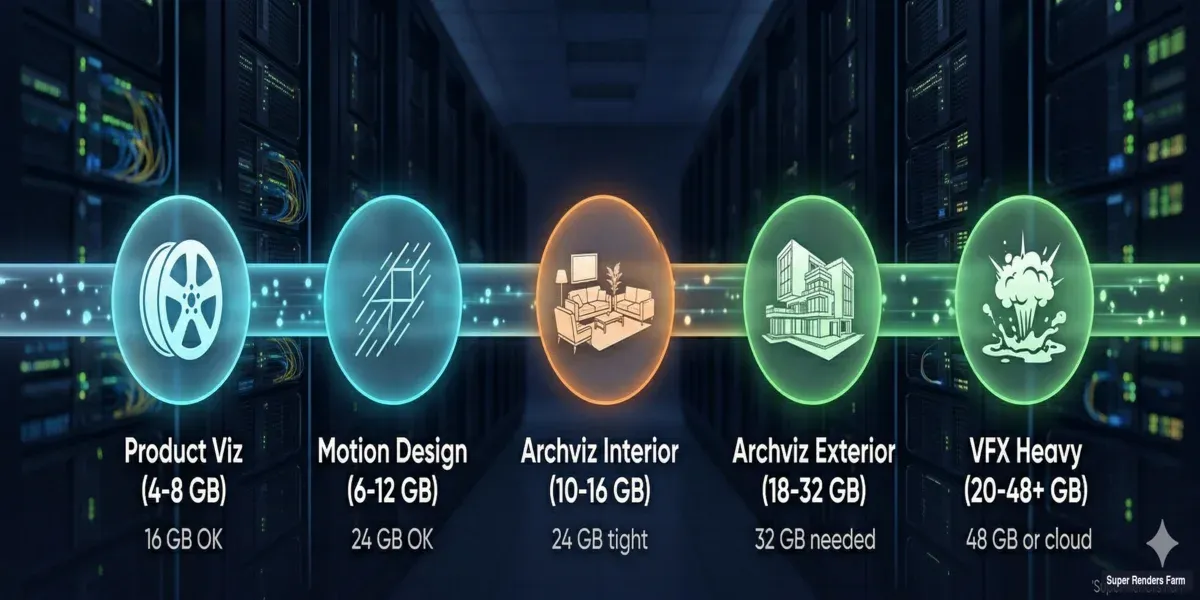 VRAM requirements diagram showing GPU memory needed for product visualization, archviz interiors, archviz exteriors, and VFX rendering
What consumes VRAM in practice:
| Asset Type | Approximate VRAM Cost |
|---|---|
| 4K texture (GPU-compressed) | 16-32 MB |
| 4K texture (uncompressed) | 64 MB |
| 1 million polygons | 40-80 MB |
| Displacement map (dense subdivision) | 200-500 MB per object |
| Volumetric cache (smoke/fire) | 500 MB - 4 GB |
| Forest Pack / scatter (10M instances) | 2-8 GB |
| HDRI environment (8K) | 128-256 MB |
A scene with 80 textures at 4K (compressed), 5 million polygons, two displacement objects, and an 8K HDRI uses approximately 6-10 GB before the render engine adds its own overhead (BVH structure, light cache, denoiser buffers). That's manageable on 16 GB. Add Forest Pack vegetation with 5 million instances, and you're at 15-20 GB — suddenly 16 GB cards are failing and you need 24 GB minimum.
For detailed analysis of how VRAM limits affect complex scenes, see our RTX 5090 VRAM limit analysis.
Render Engine GPU Compatibility (2026)
Not every GPU works with every render engine. This table reflects current production compatibility:
| Render Engine | NVIDIA CUDA | NVIDIA OptiX (RT Cores) | AMD HIP | Intel Arc | Multi-GPU | Out-of-Core (RAM Fallback) |
|---|---|---|---|---|---|---|
| Redshift 3.6+ | Full | Full | No | No | Yes (linear scaling) | Yes (with speed penalty) |
| Octane 2024+ | Full | Full | No | No | Yes | Limited |
| V-Ray GPU 7 | Full | Full | No | No | Yes | Hybrid CPU+GPU mode |
| Arnold GPU 7.3+ | Full | Full | No | No | Yes | Unified memory model |
| Cycles (Blender 4.x) | Full | Full | Full (HIP) | Partial (oneAPI) | Yes | No |
| Unreal Engine 5.4+ (Path Tracer) | Full | Full | No | No | Limited | No |
| D5 Render | Full | Full | No | No | No | No |
| Enscape | Full | Full | No | No | No | No |
Key observations:
-
NVIDIA dominance is structural. Every major GPU render engine supports CUDA and OptiX. AMD support is essentially Blender-only for production rendering. This isn't changing soon — engine developers prioritize the hardware their paying users actually own. (We're an official Maxon render partner for Redshift and an official Chaos render partner for V-Ray — both engines we run daily on our GPU fleet.)
-
OptiX matters. RT core acceleration via OptiX provides 20-40% speedup over raw CUDA in supported engines. All RTX cards (20-series onward) have RT cores, but newer generations have more capable ones. The RTX 5090's 4th-generation RT cores show measurable improvement in heavy ray-tracing scenes.
-
Multi-GPU scaling varies. Redshift scales almost linearly (1.8-1.9x with 2 GPUs). Octane scales well for final renders but not viewport. V-Ray GPU and Arnold GPU support multi-GPU but with diminishing returns past 2 cards in most workloads. For scaling beyond 2-4 GPUs, cloud rendering becomes more practical — you avoid PCIe bandwidth bottlenecks, power constraints, and the upfront investment.
-
Out-of-core is a safety net, not a workflow. Redshift's out-of-core rendering prevents crashes when scenes exceed VRAM, but performance drops 3-8x. Don't size your GPU around out-of-core capability — size it to fit your typical scenes in VRAM.
Benchmark Comparison: Real Render Performance
These benchmarks use standardized scenes to compare raw rendering throughput. All numbers from publicly available benchmark suites (Blender Benchmark, OctaneBench, Redshift vendor data) combined with our internal testing:
For V-Ray-specific hardware scores and methodology, see our V-Ray Benchmark guide.
| GPU | Blender Classroom (samples/min) | OctaneBench 2024 | Redshift (Archviz Interior, relative) | V-Ray GPU (V-Ray Benchmark, vraymarks) |
|---|---|---|---|---|
| RTX 5090 | 1,850 | 982 | 1.00x (baseline) | 3,420 |
| RTX 4090 | 1,420 | 756 | 0.77x | 2,640 |
| RTX 5080 | 1,050 | 548 | 0.57x | 1,920 |
| RTX 4080 SUPER | 980 | 512 | 0.53x | 1,810 |
| RTX 3090 Ti | 920 | 482 | 0.50x | 1,680 |
| RTX 3090 | 870 | 458 | 0.47x | 1,590 |
| RTX A6000 | 780 | 412 | 0.42x | 1,440 |
| RTX 4070 Ti SUPER | 740 | 392 | 0.40x | 1,380 |
Important context for these numbers:
- Benchmarks measure compute speed on scenes that FIT in VRAM. They don't tell you whether your actual scenes will fit.
- The RTX A6000 scores lower than consumer cards in raw compute — but it can render scenes that crash on every other card on this list. VRAM capacity doesn't show up in benchmarks.
- The RTX 5090's 30% uplift over the 4090 is consistent across engines, suggesting the improvement is architectural rather than engine-specific optimization.
- Real production performance varies significantly from benchmarks. A scene with heavy displacement pushes RT cores harder; a scene with complex shaders pushes CUDA cores; a scene with lots of textures pushes memory bandwidth.
Cloud GPU Rendering vs. Buying Hardware
At some point, the GPU you need costs more than what makes sense to own — or your deadline requires more rendering power than any single workstation provides. This is where cloud GPU rendering enters the picture.
When buying makes sense:
- You render daily and can utilize the GPU 4+ hours per day
- Your scenes fit comfortably within a single GPU's VRAM
- You value instant access (no upload time, no queue)
- Budget allows $1,500-5,000 upfront per workstation GPU
When cloud GPU rendering makes sense:
- Deadlines require parallel rendering across many GPUs simultaneously
- Scenes exceed your local GPU's VRAM (cloud farms offer higher-VRAM options)
- Rendering is bursty (heavy during deadlines, idle otherwise)
- You need access to current-gen hardware without the capital expenditure
- Total cost of ownership analysis favors cloud for your utilization pattern
On our farm, we run RTX 5090 GPUs (32 GB VRAM each) for GPU rendering jobs.
For Cinema 4D users running Redshift, our Cinema 4D Redshift render farm guide covers GPU requirements, scene optimization, and what to expect from cloud rendering with current-generation hardware. For artists whose scenes exceed 24 GB — the limit of a local RTX 4090 — cloud rendering with 32 GB cards provides headroom without requiring a $4,000+ A6000. The economics work out when you factor in hardware depreciation, power costs, and the flexibility to scale to dozens of GPUs during crunch periods.
The hybrid approach we see most successful studios adopt: a capable local GPU (RTX 4090 or 5090) for daily lookdev and iteration, combined with cloud rendering for final production frames and deadline crunches. This gives you instant feedback during creative work and burst capacity when you need throughput.
Recommendations by Budget and Use Case
Under $1,000 — Learning and Lightweight Production
Pick: RTX 3090 (used, ~$700-850) or RTX 4070 Ti SUPER (~$799)
If VRAM matters more than speed (and for rendering, it usually does): get a used RTX 3090. The 24 GB means you won't hit memory walls on moderate production scenes. If you prefer new hardware with warranty: the 4070 Ti SUPER at 16 GB handles product viz and motion design comfortably.
$1,000-$1,800 — Serious Production
Pick: RTX 4090 (~$1,599-1,799)
The RTX 4090 remains the single card recommendation for most professional 3D rendering workflows in 2026. 24 GB handles the majority of production scenes, and its compute performance is within 25-30% of the RTX 5090 at $400-600 less. Unless you specifically need 32 GB or already own a 4090, this is where the value sits.
$1,800-$2,500 — Maximum Single-Card Performance
Pick: RTX 5090 (~$1,999)
When 24 GB isn't enough but $4,000+ for an A6000 isn't justified. The 32 GB of GDDR7 handles dense archviz interiors, moderate vegetation scenes, and VFX shots that overflow on 24 GB cards. This is what we run on our GPU render nodes — the combination of 32 GB VRAM and current-gen compute covers the widest range of production scenarios.
$4,000+ — Maximum VRAM
Pick: RTX A6000 (48 GB, ~$4,400)
Only when you regularly work with scenes that exceed 32 GB — heavy VFX with volumetric simulations, dense urban environments with full vegetation, or multi-asset compositions that simply won't fit on consumer hardware. Consider cloud rendering as an alternative at this price point — the capital investment in an A6000 buys substantial cloud rendering credit.
FAQ
Q: What is the best GPU for 3D rendering in 2026? A: At Super Renders Farm, the NVIDIA RTX 5090 (32 GB VRAM) offers the strongest combination of rendering speed and memory capacity for professional 3D work. The RTX 4090 (24 GB) remains excellent value for most workflows. The choice depends primarily on whether your scenes exceed 24 GB of VRAM.
Q: How much VRAM do I need for GPU rendering? A: For product visualization and motion design, 16 GB is workable. For archviz interiors with 4K textures, 24 GB provides comfortable headroom. For archviz exteriors with vegetation or VFX with simulation data, 32-48 GB is often required. Your scene's texture count, polygon density, and displacement complexity determine the actual requirement.
Q: Does Redshift work with AMD GPUs? A: No. Redshift requires NVIDIA GPUs (CUDA/OptiX). The same applies to Octane and V-Ray GPU. Among major render engines, only Blender Cycles supports AMD GPUs via HIP. If your pipeline uses Redshift, Octane, or V-Ray GPU, you need NVIDIA hardware.
Q: Is the RTX 5090 worth the upgrade from RTX 4090 for rendering? A: The RTX 5090 provides approximately 30% faster rendering and 33% more VRAM (32 GB vs 24 GB). If your scenes regularly use 20-24 GB of VRAM and you're hitting memory limits, the upgrade is immediately justified. If your scenes fit comfortably in 20 GB or less, the 4090 remains highly capable and the 30% speed improvement may not justify the cost difference. See our RTX 5090 rendering performance analysis for detailed benchmarks.
Q: Can I use multiple GPUs for rendering? A: Yes, most GPU render engines support multi-GPU configurations. Redshift scales nearly linearly (1.8-1.9x with 2 GPUs). Octane and V-Ray GPU also support multiple cards. VRAM does not pool across GPUs — each card must independently hold the scene data. Multi-GPU improves speed but does not solve VRAM limitations.
Q: Is a workstation GPU (Quadro/RTX A-series) necessary for rendering? A: Not for rendering performance. Consumer RTX cards (4090, 5090) are faster and cheaper than their workstation equivalents for path tracing workloads. Workstation cards (A6000) justify their premium only when you need more VRAM (48 GB), certified drivers for specific CAD/DCC applications, or ECC memory for simulation workloads. For pure rendering, consumer cards deliver more performance per dollar.
Q: When should I use cloud GPU rendering instead of buying a GPU? A: Cloud GPU rendering makes sense when: your deadlines require more GPUs than you own, your scenes exceed your local GPU's VRAM, your rendering workload is bursty rather than constant, or the total cost of ownership (hardware + power + depreciation) exceeds cloud credits for your usage pattern. Many studios combine a local GPU for daily iteration with cloud rendering for final production output.
About Alice Harper
Blender and V-Ray specialist. Passionate about optimizing render workflows, sharing tips, and educating the 3D community to achieve photorealistic results faster.



