
What Is Houdini? Procedural 3D Software Explained for Artists and Studios
Overview
Introduction
What is Houdini? It is the 3D application from SideFX that builds a scene out of connected nodes instead of stacking edits onto a model, and that single design choice explains almost everything about it: why visual effects studios reach for it when they need fire, water, destruction and crowds, why its learning curve has a reputation, and why a lot of working 3D artists never need to open it at all.
This guide explains what Houdini is, what "procedural" actually means in practice, what the main parts of the software do, and who genuinely benefits from it. It also covers what changes when you render a Houdini scene, because that is where the software's design starts to affect your compute bill. It deliberately does not repeat licence prices; those are laid out with measurement dates in How Much Does Houdini Cost. This article answers "what is it and do I need it", that one answers "what will it cost me".
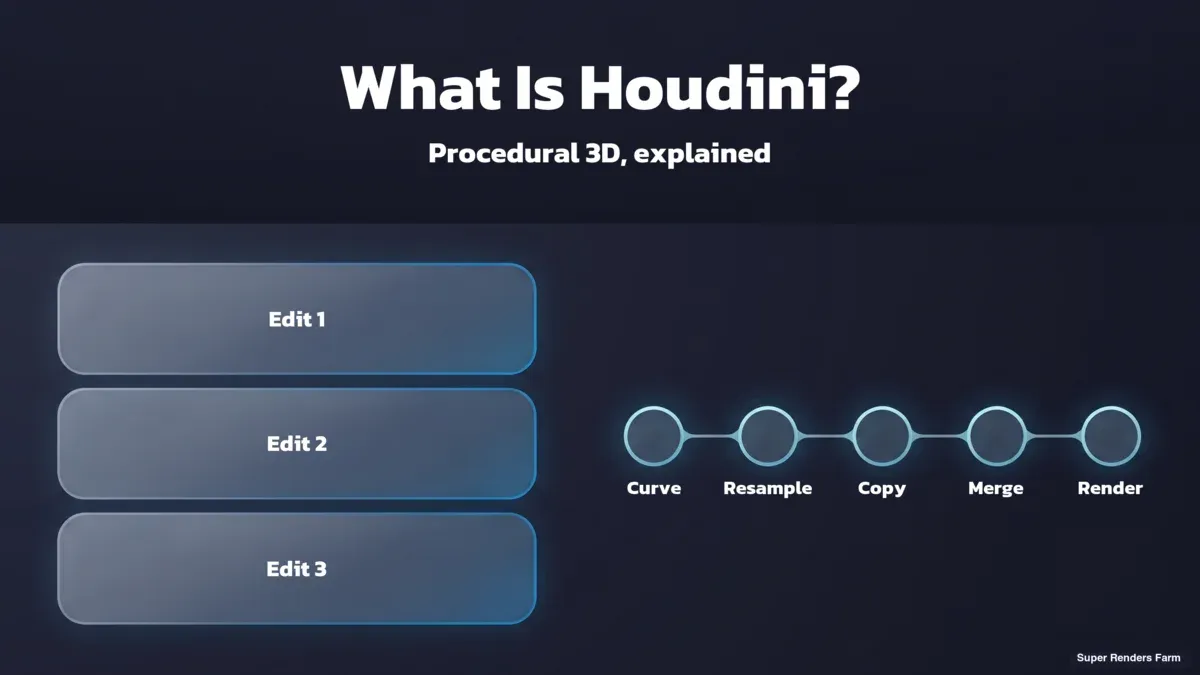
 History stack of three edits beside a node network where changing one Curve node updates every result
What Is Houdini, in One Paragraph
Houdini is professional 3D software developed by Side Effects Software, known as SideFX, a company based in Toronto. SideFX describes it as procedural content creation tools for film and TV, game development and more, built from the ground up as a procedural system. It was first released in 1996 and grew out of an earlier procedural toolset called PRISMS, according to the Wikipedia entry on Houdini. Today it covers modeling, animation, simulation, lighting, rendering and pipeline automation in one application, but its reputation was built on simulation: smoke, fire, liquids, rigid-body destruction, cloth, hair and crowds.
The one idea to hold onto is this: in Houdini, nothing is a one-off edit. Every action is stored in a node, and the nodes are wired into a network that works as a recipe for the result. SideFX's own documentation describes it in those terms, noting that Houdini records the actions you took and the parameters you used, so you can go back and change a parameter or selection on an existing node and edit the history of how the scene was created.
Procedural Versus Layer-Based: The Difference That Matters
Most 3D packages people learn first, such as Maya, 3ds Max, Cinema 4D and Blender, are built around objects and a modifier or history stack. You model a shape, add a modifier, add another, and the stack remembers the order. That is a form of non-destructive editing, and for a lot of work it is exactly right. Several of these tools have also added node-based and procedural systems alongside the classic workflow, so the line is not absolute.
Houdini starts from the other end. The network is the scene. There is no "base model" underneath that you edit by hand; there is a chain of operations that generates the model, and every number in that chain stays editable for the life of the project.
| Layer-based workflow | Procedural (Houdini) workflow | |
|---|---|---|
| What you store | The result of your edits, plus a history | The recipe that produces the result |
| Changing an early decision | Often means redoing or undoing later steps | Change one parameter, everything downstream recomputes |
| Making 50 variations | 50 manual passes, or a lot of scripting | One network driven by different inputs |
| Learning curve | Gentler, you push and pull things directly | Steeper, you design the system that pushes and pulls |
| Where it pays off | One-off hero assets, direct artistic control | Anything repeated, varied, simulated or automated |
A concrete way to feel the difference: imagine a fence built along a curve. In a layer-based tool you place posts, then rails, then adjust when the client moves the fence line. In Houdini you describe the fence as a rule applied to a curve, so moving the curve rebuilds the whole fence. The same logic scales from a fence to a city block, a debris field, or ten thousand trees with different heights.
The cost of that power is up-front thinking. You are building a small machine, not shaping a model, and the first weeks feel slow for anyone used to direct manipulation.
 Illustration, not a screenshot: a simple Houdini SOP node chain of curve, resample, copy to points and merge beside the wooden fence it builds along a curve.
Illustration of a four-node SOP chain that rebuilds a fence whenever the curve changes. Not a screenshot of the Houdini interface.
The Main Parts of Houdini
Houdini organises its nodes into contexts, each handling a different kind of work. Knowing the names helps because every tutorial and every forum answer uses them.
| Context | Short name | What it does |
|---|---|---|
| Geometry | SOPs | Generate and modify geometry. SideFX's documentation describes SOP nodes as living inside Geo objects and generating geometry. This is where modeling and procedural asset building happen. |
| Dynamics | DOPs | Set up the conditions and rules for dynamics simulations: fluids, smoke, rigid bodies, cloth. |
| USD / Solaris | LOPs | Generate USD describing characters, props, lighting and rendering. This is the layout, look-development and lighting environment, and it is where Karma lives. |
| Tasks | TOPs (PDG) | Define a workflow where data becomes work items that nodes manipulate, including external processes that can run locally or on a server farm. Used for pipeline automation and batch work. |
| Images | COPs (Copernicus) | Image processing and procedural texture creation. |
| Shaders and code | VOPs and VEX | Visual programming for shaders and small programs. VEX is Houdini's own expression and scripting language. |
| Characters | KineFX | Rigging and animation tools, with character FX such as hair, fur and muscles. |
You do not need all of these to be productive. Most newcomers live in SOPs for a long time, then add DOPs to simulate something, then Solaris for lighting and rendering.
What People Actually Use Houdini For
SideFX lists its core strengths as simulation and visual effects, character tools, USD-based layout and lighting, and pipeline tools. In practice the work falls into a handful of groups.
Visual effects simulation. This is the headline use. Pyro for fire and smoke, fluids for water and liquids, grains for sand and snow, Vellum for cloth, hair and soft bodies, rigid-body dynamics for destruction, and crowds. These are the shots where a procedural system pays for itself, because directors ask for changes and a simulation has to be re-run with different inputs, not repainted.
For how simulation work fits into the wider visual effects discipline, see our overview of what VFX is.
Procedural environments and assets. Terrain, scattering, cities, vegetation and architecture built from rules. If you need many variations of a building or a thousand unique rocks, a procedural network produces them without per-asset hand work.
Look development and lighting in USD. Solaris is the USD-based part of the application for setting up layout, look-dev and lighting across multiple shots, and Karma is the renderer integrated into it.
Pipeline automation. The task-oriented TOP network lets technical directors distribute work items and manage dependencies, for example baking assets or running batches of simulations as a repeatable process.
The common thread is repetition and variation. If the work happens once, a layer-based tool is usually quicker; if it happens a hundred times with changes, a procedural network starts to win.
 Houdini contexts map: SOPs geometry, DOPs simulation, Solaris lighting, then Karma render
Houdini 22: Where the Software Stands Now
As of 5 October 2026, SideFX's documentation describes Houdini 22.0 (build 22.0.462), and trade coverage from CG Channel reports that SideFX released Houdini 22 in July 2026. Headline additions include a 3D Gaussian splatting toolset (training splats from reference photos or 3D scenes, animating, relighting and rendering them with Karma), updates to the KineFX character tools, expanded Copernicus image-processing and texture tools, and interface changes such as customisable themes. The full list is on SideFX's What's New in H22 page.
One practical point for anyone reading older tutorials: Houdini versions matter for scene files. A scene saved in a newer build can behave differently, or fail to load, in an older one, so check the version before you move a project between machines, studios or render farms. When two pages disagree about which release is current, the version header on SideFX's documentation is the reference to trust.
Who Actually Needs Houdini (and Who Does Not)
This is the section most explainers skip, and it is the one that saves people months. Houdini is not a better Maya or a harder Blender. It is a different kind of tool, and it pays off in specific situations.
You probably need Houdini if:
- Your work involves simulation at a level where you want to control the solver, not just run a preset: destruction, fluids, pyro, or crowd behaviour.
- You regularly need many variations of the same thing, and the variation should come from rules, not manual rework.
- You work in a studio pipeline built around USD, and you want layout, look-dev and lighting in one environment.
- You are a technical director who needs to automate asset processing, and a node-based task graph fits how you think.
You probably do not need Houdini if:
- Most of your work is single hero assets: a product, a character, a piece of furniture. A layer-based modeler gets you there faster.
- You produce architectural visualization where scenes are modeled once and rendered many times. The expensive part of that work is rendering, not procedural generation.
- You do motion design with extrusion, cloners and simple dynamics. Tools built for that are quicker to learn and often enough.
- You want to learn "3D" in general. Houdini is a poor first package because the procedural mindset is easier to pick up once you understand what the nodes are replacing.
There is also a middle group: people who need one slice of Houdini, such as a single fire effect or a terrain generator. A short project in the free Apprentice edition shows whether the approach fits before they commit anything. SideFX lists Apprentice as a free version for non-commercial work. Its own page states that renders to most formats carry a watermark, resolution is limited to 1920x1080, scenes save in a separate non-commercial file format, and it cannot be used with third-party renderers. It is the right way to find out whether Houdini suits you, and the wrong way to produce anything you intend to deliver to a client.
SideFX's paid editions are Indie, Core and FX. The difference between Core and FX is described on SideFX's own page as FX including all the Core features while adding specialised physical simulation capability, whereas Core focuses on foundations such as lighting, animation and procedural modeling. Prices, the bundled Karma render licences and which tier fits which kind of artist are all in the pricing breakdown, with measurement dates, so we have not repeated them here.
How Houdini Scenes Get Rendered
Because Houdini is a system for generating things, rendering it has a few features that differ from rendering a modeled scene. It helps to know them before you plan a job.
The renderers
Houdini works with several renderers, and which one you use shapes both the look and the hardware you need.
| Renderer | What it is | Runs on |
|---|---|---|
| Karma CPU | SideFX's own physically based path tracer, built on USD and part of Solaris | CPU |
| Karma XPU | A hybrid mode of Karma that uses the CPU and also takes advantage of the GPU. SideFX notes it gives up some legacy feature support, including VEX-based shaders, and works with USD materials and MaterialX | CPU plus NVIDIA GPU |
| Mantra | Houdini's older renderer. SideFX describes Karma as a new renderer intended to replace Mantra for new projects | CPU |
| Redshift | A third-party renderer from Maxon, widely used with Houdini. It is primarily a GPU renderer, with a slower CPU mode and a hybrid XPU mode | GPU primarily; on Super Renders Farm it runs on our GPU nodes (2x RTX 5090 per node, 32 GB per card, no VRAM pooling) |
| Arnold, V-Ray, Octane | Third-party engines that have Houdini integrations | Varies by engine |
The practical consequence: Karma CPU needs processor time and plenty of RAM, and Karma XPU adds GPU memory as a limit. Redshift is primarily a GPU renderer (it also has a slower CPU mode and a hybrid XPU mode), and on Super Renders Farm Redshift runs on our GPU nodes, which are 2x RTX 5090 per node with 32 GB of VRAM per card and no VRAM pooling, so a Redshift job needs GPU nodes. For a deeper look at the XPU side, our Karma XPU cloud render guide covers drivers, CUDA and memory limits in detail.
 Houdini renderer choice by hardware on a render farm: Karma CPU and Mantra on CPU nodes, Karma XPU on CPU and GPU nodes, Redshift on GPU nodes
Simulation and rendering are two different jobs
The part that surprises newcomers is that a simulation and a render behave differently on a farm. Most simulations run frame by frame in order, because frame 40 depends on frame 39. Adding more machines does not make one simulation finish sooner. The usual workflow is to simulate once, write the result to disk as a cache, and then render the frames from that cache. Rendering is the part that parallelises, because each frame can be rendered independently once the cache exists.
That has two consequences. First, the cache has to travel with the job: a pyro or fluid cache can be many gigabytes, so file paths and transfer time matter. Second, render cost is mostly a frame-count problem. A hypothetical example, for illustration only: a ten-second shot at 24 frames per second is 240 frames. If each frame takes 20 minutes on a single machine, that is 80 hours of machine time. Spread across many machines at once, it finishes in an afternoon, but the total compute stays at 80 hours. That total, multiplied by the rate for the hardware tier you choose, is the render bill, and it is separate from anything you pay SideFX for the software.
Current rates are on the pricing page; we have kept numbers out of this explainer because they change.
What running Houdini on our farm looks like
On Super Renders Farm, Karma and Mantra run on every CPU node, Karma XPU runs on both CPU and GPU nodes, and Redshift runs on every GPU node (2x RTX 5090 per node, 32 GB per card, no VRAM pooling), so none of those needs a setup request. Arnold, V-Ray and Octane for Houdini are provisioned on request, which means contact us to confirm before you upload a scene that depends on them. We support Houdini 21.0 or later, and it is still worth confirming the exact build with our support team before you upload a scene saved in a newer release such as 22.x. Karma XPU renders on our RTX 5090 GPU nodes, which carry 32 GB of VRAM per card; memory is per card and is not pooled across cards, so a scene that does not fit in 32 GB of GPU memory is a candidate for Karma CPU instead. Most of our render jobs overall run on CPU, and for Houdini that is often the right choice when a scene is memory-heavy or relies on features XPU does not cover yet. Our Houdini render farm page lists the supported setup in full, and our setup guide for Houdini on a cloud farm walks through preparing a scene.
Common Misunderstandings About Houdini
"The free version is a demo." Apprentice carries the full toolset for learning, but it is strictly non-commercial, so it is a learning tool, not a way to start delivering paid work.
"A procedural scene is always lighter to render." Not necessarily. Procedural scenes can generate enormous amounts of geometry from small inputs, so memory use and cache size can be surprising. Test a representative frame before committing to a full job, a point we cover for simulation-heavy scenes in our Houdini cloud rendering VFX simulation deep dive.
"My local setup is the render setup." Plugins, renderer versions, asset paths and cache locations all have to be reproducible on whichever machines render the job. Relative paths and packaged assets save more headaches than any single setting.
Summary: Do You Need Houdini?
| If this describes your work | Houdini fit | What to do next |
|---|---|---|
| Hero assets, product shots, single-scene modeling | Low | Stay with a layer-based modeler |
| Architectural visualization | Low | Spend your effort on render setup, not procedural tools |
| Motion design with simple dynamics | Low to medium | Try your current tool's cloners and dynamics first |
| Many variations of one asset or environment | High | Learn SOPs and build one rule-driven network |
| Fire, smoke, water, destruction, crowds | High | Learn DOPs, then plan simulation caches and render hardware |
| USD pipeline, lighting across many shots | High | Learn Solaris and Karma |
| You are not sure | Unknown | Spend a few weeks in the free Apprentice edition on a small, real task |
If you are in a high-fit row, the next practical questions are licence tier and where the frames will render. The first is covered in our Houdini pricing breakdown, and the second in our comparison of render farms for Houdini. If you want the broader picture of what a render farm does for any 3D package, see what a render farm is.
FAQ
Q: What is Houdini used for? A: Houdini is used mainly for visual effects simulation (fire, smoke, water, destruction, cloth, hair and crowds), procedural modeling of environments and assets, USD-based lighting and look development, and pipeline automation. It also covers animation and rendering, but simulation and procedural generation are where it is hardest to replace.
Q: What does procedural mean in Houdini? A: Procedural means the scene is defined by a network of connected nodes that record every action and parameter, rather than by a model you edit directly. Change a parameter early in the network and everything downstream recomputes, which makes variation, revision and automation far cheaper than in a layer-based tool.
Q: Is Houdini free? A: SideFX offers Houdini Apprentice free for non-commercial use. Its page states that renders carry a watermark, resolution is limited to 1920x1080, scenes use a separate file format, and third-party renderers are not available. Commercial work needs a paid edition, and the current prices are in our pricing breakdown.
Q: Is Houdini hard to learn? A: It is harder than most 3D packages at the start, because you learn to design a system rather than shape an object. Most people only need a slice of it, often SOPs first, then dynamics or Solaris when the work calls for them. Starting from a small, real task in Apprentice makes the curve less steep than reading about everything at once.
Q: What is the difference between Houdini Core and FX? A: SideFX describes Houdini FX as including all the Core features while adding specialised physical simulation capability, whereas Core focuses on foundations such as lighting, animation and procedural modeling. Whether that difference matters depends on how you build simulations, which our pricing article explains.
Q: What is Karma in Houdini? A: Karma is SideFX's physically based path tracer, integrated with USD and part of Solaris. It comes in two modes: Karma CPU, which runs on processors, and Karma XPU, which uses the CPU and also takes advantage of the GPU. SideFX describes Karma as intended to replace Mantra for new projects.
Q: Can Houdini scenes be rendered on a render farm? A: Yes. Simulations are usually cached to disk first, then the frames render in parallel across many machines. On our farm, Karma and Mantra run on every CPU node, Karma XPU runs on both CPU and GPU nodes, Redshift runs on every GPU node, and Arnold, V-Ray and Octane for Houdini are provisioned on request, so contact us to confirm before you upload a scene that needs them.
About Thierry Marc
3D Rendering Expert with over 10 years of experience in the industry. Specialized in Maya, Arnold, and high-end technical workflows for film and advertising.



