
Houdini Karma XPU on a Cloud Render Farm: A 2026 Technical Guide
Overview
Introduction
Karma XPU is the renderer a growing number of Houdini studios are standardizing on, and for good reason: it is SideFX's own production renderer, it lives natively inside Solaris and USD, and its hybrid CPU-plus-GPU execution makes look-dev feel almost interactive. On a single workstation, it is a pleasure to use. The trouble starts when you take a Karma XPU scene off your workstation and try to run a few hundred frames of it across a farm.
At farm scale, Karma XPU stops behaving like a faster version of Karma CPU and starts behaving like a different beast. VRAM becomes a hard ceiling rather than a suggestion. Simulations that ran fine interactively cannot be distributed at all until they are cached. The renderer can quietly fall back to CPU on a heavy frame and leave you wondering why one shot took six times longer than the one next to it. None of these are bugs — they are the architecture showing through under load.
We have been running distributed rendering for Houdini work for years, and Karma XPU is one of the engines available on our Houdini cloud render farm alongside Redshift and Mantra, with Arnold, V-Ray for Houdini, and Octane provisioned on request. This guide is the technical deep-dive: what Karma XPU actually is, how it differs from Karma CPU and Mantra, what changes when you render it headless on a farm, how simulation caching has to work first, and how to decide between Karma XPU and Redshift for a given shot. If you want a step-by-step scene-prep checklist instead, our Houdini setup guide covers that ground; this article assumes you already know your way around Solaris.
Why Karma XPU Is Harder to Scale Than It Looks
The thing to understand about Karma XPU is that "XPU" is not a renderer — it is an execution mode. Karma is a single USD render delegate, and XPU is the path that dispatches work to your CPU cores and your NVIDIA GPU at the same time, with both devices contributing samples to the same image. Karma CPU is the same delegate with the GPU switched off. That design is elegant on a workstation and awkward on a farm, for four reasons.
First, the GPU path runs on OptiX, which means it loads geometry, textures, and acceleration structures into GPU VRAM. When a scene fits in VRAM, you get the full hybrid speed-up. When it does not, Karma XPU tends to fall back toward CPU execution rather than streaming data the way some GPU renderers do. The render still finishes, but at a fraction of the expected speed — and nothing in a normal job log shouts about it.
Second, XPU is younger than the engines it competes with. Houdini 20.0 was its first production-stability milestone and 20.5 widened its feature coverage considerably, but a handful of features still favour Karma CPU. If a shot uses one of them, part of the render can drop to the CPU path silently.
Third, version pinning matters more than people expect. A scene authored in one Houdini point release should render on farm nodes running that same release; Karma's surface has shifted enough between 20.0, 20.5, and the 21 line that cross-version renders are not something to assume.
Fourth — and this one trips up everyone the first time — simulations are not frames. You cannot simply throw a Pyro or FLIP setup at a farm and expect it to distribute. That deserves its own section, and it gets one below.
Karma XPU vs Karma CPU vs Mantra
Three renderers ship in the box with Houdini, and choosing among them is the first real decision for any farm job. They are not interchangeable.
Mantra is the legacy engine. It predates USD entirely, operating on Houdini's own scene-description pipeline and using VEX-based (CVEX) shaders rather than MaterialX. SideFX has not removed it and it remains fully functional, but it receives no new features — the forward direction is clearly Karma. Mantra still earns its keep in two places: pipelines with deep libraries of VEX shaders that would be expensive to rebuild, and the occasional micropolygon or displacement behaviour that does not yet have a clean Karma equivalent. If your shaders are CVEX, they do not translate to Karma, and that alone can keep a shot on Mantra.
Karma CPU is the reference path. It is USD-native, implements the full Karma feature set, and is the ground truth when you need to know what a frame is "supposed" to look like. It runs multi-threaded across CPU cores with no GPU involvement. On a farm with a large CPU fleet it is genuinely practical — it sidesteps the VRAM ceiling completely, which makes it the sensible choice for scenes too heavy to fit comfortably in GPU memory.
Karma XPU is the hybrid accelerated path: CPU plus NVIDIA GPU, both tracing into the same frame, using MaterialX shading and the same USD-native foundation as Karma CPU. Pairing the GPU with the CPU, it renders interactive look-dev and in-VRAM final frames faster than either CPU-only path, and it is the natural default for new Solaris pipelines. Its limitation is that it is a feature subset of Karma CPU — most of the gaps that remain are around exotic volume, shading, or AOV edge cases, and SideFX has been closing them release by release. The honest production rule is to render a comparison frame on both XPU and CPU before you commit a sequence to XPU, because when XPU and CPU disagree, CPU is correct.
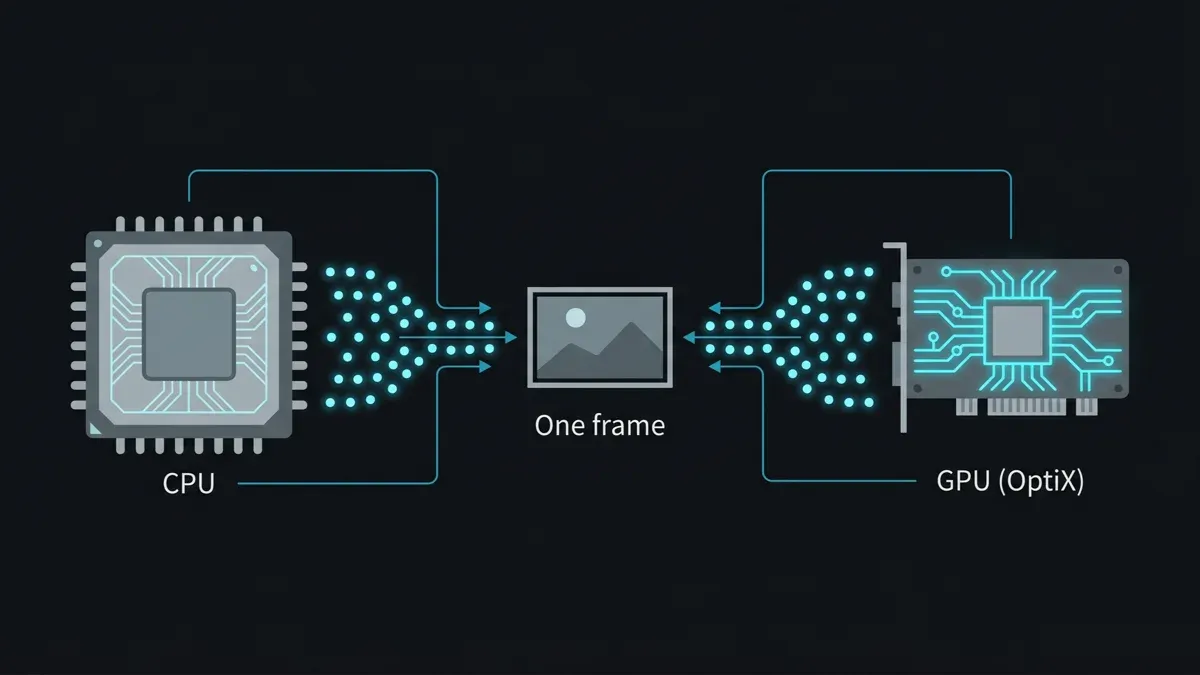 Diagram of Houdini Karma XPU splitting render work across CPU and GPU simultaneously, both contributing samples to a single frame.
| Aspect | Mantra | Karma CPU | Karma XPU |
|---|---|---|---|
| Scene foundation | Pre-USD (native pipeline) | USD / Solaris | USD / Solaris |
| Compute | CPU | CPU | CPU + NVIDIA GPU |
| Shading | VEX / CVEX | MaterialX | MaterialX |
| Feature completeness | Frozen (no new features) | Reference (full) | Subset of CPU, maturing |
| VRAM ceiling | None | None | Yes — GPU memory bound |
| Suited to | Legacy VEX pipelines | Heavy scenes, ground-truth | USD-native look-dev + final frames in VRAM |
Running Karma XPU Headless on a Cloud Render Farm
Interactively, you render by hitting the button in the Solaris viewport. On a farm, that button is a command-line program called husk. It is SideFX's standalone USD renderer — a lightweight process that loads a composed USD stage and renders it without spinning up a full interactive Houdini session. It ships with Houdini and is the canonical way to render Karma at scale. A submission looks, in essence, like this:
husk --renderer Karma \
     --frame 1001 --frame-count 50 \
     --output /project/render/shot_010.$F4.exr \
     /project/usd/shot_010.usd
Each farm node runs husk against the same USD stage but for a different frame range, which is what makes frame-level distribution work. The stage itself is a fully composed .usd/.usdc file that references all geometry, lights, cameras, and materials. Your AOVs are not command-line flags — they are USD Render Var prims baked into the stage from the Render Settings and Render Var LOPs, so husk reads them without needing a live Houdini network. Beauty, alpha, normals, albedo, and the rest travel inside the USD.
A few farm-specific mechanics are worth knowing. Karma supports checkpointing, writing intermediate render state at sample intervals so a long hero frame can resume instead of restarting if a node hiccups — valuable for thousand-sample single frames, less relevant for moderate-sample animation where each frame is cheap to redo. Denoising runs through either the OptiX denoiser on the GPU or Intel's OIDN on the CPU; on a farm we lean toward OIDN when temporal stability across many nodes matters, because it produces identical output regardless of which machine processed the frame.
On licensing, we will be direct, because it is a common question. Karma is not a separately licensed plugin the way Redshift, Arnold, V-Ray, and Octane are — it comes bundled with Houdini itself. We run Houdini and Karma under render-only utilization to render your jobs; we are not a SideFX partner and we do not resell Houdini licenses. Because our farm is fully managed, you do not remote-desktop into a node, install Houdini yourself, or hand us a license — you upload your scene and cached data, and the render-side licensing on our nodes is handled as part of operating the service. For the commercial engines in the Houdini stack, the Redshift, Arnold, V-Ray, and Octane licenses are included in the render rate, with Arnold, V-Ray, and Octane provisioned on request.
Houdini's own license costs sit separately from render-engine licensing. See our breakdown of how much Houdini costs across its Apprentice, Indie, Core, and FX tiers.
The Super Renders Farm Houdini Stack
A render farm that only runs one engine forces every shot through one set of trade-offs. Houdini work rarely cooperates with that, so our Houdini cloud render farm runs the full set: Karma (in both XPU and CPU modes), Mantra, and Redshift, with Arnold, V-Ray for Houdini, and Octane provisioned on request. The point of the spread is that you pick the right engine per shot rather than per studio — Karma XPU for the USD-native look-dev pass, Karma CPU for the volume-heavy hero frame that will not fit in VRAM, Redshift for the speed-critical sequence, Mantra for the legacy shader setup.
The hardware underneath splits along the same CPU/GPU line that Houdini work does. Our CPU fleet contributes 20,000+ CPU cores, which is where the majority of production rendering actually happens — across the industry, and on our farm, CPU rendering is still the larger share of jobs. That CPU capacity is what makes Karma CPU and Mantra practical at sequence scale and what catches Karma XPU when a frame is too heavy for the GPU. For GPU work, our dedicated GPU machines run NVIDIA RTX 5090 cards with 32 GB of VRAM each. For Karma XPU specifically, that 32 GB is the number that matters most: VRAM is the effective ceiling on how complex a scene can be before XPU stops accelerating on the GPU. A 4K UDIM texture set, a dense instanced environment, or a high-resolution VDB can each eat into that budget quickly, and the larger the card, the further you get before the render quietly drops to CPU. If you are weighing GPU-bound work in general, our RTX 5090 GPU rendering notes go deeper on the card, and the broader GPU render farm page covers the fleet.
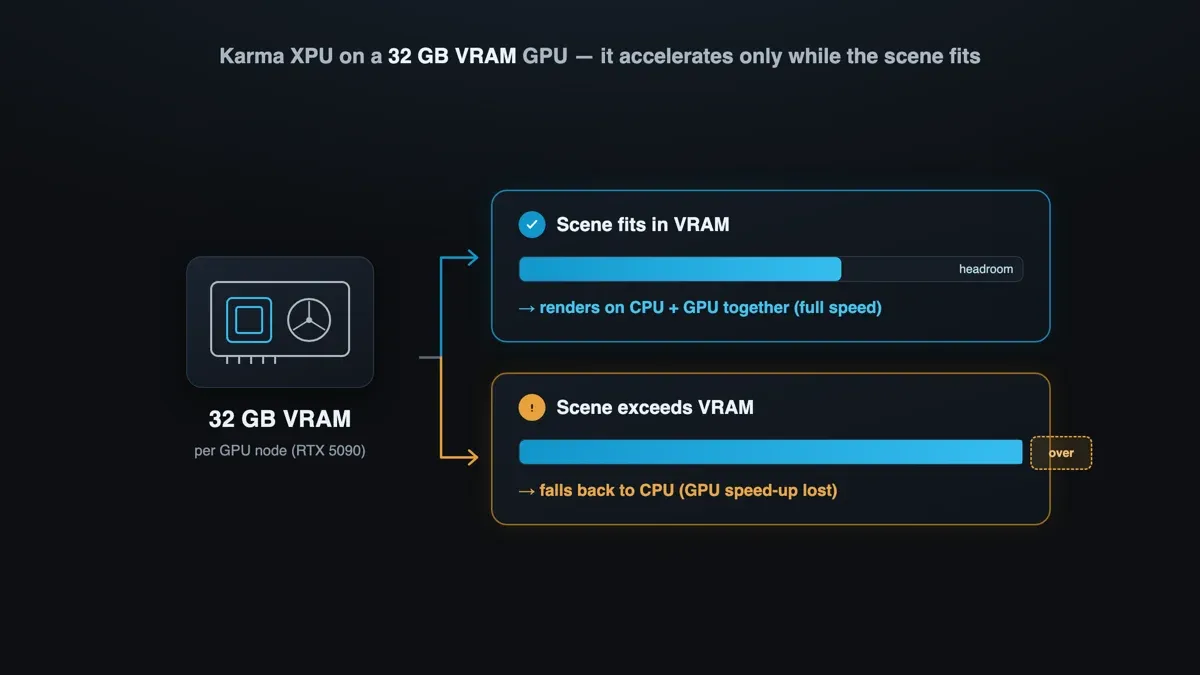 Diagram of Karma XPU and GPU VRAM: a scene that fits in 32 GB VRAM renders at hybrid CPU+GPU speed, while a scene that exceeds VRAM falls back to CPU.
Billing follows the hardware: CPU rendering is metered per GHz-hour and GPU rendering per OctaneBench-hour, so a Karma CPU sequence and a Redshift sequence are priced on the units that actually describe the work they did. Because Karma XPU can use both devices, the cleanest mental model is that it bills as GPU time when it runs on a GPU node and stays in VRAM, with the CPU contribution riding along — another reason the VRAM ceiling is worth respecting.
Simulation Caching: The Step You Cannot Skip
Here is the single most important concept for rendering Houdini on any farm, and the one most likely to waste a day if it is misunderstood: frames are embarrassingly parallel, but simulations are not.
Frame 1042 of a rendered animation does not need frame 1041 to exist first — both can render on separate machines at the same moment. That independence is the entire reason render farms work. A simulation is the opposite. Frame 1042 of a Pyro sim is computed from the state of the smoke at frame 1041, which came from 1040, all the way back to the first frame. You cannot compute the middle of a sim without computing everything before it, in order, on one machine. Hand a raw simulation to a farm and there is nothing to distribute.
The resolution is deterministic and non-negotiable: simulate first, cache to disk, then render the cache on the farm. The simulation runs sequentially on one machine (or a dedicated sim box) and writes every frame's result to disk. Those cache files — now static, frame-independent data — are what the farm renders. The render nodes never re-simulate; they read pre-computed geometry and volumes and trace frames in parallel like any other animation.
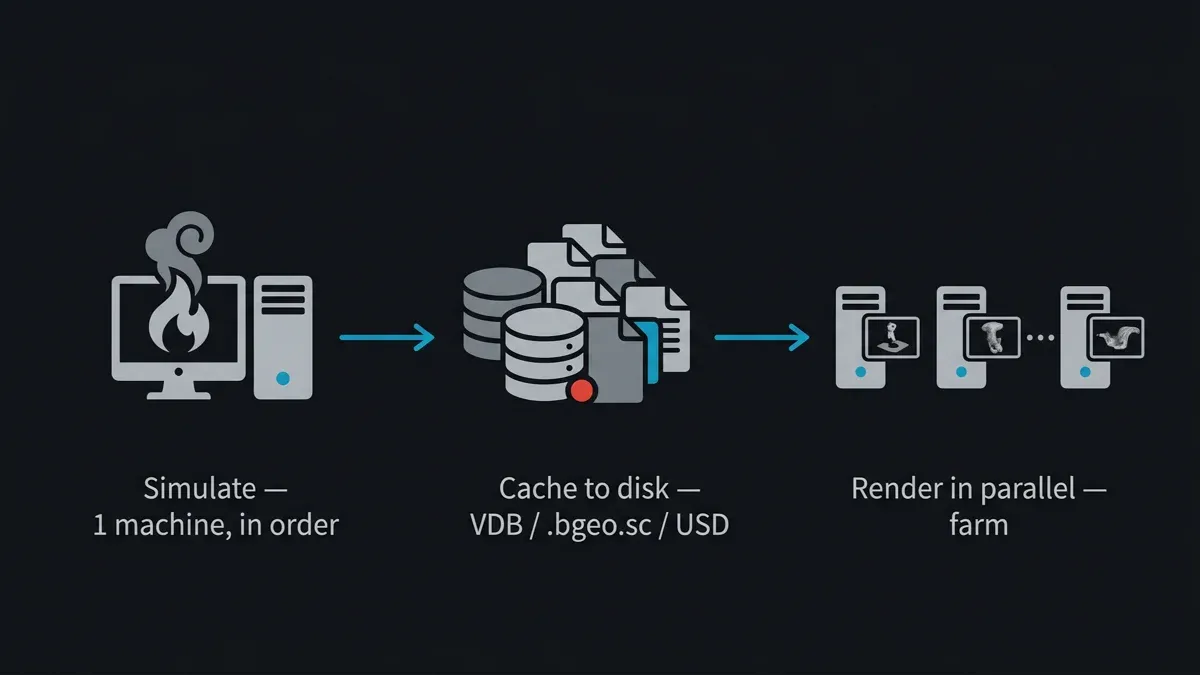 Pipeline diagram: a simulation is solved sequentially on one machine, cached to disk as VDB or bgeo, then rendered frame-by-frame in parallel across a render farm.
What you cache depends on the solver:
| Simulation | Solver | Cache format | Notes |
|---|---|---|---|
| Smoke / fire | Sparse Pyro | .vdb | Industry-standard sparse volumes; read straight into the render stage |
| Liquids | FLIP | .bgeo.sc particles → meshed surface | Meshing from cached particles is per-frame independent, so it can be farmed separately |
| Cloth / grain / softbody | Vellum | .bgeo.sc | Hero cloth caches get large fast — watch storage throughput |
| Rigid bodies, crowds, instances | RBD / Agents | .bgeo.sc or USD | USD (PointInstancer) is the cleanest hand-off to Karma |
A detail worth calling out: there is a real difference between the simulation itself and the work downstream of it. FLIP surfacing — turning cached particles into a render mesh — depends only on each frame's own particles, not on the previous frame, so that step is parallelisable and can go to the farm as its own pass even though the underlying sim could not. The increasingly common pattern in Houdini 20-plus pipelines is to cache geometry directly to USD, so husk reads it natively at render time with no SOP-to-USD translation step on the node.
This is also where PDG/TOPs earns its place. PDG is Houdini's dependency-aware task graph, and it models exactly the relationship that farm rendering needs: "cache this simulation, and only once the cache exists, render these frames from it." A File Cache TOP produces the sim cache as an output dependency; a render task downstream waits for it and then fans out per frame. PDG can drive both the caching and the husk render through its scheduler nodes, which is why it has become the backbone of serious Houdini farm pipelines.
One practical note from experience: cloth and high-resolution liquid caches can run to gigabytes per frame, and when dozens of nodes pull the same sequence from shared storage at once, read throughput — not compute — becomes the bottleneck. We support uploads with no hard size cap (a single browser upload gets slow above roughly 2 GB and unreliable above about 5 GB, so use the client app or S3 access through Cloud Direct Connect above 2 GB), and the farm does not extract archives, so upload heavy cache sequences as unpacked folders; the Client App resumes if a large transfer drops. Rendered output stays available after a job completes with no fixed automatic deletion period, so there is no clock racing you while you pull a full sequence down.
Submitting a Karma XPU Job, Start to Finish
Putting the pieces together, a clean Karma XPU farm job runs in a predictable order:
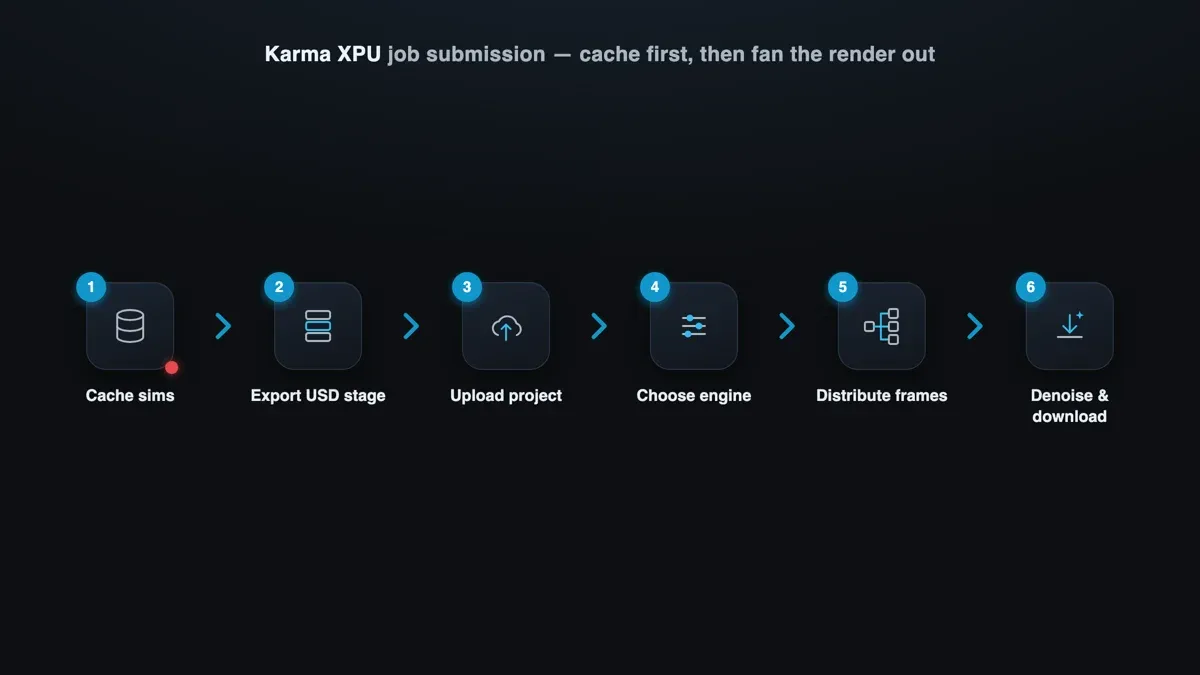 Six-step workflow for submitting a Karma XPU job to a cloud render farm: cache simulations, export USD stage, upload, choose engine, distribute frames, denoise and download.
- Cache every simulation. Pyro to VDB, FLIP and Vellum to
.bgeo.scor USD. Confirm the caches are complete and frame-contiguous — a missing middle frame surfaces as a hole in the render, not an error. - Export a composed USD stage with your Render Settings and Render Var prims baked in, all asset paths resolved so they are reachable from a render node rather than from your workstation's local drives.
- Pack the project — scene, caches, textures, and any OCIO config — and upload it. Because the farm is fully managed, there is no node to log into and no Houdini install to babysit.
- Choose the engine. Karma XPU for the in-VRAM look-dev and final passes; switch to Karma CPU for frames you know are too heavy for 32 GB; reach for Redshift where speed is the priority.
- Distribute the frames. The farm fans the frame range across nodes, each running
huskfor its slice. You watch progress rather than managing it. - Denoise and download. Pull the EXRs (with OIDN applied if you configured it) promptly and keep your own archive.
The recurring failure mode across all of this is asset resolution. USD resolves paths relative to the layer that references them or as absolute paths, and an absolute path that points at your local workstation drive will simply produce missing textures or missing geometry on a render node — often with no hard error, just black where an asset should be. Resolve paths against a shared project root, keep your OCIO config consistent across the job so colour does not drift, and flatten custom HDA dependencies into the USD before export so a node does not need a plugin it was never given. For the broader fundamentals of how cloud rendering distributes this kind of work, our cloud render farm overview sets the context.
Our cloud rendering explained guide covers that underlying model in more depth — how it works and what it costs.
When to Choose Karma XPU vs Redshift
Both Karma XPU and Redshift can render Houdini on a GPU farm, and the choice is not about which is "better" — it is about what the shot and the pipeline need. They come from different philosophies. Karma XPU is physically based, USD-native, MaterialX-shaded, and made by the same vendor as Houdini itself. Redshift is a mature, predominantly biased GPU renderer with more than a decade of production history, a Houdini plugin, and — this is its standout farm trait — a robust out-of-core system that spills gracefully from VRAM to system RAM and NVMe when a scene gets too big. Where Karma XPU tends to fall back to CPU on VRAM overflow, Redshift keeps rendering on the GPU with a predictable performance penalty, which is why a 32 GB card can drive scenes with far more than 32 GB of textures under Redshift.
That difference drives most of the decision:
| Choose Karma XPU when… | Choose Redshift when… |
|---|---|
| The pipeline is USD / Solaris-native | Raw GPU speed is the priority |
| Shaders are MaterialX | The scene is VRAM-heavy (big VDBs, huge texture sets) |
| You want physically based light transport, no GI-cache flicker | You need out-of-core stability above the VRAM ceiling |
| You are standardizing on the full SideFX stack | The team already has Redshift shaders and look-dev |
| The renderer cost lever matters (Karma ships with Houdini) | You work across C4D / Maya / Houdini and want one look |
The other engines fill in the edges. Arnold is the choice for heavy VFX with complex subsurface, hair, and volumes, or when a pipeline already depends on Arnold-specific shaders — it is provisioned on request; pin the HtoA version to the farm nodes and pre-convert textures to .tx. V-Ray for Houdini makes sense for studios already standardized on V-Ray across 3ds Max and Maya who want one consistent look across DCCs; you can read more on our Redshift page about the GPU side of that comparison. Octane suits teams already in its spectral, node-based ecosystem and bills cleanly per OctaneBench-hour. If you want a wider provider-by-provider comparison rather than an engine one, our Houdini render farm comparison covers that decision.
One caution specific to Karma XPU on a farm: because a sequence can contain both light frames (GPU-accelerated) and heavy frames (silently CPU-bound), render times can vary widely across what looks like one uniform job. The fix is a pre-flight memory check on the heaviest frame before you commit the whole range — if it is going to blow past 32 GB of VRAM, decide deliberately between Karma CPU on the CPU fleet and Redshift's out-of-core path rather than letting the renderer decide for you mid-sequence. Beyond the engine itself, the standard farm gotchas still apply: pin the Houdini version, keep the denoiser configuration explicit rather than relying on per-node defaults, and verify every asset path resolves from a node and not just from your machine.
For the official renderer details, SideFX maintains thorough documentation for both Karma and the husk command-line renderer — worth a read before your first large submission.
FAQ
Q: What is the difference between Karma XPU and Karma CPU? A: They are the same USD-native Karma renderer in two execution modes. Karma CPU runs only on CPU cores and implements the full, reference-quality feature set. Karma XPU adds your NVIDIA GPU and renders on CPU and GPU together for speed, but it currently supports a subset of Karma CPU's features and is bound by GPU VRAM. The practical habit is to confirm a frame on Karma CPU when XPU output looks off, because CPU is the ground truth.
Q: Do I need a SideFX or Houdini license to render Karma on a cloud render farm? A: Not from your side, on a fully managed farm. Karma is bundled with Houdini rather than licensed separately like Redshift or Octane, and we run Houdini under render-only utilization to render your jobs — we are not a SideFX partner and do not resell Houdini licenses. You upload your scene and caches; the render-side licensing on our nodes is handled as part of the managed service.
Q: Why do simulations have to be cached before rendering on a farm?
A: Because simulations are sequential and frames are not. Each simulation frame depends on the state of the frame before it, so a sim must be solved in order on one machine. Render frames, by contrast, are independent and can run on hundreds of nodes at once. Caching the finished simulation to disk (VDB for Pyro, .bgeo.sc or USD for FLIP and Vellum) turns it into static data the farm can render in parallel without re-simulating.
Q: How does Karma XPU handle a scene that exceeds GPU VRAM? A: Unlike Redshift, which streams out-of-core from system memory, Karma XPU tends to fall back toward CPU execution when a scene will not fit in VRAM. The render still completes, but the GPU acceleration is lost and the frame can take dramatically longer — with nothing obvious in the log. For scenes you know are heavy, it is better to choose Karma CPU on the CPU fleet or Redshift's out-of-core path deliberately than to let the fallback happen mid-sequence.
Q: Is Karma XPU faster than Redshift? A: It depends on the shot. Redshift is a highly optimized, mostly biased GPU renderer and is often faster on typical production scenes, especially VRAM-heavy ones where its out-of-core system keeps work on the GPU. Karma XPU is physically based and fully USD-native, which is a better fit for Solaris pipelines and MaterialX shading even if it needs more samples for equivalent noise. Speed alone does not decide it — pipeline fit and VRAM headroom usually do.
Q: What is husk and do I need to use it directly?
A: husk is SideFX's standalone command-line USD renderer, and it is what actually renders Karma on a farm node — a lightweight process that loads a composed USD stage without a full Houdini session. On a managed farm you do not invoke it by hand; you submit your scene and the farm runs husk per frame across nodes for you. Knowing it exists helps you understand why a clean, fully resolved USD export matters so much.
Q: Can PDG/TOPs drive a Karma render on the farm?
A: Yes. PDG models the dependency between caching a simulation and rendering from it, and its scheduler nodes can dispatch both the File Cache step and the downstream husk render across a farm. It is the standard way serious Houdini pipelines express "cache first, then fan the render out per frame," and it keeps the sequential and parallel parts of the job in the right order automatically.
Q: Which Houdini renderers can I use besides Karma XPU? A: Our Houdini stack runs Karma in both XPU and CPU modes, plus Mantra and Redshift, with Arnold, V-Ray for Houdini, and Octane provisioned on request. That range lets you match the engine to the shot — Karma XPU for USD-native look-dev, Karma CPU for VRAM-heavy hero frames, Redshift for speed and out-of-core, Mantra for legacy VEX shaders, and Arnold, V-Ray, or Octane where a pipeline already depends on them.
About Alice Harper
Blender and V-Ray specialist. Passionate about optimizing render workflows, sharing tips, and educating the 3D community to achieve photorealistic results faster.



