
Octane on a Cloud Render Farm: GPU Rendering, OctaneBench Pricing, and DCC Support in 2026
Overview
Introduction
OctaneRender has a clear reputation: physically accurate, spectrally correct, and fast on the right hardware. It also has one hard rule that shapes every decision around it — it runs on the GPU and nowhere else. That single constraint is what makes Octane both a pleasure on a well-equipped machine and a genuine challenge to scale across a render farm.
We run Octane jobs on our GPU render farm alongside CPU engines like V-Ray, Corona, and Arnold. The GPU side — Octane, Redshift, V-Ray GPU — has grown into a meaningful, steadily expanding share of the work, and over thousands of those jobs we have learned where the engine shines and where it bites.
This guide covers the practical reality of running OctaneRender at scale in the cloud: why GPU-only rendering changes how a farm has to behave, how OctaneBench-hour pricing works and why it is a more honest unit than a flat card-hour rate, which 3D applications pair well with Octane, and how to think about VRAM before you upload a heavy scene.
For the broader fundamentals — what cloud rendering is, how it works, and what it costs — see our cloud rendering explained guide. No marketing gloss — just how it works.
What makes OctaneRender different: GPU-only, unbiased, spectral
OctaneRender is OTOY's unbiased, spectrally accurate path tracer. "Unbiased" means it converges toward a physically correct solution by simulating real light transport rather than approximating it; "spectral" means it computes color across the full light spectrum rather than in simple RGB, part of why Octane renders feel so clean. For the farm conversation, the defining fact is the hardware it demands.
Octane runs exclusively on NVIDIA GPUs through CUDA and the NVIDIA OptiX ray-tracing API. There is no CPU rendering mode — not as a fallback, not as a hybrid option, not as an overflow path. If a scene cannot run on the GPU, it does not run in Octane at all. This is different from V-Ray or Redshift, which offer CPU or hybrid paths. It also means AMD GPUs and Apple Silicon are not supported: Octane needs CUDA, and CUDA is NVIDIA-only. Our GPU fleet is built on NVIDIA RTX 5090 cards with 32 GB of VRAM each — precisely what Octane and the other GPU engines require.
On RTX-generation cards (Ampere, Ada, and now Blackwell), Octane uses OptiX for hardware-accelerated ray tracing — genuine BVH traversal on the RT cores rather than software emulation — and it ships a spectral AI denoiser that runs on the same GPU as a post-process across accumulated samples. The denoiser is deterministic for a given seed and sample count, which matters more than it sounds: when you distribute an animation across many nodes, you do not want the denoiser to make frame 47 look subtly different from frame 46.
One point causes more confusion than any other: out-of-core memory. Octane can page textures across the PCIe bus from system memory when they exceed VRAM, so a scene with a heavy texture set can still render — at a performance cost, since PCIe bandwidth is a fraction of the card's onboard GDDR7 bandwidth. What out-of-core does not cover is geometry: the triangle data and the BVH acceleration structure must fit in VRAM. A scene whose geometry alone exceeds the card's memory will not render. So before you assume "out-of-core means unlimited scene size" — it does not. It means flexible textures and a hard geometry ceiling.
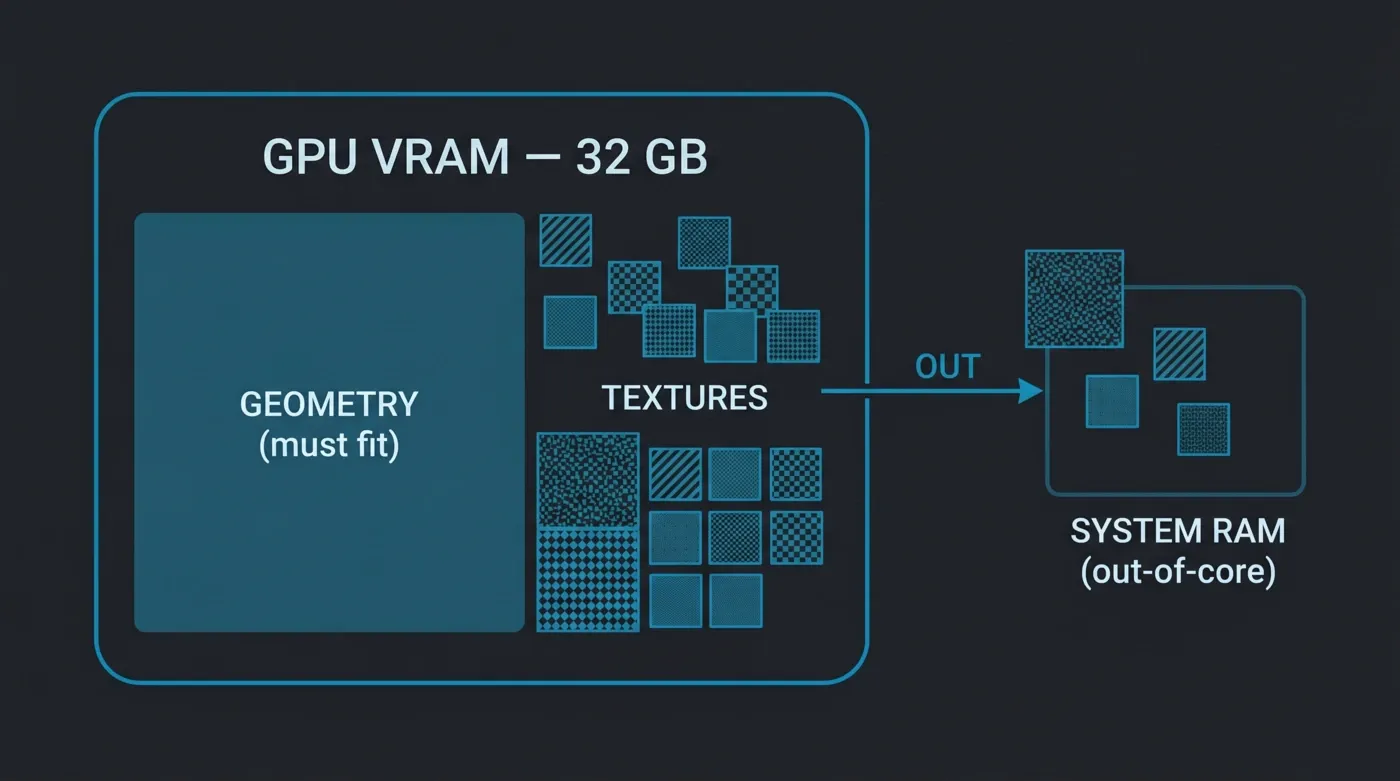 Octane out-of-core memory: geometry must fit inside the 32 GB GPU VRAM, while textures can spill over to system RAM
Running Octane on a cloud render farm: the parts that are actually hard
Distributing CPU rendering across a farm is a relatively forgiving problem — split the frames, ship the scene, collect the results. GPU rendering with Octane introduces constraints that a CPU farm never has to think about.
Each GPU is its own island. When we distribute an animation, the standard model is frame distribution: each GPU renders a different frame independently. That scales almost linearly — twice the cards, roughly twice the frames per hour. Octane does have a network-rendering mode where several GPUs cooperate on one frame, but that is a different, higher-overhead workflow; the farm model is one frame per card. The practical consequence: every node must fit the whole scene in its own 32 GB, because there is no borrowing VRAM from the card next door.
For more on how this frame-per-card model compares to other GPU renderers' multi-GPU scaling, see our multi-GPU scaling benchmark.
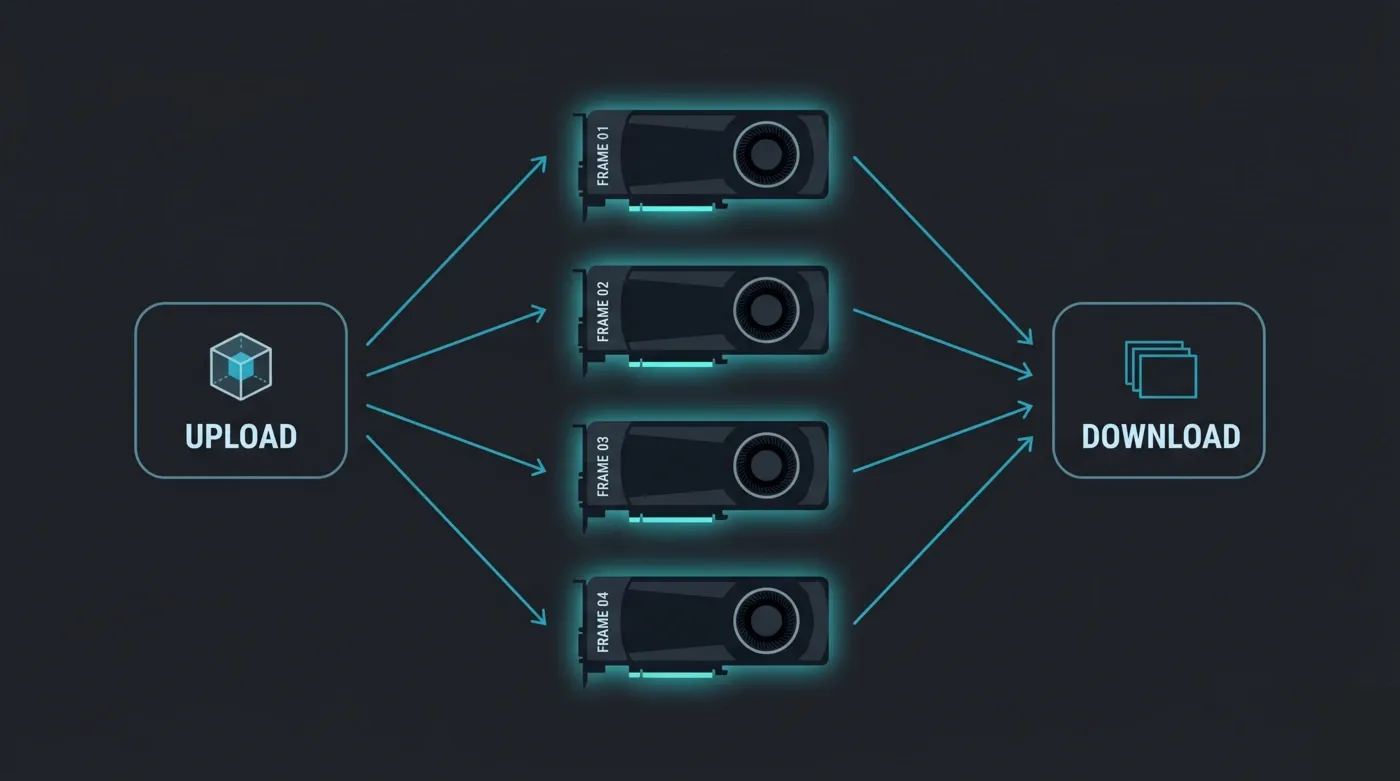 Octane render farm frame distribution: each RTX 5090 GPU node renders a different animation frame independently, then the finished frames are collected for download
Driver and version matching is unglamorous and critical. Octane is strict about CUDA driver versions, and the Octane plugin in your DCC must match the Octane core build on the farm. Mismatched drivers across a fleet can cause crashes or, worse, silent render differences between nodes. On a self-managed IaaS instance, you pin drivers and reconcile plugin versions yourself; on a fully managed farm, the fleet is version-locked to supported Octane builds and the engine license (Octane included) is bundled in the rate — nothing to install or activate on your end.
Assets have to be everywhere the frame might land. Every texture, HDRI, and referenced file must be reachable from whichever node picks up a frame, at the exact path the scene expects. A managed pipeline resolves and distributes those assets from your uploaded project; a do-it-yourself GPU farm leaves you configuring shared storage and path remapping yourself.
Here is the division of labor we see between a self-managed GPU setup and a fully managed farm:
| Task | Self-managed / IaaS GPU farm | Fully managed farm |
|---|---|---|
| CUDA driver management | You patch and pin per instance | Fleet-managed, locked to supported Octane builds |
| Octane engine install | You install on every node | Pre-installed, version-matched to the plugin |
| Render-engine license | You procure and activate per node | Bundled in the per-OBh rate |
| Asset path resolution | You configure shared storage / remap paths | Resolved from your uploaded project |
| Remote-desktop setup (RDP) | Usually required to configure a node | Not required — rendering is headless |
| Frame distribution | You orchestrate | Handled by submission routing |
That last row matters. Because Octane farm rendering is fully headless, there is no remote-desktop step — you submit from your DCC and the farm renders, removing a whole category of setup friction that GPU IaaS rentals still impose.
OctaneBench and the OBh pricing model
This is the part of Octane economics that most artists have never had explained clearly, so it is worth slowing down.
OctaneBench is OTOY's standardized GPU benchmark. It renders a fixed reference scene and outputs a single unitless score representing how much Octane work a GPU can do per second relative to a baseline card — a higher score means more throughput. Because OTOY publishes it and anyone can run it, it has become a credible, vendor-neutral way to compare GPUs for Octane specifically.
That benchmark is also the basis for how GPU work is billed here. We charge GPU rendering at $0.003 per OctaneBench-hour (OBh). An OctaneBench-hour is one hour of compute from a GPU delivering one unit of OctaneBench throughput. A card with a high OctaneBench score delivers many OBh per wall-clock hour; a slower card delivers fewer. You are billed for the OctaneBench-hours your job actually consumes.
Why does that matter? Consider a flat per-card-hour rate. Two farms might both advertise "$X per GPU-hour," but if one rents you a current-generation card and the other a card two generations old, you pay the same hourly price for very different amounts of work — the faster card finishes in a fraction of the time, the slower one bills many more hours. OctaneBench-hour billing normalizes that: you pay for render throughput delivered, not for time occupying a machine. A faster card finishing sooner simply consumes the OBh the work required and stops.
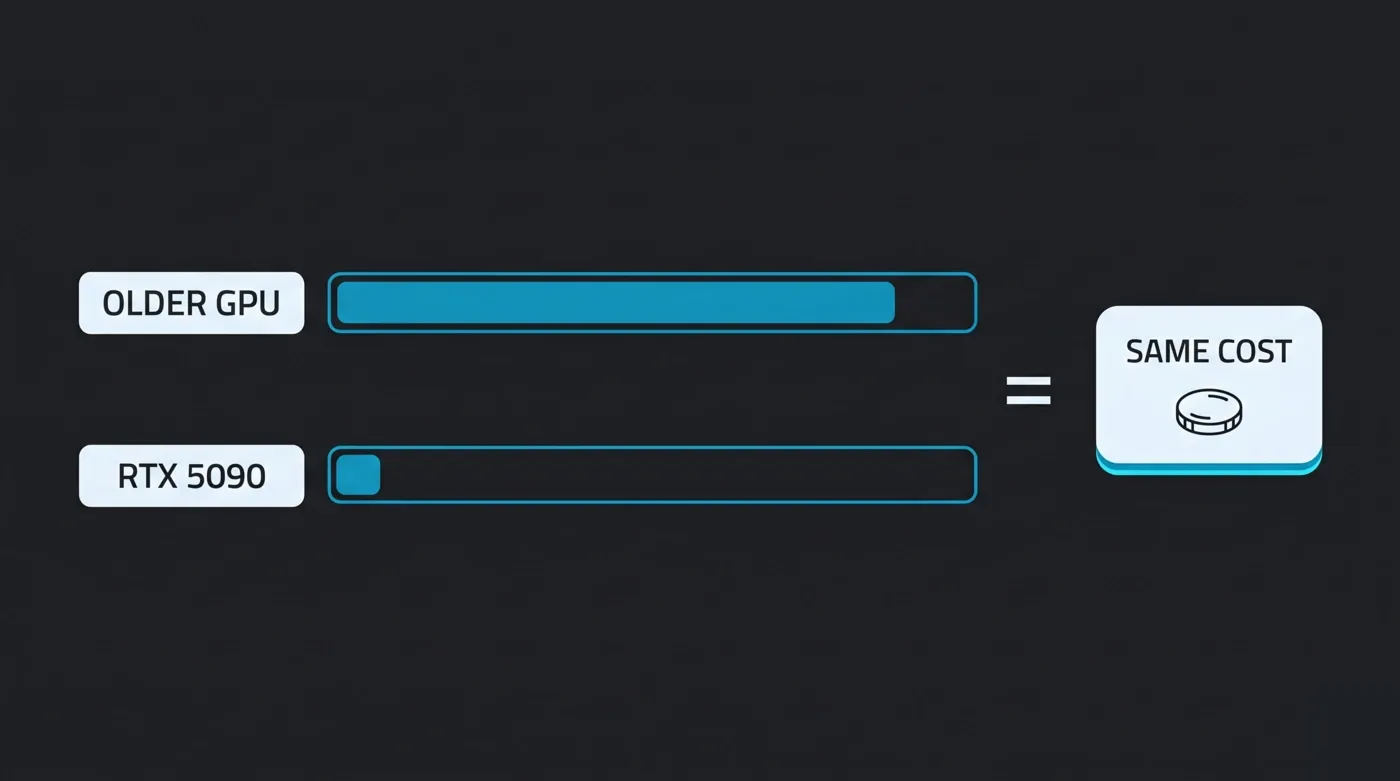 OctaneBench-hour billing normalizes render cost to throughput delivered: a faster GPU finishes in fewer hours, so the same work costs the same regardless of card generation
For reference, an RTX 5090 delivers in the neighborhood of 1,730 OctaneBench-hours of throughput per wall-clock hour — a figure consistent with published benchmarks for the Blackwell architecture, though exact scores vary with scene complexity and system configuration. The canonical number to anchor on is the rate itself: $0.003/OBh. Here is how a job pencils out:
| Quantity | Value |
|---|---|
| Billing rate (canonical) | $0.003 / OBh |
| RTX 5090 throughput (illustrative) | ~1,730 OBh per card-hour |
| Effective card-hour cost | ~$5.20 / card-hour |
| Example job: 90-frame animation, ~1 card-hour per frame (illustrative) | ~90 card-hours |
| Example total | ~90 × $5.20 ≈ $468 |
Treat the per-frame render time and the OctaneBench score in that table as illustrative — both depend entirely on your scene. The rate is the fixed part. New accounts also start with $25 in free render credits, and credits do not expire, so you can run a real test scene and see your own numbers before committing to a full job. We lay out the full model on the render farm pricing guide, and there is a worked breakdown of how to estimate jobs frame-by-frame in our cost-per-frame guide.
A caution worth stating plainly, because it trips people up when comparing providers: OctaneBench-hour is sometimes used as a billing unit even by farms that do not actually run OctaneRender — they borrow the benchmark as a normalization metric for whatever GPU engine they do offer. If Octane support specifically matters to you, confirm the farm runs the engine itself, not just its benchmark. And a per-card-hour quote means little until you know which card you are renting; the GPU generation is the number that decides your real cost.
We explain how OctaneBench and other benchmarks factor into our own billing and testing approach in our render farm benchmark methodology.
Octane across your DCC: Cinema 4D, Maya, 3ds Max, and Houdini
Octane reaches your work through plugins, and the maturity of those plugins varies by application. Knowing where Octane is strongest helps you decide whether it is the right engine for your pipeline.
Cinema 4D is Octane's flagship home. The OctaneRender plugin for C4D is the most mature, most production-prevalent integration OTOY ships, with deep support for native C4D materials, MoGraph and effectors, the Takes system for multi-pass output, and native motion blur. If you are a motion designer or a product-visualization artist working in Cinema 4D, Octane is a natural fit — and it is the engine most people mean when they talk about "Octane in production." It is also where the Octane-versus-Redshift decision plays out most often; we cover that trade-off in our Cinema 4D Redshift guide if you are weighing the two.
Maya has a solid OctaneRender plugin used in VFX and motion pipelines that want GPU path tracing without committing to Arnold or Redshift. Material networks, camera and lighting integration, and Alembic caches are all supported. It is less community-dominant than the C4D pairing but commercially significant.
3ds Max runs Octane well, particularly in archviz and product visualization. The 3ds Max archviz market still leans heavily on CPU engines like V-Ray and Corona, so Octane is a deliberate choice there rather than the default — but the plugin is capable and material conversion is good.
Houdini has an OctaneRender plugin that handles procedural geometry well and appears in VFX work. In the Houdini GPU space, SideFX's own Karma XPU and Redshift carry a larger share, so Octane-for-Houdini is a real but smaller slice — a good option if Octane is already your studio standard. On our farm, Octane for Houdini is provisioned on request, so contact us to confirm before you upload.
A note for Blender artists. Blender's production-standard path tracer is Cycles, and it is the engine most Blender jobs on our farm run on. On our RTX 5090 nodes, Cycles uses OptiX hardware ray tracing, so you get GPU path tracing on the same hardware tier as our Octane jobs — unbiased, physically based output — without needing a separate Octane subscription. EEVEE is supported too, on our CPU and GPU nodes: you submit EEVEE jobs the same way you submit Cycles jobs, so set your scene to whichever engine your project uses. The honest nuance is that EEVEE is so fast per frame on a single modern GPU that short sequences are often quickest to render locally; where the farm earns its keep with EEVEE is scale, such as large unattended batch frame ranges or when your own GPU is tied up. If Octane specifically is your engine, Cinema 4D, Maya, 3ds Max, and Houdini are where it is most at home, though on our farm Octane for Houdini is provisioned on request; if you are in Blender, Cycles on GPU gets you to the same class of result, and V-Ray for Blender and Octane for Blender are provisioned on request, so contact us to confirm before you upload.
GPU requirements and when Octane is the right engine
Because Octane lives and dies by the GPU, a few hardware realities are worth keeping in front of you.
VRAM is the number that matters most. The 32 GB on an RTX 5090 sets the geometry ceiling for Octane. Archviz interiors with full furniture libraries and displacement, or VFX shots with dense character geometry and volumes, routinely climb past what a 24 GB card can hold — and a scene that fails to load on a 24 GB GPU can succeed on a 32 GB one. That is a concrete, verifiable difference, not a marketing line. Out-of-core adds texture headroom on top, but plan your geometry to fit. There is more on where the RTX 5090 lands for GPU rendering in our RTX 5090 performance article.
CUDA and NVIDIA, every time. Octane requires a CUDA-capable NVIDIA GPU (compute capability 5.0 or higher, which any current card clears comfortably). Any advice you read online about rendering on AMD cards or Apple Silicon simply does not apply to an Octane workflow — the engine cannot use them. That is why a farm built specifically on NVIDIA hardware is the correct match for Octane, with no caveats.
When is Octane the right call, and when is something else? A balanced way to think about it:
| Your situation | Engine that tends to fit | Why |
|---|---|---|
| C4D motion design, archviz, product viz on GPU | OctaneRender | Most mature integration, large community, clean spectral output |
| Already in the Maxon ecosystem | Redshift | Biased engine, converges fast, bundled with Maxon subscriptions |
| Maya / VFX, GPU priority | Octane or Redshift | Both viable; Redshift more common in VFX, Octane strong in motion work |
| 3ds Max archviz | V-Ray or Corona (CPU) | The market default for this segment |
| Blender, GPU path tracing | Cycles (OptiX) | The Blender-native production standard on GPU; on our farm Octane for Blender is a secondary option, provisioned on request |
| Houdini VFX / procedural | Karma XPU or Redshift | Larger share of the Houdini GPU market; Octane is a secondary option, provisioned on request |
| Geometry-heavy scenes near 32 GB | Octane on 32 GB nodes | The VRAM headroom argument is strongest here |
| CPU-only budget or pipeline | V-Ray, Corona, Arnold (CPU) | Octane does not run on CPU at all |
It is worth saying clearly that GPU rendering, Octane included, is not the whole story on our farm — the majority of the jobs we run are still CPU-based, with V-Ray and Corona archviz work making up most of the volume. Octane sits in a growing GPU segment, not at the center of everything. If your pipeline is CPU-first, none of the Octane-specific constraints above apply to you, and a CPU engine is very likely the better fit. The point of this guide is to be straight about where Octane earns its place — and where it does not.
If you are choosing an engine for Blender specifically, Blender render engines compared for 2026 sets Octane next to the alternatives.
FAQ
Q: Does Super Renders Farm support OctaneRender? A: Yes. Octane runs on our NVIDIA RTX 5090 GPU nodes (32 GB VRAM each), and the OctaneRender license is included in the render rate — there is nothing to install or activate on your end, and no remote desktop required, since rendering is fully headless.
Q: What is an OctaneBench-hour (OBh) and how does the pricing work? A: An OctaneBench-hour is one hour of compute from a GPU delivering one unit of OctaneBench throughput, where OctaneBench is OTOY's standardized GPU benchmark. We bill GPU rendering at $0.003 per OBh, which means you pay for render throughput actually delivered rather than for time spent occupying a card — a faster GPU finishes sooner and simply consumes the OBh the work required.
Q: What GPU do I need for Octane rendering on the farm? A: You do not need any GPU of your own to render on the farm — the rendering happens on our RTX 5090 nodes. Octane itself requires a CUDA-capable NVIDIA GPU (it does not run on AMD or Apple Silicon), which is exactly what the fleet is built on, so your scene runs on hardware matched to the engine.
Q: Can Octane render a scene that is larger than the GPU's VRAM? A: Partly. Octane can page textures from system memory through out-of-core when they exceed VRAM, at a performance cost. Geometry is different — the triangle data and acceleration structure must fit in VRAM, so a scene whose geometry alone exceeds the card's 32 GB will not render until it is optimized with instancing, proxies, or reduced tessellation.
Q: Which 3D applications work with Octane on the farm? A: Octane's most production-prevalent homes are Cinema 4D (the flagship integration), Maya, 3ds Max, and Houdini. Cinema 4D has the deepest and most widely used OctaneRender plugin; the others are mature and used across VFX, archviz, and motion work. On our farm, Octane for Houdini and Octane for Blender are provisioned on request, so contact us to confirm before you upload.
Q: Can I render Blender scenes with Octane? A: Octane for Blender is provisioned on request, so contact us to confirm before you upload. Most Blender jobs on our farm run on Cycles, Blender's production-standard path tracer: on our RTX 5090 nodes Cycles uses OptiX hardware ray tracing, so you get GPU path tracing on the same hardware tier as Octane jobs without a separate Octane subscription. EEVEE is supported too, on our CPU and GPU nodes, so set your scene to whichever engine your project uses. If Octane specifically is your engine, Cinema 4D, Maya, 3ds Max, and Houdini are the natural fit, though Octane for Houdini is provisioned on request.
Q: Does Octane fall back to CPU if a scene will not fit on the GPU? A: No. OctaneRender is GPU-only — there is no CPU mode or hybrid fallback. If a scene cannot run on the GPU, it has to be optimized to fit, or rendered in an engine that supports CPU rendering, such as V-Ray, Corona, or Arnold, all of which we also run.
Q: How do I get my project to the farm, and how long are renders kept? A: You upload your project bundle (upload it as an unpacked folder; the farm does not extract archives), and the farm resolves and distributes assets to the render nodes for you. Finished renders stay available with no fixed automatic deletion period, and you can download them via the web or the Client App's auto-download.
About Alice Harper
Blender and V-Ray specialist. Passionate about optimizing render workflows, sharing tips, and educating the 3D community to achieve photorealistic results faster.



