GrowFX 렌더링 문제 V-Ray 및 Corona 완전 해결 가이드
개요
GrowFX 렌더링 문제 V-Ray 및 Corona: 완전 해결 가이드
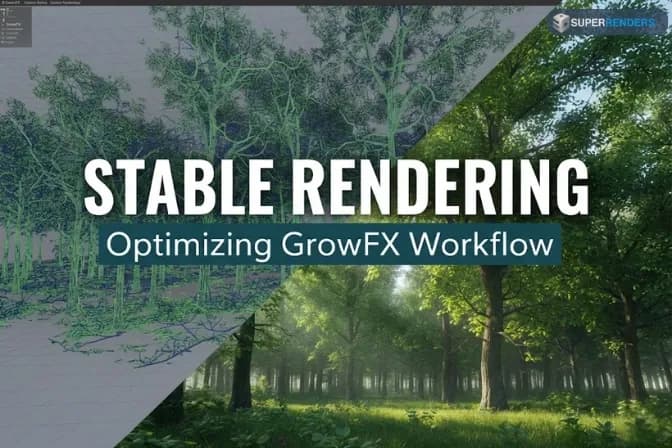
GrowFX vegetation (한국어)은 Exlevel의 프로시저럴 시스템으로, 뷰포트에서는 완벽해 보이지만 V-Ray나 Corona로 최종 렌더링할 때 자주 실패합니다. 재질이 제대로 변환되지 않습니다. 디스플레이스먼트가 깨집니다. 메모리 사용량이 폭발적으로 증가합니다. 렌더링 엔진은 프로시저럴 지오메트리를 다르게 처리하는데, 식생—특히 opacity map (한국어), 복잡한 재질, 높은 폴리곤 수—이런 차이를 극명하게 드러냅니다.
이 글에서는 GrowFX를 업계에서 가장 인기 있는 두 가지 렌더링 엔진인 V-Ray와 Corona Renderer와 결합할 때 발생하는 특정 렌더링 문제를 다룹니다. 각 엔진이 GrowFX geometry (한국어), 재질, acceleration structure (한국어)를 처리하는 방식을 이해하는 것이 프로덕션 작업에 필수적입니다.
V-Ray와 Corona가 GrowFX를 다르게 처리하는 방식 이해하기
V-Ray의 프로시저럴 지오메트리 접근법
V-Ray는 원시 속도와 분산 렌더링을 우선시합니다. GrowFX geometry (한국어)를 만나면:
- BVH Construction (한국어): V-Ray는 CPU ray tracing (한국어)에 최적화된 acceleration structure (한국어) 구축
- Material Evaluation (한국어): V-Ray는 컴파일된 셰이더 시스템을 통해 재질 처리
- Opacity Handling (한국어): 투명 표면(잎 opacity map (한국어))은 ray tracing (한국어)과 재질 콜백으로 처리
V-Ray의 주요 장점은 분산 렌더링 성능입니다. 단점은 opacity map (한국어) 잎이 렌더러가 모든 ray intersection (한국어)에서 재질 콜백을 평가하도록 강제한다는 것입니다. 이는 비용이 많이 드는 작업입니다.
Corona Renderer의 프로시저럴 지오메트리 접근법
Corona는 거의 모든 geometry (한국어)를 RAM에 직접 로드하고 단일 통합 acceleration structure (한국어)를 유지합니다. 이런 접근법:
- Memory Intensive (한국어): 모든 GrowFX polygon (한국어)은 렌더링 시작 전에 시스템 RAM에 로드
- Fast Single-Machine Rendering (한국어): 통합 메모리 레이아웃으로 뛰어난 싱글코어 성능 제공
- Material Handling (한국어): Corona의 내부 재질 시스템은 전형적인 archviz (한국어) 재질에 매우 최적화됨
Corona의 장점은 싱글머신 렌더링 속도와 재질 일관성입니다. 단점은 메모리 소비량입니다. 수백만 개의 GrowFX polygon (한국어)을 가진 장면은 Corona에서 100GB 이상의 RAM을 쉽게 소비할 수 있습니다. V-Ray는 같은 장면을 proxy (한국어) 기반 아웃오브코어 geometry (한국어)로 40GB로 렌더링할 수 있습니다.
일반적인 렌더링 문제 1: 뷰포트에서 렌더로의 재질 오변환
재질 변환 중에 일어나는 일
GrowFX 나무는 일반적으로 뷰포트에서 Arch & Design material (한국어)(Autodesk Physical Materials)을 사용합니다. V-Ray나 Corona로 렌더링할 때, 이 재질들은 렌더링 엔진 특정 형식으로 변환되어야 합니다:
- 뷰포트 재질 → V-Ray 재질
- 뷰포트 재질 → Corona Physical Material (한국어)
문제: 이 변환이 항상 완벽하지 않습니다. Opacity map (한국어)은 다른 falloff (한국어)로 렌더링될 수 있습니다. Bump map (한국어)은 너무 강하거나 약하게 나타날 수 있습니다. Specular highlight (한국어)가 반전될 수 있습니다. 잎의 Subsurface Scattering (한국어)이 완전히 사라질 수 있습니다.
증상
- 식생이 렌더에서는 불투명하지만 뷰포트에서는 투명합니다
- 껍질이 렌더에서는 과도하게 반짝이거나 완전히 무광입니다
- 잎이 확산형이어야 하는데 심한 specular highlight (한국어)를 보입니다
- Normal/bump mapping (한국어)이 반전되거나 없어 보입니다
진단
- 단일 GrowFX 나무, 조명 없음, 평면 흰색 배경으로 간단한 테스트 프레임 렌더링
- 렌더된 이미지의 alpha channel (한국어) 검사
- opacity가 뷰포트 미리보기와 다르게 렌더되면 재질이 오변환되는 것입니다
- 어떤 텍스처가 어떤 geometry (한국어)에 적용되는지 확인합니다(껍질 vs 잎 vs 가지)
V-Ray 해결법
- 재질을 수동으로 변환합니다: 자동 변환에 의존하지 마세요. 껍질, 잎, 가지용 명시적 V-Ray Physical Material (한국어)을 만듭니다.
- V-Ray Wrapper Texture를 Opacity에 사용합니다: 표준 opacity map (한국어) 대신, V-Ray Falloff texture (한국어)를 opacity control (한국어)로 사용합니다:
- V-Ray 재질에서 transparency (한국어) 활성화
- 잎 opacity (한국어)에는 "Facing Ratio" 모드로 설정된 Falloff texture (한국어) 사용
- 뷰포트 모양과 일치하도록 곡선 조정
- Subsurface Scattering Approximation 비활성화합니다: 잎이 그럴 리가 없는데 빛이 통과하는 것처럼 보이면:
- V-Ray 재질에서 SSS (한국어) 비활성화
- 또는 SSS density/absorption (한국어)을 증가시켜 보이지 않도록 합니다
- Proxy Conversion으로 테스트합니다: GrowFX 나무를 V-Ray proxy (한국어)로 변환하고 proxy (한국어)에 재질을 재할당합니다. Proxy (한국어)는 때때로 원시 프로시저럴 geometry (한국어)보다 재질을 더 일관되게 렌더링합니다.
Corona 해결법
- Corona Physical Material을 직접 사용합니다: Corona는 archviz (한국어) 작업에서 V-Ray보다 우수한 재질 변환을 가집니다. 각 GrowFX geometry (한국어) 유형용 Corona Physical Material (한국어)을 만듭니다.
- Corona Physical Material의 Opacity Maps:
- Material Base Color (한국어)에 잎 텍스처 추가
- Opacity slot (한국어)에(Transparency (한국어) 아래) 동일한 잎 텍스처 또는 전용 opacity map (한국어) 추가
- Corona는 색상과 opacity (한국어)를 동시에 존중합니다
- 껍질 Displacement: 껍질이 평평해 보이면:
- Bump Map (한국어)을 Bump Slot (한국어)에 추가합니다(Normal이 아님)
- Corona는 세부 묘사에 normal map (한국어)보다 Bump Map (한국어)을 더 효과적으로 사용합니다
- bump amount (한국어)를 0.1-0.3으로 설정하면 사실적인 모양이 됩니다
- 잎의 Subsurface Scattering: 잎이 빛 투과 없이 죽어 보이면:
- Corona Physical Material (한국어)에서 "Subsurface Scattering" 활성화
- scattering color (한국어)를 옅은 초록색으로 설정
- scattering distance (한국어)를 0.1-0.2 mm로 설정
- 간단한 테스트 프레임으로 테스트합니다
일반적인 렌더링 문제 2: 메모리 오버플로우와 아웃오브코어 렌더링
GrowFX가 메모리 압박을 유발하는 이유
단일 GrowFX 나무는 프로시저럴 평가와 Meta Mesh (한국어) 확장 후 1천만~5천만 개 polygon (한국어)을 생성할 수 있습니다. 20개 나무 산림 장면은 쉽게 2억~5억 polygon (한국어)을 칠 수 있습니다. V-Ray와 Corona 모두 이 geometry (한국어) 위에 acceleration structure (한국어)을 구축해야 합니다:
- V-Ray: BVH tree (한국어)(~polygon (한국어)당 8바이트)
- Corona: 통합 acceleration structure (한국어)(~polygon (한국어)당 12-16바이트)
5억 polygon (한국어) × 12바이트 = 6GB는 acceleration structure (한국어)만 차지합니다, 재질, 텍스처, 중간 버퍼는 제외합니다.
Corona 메모리 관리
Corona Renderer는 모든 geometry (한국어)를 RAM에 로드합니다. geometry (한국어)가 사용 가능한 RAM을 초과하면, Corona는 "메모리 부족" 오류로 종료됩니다. out-of-core (한국어) 렌더링 옵션은 없습니다.
해결법:
-
GrowFX polygon (한국어) 수 감소:
- 보조 가지의 segment count (한국어) 낮춤
- 비영웅 나무에서 Meta Mesh (한국어) 비활성화
- 먼 식생에 LOD (한국어)(level of detail (한국어)) 시스템 사용
- camera culling (한국어)을 활성화하여 보기 외 geometry (한국어) 숨김
-
텍스처 단순화:
- 더 낮은 해상도 텍스처 맵 사용(4K 대신 2K)
- 여러 텍스처 슬롯을 atlas map (한국어)으로 결합
- 가능하면 텍스처 color depth (한국어) 감소
-
Corona Proxies 사용:
- GrowFX를 Corona proxy (한국어) 형식으로 변환
- Proxy (한국어) 파일은 원시 geometry (한국어)보다 효율적으로 스트리밍될 수 있습니다
- Proxy (한국어) 변환은 프레임별 caching (한국어) 이점도 제공합니다
-
사용 가능한 RAM 증가:
- 장면이 100GB를 필요로 하고 64GB만 있으면, 단순화하거나 업그레이드합니다
- Super Renders Farm 같은 렌더 팜에서는 더 높은 메모리 노드 요청합니다(256GB)
V-Ray 메모리 관리
V-Ray는 adaptive geometry loading (한국어)을 통해 out-of-core geometry (한국어)를 지원합니다. 그러나 out-of-core (한국어) 렌더링은 성능 저하를 야기합니다:
- In-core rendering (한국어): 장면 단일 통과, 최적 cache efficiency (한국어)
- Out-of-core rendering (한국어): 렌더 중 geometry (한국어) 스왑, 상당한 속도 저하(3-10배 느림)
해결법:
- V-Ray Proxies 사용: 렌더링 전에 GrowFX를 V-Ray proxy (한국어) 형식으로 변환합니다. Proxy (한국어)는 대규모 geometry (한국어)와 메모리 효율을 위해 용도에 맞게 제작됐습니다.
- Proxy Streaming: V-Ray 설정에서 "Proxy Streaming (한국어)"을 활성화합니다. 이것은 렌더 중에 선택적 proxy (한국어) 데이터 로딩을 허용하여 초기 메모리 요구 사항을 줄입니다.
- 분산 렌더링: V-Ray의 분산 렌더링(bucket-based (한국어))은 메모리 압박을 여러 머신에 분산시킵니다. 단일 복잡한 프레임을 10개 노드에 걸쳐 렌더링할 수 있고, 각 노드가 픽셀과 geometry (한국어)의 부분 집합을 처리합니다.
- Geometry Reduction: Corona와 동일—segment count (한국어) 낮춤, 배경에서 Meta Mesh (한국어) 비활성화, LOD (한국어) 시스템 사용.
일반적인 렌더링 문제 3: 디스플레이스먼트 및 Bump Mapping 아티팩트
Displacement Offset 문제
GrowFX는 프로시저럴로 생성된 geometry (한국어)와 복잡한 normal (한국어)을 사용합니다. displacement (한국어)가 적용될 때(껍질 세부 묘사, 잎 줄무늬), 예상치 못한 아티팩트가 자주 발생합니다:
- Surface normal (한국어)은 가지 교차점에서 충돌하는 방향을 가리킵니다
- Displacement (한국어)는 인접한 geometry (한국어)를 뚫고 나갑니다
- 껍질 displacement (한국어)는 일부 영역에서 반전된 것처럼 보입니다
진단
displacement (한국어)가 활성화된 상태로 단일 테스트 프레임을 렌더링합니다. displacement (한국어)가 가지 교차점에서 눈에 띄는 이음새를 만들거나 반전된 모양을 만들면, 문제는 프로시저럴 경계에서의 normal (한국어) 방향 불일치입니다.
V-Ray 해결법
- Normal Consistency 확인합니다: GrowFX 객체 속성에서 "Unified Normals (한국어)"이 활성화되어 있는지 확인합니다. 이것은 GrowFX가 프로시저럴 경계를 통해 일관된 normal (한국어) 방향을 생성하도록 강제합니다.
- V-Ray의 Displacement 설정:
- "Displacement (한국어)" 슬롯 사용, "Bump (한국어)" 아님
- displacement amount (한국어)를 보수적으로 설정합니다(껍질에는 0.1-0.5 mm)
- 2D 텍스처 displacement (한국어)를 사용하는 경우 "Use 2D Map (한국어)" 활성화
- displacement (한국어)에 대해 "Use Camera Space (한국어)" 비활성화
- Displacement Complexity 감소: displacement (한국어)를 영웅 나무에만 사용합니다. 배경 나무의 경우 displacement (한국어) 대신 bump mapping (한국어)을 사용합니다. Bump mapping (한국어)은 더 저렴하고 normal (한국어) 방향 문제가 없습니다.
Corona 해결법
- Bump Maps 사용, Displacement 아님: Corona의 displacement (한국어) 시스템은 복잡한 프로시저럴 geometry (한국어)에 덜 견고합니다. 대신 Corona 재질에서 Bump Map (한국어)을 사용합니다.
- Normal Map Strength: normal map (한국어)을 사용하는 경우, 강도를 2.0+ 대신 0.5-1.0으로 설정합니다. 극단적인 normal (한국어) 강도는 프로시저럴 경계에서 아티팩트를 증폭시킵니다.
- Per-Object Normal Mapping: 전체 나무에 단일 displacement (한국어)를 적용하는 대신, 특정 geometry (한국어) 유형에 bump/normal (한국어)을 적용합니다. 예: 껍질 재질은 더 강한 bump (한국어), 잎 geometry (한국어)는 더 약한 bump (한국어).
일반적인 렌더링 문제 4: 애니메이션의 프레임 간 깜박임
깜박임이 발생하는 이유
애니메이션 GrowFX 장면(성장 애니메이션 또는 바람 시뮬레이션)에서 geometry (한국어)는 프레임마다 변합니다. 프로시저럴 상태가 잠기거나 cache (한국어)되지 않으면, 각 프레임은 약간 다른 geometry (한국어)를 생성할 수 있습니다:
- 가지 위치가 약간 움직입니다
- 잎 normal (한국어)이 변합니다
- Shadow boundary (한국어)가 움직입니다
- Specularity hotspot (한국어)이 움직입니다
결과: 최종 애니메이션에서 눈에 띄는 깜박임 또는 crawling artifact (한국어).
증상
- 2개 연속 프레임의 테스트 렌더는 눈에 띄는 geometry shimmer (한국어) 보입니다
- 포그라운드 나무가 떨리거나 "숨을 쉬는" 것처럼 보입니다
- 잎 opacity (한국어)가 깜박입니다
- 식생의 shadow edge (한국어)는 프레임 간 크롤링하는 것처럼 보입니다
진단
애니메이션에서 2개 연속 프레임을 내보내고 이미지 편집기에서 하나를 다른 하나에서 뺍니다(difference blend mode (한국어)). 눈에 띄는 밝은 영역은 프레임 간 geometry (한국어) 차이를 나타냅니다.
해결법
- Frame별 Procedural State 캐시: GrowFX cache (한국어) 모드를 활성화합니다. caching (한국어)을 "per-frame (한국어)"으로 설정합니다. 이것은 애니메이션이 시작하기 전에 각 프레임의 geometry (한국어)를 잠급니다. GrowFX 프로덕션 문제 및 해결법에 대한 우리 글을 참조합니다.
- Lock Random Seeds: 모든 GrowFX random seed (한국어) 값이 명시적으로 설정되어 있는지 확인합니다(제한 없음). 동일한 seed (한국어) = 프레임 간 동일한 geometry (한국어).
- Bake Wind Animation: 실시간 wind simulation (한국어)을 사용하지 마세요. wind parameter (한국어)를 keyframe (한국어)으로 bake (한국어)합니다. 이것은 모든 렌더 노드가 프레임당 동일한 바람 값을 읽도록 보장합니다.
- Disable Temporal Anti-Aliasing: 일부 렌더링 엔진은 프레임에 걸쳐 temporal AA (한국어)를 적용합니다. 식생 애니메이션의 경우 temporal AA (한국어)를 비활성화합니다. 대신 spatial super-sampling (한국어)을 사용합니다.
일반적인 렌더링 문제 5: V-Ray 또는 Corona를 사용한 팜의 렌더 노드 크래시
팜 특정 문제
렌더 팜은 로컬 머신과 다른 설정과 제약을 적용합니다:
- 노드당 낮은 메모리 사용 가능(256GB 워크스테이션 vs 64-96GB)
- 100개 이상의 노드가 동시에 geometry (한국어)에 접근할 때 네트워크 스토리지 I/O (한국어) 병목
- geometry (한국어) 평가 단계의 timeout (한국어) 제한
일반적인 실패 모드: 장면은 로컬에서 렌더링되지만 팜에서 "메모리 부족" 오류로 크래시.
팜 로그에서 진단
- 렌더 노드의 전체 오류 로그 요청합니다
- "메모리" 또는 "할당 실패" 메시지 검색
- 크래시 timestamp (한국어) 확인합니다: 초기화, geometry (한국어) 평가, 렌더링 중?
- geometry (한국어) 평가 중 크래시 = 메모리 오버플로우
- 렌더링 중 크래시 = 재질/셰이더 문제 또는 VRAM (한국어) 오버플로우
팜 크래시 해결법
- Pre-Render Validation: 메모리 모니터링을 활성화한 상태로 로컬에서 GrowFX 장면을 렌더링합니다. geometry (한국어) 평가 중 peak RAM (한국어) 사용량을 확인합니다. 팜의 사용 가능한 RAM을 초과하면 geometry (한국어)를 단순화하거나 더 높은 메모리 노드를 요청합니다.
- 팜 작업에 Proxies 사용: 모든 복잡한 GrowFX를 V-Ray 또는 Corona proxy (한국어)로 변환합니다. Proxy (한국어) 변환은 변환 시간을 메모리 효율성과 안정성으로 교환합니다. Proxy (한국어)는 또한 팜 렌더링을 3-10배 가속화합니다.
- 제출 전 Cache: 모든 GrowFX 프로시저럴 상태를 캐시합니다. Cached geometry (한국어)는 잠겨 있습니다. 팜 노드는 프로시저럴 규칙을 재평가하지 않습니다. 준비 시간과 메모리 압박을 줄입니다.
- VRAM Pressure 감소: 텍스처를 2K 해상도로 압축합니다. texture atlasing (한국어)을 사용하여 material instance (한국어) 수 감소. GPU 팜에서 장면 VRAM (한국어) 사용량이 장치 제한 아래에 있는지 확인합니다.
V-Ray와 Corona를 GrowFX와 함께 사용하기 위한 핵심 관행
- 로컬에서 먼저 테스트: 팜에 제출하기 전에 로컬 테스트 렌더링 없이 절대 제출하지 마세요
- 메모리 모니터링: 준비 및 렌더링 중 peak memory (한국어) 사용량 추적합니다
- 규모를 위해 proxy (한국어) 사용: Proxy (한국어) 변환은 프로덕션 GrowFX 작업의 표준입니다
- 애니메이션 캐시: 프레임별 caching (한국어)은 깜박임을 제거하고 일관성을 보장합니다
- 배경 단순화: 영웅 나무는 상세할 수 있습니다. 배경 식생은 적극적으로 단순화해야 합니다
- 프로필 재질: 전체 프로덕션 전에 간단한 테스트 장면으로 재질 변환 확인합니다
- 팜에서 검증: 전체 작업 제출 전에 테스트 프레임 제출합니다
FAQ
GrowFX에 어떤 렌더링 엔진이 더 빠른가요—V-Ray 아니면 Corona?
싱글머신 렌더링의 경우, Corona는 통합 acceleration structure (한국어) 때문에 일반적으로 20-30% 더 빠른 편입니다. 분산 렌더링의 경우, V-Ray의 병렬화가 종종 승리합니다. 특정 장면의 경우, 프로덕션 전에 로컬에서 둘 다 테스트합니다.
GrowFX를 항상 proxy (한국어)로 변환해야 할까요?
3-5개 이상의 나무나 Meta Mesh (한국어) 사용이 있는 장면의 경우 그렇습니다. Proxy (한국어) 변환은 20-30분이 걸리지만 렌더 시간을 절약하고 메모리 압박을 상당히 줄입니다.
GrowFX 재질이 V-Ray와 Corona에서 다르게 보이는 이유는 뭘까요?
각 엔진은 다른 재질 시스템, shading model (한국어), opacity handling (한국어)을 가집니다. 항상 대상 렌더러에서 재질을 다시 테스트합니다. 뷰포트 = 렌더를 가정하지 마세요.
V-Ray에서 opacity (한국어) 평가를 비활성화하여 잎 렌더링을 가속화할 수 있을까요?
안전하게는 아닙니다. opacity (한국어) 평가를 비활성화하면 transparency (한국어)를 제거하여 잎을 불투명하게 만듭니다. 대신 proxy (한국어) 변환이나 level-of-detail (한국어) 시스템을 사용하여 opacity (한국어) 처리를 최적화합니다.
가지 교차점에서 displacement (한국어) 아티팩트를 어떻게 방지할까요?
GrowFX "Unified Normals (한국어)"이 활성화되어 있는지 확인합니다. displacement (한국어) 양을 줄이거나 displacement (한국어) 대신 bump mapping (한국어)을 사용합니다. Bump map (한국어)은 프로시저럴 geometry (한국어)에 더 관용적입니다.
애니메이션이 로컬에서는 부드러운데 팜에서 깜박이는 이유는 뭘까요?
Random seed (한국어)가 아마도 잠기지 않았거나, wind animation (한국어)이 실시간이 아닌 baked (한국어)되었습니다. 모든 GrowFX random seed (한국어)를 잠그고 wind animation (한국어)을 keyframe (한국어)으로 bake (한국어)합니다.
관련 리소스
About Alice Harper
Blender and V-Ray specialist. Passionate about optimizing render workflows, sharing tips, and educating the 3D community to achieve photorealistic results faster.