Render Farm Cloud pour Archviz 2026 : Guide Complet
Aperçu
Pour la visualisation architecturale en 2026, les render farms cloud les plus intéressantes sont celles qui supportent V-Ray, Corona et Forest Pack nativement, gèrent aussi bien les images statiques que les animations de walkthrough, et facturent par GHz-heure pour que vous ne payiez que pour le calcul réellement utilisé. Super Renders Farm répond aux trois critères et est certifiée Chaos pour V-Ray et Corona, avec une flotte GPU RTX 5090 aux côtés de nœuds CPU haute densité pour les workloads hybrides. Ce guide compare les principales render farms archviz sur le support des plugins, la transparence des prix, les délais de rendu et la qualité du support.
Pour un aperçu complet de la visualisation architecturale — des choix logiciels et des pipelines de production aux stratégies de rendu — consultez le guide archviz complet de Super Renders Farm.
La préparation des scènes pour le rendu cloud requiert une attention particulière à l'optimisation. Notre ressource détaillée sur l'optimisation des performances dans les grandes scènes 3ds Max garantit que vos fichiers archviz sont rendus efficacement à l'échelle.
Le défi n'a jamais été la capacité — les moteurs de rendu modernes comme V-Ray, Corona, Redshift et Octane produisent des résultats époustouflants. Le goulot d'étranglement est l'infrastructure.
Pour les utilisateurs de Corona, notre guide Corona sur les render farms couvre la configuration complète. Le rendu local sur des stations de travail est lent. Les solutions cloud DIY nécessitent une expertise informatique que vous n'avez peut-être pas. Les render farms en libre-service vous obligent à louer des machines virtuelles, installer des logiciels et gérer des licences — des tâches qui détournent les architectes et les artistes du travail créatif.
Ce guide explore comment choisir la bonne render farm cloud pour l'archviz en 2026, ce qui distingue les bonnes options des autres, et pourquoi un service entièrement géré pourrait être exactement ce dont votre studio a besoin. Notre render farm 3ds Max gère V-Ray et Corona avec le support Forest Pack et RailClone — bien adapté aux freelances archviz qui ont besoin de délais rapides sans gérer l'infrastructure.
Les équipes archviz sous pression de délais s'appuient sur notre processus de rendu sans bureau à distance pour maintenir des cycles d'itération courts.
Pour des comparaisons de render farms spécifiques aux DCC, nous avons des évaluations détaillées pour les render farms 3ds Max, les render farms Maya et les render farms Houdini.
Pourquoi les studios archviz ont besoin du rendu cloud
La visualisation architecturale a considérablement évolué. Les clients attendent désormais :
- Rendus statiques photoréalistes (résolution 2K–8K, parfois avec intégration de produits)
- Séquences d'animation (walkthroughs de 1 à 5 minutes)
- Livrables VR (rendus stéréo 360°, prévisualisations interactives)
- Multiples itérations de design (5–20 variations par projet, nécessitant chacune un nouveau rendu)
- Délais serrés (souvent 48–72 heures du brief à la livraison)
Une seule scène 3D haute résolution et entièrement éclairée peut prendre 8–24 heures à rendre sur une station de travail. Une animation d'une minute en résolution 2K pourrait nécessiter 1 440 images × 30 minutes par image = 720 heures de calcul.
Le rendu cloud résout cela par :
Pour gérer les séquences d'animation dans les visualisations urbaines, l'animation du trafic au niveau du sol est souvent essentielle. Le guide sur la création d'animations de trafic réalistes dans 3ds Max détaille les patterns de workflow qui s'intègrent aux pipelines de rendu cloud.
- Parallélisation — répartir un job de 1 440 images sur 50 nœuds, rendre en heures au lieu de semaines
- Spécialisation matérielle — accéder aux GPU de pointe (RTX 5090, 5080) sans le coût en capital de $15 000+
- Flexibilité — scaler de 1 à 100 nœuds en fonction de la taille du projet
- Efficacité des coûts — payer uniquement ce que vous utilisez
Mais toutes les solutions cloud ne sont pas créées égales.
De nombreux projets archviz incluent des environnements urbains avec des animations de trafic. Pour les studios travaillant sur des scènes de ville, notre guide complet du plugin City Traffic pour 3ds Max couvre les techniques d'automatisation et d'optimisation qui réduisent le temps d'itération avant le rendu cloud.
Types de services de rendu cloud : géré vs. self-service
Entièrement géré (modèle SaaS)
Comment ça fonctionne :
- Vous uploadez votre scène (via portail web, client desktop ou API)
- L'équipe de la render farm configure tout en backend
- Vous téléchargez les images rendues — pas de bureau à distance, pas d'installation logicielle, pas de gestion de licences
- Tarification transparente : pay-per-render ou abonnement mensuel
Adapté pour :
- Petits studios (1–10 artistes)
- Équipes sans personnel IT dédié
- Artistes qui veulent se concentrer sur le travail 3D, pas l'infrastructure
- Workflows multi-logiciels (3ds Max + Maya + Cinema 4D)
Exemples de plateformes : SuperRenders Farm, RebusFarm, GarageFarm, Fox Renderfarm
Self-service (modèle IaaS)
Comment ça fonctionne :
- Vous louez une machine GPU distante (bureau virtuel)
- Vous vous connectez en bureau à distance, installez vos logiciels, gérez vos licences
- Vous configurez les jobs de rendu localement et les soumettez
- Vous êtes responsable de tout : mises à jour logicielles, conformité des licences, orchestration des jobs
Exemples de plateformes : iRender, AWS Deadline Cloud, Azure Batch
Le coût caché du self-service : Vous économisez de l'argent par heure de calcul, mais vous perdez des heures en administration. Un artiste gagnant $40–80/heure à déboguer une session de bureau à distance au lieu de créer est une fausse économie.
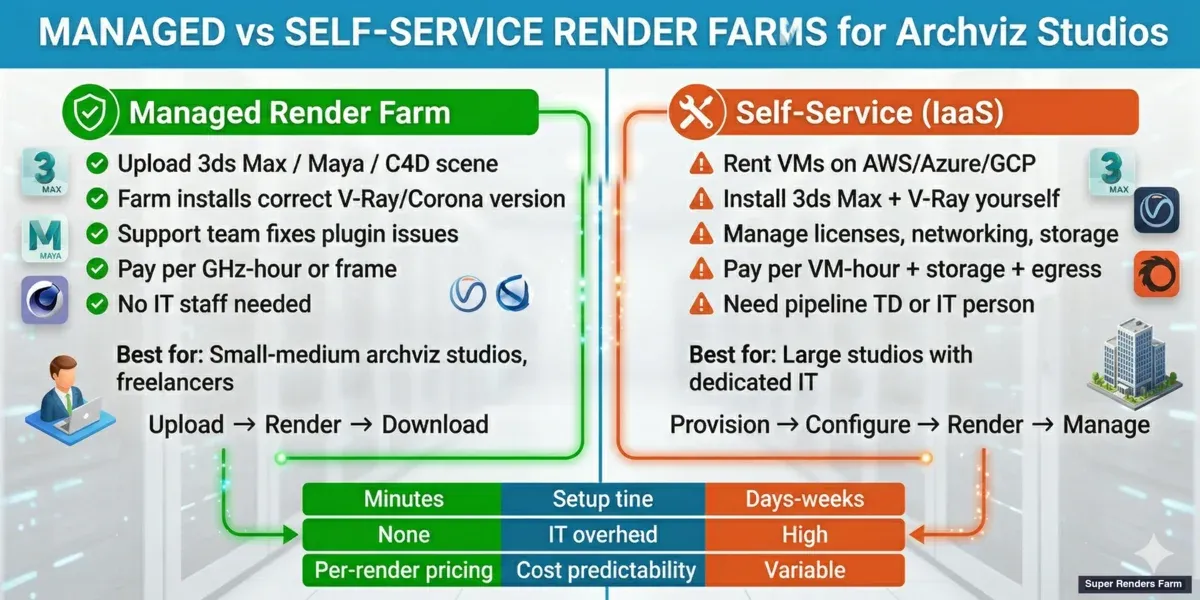 Render farms gérées vs self-service pour archviz — comparaison du workflow, des coûts et de la surcharge IT
Critères clés pour choisir la bonne render farm cloud
1. Spécifications matérielles
| Spécification | Ce qui compte pour l'archviz | | :--- | :--- | | Modèle GPU | RTX 5090 (32 Go de VRAM) bien adapté pour le rendu V-Ray et Redshift GPU | | Cœurs CPU | Xeons 22 cœurs suffisants pour le rendu CPU (Corona, NVIDIA Iray, V-Ray CPU traditionnel) | | Mémoire | VRAM 24 Go+ essentielle pour les scènes complexes | | Versions de drivers | Doivent supporter les dernières versions logicielles (V-Ray 6.x, Corona 10.x, Redshift 3.5+) |
Instantané de benchmark par carte (dépendant du driver, fin avril 2026) : La RTX 5090 atteint environ 1 050–1 100 OctaneBench, contre la référence typique ~745 de la RTX 4090 — environ 41–48 % d'amélioration par carte sur Octane et déltas similaires sur le débit Redshift CUDA dans des tests de scènes spécifiques à l'archviz. Cet écart est particulièrement significatif pour le rendu GPU V-Ray et les intérieurs Octane archviz avec des textures 8K lourdes, où le sous-système mémoire GDDR7 et les 32 Go du 5090 évitent les débordements hors noyau auxquels le RTX 4090 (24 Go) est confronté sur des scènes denses. Les scores par carte varient de ±3–5 % selon les versions de driver — à considérer comme une référence de catégorie et non comme un contrat de débit fixe.
2. Support logiciel
Les studios archviz utilisent typiquement :
- 3ds Max + V-Ray (le plus courant en Amérique du Nord/Europe)
- Cinema 4D + Redshift (motion design, petits studios)
- Blender + Cycles ou Redshift (freelances, studios sensibles aux coûts)
- Maya + Arnold (archviz adjacent VFX, certains studios)
Signal d'alerte : Une render farm qui ne liste pas explicitement votre combinaison logiciel/moteur. Pour les utilisateurs de Cinema 4D, notre guide des render farms Redshift pour Cinema 4D détaille la compatibilité des versions.
3. Facilité d'utilisation
Pour les services entièrement gérés :
- Soumission en un clic depuis votre logiciel 3D (plugin) ou interface web
- Pas de bureau à distance requis
- Détection automatique du logiciel
- Tarification claire à l'avance (pas de frais surprises)
4. Fiabilité et disponibilité
- SLA de disponibilité (99,9 % est la norme du secteur)
- Temps de réponse pour les demandes de support
- Avis sur Reddit, forums industriels et sites comme TrustPilot
- Depuis combien de temps l'entreprise est en activité
5. Structure tarifaire
| Modèle | Meilleur pour | Exemple | | :--- | :--- | :--- | | Par image/minute | Workloads variables, projets ponctuels | $0.10–0.50 par minute de temps GPU | | Abonnement mensuel | Production studio régulière, budgets prévisibles | $200–2 000/mois pour N slots de rendu | | Hybride | Studios en croissance | Abonnement de base + dépassements | | Location VM horaire | Self-service, calcul à la demande | $2–8/heure par nœud GPU |
Consultez également notre guide de tarification des render farms pour les implications de coût à long terme.
6. Qualité du support
- Support email + chat (pas seulement tickets)
- Garantie de délai de réponse (idéalement <4 heures pendant les heures ouvrables)
- Ingénieurs support qui comprennent le logiciel 3D, pas seulement l'infrastructure cloud
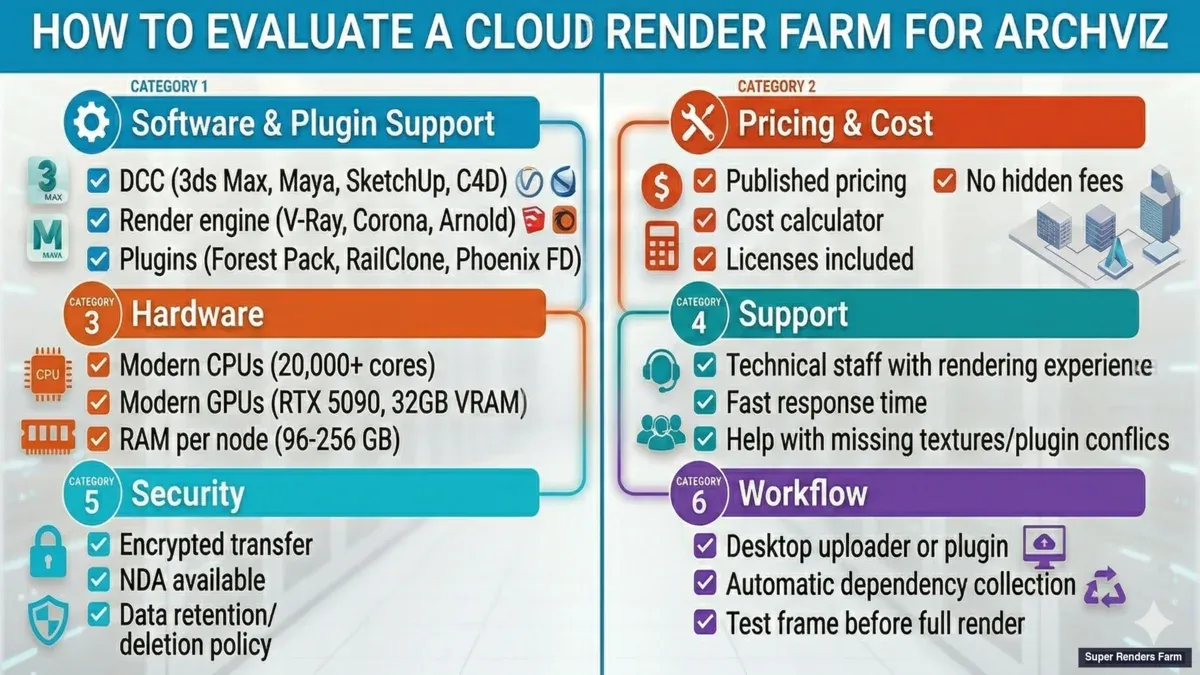 Liste de vérification pour l'évaluation des render farms cloud pour studios archviz
Comment SuperRenders Farm se distingue pour l'archviz
SuperRenders Farm (superrendersfarm.com) sert des studios archviz du monde entier depuis 2010, et la plateforme est conçue spécifiquement pour ce cas d'usage.
Entièrement géré, sans bureau à distance
Vous uploadez votre scène via le portail web ou le client desktop. L'équipe de Super Renders Farm gère la configuration :
- Détection de votre logiciel 3D et moteur de rendu
- Attribution du bon matériel
- Gestion des licences logicielles
- Optimisation des paramètres de rendu pour la vitesse
Pour un studio archviz de 3 personnes, cela signifie 3–5 heures économisées par projet sur les tâches d'infrastructure. À $50/heure de main-d'œuvre, c'est $150–250 par projet de gains d'efficacité purs.
Matériel conçu pour l'archviz
Super Renders Farm exploite 100+ nœuds de rendu avec :
- GPU : NVIDIA RTX 5090 (32 Go de VRAM) — bien adapté pour V-Ray et Redshift
- CPU : Dual Intel Xeon E5-2699 V4 (22 cœurs, 3,60 GHz) — pour le rendu CPU de secours
- Mémoire : 256 Go de RAM système par nœud — pas d'erreurs OOM sur les scènes complexes
Ce matériel est optimisé pour les scènes haute densité polygonale et haute résolution de textures typiques en archviz.
Support logiciel complet
Super Renders Farm supporte le pipeline archviz complet :
- Logiciels 3D : 3ds Max, Maya, Cinema 4D, Blender, Houdini
- Moteurs de rendu : V-Ray, Corona, Arnold, Redshift, Octane, Cycles
Et surtout, Super Renders Farm supporte les plugins spécifiques à l'archviz :
- Forest Pack (bibliothèque de végétation 3ds Max)
- RailClone (rails et patterns architecturaux 3ds Max)
- Tyflow (particules et dynamiques 3ds Max)
- Notch (motion graphics en temps réel)
Ces plugins sont courants en archviz mais manquent sur de nombreuses render farms.
Pour un guide complet sur l'exécution de Forest Pack et RailClone d'iToo Software sur Super Renders Farm — incluant les problèmes courants, la couverture des licences et les conseils d'optimisation — consultez notre guide dédié.
Tarification transparente et plans flexibles
Super Renders Farm offre :
- Pay-as-you-go pour les studios aux workloads imprévisibles
- Crédits mensuels pour les studios réguliers (meilleures $/minute)
- Remises de volume pour les studios qui rendent 300+ heures/mois
Exemples de tarification (fin avril 2026) :
- Heure GPU (RTX 5090) : $3,50–$5,20
- Heure CPU (22 cœurs) : $0,40–$0,60
- Abonnement mensuel (illimité, limite 5 nœuds) : $2 500
Notre analyse détaillée des coûts montre comment cela s'adapte selon les types de projets.
Support réel de vraies personnes
Super Renders Farm emploie des ingénieurs de rendu qui comprennent l'archviz. Pas de chatbots, pas d'équipe de support niveau 1. Temps de réponse : généralement <2 heures pendant les heures ouvrables US/EU.
Comment les studios archviz utilisent le rendu cloud : scénarios réels
Scénario 1 : freelance archviz seul
- Setup : Travaille depuis chez lui, utilise 3ds Max + V-Ray. Les projets vont du rendu statique unique aux animations de 2 minutes.
- Défi : La station de travail desktop (RTX 3080) met 16 heures pour un rendu statique 2K. Les clients attendent des délais de 48 heures.
- Solution cloud : Le freelance uploade le fichier 3ds Max via le portail web. L'équipe de Super Renders Farm le configure. Le rendu 2K est terminé en 45 minutes (15× plus rapide). Coût : ~$3–5 par rendu.
Scénario 2 : studio archviz boutique (5 artistes)
- Setup : Mix de 3ds Max + V-Ray et Cinema 4D + Redshift. 10–15 projets/mois.
- Solution cloud : Abonnement mensuel Super Renders Farm pour 300 heures GPU/mois (~$300). Les grands projets (animations, rendus 8K) vont sur Super Renders Farm. Les stations de travail locales restent libres pour le travail artistique.
Scénario 3 : cabinet d'architecture avec équipe viz interne (12 artistes)
- Setup : Grands projets : animation VR de 40 minutes, séries d'itérations de design.
- Solution cloud : Plan entreprise Super Renders Farm avec accès illimité aux nœuds. Les artistes uploadent les scènes ; les jobs se mettent automatiquement en file d'attente sur Super Renders Farm.
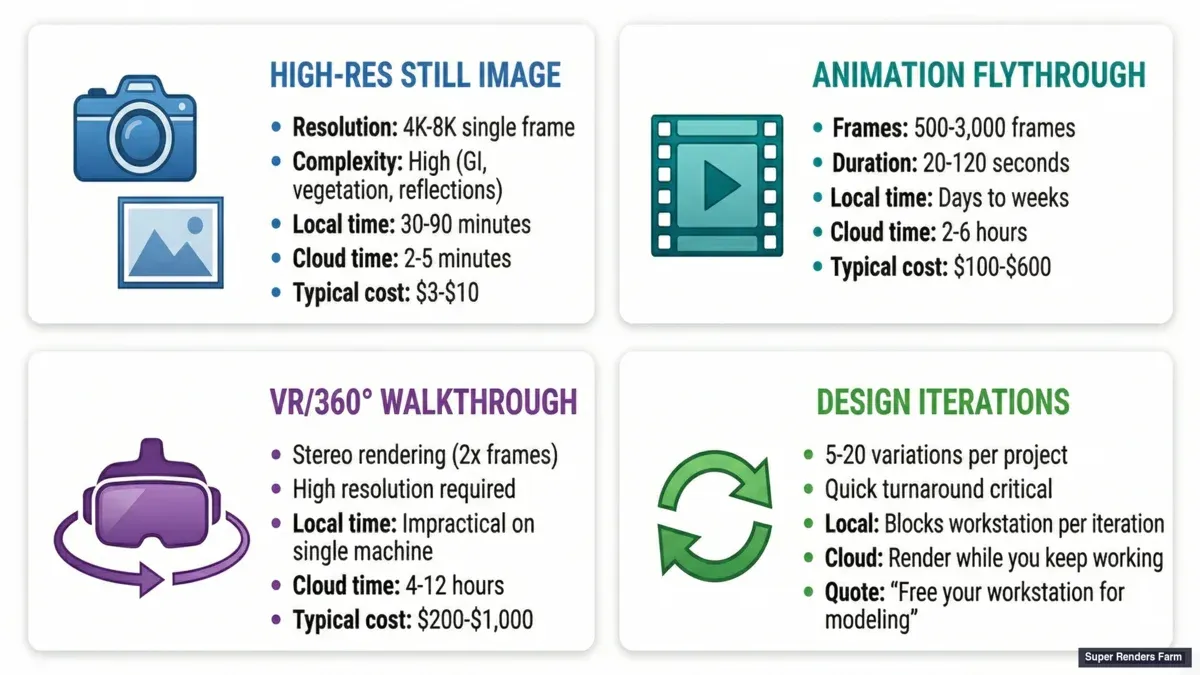 Scénarios de rendu cloud archviz — image statique unique, séquence d'animation, walkthrough VR et itérations de design
Super Renders Farm vs. concurrents : le compromis géré vs. self-service
| Facteur | SuperRenders Farm (Géré) | iRender (Self-Service IaaS) | GarageFarm (Géré) | AWS Deadline (DIY) | | :--- | :--- | :--- | :--- | :--- | | Temps de configuration | 10 minutes | 2–4 heures | 15 minutes | 1–2 jours | | Coûts cachés | ~$0/projet | ~$40–80/projet | ~$0/projet | ~$200+/projet | | Tarification (100 heures GPU) | ~$200–250 | ~$300–400 | ~$200–300 | ~$150–200 | | Coût total de possession | ~$400–500 | ~$600–800 | ~$400–600 | ~$600–1 200 |
Le coût par heure de calcul d'iRender semble plus bas. Mais en intégrant le temps des artistes, l'expertise requise et la latence du support, les services gérés s'en sortent souvent mieux en coût total de possession.
Démarrer : 5 étapes pour votre premier rendu sur Super Renders Farm
- Créer un compte sur superrendersfarm.com (compte gratuit, ajouter un mode de paiement)
- Télécharger le client desktop de Super Renders Farm pour votre OS (Windows, Mac, Linux)
- S'authentifier avec vos identifiants Super Renders Farm dans le client
- Ouvrir votre fichier 3D dans votre logiciel (3ds Max, Cinema 4D, Blender, etc.)
- Soumettre le job — le client détecte automatiquement votre logiciel/moteur, regroupe la scène, uploade et met en file d'attente pour le rendu
Le premier job est généralement terminé en 30–60 minutes. Téléchargez les images directement sur votre machine locale.
FAQ : Questions courantes sur le rendu cloud pour l'archviz
Q: Quelle est la principale différence entre les render farms entièrement gérées et self-service ? A: Chez Super Renders Farm, les render farms entièrement gérées gèrent toute la configuration, les licences et l'infrastructure pour vous. Les render farms self-service vous louent une machine que vous gérez vous-même. Pour les studios archviz sans personnel IT dédié, le rendu entièrement géré économise du temps et élimine la complexité opérationnelle.
Q: Puis-je rendre tout mon projet sur une render farm cloud, ou seulement les débordements ? A: Les deux. De nombreux studios utilisent les render farms pour tout le rendu (délais plus rapides). D'autres utilisent les render farms uniquement pour le travail de crise avant les délais. Vous pouvez partager les workflows — utiliser vos stations de travail pour les rendus de prévisualisation, utiliser la render farm pour les images haute résolution finales et les animations.
Q: Ma scène V-Ray se rendra-t-elle identiquement sur une render farm cloud par rapport à ma station de travail locale ? A: Oui, quand les versions de drivers et de logiciels correspondent. De légères différences en virgule flottante peuvent survenir en raison de l'architecture GPU, mais la qualité de rendu est visuellement identique.
Q: Combien de temps prend un projet archviz typique sur une render farm cloud ? A: Un rendu statique 2K (V-Ray ou Corona) : 30 secondes à 5 minutes selon la complexité. Une animation d'1 minute (2K, 24fps = 1 440 images) : 1–4 heures réparties sur 50 nœuds parallèles.
Q: Que se passe-t-il si une image échoue en plein rendu ? A: Les render farms entièrement gérées relancent automatiquement les images échouées. Si ça échoue à nouveau, le support est notifié. La plupart des échecs sont résolus en 24 heures.
Q: Quelle est la taille minimale de job pour laquelle une render farm cloud en vaut la peine ? A: Même un seul rendu statique vaut le coup si votre délai est urgent. Pour un travail en cours, les coûts de render farm deviennent très rentables dès 50+ heures de rendu par mois.
Q: Puis-je utiliser une render farm cloud si je n'ai pas de render wrangler ou de pipeline TD ? A: Oui — c'est exactement pour ça que sont conçues les render farms entièrement gérées. Aucun personnel technique requis.
Q: Comment passer du rendu DIY à une render farm gérée ? A: Commencez par un projet test. Préparez une scène récente et soumettez-la à la render farm gérée pour 5–10 images. Comparez la qualité de sortie et les délais, puis déplacez progressivement les projets plus importants vers la render farm.
Dernière mise à jour : 2026-04-30