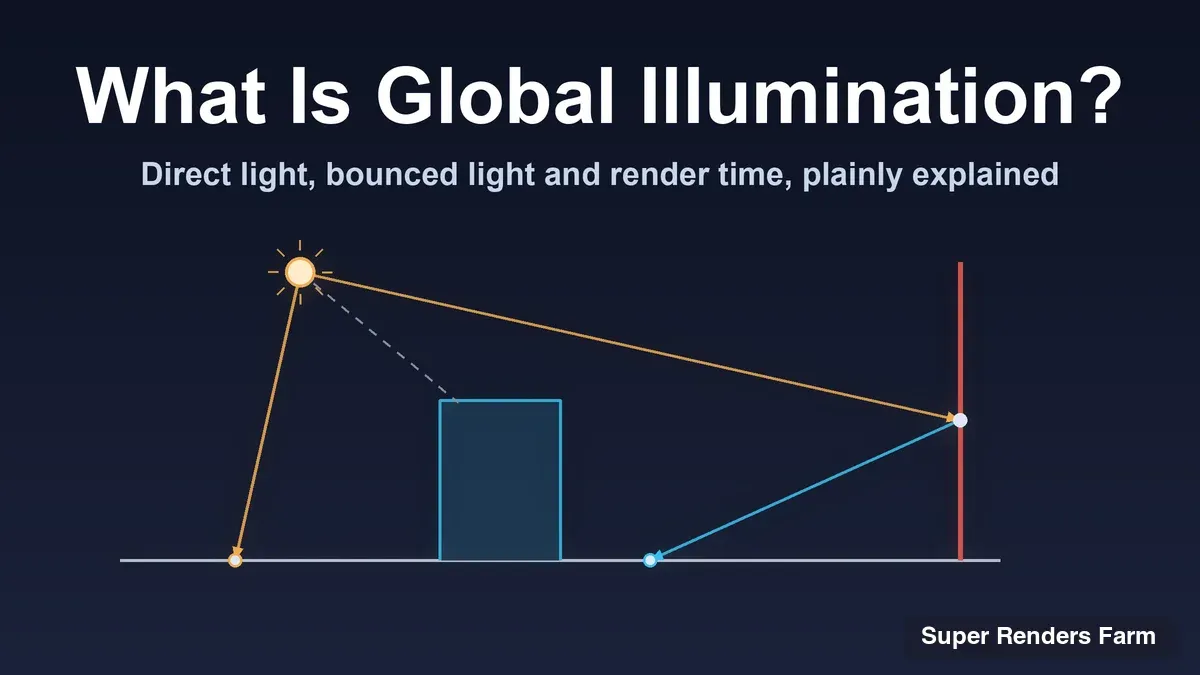
What Is Global Illumination? How Bounced Light Shapes Realism and Render Time
Overview
Introduction
What is global illumination? It is the group of rendering methods that add indirect light to an image: light that reaches a surface only after it has bounced off other surfaces. Direct illumination arrives straight from a light source. Global illumination, often shortened to GI, also counts the light that has been reflected once, twice or many times on its way, which is what makes a white wall glow softly beside a window and a red sofa tint the floor around it.
Wikipedia's article on global illumination (read 23 November 2026) puts the stakes plainly: without it, shadows would look completely dark, because the parts of a scene that no light reaches directly get nothing.
This guide covers direct and indirect light, what GI adds, why bounce count is where render time goes, and how renderers compute GI by brute force, with caches, or ahead of time. Two boundaries keep it short. How a ray is cast and followed is in what ray tracing is, and the noise and sampling comparison of ray tracing and path tracing is in ray tracing vs path tracing, so we link to them instead of repeating them.
Direct Light and Indirect Light
Direct light travels from a light source to a surface without touching anything else. Indirect light is whatever arrives after at least one reflection; Wikipedia's article treats GI as another name for indirect illumination.
The diagram below shows one light in a simple room with a red wall and a block. The floor point on the left sees the light straight on. The floor point on the right sits behind the block, so the block shadows it from the light. If a renderer only computed direct light, that point would be black. With one bounce, light travels from the lamp to the red wall and from the wall onto the floor, so the shadowed point is lit, and it picks up a little of the wall's color on the way.
 Room cross-section with a light, a block and a red wall: one floor point is lit directly by the light, and a second floor point behind the block is lit only by light that bounced off the red wall
GI is expensive because the question changes from "can this point see a light?" to "how much light arrives from everywhere?" A point is lit by the lamp, by every surface that sees the lamp, by every surface that sees those surfaces, and so on.
What Global Illumination Adds to an Image
The visible effects are the ones people notice when a render suddenly looks real:
- Soft fill light. Shadowed areas are not black; they receive light from walls, ceilings and floors.
- Color bleeding. A colored surface tints its neighbors. Wikipedia's example is red and green walls tinting nearby surfaces.
- Brighter interiors. Arnold's documentation notes that added bounced light is especially noticeable in interiors, which is where GI settings matter most.
- Caustics, in some definitions. Light focused through glass onto a wall is a caustic. Wikipedia notes that in practice, especially in real-time work, "GI" usually means diffuse inter-reflection or caustics.
Caustics are the hardest item on that list. The Blender manual's Cycles light paths page (Blender 5.2 LTS, read 23 November 2026) says path tracing can render caustics but in practice may be inefficient to the point of too much noise, and it offers switches to disable reflective and refractive caustics. Soft fill and color bleeding are far cheaper by comparison.
Light Bounces: Where the Render Time Goes
A bounce is one reflection along a light path. Every renderer lets you limit how many bounces it follows, and that limit is one of the strongest controls over both realism and render time.
The Cycles manual's light paths page (read 23 November 2026) lets you cap total bounces and also cap diffuse, glossy, transmission and volume bounces separately. It says higher values give better quality and lower values can render faster, and that a value of 0 results in direct lighting only. Arnold's ray depth documentation (read 23 November 2026) describes the same idea in its own terms: zero diffuse depth is equal to disabling diffuse illumination, which leaves direct lighting only, while raising it adds more bounced light, which the page says can be especially noticeable in interiors. The page's example captions label a diffuse depth of 1 as the default. V-Ray's global illumination rollout page (read 23 November 2026) states that by default the brute force engine has 3 light bounces while the light cache works with 100.
Why not allow a hundred bounces everywhere? Each extra bounce adds rays, and carries less light than the one before. The chart below shows that with a hypothetical, idealized closed room in which every surface reflects the same fraction r of the light that hits it: the first n bounces carry a share of 1 - r^n of all the indirect light that will ever arrive.
 Bar chart of the share of indirect light captured by the first 1, 2, 3, 4, 6 and 8 bounces for surfaces reflecting 50% and 80% of light: 50, 75, 87.5, 93.8, 98.4 and 99.6 percent versus 20, 36, 48.8, 59.0, 73.8 and 83.2 percent
With surfaces reflecting 50% of light, three bounces capture 87.5% of the indirect light, so a low limit looks nearly right. With surfaces reflecting 80%, which stands in for pale interior surfaces, three bounces capture only 48.8% and eight capture 83.2%. These figures are arithmetic on an idealized model, not renderer measurements, but they show why bright, enclosed scenes need deeper bounces than dark or open ones, and cost more per frame for it.
A shortcut exists for the tail. Cycles has a Fast GI Approximation setting that replaces global illumination with ambient occlusion after a specified number of bounces. Our ambient occlusion explainer covers how AO estimates how enclosed a point is, which makes it a cheap stand-in for faint late bounces.
How Renderers Compute Global Illumination
There is no single GI algorithm. Wikipedia's article lists radiosity, ray tracing, beam tracing, cone tracing, path tracing, Metropolis light transport and photon mapping among the offline methods. In practice, four ideas cover most of what you meet in production rendering.
Brute-force path tracing. The renderer traces random light paths from each shading point, up to the bounce limit, and averages them. Nothing is precomputed; the price is noise that fades as samples increase. Wikipedia's page on the rendering equation (read 23 November 2026) records that it was introduced to computer graphics in 1986 by David Immel and colleagues and independently by James Kajiya, and says path tracing improves and simplifies the Monte Carlo way of evaluating it. Cycles works this way, and V-Ray offers it as its brute force engine. Corona calls its equivalent Path Tracing; its performance tab documentation (read 23 November 2026) calls it an accurate brute force solution.
Caches that interpolate. To avoid solving every bounce at every pixel, some renderers compute indirect light at a limited number of points and interpolate between them. V-Ray's light cache and Corona's UHD cache are the current examples in this article. The Corona page calls the UHD cache a fast, interpolated, slightly less accurate solution that works best in scenes with a lot of light bouncing, such as interiors. V-Ray's light cache settings page (read 23 November 2026) calls the light cache a biased GI solution. Biased means the result is a good approximation that does not converge exactly to the true answer however long it renders.
Photon mapping. Wikipedia's photon mapping page (read 23 November 2026) says it was developed by Henrik Wann Jensen between 1995 and 2001 as a two-pass method: first photons are sent from the lights and their landing points are stored in a map, then the render uses that map to estimate light at each pixel. It handles caustics and diffuse indirect light well, and it is biased but consistent: accuracy improves as the photon count grows.
Radiosity. Wikipedia's radiosity article (read 23 November 2026) says radiosity methods were first developed around 1950 in heat transfer engineering and adapted to computer graphics in 1984 and 1985 at Cornell University and Hiroshima University. The solution is viewpoint independent, so once computed it works for every camera angle, and the article notes that static, precomputed radiosity can be displayed in real time through lightmaps. It is generally not used to solve the complete rendering equation, so specular effects need other methods.
Comparing the Approaches
| Approach | How it computes indirect light | Strength | Watch for |
|---|---|---|---|
| Brute-force path tracing | Random bounce paths per shading point, averaged | No precomputed solution to manage, no cache to keep consistent | Noise until enough samples; deep bounces cost more |
| Interpolated cache (light cache, UHD cache) | Solves at sparse points, interpolates between them | Faster per frame in bounce-heavy interiors | Biased; can differ from frame to frame in animation |
| Photon mapping | Photons stored in a map, then read at render time | Caustics and diffuse indirect light | Biased; quality depends on photon count |
| Radiosity | Diffuse energy exchange, independent of the camera | Reusable for any view of a static scene | Diffuse-focused; specular needs other methods |
| Baked or precomputed | Solved ahead of time and stored (lightmaps, probes) | Cheap to display in real time | Lighting is fixed until you bake again |
Baked GI and Real-Time GI
Games and interactive viewers cannot spend minutes on a frame, so they split GI in two. Baked GI is solved ahead of time and stored as lightmaps or probes: cheap to display but fixed until you bake again. Real-time GI updates every frame, on a much smaller ray and sample budget.
Wikipedia's global illumination article (read 23 November 2026) lists the real-time families, among them irradiance volumes, voxel-based methods, screen-space GI that works from the data already on screen, and later systems such as dynamic diffuse global illumination and surfel-based approaches, many made practical by hardware ray tracing. Epic's Lumen documentation (Unreal Engine 5.9, read 23 November 2026) describes Lumen as a fully dynamic global illumination and reflections system that can use hardware ray tracing where supported and falls back to software ray tracing otherwise. It also states that when Lumen is enabled, precomputed static lighting contributions are disabled and all lightmaps are hidden, a clear example of dynamic GI replacing baked GI.
It is the same bounced-light problem on a different budget. For how real-time and offline pipelines compare overall, see real-time vs offline rendering.
Global Illumination and Animation Flicker
GI creates one problem that stills do not have: consistency from one frame to the next. A cached GI solution is an approximation, and an approximation solved separately for each frame can differ slightly between neighbors.
The sources say this directly. V-Ray's light cache page (read 23 November 2026) says that since the light cache is a biased GI solution, it can introduce some unwanted flickering in animations. It lists a Single frame mode that computes a new light cache for each frame, plus a From file mode and a Save to file option for reusing one. Corona's performance tab page (read 23 November 2026) offers two UHD cache presets: Still frame (fast precomputation), which it says might flicker in animations, and Animation (flicker-free), a configuration with longer precomputation that aims at eliminating flickering. Its Load from file option is described as good for animations because it prevents flickering.
 Two lanes comparing a cached GI solution computed new for every frame with a single saved cache loaded by every frame
This matters on a farm because frames are rendered as separate jobs. The sources describe the per-frame mode in terms of frames, not machines, so this is our reading: when a mode computes a new cache for each frame, every frame builds its own wherever it renders, and neighboring frames can disagree. A saved cache that every frame loads gives all of them the same solution. V-Ray's page adds one more constraint: the light cache calculation cannot be distributed among several machines for distributed rendering. If your pipeline depends on a precomputed cache, decide where it is computed and how it travels with the scene before you send a long sequence.
Brute-force path tracing has no cache to disagree about, so it is one way to remove the question. Its cost is noise and time instead. The Cycles manual's sampling page (read 23 November 2026) lists a seed that gives different noise patterns and an animated seed option that changes the seed for each frame, recommended for animations because a varying noise pattern is less noticeable. That is about noise, not cached GI, but it shows the trade. For ways to reduce the cost, our render time optimization guide covers sampling, denoising and scene preparation.
Global Illumination Jobs on Super Renders Farm
A GI-heavy interior renders on a farm like any other scene: frames are processed in parallel as batch jobs. What changes is that bounce depth and cache choices decide how long each frame occupies a machine, and how consistent frames are with each other.
Super Renders Farm is a fully managed farm: you upload the scene and do not set up machines, install software or manage render licenses yourself. Cycles and EEVEE in Blender, Arnold, V-Ray and Corona in 3ds Max, and Redshift in Maya and Cinema 4D are ready without a setup request. Some other engine and host pairings are provisioned on request, and some do not exist as products (Corona outside 3ds Max and Cinema 4D, or Arnold in Blender, for example). The supported software page shows the engines for each host, so check it or contact us to confirm before you upload. Real-time viewers such as Enscape, D5 Render or Lumion are not rendered on the farm; it renders offline frames.
Corona, and Arnold or V-Ray in their CPU modes, render on our CPU nodes. Redshift renders on our GPU cloud render farm, where each node carries two RTX 5090 cards with 32 GB of VRAM per card; memory is per card and is not pooled, so a GPU scene has to fit in 32 GB. New accounts receive $25 free render credits, which you can use on test frames of your most bounce-heavy shot before committing a sequence, including two or three neighboring frames to check for flicker, and our team is on 24/7 live chat for scene checks. Current rates are on the pricing page.
Common Misunderstandings
"Global illumination means ray tracing." GI describes the result, bounced light. Ray tracing and path tracing are ways of computing it, and so are caches, photon maps, radiosity and baked lightmaps.
"More bounces always means a better image." In dark or open scenes the later bounces add almost nothing visible while still adding render time, which is why renderers expose a limit.
"A GI cache is just a faster version of brute force." A cache is a biased approximation and, in animation, needs a plan for consistency.
Summary: What to Remember
| If you are asking | Short answer |
|---|---|
| What is global illumination? | Direct light plus all the light that reaches a surface after bouncing off other surfaces |
| What does it add to a render? | Soft fill in shadowed areas, color bleeding between surfaces, realistic interiors |
| Where does render time come from? | Bounce depth: every extra bounce adds rays, and bright enclosed scenes need more of them |
| How is it computed? | Brute-force path tracing, interpolated caches, photon mapping, radiosity, or baked and real-time approximations |
| Why can it flicker in animation? | A cached solution is a biased approximation; computing it per frame lets neighboring frames differ |
| What should a farm job decide? | Bounce limits, and whether to use brute force or a saved cache for the whole sequence |
FAQ
Q: What is global illumination in simple terms? A: Global illumination is the lighting that comes from light bouncing off surfaces instead of arriving straight from a lamp. It fills shadows, lets colored surfaces tint their neighbors and makes interiors look believable. A renderer that skips it shows only direct light, and areas no light reaches directly render dark.
Q: What does global illumination do? A: It adds indirect light to the image. Light reflects from walls, floors and objects onto other surfaces, so shadowed areas receive soft fill and nearby surfaces pick up color from each other. In production renderers the bounce limit mainly controls how much of this effect you get.
Q: What is global illumination in games? A: In games it means the same bounced light, computed within a frame budget. Engines use baked lightmaps and probes solved ahead of time, or real-time systems such as screen-space GI and Unreal Engine's Lumen, which updates as lights and objects move, with far fewer rays than offline rendering.
Q: Is global illumination the same as ray tracing? A: No. Global illumination is the effect, indirect light. Ray tracing is one family of ways to compute it, and path tracing is the form used by most offline renderers. GI can also come from caches, photon maps, radiosity or baked lightmaps, so a renderer can produce GI without tracing rays at render time.
Q: What is the difference between direct and indirect illumination? A: Direct illumination is light that travels from a source to a surface with no reflection in between. Indirect illumination is light that reaches a surface after bouncing off at least one other surface. Global illumination is the combination of both, and a bounce limit of 0 in renderers such as Cycles and Arnold gives direct lighting only.
Q: Does global illumination slow down rendering? A: Yes, because every extra bounce adds rays to trace. Bright, enclosed scenes such as white interiors need more bounces to look right and take longer per frame. Lowering bounce limits, using a cache or using an ambient occlusion approximation for late bounces can cut the cost, with some loss of accuracy.
Q: What is baked global illumination? A: Baked global illumination is indirect light solved ahead of time and stored, for example as lightmaps or probes. It is cheap to display because nothing is recalculated per frame, but if a light or wall moves, the stored result is out of date until you bake again.
Q: Why does global illumination flicker in animations? A: Cached GI methods such as V-Ray's light cache and Corona's UHD cache are interpolated approximations, and V-Ray's documentation says the biased light cache can introduce flickering in animations. Computing a new cache for every frame lets neighboring frames differ slightly. Using a saved cache for the whole animation, a flicker-free preset or brute-force path tracing avoids it.
About Thierry Marc
3D Rendering Expert with over 10 years of experience in the industry. Specialized in Maya, Arnold, and high-end technical workflows for film and advertising.