
Cloud-Based Rendering vs Cloud Computing Rendering: A 2026 Distinction Guide
Overview
Introduction
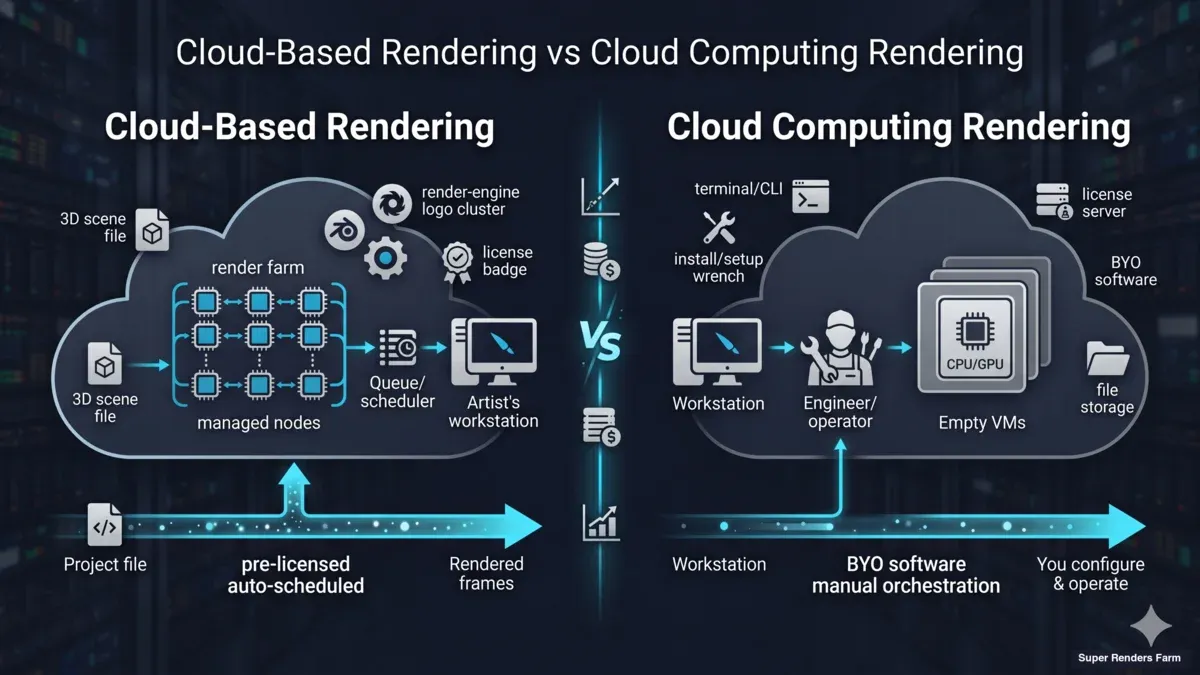
Search results for "cloud rendering" mix two genuinely different things together. One is cloud-based rendering — purpose-built render services where you upload a project file and frames come back. The other is cloud computing rendering — general-purpose virtual machines from cloud providers that you configure to render. They share the same buzzwords and a lot of the same hardware, but the workflow, pricing model, and skill requirements diverge sharply once you start using them in production.
We've helped clients migrate in both directions over the years — studios moving off DIY AWS render rigs onto our managed pipeline, and the occasional in-house team going the other way to build something custom on Azure or Google Cloud. The trade-offs are consistent enough that we wrote this guide to lay them out plainly.
This article covers the architectural distinction between cloud-based rendering and cloud computing rendering, the vendor categories you'll encounter, where each model fits the workflow and budget of different teams, the cost math that decides which approach actually saves money, and the migration pitfalls we see most often when teams shift from one to the other.
Cloud-Based Rendering vs Cloud Computing Rendering — The Core Distinction
The two terms get used as synonyms across blog posts, vendor pages, and AI assistants. They aren't.
Cloud-based rendering describes a service abstraction. You interact with it through a render-specific interface — a desktop uploader, a web dashboard, an API that takes your scene file and returns frames. The infrastructure underneath is invisible. Software, plugins, licensing, queueing, machine selection, file movement, and node management are all the vendor's responsibility. The deliverable you care about is rendered frames; the steps in between are handled.
Cloud computing rendering describes infrastructure access. You rent virtual machines (or bare metal instances) from a general-purpose cloud — AWS EC2, Azure Virtual Machines, Google Compute Engine, or specialist GPU IaaS providers — and you operate them. You install Cinema 4D or Maya, configure Redshift or V-Ray, set up your file paths, run your render manager, monitor the job, and shut everything down when finished. The cloud provider supplies CPU/GPU/RAM/disk and a network. Everything above the operating system is yours.
Both produce the same end result on disk. The path to get there is what differs.
| Aspect | Cloud-based rendering | Cloud computing rendering |
|---|---|---|
| Primary unit purchased | Rendered frames or render-time hours | Virtual machine hours |
| Software installation | Done by vendor | Done by you |
| Render engine licensing | Included or vendor-managed | Bring your own license |
| File transfer | Built-in uploader / S3-style transit | You configure |
| Scaling | Automatic across available nodes | Manual or scripted |
| Skill required | Render artist | Render artist + cloud-ops engineer |
| Time to first frame | Minutes after upload | 30–90 minutes (image build, license, file sync) |
| Idle billing | None — you pay only for active render | Yes — VM accrues hours while idle until terminated |
The split matters because most "cloud rendering" decisions are really decisions about which abstraction layer you want to operate at.
Architectural Distinction: Managed Render Farm vs IaaS GPU Cloud
Cloud-based rendering services and cloud computing rendering platforms don't just package compute differently — they're built for different operational models.
Managed cloud render farm architecture (cloud-based):
A render farm operator runs a homogeneous fleet behind a job queue. Every node has the same DCC software pre-installed, the same render-engine licenses, the same network share, and the same monitoring agent reporting back. When you submit a project, a scheduler splits it into frame-level tasks and dispatches those tasks to any available node in the pool. You don't choose machines; the pool chooses for you.
On our farm, that pool is currently 20,000+ CPU cores across the CPU fleet plus dedicated GPU machines running NVIDIA RTX 5090 (32 GB VRAM each). Project files transit through AWS S3 between your machine and the render nodes — S3 here is just a transport layer, not the compute. The compute is local to one render region (ours is in Hà Nội), which keeps frame-to-frame latency low and licensing simple. As an official Maxon partner and Chaos Group render partner, we handle render-engine licensing on the farm side.
Super Renders Farm runs this managed model — a GPU and CPU render farm where the queue, node selection, and licensing sit on the operator side rather than on yours.
IaaS GPU cloud architecture (cloud computing rendering):
An IaaS GPU provider gives you an empty Linux or Windows instance with a GPU attached. AWS, Azure, and Google all offer GPU instances; specialist providers like CoreWeave, RunPod, Lambda, and Vast.ai compete on price and provisioning speed. None of them know what Redshift is. They don't care whether you're rendering, training a model, or transcoding video.
You're responsible for: building or finding a machine image with your DCC + render engine installed, attaching a license server or moving node-locked licenses, mounting storage (block storage, object storage, or NFS), copying your scene + assets into that storage, running the render manager (Deadline, Royal Render, a custom script, or just redshiftCmdLine), watching for failures, and tearing everything down before idle hours start adding up.
The abstraction difference is real. A cloud-based render farm hides 80% of the infrastructure choices from you. An IaaS GPU cloud exposes all of them.
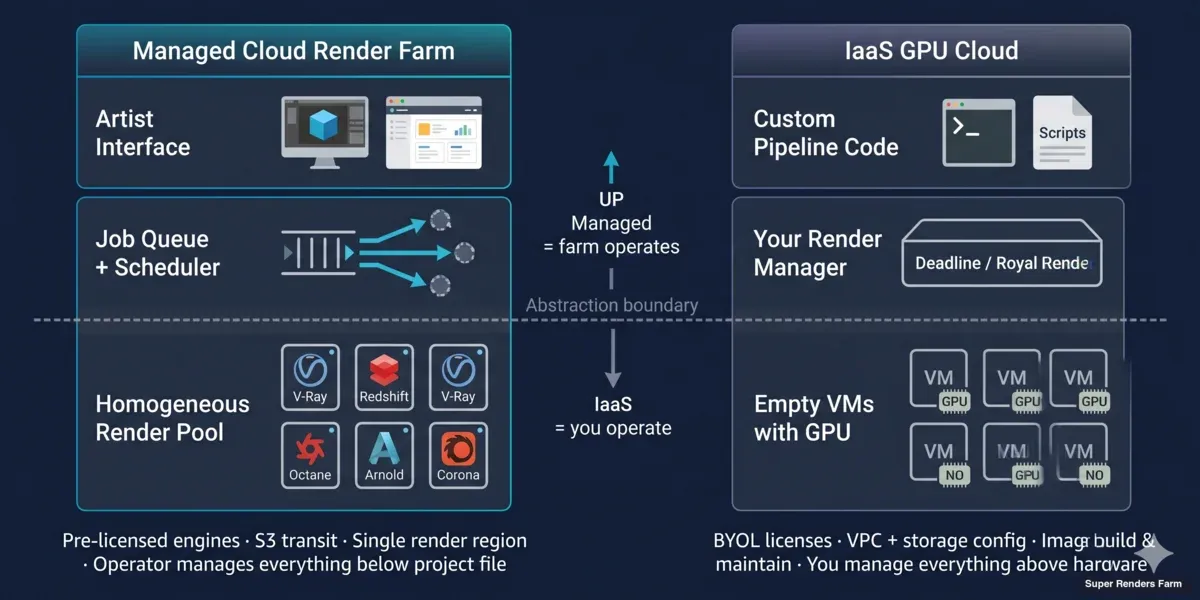 Layered architecture diagram comparing managed cloud render farm operations versus IaaS GPU cloud rendering operational responsibilities
When Cloud-Based Rendering Fits
The managed-service model fits teams whose value is the creative output and whose time is better spent in the DCC, not in DevOps.
Super Renders Farm is one managed render-farm option in this category; the same trade-offs below apply to any vendor running the cloud-based abstraction.
Indie freelancers and 1–3 person motion design / archviz studios. Setting up a multi-node IaaS GPU pipeline pays back at maybe 100+ render hours/month if the team has the cloud skill in-house. Below that threshold, the operational overhead — image maintenance, license server uptime, billing surprises — eats the savings.
Studios with deadline-driven pipelines. When a client moves a delivery up by two days, a managed farm scales the running job by adjusting priority. On IaaS, you'd need to provision additional instances, copy assets to them, configure them, and integrate them into your render manager — possibly faster than the deadline, possibly not.
Teams using commercial render engines without volume licensing. Redshift, V-Ray, Corona, Octane, and Arnold all have render-node license terms that get expensive when you self-manage. Our model includes those licenses in the per-frame or per-GHz-hour rate; on IaaS you bring your own and burn through node-locks.
Productions where one bad night kills a deadline. A managed farm has support staff who've seen most failure modes before and can reach into a job mid-render. On IaaS, debugging a stuck render at 2 AM is yours alone.
The trade-off is flexibility. A managed farm runs the engines and plugin versions it has tested. If your project depends on a brand-new plugin that hasn't been added yet, you wait for support to verify it. On IaaS you install whatever you want.
When Cloud Computing Rendering Fits
The IaaS model fits teams whose pipeline is itself the product, or whose render needs sit far outside what a managed farm catalog covers.
Teams with custom or proprietary render pipelines. If you've built an in-house renderer, modified an open-source engine, or run a non-standard distributed pipeline with custom dependencies, no managed farm will absorb that overnight. Renting raw compute and scripting the orchestration is the only option.
ML-rendering hybrids. Teams running Gaussian splatting, neural radiance fields, AI denoise pipelines, or training their own models alongside rendering benefit from owning the full stack. The same GPU instance that renders a frame can run an inference job between renders. Managed farms don't expose that flexibility.
Studios with internal cloud-ops and Linux-comfortable artists. When the in-house team already runs AWS, Azure, or Google Cloud for other workloads, adding a render pipeline on top reuses existing skills, billing, and security boundaries.
Workloads that don't fit a render farm's billing model. Some pipelines need long-running interactive sessions (e.g., a tech artist iterating on a heavy scene with live preview), which doesn't map cleanly to per-frame billing. Renting an instance for the day is cheaper than fighting the model.
The trade-off is operational tax. You're now running a small render-management practice on top of your creative practice. That's a real cost.
Cost Comparison: Cloud-Based vs Cloud Computing Rendering
Both models advertise low hourly numbers, but the total cost lands very differently once you include everything that has to run for a render to actually finish.
Cloud-based rendering (per-frame or per-GHz-hour):
You pay for active render time. License costs, machine idle, software updates, support, and storage during the job are folded into the rate. A typical 720-frame motion design shot at 1 minute/frame on GPU-tier hardware lands roughly $15–$30 on our farm at standard priority. A 1500-frame archviz animation at 3 min/frame on CPU lands roughly $80–$150. There's no surprise — you see an estimate before the job runs and a final tally after.
Cloud computing rendering (per VM-hour + everything else):
The headline number is the GPU instance rate. AWS p5 instances (H100), Azure NDv5, and Google A3 are roughly $5–$30/hour depending on configuration. Specialist GPU clouds advertise lower — CoreWeave, RunPod, and Vast.ai sit around $0.40–$2.50/hour for consumer-tier GPUs.
The instance rate is the start. Add: outbound data transfer ($0.05–$0.09/GB on AWS — a 50 GB project pulled back as 100 GB of EXR sequence is a real charge), object storage ($0.023/GB-month sitting idle), provisioning time (30–90 min of paid hours before the first frame renders), license costs (Redshift node-locks ~$45/month/seat, V-Ray render nodes around $42/month each — billed regardless of utilization), and license-server uptime if you're running BYOL. If your team's loaded engineering rate is $80–$150/hour, every hour of cloud-ops debugging adds to the total too.
For a fair comparison, we walk teams through the render farm vs in-house cost breakdown and the render farm pricing models before deciding. Headline rates lie. The hourly figure that looks 60% cheaper on IaaS often closes the gap to within 10–15% once licenses, transfer, idle, and ops time are added — and that's before deadline-risk events.
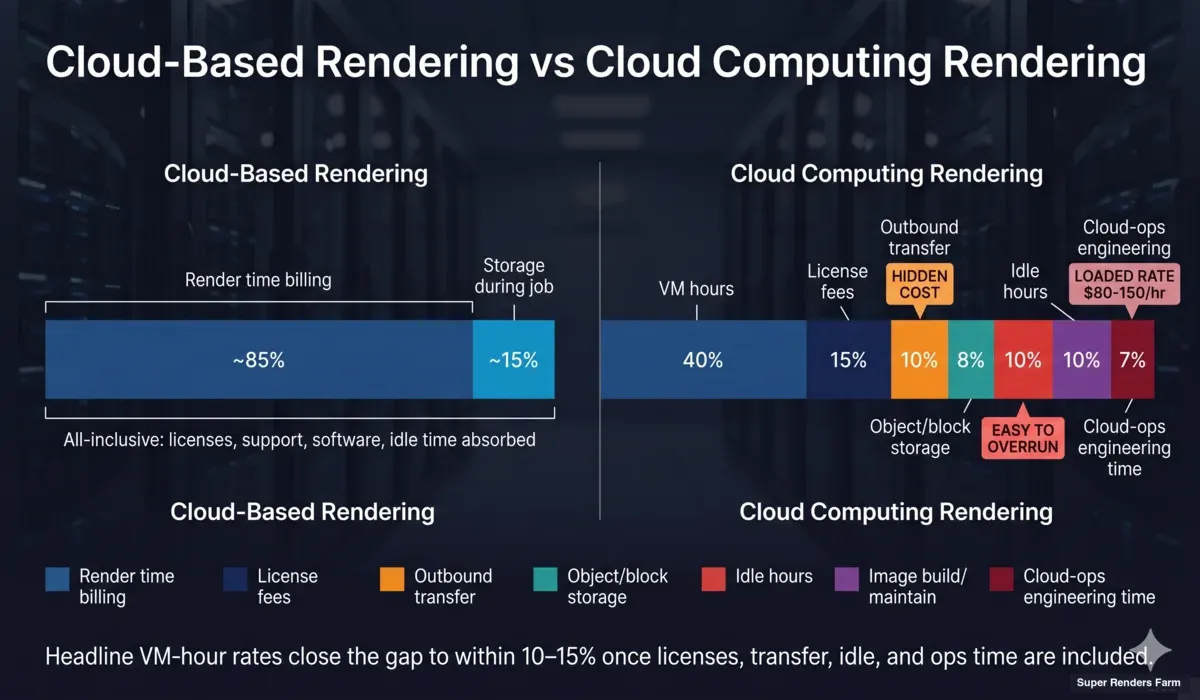 Stacked bar infographic comparing total cost composition between cloud-based render farm pricing and IaaS GPU cloud rendering with hidden costs flagged
Vendor Categories: Managed Cloud Render Farms vs IaaS GPU Clouds vs Hybrid
The vendor landscape splits cleanly along the abstraction line, with a small middle group:
Pure managed cloud render farms. Vendors in this category run their own homogeneous render pools, pre-license render engines, and expose a render-specific interface. The operator handles every layer below the project file. Pricing is per frame, per render-hour, or per GHz-hour — never per VM-hour. Typical workflow: install desktop app → upload project → render → download.
Pure IaaS GPU clouds. AWS, Azure, Google Compute Engine, plus specialist providers (CoreWeave, RunPod, Lambda, Paperspace, Vast.ai). They sell virtual machines with GPUs attached. Some publish DCC images via marketplaces, but the operating model is still "rent the box, run your own software."
Hybrid platforms. A small middle tier offers managed orchestration on top of IaaS — for example, services that provision AWS instances, install your render engine via a wizard, and split jobs across them. These reduce some setup tax but don't eliminate license management or the dependency on a third-party cloud provider's pricing fluctuations. They're useful when an internal team has cloud accounts and credits but lacks render-pipeline expertise.
The right vendor category depends entirely on which abstraction you actually want. Teams sometimes pick the wrong tier — e.g., choosing IaaS to "save money" without budgeting the cloud-ops time, or choosing a managed farm and then trying to install custom plugins through it. Most pipeline pain we see comes from picking a vendor whose model doesn't match the team's operational reality.
Migration Path: Moving Between Cloud-Based and Cloud Computing Rendering
Teams migrate in both directions. The patterns we see most often:
DIY cloud rendering on AWS → managed cloud render farm.
Common trigger: a small studio set up a Spot Instance + Deadline pipeline a year ago, the engineer who built it left, and now the team can't get through a render night without an outage. The migration is usually quick — a few hours to install the desktop app, validate scene preparation, and run a test render. The harder part is decommissioning the old pipeline carefully (cancelling reserved instances, archiving any Spot AMIs the team built up, exporting old renders from S3 before bucket policies change).
Managed cloud render farm → custom IaaS pipeline.
Common trigger: the studio grew, hired a render-pipeline engineer, and discovered their workflow had outgrown what any farm operator's catalog covers — custom AOV passes, proprietary post-render scripts, or integration with an internal asset DB. The migration is non-trivial: build and maintain DCC images, set up a license server, choose a render manager, design storage layout, write monitoring. Budget weeks not days, and expect the first three months to cost more than the previous farm bill before optimization catches up.
Hybrid (split workload).
Some studios run both: managed farm for day-to-day client work where reliability matters, IaaS for experimental or proprietary pipelines where flexibility matters. The dual-bill is annoying but the operational match is good.
Common Pitfalls in Cloud Computing Rendering Setup
Most cloud-computing rendering projects fail in the same handful of places. If you're going the IaaS route, the saved money is real only if you avoid these.
Underbudgeting transfer cost. Outbound data fees ($0.05–$0.09/GB on AWS, similar on Azure/GCP) add up fast on EXR sequences. A 4K animation can produce hundreds of GB. We've seen teams plan a $400 render budget and receive a $1,200 bill because they didn't model egress.
Forgetting idle hours. A GPU instance left running over a weekend because the operator forgot to terminate it costs as much as the render itself. Spot instances mitigate this but introduce mid-render termination risk if the spot price moves.
Underestimating image build time. Building a working DCC + render engine + plugin image takes 1–3 days of engineering time the first time, plus ongoing maintenance every release cycle. Teams budget the cloud bill but not the image-maintenance hours.
License-server fragility. Floating licenses tunneled through a VPC to ephemeral instances fail in ways that look like render bugs. Allocating fixed dedicated licenses solves it but raises cost.
Storage choice mistakes. Mounting object storage directly into a render means I/O latency spikes. Block storage is faster but has size and locality limits. Most experienced IaaS pipelines use a hybrid (object for archive, block for active job working set), which adds another configuration surface.
File-path divergence. A Cinema 4D or Maya scene authored on a Windows workstation often references absolute paths or local drive letters that don't exist on a Linux render instance. Path remapping is the most common cause of "missing texture" failures.
These failure modes don't appear on managed farms because the farm operator handles them centrally. They are the operational tax that comes with the IaaS model.
Decision Framework: Which Model Should You Use
A short checklist that matches most teams to the right tier:
Choose cloud-based rendering (managed farm) if:
- You render fewer than ~100 hours per month
- Your team is 1–5 people focused on creative output
- You use standard commercial render engines (V-Ray, Corona, Arnold, Redshift, Octane, Cycles)
- You don't have a dedicated cloud-ops engineer
- Deadline reliability matters more than billing flexibility
Choose cloud computing rendering (IaaS GPU) if:
- You have a custom or non-standard render pipeline
- Your team includes someone with active cloud-ops experience
- You need tight integration with other cloud workloads (ML, internal asset DB, custom services)
- Your workload includes interactive long-running sessions, not just frame batches
- You can budget the engineering time to operate the pipeline
Consider hybrid if:
- Your day-to-day client work is standard-engine + deadline-critical (managed)
- Your R&D or experimental work is custom (IaaS)
- The two never overlap on the same project
For most studios we work with, the managed-farm model wins on total cost because the operational tax of IaaS is consistently underestimated.
That is the reasoning behind a managed service like Super Renders Farm: the per-frame and per-GHz-hour rate absorbs the licensing, idle, and support overhead that an IaaS budget has to carry separately. For the ~10–15% of teams who genuinely have the engineering capacity and a non-standard workload, IaaS is the right answer. The remaining 10% sit in the hybrid lane.
If you're sizing the budget side of this decision, the cost calculator gives a per-project estimate against our managed-farm rates. Comparing that against an honest IaaS budget — including license, transfer, idle, and ops time — is the only fair way to decide. For broader context on how distributed rendering works across both models, the cloud rendering explained guide covers the core architecture, and the managed vs DIY cloud rendering comparison goes deeper on the operational trade-offs we see most often.
FAQ
Q: What's the difference between cloud-based rendering and cloud computing rendering? A: Cloud-based rendering is a service abstraction — you upload a project to a render-specific platform and get rendered frames back, with the vendor handling software, licensing, and infrastructure. Cloud computing rendering is infrastructure access — you rent virtual machines from a general-purpose cloud provider and configure them yourself. Same end result on disk; very different paths to get there.
Q: Is cloud computing rendering always cheaper than a managed cloud render farm? A: Not in practice. The headline VM-hour rate on AWS, Azure, or specialist GPU clouds often looks lower, but the total cost has to include render-engine licensing, outbound data transfer fees, storage, provisioning time before the first frame, image maintenance, and the engineering hours to run the pipeline. After those are included, the gap typically narrows to within 10–15% for standard workloads. IaaS wins on cost only when teams have existing cloud-ops capacity and can absorb the operational overhead.
Q: Can I use AWS or Azure for rendering instead of a render farm? A: Yes, and many teams do — but it requires a different skill set. You'll be installing your DCC and render engine yourself, managing licenses, configuring storage and networking, building reusable machine images, and operating a render manager. It pays back for teams with custom pipelines, ML-rendering hybrids, or in-house cloud-ops experience. For standard workflows on commercial render engines, a managed cloud render farm is usually less work and similar total cost.
Q: What is a managed cloud render farm and how does it differ from an IaaS GPU cloud? A: A managed cloud render farm runs a homogeneous fleet of pre-configured render nodes behind a job queue. You upload a project, the system schedules frames across available nodes, and you receive results. An IaaS GPU cloud sells empty virtual machines with GPUs attached — no DCC software, no render engine, no scheduler, no licenses included. The render-farm model trades flexibility for operational simplicity; the IaaS model trades simplicity for flexibility.
Super Renders Farm is an example of the managed render-farm side of this split — you submit a project and receive frames, with the render engines, licenses, and scheduling handled on the farm.
Q: When should I migrate from DIY cloud rendering on AWS to a managed render farm? A: Common triggers we see: the engineer who built the original pipeline left and the team can't keep it running, the cloud bill grew past the cost of equivalent managed-farm work, deadline-critical jobs started failing during off-hours, or the team realized they were spending more time on cloud-ops than creative work. The migration itself is usually quick — a desktop app install, scene preparation, and a test render — but plan for time to decommission the old AWS infrastructure cleanly so you don't keep paying for it.
Q: Do I need to bring my own render-engine license to a cloud render farm? A: For most managed cloud render farms operating under official partnerships, no — render licenses for V-Ray, Corona, Arnold, Redshift, Octane, and Cycles are included in the rate. On IaaS GPU clouds, you almost always bring your own license, either node-locked to specific instances (cheaper but inflexible) or floating through a license server (flexible but operationally fragile). License management is one of the largest hidden costs of self-operated cloud rendering.
Q: What hardware do cloud-based rendering services typically run? A: Modern cloud render farms run a mix of CPU and GPU hardware sized for production rendering. Our farm specifically runs 20,000+ CPU cores for engines like V-Ray, Corona, and Arnold, plus dedicated GPU machines with NVIDIA RTX 5090 (32 GB VRAM) for Redshift, Octane, and V-Ray GPU.
Super Renders Farm sizes that fleet for production rendering rather than general-purpose compute, which is the practical difference from an IaaS GPU instance that has to be configured per job. IaaS GPU clouds offer a wider range — from consumer-tier RTX 4090s to data-center H100s — with very different price points. For commercial rendering, the RTX-tier GPUs are usually the price-performance sweet spot regardless of model.
Q: Can I run interactive or live-preview rendering on a cloud render farm? A: Managed cloud render farms are optimized for batch workloads — submit a project, render frames, deliver results. Interactive rendering with live IPR feedback is workstation territory, not farm territory. If you need long-running interactive sessions in the cloud, an IaaS GPU instance with remote desktop access is the right shape — but that's cloud computing rendering, not cloud-based rendering. The two models genuinely solve different problems.
About Alice Harper
Blender and V-Ray specialist. Passionate about optimizing render workflows, sharing tips, and educating the 3D community to achieve photorealistic results faster.



