

Cloud Render Farm Completamente Gestita vs DIY: Il Vero Confronto dei Costi
Panoramica
Introduzione
C'è una domanda che emerge in quasi ogni conversazione iniziale che abbiamo con uno studio nuovo: "Perché non noleggierei semplicemente GPU e renderei da solo?"
È una domanda legittima. Le istanze GPU cloud sono diventate più economiche. AWS, Google Cloud e Azure offrono tutti macchine GPU NVIDIA che puoi attivare in pochi minuti. Servizi come AWS Deadline Cloud promettono infrastruttura di render farm gestita. E poi ci sono i render farm IaaS che ti danno accesso a un desktop remoto con software DCC preinstallato — essenzialmente una workstation affittata nel cloud.
Allora perché qualcuno pagherebbe per una render farm completamente gestita quando teoricamente puoi farlo da solo?
Gestiamo un servizio di rendering completamente gestito da Super Renders Farm dal 2010 — ben prima che il "cloud rendering" fosse una categoria che qualcuno pubblicizzava. In questo tempo, abbiamo visto studi provare ogni approccio: GPU cloud bare-metal, piattaforme infrastrutturali gestite, servizi remote desktop per il rendering e farm completamente gestite come la nostra. Il modello che emerge non riguarda quale opzione ha il tasso più basso per GPU-ora. Riguarda dove effettivamente va il tempo del tuo studio.
Questo articolo suddivide le vere differenze tra questi approcci — non le versioni di marketing, ma quello che effettivamente accade quando stai renderizzando 3.000 frame alle 2 del mattino di giovedì prima di una scadenza client.
I Quattro Modelli di Cloud Rendering
Prima di confrontare, aiuta definire chiaramente cosa significa effettivamente ogni modello, perché la terminologia si confonde nel materiale di marketing.
1. GPU cloud grezze (DIY) Noleggi macchine virtuali con GPU da AWS, Google Cloud o Azure. Installi tutto: configurazione del sistema operativo, software DCC, motore di rendering, plugin, server di licenza, gestione dei job (Deadline, Tractor, ecc.) e storage. Gestisci l'intera pipeline.
2. Infrastruttura cloud gestita (ad es. AWS Deadline Cloud) Il provider cloud gestisce parte dell'orchestrazione — accodamento dei job, auto-scaling, provisioning dei worker — ma configurate comunque il vostro stack software, gestite le licenze e risolvete i problemi di rendering. Pensatela come "DevOps gestito per il rendering" piuttosto che "rendering gestito".
3. Servizi remote desktop / IaaS per il rendering Un'azienda di rendering ti dà accesso a desktop remoto su macchine con software DCC preinstallato. Ti connetti via RDP o simile, apri la tua scena, configuri le impostazioni e colpisci render. L'hardware e il software di base sono gestiti; il flusso di lavoro di rendering dipende da te.
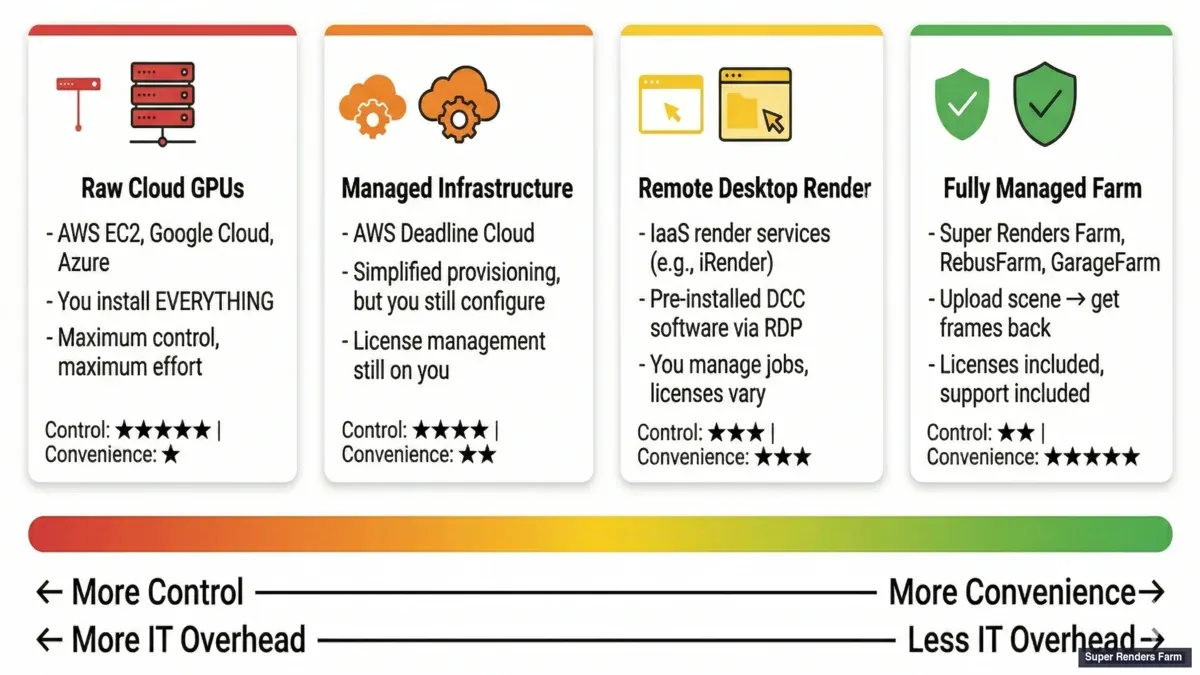 Four models of cloud rendering — raw cloud GPUs, managed infrastructure, remote desktop, and fully managed render farm
4. Render farm completamente gestite Carichi un file di scena. La farm gestisce tutto: distribuzione software, licenze, gestione plugin, versioni dei driver, distribuzione dei job, gestione degli errori e consegna dell'output. Monitori il progresso attraverso una dashboard. Non tocchi i nodi di rendering.
Ogni modello ha casi d'uso legittimi. Il problema è che gli studi spesso scelgono in base al prezzo nominale senza considerare il costo operativo che sta sopra.
Confronto Diretto: Completamente Gestita vs. DIY
Prima dei calcoli sui costi, è utile vedere i due estremi dello spettro — una farm completamente gestita e una configurazione cloud DIY autogestita — messi a confronto sui fattori che determinano davvero la decisione. (I due modelli intermedi, l'infrastruttura gestita e il remote desktop, generalmente si collocano tra queste colonne nella maggior parte delle righe.)
| Fattore | Completamente Gestita | Cloud DIY |
|---|---|---|
| Tempo di configurazione | Circa 10 minuti | Giorni o settimane |
| Gestione continuativa | Minima | Significativa |
| Complessità delle licenze | Se ne occupa la farm | Te ne occupi tu |
| Prevedibilità dei costi | Alta (prezzo per frame o per job) | Bassa (molti costi variabili) |
| Curva di apprendimento | Bassa | Alta |
| Personalizzazione | Limitata | Illimitata |
| Conflitti di dipendenze | Rari | Comuni |
| Tempo di risposta del supporto | Da ore a circa un giorno | Community o supporto a pagamento |
| Ideale per | Job coerenti e ripetibili | Flussi di lavoro specializzati e altamente personalizzati |
Nessuna delle due colonne è universalmente migliore — la tabella mostra un compromesso, non una classifica. Il resto di questa guida mette numeri dietro ogni riga.
Il Costo Nascosto Che Non Appare Sulle Fatture
Ecco cosa abbiamo osservato in quindici anni di osservazione di studi che cambiano tra modelli di rendering:
Il tasso per GPU-ora non è mai il costo effettivo. Il costo effettivo è: GPU-ore × tasso + (ore dell'artista spese in infrastruttura × tasso orario dell'artista).
Un artista 3D senior presso uno studio di medie dimensioni tipicamente costa tra 40 e 80 dollari all'ora, completamente caricato. Un direttore tecnico costa di più. Quando quella persona spende quattro ore a debuggare un disallineamento del driver su un desktop remoto, o tre ore a configurare i worker di Deadline su AWS, o due ore a capire perché il loro server di licenza V-Ray non è visibile dall'istanza cloud — è denaro vero che non appare mai sulla fattura di cloud computing.
Abbiamo visto questo modello ripetutamente:
Uno studio passa a GPU cloud grezze perché il tasso per ora è 30-40% più economico di una farm gestita. Tre mesi dopo, hanno bruciato abbastanza ore di artista in compiti infrastrutturali che il costo effettivo per frame è superiore all'opzione gestita. I risparmi nel calcolo sono consumati dall'overhead nelle operazioni. Per comprendere il quadro economico completo, leggi la nostra analisi dettagliata dei costi di build vs cloud.
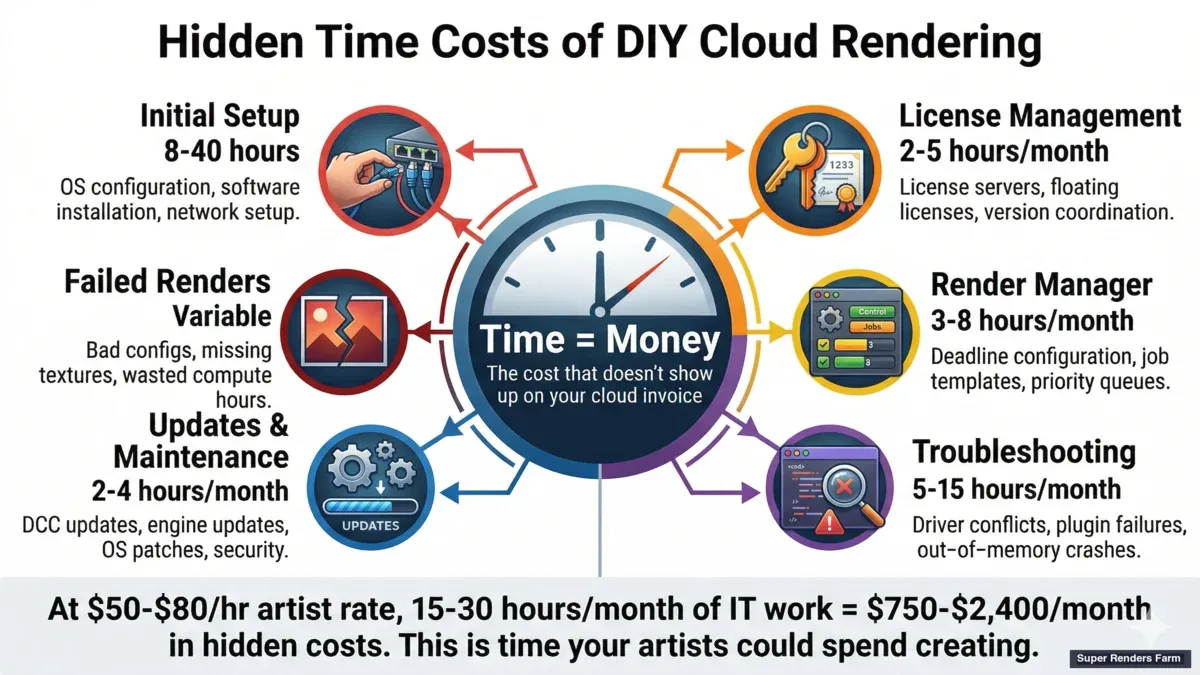 Hidden costs of DIY cloud rendering — time spent on setup, licensing, troubleshooting, and failed renders
Questo non è universale. Gli studi con render wrangler dedicati o pipeline TD — persone il cui lavoro è gestire l'infrastruttura di rendering — possono assolutamente eseguire il rendering cloud personalmente in modo conveniente. Ma per gli studi dove le stesse persone che creano il lavoro gestiscono anche la pipeline di rendering, l'economia spesso non funziona.
L'Economia Reale: Costo Totale vs. Tariffa Oraria
La sezione precedente ha esposto l'argomentazione qualitativa; ecco i numeri concreti che la sostengono. L'errore comune è confrontare il prezzo per core o per ora invece del costo totale. Le cifre seguenti sono tipiche stime di settore a scopo illustrativo — non un preventivo di una farm specifica — ma mostrano come i due modelli tendono ad accumularsi.
Modello di costo completamente gestito. Le farm gestite in genere fissano il prezzo per frame o per job piuttosto che per ora. Come parametro di riferimento approssimativo del settore, un frame archviz in HD rientra comunemente nella fascia $0,40–$1,20 per frame a seconda della qualità e della complessità, il che porta una sequenza di animazione da 2.000 frame a circa $800–$2.400 in totale. Poiché il prezzo è quotato per frame o per job, l'importo è noto prima che il job venga eseguito, e calcolo, licenze, storage e tempo di inattività sono inclusi in quell'unica cifra invece di essere fatturati come voci separate.
Modello di costo cloud DIY. Il DIY sembra economico a prima vista — le istanze GPU cloud grezze sono spesso citate a $2–$4 all'ora — ma la voce di calcolo è solo un input. Il quadro completo di solito include:
- Costi delle licenze. I motori di rendering commerciali e le applicazioni DCC sono tipicamente concessi in licenza per nodo; una singola licenza di nodo per il motore di rendering costa comunemente da poche centinaia di dollari fino a circa $1.500 all'anno (la ripartizione per nodo è nella sezione successiva). Attivando dieci nodi, la sola voce licenze può facilmente raggiungere cifre a cinque zeri all'anno.
- Infrastruttura. Calcolo a circa $2–$6 all'ora per nodo, più storage, più trasferimento dati — l'egress può costare circa $0,09–$0,20 per GB.
- Gestore di rendering. Un gestore di rendering distribuito aggiunge un proprio costo (ad esempio, nell'ordine di $0,005 per ora-core), che si accumula su molti nodi.
- Overhead DevOps. Qualcuno deve monitorare, aggiornare, risolvere i problemi e ottimizzare la configurazione — comunemente 5–15 ore al mese anche per una piccola implementazione.
- Render falliti. Configurazioni errate, problemi di dipendenze e disallineamenti dei driver bruciano ore di calcolo senza alcun risultato.
Per rendere concreto il confronto, considera un singolo job da 2.000 frame renderizzato su infrastruttura DIY:
- Stima: 10 nodi × 10 ore = 100 ore-nodo
- Calcolo: 100 × $3 = $300
- Licenze (ammortizzate su questo job): ~$200
- Storage e trasferimento: ~$50
- Tempo DevOps: 2 ore × $50/ora (tasso illustrativo, all'interno della fascia $40–$80 indicata sopra) = $100
- Render falliti e ritentativi: ~$50
- Totale approssimativo: $700
A fronte dei $800–$2.400 che una farm gestita potrebbe addebitare per la stessa sequenza, la colonna DIY può sembrare più bassa sulla carta — ma quei $700 hanno anche consumato circa due ore del tempo di un membro del team, e presuppongono che la configurazione esista già. Il DIY può risultare vantaggioso quando uno studio ha una persona dedicata all'infrastruttura; per un piccolo studio senza questa figura, il totale della farm gestita è spesso il numero reale più basso una volta prezzato quel tempo.
Gestione delle Licenze: Costi per Nodo e la Trappola della Licenza Mobile
Le licenze sono una delle voci nascoste più importanti in una configurazione DIY, e vale la pena analizzarle a parte.
Su una farm completamente gestita, è la farm a possedere le licenze del motore di rendering e delle applicazioni. L'utente non configura licenze per posto, licenze per nodo di rendering o un server di licenza mobile — le licenze sono incluse nel prezzo per frame, quindi non c'è alcun costo di licenza separato per nodo a carico dell'utente.
In una configurazione DIY, servono licenze per ogni nodo, e le cifre per nodo si sommano rapidamente. Come tipici prezzi di listino di settore (illustrativi, non un preventivo):
- Corona: circa $500 all'anno per nodo
- V-Ray: circa $1.500 all'anno per nodo (se non già posseduto)
- 3ds Max o Cinema 4D: circa $600+ all'anno per nodo (a meno che non sia già posseduto)
Il costo è solo metà del problema — l'altra metà è la complessità. Le licenze mobili su una rete locale sono semplici; le licenze mobili tra nodi cloud non lo sono. Devi allestire un server di licenza nel cloud, proteggerlo, monitorarlo e assicurarti che ogni nodo di rendering e ogni applicazione on-premise possa raggiungerlo. Se quel server di licenza diventa irraggiungibile, i render falliscono. In pratica, i piccoli studi tendono a comprare licenze in eccesso "per sicurezza", oppure perdono job quando il server di licenza va giù — un singolo punto di guasto che il modello gestito elimina del tutto.
Un Esempio Pratico: Un Piccolo Studio di Archviz
Per collocare il compromesso in una singola decisione, considera un caso realistico: uno studio di archviz di cinque persone che renderizza progetti 3ds Max e V-Ray.
Situazione attuale. Il team ha renderizzato localmente. Un'animazione da 2.000 frame occupa le loro workstation per circa 12 ore e blocca altro lavoro mentre è in corso.
Opzione A — farm completamente gestita.
- Settimana 1: carica il primo job, ricevi i frame indietro in circa 2 ore
- Costo: nell'ordine di $1.500 per questo job (una cifra tipica di una farm gestita per una sequenza di queste dimensioni, non un preventivo specifico)
- Continuativo: invia i job tramite un'interfaccia web o un plugin, ricevi i risultati il giorno dopo
- Nessuna infrastruttura da gestire, e nessun costo di licenza oltre al software già posseduto dallo studio
- Il team impara il sistema in circa un giorno
Opzione B — cloud DIY (ad esempio, AWS Deadline Cloud).
- Settimana 1–2: configura l'account cloud, scegli i tipi di istanza, installa e configura il gestore di rendering e le licenze
- Costo: circa $400 di calcolo più circa $200 di licenze V-Ray per questo job
- Continuativo: qualcuno nel team possiede l'infrastruttura — monitoraggio dei costi, patching e risoluzione dei problemi
- Il primo render potrebbe fallire per una configurazione errata; un secondo tentativo ha successo
- Curva di apprendimento: nell'ordine di 40–80 ore distribuite nel primo mese
In questo scenario l'opzione gestita evita circa 40–80 ore di configurazione e 5–10 ore al mese di gestione continuativa — nell'ordine di $2.000–$4.000 al mese di tempo dell'artista recuperato ai tassi usati sopra. Un job quotato circa $1.500 su una farm gestita rispetto a circa $600 di calcolo e licenze DIY sembra più basso nella colonna DIY finché non si riaggiunge quel tempo recuperato; per uno studio senza una persona dedicata all'infrastruttura, i totali spesso convergono o si invertono. Questa è esattamente la dinamica di pareggio che il resto di questa guida descrive: i costi unitari del DIY vincono su larga scala e con personale dedicato, mentre la gestione completa vince quando il tempo degli artisti è la risorsa scarsa.
AWS Deadline Cloud: Infrastruttura Gestita ≠ Rendering Gestito
AWS Deadline Cloud merita discussione specifica perché appare in modo prominente quando le persone cercano render farm gestite e la distinzione tra quello che gestisce e quello che non gestisce è importante.
Deadline Cloud gestisce l'orchestrazione dei job: provvede istanze EC2, distribuisce compiti di rendering, scala i worker su e giù e gestisce la coda. Questo è genuinamente prezioso — impostare Deadline sulla tua infrastruttura AWS personale è un progetto multi-giorno che coinvolge ruoli IAM, configurazione VPC, politiche di storage S3 e gruppi di auto-scaling.
Cosa Deadline Cloud non gestisce:
Licenze software. Hai bisogno delle tue licenze per la tua applicazione DCC (Maya, 3ds Max, Cinema 4D, Houdini) e il tuo motore di rendering (V-Ray, Arnold, Redshift, ecc.). Per Redshift, significa acquistare licenze di nodo di rendering separate dall'abbonamento della workstation. Per V-Ray, hai bisogno di licenze DR (Distributed Rendering) — abbiamo coperto il panorama delle licenze V-Ray in dettaglio in una guida separata. Gestire un server di licenza mobile nel cloud aggiunge un altro strato di configurazione.
Compatibilità dei plugin. Se la tua scena usa X-Particles, Forest Pack, Scatter, TyFlow o qualsiasi plugin di terze parti, devi costruire un AMI personalizzato (Amazon Machine Image) con quei plugin installati, concessi in licenza e abbinati in versione al tuo software DCC. Quando un plugin si aggiorna, ricostruisci l'AMI.
Gestione dei driver. Il rendering GPU richiede versioni specifiche del driver NVIDIA. Redshift 3.6 potrebbe aver bisogno di un driver diverso da Redshift 3.5. Gestisci queste dipendenze nella configurazione AMI.
Risoluzione dei problemi. Quando il frame 847 di 3.000 renderizza in nero a causa di un problema di percorso della trama, stai diagnosticando da solo. Il supporto AWS può dirti se un'istanza EC2 è sana; non può dirti perché la tua mappa di spostamento V-Ray non sta caricando.
Gestione dei costi. Le istanze EC2 GPU fatturano al secondo, il che sembra efficiente fino a quando un job configurato male esegue 200 istanze per sei ore renderizzando l'angolo fotocamera sbagliato. Abbiamo sentito da studi che hanno ricevuto fatture sorprendenti in intervalli a quattro cifre da un singolo invio di job errato.
Niente di questo rende Deadline Cloud un prodotto cattivo. È uno strumento potente per gli studi che hanno il personale tecnico per gestirlo. Il punto è che "gestito" nel contesto AWS significa infrastruttura gestita, non rendering gestito. L'esperienza di rendering deve ancora provenire dal tuo team.
Servizi Remote Desktop: La Via di Mezzo
I servizi remote desktop occupano una posizione interessante. L'hardware è gestito, il software è preinstallato e ottieni un ambiente desktop Windows familiare. Per alcuni flussi di lavoro, questa è la scelta giusta.
Dove il remote desktop funziona bene: studi con pipeline complesse e non standard che richiedono intervento manuale durante il rendering. Se hai bisogno di eseguire uno script Python personalizzato tra i pass di rendering, regolare manualmente le impostazioni della cache di simulazione di Houdini o utilizzare strumenti proprietari che non possono essere automatizzati — il remote desktop ti dà il controllo per farlo.
Dove il remote desktop si interrompe: throughput e scalabilità. Sei limitato da quante sessioni remote puoi gestire simultaneamente. Il rendering di un'animazione di 3.000 frame su un desktop remoto significa badare a una sessione — controllare gli errori, riavviare frame falliti, gestire i file di output. Alle 2 di notte.
C'è anche una sfumatura di licenza che sorprende le persone. Su un desktop remoto, stai eseguendo la tua licenza DCC sulla macchina remota. Ciò significa che uno dei tuoi posti di licenza è consumato dalla sessione cloud. Se hai un piccolo numero di posti, i tuoi artisti locali potrebbero essere bloccati mentre la macchina cloud sta renderizzando.
I tassi per ora per i servizi remote desktop spesso sembrano competitivi, ma considera il tempo di supervisione manuale e il consumo del posto di licenza, e il costo effettivo aumenta.
Completamente Gestita: Cosa Significa Effettivamente nella Pratica
Su una farm completamente gestita, ecco cosa accade quando invii un job Cinema 4D + Redshift, ad esempio:
- Carichi il progetto .c4d confezionato (scena + texture + proxy).
- Il sistema della farm identifica le versioni software richieste: Cinema 4D 2025.2, Redshift 3.6.05, X-Particles 2024.
- I nodi di rendering sono assegnati con il software corretto, i plugin e i driver GPU già configurati.
- Le licenze Redshift sono allocate dal pool della farm — nessuna configurazione di licenza da parte tua.
- Il job è distribuito tra i nodi disponibili. Ogni nodo renderizza i frame assegnati.
- Se un frame fallisce (overflow VRAM, errore plugin, texture corrotta), il sistema lo segnala e riprova o avvisa il team di supporto.
- I frame completati vengono assemblati e messi a disposizione per il download.
- Ricevi una notifica quando è finito.
A nessun punto ti connetti a una macchina remota, gestisci un server di licenza, debuggi un problema di driver o configuri uno scheduler di job. L'expertise che altrimenti verrebbe dal tuo pipeline TD è fornita dal team operativo della farm.
Il compromesso: hai meno controllo sull'ambiente di rendering. Se hai bisogno di eseguire uno script di pre-rendering personalizzato, o usare un plugin che la farm non supporta, o renderizzare con impostazioni non standard che richiedono configurazione manuale del nodo — una farm completamente gestita potrebbe non accoglierlo. Stai ottimizzando per velocità e affidabilità al costo della flessibilità.
Quando Ha Senso Ogni Modello
Questo non è una decisione che va bene per tutti. Ecco un quadro pratico:
Scegli GPU cloud grezze (DIY) se:
- Hai un pipeline TD dedicato o render wrangler in staff
- La tua pipeline include strumenti personalizzati che non possono essere confezionati per una farm di terze parti
- Renderizzi in modo coerente sufficiente da giustificare l'investimento infrastrutturale
- Sei a tuo agio gestendo AMI, server di licenza e reti cloud
Scegli infrastruttura gestita (AWS Deadline Cloud) se:
- Hai personale tecnico ma non vuoi gestire la configurazione cloud bare-metal
- Il tuo volume di rendering è abbastanza alto perché il prezzo di Deadline Cloud abbia senso
- Hai bisogno di auto-scaling ma vuoi controllare lo stack software
- Il tuo studio ha già infrastruttura AWS e expertise
Scegli remote desktop se:
- Hai bisogno di intervento manuale durante il rendering
- La tua pipeline richiede strumenti interattivi che non possono essere elaborati
- Stai renderizzando scene singole complesse (non grandi sequenze di frame)
- Hai plugin proprietari che solo tu puoi installare e configurare
Scegli completamente gestita se:
- Il tempo dei tuoi artisti è la tua risorsa più scarsa
- Renderizzi combinazioni standard di DCC + motore di rendering (3ds Max, Maya, C4D, Houdini + V-Ray, Corona, Redshift, Arnold)
- Hai bisogno di scalare il rendering senza scalare il tuo team tecnico
- Le scadenze sono non negoziabili e non puoi permetterti tempo di risoluzione dei problemi infrastrutturali
- Vuoi capire l'economia completa del prezzo della render farm
La maggior parte degli studi con cui lavoriamo rientrano nell'ultima categoria. Non stanno scegliendo completamente gestito perché non riescono a capire AWS — stanno scegliendolo perché il debug dell'infrastruttura cloud a mezzanotte non è dove vogliono che i loro artisti senior passino il tempo.
Una Nota sulla Trasparenza dei Costi
Una preoccupazione comune sulle farm gestite è l'opacità dei prezzi. Quando una farm addebita per frame o per GHz-ora, può sembrare una scatola nera rispetto alla fatturazione al secondo EC2 che le GPU cloud grezze offrono.
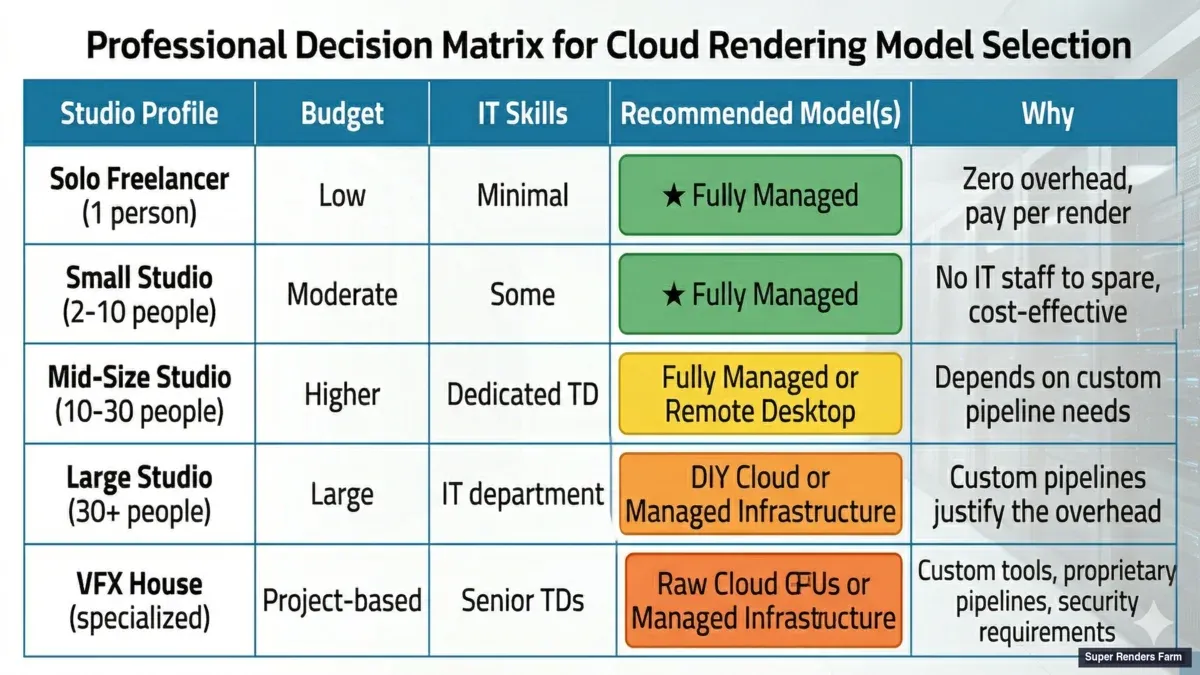 Which cloud rendering model fits your studio — decision matrix by team size, budget, and workflow complexity
Questa è una preoccupazione valida e vale la pena capire cosa è incluso nel prezzo di una farm gestita: calcolo, licenze, storage, larghezza di banda, supporto e overhead operativo. Quando confronti con il cloud grezzo, assicurati di confrontare lo stack completo — non solo la voce di calcolo.
Un esercizio utile: prendi un progetto recente, calcola il totale delle ore di artista spese in operazioni di rendering (non lavoro creativo — solo gestione infrastrutturale) e aggiungi quel costo alla tua fattura di calcolo cloud. Quindi confronta quel totale con quello che una farm gestita avrebbe addebitato per lo stesso job. Per gli studi senza personale dedicato al rendering, il confronto è spesso sorprendente.
FAQ
Cosa significa "completamente gestita" per una render farm cloud?
Una render farm completamente gestita gestisce l'intera pipeline di rendering: installazione software, licenze, gestione plugin, distribuzione dei job, gestione degli errori e consegna dell'output. Carichi un file di scena e ricevi frame renderizzati — senza configurare o gestire alcuna infrastruttura cloud.
AWS Deadline Cloud è una render farm completamente gestita?
No. AWS Deadline Cloud è infrastruttura di rendering gestita — gestisce l'orchestrazione dei job e l'auto-scaling, ma gestisci comunque il tuo stack software, licenze, plugin e risoluzione dei problemi. È uno strumento DevOps per il rendering, non un servizio di rendering.
I render farm richiedono l'accesso al desktop remoto?
Dipende dal tipo di servizio. I noleggi di GPU in cloud in self-service (IaaS) tipicamente richiedono RDP o SSH per installare il software ed eseguire render su una macchina remota. I servizi di render con desktop remoto ti danno una sessione RDP verso una workstation in cloud preconfigurata. I render farm completamente gestiti — la categoria in cui opera Super Renders Farm — non richiedono l'accesso al desktop remoto. Invii i job attraverso un plugin leggero all'interno della tua applicazione 3D locale, e i frame completati vengono scaricati automaticamente sulla tua macchina.
Posso renderizzare senza usare Remote Desktop su una cloud farm?
Sì. Le render farm completamente gestite non richiedono accesso al desktop remoto. Invii scene attraverso un'interfaccia web o un'applicazione desktop e monitori il progresso attraverso una dashboard. Non ti connetti mai direttamente ai nodi di rendering.
Una render farm completamente gestita è più costosa del rendering cloud DIY?
Il tasso per GPU-ora è tipicamente più alto, ma il costo totale del rendering — includendo il tempo dell'artista speso in infrastruttura — è spesso inferiore per gli studi senza personale dedicato alle operazioni di rendering. Il confronto dipende dalla capacità tecnica del tuo team e dal volume di rendering. Per una guida specifica, vedi cosa effettivamente costa un servizio completamente gestito.
Cosa succede se ho bisogno di un plugin che la farm gestita non supporta?
La maggior parte delle farm gestite mantiene versioni correnti dei principali plugin (X-Particles, Forest Pack, Scatter, TyFlow, ecc.). Per plugin di nicchia o proprietari, verifica con la farm prima di impegnarti. Se il tuo plugin non è supportato, un approccio remote desktop o DIY potrebbe essere necessario per quei job specifici.
Come faccio la transizione dal rendering cloud DIY a una farm gestita?
Inizia con un progetto di test. Confeziona una scena recente e inviala alla farm gestita per un piccolo batch di frame. Confronta la qualità dell'output, il tempo di turnaround e il costo totale (includendo il tuo tempo di configurazione per la versione DIY) prima di impegnarti in un cambio di flusso di lavoro più grande.
Una farm completamente gestita gestirà la mia combinazione software specifica?
La maggior parte delle farm supporta tutte le principali applicazioni 3D (3ds Max, Cinema 4D, Blender, Maya, Houdini, After Effects) e motori di rendering (V-Ray, Corona, Arnold, Redshift, Octane, Cycles). Se usi qualcosa di nicchia, contatta il supporto della farm per verificare prima di iscriverti.
Posso scalare una farm completamente gestita per gestire un volume di rendering illimitato?
Sì. Le farm con prezzi per frame si ridimensionano automaticamente per gestire il tuo carico di lavoro. Le farm con modelli di abbonamento potrebbero avere limiti di nodi mensili, ma puoi effettuare l'upgrade a livelli superiori. Parla con la farm sul tuo volume previsto prima di iniziare.
Ultimo Aggiornamento: 2026-03-18



