
CG vs CGI: What's the Difference?
Overview
Introduction
The terms CG and CGI get used interchangeably across forums, job postings, and client briefs — but they don't mean the same thing. We see this confusion regularly when clients describe their projects: someone working on an architectural walkthrough calls it "CG work," while another person rendering the exact same type of project calls it "CGI." Both are technically correct, but understanding the distinction helps when communicating with studios, clients, and render service providers.
This guide breaks down what each term actually means, where they overlap, and why the difference matters in professional production workflows.
What Is CG (Computer Graphics)?
CG stands for computer graphics — the entire field of creating, manipulating, and displaying visual content using computers. It's an umbrella term that covers everything from the icons on your phone screen to a photorealistic architectural visualization.
CG includes:
- 2D graphics: UI design, digital illustration, motion graphics, vector art
- 3D graphics: modeling, texturing, lighting, rendering
- Data visualization: charts, scientific simulations, medical imaging
- Real-time graphics: video games, VR/AR experiences, interactive applications
- Image processing: photo editing, compositing, color grading
If a computer was involved in generating or processing visual output, it falls under CG. The term originated in academic and research contexts during the 1960s when universities like the University of Utah began developing algorithms for displaying and manipulating images on computer screens.
What Is CGI (Computer-Generated Imagery)?
CGI stands for computer-generated imagery — a specific subset of CG focused on creating realistic or stylized visual content for media production. When someone says "CGI," they typically mean images, sequences, or environments that were built digitally rather than captured by a camera.
CGI is most associated with:
- Film and television: visual effects (VFX), digital characters, environment extensions
- Advertising: product renders, brand animations, virtual sets
- Architectural visualization: interior and exterior renders, walkthrough animations
- Game cinematics: pre-rendered cutscenes (distinct from real-time game graphics)
The key distinction: CGI always produces imagery — stills, animations, or video sequences intended for human viewing. A database visualization dashboard is CG but not CGI. A photorealistic render of a building that doesn't exist yet is both CG and CGI.
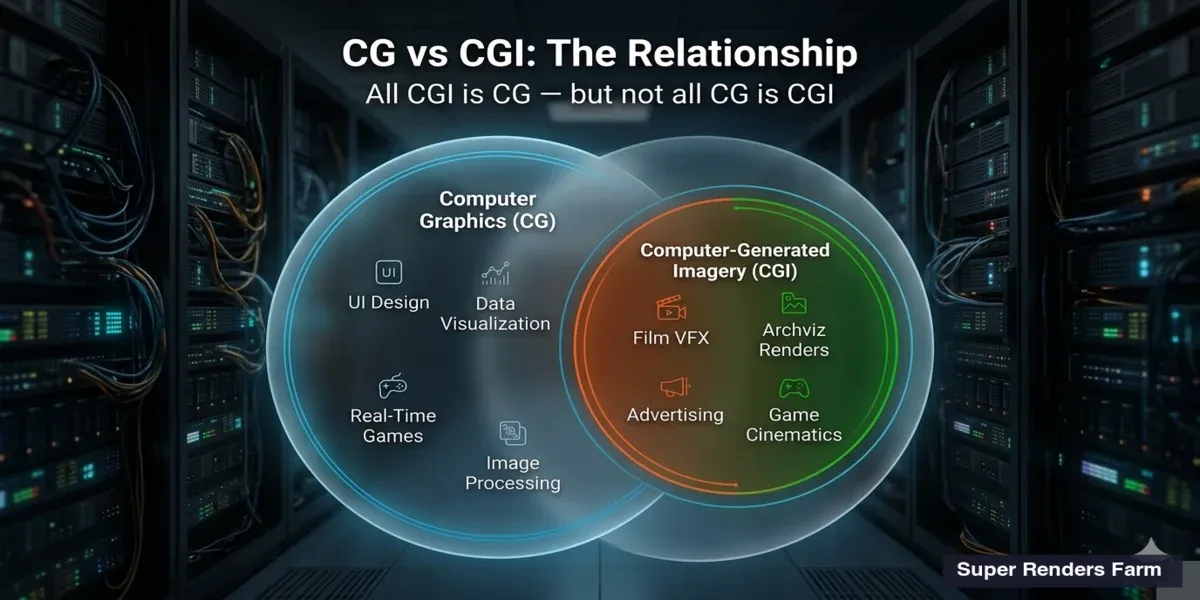 Diagram showing CG as a broad umbrella containing CGI as a subset, with examples of each category
CG vs CGI: Key Differences
| Aspect | CG (Computer Graphics) | CGI (Computer-Generated Imagery) |
|---|---|---|
| Scope | Broad field covering all computer-generated visuals | Subset focused on imagery for media |
| Includes | 2D, 3D, UI, data viz, games, simulations | Film VFX, archviz renders, ads, cinematics |
| Output | Any visual output (interactive or static) | Stills, animations, video sequences |
| Real-time? | Yes — games, AR/VR, interactive apps | Typically pre-rendered (offline rendering) |
| Industry usage | Academic, technical, engineering contexts | Entertainment, advertising, architecture |
| Example | A game engine rendering frames at 60fps | A film studio rendering a dragon at 4K |
Think of it this way: all CGI is CG, but not all CG is CGI. CGI is the part of computer graphics where the goal is producing final visual content — the kind that ends up on screens, in theaters, or in client presentations.
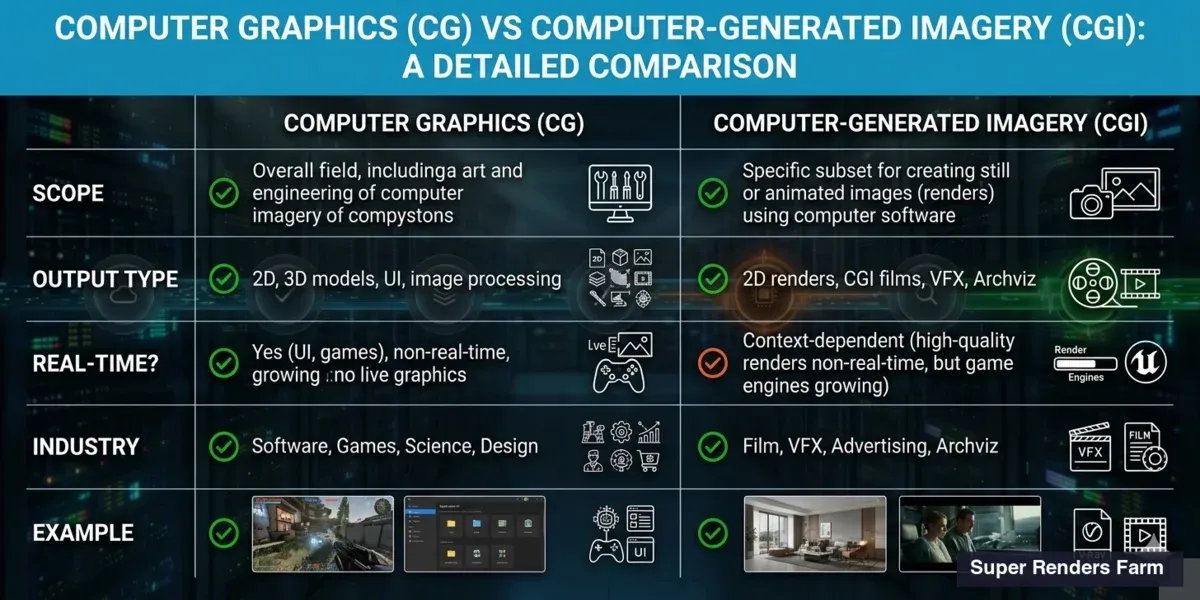 CG vs CGI comparison infographic showing key differences in scope, output, and industry usage
A Brief History: When the Terms Diverged
Computer graphics as a discipline dates back to the early 1960s. Ivan Sutherland's Sketchpad (1963) is often cited as the first interactive computer graphics program. Through the 1970s and 1980s, "computer graphics" covered everything — research papers, hardware development, rendering algorithms, and the occasional film experiment.
The term CGI gained traction in the late 1980s and early 1990s as Hollywood began using digital techniques more prominently. Films like The Abyss (1989), Terminator 2: Judgment Day (1991), and Jurassic Park (1993) brought computer-generated imagery into mainstream awareness. Audiences and journalists needed a term specifically for "the digital parts of a movie," and CGI filled that role.
By the 2000s, the split was clear:
- CG remained the academic and technical umbrella term
- CGI became the popular term for digitally created visual content in entertainment and media
Today, professionals in film and advertising almost always say "CGI." Game developers and researchers tend to say "CG." Architectural visualization firms use both, though "CGI" is more common in client-facing communication.
How CG and CGI Are Used in the Industry Today
Film and Television
In film production, CGI refers to any digitally created element composited into live-action footage or rendered as a fully digital shot. This includes character animation, environment creation, particle effects, and digital matte paintings. Major VFX studios like ILM, Weta FX, and Framestore produce CGI using tools like Maya, Houdini, and Nuke, with rendering handled by Arnold, V-Ray, or Renderman.
A single VFX-heavy film can require millions of render hours — which is where render farms become essential to meeting production deadlines.
Games
Game development sits at an interesting intersection. Real-time rendering — the game running on a player's hardware — is CG but not traditionally called CGI. However, pre-rendered cinematics and trailers for games are CGI in the conventional sense. The line has blurred as real-time engines like Unreal Engine 5 approach the visual quality that once required offline rendering.
Real-time ray tracing is pushing this boundary further, enabling effects like global illumination and reflections that were previously only achievable through CGI-style offline rendering.
Architectural Visualization
Archviz is one of the most active CGI sectors today. Studios produce photorealistic renders and walkthrough animations of buildings, interiors, and urban developments — all created before physical construction begins. The tools (3ds Max, V-Ray, Corona) and workflows overlap heavily with film CGI, though the output is typically stills and short animations rather than feature-length sequences.
We work with archviz studios daily and see projects ranging from single-frame hero shots to 4K walkthrough animations with thousands of frames. The rendering demands can rival film production — a complex interior scene with detailed materials, caustics, and high-resolution textures can take 30 minutes to several hours per frame.
Where Render Farms Fit in the CGI Pipeline
CGI production follows a pipeline: modeling → texturing → lighting → rendering → compositing. Rendering is the most compute-intensive stage — converting 3D scene data into final 2D images or animation frames.
For single frames or short tests, a local workstation handles rendering fine. But production timelines rarely allow weeks of local rendering. A 3,000-frame architectural animation at 20 minutes per frame requires 1,000 hours of render time — over 41 days on a single machine.
Cloud render farms solve this by distributing frames across hundreds of machines simultaneously. What takes 41 days locally can finish in hours. This applies equally to film VFX, archviz animations, and advertising content — anywhere CGI needs to be rendered at scale.
The process typically works like this:
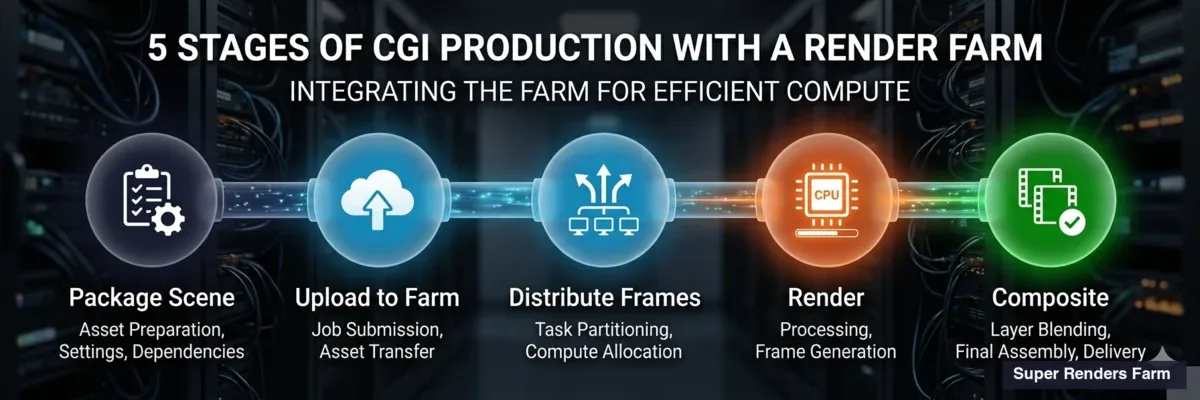 CGI production pipeline diagram showing 5 stages from scene packaging to final compositing
- Package the scene — gather all assets (textures, proxies, caches) into a single project
- Upload to the render farm — scene files and dependencies are transferred to cloud storage
- Distribute rendering — each frame (or frame range) is assigned to a separate machine
- Download results — completed frames are available for download as they finish
- Composite — final frames go through post-production (color grading, effects, editing)
Understanding whether your work falls under CG or CGI helps when choosing tools and services. Real-time CG (games, interactive apps) typically doesn't need a render farm. CGI (film VFX, archviz, advertising) almost always benefits from distributed rendering once projects exceed a few dozen frames — whether you're working with V-Ray, Corona, or GPU engines like Redshift.
For a deeper look at how rendering works at a technical level, see our guide on what rendering is in computer graphics.
FAQ
Q: Is CGI the same as VFX? A: Not exactly. VFX (visual effects) is a broader discipline that includes CGI but also covers practical effects, compositing, rotoscoping, and motion capture. CGI specifically refers to the computer-generated imagery within a VFX pipeline — the digitally created elements like 3D characters, environments, or particle simulations.
Q: Is animation the same as CGI? A: Animation is a technique; CGI is a production method. Traditional animation (hand-drawn, stop-motion) is not CGI. Computer-generated animation — like Pixar films or 3D character work — is both animation and CGI. The terms overlap when animation is produced using 3D software and rendering engines.
Q: Is Blender CG or CGI? A: Blender is a CG tool that can produce CGI. As a 3D application, Blender covers modeling, sculpting, animation, simulation, and rendering — all CG disciplines. When you use Blender to create a final rendered image or animation for a film, advertisement, or archviz project, the output is CGI.
Q: What does "CG artist" mean? A: A CG artist is anyone who creates visual content using computer graphics tools. This includes 3D modelers, texture artists, lighting TDs, animators, compositors, and real-time developers. The term is intentionally broad — a UI designer and a VFX compositor are both CG artists, though their specializations differ significantly.
Q: Do video games use CGI? A: Games use real-time CG for gameplay (rendered by the player's hardware in real time) and sometimes use pre-rendered CGI for cinematic cutscenes and trailers. The gameplay itself is technically computer graphics but not CGI in the traditional sense, since CGI implies pre-rendered or offline-rendered content.
Q: What is the difference between CGI and 3D rendering? A: 3D rendering is a technical process — converting 3D scene data into 2D images using a render engine. CGI is the broader practice of creating visual content using computers for media production. 3D rendering is one step in the CGI pipeline, alongside modeling, texturing, animation, and compositing. You can render 3D graphics for non-CGI purposes (scientific visualization, CAD previews), so rendering alone doesn't equal CGI.
Q: Why do some people use CG and CGI interchangeably? A: In casual conversation, the distinction rarely matters — both refer to "stuff made on computers." The terms diverged historically: CG stayed in academic and technical circles, while CGI became the popular media term after films like Jurassic Park popularized digital effects. In professional settings, using the precise term signals domain knowledge, but most people understand both.
Q: Does CGI always require a render farm? A: No, but production CGI often does. A single archviz still image or a short motion graphics piece can render on a workstation. But feature film VFX, long architectural animations, or advertising campaigns with tight deadlines typically require distributed rendering across many machines to meet delivery schedules. The decision depends on frame count, scene complexity, and deadline pressure.
About Alice Harper
Blender and V-Ray specialist. Passionate about optimizing render workflows, sharing tips, and educating the 3D community to achieve photorealistic results faster.



